
ListView + ArrayAdapter + 接口回调
众所周知,ListView是安卓最为频繁使用的控件,但是,随着人们审美观的提高,一些初级的ListView已经满足不了需求了,于是,我们必须为自己定制一套专属的ListView,这就需要用到适配器,ArrayAdapter可以满足大部分需求,在自己定制适配器的过程中,我遇到了许许多多的问题,希望把我的心得交给大家,免得大家再重蹈覆辙,下面进入实战。
我们的终极界面是这样的:
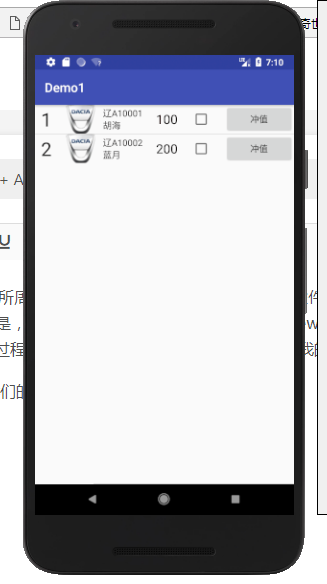
此图是静态截面图
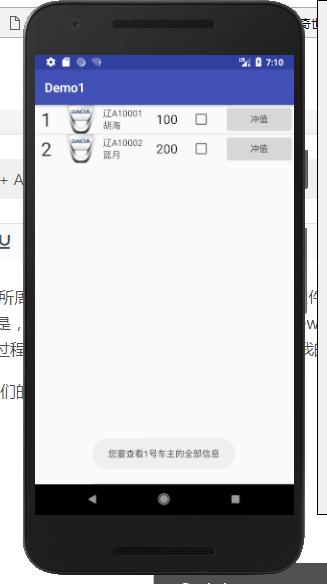
此图是点击ID为1的整行信息后的效果图
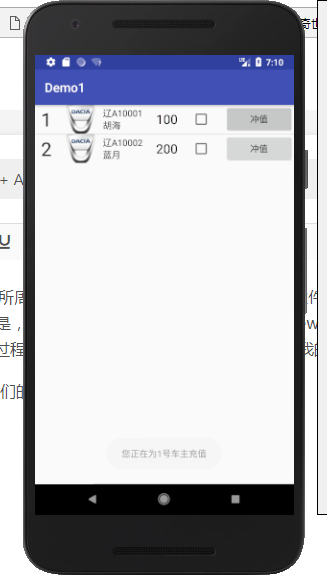
此图是点击ID为1中的按钮后的效果图
下面开始步入正题
完成这整个项目需要完成以下条目:
1.为每个ListView中的元素编写一个通用界面。
2.为每个元素写一个通用适配器。
3.在主界面中添加一个ListView。
4.实例化元素并与ArrayAdapter绑定,并添加全局和内部点击事件。
1.开始编写元素布局(这里叫Node)
<?xml version="1.0" encoding="utf-8"?>

<LinearLayout xmlns:android="http://schemas.android.com/apk/res/android"

    android:layout_width="match_parent"

    android:layout_height="120px"

    android:orientation="horizontal"

    android:descendantFocusability="blocksDescendants">            //如果不写这句代码,会使最外层元素点击无效

    <TextView

        android:id="@+id/order"

        android:layout_width="wrap_content"

        android:layout_height="match_parent"

        android:layout_weight="1"

        android:layout_gravity="center"

        android:textSize="30dp"

        android:textColor="@color/theme"

        android:gravity="center"

        />

    <ImageView

        android:id="@+id/logo"

        android:layout_width="wrap_content"

        android:layout_height="match_parent"

        android:layout_weight="1"

        android:layout_gravity="center"

        />

    <LinearLayout

        android:id="@+id/info"

        android:layout_width="wrap_content"

        android:layout_height="match_parent"

        android:layout_weight="1"

        android:gravity="center_vertical"

        android:layout_gravity="center"

        android:orientation="vertical">

        <TextView

            android:id="@+id/car_order"

            android:layout_width="wrap_content"

            android:layout_height="wrap_content"

            android:textColor="@color/theme"

            />

        <TextView

            android:id="@+id/name"

            android:layout_width="wrap_content"

            android:layout_height="wrap_content"

            android:textColor="@color/theme"

            />

    </LinearLayout>

    <TextView

        android:id="@+id/money"

        android:layout_width="wrap_content"

        android:layout_height="match_parent"

        android:layout_weight="1"

        android:gravity="center_vertical"

        android:textColor="@color/black"

        android:textSize="20dp"

        />

    <CheckBox

        android:id="@+id/jud"

        android:layout_width="wrap_content"

        android:layout_height="match_parent"

        android:layout_weight="1"

        android:layout_gravity="center"

        />

    <Button

        android:id="@+id/delta"

        android:layout_width="wrap_content"

        android:layout_height="match_parent"

        android:layout_weight="1"

        android:layout_gravity="center"

        android:text="冲值"/>

</LinearLayout>
需要在values的布局下的colors布局界面中添加如下代码:
<color name="black">#080000</color>

<color name="theme">#282626</color>
还需要在drawble目录下放一张50 * 50(推荐大小)的名为Logo.png的图片
2.为元素写一个管理类(Node类)。
public class Node {

    private int order;

    private int logo;

    private String car_order;

    private String name;

    private int money;

    private CheckBox jud;

    private Button delta;

    public Node(int order,int logo,String name,int money){

        this.order = order;

        this.logo = logo;

        this.car_order = "辽A1000" + order;

        this.name = name;

        this.money = money;

    }

    public int getorder(){

        return order;

    }

    public String getcar_order(){

        return car_order;

    }

    public int getlogoID(){

        return logo;

    }

    public String getname(){

        return name;

    }

    public int getmoney(){

        return money;

    }

}
2.为元素写一个适配器.
public class NodeAdapter extends ArrayAdapter<Node>{

    private int resourceId;

    public NodeAdapter(Context context, int resourceId, List<Node> objects){

        super(context,resourceId,objects);

        this.resourceId = resourceId;

    }

    @Override

    public View getView(final int position, View convertView, ViewGroup parent) {

        Node node = getItem(position);

        //View view = LayoutInflater.from(getContext()).inflate(resourceId, null);

        View view;

        ViewHolder holder;

        if(convertView == null){

            view = LayoutInflater.from(getContext()).inflate(resourceId,parent,false);

            holder = new ViewHolder();

            holder.order = (TextView)view.findViewById(R.id.order);

            holder.logo = (ImageView)view.findViewById(R.id.logo);

            holder.car_order = (TextView)view.findViewById(R.id.car_order);

            holder.name = (TextView)view.findViewById(R.id.name);

            holder.money = (TextView)view.findViewById(R.id.money);

            holder.jud = (CheckBox)view.findViewById(R.id.jud);

            holder.delta = (Button)view.findViewById(R.id.delta);

            view.setTag(holder);

        }else{

            view = convertView;

            holder = (ViewHolder)view.getTag();

        }

        holder.order.setText(node.getorder() + "");

        holder.logo.setImageResource(node.getlogoID());

        holder.car_order.setText(node.getcar_order());

        holder.name.setText(node.getname() + "");

        holder.money.setText(node.getmoney() + "");

        holder.jud.setTag(position);

        holder.delta.setTag(position);

        holder.delta.setOnClickListener(new View.OnClickListener() {

            @Override

            public void onClick(View v) {

                itemSelect.seleId(position);

            }

        });

        return view;

    }

    public interface onItemSelect{                //回调接口

        void seleId(int i);

    }

    private onItemSelect itemSelect;

    public void setOnItemSelectListener(onItemSelect listener){

        this.itemSelect = listener;

    }

    class ViewHolder{

        TextView order;

        ImageView logo;

        TextView car_order;

        TextView name;

        TextView money;

        CheckBox jud;

        Button delta;

    }

}
3,写主界面布局代码:
<?xml version="1.0" encoding="utf-8"?>

<LinearLayout xmlns:android="http://schemas.android.com/apk/res/android"

    android:orientation="vertical"

    android:layout_width="match_parent"

    android:layout_height="match_parent">

    <ListView

        android:id="@+id/nodeview"

        android:layout_width="match_parent"

        android:layout_height="wrap_content" />

</LinearLayout>
4.为主界面完成代码。
public class MainActivity extends AppCompatActivity {

    private List<Node> nodeList = new ArrayList<Node>();

    private ListView nodeview;

    @Override

    protected void onCreate(Bundle savedInstanceState) {

        super.onCreate(savedInstanceState);

        setContentView(R.layout.activity_main);

        initNode();

        NodeAdapter adapter = new NodeAdapter(getApplicationContext(),R.layout.node,nodeList);

        nodeview.setAdapter(adapter);

        nodeview.setOnItemClickListener(new AdapterView.OnItemClickListener() {

            @Override

            public void onItemClick(AdapterView<?> parent, View view, int position, long id) {

                Node node = nodeList.get(position);

                Toast.makeText(getApplicationContext(),"您要查看" + node.getorder() + "号车主的全部信息",Toast.LENGTH_SHORT).show();

            }

        });

        adapter.setOnItemSelectListener(new NodeAdapter.onItemSelect() {

            @Override

            public void seleId(int i) {

                int order = i + 1;

                Toast.makeText(getApplicationContext(),"您正在为" + order + "号车主充值",Toast.LENGTH_SHORT).show();

            }

        });

    }

    private void initNode(){

        nodeview = (ListView)findViewById(R.id.nodeview);

        Node node1 = new Node(1,R.drawable.logo,"胡海",100);

        Node node2 = new Node(2,R.drawable.logo,"蓝月",200);

        nodeList.add(node1);

        nodeList.add(node2);

    }

}
5.整个项目框架如下:
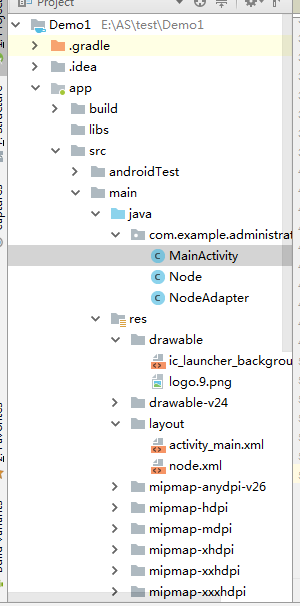
到此,这个项目就完成了.效果上面已经有图了。
ListView + ArrayAdapter + 接口回调的更多相关文章
- Android接口回调的理解
1.各种理解 <1>说白了,就是拿到对象引用,调其方法 <2>实际上就是利用多态的方式调用而已 <3>其实很容易理解的,定义接口,然后提供一个外部的接口设置进去,然 ...
- Android中的接口回调技术
Android中的接口回调技术有很多应用的场景,最常见的:Activity(人机交互的端口)的UI界面中定义了Button,点击该Button时,执行某个逻辑. 下面参见上述执行的模型,讲述James ...
- Android系列之Fragment(三)----Fragment和Activity之间的通信(含接口回调)
[声明] 欢迎转载,但请保留文章原始出处→_→ 生命壹号:http://www.cnblogs.com/smyhvae/ 文章来源:http://www.cnblogs.com/smyhvae/p/ ...
- Android开发之自定义组件和接口回调
说到自定义控件不得不提的就是接口回调,在Android开发中接口回调用的还是蛮多的.在这篇博客开始的时候呢,我想聊一下iOS的自定义控件.在iOS中自定义控件的思路是继承自UIView, 在UIVie ...
- Android接口回调机制
开发中,接口回调是我们经常用到的. 接口回调的意思即,注册之后并不立马执行,而在某个时机触发执行. 举个例子: A有一个问题不会,他去问B,B暂时解决不出来,B说,等我(B)解决了再告诉你(A)此时A ...
- java中的接口回调
[接口回调]接口回调是多态的另一种体现.接口回调是指:可以把使用某一个接口的类创建的对象的引用赋给该接口声明的接口变量中,那么该接口变量就可以调用被类实现的接口中的方法.当接口变量调用被类实现的接口中 ...
- (转)Android之接口回调机制
开发中,接口回调是我们经常用到的. 接口回调的意思即,注册之后并不立马执行,而在某个时机触发执行. 举个例子: A有一个问题不会,他去问B,B暂时解决不出来,B说,等我(B)解决了再告诉你(A)此时A ...
- Android 中的接口回调
http://blog.csdn.net/wangjinyu501/article/details/22052187 在Android中到处可见接口回调机制,尤其是UI事件处理方面.举一个最常见的 ...
- 弄明白Android 接口回调机制
以前对于这个机制理解不够深刻,现在重新整理下思路. 一.建模 我理解的接口回调就是,我这个类实现了一个接口里的方法doSomething,然后注册到你这里,然后我就去做别的事情去了,你在某个触发的时机 ...
随机推荐
- VScode 格式化代码保存时使用ESlint修复代码
前言 eslint vs code 新买的电脑啊啊西 装VScode 配置格式化代码保存时使用ESlint修复代码头快炸了,不建议初学者用,太费时间了: 终于搞定---再也不要担心缩进,函数(名)和 ...
- css3特性简要概括
---恢复内容开始--- css3新增核心知识 背景和边框 文本效果 2d/3d转换 过渡和动画 多列布局 弹性盒模型 媒体查询 增强选择器 css3浏览器兼容性 css3在线工具 css3gener ...
- Jquery 系列化表单
大家知道Jquery中有serialize方法,可以将表单序列化为一个“&”连接的字符串,但却没有提供序列化为Json的方法.不过,我们可以写一个插件实现. 我在网上看到有人用替换的方法,先用 ...
- Xamarine ContentPage.ToolbarItems 未显示/不显示在界面
将页面封装到NavigationPage中.在App.xaml.cs的构造函数中 将 MainPage = new MainPage(); 替换为 MainPage = new NavigationP ...
- 【Weiss】【第03章】练习3.2
[练习3.2] 给你一个链表L和另一个链表P,它们包含以升序排列的整数.操作printlots(L,P)将打印L中那些由P所指定的位置上的元素. 例如,如果p=1,3,4,6,那么,L的第一.第三.第 ...
- BigDecimal介绍及BigDecimal实现四舍五入
BigDecimal介绍及BigDecimal实现四舍五入 BigDecimal是什么? 我们知道float最大精度是7-8位有效数字,而double的最大精度是16-17位有效数字,那么大于16位的 ...
- 《面试经典系列》- 从底层理解==和equals的区别
前言 在我们Java面试中,基础知识基本上比定会考核的点,而“==和equals的区别”则是面试官最喜欢.最经常问的问题. 但我们看了不少的文章.解释,总是一头雾水.一知半解的,往往很容忘记.今天,我 ...
- vunlhub-DC-1-LinuxSuid提权
将靶场搭建起来 桥接看不到IP 于是用masscan 进行C段扫描 试试80 8080 访问之后发现是个drupal 掏出msf搜索一波 使用最近年限的exp尝试 exploit/unix/webap ...
- web----HTML(WEB概述)
## web概述: *JavaWeb: 什么是web,即JavaWeb(使用Java语言开发基于互联网的项目). *软件架构: 1.C/S:Client/Server 客户端/服务器端 *在用户本地有 ...
- 解析“60k”大佬的19道C#面试题(下)
解析"60k"大佬的19道C#面试题(下) 在上篇中,我解析了前 10 道题目,本篇我将尝试解析后面剩下的所有题目. 姐妹篇:解析"60k"大佬的19道C#面试 ...