
自定义Bootstrap样式弹出框
最近做的一些功能需要用到Bootstrap,然而原来的系统并没有引入Bootstrap,为了新写的控件能够应用于老的页面,又不需要在老的页面上引入全套的Bootstrap文件决定写一个模仿Bootstrap样式的弹出框插件。
  1 var bsDialog = function (opt) {

  2         var $this = this;

  3

  4         $this._default = {

  5             showMask: true,

  6             onInited: null,

  7             showConfirm: false,

  8             onConfirm: null,

  9             hideAfterConfirm: true,

 10             showCancel: false,

 11             onCancel: null,

 12             onClose: null,

 13             dragable: false,//是否可拖动

 14             title: "",

 15             url: "",

 16             content: "",

 17             width: 400,

 18             height: 200

 19         };

 20

 21         $this.option = $.extend(true, {}, $this._default, opt);

 22         $this.controlId = $$.generateId();

 23         $this.mask = null;

 24         $this.dialogBack = null;

 25         $this.dialog = null;

 26

 27         if ($$.isFunction($this.option.onConfirm)) {

 28             $this.option.showConfirm = true;

 29         }

 30

 31         if ($$.isFunction($this.option.onCancel)) {

 32             $this.option.showCancel = true;

 33         }

 34

 35         $this.option.showFoot = $this.option.showConfirm || $this.option.showCancel;

 36     }

 37

 38     bsDialog.prototype = {

 39         showDialog: function () {

 40             var $this = this;

 41

 42             $this.initCss();

 43

 44             var dialogHtml = "";

 45             if ($this.option.showMask) {

 46                 dialogHtml += "\

 47 <div id='bsdm" + $this.controlId + "' class='bsd-mask'></div>";

 48             }

 49

 50             var dialogX = ($(window).width() - $this.option.width) / 2;

 51             var dialogY = ($(window).height() - $this.option.height) / 4;

 52             dialogHtml += "\

 53 <div id='bsdb" + $this.controlId + "' class='bsd-back'>\

 54     <div id='bsdc" + $this.controlId + "' class='bsd-container' style='width:" + $this.option.width + "px;height:" + $this.option.height + "px;left:" + dialogX + "px;top:" + (-$this.option.height / 4) + "px;'>\

 55         <div class='bsd-head'>\

 56             <span class='bsd-title' " + ($this.option.dragable ? "style='cursor:move;'" : "") + ">" + $this.option.title + "</span>\

 57             <span class='bsd-close'>×</span>\

 58         </div>\

 59         <div class='bsd-content' style='" + ($this.option.showFoot ? "bottom: 56px; border-radius: 0px; border-bottom: 1px solid #e5e5e5;" : "bottom: 0px; border-radius: 0 0 6px 6px;") + (!$$.isNullOrWhiteSpace($this.option.url) ? "overflow-y: hidden;" : "overflow-y: auto;padding: 15px;") + "'>";

 60

 61             if (!$$.isNullOrWhiteSpace($this.option.url)) {

 62                 dialogHtml += "\

 63             <iframe src='" + $this.option.url + "'></iframe>";

 64             } else {

 65                 dialogHtml += $this.option.content;

 66             }

 67

 68             dialogHtml += "\

 69         </div>";

 70

 71             if ($this.option.showFoot) {

 72                 dialogHtml += "\

 73         <div class='bsd-foot'>";

 74

 75                 if ($this.option.showConfirm) {

 76                     dialogHtml += "<span class='bsd-btn bsd-confirm'>确认</span>";

 77                 }

 78

 79                 if ($this.option.showCancel) {

 80                     dialogHtml += "<span class='bsd-btn bsd-cancel'>取消</span>";

 81                 }

 82

 83                 dialogHtml += "\

 84         </div>";

 85             }

 86

 87             dialogHtml += "\

 88     </div>\

 89 </div>";

 90

 91             var $body = $("body");

 92             $body.append(dialogHtml);

 93             var beforeWidth = $body.width();

 94             $body.addClass("bsd-dialog-open");

 95             var afterWidth = $body.width();

 96             if (afterWidth > beforeWidth) {

 97                 $body.css({

 98                     "padding-right": ($$.soe($$.soe($body.css("padding-right")).trimRight("px")).toFloat() + afterWidth - beforeWidth) + "px"

 99                 });

100             }

101

102             $this.mask = $("#bsdm" + $this.controlId);

103             $this.dialogBack = $("#bsdb" + $this.controlId);

104             $this.dialog = $("#bsdc" + $this.controlId);

105

106             $this.mask.animate({

107                 opacity: 0.5

108             }, 200, function () {

109                 $this.dialog.css({

110                     display: "block",

111                     opacity: 1

112                 });

113                 $this.dialog.animate({

114                     top: dialogY

115                 }, 300);

116             });

117

118             $this.dialog.on("click", ".bsd-close", function () {

119                 $this.close();

120             });

121             $this.dialog.on("click", ".bsd-confirm", function () {

122                 if ($$.isFunction($this.option.onConfirm)) {

123                     var result = $this.option.onConfirm();

124

125                     if (result && $this.option.hideAfterConfirm) {

126                         $this.close();

127                     }

128                 } else {

129                     if ($this.option.hideAfterConfirm) {

130                         $this.close();

131                     }

132                 }

133             });

134             $this.dialog.on("click", ".bsd-cancel", function () {

135                 if ($$.isFunction($this.option.onCancel)) {

136                     $this.option.onCancel();

137                 }

138

139                 $this.close();

140             });

141

142             if ($this.option.dragable) {

143                 $this.initDrag();

144             }

145

146             if ($$.isFunction($this.option.onInited)) {

147                 $this.option.onInited($this.dialog);

148             }

149         },

150         initCss: function () {

151             var $this = this;

152

153             var targetControl = $("head");

154             if (targetControl.length == 0) {

155                 targetControl = $("body");

156             }

157             if (targetControl.length == 0) {

158                 return;

159             }

160

161             if (targetControl.find("#bsDialogStyle").length == 0) {

162                 var cssHtml = "\

163 <style id='bsDialogStyle'>\

164     .bsd-dialog-open { overflow: hidden; }\

165     .bsd-mask { position: fixed; top: 0; right: 0; bottom: 0; left: 0; background-color: #000; opacity: 0; z-index: 9998; }\

166     .bsd-back { position: fixed; top: 0; right: 0; bottom: 0; left: 0; background-color: rgba(0, 0, 0, 0); z-index: 9999; }\

167     .bsd-container { display: none; position: relative; border: 1px solid rgba(0,0,0,.2); border-radius: 6px; box-shadow: 0 5px 15px rgba(0,0,0,.5); background-color: #FFF; opacity: 0; z-index: 999999; font-family: 'Helvetica Neue',Helvetica,Arial,sans-serif; font-size: 14px; line-height: 1.42857143; color: #333; }\

168     .bsd-container .bsd-head { display: block; position: absolute; top: 0px; right: 0px; left: 0px; height: 56px; box-sizing: border-box; padding: 0 15px; border-bottom: 1px solid #e5e5e5; word-break: break-all; word-wrap: break-word; }\

169     .bsd-container .bsd-head .bsd-title { display: inline-block; font-size: 18px; line-height: 56px; font-weight: 500; width: 100%; }\

170     .bsd-container .bsd-close { display: inline-block; position: absolute; top: 14px; right: 12px; width: 20px; height: 20px; font-size: 24px; text-align: center; line-height: 18px; cursor: pointer; color: #CCC; }\

171     .bsd-container .bsd-close:hover { color: #808080; }\

172     .bsd-container .bsd-content { display: inline-block; position: absolute; top: 56px; right: 0px; left: 0px; overflow-x: auto; }\

173     .bsd-container .bsd-content iframe { border: none; width: 100%; height: 100%; overflow: auto; }\

174     .bsd-container .bsd-foot { display: inline-block; position: absolute; right: 0px; bottom: 0px; left: 0px; height: 56px; text-align: right; padding: 0 10px 0 0; }\

175     .bsd-container .bsd-foot .bsd-btn { display: inline-block; padding: 6px 10px; border-radius: 4px; color: #FFF; margin: 15px 15px 0 0; }\

176     .bsd-container .bsd-foot .bsd-btn.bsd-confirm { background-color: #D9534F; }\

177     .bsd-container .bsd-foot .bsd-btn.bsd-confirm:hover { background-color: #C9302C; }\

178     .bsd-container .bsd-foot .bsd-btn.bsd-cancel { background-color: #337AB7; }\

179     .bsd-container .bsd-foot .bsd-btn.bsd-cancel:hover { background-color: #286090; }\

180 </style>";

181

182                 targetControl.append(cssHtml);

183             }

184         },

185         initDrag: function () {

186             var $this = this;

187

188             var $dialogHead = $this.dialog.find(".bsd-head");

189             $dialogHead.on("mousedown", ":not(.bsd-close)", function (e) {

190                 var position = $this.dialog.position();

191                 var divLeft = parseInt(position.left, 10);

192                 var divTop = parseInt(position.top, 10);

193                 var mousey = e.pageY;

194                 var mousex = e.pageX;

195                 $this.dialogBack.bind('mousemove', function (moveEvent) {

196                     var left = divLeft + (moveEvent.pageX - mousex);

197                     var top = divTop + (moveEvent.pageY - mousey);

198                     $this.dialog.css({

199                         'top': top + 'px',

200                         'left': left + 'px'

201                     });

202

203                     return false;

204                 });

205             });

206             $dialogHead.on("mouseup", function () {

207                 $this.dialogBack.unbind("mousemove");

208             });

209         },

210         close: function () {

211             var $this = this;

212

213             var $body = $("body");

214             var beforeWidth = $body.width();

215             $body.removeClass("bsd-dialog-open");

216             var afterWidth = $body.width();

217             if (beforeWidth > afterWidth) {

218                 $body.css({

219                     "padding-right": ($$.soe($$.soe($body.css("padding-right")).trimRight("px")).toFloat() - (beforeWidth - afterWidth)) + "px"

220                 });

221             }

222

223             $this.dialog.animate({

224                 top: -$this.option.height / 4,

225                 opacity: 0

226             }, 200, function () {

227                 $this.dialog.remove();

228                 $this.dialogBack.remove();

229                 $this.mask.animate({

230                     opacity: 0

231                 }, function () {

232                     $this.mask.remove();

233                     if ($$.isFunction($this.option.onClose)) {

234                         $this.option.onClose();

235                     }

236                 });

237             });

238         }

239     }

240

241     $.extend({

242         bsDialog: function (opt) {

243             var dialog = new bsDialog(opt);

244

245             dialog.showDialog();

246

247             return dialog;

248         }

249     });
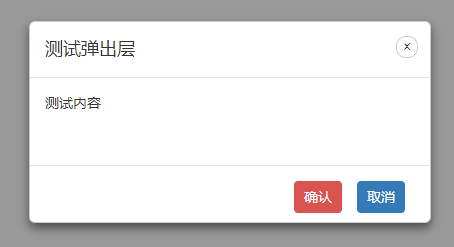
1、弹出文本内容
 1 $.bsDialog({

 2     dragable: true,

 3     title: "测试弹出层",

 4     content: "测试内容",

 5     showConfirm: true,

 6     onConfirm: function () {

 7         alert("confirm click");

 8

 9         return true;

10     },

11     showCancel: true,

12     onCancel: function () {

13         alert("cancel click");

14     },

15     width: 400,

16     height: 200

17 });
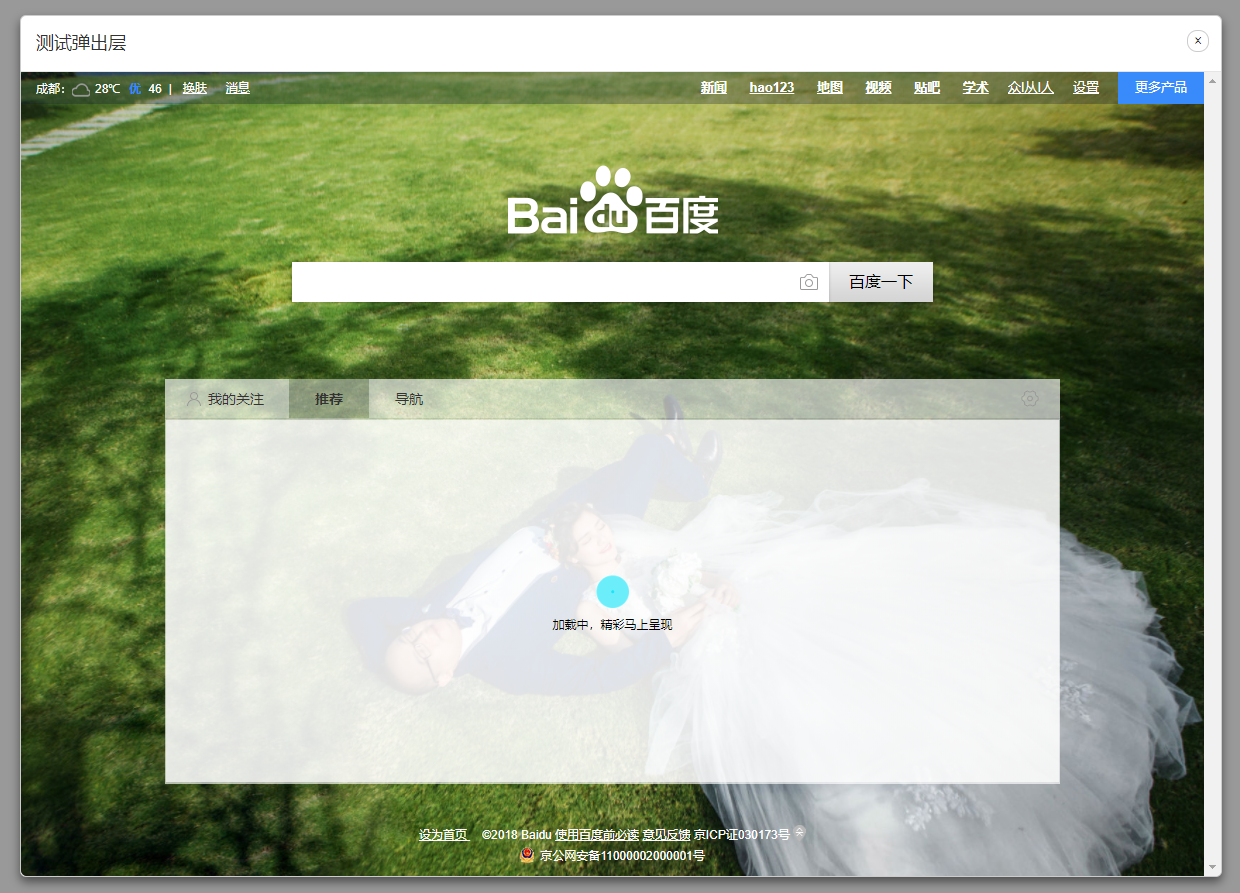
2、弹出URL
1 $.bsDialog({

2     dragable: true,

3     title: "测试弹出层",

4     url: "http://www.baidu.com",

5     width: 1200,

6     height: 860

7 });
转载于:https://www.cnblogs.com/zcr-yu/p/9187853.html
自定义Bootstrap样式弹出框的更多相关文章
- Bootstrap模态弹出框
前面的话 在 Bootstrap 框架中把模态弹出框统一称为 Modal.这种弹出框效果在大多数 Web 网站的交互中都可见.比如点击一个按钮弹出一个框,弹出的框可能是一段文件描述,也可能带有按钮操作 ...
- Bootstrap:弹出框和提示框效果以及代码展示
前言:对于Web开发人员,弹出框和提示框的使用肯定不会陌生,比如常见的表格新增和编辑功能,一般常见的主要有两种处理方式:行内编辑和弹出框编辑.在增加用户体验方面,弹出框和提示框起着重要的作用,如果你的 ...
- JS组件Bootstrap实现弹出框和提示框效果代码
这篇文章主要介绍了JS组件Bootstrap实现弹出框和提示框效果代码,对弹出框和提示框感兴趣的小伙伴们可以参考一下 前言:对于Web开发人员,弹出框和提示框的使用肯定不会陌生,比如常见的表格新增和编 ...
- Bootboxjs快速制作Bootstrap的弹出框效果
Bootboxjs是一个简单的js库,简单快捷帮你制作一个Bootstrap的弹出框效果. 一.简介 bootbox.js是一个小的JavaScript库,它帮助您在使用bootstrap框架的时候快 ...
- 基于js alert confirm样式弹出框
基于js alert confirm样式弹出框.这是一款根据alert confirm优化样式的确认对话框代码. 在线预览 源码下载 实现的代码. html代码: <div id=" ...
- [Bootstrap]modal弹出框
写在前面 在实际开发中,为了友好,更需要一种美观的弹出框,js原生的alert,很难满足需求.这里推荐一个bootstrap的弹出框. 一个例子 先看效果吧 代码: <!DOCTYPE html ...
- Bootstrap实现弹出框和提示框效果代码
一.Bootstrap弹出框使用过JQuery UI应该知道,它里面有一个dialog的弹出框组件,功能也很丰富.与jQuery UI的dialog类似,Bootstrap里面也内置了弹出框组件.打开 ...
- Bootstrap popover弹出框
popover被挤压.遮挡的问题: 弹出框显示的时候如果贴近一个列的边沿,就会很窄或被遮挡,解决起来很简单,只需在初始化的时候添加一个container属性就可以了: $(function (){ $ ...
- Flex AIR自定义Mobile的弹出框组件
做Flex Mobile开发的人应该知道,Flex为手机应用并没有提供弹出框组件,需要自定义. 通过查找文档.资料,我做出一个效果还算不错的弹出框组件,可以适用于手机设备上,不多讲,直接贴源码,相信对 ...
随机推荐
- 【JavaScript】js02
正则对象. 声明: //var reg = new RegExp('', '');// i,g 修正符. // i,不区分大小写,g 全局匹配. //var reg = /\w/i; 方法: //ex ...
- 【高并发】你知道吗?大家都在使用Redisson实现分布式锁了!!
写在前面 忘记之前在哪个群里有朋友在问:有出分布式锁的文章吗-@冰河?我的回答是:这周会有,也是[高并发]专题的.想了想,还是先发一个如何使用Redisson实现分布式锁的文章吧?为啥?因为使用Red ...
- MTK Android 平台语言支持状态
Language English Name Chinese Name Code GB ICS JB KK L العربية Arabic(Israel) 阿拉伯语(以色列) ar_IL Y Y ...
- Go gRPC进阶-TLS认证+自定义方法认证(七)
前言 前面篇章的gRPC都是明文传输的,容易被篡改数据.本章将介绍如何为gRPC添加安全机制,包括TLS证书认证和Token认证. TLS证书认证 什么是TLS TLS(Transport Layer ...
- 广告行业中那些趣事系列9:一网打尽Youtube深度学习推荐系统
最新最全的文章请关注我的微信公众号:数据拾光者. 摘要:本篇主要分析Youtube深度学习推荐系统,借鉴模型框架以及工程中优秀的解决方案从而应用于实际项目.首先讲了下用户.广告主和抖音这一类视频平台三 ...
- c++动态数组的优点,创建和删除
动态数组可以有两种使用方式: 1:不能预先知道数组的大小使用动态数组 传统数组(静态数组)是需要在程序运行前,就指定大小,比如说 int i = 10; int a[i]; 这种就是不合法的. 因为函 ...
- k8s~helm镜像版本永远不要用latest
对于容器编排工具k8s来说,你可以使用它规定的yaml格式的脚本,使用客户端kubectl来与k8s进行通讯,将你定义好的yaml部署脚本应用到k8s集群上,而这对yaml脚本一般来说都是很像的,就是 ...
- N皇后问题 回溯非递归算法 C++实现2
运行结果 代码如下 #include <bits/stdc++.h> using namespace std; ; const char *LINE32 = "--------- ...
- react性能优化最佳实践
1.PureComponent 的使用场景 PureComponent 和 Component 的区别是,PureComponent 自带 shouldComponentUpdate 生命周期函数,会 ...
- 如何把Excel表暴力拆分了,python两段代码帮你搞定
前言 本文的文字及图片来源于网络,仅供学习.交流使用,不具有任何商业用途,版权归原作者所有,如有问题请及时联系我们以作处理. 作者:老方玩编程 PS:如有需要Python学习资料的小伙伴可以加点击下方 ...