
在IDEA中使用Spring写一个HelloWorld
准备工作
1、使用IDEA2018专业版,
我试了IDEA2019教育版和IDEA2020社区版,都无法顺利创建一个Spring项目,实在是恼火,一气之下,统统卸载掉。
重装了一个IDEA2018专业版,突然就变得很顺利了。
2、在IDEA中安装Spring插件
点击File--settings--Plugins,搜索“Spring”,安装Spring Assistant。

新建Spring项目
1、新建项目:New--Project,选择Spring

项目名为“hellospring”
IDEA有一个好处,当你创建spring项目时,它会自动下载所需要的spring包。
2、右键src,创建一个包(Package),名字叫作"hello"吧。
3、在hello包下创建两个class源文件:HelloWorld.java 和MainApp.java
其中,HelloWorld.java 中写入:
package hello;

public class HelloWorld {

    private String message;

    public void setMessage(String message){

        this.message  = message;

    }

    public void getMessage(){

        System.out.println("Your Message : " + message);

    }

}
MainApp.java中写入:
package hello;

import org.springframework.context.ApplicationContext;

import org.springframework.context.support.ClassPathXmlApplicationContext;

public class MainApp {

    public static void main(String[] args) {

        ApplicationContext context =

                new ClassPathXmlApplicationContext("Beans.xml");

        HelloWorld obj = (HelloWorld) context.getBean("helloWorld");

        obj.getMessage();

    }

}
上面MainApp.java文件里,有一个Beans.xml
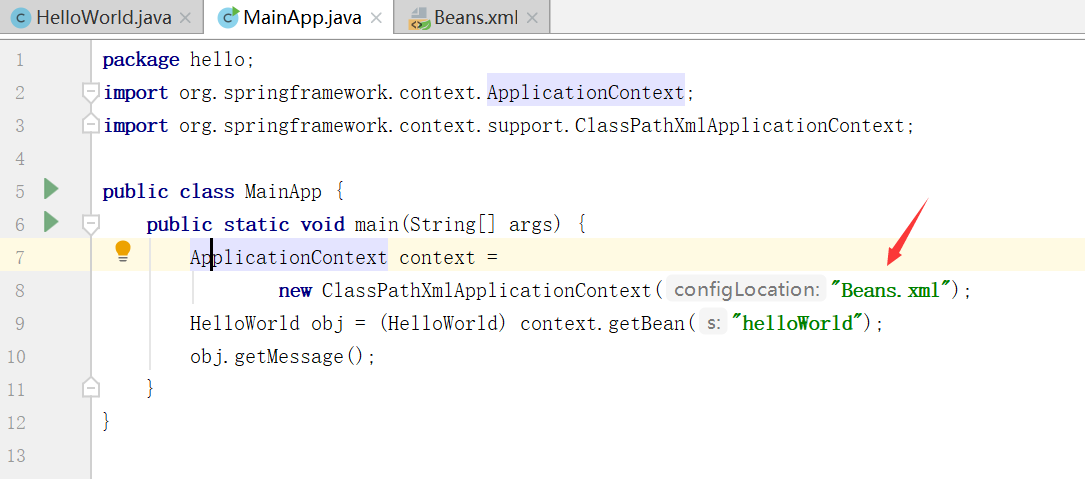
这是一个配置文件,需要手动创建它。
4、创建配置文件Beans.xml
右键src--New--XML Configuation File--Spring Config

命名为Beans,点击确定。
Beans.xml的内容如下:
<?xml version="1.0" encoding="UTF-8"?>

<beans xmlns="http://www.springframework.org/schema/beans"

       xmlns:xsi="http://www.w3.org/2001/XMLSchema-instance"

       xsi:schemaLocation="http://www.springframework.org/schema/beans http://www.springframework.org/schema/beans/spring-beans.xsd">

    <bean id="helloWorld" class="hello.HelloWorld">

        <property name="message" value="Hello World!"/>

    </bean>

</beans>
其实我们需要添加的只有这三行:
<bean id="helloWorld" class="hello.HelloWorld">

        <property name="message" value="Hello World!"/>

    </bean>
class 属性表示需要注册的 bean 的全路径,这里就是HelloWorld.java的文件路径
id 则表示 bean 的唯一标记。
这里的value中的值,就是输出到屏幕上的内容。
此时的目录结构如下:
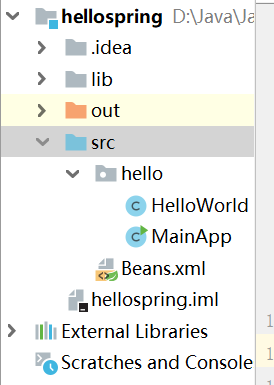
忽略掉out目录,那是程序运行之后自动生成的。
运行MainApp.java文件
输出结果如下:
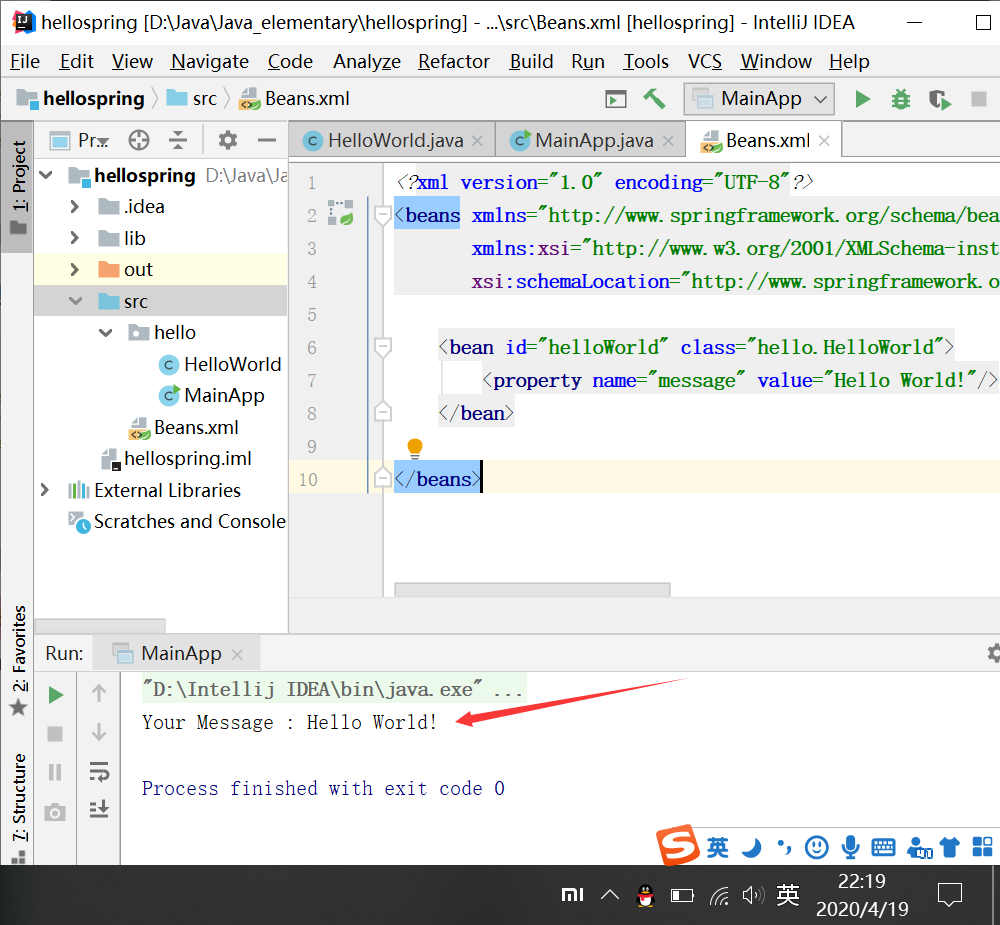
试一下,修改value中的值,比如,改成下面这样:
<bean id="helloWorld" class="hello.HelloWorld">

        <property name="message" value="你好,Spring!"/>

    </bean>
再运行MainApp.java,结果如下:
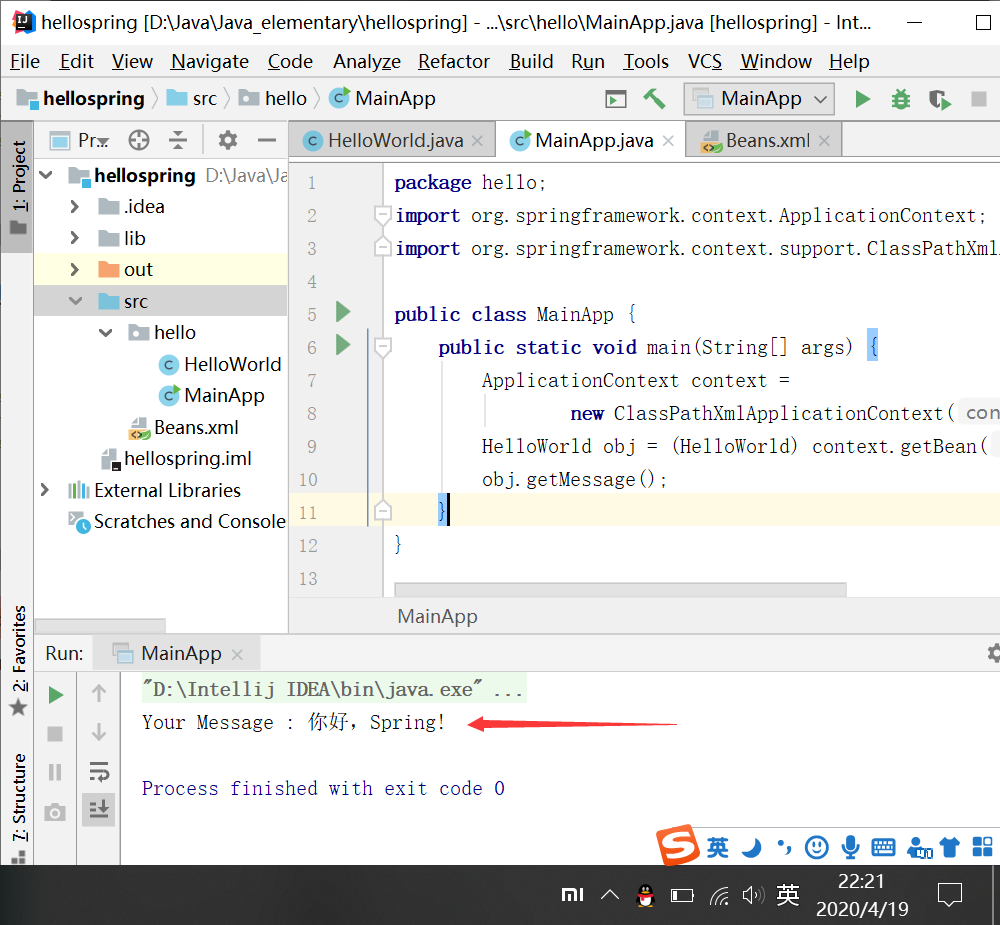
就这样,成功创建了第一个Spring程序。
每天学习一点点,每天进步一点点。
在IDEA中使用Spring写一个HelloWorld的更多相关文章
- Spring第一个helloWorld
Spring 简介: 轻量级:Spring是非侵入性的-基于Spring开发的应用中的对象可以不依赖于Spring的API 依赖注入(DI—dependdency injection.IOC) 面向切 ...
- 汇编入门——使用DOSBox写一个HelloWorld以及相关软件安装
0.0.0) 在D盘建立一个ASM文件夹 0.0.1) 放入所需要的文件 1所标示的红色框为必须要存在的文件,要处理汇编文件.百度网盘中下载. 2自己编写的汇编(asm)文件. 3编译汇编自己生成的文 ...
- 跟我一起写一个hello-world react组件并发布到npm
第一步:初始化我们的配置 $ mkdir react-hello-world $ cd react-hello-world/ $ npm init -y 修改我们的package.json文件 //p ...
- 微信小程序开发入门:10分钟从0开始写一个hello-world
小程序开发需要三个描述整体程序的app文件 和 一个描述多个页面的 pages文件夹. (1)三个app文件分别是app.js,app.json,app.wxss. app.js文件是脚本文件处理一些 ...
- 利用HADOOP中的jar写一个RPC
RPC调用需要服务端和客户端使用相同的协议: 协议: package cn.itcast.bigdata.hadooprpc.protocol; public interface IUserLogin ...
- Spring Boot 《一》开发一个“HelloWorld”的 web 应用
一,Spring Boot 介绍 Spring Boot不是一个新的框架,默认配置了多种框架使用方式,使用SpringBoot很容易创建一个独立运行(运行jar,内嵌Servlet).准生产级别的基于 ...
- 2.每人自己建立一个HelloWorld项目,练习使用git的add/commit/push/pull/fetch/clone等基本命令。比较项目的新旧版本的差别。答题人:张立鹏
第1步:创建SSH Key.在用户主目录下,看看有没有.ssh目录,如果有,再看看这个目录下有没有id_rsa和id_rsa.pub这两个文件,如果已经有了,可直接跳到下一步.如果没有,打开Shell ...
- eclipse使用javaFX写一个HelloWorkld
------------------------------------------------ 操作系统:Ubuntu18.04 EclipseVersion: Oxygen.3a Release ...
- 用Solidity在Truffle上构建一个HelloWorld智能合约
原文地址:石匠的blog Truffle的环境安装在前文已经整理,这次用Solidity在Truffle写一个HelloWorld以太坊智能合约,并在testrpc上进行测试.当前的软件版本信息如下: ...
随机推荐
- Window+Protobuf使用说明
Window+Protobuf使用说明 C++WindowCmakeProtocbuf 介绍 起因 由于项目中要用到二进制存储数据,之前使用的方式是按照字节数依次将数据写入字节流中, 但是这样做起来做 ...
- gitlab环境部署
一:配置主机名 [root@localhost ~]# hostname gitlab[root@localhost ~]# bash 二:安装依赖包 [root@gitlab ~]# yum -y ...
- hdu_2570 迷障 贪心
迷瘴 Time Limit: 2000/1000 MS (Java/Others) Memory Limit: 32768/32768 K (Java/Others)Total Submissi ...
- 如何装双系统win10下装Ubuntu
如何装双系统win10下装Ubuntu 第一步 制作启动盘 下载UItraISO软件.下载Ubuntu系统(地址:https://www.ubuntu.com/download).准备一个大于8g的U ...
- 【React踩坑记六】create-react-app创建的react项目通过iP地址访问(实现局域网内访问)
同项目组的小伙伴想用自己的电脑访问我电脑上开发阶段的create-react-app创建的react项目. 试过了了各种内网穿透工具ngrok以及localtunnel等. 奈何打开效率实在太过于龟速 ...
- USACO Training Section 1.2 [USACO1.2]方块转换 Transformations
题目描述 一块N x N(1<=N<=10)正方形的黑白瓦片的图案要被转换成新的正方形图案.写一个程序来找出将原始图案按照以下列转换方法转换成新图案的最小方式: 1:转90度:图案按顺时针 ...
- 【K8S】K8S 1.18.2安装dashboard(基于kubernetes-dashboard 2.0.0版本)
[K8S]K8S 1.18.2安装dashboard(基于kubernetes-dashboard 2.0.0版本) 写在前面 K8S集群部署成功了,如何对集群进行可视化管理呢?别着急,接下来,我们一 ...
- 题解 CF545A 【Toy Cars】
题目传送门 太弱了,只能写写A题的题解 题意 给你一个 $n·n$ 的矩阵,翻车分三种情况: 如果 $a_i,_j=1$ ,记录第 $i$ 辆车 如果 $a_i,_j=2$ ,记录第 $j$ 辆车 如 ...
- libevent(七)信号事件监听
libevent通过socketpair实现对信号事件的监听. 还记得event_base吗? struct event_base { struct evsig_info sig; // 略 }; e ...
- Automatic Reference Counting
NSObject简化版alloc: struct obj_layout { NSUInteger retained; }; + (id)alloc { int size = sizeof(struct ...