
Offset等一些类似属性的使用
1.offset系列
// offset 系列

var father = document.querySelector('.father');

var son = document.querySelector('.son');

// 1.可以得到元素的偏移 位置 返回的不带单位的数值

console.log(father.offsetTop);

console.log(father.offsetLeft);

// 它以带有定位的父亲为准  如果么有父亲或者父亲没有定位 则以 body 为准

console.log(son.offsetLeft);

var w = document.querySelector('.w');

// 2.可以得到元素的大小 宽度和高度 是包含padding + border + width

console.log(w.offsetWidth);

console.log(w.offsetHeight);

// 3. 返回带有定位的父亲 否则返回的是body

console.log(son.offsetParent); // 返回带有定位的父亲 否则返回的是body

console.log(son.parentNode); // 返回父亲 是最近一级的父亲 亲爸爸 不管父亲有没有定位

ript>
offset和style有关属性的比较
1.是否可读写:
拿offsetWidth和style.width来说,我们执行一下以下代码:
        .box {

            width: 200px;

            height: 200px;

            background-color: pink;

            padding: 10px;

        }
我们把盒子的长度和宽度都设置为了200px,log一下二者:
        var box = document.querySelector('.box');

        console.log(box.offsetWidth);
// 220

        console.log(box.style.width);
// 200px
从中我们得到了3个信息
1.二者都是可读的。
2.style会带单位。
并且根据规范对其赋值的时候也应该带单位,所以当我们通过offset获得的值再使用style时应在其后方加上px;
3.offset会把padding包含在内。
再分别对其进行赋值操作:
        var box = document.querySelector('.box');

        box.offsetWidth = '300';

        console.log(box.offsetWidth); //

        console.log(box.style.width); //200px

        box.style.width = '300px';

        console.log(box.offsetWidth); //

        console.log(box.style.width); //300px
发现前者并不能对元素的属性进行写的操作,这也意味着如果我们如果通过offset得到的属性而要对页面元素进行操作的时候,应该选用与style配合的方法;
这里有个动态拖拽框的小案例,有兴趣的朋友不妨试试。
<!DOCTYPE html>

<html lang="en">

<head>

    <meta charset="UTF-8">

    <meta name="viewport" content="width=device-width, initial-scale=1.0">

    <title>Document</title>

    <style>

        * {

            margin: 0;

            padding: 0;

        }

        .login_header {

            width: 100%;

            /* height: 30px; */

            line-height: 30px;

            text-align: center;

            font-size: 24px;

            margin-top: 8px;

        }

        a {

            text-decoration: none;

            color: #000;

        }

        .login {

            position: fixed;

            left: 50%;

            top: 50%;

            transform: translate(-50%, -50%);

            width: 512px;

            height: 280px;

            background-color: #fff;

            border: 1px solid #cccccc;

            box-shadow: 0px 0px 20px #dddddd;

            display: none;

        }

        .login_title {

            margin-top: 20px;

            text-align: center;

            font-size: 20px;

            cursor: move;

        }

        .login_uname,

        .login_password {

            margin: 20px 0;

        }

        .login_uname input,

        .login_password input {

            outline: none;

            text-indent: 5px;

            height: 38px;

            width: 350px;

            border: 1px solid #cccccc;

        }

        .login_button {

            text-align: center;

            line-height: 40px;

            position: absolute;

            left: 50%;

            transform: translateX(-50%);

            width: 256px;

            height: 40px;

            font-size: 16px;

            border: 1px solid #cccccc;

        }

        label {

            text-align: right;

            display: inline-block;

            width: 100px;

            height: 35px;

            padding-right: 10px;

            /* width: 20px; */

        }

        .login_close a {

            position: absolute;

            top: -15px;

            right: -15px;

            display: block;

            width: 35px;

            height: 35px;

            line-height: 35px;

            text-align: center;

            font-size: 14px;

            background-color: #fff;

            border-radius: 50%;

            box-shadow: 0px 0px 20px #dddddd;

        }

        .mask {

            position: fixed;

            top: 0;

            width: 100%;

            height: 100%;

            background-color: #B2B2B2;

            z-index: -99;

            display: none;

        }

    </style>

</head>

<body>

    <div class="login_header"><a href="javascript:;" id="enter_login">点击,弹出登录框</a></div>

    <div class="login">

        <div class="login_title" id="title">登录会员</div>

        <div class="login_uname">

            <label for="uname">用户名:</label>

            <input type="text" placeholder="请输入用户名" id="uname">

        </div>

        <div class="login_password">

            <label for="password">登录密码:</label>

            <input type="password" placeholder="请输入密码" id="password">

        </div>

        <a class="login_button" href="javascript:;">登录会员</a>

        <div class="login_close">

            <a href="javascript:;" id="close">关闭</a>

        </div>

    </div>

    <div class="mask"></div>

    <script>

        var title = document.querySelector('#title');

        var enter_login = document.querySelector('#enter_login');

        var login = document.querySelector('.login');

        var login_uname = document.querySelector('.login_uname').querySelector('input');

        var login_password = document.querySelector('.login_password').querySelector('input');

        var close_button = document.querySelector('#close');

        var mask = document.querySelector('.mask');

        enter_login.addEventListener('click', function() {

            login.style.display = 'block';

            mask.style.display = 'block';

        })

        close_button.addEventListener('click', function() {

            login.style.display = 'none';

            mask.style.display = 'none';

        })

        function onFocus(input) {

            input.addEventListener('focus', function() {

                this.style.borderColor = 'skyblue';

            })

            input.addEventListener('blur', function() {

                this.style.borderColor = '#ccc';

            })

        }

        onFocus(login_uname);

        onFocus(login_password);

        title.addEventListener('mousedown', function(e) {

            var x = e.pageX - login.offsetLeft;

            var y = e.pageY - login.offsetTop;

            function move(e) {

                var moveX = e.pageX - x;

                var moveY = e.pageY - y;

                login.style.left = moveX + 'px';

                login.style.top = moveY + 'px';

            }

            title.addEventListener('mousemove', move);

            title.addEventListener('mouseup', function() {

                title.removeEventListener('mousemove', move);

            })

        })

    </script>

</body>

</html>
2.鼠标当前的坐标及其在某盒子内的坐标
在事件的函数中传入e,通过e.pageX,e.pageY获取当前鼠标在页面中的位置坐标。
这里我们综合上面的offset来计算一下鼠标在当前盒子中的坐标:
思路:盒子中的x坐标为鼠标再页面中距离左端的距离e.pagex减去盒子距离左端的长度box.offsetLeft。
        window.addEventListener('load', function() {

            var div = document.querySelector('div');

            div.addEventListener('mousemove', function(e) {

                var x = e.pageX - div.offsetLeft;

                var y = e.pageY - div.offsetTop;

                console.log(x);

                console.log(y);

                div.innerHTML = '鼠标在盒子内的X坐标是' + x + '  y坐标是' + y;

            })

        })
3.Client系列
我们使用 client 系列的相关属性来获取元素可视区的相关信息。通过 client 系列的相关属性可以动态的得到该元素的边框大小、元素大小等。
用法与offset一致,同样含有Left Top Width Height区别在于client不包含边框!
4.Scroll系列
这里我们用一张图来解释一下
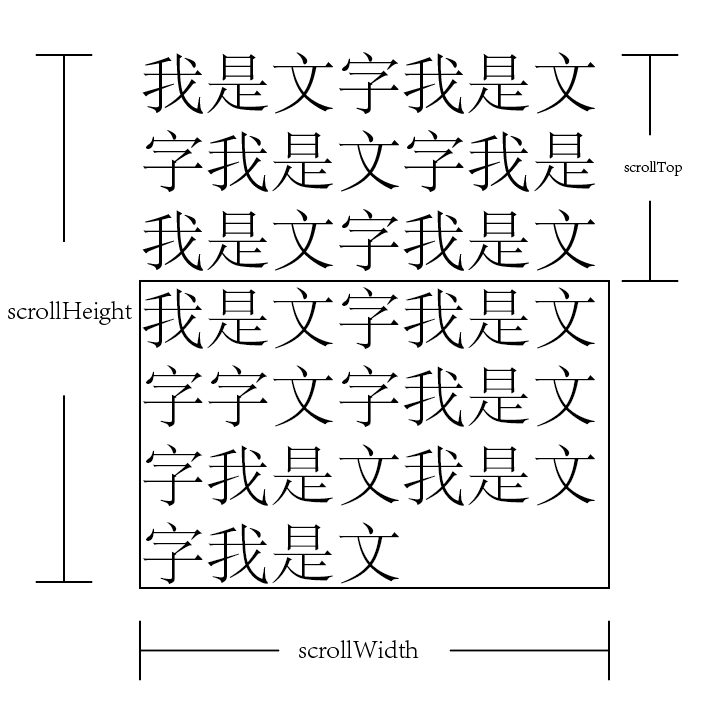 scrollTop是指被卷曲的长度,Height是文字的总长度。
Offset等一些类似属性的使用的更多相关文章
- JavaScript学习笔记5 之 计时器 & scroll、offset、client系列属性 & 图片无缝滚动
一.计时器 setInterval ( 函数/名称 , 毫秒数 )表示每经过一定的毫秒后,执行一次相应的函数(重复) setTimeout ( 函数/名称 , 毫秒数 ) 表示经过一定的毫秒后,只执行 ...
- JQ的offset().top与JS的getBoundingClientRect区别详解,JS获取元素距离视窗顶部可变距离
壹 ❀ 引 我在 JQ的offset().top与js的offsetTop区别详解 这篇博客中详细分析了JQ方法offset().top与JS属性offsetTop的区别,并得出了一条offset( ...
- OFFSET约束(OFFSET IN 和OFFSET OUT)
OFFSET 的意思是偏移.对于同步时序电路来说,数据和时钟之间的偏移量是必须要关注的.OFFSET IN和OUT分别对应的是输入和输出FPGA数据和时钟之间的偏移关系,本文将分析这一种关系.阅读本文 ...
- 攻城狮在路上(壹) Hibernate(三)--- 属性访问、命名策略、派生属性、指定包名等
一.hibernate访问持久化类属性的策略: 在<property>元素中的access属性用于指定Hibernate访问持久化类属性的方式. 常见的方式如下: 1.property:默 ...
- CSS属性之 -- overflow
overflow可以实现隐藏超出对象内容,同时也有显示与隐藏滚动条的作用,overflow属性有四个值:visible (默认), hidden, scroll, 和auto.同样有两个overflo ...
- jQuery RemoveAttr(checked)之后再Attr(checked)属性无效果的原因分析
jQuery中attr()和prop()在修改checked属性时的区别 投稿:whsnow 字体:[增加 减小] 类型:转载 使用语句$.attr('checked',true),将复选框的属性 ...
- C++学习之路—继承与派生(一):基本概念与基类成员的访问属性
(本文根据<c++程序设计>(谭浩强)总结而成,整理者:华科小涛@http://www.cnblogs.com/hust-ghtao,转载请注明) 1 基本思想与概念 在传统的程序设计 ...
- python_如何创建可管理的对象属性
案例: 在面向对象编程中,我们把方法作为对象的接口,自己访问对象的属性可能是不安全的,或设计上不灵活,但是使用调用方法在形式上不如访问属性简洁 繁: circle.getRadius() circle ...
- 关于table相关的属性,CSS样式
table属性: 1:border没有设置的话表格没有边框 2:cellpadding单元格和内容的空白 3:cellspacing单元格和单元格之间的空白 4:frame规定外边框可见性 5:rul ...
随机推荐
- 忍不住还是手写了一遍博客的css
F12边调边改,的一点一点撸出来这个效果.感觉已经可以了.日历感觉没什么用直接隐藏了.
- Salesforce LWC学习(十六) Validity 在form中的使用浅谈
本篇参考: https://developer.salesforce.com/docs/component-library/bundle/lightning-input/documentation h ...
- Mac剪切板中的PNG保存到文件swift
SwiftGG 教程大全 中文翻译 命令行工具开发教程 Line Programs on macOS Tutorial swift4,较详细 Swift基础中需要注意的点 NSPasteboard M ...
- 不使用tomcat,仅适用javaSE手写服务器--模拟登陆
1.搭建框架 我们只是简单模拟,框架简单分三个模块 a,服务器端server包 b,servlet,根据不同的请求url,利用反射生产对应的servlet c,IO工具包,用来关闭IO流 d,编写we ...
- GraphicsLab Project 之 Curl Noise
作者:i_dovelemon 日期:2020-04-25 主题:Perlin Noise, Curl Noise, Finite Difference Method 引言 最近在研究流体效果相关的模拟 ...
- 推荐web前端框架bootstrap
bootstrap是基于Jquery而开发的一个前端框架. 全中文的学习网站:http://www.runoob.com/bootstrap/bootstrap-tutorial.html 实际上就是 ...
- 关于go的入门书籍——go自学的序
说实话,许世伟的<GO语言编程>,承载的心血是轻易可见的.但是我更喜欢那种工具书,就是简单说明他干嘛她干嘛,就能干嘛干嘛··· 比如读张晏关于<取代Apache的高性能Web服务器& ...
- php时间:获取上一个月,本月天数,下一个月
时间戳转日期 date() 日期转时间戳 strtotime() 当前时间戳time() 获取当前月的天数: $i=; $y=; echo date("t",strtotime(& ...
- 2019-2020-1 20199303《Linux内核原理与分析》第六周作业
系统调用的三层机制 首先是为系统增加新的命令 运行脚本自动生成文件系统 其中有一个显示时间的功能 编辑test.c文件,增加一个hello函数用来显示学号,再次使用make roofts自动编译,调用 ...
- ElasticSearch 镜像 & 安装 & 简易集群
目录 ES镜像 JDK镜像 安装 1. 安装JDK 2. 解压安装ES 3. 配置 4. 新建用户 5. 启动 踩坑 1. root启用报错 2. max file descriptors [4096 ...