
Linux查看系统开机时间
有时候需要查看Linux系统运行了多久时间,此时需要知道上次开机启动时间; 有时候由于断电或供电故障突然停机,需要查看Linux开机时间/重启时间; 下面总结一些查看Linux开机关机时间的方法(非常全面)
1: who 命令查看
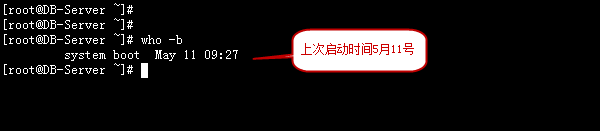
who -b 查看最后一次系统启动的时间。
who -r 查看当前系统运行时间
[root@DB-Server ~]# who -b
system boot May 11 09:27

2: last reboot
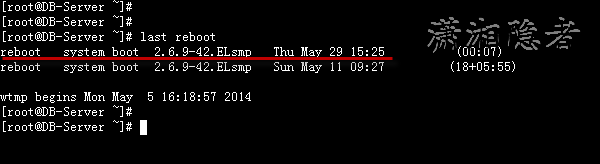
如下所示last reboot可以看到Linux系统历史启动的时间。 重启一下操作系统后,然后
[root@DB-Server ~]# last reboot
reboot system boot 2.6.9-42.ELsmp Thu May 29 15:25 (00:07)
reboot system boot 2.6.9-42.ELsmp Sun May 11 09:27 (18+05:55)
wtmp begins Mon May 5 16:18:57 2014
如果只需要查看最后一次Linux系统启动的时间
[root@DB-Server ~]# last reboot | head -1
reboot system boot 2.6.9-42.ELsmp Thu May 29 15:25 (00:08)
3:TOP命令查看
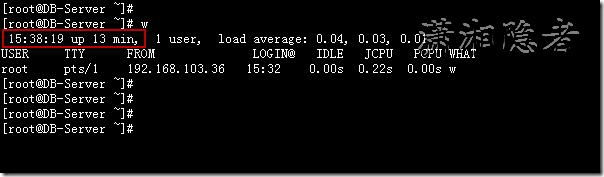
如下截图所示,up后表示系统到目前运行了多久时间。反过来推算系统重启时间
 4:w 命令查看
4: w命令查看
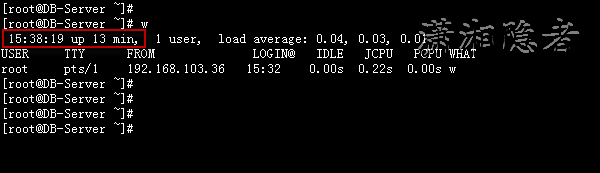
如下截图所示,up后表示系统到目前运行了多久时间。反过来推算系统重启时间
5:uptime 命令查看
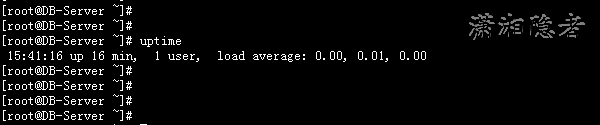
6: 查看/proc/uptime
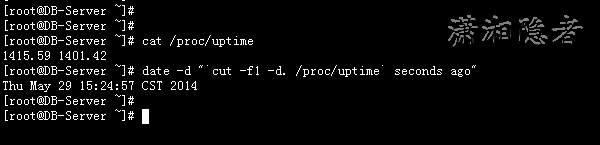
[root@DB-Server ~]# cat /proc/uptime
1415.59 1401.42
[root@DB-Server ~]# date -d "`cut -f1 -d. /proc/uptime` seconds ago"
Thu May 29 15:24:57 CST 2014
[root@DB-Server ~]# date -d "$(awk -F. '{print $1}' /proc/uptime) second ago" +"%Y-%m-%d %H:%M:%S"
2014-05-29 15:24:57

参考资料:
http://www.thegeekstuff.com/2011/10/linux-reboot-date-and-time/
http://www.averainy.info/linux-system-operation-time-and-the-view-of-the-latest-powered-up-time/
Linux查看系统开机时间的更多相关文章
- 转载: Linux查看系统开机时间
转自: https://www.cnblogs.com/kerrycode/p/3759395.html 查看Linux系统运行了多久时间,此时需要知道上次开机启动时间: 有时候由于断电或供电故障突然 ...
- Linux查看系统开机时间(转)
1.who命令查看 who -b查看最后一次系统启动的时间. who -r查看当前系统运行时间 2.last reboot last reboot可以看到Linux系统历史启动的时间. 重启一下操作 ...
- linux 查看系统当前时间,修改时间
linux 查看系统当前时间,修改时间1. 查看时间和日期命令 : "date"2.设置时间和日期例如:将系统日期设定成2018年6月8日的命令命令 : "date -s ...
- Linux查看系统开机和关机时间
1.who 命令查看 who -b 查看最后一次系统启动的时间 who -r 查看当前系统运行时间 [root@test ~]# who -b system ...
- 笔记:查看linux系统开机时间
[root@localhost ~]# uptime -s -- :: 通过命令uptime -s 查看系统开机时间
- Linux 系统开机时间及当前时间
最近一次系统开机时间:date -d "$(awk -F. '{print $1}' /proc/uptime) second ago" +"%Y-%m-%d %H:%M ...
- Linux查看系统状态命令
Linux查看系统状态命令 iostat iostat 命令详细地显示了存储子系统方面的情况.你通常用iostat来监控存储子系统总体上运行状况如何,并且在用户注意到服务器运行缓慢之前提早 ...
- Linux查看系统当前登录用户的命令,top命令看到users有多个用户登录
Linux查看系统当前登录用户的命令,top命令看到users有多个用户登录 作为系统管理员,top命令看到users有多个用户登录,会需要查看下是否被黑客进入了. 实战例子:top命令:top - ...
- Linux 查看系统硬件信息(实例详解)
原文链接:http://www.cnblogs.com/ggjucheng/archive/2013/01/14/2859613.html linux查看系统的硬件信息,并不像windows那么直观, ...
随机推荐
- 关于opencv中人脸识别主函数的部分注释详解。
近段时间在搞opencv的视频人脸识别,无奈自带的分类器的准确度,实在是不怎么样,但又能怎样呢?自己又研究不清楚各大类检测算法. 正所谓,功能是由函数完成的,于是自己便看cvHaarDetectObj ...
- 安装infer整个过程
日期:2015-06-26 孟起 15:43:25 大神.. 孟起 15:43:38 我是不是照着这个安装 HelloWorld 15:45:05 直接找二进制文件安卓就行 孟起 15:46: ...
- 使用GIT@OSChina 实现协同工作的方法。
由于我新建了一个团队,团队里的人对于GIT都不太熟悉,所以才有了这篇文章.我用的是git-1.9.4的版本,所以我建议团队里面的成员也使用这个版本.首先是下载git,这个自己去网上找吧,一大堆,记得是 ...
- Win8.1安装mysql-installer-community-5.6.21.0.mis
引言 我本机是win8.1,在官网下载的这个安装是32位和64位都能装,安装步骤参考:http://jingyan.baidu.com/article/67662997305dcd54d51b84d4 ...
- Struts2 源码分析——Result类实例
本章简言 上一章笔者讲到关于DefaultActionInvocation类执行action的相关知识.我们清楚的知道在执行action类实例之后会相关处理返回的结果.而这章笔者将对处理结果相关的内容 ...
- Cross-Origin Request Blocked: The Same Origin Policy disallows reading the remote resource at http://localhost:9001/api/size/get. (Reason: CORS header 'Access-Control-Allow-Origin' missing).
Cross-Origin Request Blocked: The Same Origin Policy disallows reading the remote resource at http:/ ...
- C#获取IP和整数IP方法
体验: http://tool.hovertree.com/info/ip/代码如下: using System; using System.Text; using System.Text.Regul ...
- [System] CentOS虚拟机系统克隆后的网络配置
VMware Workstation 虚拟机在进行克隆 CentOS 系统之后,在克隆机上配置网卡时,会出现一些细节问题,讨论一二. 一.情景描述 克隆机上默认由 NetworkManager 服务管 ...
- 原生JS投票特效
效果:http://hovertree.com/texiao/js/24/ 效果图: 代码如下: <!DOCTYPE html> <html lang="en"& ...
- Android开发之重力传感器
重力传感器与方向传感器的开发步骤类似,只要理清了期中的x,y,z的值之后就可以根据他们的变化来进行编程了,首先来看一副图 假设当地的重力加速度值为g 当手机正面朝上的时候,z的值为q,反面朝上的时候, ...