
25-Java-Spring框架(三)
Spring框架的了解、SpringIOC的部分内容请阅读23-Java-Spring框架(一)
SpringwebMVC的了解、请求流程、运用等请阅读24-Java-Spring框架(二)
四、Spring AOP(Aspect Oriented Programming)
1.SpringAOP了解
SpringAOP将通用业务和传统业务隔离,通过AOP配置进行结合实现功能叠加的效果(可以利用低耦合模式实现通用业务的调用)
三个相关术语:1.Aspect(方面/切面):指封装了通用业务逻辑,可以切入到其他目标上组件上的方法
2.Pointcut(切入点):指表达式,用于指定被切的目标组件和方法
(1)方法限定表达式:execution(修饰符 返回类型 方法名(参数列表) 抛出异常)
execution(* query*()) 表示所有以query开头的方法会被切入功能(第一个*表示方法返回类型,第二个*表示任意)
execution(* com.spring.*.*(..)) 表示所有以com.spring包下面的所有的类中的所有的方法会被切入功能
execution(* com.spring..*.*(..)) 表示所有以com.spring包以及子包下面的所有的类中的所有的方法会被切入功能
(2)类型限定表达式:within(包名.类名)
within(com.spring.controller.springtest) 表示com.spring.controller包下的springtest组件类中的所有方法都会被切入
within(com.spring.controller..*) 表示com.spring.controller包以及子包下的所有组件类中的所有方法都会被切入
(3)名称限定表达式:bean(id名称)
bean(student) 表示id名称为student的bean对象的所有方法
bean(*ent) 表示id名称为以ent结尾的bean对象的所有方法
bean(std*) 表示id名称为以std开头的bean对象的所有方法
3.Advice(通知):指定切入时机,比如方法调用前,方法调用后,异常发生后等等
          try{

                  //环绕通知@Around(可以理解为前置通知加后置通知)

                  //前置通知@Before

                  //执行目标组件方法

                  //后置通知@AfterReturning

          } catch{

                  //异常通知@AfterThrowing

          } finally{

                  //最终通知@After

          }
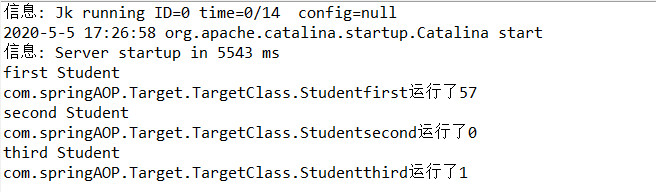
2.AOP的运用案例一(案例:计时演示)
第一步:建立web项目
第二步:配置SpringIOC、SpringAOP、SpringMVC环境,引入相关jar包
第三步:配置web.xml
 <?xml version="1.0" encoding="UTF-8"?>

 <web-app version="3.0"

     xmlns="http://java.sun.com/xml/ns/javaee"

     xmlns:xsi="http://www.w3.org/2001/XMLSchema-instance"

     xsi:schemaLocation="http://java.sun.com/xml/ns/javaee

     http://java.sun.com/xml/ns/javaee/web-app_3_0.xsd">

   <display-name></display-name>

   <welcome-file-list>

     <welcome-file>index.jsp</welcome-file>

   </welcome-file-list>

   <servlet>

       <servlet-name>springmvc</servlet-name>

       <servlet-class>org.springframework.web.servlet.DispatcherServlet</servlet-class>

       <init-param>

           <param-name>contextConfigLocation</param-name>

           <param-value>classpath:applicationContext.xml</param-value>

       </init-param>

       <load-on-startup>1</load-on-startup>

   </servlet>

   <servlet-mapping>

       <servlet-name>springmvc</servlet-name>

       <url-pattern>*.do</url-pattern>

   </servlet-mapping>

 </web-app>
第四步:编写被切入的目标测试类(实现传统业务)
 package com.springAOP.Target;

 import org.springframework.stereotype.Component;

 //切面的触发,都是service的对应代理去触发的,所以,你在service里面直接调用触发切面的方法,是达不到这个效果的,

 //所以,需要使用这个ioc注入的代理对象,就会触发切面的方法啦

 @Component("targetclass")

 public class TargetClass {

     public void Studentfirst(){

         System.out.println("first Student");

     }

     public void Studentsecond(){

         System.out.println("second Student");

     }

     public void Studentthird(){

         System.out.println("third Student");

     }

 }
第五步:编写通过AOP实现的通用业务的计时功能
 package com.springAOP.AOPTimeTest;

 import org.aspectj.lang.ProceedingJoinPoint;

 import org.aspectj.lang.annotation.Around;

 import org.aspectj.lang.annotation.Aspect;

 import org.springframework.stereotype.Component;

 import org.springframework.util.StopWatch;

 @Component//加载SpringAOPTimeTest到Spring框架中

 @Aspect//加载一个实现切面AOP功能的对象

 public class SpringAOPTimeTest {

     @Around("within(com.springAOP.Target.*)")//表示com.springAOP.Target包的所有组件类中的所有方法都会被切入环绕通知

     public Object time(ProceedingJoinPoint pjp) throws Throwable{

         StopWatch watch = new StopWatch();//调用Spring框架封装好的计时类

         watch.start();//开始计时

         Object obj = pjp.proceed();//执行被切入的目标组件方法

         watch.stop();//结束计时

         String ClassName = pjp.getTarget().getClass().getName();//获取包名+类名

         String AdviceName = pjp.getSignature().getName();//获取方法名

         long time = watch.getTotalTimeMillis();//获取时间差

         System.out.println(ClassName+"."+AdviceName+"运行了"+time);

         return obj;

     }

 }
第六步:配置applicationContext.xml
 <?xml version="1.0" encoding="UTF-8"?>

 <beans xmlns="http://www.springframework.org/schema/beans"

        xmlns:xsi="http://www.w3.org/2001/XMLSchema-instance"

        xmlns:context="http://www.springframework.org/schema/context"

        xmlns:aop="http://www.springframework.org/schema/aop"

        xmlns:tx="http://www.springframework.org/schema/tx"

        xmlns:jdbc="http://www.springframework.org/schema/jdbc"

        xmlns:jee="http://www.springframework.org/schema/jee"

        xmlns:mvc="http://www.springframework.org/schema/mvc"

        xmlns:util="http://www.springframework.org/schema/util"

        xsi:schemaLocation="

             http://www.springframework.org/schema/beans http://www.springframework.org/schema/beans/spring-beans.xsd

             http://www.springframework.org/schema/tx http://www.springframework.org/schema/tx/spring-tx.xsd

             http://www.springframework.org/schema/aop http://www.springframework.org/schema/aop/spring-aop.xsd

             http://www.springframework.org/schema/util http://www.springframework.org/schema/util/spring-util.xsd

             http://www.springframework.org/schema/jdbc http://www.springframework.org/schema/jdbc/spring-jdbc.xsd

             http://www.springframework.org/schema/jee http://www.springframework.org/schema/jee/spring-jee.xsd

             http://www.springframework.org/schema/mvc http://www.springframework.org/schema/mvc/spring-mvc.xsd

             http://www.springframework.org/schema/context http://www.springframework.org/schema/context/spring-context.xsd">

         <!-- 配置AOP组件aspectj自动代理 -->

         <aop:aspectj-autoproxy/>

         <!-- 配置组件扫描 -->

         <context:component-scan base-package="com.springAOP"/>

         <!-- 配置注解handler -->

         <mvc:annotation-driven/>

         <!-- 配置ViewResolver视图解析器 -->

         <!-- 完整的页面路径:前缀+视图名称+后缀 -->

         <bean id = "viewresolver" class="org.springframework.web.servlet.view.InternalResourceViewResolver">

             <!-- 路径前缀 -->

             <property name="prefix" value="/"></property>

             <!-- 路径后缀 -->

             <property name="suffix" value=".jsp"></property>

         </bean>

 </beans>
第七步:编写springMVC部分的Controller前端控制器,调用传统业务方法
 package com.springAOP.mvccontroller;

 import javax.annotation.Resource;

 import org.springframework.stereotype.Controller;

 import org.springframework.web.bind.annotation.RequestMapping;

 import org.springframework.web.servlet.ModelAndView;

 import com.springAOP.Target.TargetClass;

 @Controller//此处相当于继承了Controller接口的作用

 public class StudentController {

     //切面的触发,都是service的对应代理去触发的,所以,你在service里面直接调用触发切面的方法,是达不到这个效果的,

     //所以,需要使用这个ioc注入的代理对象,就会触发切面的方法啦

     @Resource(name = "targetclass")

     private TargetClass tc;

     @RequestMapping("/stu.do")//此处等价于applicationContext.xml中的配置HandlerMapping组件

     public ModelAndView student(){

         tc.Studentfirst();

         tc.Studentsecond();

         tc.Studentthird();

         ModelAndView mac = new ModelAndView();

         mac.setViewName("index");

         mac.getModel();

         return mac;

     }

 }
第八步:测试运行
3.AOP运用案例二(案例:AOP实现异常抛出到日志)
第一步:建立web项目
第二步:配置SpringIOC、SpringAOP、SpringMVC环境,引入相关jar包(同案例一)
第三步:配置web.xml(同案例一)
第四步:编写被切入的目标测试类(实现传统业务)(同案例一)
第五步:编写通过AOP实现的通用业务的异常抛出功能
 package com.springAOP.test;

 import java.io.FileWriter;

 import java.io.IOException;

 import java.io.PrintWriter;

 import java.util.Date;

 import org.aspectj.lang.ProceedingJoinPoint;

 import org.aspectj.lang.annotation.AfterThrowing;

 import org.aspectj.lang.annotation.Around;

 import org.aspectj.lang.annotation.Aspect;

 import org.springframework.stereotype.Component;

 import org.springframework.util.StopWatch;

 @Component//加载SpringAOPTimeTest到Spring框架中

 @Aspect//加载一个实现切面AOP功能的对象

 public class SpringAOPTest {

     @Around("within(com.springAOP.Target.*)")//表示com.springAOP.Target包的所有组件类中的所有方法都会被切入环绕通知

     public Object time(ProceedingJoinPoint pjp) throws Throwable{

         StopWatch watch = new StopWatch();//调用Spring框架封装好的计时类

         watch.start();//开始计时

         Object obj = pjp.proceed();//执行被切入的目标组件方法

         watch.stop();//结束计时

         String ClassName = pjp.getTarget().getClass().getName();//获取包名+类名

         String AdviceName = pjp.getSignature().getName();//获取方法名

         long time = watch.getTotalTimeMillis();//获取时间差

         System.out.println(ClassName+"."+AdviceName+"运行了"+time);

         return obj;

     }

     @AfterThrowing(throwing="ex",pointcut="within(com.springAOP..*)")//表示com.springAOP包以及子包的所有组件类中的所有方法都会被切入异常通知

     public void logException(Exception ex){

         //异常信息写入日志文件

         try {

             FileWriter fw = new FileWriter("F:\\error.log",true);

             PrintWriter pw = new PrintWriter(fw);

             pw.println(new Date()+"发生了"+ex+"异常"+"详情如下:");

             StackTraceElement[] stackTrace = ex.getStackTrace();

             for(StackTraceElement s:stackTrace){

                 if(s.toString().contains("com.springAOP")){//只写入重要的报错语句

                     pw.println(s);

                 }

             }

             pw.println("=========================================================");

             pw.close();

         } catch (IOException e) {

             // TODO Auto-generated catch block

             e.printStackTrace();

         }

     }

 }
第六步:配置applicationContext.xml(同案例一)
第七步:编写springMVC部分的Controller前端控制器,调用传统业务方法
 package com.springAOP.mvccontroller;

 import javax.annotation.Resource;

 import org.springframework.stereotype.Controller;

 import org.springframework.web.bind.annotation.RequestMapping;

 import org.springframework.web.servlet.ModelAndView;

 import com.springAOP.Target.TargetClass;

 @Controller//此处相当于继承了Controller接口的作用

 public class StudentController {

     //切面的触发,都是service的对应代理去触发的,所以,你在service里面直接调用触发切面的方法,是达不到这个效果的,

     //所以,需要使用这个ioc注入的代理对象,就会触发切面的方法啦

     @Resource(name = "targetclass")

     private TargetClass tc;

     @RequestMapping("/stu.do")//此处等价于applicationContext.xml中的配置HandlerMapping组件

     public ModelAndView student(){

         tc.Studentfirst();

         tc.Studentsecond();

         tc.Studentthird();

         ModelAndView mac = new ModelAndView();

         mac.setViewName("index");

         mac.getModel();

         //此处用于异常报错

         String str = null;

         str.length();

         return mac;

     }

 }
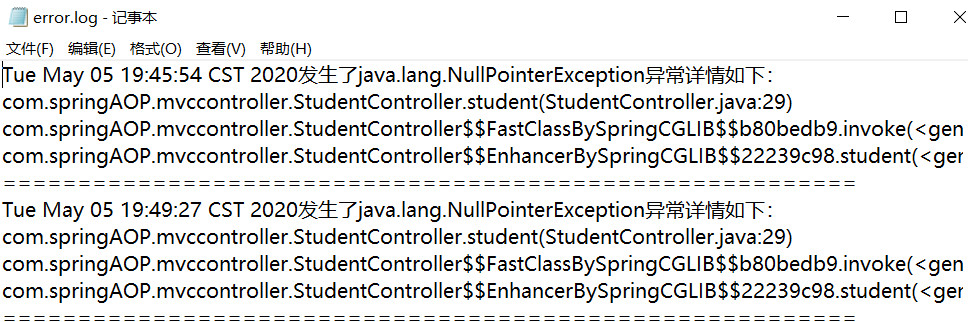
第八步:测试运行
3.SpringAOP原理
在使用AOP之后,Spring容器返回的是组件对象,是采用动态代理技术生成一个动态代理对象(是原有组件对象的子类),
对原有组件的方法进行重写,在重写方法中调用切面组件追加功能和原有组件的功能。
动态代理:JDK动态代理:依赖于接口
CGLIB动态代理:不依赖于接口
CGLIB技术:采用子类模式生成动态代理对象,默认目标组件没有接口采用
在使用中,可以追加<aop:aspectj-autoproxy proxy-target-class="true"/> 强制采用CGLIB模式生成动态代理对象,建议使用,因为更安全
Proxy技术:采用接口模式生成动态代理对象,默认目标组件有接口采用
25-Java-Spring框架(三)的更多相关文章
- 从零开始实现一个简易的Java MVC框架(三)--实现IOC
Spring中的IOC IoC全称是Inversion of Control,就是控制反转,他其实不是spring独有的特性或者说也不是java的特性,他是一种设计思想.而DI(Dependency ...
- 基于java spring框架开发部标1078视频监控平台精华文章索引
部标1078视频监控平台,是一个庞杂的工程,涵盖了多层协议,部标jt808,jt809,jt1078,苏标Adas协议等,多个平台功能标准,部标796标准,部标1077标准和苏标主动安全标准,视频方面 ...
- 《Java Spring框架》SpringXML配置详解
Spring框架作为Bean的管理容器,其最经典最基础的Bean配置方式就是纯XML配置,这样做使得结构清晰明了,适合大型项目使用.Spring的XML配置虽然很繁琐,而且存在简洁的注解方式,但读懂X ...
- 吴裕雄--天生自然JAVA SPRING框架开发学习笔记:Spring JDK动态代理
JDK 动态代理是通过 JDK 中的 java.lang.reflect.Proxy 类实现的.下面通过具体的案例演示 JDK 动态代理的使用. 1. 创建项目 在 MyEclipse 中创建一个名称 ...
- [Java]Spring框架
在这里学习Spring框架: >>spring&struts框架学习 >>spring >>Java回顾之Spring基础 >>IBM Java ...
- 吴裕雄--天生自然JAVA SPRING框架开发学习笔记:SSM(Spring+Spring MVC+MyBatis)框架整合搭建详细步骤
因为 Spring MVC 是 Spring 框架中的一个子模块,所以 Spring 与 SpringMVC 之间不存在整合的问题.实际上,SSM 框架的整合只涉及 Spring 与 MyBatis ...
- 吴裕雄--天生自然JAVA SPRING框架开发学习笔记:SSH框架(Struts2+Spring+Hibernate)搭建整合详细步骤
在实际项目的开发中,为了充分利用各个框架的优点,通常都会把 Spring 与其他框架整合在一起使用. 整合就是将不同的框架放在一个项目中,共同使用它们的技术,发挥它们的优点,并形成互补.一般而言,在进 ...
- 吴裕雄--天生自然JAVA SPRING框架开发学习笔记:Spring JDBCTemplate简介
Spring 框架针对数据库开发中的应用提供了 JDBCTemplate 类,该类是 Spring 对 JDBC 支持的核心,它提供了所有对数据库操作功能的支持. Spring 框架提供的JDBC支持 ...
- 吴裕雄--天生自然JAVA SPRING框架开发学习笔记:Spring使用AspectJ开发AOP基于XML和基于Annotation
AspectJ 是一个基于 Java 语言的 AOP 框架,它扩展了 Java 语言.Spring 2.0 以后,新增了对 AspectJ 方式的支持,新版本的 Spring 框架,建议使用 Aspe ...
- 吴裕雄--天生自然JAVA SPRING框架开发学习笔记:Spring DI(依赖注入)的实现方式属性注入和构造注入
依赖注入(Dependency Injection,DI)和控制反转含义相同,它们是从两个角度描述的同一个概念. 当某个 Java 实例需要另一个 Java 实例时,传统的方法是由调用者创建被调用者的 ...
随机推荐
- 数据结构和算法(Golang实现)(24)排序算法-优先队列及堆排序
优先队列及堆排序 堆排序(Heap Sort)由威尔士-加拿大计算机科学家J. W. J. Williams在1964年发明,它利用了二叉堆(A binary heap)的性质实现了排序,并证明了二叉 ...
- Android UIAutomator自动化测试
描述:UiAutomator接口丰富易用,可以支持所有Android事件操作,事件操作不依赖于控件坐标,可以通过断言和截图验证正确性,非常适合做UI测试. UIAutomator不需要测试人员了解代码 ...
- python2.7安装pip
- stand up meeting 1/12/2016
part 组员 工作 工作耗时/h 明日计划 工作耗时/h UI 冯晓云 UI测试和调整:页面跳转调整 3 查漏补缺,扫除UI b ...
- Pet BFS
一天早上小明醒来时发现他的宠物仓鼠不见了. 他在房间寻找但是没找到仓鼠. 他想用奶酪诱饵去找回仓鼠. 他把奶酪诱饵放在房间并且等待了好几天. 但是可怜的小明除了老鼠和蟑螂没见到任何东西. 他找到学校的 ...
- Python - Python的基础知识结构,学习方法、难点和重点
[原创]转载请注明作者Johnthegreat和本文链接. 相信大家都知道,Python很容易学,有编程基础的人,最多两个星期就可以很愉快的撸Python的代码了,那么具体涉及的知识有哪些,下面为大家 ...
- Linux学习笔记(七)关机、重启及常用的网络命令
关机.重启命令 sync shutdown reboot init sync 英文原意:flush file system buffers 功能:刷新文件系统缓冲区,将内存中的数据保存到硬盘中 语法: ...
- sftp的用法
linux sftp远程连接命令 sftp -oPort=60001 root@192.168.0.254 使用-o选项来指定端口号. -oPort=远程端口号 sftp> get /var/w ...
- 泛微ecology OA系统在数据库配置信息泄露
漏洞描述 攻击者可通过该漏洞页面直接获取到数据库配置信息,攻击者可通过访问存在漏洞的页面并解密从而获取数据库配置信息,如攻击者可直接访问数据库,则可直接获取用户数据,由于泛微e-cology默认数据库 ...
- CVE-2018-12613 的一些思考
复现 CVE-2018-12613 的一些思考,关于文件包含路径的问题 漏洞 /index.php 第 55 行 $target_blacklist = array ( 'import.php', ' ...