
vue练手项目——桌面时钟
用vue实现一个简单的网页桌面时钟,主要包括时钟显示、计时、暂停、重置等几个功能。
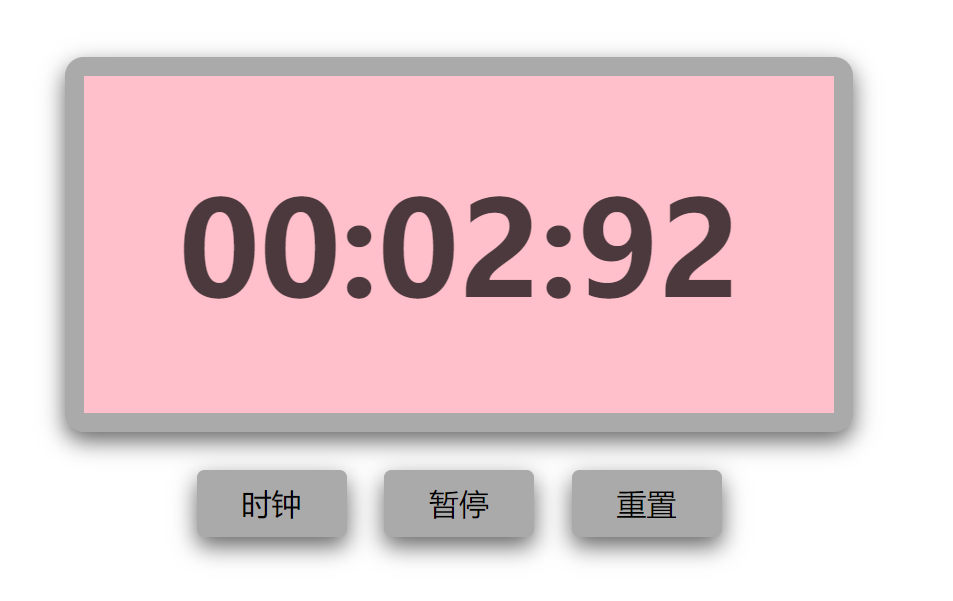
效果图如下,页面刚进来的时候是一个时钟,时钟上显示的时、分、秒为当前实际时间,点击计时器按钮后,页面变成一个计时器,并且计时器按钮被暂停与重置两个按钮替代,分别对计时器进行暂停和重置,若点击时钟按钮会切换回时钟界面。

代码如下:
<!DOCTYPE html>

<html>

<head>

    <meta charset="utf-8">

    <title>时钟</title>

    <style type="text/css">

        .clock {

            width: 400px;

            height: 180px;

            line-height: 180px;

            border: 10px solid #aaa;

            border-radius: 10px;

            margin: 120px auto;

            background: pink;

            text-align: center;

            position: relative;

            box-shadow: 0px 5px 20px rgba(0,0,0,.6);

        }

        .clock .text {

            font-size: 70px;

            font-weight: bold;

            color: rgba(0,0,0,.7);

        }

        .clock .btn {

            position: absolute;

            /*top: -66px;*/

            bottom: -66px;

            border: none;

            outline: none;

            width: 80px;

            height: 36px;

            border-radius: 4px;

            font-size: 16px;

            background: #aaa;

            cursor: pointer;

            box-shadow: 0px 5px 20px rgba(0,0,0,.6);

        }

        .clock .btn:hover {

            opacity: 0.8;

        }

        .clock .btn-clock {

            left: 110px;

        }

        .clock .btn-clock.to-left {

            left: 60px;

        }

        .clock .btn-timer {

            right: 110px;

        }

        .clock .btn-suspend {

            right: 160px;

        }

        .clock .btn-reset {

            right: 60px;

        }

    </style>

    <script src="https://cdn.jsdelivr.net/npm/vue/dist/vue.js"></script>

</head>

<body>

    <div id="app">

        <div class="clock">

            <span class="text" v-if="index == 0">

                {{ hour }}:{{ min }}:{{ sec }}

            </span>

            <span class="text" v-else>

                {{ min }}:{{ sec }}:{{ msec }}

            </span>

            <button class="btn btn-clock" @click="selectClock" :class="{'to-left': index != 0}">时钟</button>

            <button class="btn btn-timer" @click="selectTimer" v-if="index == 0">

                <span>计时器</span>

            </button>

            <button class="btn btn-suspend" @click="suspendTimer" v-if="index > 0">

                <span v-if="index == 1">暂停</span>

                <span v-if="index == 2">开始</span>

            </button>

            <button class="btn btn-reset" @click="resetTimer" v-if="index == 1 || index == 2">

                <span>重置</span>

            </button>

        </div>

    </div>

    <script type="text/javascript">

        var app = new Vue({

            el: '#app',

            data: {

                index: 0,   // 0表示时钟页面,1表示计时器计时状态,2表示计时器暂停状态

                hour: '00',  // 页面显示的数值

                min: '00',

                sec: '00',

                msec: '00',

                h: 0,       // 临时保存的数值

                m: 0,

                s: 0,

                ms: 0,

                timer: null,

                date: null

            },

            // 监视器

            watch: {

                index(newValue, oldValue) {

                    clearInterval(this.timer);

                    this.timer = null;

                    this.date = null;

                    // 从时钟页面click过来 或 从计时器页面click过来

                    if (oldValue == 0 || newValue == 0) {   // index等于2时数据保留

                        this.hour = '00';

                        this.min = '00';

                        this.sec = '00';

                        this.msec = '00';

                        this.h = 0;

                        this.m = 0;

                        this.s = 0;

                        this.ms = 0;

                    }

                    this.autoMove();

                }

            },

            methods: {

                // 自动计时

                autoMove() {

                    if (this.index == 0) {

                        this.timer = setInterval(res => {

                            this.date = new Date();

                            this.h = this.date.getHours();

                            this.m = this.date.getMinutes();

                            this.s = this.date.getSeconds();

                            this.hour = this.h > 9 ? this.h : '0' + this.h;

                            this.min = this.m > 9 ?  this.m : '0' + this.m;

                            this.sec = this.s > 9 ? this.s : '0' + this.s;

                        }, 1000);

                    } else if (this.index == 1){

                        this.timer = setInterval(res => {

                            this.ms ++;

                            if (this.ms == 100) {

                                this.s ++;

                                this.ms = 0;

                            }

                            if (this.s == 60) {

                                this.m ++;

                                this.s = 0;

                            }

                            this.msec = this.ms > 9 ? this.ms : '0' + this.ms;

                            this.min = this.m > 9 ?  this.m : '0' + this.m;

                            this.sec = this.s > 9 ? this.s : '0' + this.s;

                        }, 10);

                    }

                },

                // 选择时钟

                selectClock() {

                    this.index = 0;

                },

                // 选择计时器

                selectTimer() {

                    this.index = 1;

                },

                // 开始、暂停计时器

                suspendTimer() {

                    if (this.index == 1) {

                        this.index = 2;

                    } else if (this.index == 2) {

                        this.index = 1;

                    }

                },

                // 重置计时器

                resetTimer() {

                    this.index = 0;

                    setTimeout(res => {

                        this.index = 1;

                    }, 1);

                }

            },

            mounted() {

                this.autoMove();

            }

        })

    </script>

</body>

</html>
vue练手项目——桌面时钟的更多相关文章
- Vue练手项目(包含typescript版本)
本项目的git仓库https://github.com/lznism/xiachufang-vue 对应的使用typescript实现的版本地址https://github.com/lznism/xi ...
- Vuex/Vue 练手项目 在线汇率转换器
详情请点击: https://zhuanlan.zhihu.com/p/33362758
- web前端学习部落22群分享给需要前端练手项目
前端学习还是很有趣的,可以较快的上手然后自己开发一些好玩的项目来练手,网上也可以一抓一大把关于前端开发的小项目,可是还是有新手在学习的时候不知道可以做什么,以及怎么做,因此,就整理了一些前端项目教程, ...
- Python之路【第二十四篇】:Python学习路径及练手项目合集
Python学习路径及练手项目合集 Wayne Shi· 2 个月前 参照:https://zhuanlan.zhihu.com/p/23561159 更多文章欢迎关注专栏:学习编程. 本系列Py ...
- 20个Java练手项目,献给嗜学如狂的人
给大家推荐一条由浅入深的JAVA学习路径,首先完成 Java基础.JDK.JDBC.正则表达式等基础实验,然后进阶到 J2SE 和 SSH 框架学习.最后再通过有趣的练手项目进行巩固. JAVA基础 ...
- Python练手项目:20行爬取全王者全英雄皮肤
引言 王者荣耀大家都玩过吧,没玩过的也应该听说过,作为时下最火的手机MOBA游戏,咳咳,好像跑题了.我们今天的重点是爬取王者荣耀所有英雄的所有皮肤,而且仅仅使用20行Python代码即可完成. ...
- 去哪找Java练手项目?
经常有读者在微信上问我: 在学编程的过程中,看了不少书.视频课程,但是看完.听完之后感觉还是不会编程,想找一些项目来练手,但是不知道去哪儿找? 类似的问题,有不少读者问,估计是大部分人的困惑. 练手项 ...
- Python学习路径及练手项目合集
Python学习路径及练手项目合集 https://zhuanlan.zhihu.com/p/23561159
- webpack练手项目之easySlide(三):commonChunks(转)
Hello,大家好. 在之前两篇文章中: webpack练手项目之easySlide(一):初探webpack webpack练手项目之easySlide(二):代码分割 与大家分享了webpack的 ...
随机推荐
- 浮动框架iframe
浮动框架式一种比较特别的框架,和frame比较类似.不过frame必须在frameset中才可以,而iframe不一样,首先, 他是一种内联框架,其次,他可以放在网页中的任何位置. 所以,iframe ...
- [LC] 238. Product of Array Except Self
Given an array nums of n integers where n > 1, return an array output such that output[i] is equ ...
- apache启动但是无法访问网页
apache启动但是访问不了的问题排除??? 端口没有被占用,则需要考虑防火墙问题. 首先我们需要确保远程的Linux系统已经安装好,我们使用xshell远程SSH登录到Linux系统里,同时我们也要 ...
- maven中 pom.xml与properties等配置文件之间互相读取变量
问题由来: 最近公司的maven项目需要改进,希望把该项目依赖的一系列artifact放到properties文件中,这样做的目的是是为了很容易看到四月份release和七月份的release,它们所 ...
- 用artifactory搭建maven2内部服务器
访问http://www.jfrog.org/sites/jfrog/index.html 下载最新的zip包(内置jetty) 下载和解压artifactory.目录结构如下: 这些目录是: bac ...
- 来自ebay内部的「软件测试」学习资料,覆盖GUI、API自动化、代码级测试及性能测试等,Python等,拿走不谢!...
在软件测试领域从业蛮久了,常有人会问我: 刚入测试一年,很迷茫,觉得没啥好做的-- 测试在公司真的不受重视,我是不是去转型做开发会更好? 资深的测试架构师的发展路径是怎么样的?我平时该怎么学习? 我 ...
- 12月18日风险投资速递:Facebook收购实时体育数据提供商Sport Stream
国内公司 1.手游公司成都掌沃无限获得近千万元天使投资 成都掌沃无限成立于2013年,是一家新成立的手机游戏开发商,创始人及CEO张涛拥有超过10年的游戏行业从业经验和连续创业经历,其首款游戏产品为& ...
- 查漏补缺:QObject类介绍
QObject是Qt对象模型的中心.这个模型的核心特征就是一种用于无缝对象间通信的被叫做信号和槽的非常强大的机制,可以使用connect()把信号和槽连接起来,也可以通过disconnect()来破坏 ...
- 确认下眼神!有没有遇上对的工资(测试leader)
屏蔽敏感信息,直接上图: ▼
- 用新架构适配MI3中遇到的各种坑
用新架构适配MI3中遇到的各种坑 首先不得不说hendy架构的强大之处, mi3也直接开机但是遇到各种坑,不能怪架构不够强大,只有说miui定制化太高.下面详细说一下mi3适配中的各种坑.有些坑会附带 ...