
体积雾 global fog unity 及改进
https://github.com/keijiro/KinoFog
lighting box 2.7.2
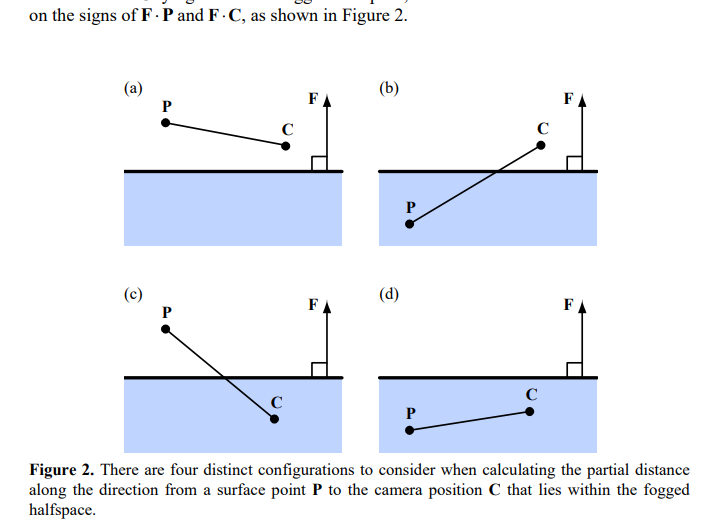
halfspace fog 相机位于一个位置 这个位置可以在fog volumn里面或者外面 雾开始的地方就是文中的plane
http://www.terathon.com/lengyel/Lengyel-UnifiedFog.pdf
这个fog volume可以从中间某个位置height 这个平面产生雾 远近浓度通过depth深度计算
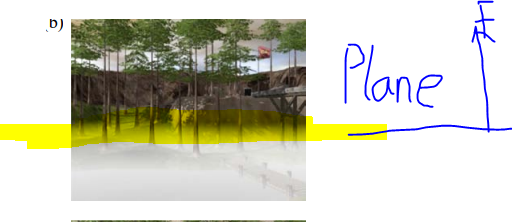
还可以定义雾密度
    // Applies one of standard fog formulas, given fog coordinate (i.e. distance)

    half ComputeFogFactor (float coord)

    {

        float fogFac = 0.0;

        if (_SceneFogMode.x == ) // linear

        {

            // factor = (end-z)/(end-start) = z * (-1/(end-start)) + (end/(end-start))

            fogFac = coord * _SceneFogParams.z + _SceneFogParams.w;

        }

        if (_SceneFogMode.x == ) // exp

        {

            // factor = exp(-density*z)

            fogFac = _SceneFogParams.y * coord; fogFac = exp2(-fogFac);

        }

        if (_SceneFogMode.x == ) // exp2

        {

            // factor = exp(-(density*z)^2)

            fogFac = _SceneFogParams.x * coord; fogFac = exp2(-fogFac*fogFac);

        }

        return saturate(fogFac);

    }

    // Distance-based fog

    float ComputeDistance (float3 camDir, float zdepth)

    {

        float dist;

        if (_SceneFogMode.y == )

            dist = length(camDir);

        else

            dist = zdepth * _ProjectionParams.z;

        // Built-in fog starts at near plane, so match that by

        // subtracting the near value. Not a perfect approximation

        // if near plane is very large, but good enough.

        dist -= _ProjectionParams.y;

        return dist;

    }

     float ComputeHalfSpace (float3 wsDir)

    {

        float3 wpos = _CameraWS + wsDir;

        float FH = _HeightParams.x;

        float3 C = _CameraWS;

        float3 V = wsDir;

        float3 P = wpos;

        float3 aV = _HeightParams.w * V;

        float FdotC = _HeightParams.y;

        float k = _HeightParams.z;

        float FdotP = P.y-FH;

        float FdotV = wsDir.y;

        float c1 = k * (FdotP + FdotC);

        float c2 = (-*k) * FdotP;

        float g = min(c2, 0.0);

        g = -length(aV) * (c1 - g * g / abs(FdotV+1.0e-5f));

        return g;

    }
FdocC = camPos.y-height.value; height 就是halfplane所定义的高度 plane法线垂直向上
       // Calculate vectors towards frustum corners.

            var cam = GetComponent<Camera>();

            var camtr = cam.transform;

            var camNear = cam.nearClipPlane;

            var camFar = cam.farClipPlane;

            var tanHalfFov = Mathf.Tan(cam.fieldOfView * Mathf.Deg2Rad / );

            var toRight = camtr.right * camNear * tanHalfFov * cam.aspect;

            var toTop = camtr.up * camNear * tanHalfFov;

            var v_tl = camtr.forward * camNear - toRight + toTop;

            var v_tr = camtr.forward * camNear + toRight + toTop;

            var v_br = camtr.forward * camNear + toRight - toTop;

            var v_bl = camtr.forward * camNear - toRight - toTop;

            var v_s = v_tl.magnitude * camFar / camNear;

            // Draw screen quad.

            RenderTexture.active = destination;

            _material.SetTexture("_MainTex", source);

            _material.SetPass();

            GL.PushMatrix();

            GL.LoadOrtho();

            GL.Begin(GL.QUADS);

            GL.MultiTexCoord2(, , );

            GL.MultiTexCoord(, v_bl.normalized * v_s);

            GL.Vertex3(, , 0.1f);

            GL.MultiTexCoord2(, , );

            GL.MultiTexCoord(, v_br.normalized * v_s);

            GL.Vertex3(, , 0.1f);

            GL.MultiTexCoord2(, , );

            GL.MultiTexCoord(, v_tr.normalized * v_s);

            GL.Vertex3(, , 0.1f);

            GL.MultiTexCoord2(, , );

            GL.MultiTexCoord(, v_tl.normalized * v_s);

            GL.Vertex3(, , 0.1f);

            GL.End();

            GL.PopMatrix();
这里是用了一个quard我做到用trangle了
要铭记一点 quard 和trangle的插值结果 顶多数据传对了 插值是一样的 没有差别 因为都是线性的 这个问题我想了好几个小时!
uv 和pos肯定是一样的 dir也是一样的 因为也是线性的
这意味着我接下来可以做大面积优化了 好开心
mg你太棒了 这个小故事告诉我们代码要每一行都看懂 不要再像黑盒那样抄了
Vector3 topLeft3 = topLeft*2-bottomLeft;//2
Vector3 bottomRight3 = bottomRight*2 -bottomLeft;//1
Vector3 topRight3= bottomRight3+topLetf3;//0
这里因为scale过到farplane不能在原始那个nearplane的数据直接3x
体积雾 global fog unity 及改进的更多相关文章
- [原]Unity3D深入浅出 - 雾效(Fog)
在Unity中开启雾效的方式:依次选中菜单栏中的 Edit - Render Settings 项,勾选Fog 选框即可开启雾效.雾效的参数如下: Fog Color:雾的颜色. Fog Mode:雾 ...
- 【Unity Shaders】Unity里的雾效模拟
写在前面 熟悉Unity的都知道,Unity可以进行基本的雾效模拟.所谓雾效,就是在远离我们视角的方向上,物体看起来像被蒙上了某种颜色(通常是灰色).这种技术的实现实际上非常简单,就是根据物体距离摄像 ...
- 关于Unity中水和雾的使用
水 自己来做水和雾还是有点麻烦的,不过没关系,Unity帮我们做好了很多可以用的. 1.Unity自己实现了水的特效,帮助我们解决游戏中水的问题 2.Unity的水集成在了Environment的环境 ...
- Unity 性能优化(力荐)
开始之前先分享几款性能优化的插件: 1.SimpleLOD : 除了同样拥有Mesh Baker所具有的Mesh合并.Atlas烘焙等功能,它还能提供Mesh的简化,并对动态蒙皮网格进行了很好的支持. ...
- 基于预计算的全局光照(Global Illumination Based On Precomputation)
目录 基于图像的光照(Image Based Lighting,IBL) The Split Sum Approximation 过滤环境贴图 预计算BRDF积分 预计算辐射度传输(Precomput ...
- Unity 几种优化建议
转: http://user.qzone.qq.com/289422269/blog/1453815561?ptlang=2052 Unity 几种优化建议 最简单的优化建议: 1.PC平台的话保持场 ...
- [Unity优化] Unity CPU性能优化
前段时间本人转战unity手游,由于作者(Chwen)之前参与端游开发,有些端游的经验可以直接移植到手游,比如项目框架架构.代码设计.部分性能分析,而对于移动终端而言,CPU.内存.显卡甚至电池等硬件 ...
- Unity Awards 2018最佳资源
好的工具与资源,将帮助你的开发,达到事办功倍,今天我们将为大家介绍荣获Unity Awards 2018最佳资源的获奖作品. 最佳艺术工具:Aura - Volumetric Lighting Aur ...
- Unity Shader 基础(4) 由深度纹理重建坐标
在PostImage中经常会用到物体本身的位置信息,但是Image Effect自身是不包含这些信息的,因为屏幕后处其实是使用特定的材质渲染一个刚好填满屏幕的四边形面片(四个角对应近剪裁面的四个角). ...
随机推荐
- Mybatis学习—XML配置文件
总结自 Mybatis官方中文文档 XML 映射配置文件 MyBatis 的配置文件包含了会深深影响 MyBatis 行为的设置(settings)和属性(properties)信息.文档的顶层结构如 ...
- eclipse out of memory
eclipse 安装目录 修改 eclipse.ini 在eclipse根目录下打开eclipse.ini,默认内容为(这里设置的是运行当前开发工具的JVM内存分配): -vmargs-Xms40m- ...
- 前端读者 | 从一行代码里面学点JavaScript
本文来自 @张小俊128:链接:http://www.html-js.com/article/A-day-to-learn-from-a-line-of-code-inside-the-JavaScr ...
- loadrunner中文件的操作
loadrunner中文件的操作 我们可以使用fopen().fscanf().fprintf().fclose()函数进行文件操作,但是因为LoadRunner不支持FILE数据类型,所以我们需要做 ...
- HDU 6070 Dirt Ratio(线段树)
Dirt Ratio Time Limit: 18000/9000 MS (Java/Others) Memory Limit: 524288/524288 K (Java/Others)Tot ...
- 第6天-javascript事件
什么是事件 事件是用户在访问页面执行时的操作,也就是用户访问页面时的行为.当浏览器探测到一个事件时,比如鼠标点击或者按键.它可以触发与这个事件相关的JavaScript对象(函数),这些对象成为事件处 ...
- NGUI 简单的背包系统
1.首先在场景中创建格子,用来存放物体的 2.为每一个格子设置标签为Item,建议只做一个格子,然后创建预制体就可以了,然后为每一个格子附加Box Collider组件,要用于检测嘛, 3.接下来就是 ...
- javascript中的对象创建与继承
js是一门基于原型的面向对象语言,与传统的面向对象如Java,C#相比,它在对象创建及继承上有自己独特的实现方式,本文主要描述js中对象创建及继承的一些实践. 1.对象创建 方式一:工厂模式创建对象 ...
- 【DFS】【打表】Lattice Animals
[ZOJ2669]Lattice Animals Time Limit: 5 Seconds Memory Limit: 32768 KB Lattice animal is a set o ...
- BZOJ 4031 [HEOI2015]小Z的房间(Matrix-Tree定理)
[题目链接] http://www.lydsy.com/JudgeOnline/problem.php?id=4031 [题目大意] 你突然有了一个大房子,房子里面有一些房间. 事实上,你的房子可以看 ...