
前端之jQuery02
文档操作
重点:创建标签,jQuery里面没有这个方法

内部(子标签)
添加到指定元素内部后面
$(A).append(B):  // B作为A的最后一个儿子元素;(把B追加到A)

$(A).appendTo(B): // A作为B最后一个儿子元素。(把A追加到B)

// 以上两种A必须为jQuery对象,而B既可以是DOM对象,又可以是jQuery对象
例子:
<!DOCTYPE html>

<html lang="zh—CN">

<head>

    <meta charset="UTF-8">

    <title>添加到指定元素内部的后面</title>

</head>

<body>

<ul class="i1" type="none">

    <li>111</li>

    <li class="c1">222</li>

    <li>*******</li>

</ul>

<script src="jquery-3.2.1.min.js"></script>

<script>

    $(".c1").append("<li>333</li>");

    $(".c1").append($("<li>444</li>"));

    $("<li>555</li>").appendTo("ul");

    $("<li>666</li>").appendTo("ul")

</script>

</body>

</html>
添加到指定元素内部的前面
$(A).prepend(B)// 把B前置到A

$(A).prependTo(B)// 把A前置到B
<!DOCTYPE html>

<html lang="zh—CN">

<head>

    <meta charset="UTF-8">

    <title>添加到指定元素内部的前面</title>

</head>

<body>

<ul class="i1" type="none">

    <li>111</li>

    <li class="c1">222</li>

    <li>*******</li>

</ul>

<script src="jquery-3.2.1.min.js"></script>

<script>

    //    $(".c1").append("<li>333</li>");

    //    $(".c1").append($("<li>444</li>"));

    //

    //    $("<li>555</li>").appendTo("ul");

    //    $("<li>666</li>").appendTo("ul")

    $(".c1").prepend("<li>333</li>");

    $(".c1").prepend($("<li>444</li>"));

    $("<li>555</li>").prependTo("ul");

    $("<li>666</li>").prependTo("ul")

</script>

</body>

</html>
外部(同级)
添加到指定元素外部的后面
$(A).after(B)://B作为兄弟元素紧挨A元素后面; 把B放到A的后面

$(A).insertAfter(B)://A作为兄弟元素紧挨B元素后面。把A放到B的后面

//以上两种A必须为jQuery对象,而B既可以是DOM对象,又可以是jQuery对象,应用实例如下:
<!DOCTYPE html>

<html lang="zh—CN">

<head>

    <meta charset="UTF-8">

    <title>添加到指定元素内部的前面</title>

</head>

<body>

<ul class="i1" type="none">

    <li>111</li>

    <li class="c1">222</li>

    <li>*******</li>

</ul>

<script src="jquery-3.2.1.min.js"></script>

<script>

    $(".c1").after("<li>333</li>");

    $(".c1").after($("<li>444</li>"));

    $("<li>555</li>").insertAfter("ul");

    $("<li>666</li>").insertAfter("ul")

</script>

</body>

</html>
添加到指定元素外部的前面
$(A).before(B)// 把B放到A的前面

$(A).insertBefore(B)// 把A放到B的前面
<html lang="zh—CN">

<head>

    <meta charset="UTF-8">

    <title>添加到指定元素内部的前面</title>

</head>

<body>

<ul class="i1" type="none">

    <li>111</li>

    <li class="c1">222</li>

    <li>*******</li>

</ul>

<script src="jquery-3.2.1.min.js"></script>

<script>

    $(".c1").before("<li>333</li>");

    $(".c1").before($("<li>444</li>"));

    $("<li>555</li>").insertBefore("ul");

    $("<li>666</li>").insertBefore("ul")

</script>

</body>

</html>
移除和清空元素
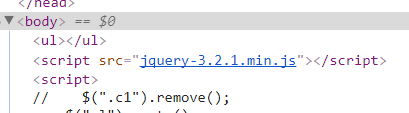
remove()// 从DOM中删除所有匹配的元素。

empty()// 删除匹配的元素集合中所有的子节点。
<!DOCTYPE html>

<html lang="zh—CN">

<head>

    <meta charset="UTF-8">

    <title>添加到指定元素内部的前面</title>

</head>

<body>

<ul>

    <li class="c1">111</li>

    <li class="c1">222</li>

    <li>*******</li>

</ul>

<script src="jquery-3.2.1.min.js"></script>

<script>

    $(".c1").remove();

    $("ul").empty()

</script>

</body>

</html>
替换
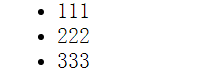
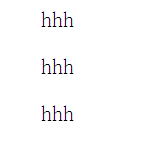
$(A).replaceWith(B):A被B替换;

$(A).replaceAll(B):A替换所有的B
<body>

<ul>

    <li class="c1">111</li>

    <li class="c1">222</li>

    <li>333</li>

</ul>

<script src="jquery-3.2.1.min.js"></script>

<script>

    $(".c1").replaceWith("<p>hhh</p>");                                  //.c1被<p>hhh</p>替换

    $("<p>hhh</p>").replaceAll("li")                                     //<p>hhh</p>替换所有的li标签

</script>

</body>
克隆
clone()// 参数
<!DOCTYPE html>

<html lang="zh—CN">

<head>

    <meta charset="UTF-8">

    <title>Title</title>

    <style>

        #i1{

            background-color: #2459a2;

            padding: 5px;

            color: white;

            margin: 6px;

        }

        #i2{

            background-color: blueviolet;

            padding: 5px;

            color: white;

            margin: 6px;

        }

    </style>

</head>

<body>

<input type="button" id="i1" value="俗得无畏">

<input type="button" id="i2" value="雅得轻狂">

<script src="jquery-3.2.1.min.js"></script>

<script>

    // clone方法不加参数true,克隆标签但不克隆标签带的事件

    $("#i1").on("click",function () {

        $(this).clone().insertAfter(this);

    });

  // clone方法加参数true,克隆标签并且克隆标签带的事件

    $("#i2").on("click",function () {

        $(this).clone(true).insertAfter(this);

    });

</script>

</body>

</html>
事件
常用事件
click(点击触发)、

hover(悬浮触发)、

focus(聚焦触发)、

blur(非聚焦触发)、

change(主要用于select标签,更改选中就会触发)、

keyup(输入按键一弹起就会触发事件,如电商网站搜索框,用户每输入一个字符,都会帮你用户提示相关内容)
jQuery对象.on(事件类型,function(){})
<!DOCTYPE html>

<html lang="zh—CN">

<head>

    <meta charset="UTF-8">

    <title>Title</title>

</head>

<body>

<input type="text" placeholder="雅俗共赏" id="i1">

<select name="" id="i2">

    <option value="1">男</option>

    <option value="2">女</option>

</select>

<p id="recommend"></p>

<script src="jquery-3.2.1.min.js"></script>

<script>

    var $d = $("#i1");

    // focus 获得焦点

    $d.on("focus",function () {

        $(this).attr("placeholder","")

    });

    // blur  失去焦点

    $d.on("blur",function () {

        $(this).attr("placeholder","雅俗共赏")

    });

    // keyup 输入按键一弹起就会触发事件

    $d.on("keyup",function () {

        // 取值,发后端做联想检索

        var userInput = $(this).val();

        alert(userInput);

    });

    // change 主要用于select标签,更改选中就会触发

    $("#i2").on("change",function () {

        if ($(this).val()===1){

            $("#recommend").text("呼啦啦")

        }

        else{

            $("#recommend").text("杜拉拉啦")

        }

    })

</script>

</body>

</html>
keydown和keyup事件组合示例:
<!DOCTYPE html>

<html lang="zh-CN">

<head>

  <meta charset="UTF-8">

  <meta http-equiv="x-ua-compatible" content="IE=edge">

  <meta name="viewport" content="width=device-width, initial-scale=1">

  <title>键盘事件示例</title>

</head>

<body>

<table border="1">

  <thead>

  <tr>

    <th>#</th>

    <th>姓名</th>

    <th>操作</th>

  </tr>

  </thead>

  <tbody>

  <tr>

    <td><input type="checkbox"></td>

    <td>Egon</td>

    <td>

      <select>

        <option value="1">上线</option>

        <option value="2">下线</option>

        <option value="3">停职</option>

      </select>

    </td>

  </tr>

  <tr>

    <td><input type="checkbox"></td>

    <td>Alex</td>

    <td>

      <select>

        <option value="1">上线</option>

        <option value="2">下线</option>

        <option value="3">停职</option>

      </select>

    </td>

  </tr>

  <tr>

    <td><input type="checkbox"></td>

    <td>Yuan</td>

    <td>

      <select>

        <option value="1">上线</option>

        <option value="2">下线</option>

        <option value="3">停职</option>

      </select>

    </td>

  </tr>

  <tr>

    <td><input type="checkbox"></td>

    <td>EvaJ</td>

    <td>

      <select>

        <option value="1">上线</option>

        <option value="2">下线</option>

        <option value="3">停职</option>

      </select>

    </td>

  </tr>

  <tr>

    <td><input type="checkbox"></td>

    <td>Gold</td>

    <td>

      <select>

        <option value="1">上线</option>

        <option value="2">下线</option>

        <option value="3">停职</option>

      </select>

    </td>

  </tr>

  </tbody>

</table>

<input type="button" id="b1" value="全选">

<input type="button" id="b2" value="取消">

<input type="button" id="b3" value="反选">

<script src="jquery-3.2.1.min.js"></script>

<script>

  // 全选

  $("#b1").on("click", function () {

    $(":checkbox").prop("checked", true);

  });

  // 取消

  $("#b2").on("click", function () {

    $(":checkbox").prop("checked", false);

  });

  // 反选

  $("#b3").on("click", function () {

    $(":checkbox").each(function () {

      var flag = $(this).prop("checked");

      $(this).prop("checked", !flag);

    })

  });

  // 按住shift键,批量操作

  // 定义全局变量

  var flag = false;

  // 全局事件,监听键盘shift按键是否被按下

  $(window).on("keydown", function (e) {

//    alert(e.keyCode);

    if (e.keyCode === 16){

      flag = true;

    }

  });

  // 全局事件,shift按键抬起时将全局变量置为false

  $(window).on("keyup", function (e) {

    if (e.keyCode === 16){

      flag = false;

    }

  });

  // select绑定change事件

  $("table select").on("change", function () {

    // 是否为批量操作模式

    if (flag) {

      var selectValue = $(this).val();

      // 找到所有被选中的那一行的select,选中指定值

      $("input:checked").parent().parent().find("select").val(selectValue);

    }

  })

</script>

</body>

</html>
按住shift键批量操作
事件绑定
.on( events [, selector ],function(){})
events: 事件
selector: 选择器(可选的)
function: 事件处理函数
移除事件
.off( events [, selector ][,function(){}])

//off() 方法移除用[ .on()绑定的事件处理程序。
- events: 事件
- selector: 选择器(可选的)
- function: 事件处理函数
阻止后续事件执行
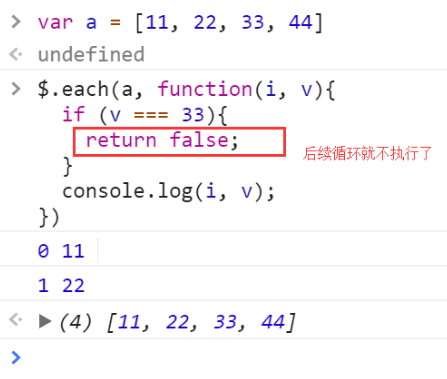
return false; // 常见阻止表单提交等 类似Python中break
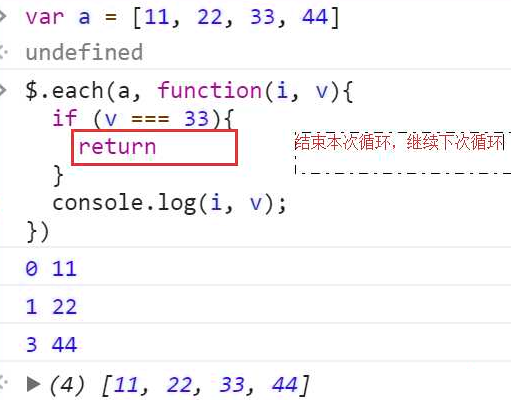
return --- 跳出本次循环,进入下一次循环 类似Python 中的continue
例子:
<!DOCTYPE html>

<html lang="en">

<head>

    <meta charset="UTF-8">

    <title>return false</title>

</head>

<body>

<form action="">

    <input id="name" type="text">

    <input id="pwd" type="password">

    <input type="submit" value="提交">

</form>

<script src="jquery-3.2.1.min.js"></script>

<script>

    $(":submit").on("click", function () {

        if ($("#name").val().length === 0 || $("#pwd").val().length === 0) {

            return false;

        }

    })

</script>

</body>

</html>
没输入不会提交(刷新)
页面载入
当DOM载入就绪可以查询及操纵时绑定一个要执行的函数。这是事件模块中最重要的一个函数,因为它可以极大地提高web应用程序的响应速度。
两种写法:
$(document).ready(function(){

// 在这里写你的JS代码...

})
简写:
$(function(){

// 你在这里写你的代码

})
文档加载完绑定事件,并且阻止默认事件发生:
<!DOCTYPE html>

<html lang="zh-CN">

<head>

  <meta charset="UTF-8">

  <meta http-equiv="x-ua-compatible" content="IE=edge">

  <meta name="viewport" content="width=device-width, initial-scale=1">

  <title>登录注册示例</title>

  <style>

    .error {

      color: red;

    }

  </style>

</head>

<body>

<form id="myForm">

  <label for="name">姓名</label>

  <input type="text" id="name">

  <span class="error"></span>

  <label for="passwd">密码</label>

  <input type="password" id="passwd">

  <span class="error"></span>

  <input type="submit" id="modal-submit" value="登录">

</form>

<script src="jquery-3.2.1.min.js"></script>

<script src="s7validate.js"></script>

<script>

  function myValidation() {

    // 多次用到的jQuery对象存储到一个变量,避免重复查询文档树

    var $myForm = $("#myForm");

    $myForm.find(":submit").on("click", function () {

      // 定义一个标志位,记录表单填写是否正常

      var flag = true;

      $myForm.find(":text, :password").each(function () {

        var val = $(this).val();

        if (val.length <= 0 ){

          var labelName = $(this).prev("label").text();

          $(this).next("span").text(labelName + "不能为空");

          flag = false;

        }

      });

      // 表单填写有误就会返回false,阻止submit按钮默认的提交表单事件

      return flag;

    });

    // input输入框获取焦点后移除之前的错误提示信息

    $myForm.find("input[type!='submit']").on("focus", function () {

      $(this).next(".error").text("");

    })

  }

  // 文档树就绪后执行

  $(document).ready(function () {

    myValidation();

  });

</script>

</body>

</html>
登录校验示例
<!DOCTYPE html>

<html lang="en">

<head>

    <meta charset="UTF-8">

    <title>页面加载完绑定事件</title>

</head>

<body>

<div id="d1">我是div标签</div>

<script src="jquery-3.2.1.min.js"></script>

<script>

    function f() {

        alert(123);

    }

//    var d1Ele = document.getElementById("d1");

//    console.log(d1Ele.innerText);

    $(document).ready(function () {

        var d1Ele = document.getElementById("d1");

        console.log(d1Ele.innerText);

        // 把绑定事件的操作都放在这里面

        f();

    });

    // 简写

    $(function () {

    })

</script>

</body>

</html>
页面加载完绑定事件
登录验证
<!DOCTYPE html>

<html lang="zh-CN">

<head>

    <meta charset="UTF-8">

    <meta http-equiv="x-ua-compatible" content="IE=edge">

    <meta name="viewport" content="width=device-width, initial-scale=1">

    <title>文本操作之登录验证</title>

    <style>

        .error {

            color: red;

        }

    </style>

</head>

<body>

<form action="">

    <div>

        <label for="input-name">用户名</label>

        <input type="text" id="input-name" name="name">

        <span class="error"></span>

    </div>

    <div>

        <label for="input-password">密码</label>

        <input type="password" id="input-password" name="password">

        <span class="error"></span>

    </div>

    <div>

        <input type="button" id="btn" value="提交">

    </div>

</form>

<script src="jquery-3.2.1.min.js"></script>

<script>

    var $inputNameObj = $("#input-name");

//    如果一个jQuery查找的对象被多次用到,我们可以用变量把它保存起来,减少重复查找

    $inputNameObj.on("blur", function () {// 取到用户名的框,绑定失去焦点事件

        var username = $inputNameObj.val();

        if (username.length === 0) {  // 判断name输入长度不为空

            $("#input-name").siblings(".error").text("用户名不能为空");

        }

    });

    $inputNameObj.on("focus", function () { // 绑定获得焦点事件

        $(this).next("span").text("");

    });

    var $inputPasswordObj = $("#input-password");

    $inputPasswordObj.on("focus", function () {

        $(this).next("span").text("");

    });

    $inputPasswordObj.on("blur", function () {

        var inputPassword = $(this).val();

        if (inputPassword.length === 0) {

            $(this).next("span").text("密码不能为空")

        }

    });

</script>

</body>

</html>

<!--定义和用法-->

<!--当元素失去焦点时发生 blur 事件。blur() 函数触发 blur 事件,-->

<!--或者如果设置了 function 参数,该函数也可规定当发生 blur 事件时执行的代码。-->
事件委托
事件委托是通过事件冒泡的原理,利用父标签去捕获子标签的事件。
示例:
表格中每一行的编辑和删除按钮都能触发相应的事件。
$("table").on("click", ".delete", function () {

  // 删除按钮绑定的事件

})
动画效果
// 基本

show([s,[e],[fn]])  显示

hide([s,[e],[fn]])    隐藏

toggle([s],[e],[fn])  切换

// 滑动

slideDown([s],[e],[fn])

slideUp([s,[e],[fn]])

slideToggle([s],[e],[fn])

// 淡入淡出

fadeIn([s],[e],[fn])

fadeOut([s],[e],[fn])

fadeTo([[s],o,[e],[fn]])

fadeToggle([s,[e],[fn]])

// 自定义

animate(p,[s],[e],[fn])
左侧菜单动画特效
<!DOCTYPE html>

<html lang="zh—CN">

<head>

    <meta charset="UTF-8">

    <title>左侧菜单</title>

    <style>

        .left {

            position: fixed;

            left: 0;

            top: 0;

            width: 30%;

            height: 1000px;

            background-color: darkslategrey;

        }

        .title {

            color: white;

            text-align: center;

            border-bottom: 1px solid rgb(28, 34, 41);

            font-size: 20px;

        }

        .right {

            width: 70%;

        }

        .content {

            color: white;

        }

        .content > div{

            border-bottom: 1px solid rgb(28, 34, 41);

            padding: 5px;

        }

        .hide { /*隐藏菜单*/

            display: none

        }

    </style>

</head>

<body>

<div class="left">

    <div class="item">

        <div class="title">菜单一</div>

        <!--this为实参-->

        <div class="content hide">

            <div>肠粉</div>

            <div>牛肉粿</div>

            <div>粉粿</div>

        </div>

    </div>

    <div class="item">

        <div class="title">菜单二</div>

        <div class="content hide">

            <div>水晶粿</div>

            <div>控窑</div>

            <div>窑番薯</div>

        </div>

    </div>

    <div class="item">

        <div class="title">菜单三</div>

        <div class="content hide">

            <div>煎蚝烙</div>

            <div>牛肉丸</div>

            <div>粉粿</div>

        </div>

    </div>

</div>

<div class="right"></div>

    <script src="jquery-3.2.1.min.js"></script>

    <script>

    var $titleEles=$(".title");

    $titleEles.on("click", function () {

         $(this).next().slideToggle(1000).parent().siblings(".item").children(".content").slideUp(1000)})

    </script>

</body>

</html>
其实我也不信
<!DOCTYPE html>

<html lang="zh—CN">

<head>

    <meta charset="UTF-8">

    <title>左侧菜单</title>

    <style>

        .left {

            position: fixed;

            left: 0;

            top: 0;

            width: 30%;

            height: 1000px;

            background-color: darkslategrey;

        }

        .title {

            color: white;

            text-align: center;

            border-bottom: 1px solid rgb(28, 34, 41);

            font-size: 20px;

        }

        .right {

            width: 70%;

        }

        .content {

            color: white;

        }

        .content > div{

            border-bottom: 1px solid rgb(28, 34, 41);

            padding: 5px;

        }

        .hide { /*隐藏菜单*/

            display: none

        }

    </style>

</head>

<body>

<div class="left">

    <div class="item">

        <div class="title">菜单一</div>

        <!--this为实参-->

        <div class="content hide">

            <div>肠粉</div>

            <div>牛肉粿</div>

            <div>粉粿</div>

        </div>

    </div>

    <div class="item">

        <div class="title">菜单二</div>

        <div class="content hide">

            <div>水晶粿</div>

            <div>控窑</div>

            <div>窑番薯</div>

        </div>

    </div>

    <div class="item">

        <div class="title">菜单三</div>

        <div class="content hide">

            <div>煎蚝烙</div>

            <div>牛肉丸</div>

            <div>粉粿</div>

        </div>

    </div>

    <!--<p>p</p>-->

</div>

<div class="right"></div>

    <script src="jquery-3.2.1.min.js"></script>

    <script>

        // 点别之前不消失 (需要给属性绑定事件

//        function showBody(ths) {

//            $(ths).next().slideToggle(1100).siblings(".content").slideUp(1000);

//        }

    var $titleEles=$(".title");

    $titleEles.on("click", function () {

         $(this).next().fadeToggle(1000).parent().siblings(".item").children(".content").fadeOut(1000)})

    </script>

</body>

</html>
前端之jQuery02的更多相关文章
- 构建一个基本的前端自动化开发环境 —— 基于 Gulp 的前端集成解决方案(四)
通过前面几节的准备工作,对于 npm / node / gulp 应该已经有了基本的认识,本节主要介绍如何构建一个基本的前端自动化开发环境. 下面将逐步构建一个可以自动编译 sass 文件.压缩 ja ...
- 常用 Gulp 插件汇总 —— 基于 Gulp 的前端集成解决方案(三)
前两篇文章讨论了 Gulp 的安装部署及基本概念,借助于 Gulp 强大的 插件生态 可以完成很多常见的和不常见的任务.本文主要汇总常用的 Gulp 插件及其基本使用,需要读者对 Gulp 有一个基本 ...
- 前端极易被误导的css选择器权重计算及css内联样式的妙用技巧
记得大学时候,专业课的网页设计书籍里面讲过css选择器权重的计算:id是100,class是10,html标签是5等等,然后全部加起来的和进行比较... 我只想说:真是误人子弟,害人不浅! 最近,在前 ...
- 总结:Mac前端开发环境的搭建(配置)
新年新气象,在2016年的第一天,我入手了人生中第一台自己的电脑(大一时好友赠送的电脑在一次无意中烧坏了主板,此后便不断借用别人的或者网站的).macbook air,身上已无分文...接下来半年的房 ...
- Fis3的前端工程化之路[三大特性篇之声明依赖]
Fis3版本:v3.4.22 Fis3的三大特性 资源定位:获取任何开发中所使用资源的线上路径 内容嵌入:把一个文件的内容(文本)或者base64编码(图片)嵌入到另一个文件中 依赖声明:在一个文本文 ...
- Fis3的前端工程化之路[三大特性篇之内容嵌入]
Fis3版本:v3.4.22 Fis3的三大特性 资源定位:获取任何开发中所使用资源的线上路径 内容嵌入:把一个文件的内容(文本)或者base64编码(图片)嵌入到另一个文件中 依赖声明:在一个文本文 ...
- Fis3的前端模块化之路[基础篇]
Fis3版本:v3.4.22 fis3是一个构建工具 解决前端开发中自动化工具.性能优化.模块化框架.开发规范.代码部署.开发流程等问题. 安装 npm install -g fis3 运行 fis3 ...
- 细说前端自动化打包工具--webpack
背景 记得2004年的时候,互联网开发就是做网页,那时也没有前端和后端的区分,有时一个网站就是一些纯静态的html,通过链接组织在一起.用过Dreamweaver的都知道,做网页就像用word编辑文档 ...
- 通过AngularJS实现前端与后台的数据对接(二)——服务(service,$http)篇
什么是服务? 服务提供了一种能在应用的整个生命周期内保持数据的方法,它能够在控制器之间进行通信,并且能保证数据的一致性. 服务是一个单例对象,在每个应用中只会被实例化一次(被$injector实例化) ...
随机推荐
- Kattis - wheretolive 【数学--求质心】
Kattis - wheretolive [数学] Description Moving to a new town can be difficult. Finding a good place to ...
- PolyBase--整合SQLServer和Hadoop
我们一直强调,大数据和传统的关系数据库并不对立,未来公司的的业务将会是大数据和关系型数据库的整合.微软的PolyBase打响了SQL Server和Hadoop整合的第一枪. 在2012年度的SQL ...
- C/C++中0xcccccccc...
* 0xABABABAB : Used by Microsoft's HeapAlloc() to mark "no man's land" guard bytes after a ...
- 【Java】流与文件(端口 & 文件读写对象)
概述: 1.input和output是相对于内存而言的.输入(input)就是写入到内存里,输出(output)就是把内存里的东西写到外面. 2.操作内存里的东西非常便利,要么声明变量,要么new对象 ...
- SVN使用—概念及生命周期
一.SVN简介 Apache Subversion 通常被缩写成 SVN,是一个开放源代码的版本控制系统,Subversion 在 2000 年由 CollabNet Inc 开发,现在发展成为 Ap ...
- Servlet+MyBatis项目转Spring Cloud微服务,多数据源配置修改建议
一.项目需求 在开发过程中,由于技术的不断迭代,为了提高开发效率,需要对原有项目的架构做出相应的调整. 二.存在的问题 为了不影响项目进度,架构调整初期只是把项目做了简单的maven管理,引入spri ...
- Refseq,accssion #,gi ,Ensembl的关系
accession编号的分子类型代号: Ensembl是2000年就开始开发的基因组自动注释软件,起初是只对真核生物基因组,2009年后开始对植物,细菌等开放.既然要注释,就要有注释对象(基因,转录本 ...
- QMesageBox的使用
一.使用构造函数弹出对话框 1. QMessageBox msgBox://最简单的对话框,里面什么也没有 QString str = “test”: msgBox.setText(str); msg ...
- unbntu修改mac地址
分享下Ubuntu下更改MAC地址的简单方法: 首先把网卡设备给 down 掉,否则会报告系统忙,无法更改. sudo ifconfig eth0 down 然后修改 MAC 地址,这一步较 Wind ...
- 一个线程知识点, 一个MongoDB的知识点
//WINForm窗体中切换前后台线程执行任务: protected void RunOnUI(Action action) { Invoke(action); } protected void Ru ...