
【C#】【串口通信(Serial Port)】【实例】建议串口调试WinForm桌面应用实例——已实现功能<存在未知BUG>
1、界面组件
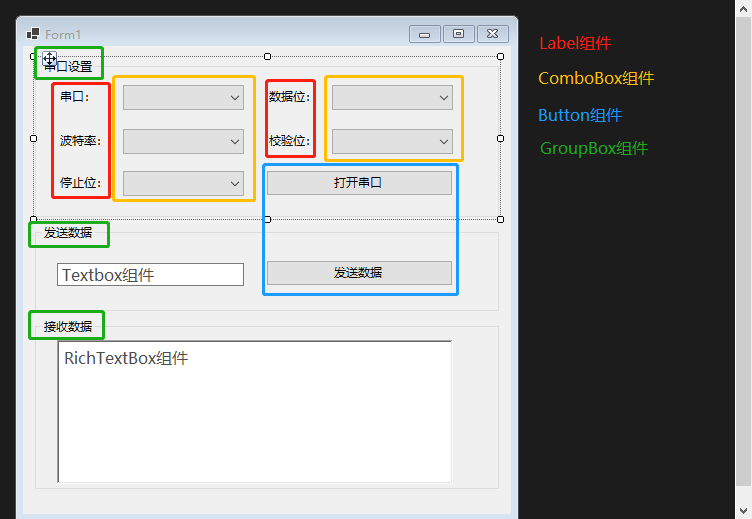
2、界面实现代码


  1 namespace WinFormsApp1

  2 {

  3     partial class Form1

  4     {

  5         /// <summary>

  6         ///  Required designer variable.

  7         /// </summary>

  8         private System.ComponentModel.IContainer components = null;

  9

 10         /// <summary>

 11         ///  Clean up any resources being used.

 12         /// </summary>

 13         /// <param name="disposing">true if managed resources should be disposed; otherwise, false.</param>

 14         protected override void Dispose(bool disposing)

 15         {

 16             if (disposing && (components != null))

 17             {

 18                 components.Dispose();

 19             }

 20             base.Dispose(disposing);

 21         }

 22

 23         #region Windows Form Designer generated code

 24

 25         /// <summary>

 26         ///  Required method for Designer support - do not modify

 27         ///  the contents of this method with the code editor.

 28         /// </summary>

 29         private void InitializeComponent()

 30         {

 31             this.groupBox1 = new System.Windows.Forms.GroupBox();

 32             this.btOpenSerial = new System.Windows.Forms.Button();

 33             this.label3 = new System.Windows.Forms.Label();

 34             this.label5 = new System.Windows.Forms.Label();

 35             this.label2 = new System.Windows.Forms.Label();

 36             this.label4 = new System.Windows.Forms.Label();

 37             this.label1 = new System.Windows.Forms.Label();

 38             this.cbStop = new System.Windows.Forms.ComboBox();

 39             this.comboBox3 = new System.Windows.Forms.ComboBox();

 40             this.cbCheck = new System.Windows.Forms.ComboBox();

 41             this.cbDataBits = new System.Windows.Forms.ComboBox();

 42             this.cbBaudRate = new System.Windows.Forms.ComboBox();

 43             this.cbSerialPort = new System.Windows.Forms.ComboBox();

 44             this.groupBox2 = new System.Windows.Forms.GroupBox();

 45             this.btSendData = new System.Windows.Forms.Button();

 46             this.tbSendData = new System.Windows.Forms.TextBox();

 47             this.groupBox3 = new System.Windows.Forms.GroupBox();

 48             this.rtbReceiveData = new System.Windows.Forms.RichTextBox();

 49             this.lReceiveCount = new System.Windows.Forms.Label();

 50             this.groupBox1.SuspendLayout();

 51             this.groupBox2.SuspendLayout();

 52             this.groupBox3.SuspendLayout();

 53             this.SuspendLayout();

 54             //

 55             // groupBox1

 56             //

 57             this.groupBox1.Controls.Add(this.btOpenSerial);

 58             this.groupBox1.Controls.Add(this.label3);

 59             this.groupBox1.Controls.Add(this.label5);

 60             this.groupBox1.Controls.Add(this.label2);

 61             this.groupBox1.Controls.Add(this.label4);

 62             this.groupBox1.Controls.Add(this.label1);

 63             this.groupBox1.Controls.Add(this.cbStop);

 64             this.groupBox1.Controls.Add(this.comboBox3);

 65             this.groupBox1.Controls.Add(this.cbCheck);

 66             this.groupBox1.Controls.Add(this.cbDataBits);

 67             this.groupBox1.Controls.Add(this.cbBaudRate);

 68             this.groupBox1.Controls.Add(this.cbSerialPort);

 69             this.groupBox1.Location = new System.Drawing.Point(12, 12);

 70             this.groupBox1.Name = "groupBox1";

 71             this.groupBox1.Size = new System.Drawing.Size(464, 160);

 72             this.groupBox1.TabIndex = 0;

 73             this.groupBox1.TabStop = false;

 74             this.groupBox1.Text = "串口设置";

 75             //

 76             // btOpenSerial

 77             //

 78             this.btOpenSerial.Location = new System.Drawing.Point(231, 112);

 79             this.btOpenSerial.Name = "btOpenSerial";

 80             this.btOpenSerial.Size = new System.Drawing.Size(187, 26);

 81             this.btOpenSerial.TabIndex = 2;

 82             this.btOpenSerial.Text = "打开串口";

 83             this.btOpenSerial.UseVisualStyleBackColor = true;

 84             this.btOpenSerial.Click += new System.EventHandler(this.btOpenSerial_Click);

 85             //

 86             // label3

 87             //

 88             this.label3.AutoSize = true;

 89             this.label3.Location = new System.Drawing.Point(22, 116);

 90             this.label3.Name = "label3";

 91             this.label3.Size = new System.Drawing.Size(56, 17);

 92             this.label3.TabIndex = 1;

 93             this.label3.Text = "停止位:";

 94             //

 95             // label5

 96             //

 97             this.label5.AutoSize = true;

 98             this.label5.Location = new System.Drawing.Point(231, 74);

 99             this.label5.Name = "label5";

100             this.label5.Size = new System.Drawing.Size(56, 17);

101             this.label5.TabIndex = 1;

102             this.label5.Text = "校验位:";

103             //

104             // label2

105             //

106             this.label2.AutoSize = true;

107             this.label2.Location = new System.Drawing.Point(22, 74);

108             this.label2.Name = "label2";

109             this.label2.Size = new System.Drawing.Size(56, 17);

110             this.label2.TabIndex = 1;

111             this.label2.Text = "波特率:";

112             //

113             // label4

114             //

115             this.label4.AutoSize = true;

116             this.label4.Location = new System.Drawing.Point(231, 30);

117             this.label4.Name = "label4";

118             this.label4.Size = new System.Drawing.Size(56, 17);

119             this.label4.TabIndex = 1;

120             this.label4.Text = "数据位:";

121             //

122             // label1

123             //

124             this.label1.AutoSize = true;

125             this.label1.Location = new System.Drawing.Point(22, 30);

126             this.label1.Name = "label1";

127             this.label1.Size = new System.Drawing.Size(44, 17);

128             this.label1.TabIndex = 1;

129             this.label1.Text = "串口:";

130             //

131             // cbStop

132             //

133             this.cbStop.DropDownStyle = System.Windows.Forms.ComboBoxStyle.DropDownList;

134             this.cbStop.FormattingEnabled = true;

135             this.cbStop.Items.AddRange(new object[] {

136             "1",

137             "1.5",

138             "2"});

139             this.cbStop.Location = new System.Drawing.Point(88, 113);

140             this.cbStop.Name = "cbStop";

141             this.cbStop.Size = new System.Drawing.Size(121, 25);

142             this.cbStop.TabIndex = 0;

143             //

144             // comboBox3

145             //

146             this.comboBox3.FormattingEnabled = true;

147             this.comboBox3.Location = new System.Drawing.Point(88, 113);

148             this.comboBox3.Name = "comboBox3";

149             this.comboBox3.Size = new System.Drawing.Size(121, 25);

150             this.comboBox3.TabIndex = 0;

151             //

152             // cbCheck

153             //

154             this.cbCheck.DropDownStyle = System.Windows.Forms.ComboBoxStyle.DropDownList;

155             this.cbCheck.FormattingEnabled = true;

156             this.cbCheck.Items.AddRange(new object[] {

157             "None",

158             "Odd",

159             "Even"});

160             this.cbCheck.Location = new System.Drawing.Point(297, 71);

161             this.cbCheck.Name = "cbCheck";

162             this.cbCheck.Size = new System.Drawing.Size(121, 25);

163             this.cbCheck.TabIndex = 0;

164             //

165             // cbDataBits

166             //

167             this.cbDataBits.DropDownStyle = System.Windows.Forms.ComboBoxStyle.DropDownList;

168             this.cbDataBits.FormattingEnabled = true;

169             this.cbDataBits.Items.AddRange(new object[] {

170             "5",

171             "6",

172             "7",

173             "8"});

174             this.cbDataBits.Location = new System.Drawing.Point(297, 27);

175             this.cbDataBits.Name = "cbDataBits";

176             this.cbDataBits.Size = new System.Drawing.Size(121, 25);

177             this.cbDataBits.TabIndex = 0;

178             //

179             // cbBaudRate

180             //

181             this.cbBaudRate.DropDownStyle = System.Windows.Forms.ComboBoxStyle.DropDownList;

182             this.cbBaudRate.FormattingEnabled = true;

183             this.cbBaudRate.Items.AddRange(new object[] {

184             "9600",

185             "19200",

186             "38400",

187             "57600",

188             "115200"});

189             this.cbBaudRate.Location = new System.Drawing.Point(88, 71);

190             this.cbBaudRate.Name = "cbBaudRate";

191             this.cbBaudRate.Size = new System.Drawing.Size(121, 25);

192             this.cbBaudRate.TabIndex = 0;

193             //

194             // cbSerialPort

195             //

196             this.cbSerialPort.DropDownStyle = System.Windows.Forms.ComboBoxStyle.DropDownList;

197             this.cbSerialPort.FormattingEnabled = true;

198             this.cbSerialPort.Location = new System.Drawing.Point(88, 27);

199             this.cbSerialPort.Name = "cbSerialPort";

200             this.cbSerialPort.Size = new System.Drawing.Size(121, 25);

201             this.cbSerialPort.TabIndex = 0;

202             //

203             // groupBox2

204             //

205             this.groupBox2.Controls.Add(this.btSendData);

206             this.groupBox2.Controls.Add(this.tbSendData);

207             this.groupBox2.Location = new System.Drawing.Point(12, 178);

208             this.groupBox2.Name = "groupBox2";

209             this.groupBox2.Size = new System.Drawing.Size(464, 88);

210             this.groupBox2.TabIndex = 1;

211             this.groupBox2.TabStop = false;

212             this.groupBox2.Text = "发送数据";

213             //

214             // btSendData

215             //

216             this.btSendData.Location = new System.Drawing.Point(231, 36);

217             this.btSendData.Name = "btSendData";

218             this.btSendData.Size = new System.Drawing.Size(187, 26);

219             this.btSendData.TabIndex = 2;

220             this.btSendData.Text = "发送数据";

221             this.btSendData.UseVisualStyleBackColor = true;

222             this.btSendData.Click += new System.EventHandler(this.btSendData_Click);

223             //

224             // tbSendData

225             //

226             this.tbSendData.Location = new System.Drawing.Point(22, 39);

227             this.tbSendData.Name = "tbSendData";

228             this.tbSendData.Size = new System.Drawing.Size(187, 23);

229             this.tbSendData.TabIndex = 0;

230             //

231             // groupBox3

232             //

233             this.groupBox3.Controls.Add(this.rtbReceiveData);

234             this.groupBox3.Location = new System.Drawing.Point(12, 272);

235             this.groupBox3.Name = "groupBox3";

236             this.groupBox3.Size = new System.Drawing.Size(464, 172);

237             this.groupBox3.TabIndex = 2;

238             this.groupBox3.TabStop = false;

239             this.groupBox3.Text = "接收数据";

240             //

241             // rtbReceiveData

242             //

243             this.rtbReceiveData.Location = new System.Drawing.Point(22, 22);

244             this.rtbReceiveData.Name = "rtbReceiveData";

245             this.rtbReceiveData.ScrollBars = System.Windows.Forms.RichTextBoxScrollBars.Vertical;

246             this.rtbReceiveData.Size = new System.Drawing.Size(396, 144);

247             this.rtbReceiveData.TabIndex = 0;

248             this.rtbReceiveData.Text = "";

249             //

250             // lReceiveCount

251             //

252             this.lReceiveCount.AutoSize = true;

253             this.lReceiveCount.Location = new System.Drawing.Point(12, 447);

254             this.lReceiveCount.Name = "lReceiveCount";

255             this.lReceiveCount.Size = new System.Drawing.Size(0, 17);

256             this.lReceiveCount.TabIndex = 3;

257             //

258             // Form1

259             //

260             this.AutoScaleDimensions = new System.Drawing.SizeF(7F, 17F);

261             this.AutoScaleMode = System.Windows.Forms.AutoScaleMode.Font;

262             this.ClientSize = new System.Drawing.Size(488, 468);

263             this.Controls.Add(this.lReceiveCount);

264             this.Controls.Add(this.groupBox3);

265             this.Controls.Add(this.groupBox2);

266             this.Controls.Add(this.groupBox1);

267             this.Name = "Form1";

268             this.Text = "Form1";

269             this.Load += new System.EventHandler(this.Form1_Load);

270             this.groupBox1.ResumeLayout(false);

271             this.groupBox1.PerformLayout();

272             this.groupBox2.ResumeLayout(false);

273             this.groupBox2.PerformLayout();

274             this.groupBox3.ResumeLayout(false);

275             this.ResumeLayout(false);

276             this.PerformLayout();

277

278         }

279

280         #endregion

281

282         private System.Windows.Forms.GroupBox groupBox1;

283         private System.Windows.Forms.GroupBox groupBox2;

284         private System.Windows.Forms.GroupBox groupBox3;

285         private System.Windows.Forms.Button btOpenSerial;

286         private System.Windows.Forms.Label label3;

287         private System.Windows.Forms.Label label5;

288         private System.Windows.Forms.Label label2;

289         private System.Windows.Forms.Label label4;

290         private System.Windows.Forms.Label label1;

291         private System.Windows.Forms.ComboBox cbStop;

292         private System.Windows.Forms.ComboBox comboBox3;

293         private System.Windows.Forms.ComboBox cbCheck;

294         private System.Windows.Forms.ComboBox cbDataBits;

295         private System.Windows.Forms.ComboBox cbBaudRate;

296         private System.Windows.Forms.ComboBox cbSerialPort;

297         private System.Windows.Forms.Button btSendData;

298         private System.Windows.Forms.TextBox tbSendData;

299         private System.Windows.Forms.RichTextBox rtbReceiveData;

300         private System.Windows.Forms.Label lReceiveCount;

301     }

302 }
界面代码
3、逻辑代码
  1 using System;

  2 using System.Collections.Generic;

  3 using System.ComponentModel;

  4 using System.Data;

  5 using System.Drawing;

  6 using System.Linq;

  7 using System.Text;

  8 using System.Threading.Tasks;

  9 using System.Windows.Forms;

 10 using System.IO.Ports;

 11

 12 namespace WinFormsApp1

 13 {

 14     public partial class Form1 : Form

 15     {

 16         SerialPort serialPort = new SerialPort();

 17         public Form1()

 18         {

 19             InitializeComponent();

 20         }

 21

 22         private void Form1_Load(object sender, EventArgs e)

 23         {

 24             // 设置默认显示第几个选项

 25             cbBaudRate.SelectedIndex = 0;

 26             cbDataBits.SelectedIndex = 0;

 27             cbCheck.SelectedIndex = 0;

 28             cbStop.SelectedIndex = 0;

 29

 30             // GetPortNames()获取所有串口名称

 31             string[] serialPortNames = SerialPort.GetPortNames();

 32             if (serialPortNames == null) // 本机端口共七个,均不可用

 33             {

 34                 MessageBox.Show("本机没有可使用串口!", "Error");

 35                 return;

 36             }

 37             else

 38             {// 将所有本机串口名遍历加入串口comboBox组件中

 39                 foreach (string item in serialPortNames)

 40                     cbSerialPort.Items.Add(item);

 41

 42             }

 43             cbSerialPort.SelectedIndex = 1;

 44

 45             serialPort.BaudRate = 9600; // 设置选中串口的波特率

 46             Control.CheckForIllegalCrossThreadCalls = false; // 线程安全检查

 47

 48             //**

 49             serialPort.DataReceived += SerialPortsDataReceived; // 事件函数,接受串口数据

 50             //**

 51

 52             serialPort.DtrEnable = true; // 获取或设置数据终端就绪(DTR)信号

 53             serialPort.RtsEnable = true; // 获取或设置启用请求发送(RTS)信号

 54

 55             serialPort.ReadTimeout = 1000; // 设置数据读取超时为1秒

 56

 57             serialPort.Close();

 58         }

 59

 60         private void SerialPortsDataReceived(object sender, SerialDataReceivedEventArgs e)

 61         {

 62             if (serialPort.IsOpen) // 判断串口是否启用

 63             {

 64                 DateTime dt = DateTime.Now;

 65                 rtbReceiveData.Text = dt.GetDateTimeFormats('f')[0].ToString() + "\r\n";

 66                 try

 67                 {

 68                     // 创建字节数组,接收串口发送的数据

 69                     Byte[] receivedData = new Byte[serialPort.BytesToRead];

 70                     // 读取数据

 71                     serialPort.Read(receivedData, 0, receivedData.Length);

 72                     // 使用UTF8编码,保证中文不会乱码

 73                     AddContent(new UTF8Encoding().GetString(receivedData));

 74                 }

 75                 catch (System.Exception ex)

 76                 {

 77                     MessageBox.Show(ex.Message, "错误提示");

 78                     // 捕获错误后,发送框置空

 79                     tbSendData.Text = "";

 80                 }

 81             }

 82             else

 83                 MessageBox.Show("请打开某个串口", "错误提示");

 84         }

 85

 86         private void AddContent(String Content)

 87         {

 88             this.BeginInvoke(new MethodInvoker(delegate

 89             {

 90                 rtbReceiveData.AppendText(Content);

 91                 rtbReceiveData.AppendText("\r\n");

 92                 lReceiveCount.Text = (int.Parse(lReceiveCount.Text) + Content.Length).ToString();

 93             }));

 94         }

 95

 96         private void btOpenSerial_Click(object sender, EventArgs e)

 97         {

 98             if (!serialPort.IsOpen)

 99             {

100                 try

101                 {

102                     // 设置串口号

103                     string serialName = cbSerialPort.SelectedItem.ToString();

104                     serialPort.PortName = serialName;

105

106                     // =========================

107                     string strBaudRate = cbBaudRate.Text;

108                     string strDataBits = cbDataBits.Text;

109                     string strCheckBits = cbCheck.Text;

110                     Double strStopBits = Convert.ToDouble(cbStop.Text);

111                     strStopBits = Math.Round(strStopBits, 1);

112                     //MessageBox.Show($"{cbCheck.Text}");

113

114                     int iBaudRate;

115                     if (!int.TryParse(strBaudRate, out iBaudRate))

116                     {

117                         MessageBox.Show("波特率参数不正确!", "错误");

118                         return;

119                     }

120                     serialPort.BaudRate = iBaudRate;

121

122                     int iDataBits;

123                     if (!int.TryParse(strDataBits, out iDataBits))

124                     {

125                         MessageBox.Show("数据位参数不正确!", "错误");

126                         return;

127                     }

128                     serialPort.DataBits = iDataBits;

129

130                     switch (strStopBits) // 停止位

131                     {

132                         case 1.0:

133                             serialPort.StopBits = StopBits.One;

134                             break;

135                         case 1.5:

136                             serialPort.StopBits = StopBits.OnePointFive;

137                             break;

138                         case 2.0:

139                             serialPort.StopBits = StopBits.Two;

140                             break;

141                         default:

142                             MessageBox.Show("Error:Stop参数不正确!", "Error");

143                             return;

144                     }

145

146                     switch (strCheckBits) // 校验位

147                     {

148                         case "None":

149                             serialPort.Parity = Parity.None;

150                             break;

151                         case "Odd":

152                             serialPort.Parity = Parity.Odd;

153                             break;

154                         case "Even":

155                             serialPort.Parity = Parity.Even;

156                             break;

157                         default:

158                             MessageBox.Show("Error:Check参数不正确!", "Error");

159                             return;

160                     }

161

162                     if (!serialPort.IsOpen) // 如果打开失败,则更新按钮文本为"打开串口"

163                         btOpenSerial.Text = "打开串口";

164                     else // 否则更新按钮文本为"关闭串口"

165                         btOpenSerial.Text = "关闭串口";

166

167                     //设置必要控件不可用

168                     cbSerialPort.Enabled = false;

169                     cbBaudRate.Enabled = false;

170                     cbDataBits.Enabled = false;

171                     cbStop.Enabled = false;

172                     cbCheck.Enabled = false;

173

174                     serialPort.Open();

175                 }

176                 catch (System.Exception ex)

177                 {

178                     MessageBox.Show("Error" + ex.Message, "Error");

179                     return;

180                 }

181             }

182             else

183             {

184                 //恢复控件功能

185                 //设置必要控件不可用

186                 cbSerialPort.Enabled = true;

187                 cbBaudRate.Enabled = true;

188                 cbDataBits.Enabled = true;

189                 cbStop.Enabled = true;

190                 cbCheck.Enabled = true;

191                 serialPort.Close();                    //关闭串口

192                 btOpenSerial.Text = "打开串口";

193             }

194         }

195

196         private void btSendData_Click(object sender, EventArgs e)

197         {

198             byte[] sendData = null;

199             if (!serialPort.IsOpen) //如果没打开

200             {

201                 MessageBox.Show("请先打开串口!", "Error");

202                 return;

203             }

204             String strSend = tbSendData.Text;

205             try

206             {

207                 sendData = Encoding.UTF8.GetBytes(tbSendData.Text.Trim());

208                 //sp1.WriteLine(txtSendStr.Text);    //写入数据

209                 serialPort.Write(sendData, 0, sendData.Length);

210             }

211             catch (Exception ex)

212             {

213                 MessageBox.Show("Error:" + ex.Message, "Error");

214             }

215         }

216

217     }

218 }
逻辑代码
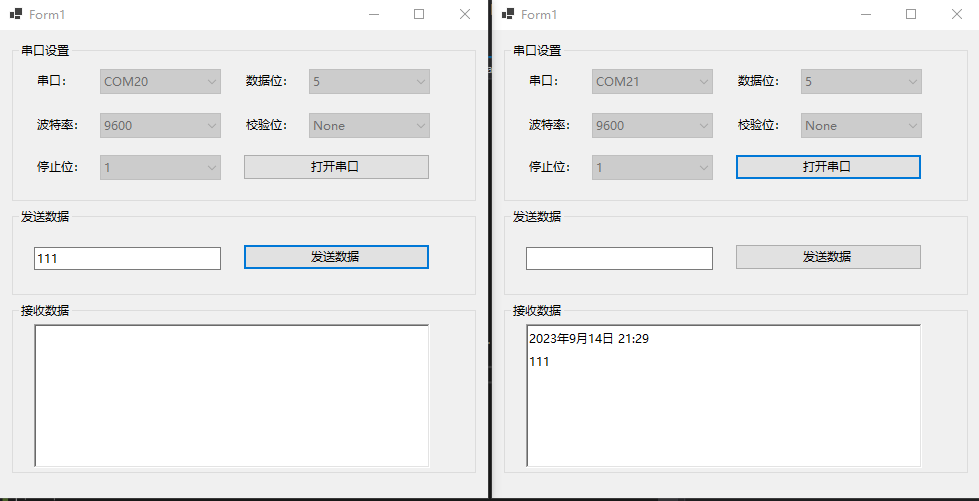
4、效果展示
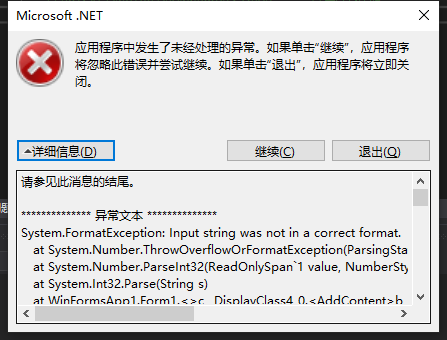
5、错误提醒
参考网址:C# 实现串口通信 - 编程教程 (17bigdata.com)
【C#】【串口通信(Serial Port)】【实例】建议串口调试WinForm桌面应用实例——已实现功能<存在未知BUG>的更多相关文章
- ESP-8266 串口通信(Serial)
ESP8266的串口通信与传统的Arduino设备完全一样.除了硬件FIFO(128字节用于TX和RX)之外,硬件串口还有额外的 256字节的TX和RX缓存.发送和接收全都由中断驱动.当FIFO/缓存 ...
- VS2015 编写C++的DLL,并防止DLL导出的函数名出现乱码(以串口通信为例,实现串口通信)
参考链接:https://blog.csdn.net/songyi160/article/details/50754705 1.新建项目 建立好的项目界面如下: 接着在解决方案中找到[头文件]然后右击 ...
- Linux 虚拟串口及 Qt 串口通信实例
Linux 虚拟串口及 Qt 串口通信实例 2011-06-22 17:49 佚名 互联网 字号:T | T Linux 虚拟串口及 Qt 串口通信实例是本文所要介绍的内容,在实现过程中,打开了两个伪 ...
- Python的扩展接口[1] -> 串口通信
串口通信 / Serial Communication 1 串口简介 / Serial Introduction 串行接口(Serial Interface)简称串口,通常为COM接口,数据发送方式为 ...
- LabVIEW串口通信
Instrument I/O 利用LabVIEW内置的驱动程序库和具有工业标准的设备驱动软件,可对 GPIB(通用接口总线).Ethernet(以太网)接口.RS-232(标准串行接口总线)/RS-4 ...
- C#中的串口通信
关于串行接口 串行接口(Serial port)又称“串口”,主要用于串行式逐位数据传输.常见的有一般电脑应用的RS-232(使用 25 针或 9 针连接器)和工业电脑应用的半双工RS-485与全双工 ...
- android 串口开发第二篇:利用jni实现android和串口通信
一:串口通信简介 由于串口开发涉及到jni,所以开发环境需要支持ndk开发,如果未配置ndk配置的朋友,或者对jni不熟悉的朋友,请查看上一篇文章,android 串口开发第一篇:搭建ndk开发环境以 ...
- C#实现简单的串口通信
前言 本着学习研究的态度,用c#语言实现简单的串口通信工具. 一.串口通信原理 串口通信 串口通信(Serial Communications)的概念非常简单,串口按位(bit)发送和接收字节.尽管比 ...
- mfc 调用Windows的API函数实现同步异步串口通信(源码)
在工业控制中,工控机(一般都基于Windows平台)经常需要与智能仪表通过串口进行通信.串口通信方便易行,应用广泛. 一般情况下,工控机和各智能仪表通过RS485总线进行通信.RS485的通信方式是半 ...
- Linux与Windows串口通信
串口是常用的计算机与外部串行设备之间的数据传输通道,由于串行通信方便易行,所以应用广泛.现在国际上不断有串口新技术及新规格推出,结合社会各方面需要,串口通信发展的空间庞大.串口通讯技术因其自身的优势和 ...
随机推荐
- 解决SVN死锁问题
svn执行clean up后出现提示:svn cleanup failed–previous operation has not finished; run cleanup if it was int ...
- 7. 用Rust手把手编写一个wmproxy(代理,内网穿透等), HTTP及TCP内网穿透原理及运行篇
用Rust手把手编写一个wmproxy(代理,内网穿透等), HTTP及TCP内网穿透原理及运行篇 项目 ++wmproxy++ gite: https://gitee.com/tickbh/wmpr ...
- 前端三件套系例之HTML——HTML文档结构、文档声明、主体结构标签、HEAD头部标签、meta元信息、Body内常用标签、6 其他了解
文章目录 HTML文档结构 1. 文档声明 2.主体结构标签 3.HEAD头部标签 4.meta元信息 5 Body内常用标签 5.1 基本标签(块级标签和内联标签) 5.2 div标签和span标签 ...
- Redis系列之——使用常见问题
文章目录 一 子进程开销和优化 二 fork操作 三 aof追加阻塞 一 子进程开销和优化 1 cpu 开销:rdb和aof文件生成,属于cpu密集型 优化:不做cpu绑定,不和cpu密集型的服务一起 ...
- Convolutional neural network (CNN)–extreme learning machine (ELM)
1. 介绍 论文:(2020)Neural networks for facial age estimation: a survey on recent advances. 地址: http://li ...
- 什么是DCloud
什么是DCloud1.什么是Dcloud2.主要包括 1. 开发工具 2. 前端框架 3. uniCloud 4. 5+app 5. MUI 6. wap2app1.什么是Dcloud 1. Dclo ...
- 手撕Vue-查找指令和模板
接着上一篇文章,我们已经实现了提取元素到内存的过程,接下来我们要实现的是查找指令和模板. 大致的思路是这样的: 遍历所有的节点 需要判断当前遍历到的节点是一个元素还是一个文本 如果是一个元素, 我们需 ...
- mysql修改密码和开启远程访问
mysql默认是关闭远程访问的,开启命令如下 1.首先打开mysql所在的bin目录,C:\Program Files\MySQL\MySQL Server 5.5\bin 在地址栏输入cmd,回车 ...
- 入门篇-其之六-Java运算符(中)
祝所有程序员,1024节日快乐!!! 一.自增/自减运算符 假设有一个变量intValue的值为10,如果想让这个值加1,有哪些方式? 首先,我们可以使用最原始的方式: int intValue = ...
- 关于虚拟机的IP地址经常改变问题的解法
主要解法就是配置静态IP地址 首先了解一下IP和子网掩码,网关的含义:IP 是标识计算机特定地址的二进制数,子网掩码用于和IP组合划分子网;网关是将信息传送到网关进行收发 开始配置:首先打开Linux ...