
5 更换npm为国内镜像
更改npm为国内镜像
在终端执行.
npm set registry http://registry.npmmirror.com
首先, 打开"我的电脑". 找到"c盘中用户文件夹". 找到你当前正在使用的"用户"
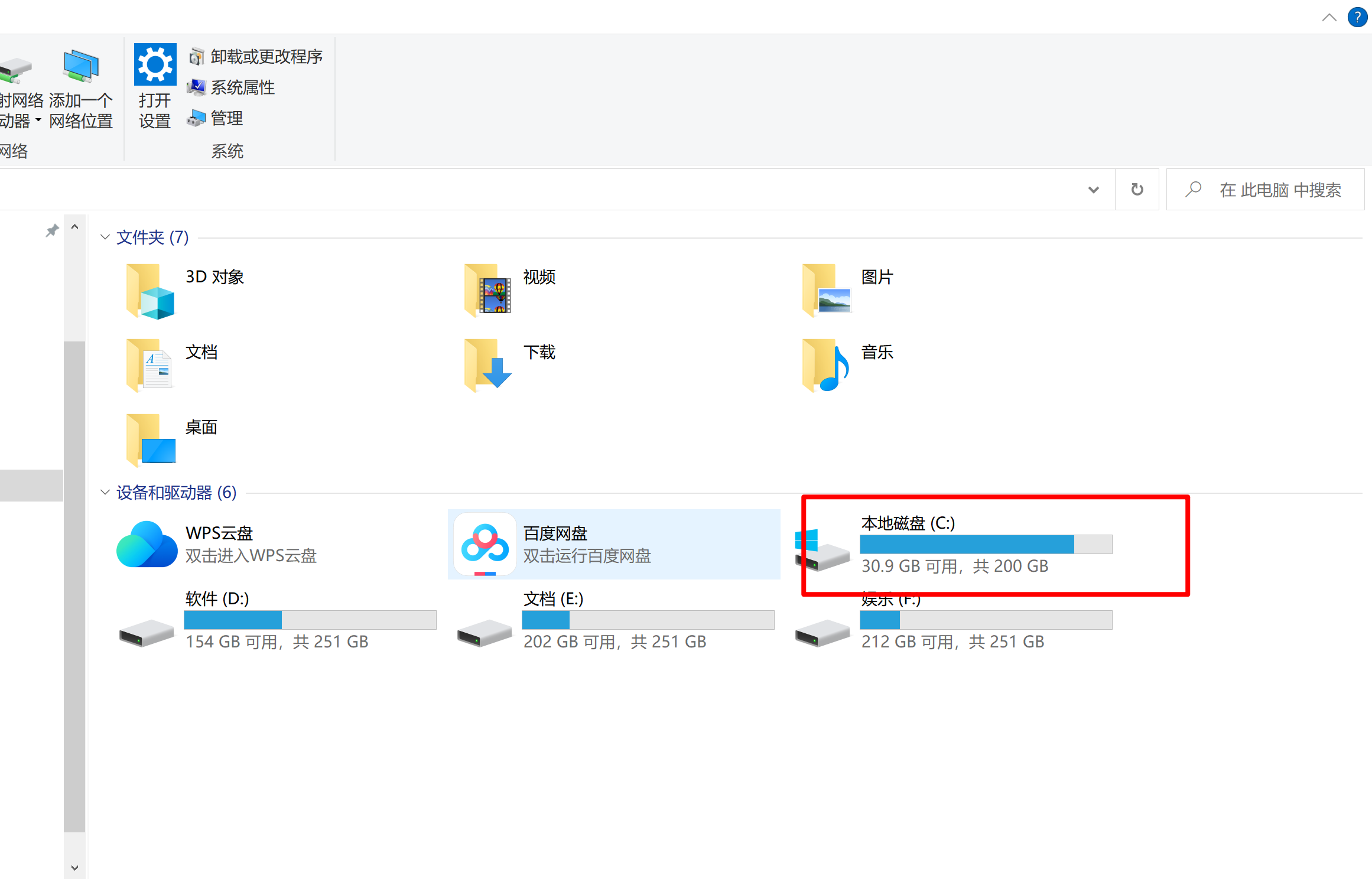
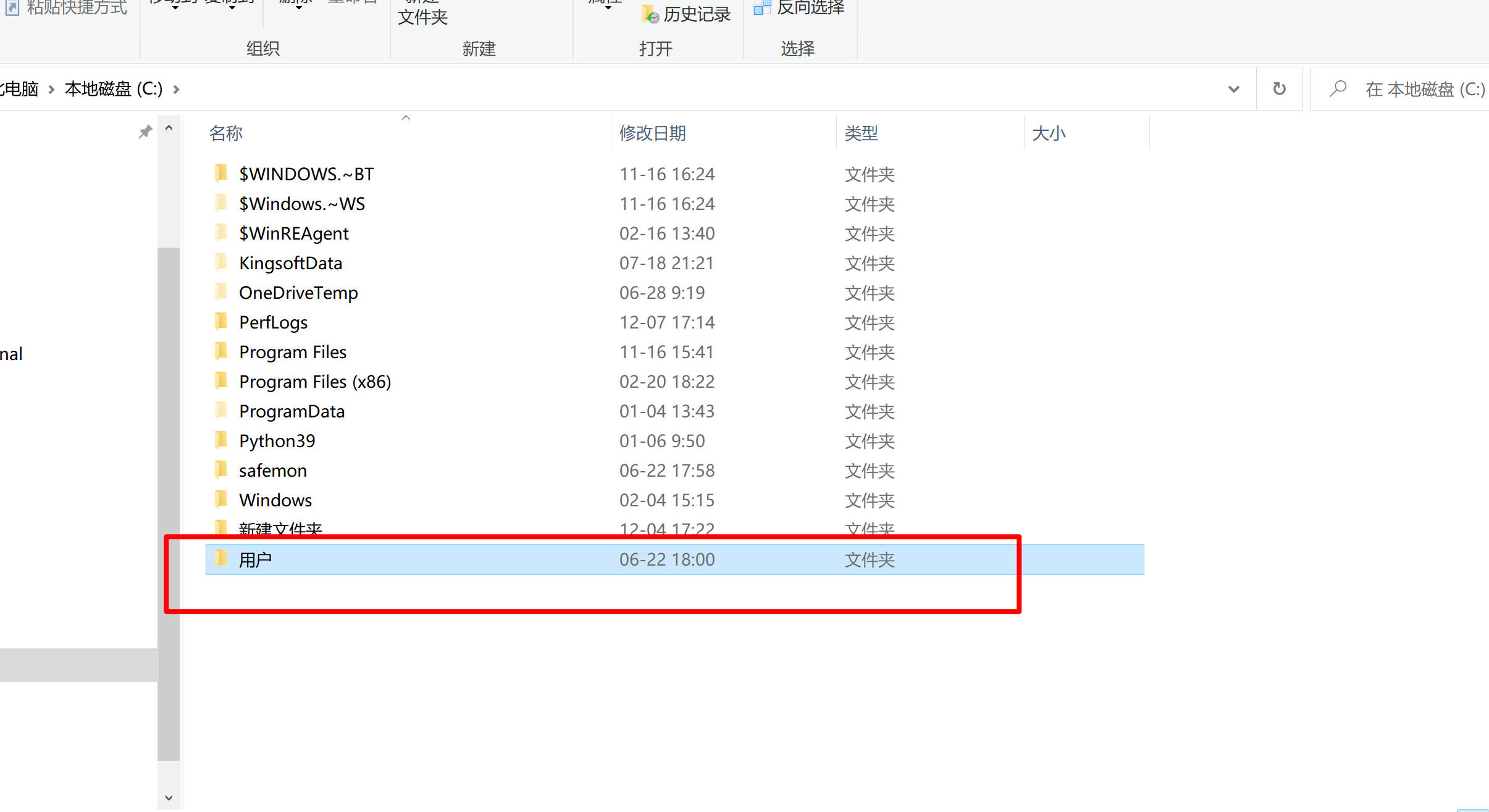
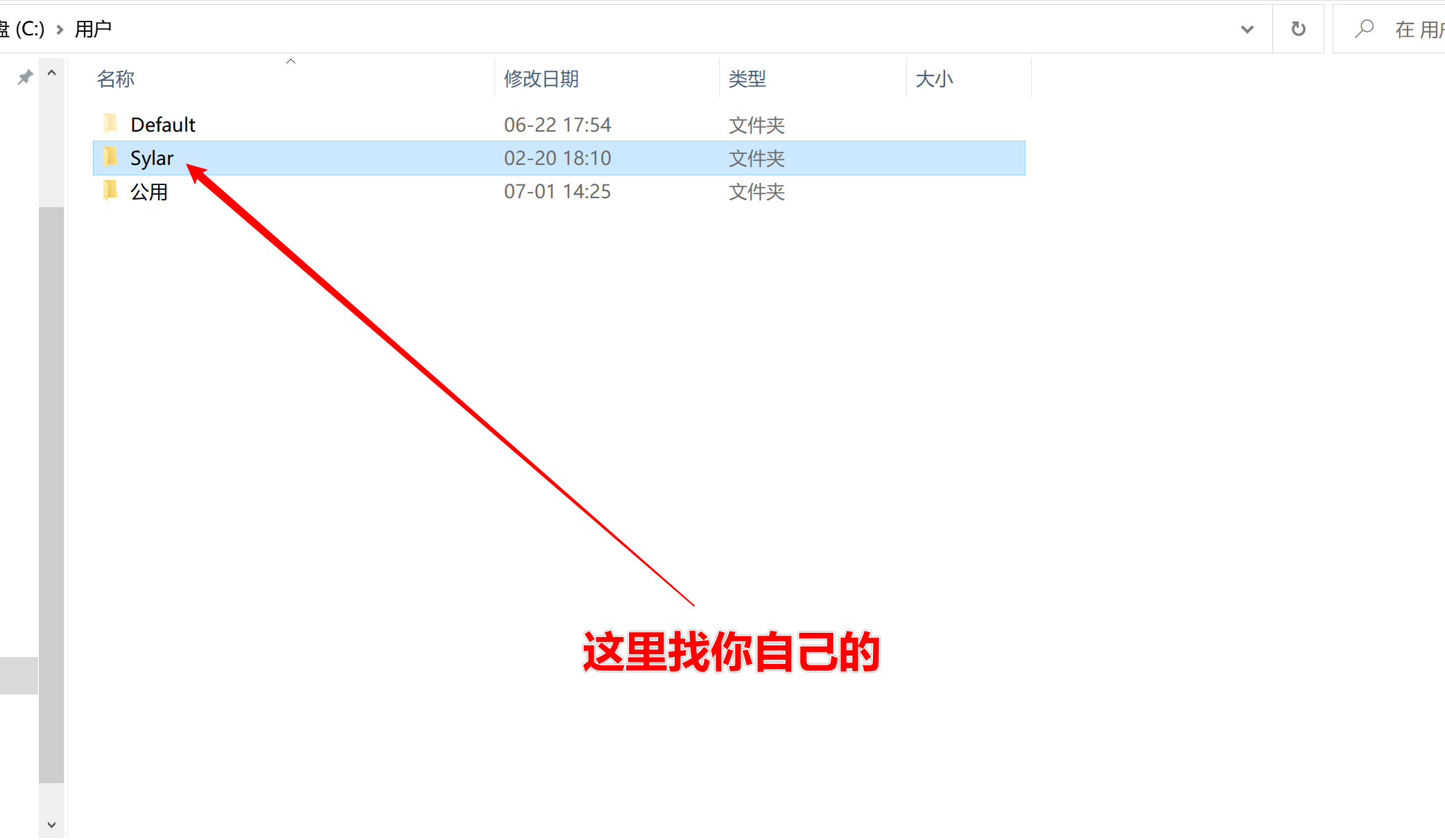
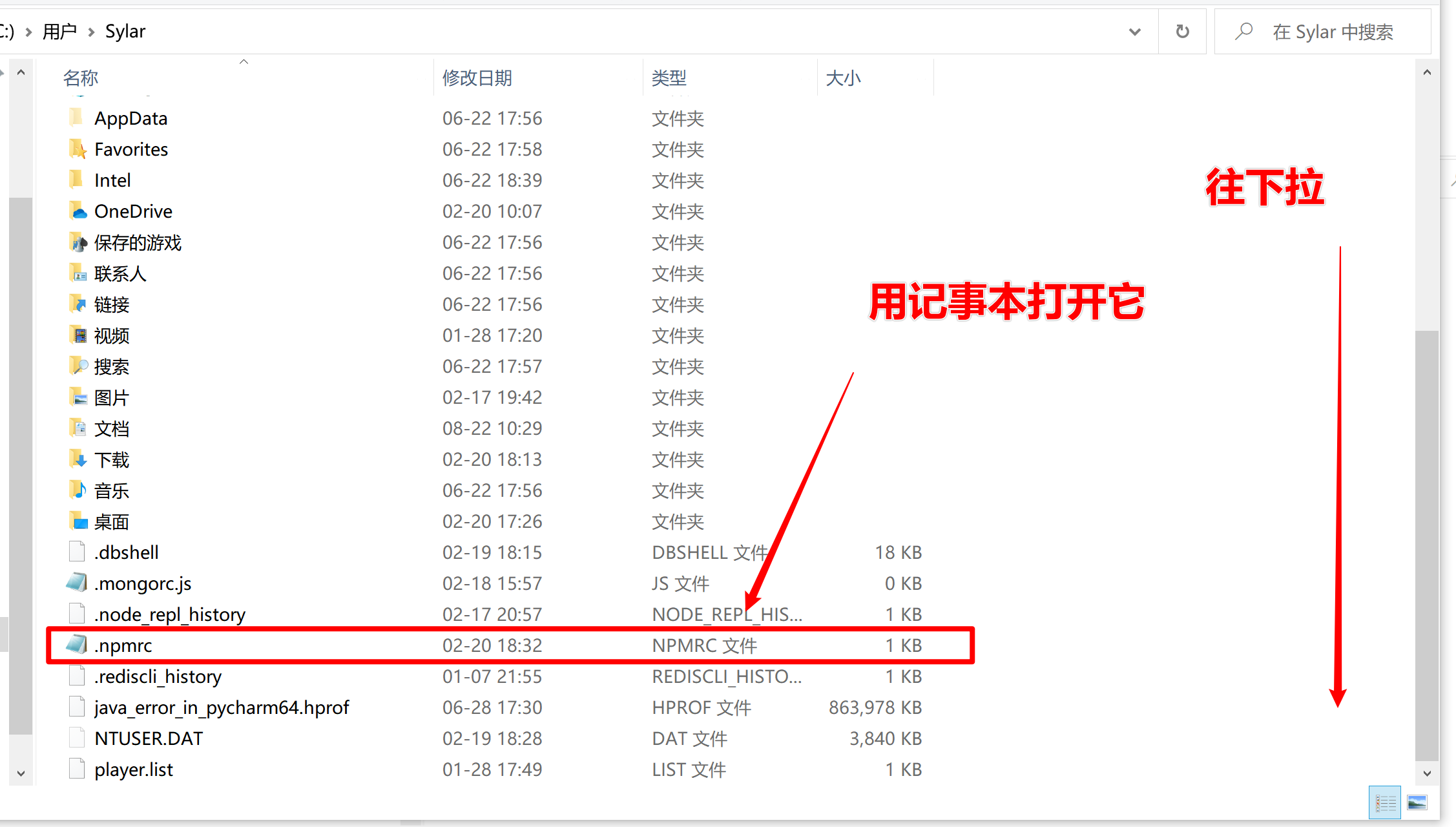
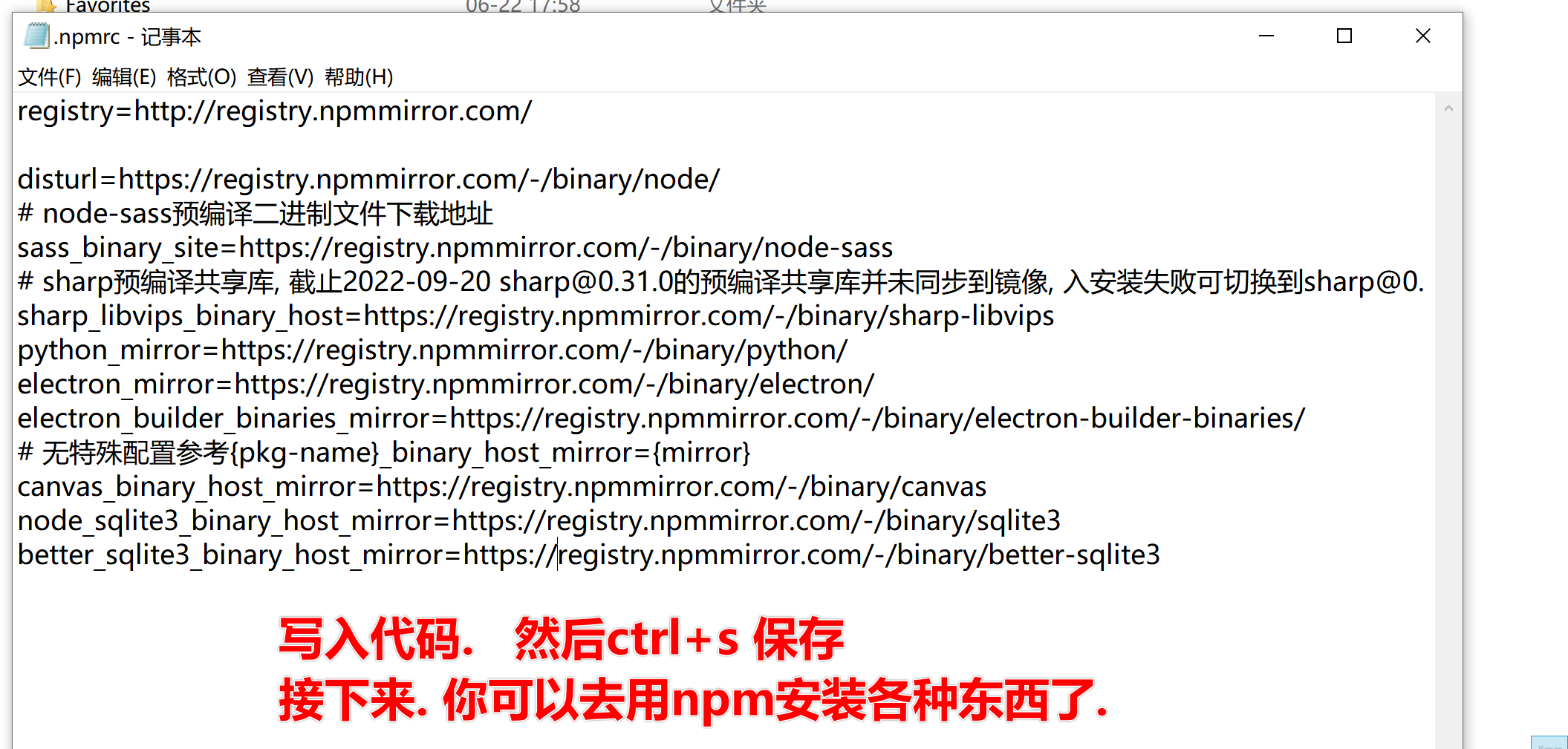
代码如下.
registry=http://registry.npmmirror.com/

disturl=https://registry.npmmirror.com/-/binary/node/

# node-sass预编译二进制文件下载地址

sass_binary_site=https://registry.npmmirror.com/-/binary/node-sass

# sharp预编译共享库, 截止2022-09-20 sharp@0.31.0的预编译共享库并未同步到镜像, 入安装失败可切换到sharp@0.30.7使用

sharp_libvips_binary_host=https://registry.npmmirror.com/-/binary/sharp-libvips

python_mirror=https://registry.npmmirror.com/-/binary/python/

electron_mirror=https://registry.npmmirror.com/-/binary/electron/

electron_builder_binaries_mirror=https://registry.npmmirror.com/-/binary/electron-builder-binaries/

# 无特殊配置参考{pkg-name}_binary_host_mirror={mirror}

canvas_binary_host_mirror=https://registry.npmmirror.com/-/binary/canvas

node_sqlite3_binary_host_mirror=https://registry.npmmirror.com/-/binary/sqlite3

better_sqlite3_binary_host_mirror=https://registry.npmmirror.com/-/binary/better-sqlite3
MAC同学,
如果是M1芯片的. 需要先更新一些库. 不是M1的不用管
包括但不限于:
brew install pkg-config cairo pango libpng jpeg giflib librsvg
命令行方式:
npm config set registry http://registry.npmmirror.com
编辑 ~/.npmrc 文件, 设置方案和windows的一样
registry=http://registry.npmmirror.com/

disturl=https://registry.npmmirror.com/-/binary/node/

# node-sass预编译二进制文件下载地址

sass_binary_site=https://registry.npmmirror.com/-/binary/node-sass

# sharp预编译共享库, 截止2022-09-20 sharp@0.31.0的预编译共享库并未同步到镜像, 入安装失败可切换到sharp@0.30.7使用

sharp_libvips_binary_host=https://registry.npmmirror.com/-/binary/sharp-libvips

python_mirror=https://registry.npmmirror.com/-/binary/python/

electron_mirror=https://registry.npmmirror.com/-/binary/electron/

electron_builder_binaries_mirror=https://registry.npmmirror.com/-/binary/electron-builder-binaries/

# 无特殊配置参考{pkg-name}_binary_host_mirror={mirror}

canvas_binary_host_mirror=https://registry.npmmirror.com/-/binary/canvas

node_sqlite3_binary_host_mirror=https://registry.npmmirror.com/-/binary/sqlite3

better_sqlite3_binary_host_mirror=https://registry.npmmirror.com/-/binary/better-sqlite3
附赠:
npm官方库搜索: https://www.npmjs.com/
JS语法规则:https://developer.mozilla.org/zh-CN/docs/Web/JavaScript/Reference
rsa.js很古老的一个库 https://ohdave.com/rsa/
5 更换npm为国内镜像的更多相关文章
- 更换 npm 源国内镜像 cnpm
默认镜像源 https://www.npmjs.com/ 临时改变镜像源 方法一:通过config配置指向国内镜像源 npm config set registry http://registry.c ...
- npm配置国内镜像资源+淘宝镜像
将npm的注册表源设置为国内的镜像 1.国内用户,建议将npm的注册表源设置为国内的镜像,可以大幅提升安装速度 2.国内优秀npm镜像推荐及使用:http://riny.net/2014/cnpm/ ...
- npm 使用国内镜像的方法
npm全称Node Package Manager,是node.js的模块依赖管理工具.由于npm的源在国外,所以国内用户使用起来各种不方便.我们通过设置使用淘宝的镜像来加快我们的速度. 临时使用 n ...
- npm使用国内镜像的方法
一.通过命令配置1. 命令 npm config set registry https://registry.npm.taobao.org 2. 验证命令 npm config get registr ...
- 修改apt,pip,npm为国内镜像源
apt 原文件备份 sudo cp /etc/apt/sources.list /etc/apt/sources.list.bak 编辑源列表文件 sudo vim /etc/apt/sources. ...
- 使用nvm管理node.js版本以及更换npm淘宝镜像源
目录 1,前言 2,安装nvm 3,nvm的使用 4,错误处理 5,修改npm默认镜像源 6,win10下cnpm报错 1,前言 注意:此教程仅限Windows,Mac可能不适用 在我们的日常开发中可 ...
- Node.js NPM国内镜像
NPM国内镜像 http://npm.hacknodejs.com/ http://registry.npmjs.vitecho.com/ https://registry.npm.taobao.or ...
- npm 国内镜像资源 --转载
npm 是node.js 环境下的包管理器,非常强大智能. 生活这这片神奇的土地上,各种奇葩手段屡见不鲜啊. 为什么要换源? npm 官方站点 http://www.npmjs.org/ 并没有被墙, ...
- 给电脑换源 npm 国内镜像 cnpm
(1)通过 config 配置指向国内镜像源 npm config set registry http://registry.cnpmjs.org //配置指向源 npm info express ...
- pip 更换国内镜像与记录
更换pip源到国内镜像 阿里云 http://mirrors.aliyun.com/pypi/simple/ 中国科技大学 https://pypi.mirrors.ustc.edu.cn/sim ...
随机推荐
- win32 - Screen to bmp file(BYTE)
void WINAPI CaptureScreenIntoFile() { BITMAPFILEHEADER bfHeader; BITMAPINFOHEADER biHeader; HGDIOBJ ...
- .Net Code Excel 文件导入
第一步 下载NuGet NPOI包 /// <summary> /// 将excel文教导入到订单表 /// </summary> /// <param name=&qu ...
- AI数字人SadTalker实战
1.概述 AI数字人在营销和品牌推广中扮演着至关重要的角色,许多企业和个人正积极利用数字技术来打造属于自己的财富.有没有一种简单而免费的方式来创建自己的数字人呢?本篇博客笔者将为大家介绍如何搭建属于自 ...
- cmake安装及报错解决办法
安装 yum install cmake 报错 centOS8(x86_64 或 aarch64) 系统下 yum或dnf 默认安装的 cmake-3.18.2-11.el8版本,安装后无法使用,出现 ...
- 【Azure 应用服务】在创建App Service时,遇见“No available instances to satisfy this request. App Service is attempting to increase capacity.”错误
问题描述 在创建新的App Service,遇见了资源不满足当前需求的提示.详细消息为: "Code": "Conflict","Message&qu ...
- 【Azure Developer】Java代码访问Key Vault Secret时候的认证问题,使用 DefaultAzureCredentialBuilder 或者 ClientSecretCredentialBuilder
问题描述 使用Java SDK获取Key Vault Secret机密信息时,需要获取授权.通常是使用AAD的注册应用(Client ID, Tenant ID, Client Secret)来获取 ...
- 使用Zabbix监控openstack的系统资源
1 概述 OpenStack是一个开源的云计算管理平台项目,是一系列软件开源项目的组合.由NASA(美国国家航空航天局)和Rackspace合作研发并发起,以Apache许可证(Apache软件基金会 ...
- etcd每个节点都存储了完整的键值对数据集,为什么扩容etcd集群仍可分散存储压力?
etcd每个节点都存储了完整的键值对数据集,这主要是为了确保数据的一致性和高可用性.在这种设计下,任何一个节点都可以处理读取请求,并在本地提供数据,从而无需跨节点通信.这种冗余的数据存储方式也增加了系 ...
- 【LLM】大模型落地-从理论到实践
简述 按个人偏好和目标总结了学习目标和路径(可按需学习),后续将陆续整理出相应学习资料和资源. 学习目标 熟悉主流LLM(Llama, ChatGLM, Qwen)的技术架构和技术细节:有实际应用RA ...
- stm32 使用多串口通信调试总结
前记: stm32使用多个串口通信,这个项目遇到了不少问题,值得反思和深入总结一下. 提纲: 这次的问题,主要有几个部分组成: A 多串口的DMA配置,这个需要注意,尽量不要使用同一个DMA ...