
[转帖]centos7离线安装postgresql13
https://www.cnblogs.com/summer-88/p/15341918.html
- 在一台可以联网的centos上安装postgresql源
yum install -y https://download.postgresql.org/pub/repos/yum/reporpms/EL-7-x86_64/pgdg-redhat-repo-latest.noarch.rpm
- 使用yumdownloader下载安装包
yumdownloader --resolve postgresql13-server
- 上传rpm包到安装的centos服务器上
-rw-rw-rw- 1 root root 1490812 Sep 27 09:45 postgresql13-13.4-1PGDG.rhel7.x86_64.rpm

-rw-rw-rw- 1 root root  390420 Sep 27 09:45 postgresql13-libs-13.4-1PGDG.rhel7.x86_64.rpm

-rw-rw-rw- 1 root root 5654980 Sep 27 09:45 postgresql13-server-13.4-1PGDG.rhel7.x86_64.rpm
- 批量安装rpm包
rpm -ivh postgresql13-13.4-1PGDG.rhel7.x86_64.rpm postgresql13-libs-13.4-1PGDG.rhel7.x86_64.rpm postgresql13-server-13.4-1PGDG.rhel7.x86_64.rpm
报错了,缺少依赖libicu
warning: postgresql13-13.4-1PGDG.rhel7.x86_64.rpm: Header V4 DSA/SHA1 Signature, key ID 442df0f8: NOKEY

error: Failed dependencies:

        libicu is needed by postgresql13-13.4-1PGDG.rhel7.x86_64

        libicui18n.so.50()(64bit) is needed by postgresql13-server-13.4-1PGDG.rhel7.x86_64

        libicuuc.so.50()(64bit) is needed by postgresql13-server-13.4-1PGDG.rhel7.x86_64
- 使用yumdownloader下载libicu
yumdownloader --resolve libicu
-rw-r--r-- 1 root root 7250656 Mar 25  2020 libicu-50.2-4.el7_7.i686.rpm

-rw-r--r-- 1 root root 7202728 Mar 25  2020 libicu-50.2-4.el7_7.x86_64.rpm

-rw-r--r-- 1 root root 1490812 Aug 12 18:07 postgresql13-13.4-1PGDG.rhel7.x86_64.rpm

-rw-r--r-- 1 root root  390420 Aug 12 18:07 postgresql13-libs-13.4-1PGDG.rhel7.x86_64.rpm

-rw-r--r-- 1 root root 5654980 Aug 12 18:07 postgresql13-server-13.4-1PGDG.rhel7.x86_64.rpm
删除libicu-50.2-4.el7_7.i686.rpm(32位安装包)
6. 重新上传到需要安装的服务器,执行安装命令
rpm -ivh libicu-50.2-4.el7_7.x86_64.rpm postgresql13-13.4-1PGDG.rhel7.x86_64.rpm postgresql13-libs-13.4-1PGDG.rhel7.x86_64.rpm postgresql13-server-13.4-1PGDG.rhel7.x86_64.rpm
- 安装成功后初始化数据库
/usr/pgsql-13/bin/postgresql-13-setup initdb
- 开机启动postgresql数据库
systemctl enable postgresql-13
- 启动postgresql数据库服务
systemctl start postgresql-13
- 创建用户和数据库,使用postgres用户登录(PostgresSQL安装后会自动创建postgres用户,无密码)
su postgres
- 登录postgresql数据库
psql
- 创建用户和数据库并授权
create user ycloans with password 'ycloans';            // 创建用户

create database sonarqube owner ycloans;                 // 创建数据库

grant all privileges on database sonarqube to ycloans;   // 授权
\q 退出命令模式
13. 开启远程访问,修改/var/lib/pgsql/13/data/postgresql.conf文件,取消 listen_addresses 的注释,将参数值改为“*”
- 修改/var/lib/pgsql/13/data/pg_hba.conf文件,增加下图红框部分内容
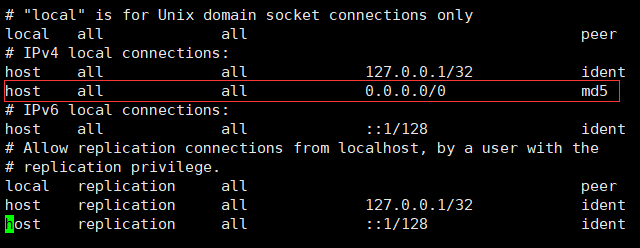
- 切换到root用户,重启postgresql服务
systemctl restart postgresql-13[转帖]centos7离线安装postgresql13的更多相关文章
- CentOS7离线安装mysql5.7
下载mysql5.7,系统选择redhat,版本选择RHEL7,下载RPM Bundle后得到一个tar文件.这里得到文件mysql-5.7.25-1.el7.x86_64.rpm-bundle.ta ...
- CentOS7 离线安装mysql-5.7.16
CentOS7 离线安装mysql-5.7.16 1 . 安装新版mysql前,需将系统自带的mariadb-lib卸载 [root@slave mytmp]# rpm -qa|grep mariad ...
- CentOS7离线安装Nginx(详细安装过程)
CentOS7离线安装Nginx(详细安装过程) 1.安装gcc.g++ 下载好所需的文件后上传至服务器(下载地址:https://download.csdn.net/download/a729360 ...
- CentOS7离线安装MySQL8.0
CentOS7离线安装MySQL8.0 卸载软件 rpm -e --nodeps 要卸载的软件包 root@jacky zookeeper]# rpm -e --nodeps java-1.6.0-o ...
- Binlog2sql+CentOS7 离线安装
Binlog2sql+CentOS7 离线安装 目录 Binlog2sql+CentOS7 离线安装 1. 环境 2. 下载 3.1 Pip 安装 3.2 PyMySQL/mysql-replicat ...
- Centos7 离线安装 php7
问题:因内部管控,机器无法连接公有yum源安装php. 正常安装php7可以参考CentOS7.2 安装 PHP7.2 下面的代码也是一种方法 yum -y install libmcrypt lib ...
- Ambari2.7.4+HDP3.1.4安装 Centos7离线安装
一. Ambari等简单介绍 1.1Ambari Ambari是一种基于Web的工具,支持Apache Hadoop集群的创建 .管理和监控. Ambari已支持大多数Hadoop组件,包括HDFS. ...
- centos7离线安装PHP7
环境 centos7.9 PHP7.4.30 准备工作 在编译PHP时会提示一些包版本不够或者缺少某些包,一般选择yum来安装缺少的包,但因为是离线安装,所以可以手动配置本地yum源.先看一下系统版本 ...
- [转帖]Centos7 yum安装Chrome浏览器
Centos7 yum安装Chrome浏览器 https://www.cnblogs.com/ianduin/p/8727333.html以及https://blog.csdn.net/libaine ...
- centos7离线安装rpm包自动解决依赖
离线安装rpm包自动解决依赖参照https://blog.csdn.net/u011396718/article/details/80153515当生产环境由于安全原因处于断网状态的时候.通过本地源的 ...
随机推荐
- Ubuntu20.04 安装shutter
1 sudo add-apt-repository ppa:linuxuprising/shutter 2 3 sudo apt install shutter 4 5 卸载 6 sudo apt-g ...
- 日常Bug排查-应用Commit报错事务并没有回滚
日常Bug排查-应用Commit报错事务并没有回滚 前言 日常Bug排查系列都是一些简单Bug排查,笔者将在这里介绍一些排查Bug的简单技巧,同时顺便积累素材_. 应用Commit报错并不一定回滚 事 ...
- MRS离线数据分析:通过Flink作业处理OBS数据
摘要:MRS支持在大数据存储容量大.计算资源需要弹性扩展的场景下,用户将数据存储在OBS服务中,使用MRS集群仅做数据计算处理的存算分离模式. 本文分享自华为云社区<[云小课]EI第47课 MR ...
- nginx 限制ip访问,禁止非法域名指向本机ip——防止被别人绑定域名到自己IP的方法
网站从国内迁移到国外,镜像主机没有配置域名(等配置好了,再配置域名),然后迁移完成了后,网站被不知道哪家的域名指向了本站服务器(很可能是某些人和组织,养域名卖的--具体是何套路,请哪位道友指教) 今天 ...
- 下一代APP Store——GPT应用商店GPTs初体验
uploading-image-126879.png 近期,OpenAI宣布GPT应用商店正式上线,目前拥有plus的用户已经可以体验了. OpenAI将GPT应用商店命名为GPTs,这也是之前发布会 ...
- Walrus 入门教程:如何创建模板以沉淀可复用的团队最佳实践
模板是 Walrus 的核心功能之一,模板创建完成后用户可以重复使用,并在使用过程中逐渐沉淀研发和运维团队的最佳实践,进一步简化服务及资源的部署.用户可以使用 HCL 语言自定义创建模板,也可以一键复 ...
- SBOM落地的关键一步——漏洞可利用性交流(VEX)
SolarWinds 网络安全事件的影响,加上 Log4j 漏洞对众多知名企业产生难以估量的后果,使软件供应链安全成为安全领域的热门话题,并且SBOM现在成为网络安全漏洞计划的一个重要组成部分. SB ...
- 十问ByteHouse:如何基于ClickHouse玩转向量检索?
更多技术交流.求职机会,欢迎关注字节跳动数据平台微信公众号,回复[1]进入官方交流群 向量检索被广泛使用于以图搜图.内容推荐以及大模型推理等场景.随着业务升级与 AI 技术的广泛使用,用户期望处理的向 ...
- 火山引擎 ByteHouse:两个关键技术,揭秘 OLAP 引擎中的数据导入技术
更多技术交流.求职机会,欢迎关注字节跳动数据平台微信公众号,回复[1]进入官方交流群 数据导入是衡量 OLAP 引擎性能及易用性的重要标准之一,高效的数据导入能力能够加速数据实时处理和分析的效率. ...
- PPT 产品发布会PPT应该怎么样改
PPT 毕业答辩PPT应该怎么样改 大图背景打底 刺眼 收集素材