
java-生成印章swing
案例1
package com;

import java.awt.BorderLayout;

import java.awt.Color;

import java.awt.Font;

import java.awt.Graphics;

import java.awt.Graphics2D;

import java.awt.RenderingHints;

import java.awt.font.FontRenderContext;

import java.awt.geom.AffineTransform;

import java.awt.geom.Ellipse2D;

import java.awt.geom.Rectangle2D;

import javax.swing.JFrame;

import javax.swing.JPanel;

public class Test2 {

       public static void main(String[] args)

       {

          DrawFrame frame = new DrawFrame();

          frame.setDefaultCloseOperation(JFrame.EXIT_ON_CLOSE);

          frame.setVisible(true);

       }

    }

    /**

       A frame that contains a panel with drawings

    */

    class DrawFrame extends JFrame

    {

       public DrawFrame()

       {

          setTitle("DrawTest");

          setSize(DEFAULT_WIDTH, DEFAULT_HEIGHT);

          // add panel to frame

          DrawPanel panel = new DrawPanel();

          panel.setBackground(Color.WHITE);

          setLocationRelativeTo(null);

          add(panel, BorderLayout.CENTER);

       }

       public static final int DEFAULT_WIDTH = 320;

       public static final int DEFAULT_HEIGHT = 340;

    }

    /**

       A panel that displays rectangles and ellipses.

    */

    class DrawPanel extends JPanel

    {

        private String message = "公章测试有限公司";

        public void paintComponent(Graphics g)

        {

            super.paintComponent(g);

            Graphics2D g2 = (Graphics2D) g;

            g2.setColor(Color.RED);

            g2.setRenderingHint(RenderingHints.KEY_ANTIALIASING, RenderingHints.VALUE_ANTIALIAS_ON);

            //绘制圆

            int radius = 150;

            Ellipse2D circle = new Ellipse2D.Double();

            circle.setFrameFromCenter(CENTERX, CENTERY, CENTERX + radius, CENTERY + radius);

            g2.draw(circle);

            //绘制中间的五角星

            Font starFont = new Font("宋体", Font.BOLD, 120);

            g2.setFont(starFont);

            g2.drawString("★", CENTERX - 60, CENTERY + 40);

            //根据输入字符串得到字符数组

            String[] messages2 = message.split("",0);

            String[] messages = new String[messages2.length-1];

            System.arraycopy(messages2,1,messages,0,messages2.length-1);

            //输入的字数

            int ilength = messages.length;

            //设置字体属性

            int fontsize = 40;

            Font f = new Font("Serif", Font.BOLD, fontsize);

            FontRenderContext context = g2.getFontRenderContext();

            Rectangle2D bounds = f.getStringBounds(message, context);

            //字符宽度=字符串长度/字符数

            double char_interval = (bounds.getWidth() / ilength);

            //上坡度

            double ascent = -bounds.getY();

            int first = 0,second = 0;

            boolean odd = false;

            if (ilength%2 == 1)

            {

                first = (ilength-1)/2;

                odd = true;

            }

            else

            {

                first = (ilength)/2-1;

                second = (ilength)/2;

                odd = false;

            }

            double radius2 = radius - ascent;

            double x0 = CENTERX;

            double y0 = CENTERY - radius + ascent;

            //旋转角度

            double a = 2*Math.asin(char_interval/(2*radius2));

            if (odd)

            {

                g2.setFont(f);

                g2.drawString(messages[first], (float)(x0 - char_interval/2), (float)y0);

                //中心点的右边

                for (int i=first+1;i<ilength;i++)

                {

                    double aa = (i - first) * a;

                    double ax = radius2 * Math.sin(aa);

                    double ay = radius2 - radius2 * Math.cos(aa);

                    AffineTransform transform = AffineTransform.getRotateInstance(aa);//,x0 + ax, y0 + ay);

                    Font f2 = f.deriveFont(transform);

                    g2.setFont(f2);

                    g2.drawString(messages[i], (float)(x0 + ax - char_interval/2* Math.cos(aa)), (float)(y0 + ay - char_interval/2* Math.sin(aa)));

                }

                //中心点的左边

                for (int i=first-1;i>-1;i--)

                {

                    double aa = (first - i) * a;

                    double ax = radius2 * Math.sin(aa);

                    double ay = radius2 - radius2 * Math.cos(aa);

                    AffineTransform transform = AffineTransform.getRotateInstance(-aa);//,x0 + ax, y0 + ay);

                    Font f2 = f.deriveFont(transform);

                    g2.setFont(f2);

                    g2.drawString(messages[i], (float)(x0 - ax - char_interval/2* Math.cos(aa)), (float)(y0 + ay + char_interval/2* Math.sin(aa)));

                }

            }

            else

            {

                //中心点的右边

                for (int i=second;i<ilength;i++)

                {

                    double aa = (i - second + 0.5) * a;

                    double ax = radius2 * Math.sin(aa);

                    double ay = radius2 - radius2 * Math.cos(aa);

                    AffineTransform transform = AffineTransform.getRotateInstance(aa);//,x0 + ax, y0 + ay);

                    Font f2 = f.deriveFont(transform);

                    g2.setFont(f2);

                    g2.drawString(messages[i], (float)(x0 + ax - char_interval/2* Math.cos(aa)), (float)(y0 + ay - char_interval/2* Math.sin(aa)));

                }

                //中心点的左边

                for (int i=first;i>-1;i--)

                {

                    double aa = (first - i + 0.5) * a;

                    double ax = radius2 * Math.sin(aa);

                    double ay = radius2 - radius2 * Math.cos(aa);

                    AffineTransform transform = AffineTransform.getRotateInstance(-aa);//,x0 + ax, y0 + ay);

                    Font f2 = f.deriveFont(transform);

                    g2.setFont(f2);

                    g2.drawString(messages[i], (float)(x0 - ax - char_interval/2* Math.cos(aa)), (float)(y0 + ay + char_interval/2* Math.sin(aa)));

                }

            }

        }

        public static final int CENTERX = 150;

           public static final int CENTERY = 150;  }
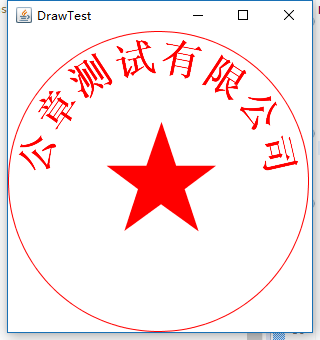
案例2,生产图导出
package com.hwaggLee.swing.graphics2D;

import java.awt.Color;

import java.awt.Font;

import java.awt.Graphics2D;

import java.awt.RenderingHints;

import java.awt.font.FontRenderContext;

import java.awt.geom.AffineTransform;

import java.awt.geom.Ellipse2D;

import java.awt.geom.Rectangle2D;

import java.awt.image.BufferedImage;

import java.io.File;

import java.util.Date;

import javax.imageio.ImageIO;

public class UtilsGraphics2D {

    private static final int WIDTH = 500;//图片宽度

    private static final int HEIGHT = 500;//图片高度

    private static String message = "公章测试有限公司";

    private static String centerName = "我是谁";

    private static String year = "2016年06月23日";

    public static void main(String[] args) throws Exception{

        BufferedImage image = startGraphics2D();

        try {

            String filePath = "C:\\Users\\huage\\Desktop\\121231\\"+new Date().getTime()+".png";

            ImageIO.write(image, "png", new File(filePath)); //将其保存在C:\\Users\\huage\\Desktop\\121231\\下

        } catch (Exception ex) {

            ex.printStackTrace();

        }

    }

    public static BufferedImage startGraphics2D(){

        // 定义图像buffer

        BufferedImage buffImg = new BufferedImage(WIDTH, HEIGHT, BufferedImage.TYPE_INT_RGB);

        Graphics2D g = buffImg.createGraphics();

        g.setColor(Color.RED);

        //设置锯齿圆滑

        g.setRenderingHint(RenderingHints.KEY_ANTIALIASING, RenderingHints.VALUE_ANTIALIAS_ON);

        //绘制圆

        int radius = HEIGHT/3;//周半径

        int CENTERX = WIDTH/2;//画图所出位置

        int CENTERY = HEIGHT/2;//画图所处位置

        Ellipse2D circle = new Ellipse2D.Double();

        circle.setFrameFromCenter(CENTERX, CENTERY, CENTERX + radius, CENTERY + radius);

        g.draw(circle);

        //绘制中间的五角星

        g.setFont(new Font("宋体", Font.BOLD, 120));

        g.drawString("★", CENTERX-(120/2), CENTERY+(120/3));

        //添加姓名

        g.setFont(new Font("宋体", Font.LAYOUT_LEFT_TO_RIGHT, 30));// 写入签名

        g.drawString(centerName, CENTERX -(40), CENTERY +(30+50));

        //添加年份

        g.setFont(new Font("宋体", Font.LAYOUT_LEFT_TO_RIGHT, 20));// 写入签名

        g.drawString(year, CENTERX -(60), CENTERY +(30+80));

        //根据输入字符串得到字符数组

        String[] messages2 = message.split("",0);

        String[] messages = new String[messages2.length-1];

        System.arraycopy(messages2,1,messages,0,messages2.length-1);

        //输入的字数

        int ilength = messages.length;

        //设置字体属性

        int fontsize = 40;

        Font f = new Font("Serif", Font.BOLD, fontsize);

        FontRenderContext context = g.getFontRenderContext();

        Rectangle2D bounds = f.getStringBounds(message, context);

        //字符宽度=字符串长度/字符数

        double char_interval = (bounds.getWidth() / ilength);

        //上坡度

        double ascent = -bounds.getY();

        int first = 0,second = 0;

        boolean odd = false;

        if (ilength%2 == 1)

        {

            first = (ilength-1)/2;

            odd = true;

        }

        else

        {

            first = (ilength)/2-1;

            second = (ilength)/2;

            odd = false;

        }

        double radius2 = radius - ascent;

        double x0 = CENTERX;

        double y0 = CENTERY - radius + ascent;

        //旋转角度

        double a = 2*Math.asin(char_interval/(2*radius2));

        if (odd)

        {

            g.setFont(f);

            g.drawString(messages[first], (float)(x0 - char_interval/2), (float)y0);

            //中心点的右边

            for (int i=first+1;i<ilength;i++)

            {

                double aa = (i - first) * a;

                double ax = radius2 * Math.sin(aa);

                double ay = radius2 - radius2 * Math.cos(aa);

                AffineTransform transform = AffineTransform.getRotateInstance(aa);//,x0 + ax, y0 + ay);

                Font f2 = f.deriveFont(transform);

                g.setFont(f2);

                g.drawString(messages[i], (float)(x0 + ax - char_interval/2* Math.cos(aa)), (float)(y0 + ay - char_interval/2* Math.sin(aa)));

            }

            //中心点的左边

            for (int i=first-1;i>-1;i--)

            {

                double aa = (first - i) * a;

                double ax = radius2 * Math.sin(aa);

                double ay = radius2 - radius2 * Math.cos(aa);

                AffineTransform transform = AffineTransform.getRotateInstance(-aa);//,x0 + ax, y0 + ay);

                Font f2 = f.deriveFont(transform);

                g.setFont(f2);

                g.drawString(messages[i], (float)(x0 - ax - char_interval/2* Math.cos(aa)), (float)(y0 + ay + char_interval/2* Math.sin(aa)));

            }

        }

        else

        {

            //中心点的右边

            for (int i=second;i<ilength;i++)

            {

                double aa = (i - second + 0.5) * a;

                double ax = radius2 * Math.sin(aa);

                double ay = radius2 - radius2 * Math.cos(aa);

                AffineTransform transform = AffineTransform.getRotateInstance(aa);//,x0 + ax, y0 + ay);

                Font f2 = f.deriveFont(transform);

                g.setFont(f2);

                g.drawString(messages[i], (float)(x0 + ax - char_interval/2* Math.cos(aa)), (float)(y0 + ay - char_interval/2* Math.sin(aa)));

            }

            //中心点的左边

            for (int i=first;i>-1;i--)

            {

                double aa = (first - i + 0.5) * a;

                double ax = radius2 * Math.sin(aa);

                double ay = radius2 - radius2 * Math.cos(aa);

                AffineTransform transform = AffineTransform.getRotateInstance(-aa);//,x0 + ax, y0 + ay);

                Font f2 = f.deriveFont(transform);

                g.setFont(f2);

                g.drawString(messages[i], (float)(x0 - ax - char_interval/2* Math.cos(aa)), (float)(y0 + ay + char_interval/2* Math.sin(aa)));

            }

        }

        return buffImg;

    }

}

java-生成印章swing的更多相关文章
- Java学习之Swing Gui编程
Java学习之Swing Gui编程 0x00 前言 前面的使用的Gui是基于Awt 去进行实现,但是在现实写Gui中 AWT实际运用会比较少. 0x01 Swing 概述 AWT 和Swing 区别 ...
- Java生成和操作Excel文件(转载)
Java生成和操作Excel文件 JAVA EXCEL API:是一开放源码项目,通过它Java开发人员可以读取Excel文件的内容.创建新的Excel文件.更新已经存在的Excel文件.使用该A ...
- 利用JAVA生成二维码
本文章整理于慕课网的学习视频<JAVA生成二维码>,如果想看视频内容请移步慕课网. 维基百科上对于二维码的解释. 二维条码是指在一维条码的基础上扩展出另一维具有可读性的条码,使用黑白矩形图 ...
- Java生成验证码原理(jsp)
验证码的作用: 验证码是Completely Automated Public Turing test to tell Computers and Humans Apart(全自动区分计算机和人类的 ...
- JAVA生成条形码
1.下载生成条形码所需要的jar包barcode4j.jar: 2.java生成条形码代码 import java.awt.image.BufferedImage;import java.io.Fil ...
- Java生成CSV文件实例详解
本文实例主要讲述了Java生成CSV文件的方法,具体实现步骤如下: 1.新建CSVUtils.java文件: package com.saicfc.pmpf.internal.manage.utils ...
- java 生成8位数字作为UID
java 生成8位数字作为UUID: /*** * 生成uid 8位数字 */public static String generateUID(){ Random random = new Rando ...
- java生成随机序列号
1.java生成随机序列号 String deleteUuid = UUID.randomUUID().toString(); 引用Jar包 //java-uuid-generator-3.1.3.j ...
- java生成简单Excel工作薄
前言: 代码都是建立在实际需求上的,上周做完一个调外部电影券接口的项目,这周产品又要excel表格,大致内容为:券所属影院.图片URL.等信息制作为excel表格,把每次同步过来的数据给他分析. jx ...
- 【转】Java生成对应字符串的MD5密码模块
原文网址:http://www.cnblogs.com/xudong-bupt/archive/2013/05/10/3070899.html (1)一般使用的数据库中都会保存用户名和密码,其中密码不 ...
随机推荐
- 2015 MVP OpenDay 及 Community Camp 演讲PPT分享
这两天来到首都北京参加一年一度的MVP OpenDay 和 MVP Community Camp.其中,31号下午有我的课程:What Will You Make: Windows IoT应用开发入门 ...
- forward和redirect的区别(转)
Redirect Forward 不同的request 不同的对象,但是可以渠道上一个页面的内容 send后面的语句会继续执行,除非return Forward后面的语句不会继续发送给客户端 速度慢 ...
- .dat 导入sqlserver2000
所有任务->还原数据库->从设备.选项中改变路径地址
- KVM 网络虚拟化基础 - 每天5分钟玩转 OpenStack(9)
网络虚拟化是虚拟化技术中最复杂的部分,学习难度最大. 但因为网络是虚拟化中非常重要的资源,所以再硬的骨头也必须要把它啃下来. 为了让大家对虚拟化网络的复杂程度有一个直观的认识,请看下图 这是 Open ...
- 7 COMPELLING REASONS YOU NEED TO START THE BUSINESS YOU’VE ALWAYS WANTED
原文链接:http://lesseesadvocate.com/7-compelling-reasons-need-start-business-youve-always-wanted/ Don’t ...
- mysql 主从复制配置
环境:已经在centos下安装好mysql,安装参考:http://www.cnblogs.com/bookwed/p/5896619.html,安装好主数据库后,可以克隆一份,注意修改ip等. 19 ...
- linux下的一些操作(持续更新)
文件操作 创建文件夹: mkdir 文件夹名称 查看当前目录的文件夹及文件:ls 参看当前文件夹下的所有文件及信息: ls -l 删除空文件夹:rmdir 文件夹名称 删除非空文件夹:rm rf 文件 ...
- [转]一种简单的js时间控件
使用方法: 粘贴代码到文本文档中,文档名称为datetime.js,然后在html文件中引用如下代码即可 <input name="shijian1" id="sh ...
- Dan Zhang - Visual Studio ALM MVP
I am a Microsoft Certified Partner specialising in .NET solutions, also worked as an ALM consultant. ...
- 【CSS】创建布局
随着对分离HTML元素的语义重要性与其表现的影响的不断强调,CSS在HTML5元素布局方面的作用越来越重要. 1. 定位内容 控制内容最简单的方式就是通过定位,这允许你使用浏览器改变元素的布局方式. ...