
"Process finished with exit code 1" 进程结束
连接到目标VM, 地址: ''127.0.0.1:4376',传输: '套接字'', 传输: '{1}'

2021-10-29 17:35:46 JRebel: Directory 'xxx\majorproject\target\classes' will be monitored for changes.

2021-10-29 17:35:47 JRebel:

2021-10-29 17:35:47 JRebel: A newer version '2021.4.0' is available for download

2021-10-29 17:35:47 JRebel: from https://jrebel.com/software/jrebel/download/

2021-10-29 17:35:47 JRebel:

2021-10-29 17:35:49 JRebel:  Starting logging to file: C:\Users\jiannachun\.jrebel\jrebel.log

2021-10-29 17:35:49 JRebel:

2021-10-29 17:35:49 JRebel:  #############################################################

2021-10-29 17:35:49 JRebel:

2021-10-29 17:35:49 JRebel:  JRebel Agent 2021.2.2 (202105271234)

2021-10-29 17:35:49 JRebel:  (c) Copyright 2007-2021 Perforce Software, Inc.

2021-10-29 17:35:49 JRebel:

2021-10-29 17:35:49 JRebel:  Over the last 30 days JRebel prevented

2021-10-29 17:35:49 JRebel:  at least 74 redeploys/restarts saving you about 0.8 hours.

2021-10-29 17:35:49 JRebel:

2021-10-29 17:35:49 JRebel:  Over the last 365 days JRebel prevented

2021-10-29 17:35:49 JRebel:  at least 2171 redeploys/restarts saving you about 24.1 hours.

2021-10-29 17:35:49 JRebel:

2021-10-29 17:35:49 JRebel:  License acquired from License Server: http://127.0.0.1:8888

2021-10-29 17:35:49 JRebel:

2021-10-29 17:35:49 JRebel:  Licensed to ilanyu.

2021-10-29 17:35:49 JRebel:

2021-10-29 17:35:49 JRebel:  You are using an offline license.

2021-10-29 17:35:49 JRebel:

2021-10-29 17:35:49 JRebel:

2021-10-29 17:35:49 JRebel:  #############################################################

2021-10-29 17:35:49 JRebel:

Process finished with exit code 1@SpringBootApplication
public class MajorDemolitionApplication {
public static void main(String[] args) {
try {
SpringApplication.run(MajorDemolitionApplication.class, args);
System.out.println("--- 项目 启动成功---" + "version1.0.0 => " + new Date());
} catch (Throwable e) {
//异常级别越大越好,我之前测试的时候,用的是Exception,但是没有日志。
e.printStackTrace();
}
}
}2021-10-29 19:32:24 JRebel:
java.lang.IllegalStateException: Could not initialize Logback logging from classpath:logback-spring.xml
at org.springframework.boot.logging.logback.LogbackLoggingSystem.loadConfiguration(LogbackLoggingSystem.java:156)
at org.springframework.boot.logging.AbstractLoggingSystem.initializeWithConventions(AbstractLoggingSystem.java:82)
at org.springframework.boot.logging.AbstractLoggingSystem.initialize(AbstractLoggingSystem.java:60)
at org.springframework.boot.logging.logback.LogbackLoggingSystem.initialize(LogbackLoggingSystem.java:117)
at org.springframework.boot.context.logging.LoggingApplicationListener.initializeSystem(LoggingApplicationListener.java:293)
at org.springframework.boot.context.logging.LoggingApplicationListener.initialize(LoggingApplicationListener.java:266)
at org.springframework.boot.context.logging.LoggingApplicationListener.onApplicationEnvironmentPreparedEvent(LoggingApplicationListener.java:229)
at org.springframework.boot.context.logging.LoggingApplicationListener.onApplicationEvent(LoggingApplicationListener.java:202)
at org.springframework.context.event.SimpleApplicationEventMulticaster.doInvokeListener(SimpleApplicationEventMulticaster.java:172)
at org.springframework.context.event.SimpleApplicationEventMulticaster.invokeListener(SimpleApplicationEventMulticaster.java:165)
at org.springframework.context.event.SimpleApplicationEventMulticaster.multicastEvent(SimpleApplicationEventMulticaster.java:139)
at org.springframework.context.event.SimpleApplicationEventMulticaster.multicastEvent(SimpleApplicationEventMulticaster.java:127)
at org.springframework.boot.context.event.EventPublishingRunListener.environmentPrepared(EventPublishingRunListener.java:75)
at org.springframework.boot.SpringApplicationRunListeners.environmentPrepared(SpringApplicationRunListeners.java:54)
at org.springframework.boot.SpringApplication.prepareEnvironment(SpringApplication.java:347)
at org.springframework.boot.SpringApplication.run(SpringApplication.java:306)
at org.springframework.boot.SpringApplication.run(SpringApplication.java:1260)
at org.springframework.boot.SpringApplication.run(SpringApplication.java:1248)
at com.longshine.major.MajorProjectApplication.main(MajorProjectApplication.java:17)
Caused by: ch.qos.logback.core.joran.spi.JoranException: Problem parsing XML document. See previously reported errors.
at ch.qos.logback.core.joran.event.SaxEventRecorder.recordEvents(SaxEventRecorder.java:65)
at ch.qos.logback.core.joran.GenericConfigurator.doConfigure(GenericConfigurator.java:151)
at ch.qos.logback.core.joran.GenericConfigurator.doConfigure(GenericConfigurator.java:110)
at ch.qos.logback.core.joran.GenericConfigurator.doConfigure(GenericConfigurator.java:53)
at org.springframework.boot.logging.logback.LogbackLoggingSystem.configureByResourceUrl(LogbackLoggingSystem.java:180)
at org.springframework.boot.logging.logback.LogbackLoggingSystem.loadConfiguration(LogbackLoggingSystem.java:152)
... 18 more
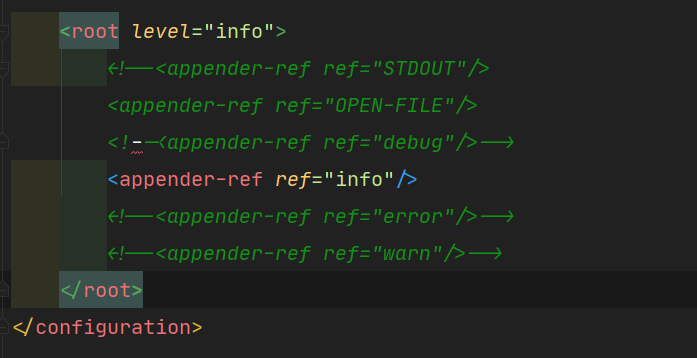
Caused by: org.xml.sax.SAXParseException; systemId: file:/J:/majorproject/target/classes/logback-spring.xml; lineNumber: 191; columnNumber: 7; 元素类型 "configuration" 必须由匹配的结束标记 "</configuration>" 终止。
at com.sun.org.apache.xerces.internal.parsers.AbstractSAXParser.parse(AbstractSAXParser.java:1239)
at com.sun.org.apache.xerces.internal.jaxp.SAXParserImpl$JAXPSAXParser.parse(SAXParserImpl.java:643)
at com.sun.org.apache.xerces.internal.jaxp.SAXParserImpl.parse(SAXParserImpl.java:327)
at ch.qos.logback.core.joran.event.SaxEventRecorder.recordEvents(SaxEventRecorder.java:59)
... 23 more
---河北 重点项目 启动成功---version1.0.0 => Fri Oct 29 19:32:26 CST 2021
与目标VM断开连接, 地址为: ''127.0.0.1:11441',传输: '套接字'', 传输: '{1}'
Process finished with exit code 0
"Process finished with exit code 1" 进程结束的更多相关文章
- cordova Process finished with exit code -1
安装完cordova之后,创建一个测试项目后,运行报Process finished with exit code -1,经过查找原因,是因为gradle没有安装,在http://www.androi ...
- [idea] - 项目启动报错Process finished with exit code 1
今天运行项目发现一个bug, "C:\Program Files\Java\jdk1.8.0_191\bin\java.exe" -XX:TieredStopAtLevel=1 - ...
- pycharm Process finished with exit code (0xC0000005)
pycharm Process finished with exit code (0xC0000005)解决办法 上次报过这个错误,是在安装浏览器时发现的,报过同样的错误.按当时的方法,以为切地解 ...
- pycharm 出现Process finished with exit code 0 或 Process finished with exit code -1
Process finished with exit code 0 意味着你的程序正常执行完毕并退出. 可以科普一下exit code,在大部分编程语言中都适用: exit code 0 表示程序执行 ...
- Android-AndroidStudio-AVD启动不了-emulator: Process finished with exit code 1
注意:解决此错误目前只针对Windows系统的电脑: 1.AndroidStudio-->AVDManager(Create Virtual Device): 2.提示AVD启动不了,同时Eve ...
- spring boot 运行提示:Process finished with exit code 1
spring boot 运行提示:Process finished with exit code 1 经检查发现是由于在application.properties配置文件中将某些自定义配置项移除了, ...
- tensorflow Process finished with exit code 137 (interrupted by signal 9: SIGKILL) 错误
Process finished with exit code 137 (interrupted by signal 9: SIGKILL) 在使用tensorflow自带的数据集做手写数字识别的时候 ...
- 运行代码后出现Process finished with exit code 0是为什么?
Process finished with exit code 0 意味着你的程序正常执行完毕并退出. 可以科普一下exit code,在大部分编程语言中都适用: exit code 0 表示程序执行 ...
- pycharm 调试Django 奇葩问题:Process finished with exit code -1073741819
想自己整个BLOG,发现python+Django好像还不错,尝试一下.在使用过程中,突然pycharm不能调试django工程.网上搜索也没解决,是google哦.好像记得启动pycharm时,看到 ...
- SpringBoot Idea 启动报错 Process finished with exit code 1
问题描述:没有其他任何错误日志,只有Process finished with exit code 1 问题原因:Maven POM.xml问题造成 由于是properties是我直接从其他项目中拷贝 ...
随机推荐
- [MySQL]SQL条件语句
IF语句:IF(expr1, trueResultExpr, falseResultExpr) 若expr1 == TRUE, 则:返回值为 trueResultExpr: 若expr1 == FAL ...
- [JavaScript]Base64 ←→ 图像
1 Base64 → 图像 [demo1] document.getElementById('img').setAttribute( 'src', 'data:image/png;base64,iVB ...
- Redis读书笔记(三)
单机数据库的实现 Redis数据库 Redis数据库的实现 struct redisServer { //... //保存服务器中的所有数据库, 数组 redisDB *db; //服务器的数据库数量 ...
- Http请求get与post请求方式的各种相关面试总结
转载请注明出处: GET方法和POST方法是两种HTTP请求方法,GET方法通过URL传递参数,可以缓存,但参数长度有限,一般用于获取资源:POST方法通过表单传递参数,不能缓存,参数长度没有限制,一 ...
- Redis缓冲区溢出及解决方案
缓冲区(buffer),是内存空间的一部分.也就是说,在内存空间中预留了一定的存储空间,这些存储空间用来缓冲输入或输出的数据,这部分预留的空间就叫做缓冲区. 一.Redis缓冲区溢出影响 在Redis ...
- DES算法图解、密码学
- Java方法的返回值及注意事项
方法的返回值 为什么要有带返回值的方法呢? 调用处拿到方法的结果之后,才能根据结果进行下一步操作 带返回值方法的定义和调用: 如果在调用处,要根据方法的结果去编写另一段代码逻辑 为了在调用处拿到方法产 ...
- Linux下ftp常见问题总结
Linux下ftp常见问题总结 似乎拖欠了几篇文章了@_@,来公司半年了,成长了不少!从大学毕业,直到看到http://blog.csdn.net/leixiaohua1020 雷霄骅(然而天妒英才 ...
- 《C和指针》第一章
1 第一章 C标准库中几个常用的IO函数 int puts(void *str): 从str中提取字符直到遇到第一个'\0'为止,将这些字符串加上'\n'后发送给stdout. int main(vo ...
- 【解决方法】windows连接域时报错:An Active Directory Domain Controller(AD DC) for the domain“chinaskills.com“....
目录-快速跳转 问题描述 原因分析: 解决方案: 附言: 问题描述 操作环境与场景: 在 VM 内 windos 2019 在连接到域时,提示报错: An Active Directory Domai ...