
vscode 配置代码自动格式化加修复
子曰:“工欲善其事,必先利其器”, 编码必须的就是有一个顺手的ide,然而光有还不行,还要懂得配置,毕竟不同的团队代码规范不同,如目前用得较多的就是eslint,今天就顺便记录下vscode + eslint 配置代码检测
文章目录
一、安装 Eslint
首选得在ide安装eslint插件

二、安装 Prettier-Code formatter
目前新的vscode 都需要安装这个 代码格式化插件
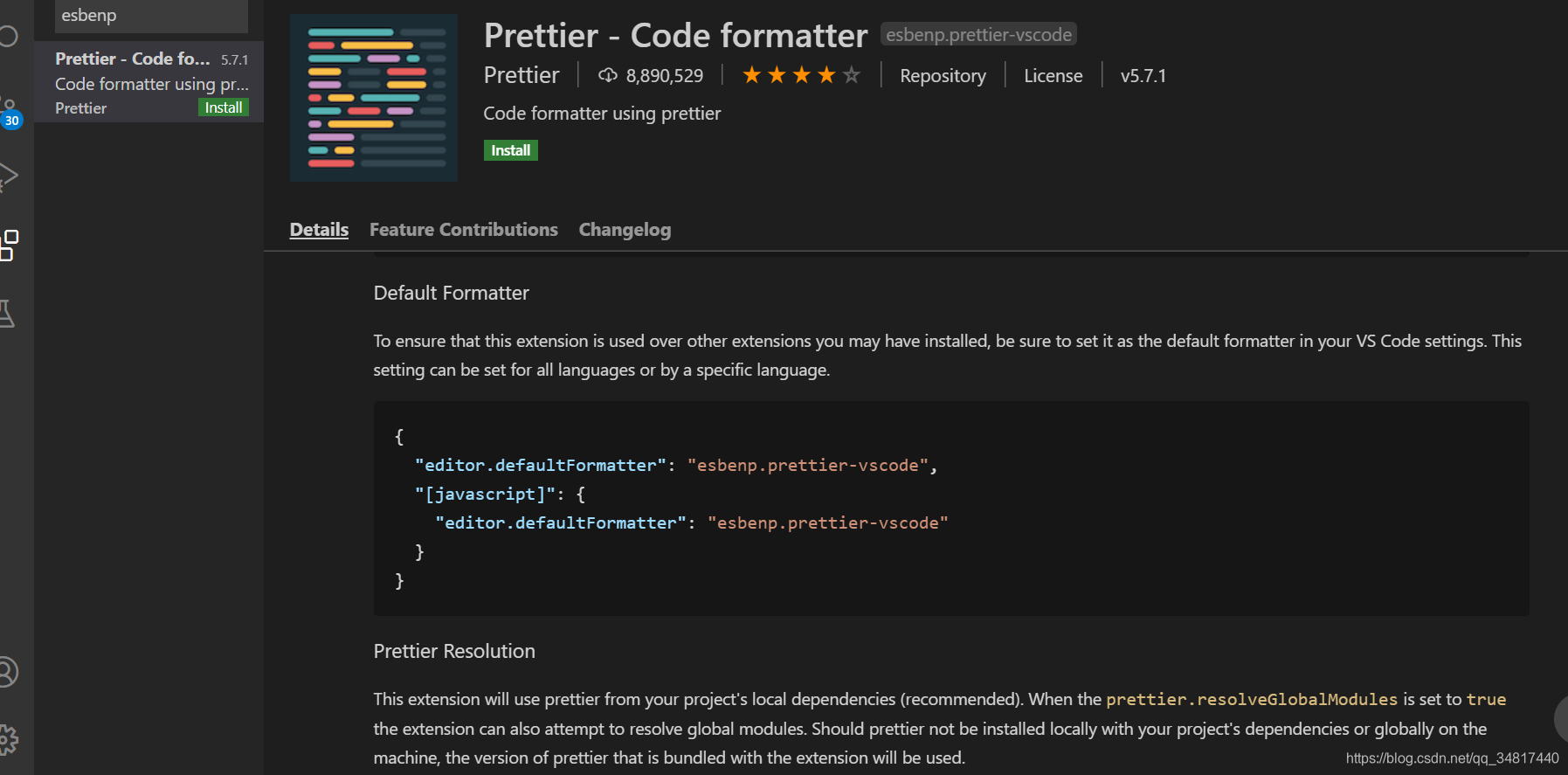
否则会提示 Extension 'esbenp.prettier-vscode' is configured as formatter but not available. Select a different default formatter to continue.
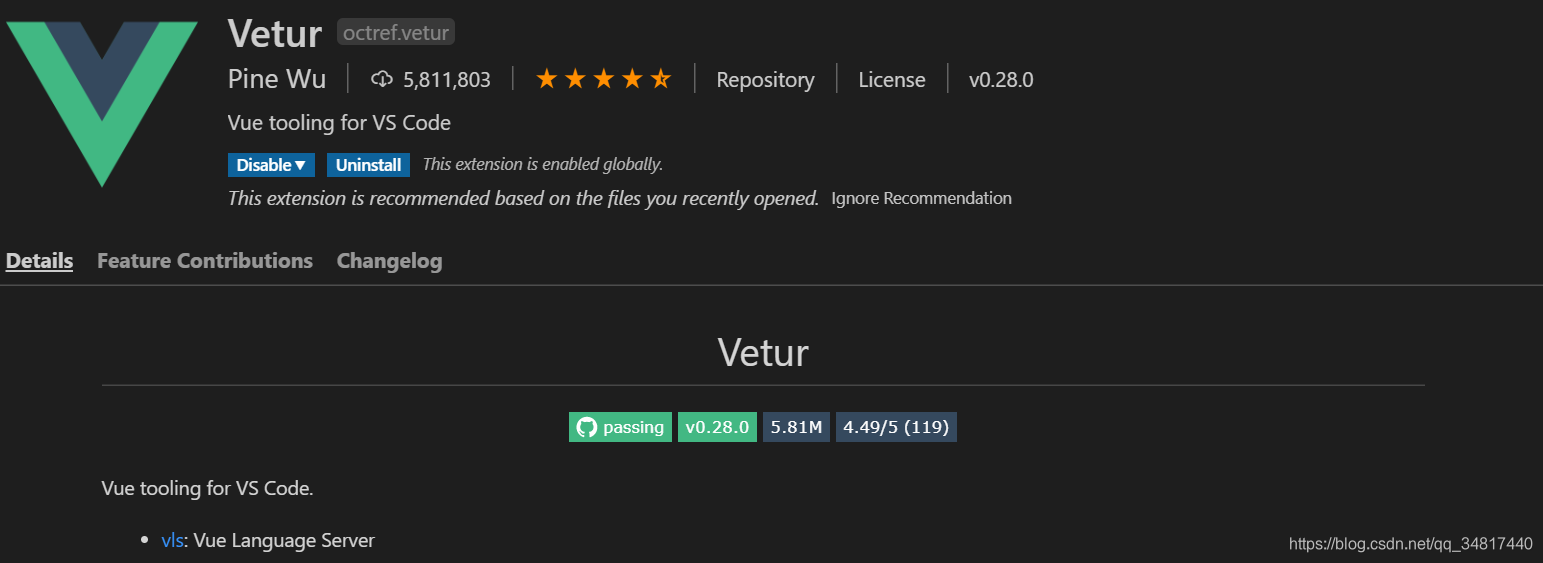
三、安装Vetur
目前vue 用的比较多,当然避不了的使用一个格式.vue的文件,如:
四、配置 setting.json
找到File > Preference > Settings > Text Editor > Code Actions On Save > Edit in setting.json打开进行编辑
截图如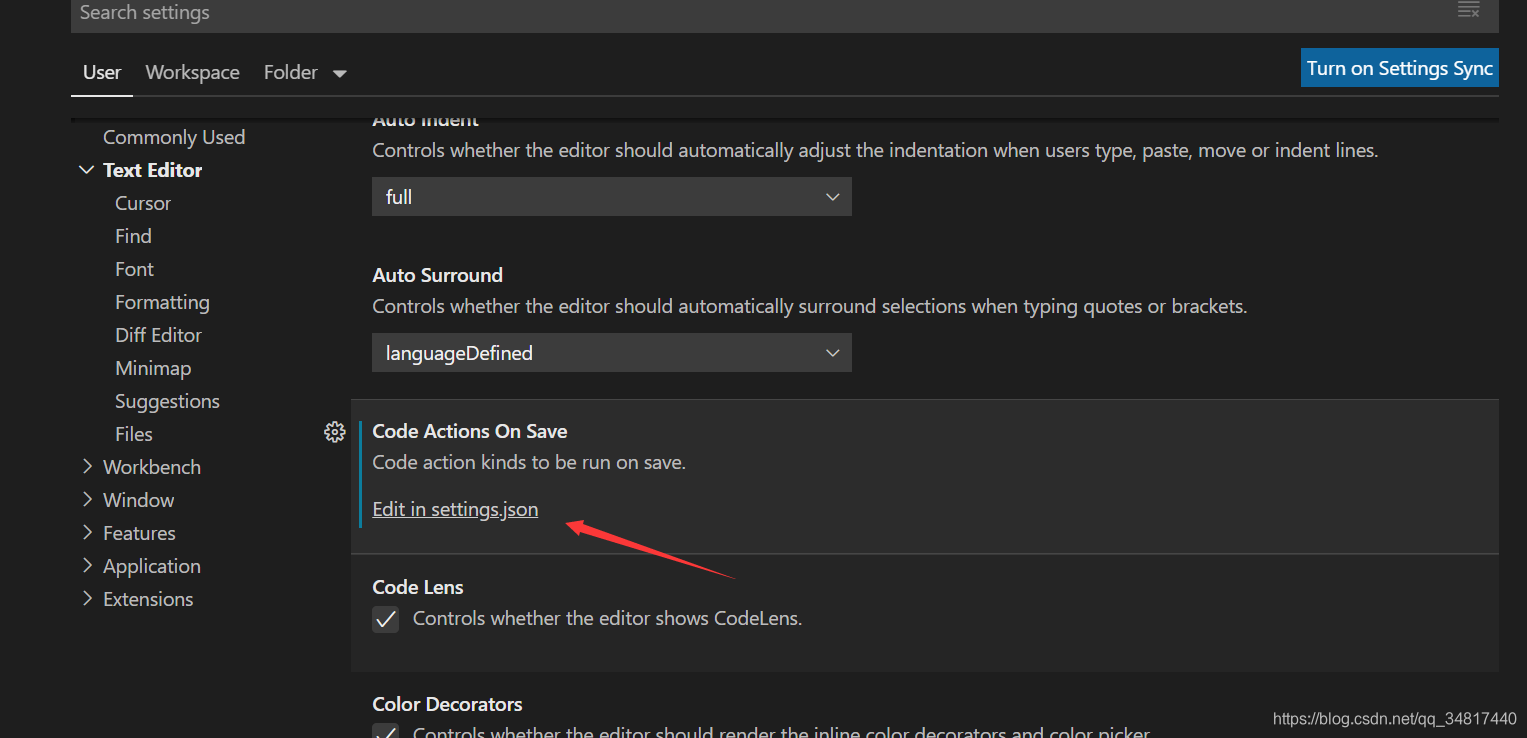
添加如下的配置到你的setting.json (这个注释很全就不过得解释了)
{

  "workbench.startupEditor": "newUntitledFile",

  "window.zoomLevel": 1, // window be show of level in ide

  "git.ignoreMissingGitWarning": true,

  "explorer.confirmDelete": false,

  "workbench.colorTheme": "One Dark Pro",

  "docthis.authorName": "tomAnny",

  "docthis.includeDescriptionTag": true,

  "docthis.includeDateTag": true,

  "docthis.includeAuthorTag": true,

  "terminal.integrated.rendererType": "dom",

  // vscode默认启用了根据文件类型自动设置tabsize的选项

  "editor.detectIndentation": false,

  // 重新设定tabsize

  "editor.tabSize": 2,

  // #每次保存的时候自动格式化

  "editor.formatOnSave": false,

  // 强制单引号

  "prettier.singleQuote": true,

  "prettier.semi": false,

  // 尽可能控制尾随逗号的打印

  "prettier.trailingComma": "all",

  // #这个按用户自身习惯选择

  "vetur.format.defaultFormatter.html": "js-beautify-html",

  // #让vue中的js按编辑器自带的ts格式进行格式化

  "vetur.format.defaultFormatter.js": "vscode-typescript",

  "vetur.format.defaultFormatterOptions": {

    "js-beautify-html": {

      "wrap_attributes": "force-aligned"

      // #vue组件中html代码格式化样式

    }

  },

  //防止VSCode启动带有node_modules的项目的时候很卡的问题

  "search.followSymlinks": false,

  "files.autoSave": "onWindowChange",

  "[vue]": {

    "editor.defaultFormatter": "octref.vetur"

  },

  "[javascript]": {

    "editor.defaultFormatter": "HookyQR.beautify"

  },

  "[scss]": {

    "editor.defaultFormatter": "HookyQR.beautify"

  },

  "[html]": {

    "editor.defaultFormatter": "HookyQR.beautify"

  },

  // #每次保存的时候将代码按eslint格式进行修复

  "editor.codeActionsOnSave": {

    "source.fixAll.eslint": true

  },

}
五、配置 .eslintrc.js
现在需要将项目中对应的elsintrc.js配置一下,来规范整个项目的代码风格,避免团队人员多了,代码五花八门,
个人配置大概如下:
module.exports = {

  root: true,

  parserOptions: {

    parser: 'babel-eslint',

    sourceType: 'module'

  },

  env: {

    browser: true,

    node: true,

    es6: true,

  },

  extends: ['plugin:vue/recommended', 'eslint:recommended'],

  // add your custom rules here

  //it is base on https://github.com/vuejs/eslint-config-vue

  rules: {

    "vue/max-attributes-per-line": [2, {

      "singleline": 10,

      "multiline": {

        "max": 1,

        "allowFirstLine": false

      }

    }],

    "vue/singleline-html-element-content-newline": "off",

    "vue/multiline-html-element-content-newline":"off",

    "vue/name-property-casing": ["error", "PascalCase"],

    "vue/no-v-html": "off",

    'accessor-pairs': 2,

    'arrow-spacing': [2, {

      'before': true,

      'after': true

    }],

    'block-spacing': [2, 'always'],

    'brace-style': [2, '1tbs', {

      'allowSingleLine': true

    }],

    'camelcase': [0, {

      'properties': 'always'

    }],

    'comma-dangle': [2, 'never'],

    'comma-spacing': [2, {

      'before': false,

      'after': true

    }],

    'comma-style': [2, 'last'],

    'constructor-super': 2,

    'curly': [2, 'multi-line'],

    'dot-location': [2, 'property'],

    'eol-last': 2,

    'eqeqeq': ["error", "always", {"null": "ignore"}],

    'generator-star-spacing': [2, {

      'before': true,

      'after': true

    }],

    'handle-callback-err': [2, '^(err|error)$'],

    'indent': [2, 2, {

      'SwitchCase': 1

    }],

    'jsx-quotes': [2, 'prefer-single'],

    'key-spacing': [2, {

      'beforeColon': false,

      'afterColon': true

    }],

    'keyword-spacing': [2, {

      'before': true,

      'after': true

    }],

    'new-cap': [2, {

      'newIsCap': true,

      'capIsNew': false

    }],

    'new-parens': 2,

    'no-array-constructor': 2,

    'no-caller': 2,

    'no-console': 'off',

    'no-class-assign': 2,

    'no-cond-assign': 2,

    'no-const-assign': 2,

    'no-control-regex': 0,

    'no-delete-var': 2,

    'no-dupe-args': 2,

    'no-dupe-class-members': 2,

    'no-dupe-keys': 2,

    'no-duplicate-case': 2,

    'no-empty-character-class': 2,

    'no-empty-pattern': 2,

    'no-eval': 2,

    'no-ex-assign': 2,

    'no-extend-native': 2,

    'no-extra-bind': 2,

    'no-extra-boolean-cast': 2,

    'no-extra-parens': [2, 'functions'],

    'no-fallthrough': 2,

    'no-floating-decimal': 2,

    'no-func-assign': 2,

    'no-implied-eval': 2,

    'no-inner-declarations': [2, 'functions'],

    'no-invalid-regexp': 2,

    'no-irregular-whitespace': 2,

    'no-iterator': 2,

    'no-label-var': 2,

    'no-labels': [2, {

      'allowLoop': false,

      'allowSwitch': false

    }],

    'no-lone-blocks': 2,

    'no-mixed-spaces-and-tabs': 2,

    'no-multi-spaces': 2,

    'no-multi-str': 2,

    'no-multiple-empty-lines': [2, {

      'max': 1

    }],

    'no-native-reassign': 2,

    'no-negated-in-lhs': 2,

    'no-new-object': 2,

    'no-new-require': 2,

    'no-new-symbol': 2,

    'no-new-wrappers': 2,

    'no-obj-calls': 2,

    'no-octal': 2,

    'no-octal-escape': 2,

    'no-path-concat': 2,

    'no-proto': 2,

    'no-redeclare': 2,

    'no-regex-spaces': 2,

    'no-return-assign': [2, 'except-parens'],

    'no-self-assign': 2,

    'no-self-compare': 2,

    'no-sequences': 2,

    'no-shadow-restricted-names': 2,

    'no-spaced-func': 2,

    'no-sparse-arrays': 2,

    'no-this-before-super': 2,

    'no-throw-literal': 2,

    'no-trailing-spaces': 2,

    'no-undef': 2,

    'no-undef-init': 2,

    'no-unexpected-multiline': 2,

    'no-unmodified-loop-condition': 2,

    'no-unneeded-ternary': [2, {

      'defaultAssignment': false

    }],

    'no-unreachable': 2,

    'no-unsafe-finally': 2,

    'no-unused-vars': [2, {

      'vars': 'all',

      'args': 'none'

    }],

    'no-useless-call': 2,

    'no-useless-computed-key': 2,

    'no-useless-constructor': 2,

    'no-useless-escape': 0,

    'no-whitespace-before-property': 2,

    'no-with': 2,

    'one-var': [2, {

      'initialized': 'never'

    }],

    'operator-linebreak': [2, 'after', {

      'overrides': {

        '?': 'before',

        ':': 'before'

      }

    }],

    'padded-blocks': [2, 'never'],

    'quotes': [2, 'single', {

      'avoidEscape': true,

      'allowTemplateLiterals': true

    }],

    'semi': [2, 'never'],

    'semi-spacing': [2, {

      'before': false,

      'after': true

    }],

    'space-before-blocks': [2, 'always'],

    'space-before-function-paren': [2, 'never'],

    'space-in-parens': [2, 'never'],

    'space-infix-ops': 2,

    'space-unary-ops': [2, {

      'words': true,

      'nonwords': false

    }],

    'spaced-comment': [2, 'always', {

      'markers': ['global', 'globals', 'eslint', 'eslint-disable', '*package', '!', ',']

    }],

    'template-curly-spacing': [2, 'never'],

    'use-isnan': 2,

    'valid-typeof': 2,

    'wrap-iife': [2, 'any'],

    'yield-star-spacing': [2, 'both'],

    'yoda': [2, 'never'],

    'prefer-const': 2,

    'no-debugger': process.env.NODE_ENV === 'production' ? 2 : 0,

    'object-curly-spacing': [2, 'always', {

      objectsInObjects: false

    }],

    'array-bracket-spacing': [2, 'never']

  }

}
关于该ESlint 配置详解请移步 ESlint配置详解这一篇进行查看
六、配置 .editorconfig
再配置一个代码 空格,缩进、换行等规范
看看官方对这个editor的介绍
What is EditorConfig?
EditorConfig helps maintain consistent coding styles for multiple developers working on the same project across various editors and IDEs. The EditorConfig project consists of a file format for defining coding styles and a collection of text editor plugins that enable editors to read the file format and adhere to defined styles. EditorConfig files are easily readable and they work nicely with version control systems.
# https://editorconfig.org

root = true

[*]

charset = utf-8

indent_style = space

indent_size = 2

end_of_line = lf

insert_final_newline = true

trim_trailing_whitespace = true

[*.md]

insert_final_newline = false

trim_trailing_whitespace = false
OK 配置完成现在可以开始开心的编码了(闲时整理忙时用,避免一台新电脑片地找配置)
vscode 配置代码自动格式化加修复的更多相关文章
- vs code配置vue自动格式化
vs code配置vue自动格式化 我他妈的要被这个vs code的格式化逼疯了.我在网上看了很多的文章,不是太老就是不好使,遇到太多坑了.在这贴出自己的配置,虽然有多余的代码,虽然可能在未来的更新 ...
- 在VSCode中配置代码自动 eslint 格式化 (实测有用)
一.Eslint Eslint 是用来检测和规范代码格式的工具,应用在工程化项目中,可以保证项目代码格式的一致性和规范性,大大提升了代码的可读性. 二.配置过程 本博客是讲述对一个已经引用 esl ...
- prettier+ts+eslint+vscode配置代码保存自动格式化,自动remove unsed declaration,delete no-unused-imports
每天都要开心(▽)哇: 以这个项目为案例 下面是项目的基本情况 What would you like to build? › App with Quasar CLI, let's go! Proje ...
- vue eslint 代码自动格式化
vue-cli 代码风格为 JavaScript Standard Style 代码检查规范严格,一不小心就无法运行,使用eslint的autoFixOnSave可以在保存代码的时候自动格式化代码 V ...
- 配置 ESLint 自动格式化自闭合标签(Self closing tag)
对于没有子元素或不需要子元素的 HTML 标签,通常写成其自闭合的形式会显得简洁些, - <SomeComponent></SomeComponent> + <SomeC ...
- 关于eclispe保存代码自动格式化的设置
最近在项目开发,上级要求所有开发人员,代码必须格式和(Ctrl+Shift+F),但是还是会偶尔忘记格式化,今天看了有一种保存之后eclipse可以自动格式代码的设置 1.请大家在eclipse设置下 ...
- visual studio粘贴html代码.会自行添加一些未知代码(自动格式化)
比如我们要粘贴这样一段代码到VS这里 <option {if empty($param.is_active)}selected=selected{/if}>请选择</option&g ...
- Eclipse中对Python代码自动格式化!
在Eclipse中使用PyDev发现无法进行代码格式化,使用通常的"Ctrl+Shift+F"快捷键,没有任何变化,难道不能对python代码格式化了吗? 通过下面设置,就可以每次 ...
- Pascal代码自动格式化
const WEnter=; key=; next_line:..WEnter]of string=(';','begin','else','then','repeat','do','var'); k ...
- eclipse配置代码自动提示
Eclipse默认只有"."之后才有代码提示. [windows-->preferences] 把这里的点改成[.abcdefghijklmnopqrstuvwxyzABCD ...
随机推荐
- 每次新建项目都要重新配置Maven项目很麻烦,这里出一个小技巧,配置一次就直接搞定所有的
Maven一次配置永久使用教程 首先,打开IDEA,将你目前放出来的项目关掉:(File->Close Project) 其次,在左侧栏里面选择这个: 然后,选择中间的这里: 接着,在弹出的页面 ...
- GCC编译器编译过程
GCC编译器编译过程 #生成test可执行文件 g++ test.cpp -o test 其实,上述命令可以分解为以下几个步骤 1. 预处理-Pre-Processing # -E 选择指示编译器仅对 ...
- 如何针对海外不同地区进行音视频自动化测试?丨Dev for Dev 专栏
近年来由于全球性的新冠疫情,世界各地对实时音视频的需求猛增.不同国家和地区由于经济发展.国家政策等原因,网络环境有很大不同,如果要做好音视频体验,就需要分地域进行音视频指标测试.但是不论是外包,还是云 ...
- swagger-ui 导出离线文档md格式
<dependency> <groupId>io.github.swagger2markup</groupId> <artifactId>swagger ...
- 深度学习之PyTorch实战(4)——迁移学习
(这篇博客其实很早之前就写过了,就是自己对当前学习pytorch的一个教程学习做了一个学习笔记,一直未发现,今天整理一下,发出来与前面基础形成连载,方便初学者看,但是可能部分pytorch和torch ...
- 有了HTTP,为啥还要用RPC
既然有 HTTP 请求,为什么还要用 RPC 调用? 一直以来都没有深究过RPC和HTTP的区别,不都是写一个服务然后在客户端调用么? HTTP和RPC最本质的区别,就是 RPC 主要是基于 TCP/ ...
- 管理WEB服务器文件的WebDAV协议&HTTP大跃进--QUIC与HTTP30&WEB安全攻击概述
管理WEB服务器文件的WebDAV协议 WebADV协议 WEBDAV追加方法 WeDAV请求示例 HTTP大跃进--QUIC与HTTP30 QUIC&HTTP3.0 HTTP2.0的问题 队 ...
- vue之数组的方法
目录 简介 filter方法 简介 本文会把遇到的数组的方法慢慢补充进来 filter方法 filter()方法是一个过虑方法 以下面的为例:列表dataList会每次取一个值,把值给匿名函数,并执行 ...
- [Linux]常用命令之【netstat/ps/lsof/ss/kill/】#进程/服务/端口#
查看系统中最近的端口连接记录 [root@sdc01 ~]# lsof -Pnl +M -i4 | grep "154" sshd 30963 0 3u IPv4 65160732 ...
- C# System.lnvalidOperationException:"A second operation started on this context before a previousoperation completed. This is usually caused by different threads using the same instance ofDbContext...
与上一篇问题一样,只是错误不一样,DbContext 不支持并发请求,每个数据库操作都使用await就可以了