
vue基础入门综合项目练习-悦听播放器
1、简介
根据B站视频 黑马程序员vue前端基础教程-4个小时带你快速入门vue 学习制作。
再次感谢 免费无私的教学视频。
感谢 @李予安丶 提供的精美的css。
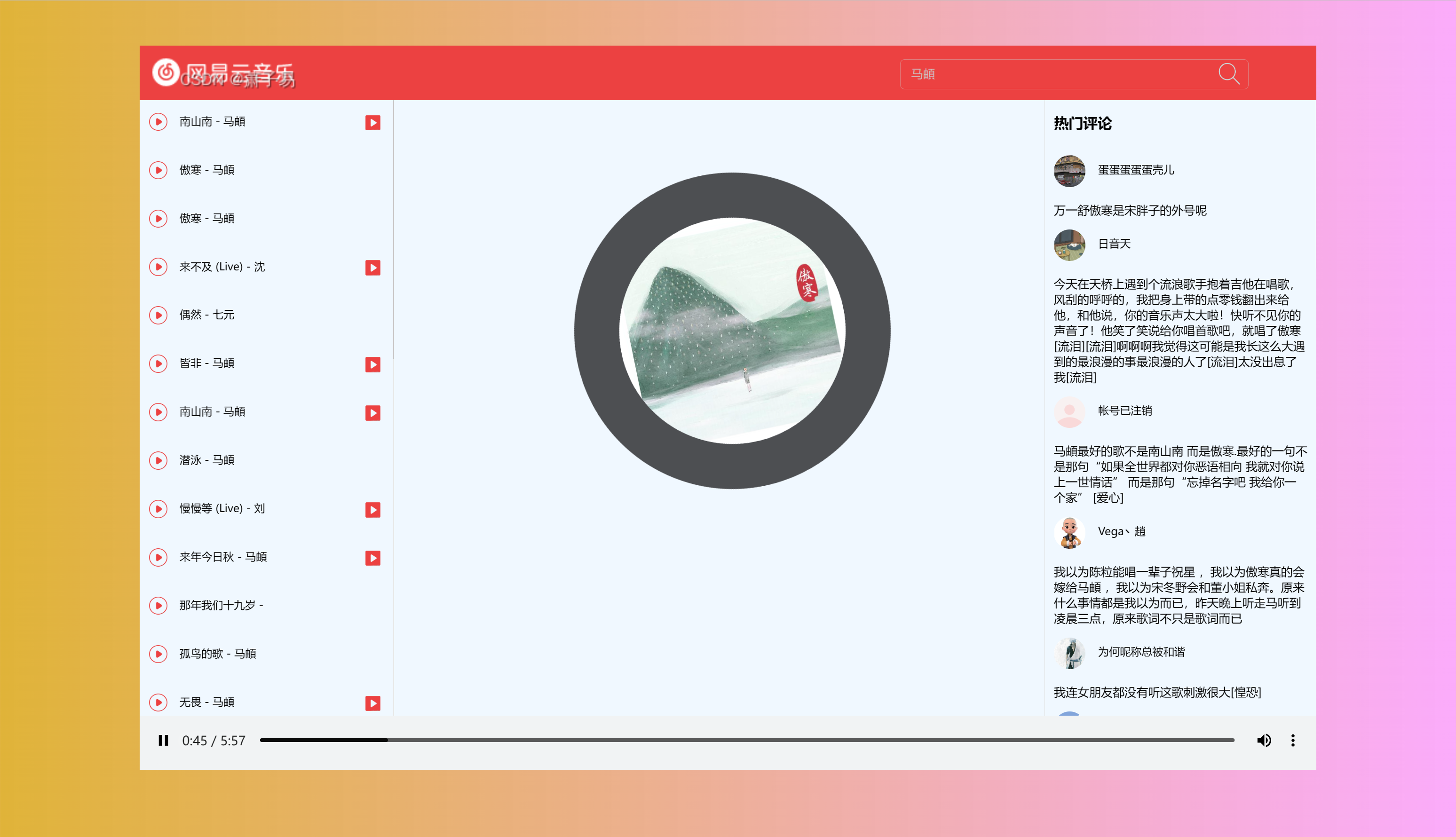
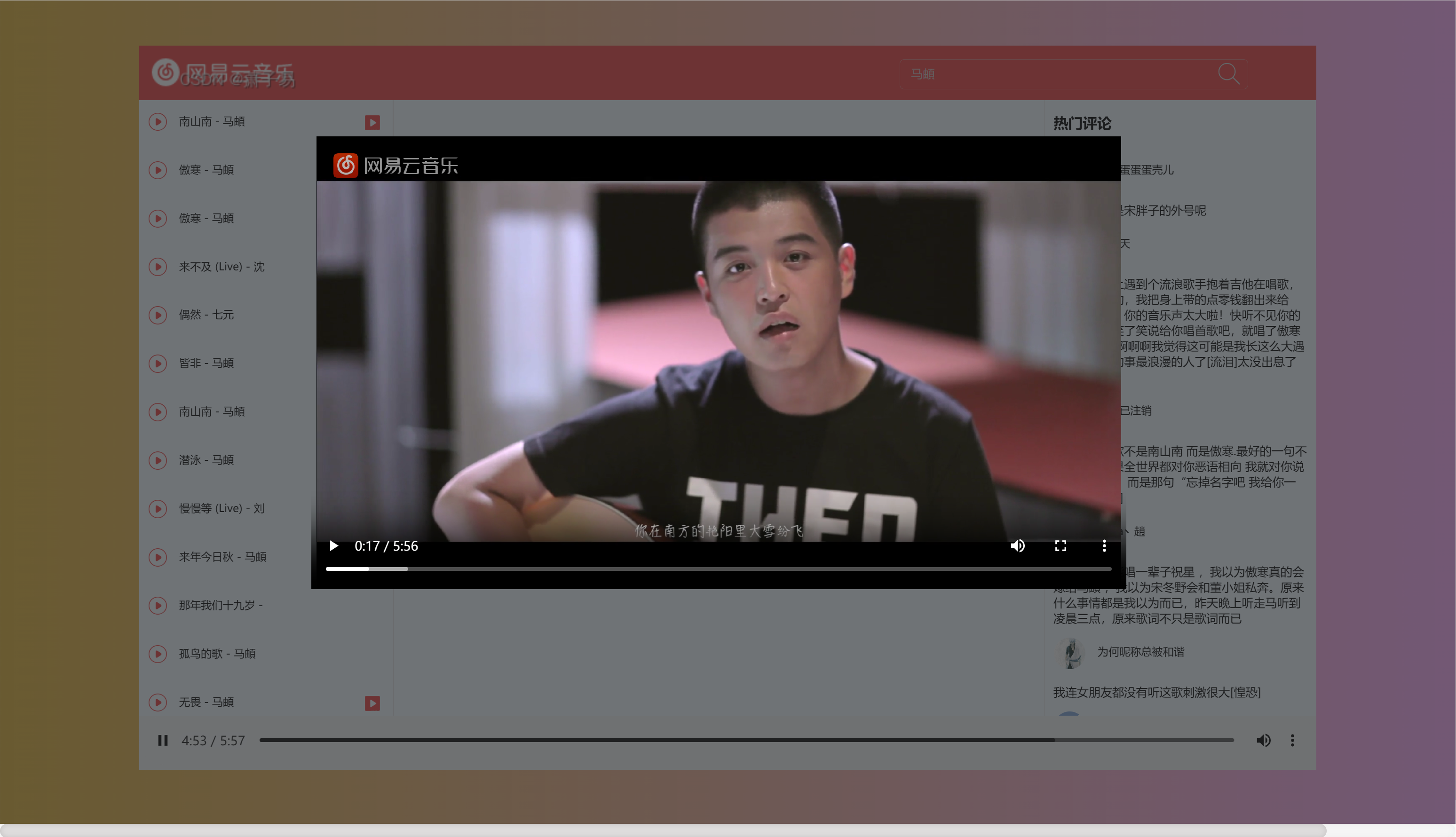
2、展示
3、技术点
- vue2
- axios
4、功能说明
4.1、基本功能
- 搜索歌曲
- 播放歌曲
- 显示歌曲热评
- 播放MV
4.2、修复问题
- 点击MV后音乐无法暂停
- 关闭MV后mv仍在后台播放
5、源代码
作为入门vue的代码,采用的是单文件的形式去编写。
因为html,css,js各自代码有一点多,因此为了提升逻辑性,分开为三个文件。
注意引用css和js的引用路径
5.1 html代码
Show Code
<head>
<meta charset="UTF-8">
<meta http-equiv="X-UA-Compatible" content="IE=edge">
<meta name="viewport" content="width=device-width, initial-scale=1.0">
<title>悦听~</title>
<link rel="icon" href="http://s1.music.126.net/style/favicon.ico?v20180823">
<!-- 引入自定义css -->
<link rel="stylesheet" href="./19.css">
</head>
<body>
<div id="app">
<header>
<span class="app-title">
<img src="./19.title.png">
</span>
<!-- 搜索歌曲 -->
<span class="app-search">
<input type="text" placeholder="搜索歌曲..." v-model="keywords" @keyup.enter="getMusicInfo" />
<a href="javascript:void(0);" @click="getMusicInfo">
<img src="./19.search.png">
</a>
</span>
</header><main>
<!-- 歌曲列表 -->
<div class="music-list">
<ul>
<li v-for="(item,index) in musicList">
<a href="#">
<img src="./19.run.png" class="music-run-image" @click="playMusic(item.id)">
<span class="music-name" @click="playMusic(item.id)">
{{ item.name }} - {{item.artists[0].name}}
</span>
<img v-if="item.mvid!=0" @click="playMv(item.mvid)" src="./19.mv.png"
class="music-mv-image">
</a>
</li>
</ul>
</div>
<!-- 歌曲专辑封面 -->
<div class="music-main">
<img :src="picUrl" v-show="picUrl!=''" class="music-cover" :class="isPlay?'running':'paused'">
</div>
<!-- 热评列表 -->
<div class="comment-list">
<span class="comment-title">热门评论</span>
<ul>
<li v-for="item in hotCommentList">
<img class="user-header" :src="item.user.avatarUrl">
<span class="username">{{ item.user.nickname }}</span>
<p>{{ item.content }}</p>
</li>
</ul>
</div>
</main> <!-- 音乐 -->
<footer>
<audio :src="musicUrl" class="music-player" @play="play" @pause="pause" controls autoplay loop></audio>
</footer>
<!-- mv视频 -->
<div class="music-mv" v-show="isMvShow" @click="closeMusicMv">
<video :src="mvUrl" controls autoplay loop></video>
</div>
</div> <!-- 导入vue.js -->
<script src="https://cdn.jsdelivr.net/npm/vue@2/dist/vue.js"></script>
<!-- 导入axios -->
<script src="https://unpkg.com/axios/dist/axios.min.js"></script>
<!-- 引入自己编写的js -->
<script src="./19.js"></script>
</body>
5.2 css代码 (html中为19.css)
Show Code
body {

    background-image: linear-gradient(to left, rgba(248, 121, 248, 0.623), rgba(216, 160, 6, 0.795));

}
app {
position: relative;

width: 1300px;

height: 800px;

background-color: aliceblue;

margin: 50px auto;


}
header {


width: 100%;


height: 60px;


background-color: #ec4141;


}
.app-title {


float: left;


}
.app-title img {


height: 60px;


}
.app-search {


display: block;


float: right;


width: 600px;


height: 60px;


}
.app-search input {


outline: none;


background-color: #ec4141a6;


border: 1px solid #cebdbd7a;


width: 380px;


line-height: 30px;


margin: 15px 140px;


font-size: 13px;


border-radius: 5px;


text-indent: 10px;


color: #cebdbdfd;


}
.app-search input:focus {


border: 1px solid #cebdbdfd;


}
.app-search img {


width: 28px;


position: relative;


top: -46px;


left: 490px;


}
footer {


float: left;


width: 100%;


height: 60px;


background-color: #f1f3f4;


}
.music-list {


float: left;


height: 680px;


width: 280px;


position: relative;


left: -191px;


border-right: 1px solid #e0e0e0;


overflow-x: hidden;


overflow-y: auto;


}
.music-list ul {


list-style: none;


margin-top: 0px;


}
.music-list ul li a {


text-decoration: none;


color: black;


display: block;


line-height: 46px;


width: 278px;


margin-left: -40px;


text-indent: 20px;


font-size: 12px;


}
.music-list ul li a:hover {


background-color: #a8a4a433;


}
.music-run-image {


width: 20px;


position: relative;


left: -10px;


top: -1px;


}
.music-name {


display: inline-block;


width: 120px;


height: 35px;


overflow: hidden;


margin-left: -20px;


}
.music-mv-image {


width: 20px;


position: relative;


left: 100px;


top: 0px;


}
.comment-list {


float: right;


height: 680px;


width: 300px;


border-left: 1px solid #e0e0e0;


overflow: hidden;


overflow-y: auto;


}
.comment-list ul li {


width: 280px;


padding-left: 10px;


list-style: none;


font-size: 13px;


position: relative;


left: -40px;


}
.comment-title {


display: block;


line-height: 40px;


text-indent: 10px;


margin-top: 5px;


font-weight: 800;


}
.user-header {


width: 35px;


height: 35px;


border-radius: 50%;


}
.username {


position: relative;


top: -15px;


left: 10px;


font-size: 12px;


}
.music-main {


height: 680px;


width: 700px;


position: absolute;


left: 300px;


}
.music-cover {


width: 250px;


position: relative;


left: 180px;


top: 80px;


border-radius: 50%;


border: 50px solid #2a2b2dd2;


animation: fadenum 30s infinite linear;


}
.music-detail {


display: block;


color: #2a2b2dab;


position: relative;


text-align: center;


top: 120px;


}
.paused {


animation-play-state:paused;


}
.running {


animation-play-state:running;


}
@keyframes fadenum {


100% {


transform: rotate(360deg);


}


}
::-webkit-scrollbar {


width: 1px;


height: 16px;


background-color: #F5F5F5;


}
::-webkit-scrollbar-track {


-webkit-box-shadow: inset 0 0 6px rgba(126, 123, 123, 0.103);


border-radius: 10px;


background-color: #F5F5F5;


}
::-webkit-scrollbar-thumb {


border-radius: 10px;


-webkit-box-shadow: inset 0 0 6px rgba(139, 136, 136, 0.3);


background-color: rgba(199, 196, 196, 0.507);


}
.music-player {


width: 1300px;


}
.music-mv {


position: absolute;


z-index: 9999;


width: 1920px;


height: 937px;


background-color: #2a2b2da6;


top: -50px;


left: -310px;


}
.music-mv video {


position: relative;


width: 900px;


height: 500px;


left: 500px;


top: 150px;


}
5.3 js代码(html中为19.js)
Show Code
var vue = new Vue({

    el:"#app",

    data: {

        // 查询关键词

        keywords: "",

        // 歌曲列表

        musicList: [],

        // 热评列表

        hotCommentList: [],

        // 封面地址

        picUrl: "",

        // 歌曲地址

        musicUrl: "",

        // 动画播放状态

        isPlay: false,

        // mv地址

        mvUrl: "",

        // mv显示隐藏

        isMvShow: ""

    },

    methods: {

        getMusicInfo: function() {

            var that = this;

            axios.get("https://autumnfish.cn/search?keywords=" + that.keywords)

            .then(function(response) {

                console.log(response.data.result.songs)

                that.musicList = response.data.result.songs;

            }, function(err) {})

        },

        playMusic: function(id) {

            var that = this;

            // 拼接歌曲地址

            this.musicUrl = "https://music.163.com/song/media/outer/url?id="+id+".mp3"

            console.log(this.musicUrl);
        //获取歌曲详情

        axios.get("https://autumnfish.cn/song/detail?ids=" + id)

        .then(function(response) {

            console.log(response)

            that.picUrl = response.data.songs[0].al.picUrl;

        }, function(err) {})

        //获取热评

        axios.get("https://autumnfish.cn/comment/hot?type=0&id=" + id)

        .then(function(response) {

            console.log(response)

            that.hotCommentList = response.data.hotComments;

        }, function(err) {})

        that.isPlay = true;

    },

    play: function() {

        console.log("play");

        this.isPlay = true;

    },

    pause: function() {

        console.log("pause");

        this.isPlay = false;

    },

    playMv: function(mvid) {

        var that = this;

        // 暂停播放音乐

        document.querySelector("audio").pause();

        // 暂停封面动画

        that.isPlay = false;

        //获取mv地址

        axios.get("https://autumnfish.cn/mv/url?id=" + mvid)

        .then(function(response) {

            console.log(response)

            // 播放mv

            that.isMvShow = true;

            that.mvUrl = response.data.data.url;

        }, function(err) {})

    },

    closeMusicMv: function() {

        // 隐藏mv

        this.isMvShow = false;

        // 暂停播放mv

        document.querySelector("video").pause();

    }

}


})
PS:
网易云开始全面扩张VIP歌曲范围了,其中包括了我最爱的薛之谦。
vue基础入门综合项目练习-悦听播放器的更多相关文章
- vue基础入门(2.1)
2.vue基础用法 2.1.事件处理 2.1.1.监听事件 使用v-on:事件名称 = '事件处理函数'的形式来监听事件,事件处理函数要写在methods后面的对象中 <!DOCTYPE htm ...
- 【音乐App】—— Vue-music 项目学习笔记:播放器内置组件开发(二)
前言:以下内容均为学习慕课网高级实战课程的实践爬坑笔记. 项目github地址:https://github.com/66Web/ljq_vue_music,欢迎Star. 播放模式切换 歌词滚动显示 ...
- 02 Vue介绍与安装,指令系统 v-*、音乐播放器
VUE文档 https://cn.vuejs.org/v2/guide/ 1.vue的介绍 尤雨溪 1.vue的优点 2.vue的介绍 3.vue的安装 4.声明式渲染 <body> &l ...
- vue基础入门
Hello World <body> <!-- 在angularJS中用ng-model --> <!-- {{mseeage?message:11}}支持三元表达式 ...
- vue基础入门(4)
4.综合实例 4.1.基于数据驱动的选项卡 4.1.1.需求 需求说明: 1. 被选中的选项按钮颜色成橙色 2. 完成被选中选项下的数据列表渲染 3. 完成选项切换 4.1.2.代码实现 <!D ...
- Vue学习笔记-Vue基础入门
此篇文章是本人在学习Vue是做的部分笔记的一个整理,内容不是很全面,希望能对阅读文章的同学有点帮助. 什么是Vue? Vue.js (读音 /vjuː/,类似于 view) 是一套构建用户界面的渐进式 ...
- Vue基础入门笔记
不是面向DOM进行编程,而是面向数据去编程.当数据发生改变,页面就会随着改变. 属性绑定(v-bind)和双向数据绑定(v-model) 模板指令(v-bind:)后面跟的内容不再是字符串而是: js ...
- vue基础入门(3)
3.组件基础 3.1.什么是组件? 3.1.1.理解组件 前端组件化开发是目前非常流行的方式,什么是前端组件化开发呢?就是将页面的某一部分独立出来,将这一部分的数据.视图.以及一些控制逻辑封装到一个组 ...
- vue基础入门(2.3)
2.3.样式绑定 2.3.1.绑定class样式 1.绑定单个class <!DOCTYPE html> <html lang="en"> <head ...
- vue基础入门(2.2)
2.2.基础指令 2.2.1.什么是指令 指令 (Directives) 是带有 v- 前缀的特殊特性,指令特性的值预期是单个 JavaScript 表达式,指令的职责是,当表达式的值改变时,将其产生 ...
随机推荐
- mimikatz和procdump的密码抓取
mimikatz mimikatz功能很强大,主要使用就是提取明文密码.哈希.PIN码和Kerberos凭证. 常用的只有两条命令: 注意:运行时使用管理员身份运行 privilege::debug ...
- JavaWeb笔记第一弹
一.MYSQL的安装 1.MYSQL的安装 可以去官网找到与自身计算机向对应的版本进行下载 网址如下: MySQL :: Download MySQL Community Server 2.MYSQL ...
- MySQL学习(三)DQL/DML/DDL/DCL 介绍
参考博客:https://blog.csdn.net/tomatofly/article/details/5949070 DQL(data query language) :数据查询语言 select ...
- Java项目是不是分布式,真有那么重要吗?
大家好,我是3y啊. 大概不知道从什么时候,「微服务」「分布式」这两个词又再次频繁出现在我的视线里. 「微服务」「分布式」在我刚毕业的时候还是比较关注的,那时候还入门了一把SpringCloud,写了 ...
- ZGC 最新一代垃圾回收器[NO]
ZGC(The Z Garbage Collector)是JDK 11中推出的一款低延迟垃圾回收器,ZGC可以说源自于 Azul System 公司开发的C4收集器[基本不用调优]它的设计目标包括: ...
- 【接口测试】Postman(二)-Postman Echo
Postman Echo Postman Echo为用户提供API调用的示例服务.简而言之,就是官方提供的一个API帮助文档.初学者可以通过它很快的掌握Postman工具.我们下面将一一介绍他们. ...
- pta第一到第三次题目集
(1)前言 pta第一次作业的7-1,7-2,7-4主要熟悉运用了 if-else 的语句使用,以及运用System.out.printf进行格式化输出,7-3九九乘法表主要学会了运用for循环及多重 ...
- JQ-DOM与元素的操作
<!DOCTYPE html> <html lang="en"> <head> <meta charset="UTF-8&quo ...
- THM-被动侦察和主动侦查
被动与主动侦察 在计算机系统和网络出现之前,孙子兵法在孙子兵法中教导说:"知己知彼,必胜不疑." 如果您扮演攻击者的角色,则需要收集有关目标系统的信息.如果你扮演防御者的角色,你需 ...
- SQL Case条件判断语句
问题描述:在表中取到一些值做出判断,配合监控监测一些表中的数据.使用select case when if 来做条件查询判断 CASE 表达式遍历条件并在满足第一个条件时返回一个值(类似于 if-th ...