
【Shiro】04 ini授权实现
【授权概念】
访问控制,即在应用中控制谁能访问哪些资源(如访问页面/编辑数据/页面操作等)。
在授权中需了解的几个关键对象:主体(Subject)、资源(Resource)、权限(Permission)、角色(Role)。
授权的前提是认证通过。
(简单说,我只有进系统了我才能知道我可以做什么,系统都进不了怎么授权)
【关键对象】
1,主体
主体,即访问应用的用户,在Shiro中使用Subject代表该用户。
用户只有授权后才允许访问相应的资源。
2,资源
在应用中用户可以访问的任何东西,
比如访问JSP 页面、查看/编辑某些数据、访问某个业务方法、打印文本等等都是资源。
用户只要授权后才能访问。
3,权限
安全策略中的原子授权单位,通过权限我们可以表示在应用中用户有没有操作某个资源的权力。
即权限表示在应用中用户能不能访问某个资源,
如:访问用户列表页面查看/新增/修改/删除用户数据(即很多时候都是CRUD(增查改删)式权限控制)打印文档等等。。。
4,角色
角色代表了操作集合,可以理解为权限的集合,
一般情况下我们会赋予用户角色而不是权限,即这样用户可以拥有一组权限,赋予权限时比较方便。
典型的如:项目经理、技术总监、CTO、开发工程师等都是角色,不同的角色拥有一组不同的权限。
【授权流程】
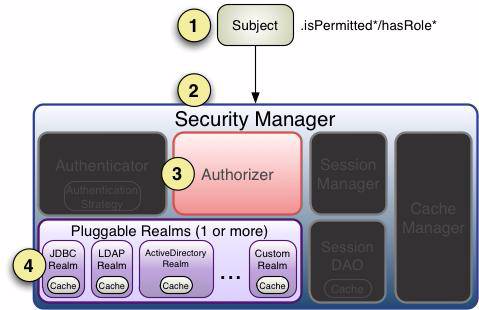
【相关方法】
1 subject.hasRole("");

判断是否有角色

2 subject.hashRoles(List);

分别判断用户是否具有List中每个内容

3 subject.hasAllRoles(Collection);

返回boolean,要求参数中所有角色用户都需要具有.

4 subject.isPermitted("");

判断是否具有权限.
【shiro.ini配置】
#配置用户

[users]

admin=123456,role1

user01=123456,role2

user02=123456,role3

user03=123456,role2,role3

#声明角色

[roles]

role1=user:query,user:add,user:update,user:delete,user:export

role2=user:query,user:add

role3=user:query,user:export
测试类编写:
    // 日志输出工具

    private static final transient Logger log = LoggerFactory.getLogger(AuthenticationTest.class);

    @SuppressWarnings("deprecation")

    public static void main(String[] args) {

        String username = "admin";

        String password = "123456";

        log.info("My First Apache Shiro Application");

        DefaultSecurityManager defaultSecurityManager = new DefaultSecurityManager();

        defaultSecurityManager.setRealm(new IniRealm("classpath:shiro.ini"));

        SecurityUtils.setSecurityManager(defaultSecurityManager);

        Subject subject = SecurityUtils.getSubject();

        try {

            subject.login(new UsernamePasswordToken(username, password));

            log.info("登陆成功");

        } catch (AuthenticationException authenticationException) {

            authenticationException.printStackTrace();

            log.error("用户名称或者密码不符合");

        }

        // 是否认证通过

        boolean authenticated = subject.isAuthenticated();

        log.info("是否认证通过:"+authenticated);

        // 角色验证

        boolean hasRole1 = subject.hasRole("role1");

        log.info("是否有role1的角色:"+hasRole1);

        //分别判断集合里面的角色 返回数组

        List<String> roleIdentifiers= Arrays.asList("role1","role2","role3");

        boolean[] hasRoles = subject.hasRoles(roleIdentifiers);

        for (boolean hasRole : hasRoles) {

            log.info(String.valueOf(hasRole));

        }

        //判断当前用户是否有roleIdentifiers集合里面的所有角色

        boolean hasAllRoles = subject.hasAllRoles(roleIdentifiers);

        log.info(String.valueOf(hasAllRoles));

        // ----------------------------------------------------------

        //权限判断

        boolean permitted = subject.isPermitted("user:query");

        log.info("判断当前用户是否有user:query的权限  "+permitted);

        boolean[] permitted2 = subject.isPermitted("user:query","user:add","user:export");

        for (boolean b : permitted2) {

            log.info(String.valueOf(b));

        }

        boolean permittedAll = subject.isPermittedAll("user:query","user:add","user:export");

        log.info(String.valueOf(permittedAll));

    }
测试结果:
[main] INFO AuthenticationTest - My First Apache Shiro Application

[main] INFO org.apache.shiro.session.mgt.AbstractValidatingSessionManager - Enabling session validation scheduler...

[main] INFO AuthenticationTest - 登陆成功

[main] INFO AuthenticationTest - 是否认证通过:true

[main] INFO AuthenticationTest - 是否有role1的角色:true

[main] INFO AuthenticationTest - true

[main] INFO AuthenticationTest - false

[main] INFO AuthenticationTest - false

[main] INFO AuthenticationTest - false

[main] INFO AuthenticationTest - 判断当前用户是否有user:query的权限  true

[main] INFO AuthenticationTest - true

[main] INFO AuthenticationTest - true

[main] INFO AuthenticationTest - true

[main] INFO AuthenticationTest - true

Process finished with exit code 0
【Shiro】04 ini授权实现的更多相关文章
- Apache shiro集群实现 (二) shiro 的INI配置
Apache shiro集群实现 (一) shiro入门介绍 Apache shiro集群实现 (二) shiro 的INI配置 Apache shiro集群实现 (三)shiro身份认证(Shiro ...
- Shiro中的授权问题(二)
上篇博客(Shiro中的授权问题 )我们介绍了Shiro中最最基本的授权问题,以及常见的权限字符的匹配问题.但是这里边还有许多细节需要我们继续介绍,本节我们就来看看Shiro中授权的一些细节问题. 验 ...
- Shiro中的授权问题
在初识Shiro一文中,我们对Shiro的基本使用已经做了简单的介绍,不懂的小伙伴们可以先阅读上文,今天我们就来看看Shiro中的授权问题. Shiro中的授权,大体上可以分为两大类,一类是隐式角色, ...
- 【shiro】(4)---Shiro认证、授权案例讲解
Shiro认证.授权案例讲解 一.认证 1. 认证流程 2.用户密码已经加密.加盐的用户认证 (1)测试类 // 用户登陆和退出,这里我自定了一个realm(开发肯定需要自定义realm获取 ...
- shiro入门学习--授权(Authorization)|筑基初期
写在前面 经过前面的学习,我们了解了shiro中的认证流程,并且学会了如何通过自定义Realm实现应用程序的用户认证.在这篇文章当中,我们将学习shiro中的授权流程. 授权概述 这里的授权指的是授予 ...
- 第四章:shiro的INI配置
4.1 根对象SecurityManager 从之前的Shiro架构图可以看出,Shiro是从根对象SecurityManager进行身份验证和授权的:也就是所有操作都是自它开始的,这个对象是线程安全 ...
- shiro中INI配置
4.1 根对象SecurityManager 从之前的Shiro架构图可以看出,Shiro是从根对象SecurityManager进行身份验证和授权的:也就是所有操作都是自它开始的,这个对象是线程安全 ...
- Shiro身份认证授权原理
shiro在应用程序中的使用是用Subject为入口的, 最终subject委托给真正的管理者ShiroSecurityMannager Realm是Shiro获得身份认证信息和来源信息的地方(所以这 ...
- Apache Shiro 标签方式授权
Shiro提供了一套JSP标签库来实现页面级的授权控制. 在使用Shiro标签库前,首先需要在JSP引入shiro标签: <%@ taglib prefix="shiro" ...
- shiro源码篇 - shiro认证与授权,你值得拥有
前言 开心一刻 我和儿子有个共同的心愿,出国旅游.昨天儿子考试得了全班第一,我跟媳妇合计着带他出国见见世面,吃晚饭的时候,一家人开始了讨论这个.我:“儿子,你的心愿是什么?”,儿子:“吃汉堡包”,我: ...
随机推荐
- golang sync.Once 保证某个动作仅执行一次的机制
type Once struct { done atomic.Uint32 m Mutex } 这段代码是 Go 语言标准库中 sync 包的一部分,定义了一个 Once 类型.Once 类型用于确保 ...
- C#中路径说明
路径中一个点和两个点的区别 ./ 表示当前目录,如"./jquery-1.3.2.min.js",也可以去掉"./",如"jquery-1.3. ...
- 面试官:为什么重写equals方法必须要重新hashCode方法?
网络上解释的很全面但是很枯涩,也有些难懂,其实就是为了保证当该对象作为key时哈希表的检索效率.如HashMap的get方法是分两步获取的 第一步通过key的哈希值找到对应的哈希桶 第二步通过equa ...
- AnnotationTransactionAttributeSource is only available on Java 1.5 and higher和windows同时安装jdk7和jdk8
AnnotationTransactionAttributeSource is only available on Java 1.5 and higher和windows同时安装jdk7和jdk8 出 ...
- Python3 dict和str互转
# Python3 dict和str互转 import ast str_of_dict = "{'key1': 'key1value111', 'key2': 'key2value222'} ...
- BST-Treap名次树数组&指针实现板子 Ver1.0
这里只有板子没有原理QWQ 可实现 1.插入 x 数 2.删除 x 数(若有多个相同的数,只删除一个) 3.查询 x 数的排名(排名定义为比当前数小的数的个数 +1) 4.查询排名为 x 的数 5.求 ...
- 高通参考设计中MTP与QRD
高通参考设计中MTP与QRD 背景 之前在调试设备树的时候,看到设备树带了一个qrd的后缀,一直没搞清楚.上网找资料也好像不是我想要的. 今天查阅lk侧的代码,发现了HW_PLATFORM_HRD这个 ...
- manage.py“Couldn't import Django”报错的问题解决
问题分析: 在pyharm中项目可以正常运行但是在终端 终端输入python manage.py runserver首次测试项目时,出现了无法引用Django的错误. Traceback (most ...
- oeasy教您玩转vim - 16 - # 行内贴靠
行头行尾 回忆上节课内容 跳跃 向前跳跃是 f 向后跳跃是 F 继续 保持方向是 ; 改变方向是 , 可以加上 [count] 来加速 还有什么好玩的吗? 动手 #这次还是用无配置的方式启动 vi - ...
- oeasy教您玩转vim - 34 - # 查找进阶
查找进阶 回忆上节课内容 上次是搜索,是全文搜索 和我们以前的行内有点像 / 正向,? 反向 n 保持方向,N 改变方向 hls 让搜索结果高亮 wrapscan 可以从头搜索 noh 取消本次高 ...