
安装nginx+ngx_lua支持WAF防护功能
安装nginx+ngx_lua支持WAF防护功能
nginx lua模块淘宝开发的nginx第三方模块,它能将lua语言嵌入到nginx配置中,从而使用lua就极大增强了nginx的能力.nginx以高并发而知名,lua脚本轻便,两者的搭配堪称完美.
用途:防止sql注入,本地包含,部分溢出,fuzzing测试,xss,SSRF等web攻击
防止svn/备份之类文件泄漏
防止ApacheBench之类压力测试工具的攻击
屏蔽常见的扫描黑客工具,扫描器
屏蔽异常的网络请求
屏蔽图片附件类目录php执行权限
防止webshell上传
系统:centos 6.4_x64
需要的软件:LuaJIT-2.0.3.tar.gz
tengine-2.1.0.tar.gz (nginx)
ngx_devel_kit-master.zip (ngx_devel_kit)
lua-nginx-module-master.zip (nginx_lua模块)
ngx_lua_waf-master.zip (waf策略 web应用防火墙)
yum -y install gcc gcc-c++ ncurses-devel libxml2-devel openssl-devel curl-devel libjpeg-devel libpng-devel autoconf pcre-devel libtool-libs freetype-devel gd zlib-devel zip unzip wget crontabs iptables file bison cmake patch mlocate flex diffutils automake make readline-devel glibc-devel glibc-static glib2-devel bzip2-devel gettext-devel libcap-devel logrotate ntp libmcrypt-devel GeoIP*
安装LuaJIT 2.0
tar zxf LuaJIT-2.0.0.tar.gz
cd LuaJIT-2.0.0
make && make install
注:lib和include是直接放在/usr/local/lib和usr/local/include
再来设置环境变量(这是给后面nginx编译的时候使用的):
vi /etc/profile
export LUAJIT_LIB=/usr/local/lib
export LUAJIT_INC=/usr/local/include/luajit-2.0
export LD_LIBRARY_PATH=/usr/local/lib/:$LD_LIBRARY_PATH
source /etc/profile
安装nginx
tar zxvf tengine-2.1.0.tar.gz
cd tengine-2.1.0
./configure --user=www --group=www --prefix=/usr/local/webserver/nginx --with-http_stub_status_module --with-pcre=/root/lnmp/pcre-8.20 --with-google_perftools_module --with-http_realip_module --with-poll_module --with-select_module --with-http_realip_module --with-http_addition_module --with-http_xslt_module --with-http_image_filter_module --with-http_sub_module --with-http_dav_module --with-http_flv_module --with-http_slice_module --with-http_mp4_module --with-http_gzip_static_module --with-http_concat_module --with-http_random_index_module --with-http_secure_link_module --with-http_degradation_module --with-http_sysguard_module --with-http_browser_module=shared --with-http_user_agent_module=shared --with-http_upstream_ip_hash_module=shared --with-http_upstream_least_conn_module=shared --with-http_upstream_session_sticky_module=shared --with-http_addition_module=shared --with-http_xslt_module=shared --with-http_image_filter_module=shared --with-http_sub_module=shared --with-http_flv_module=shared --with-http_slice_module=shared --with-http_mp4_module=shared --with-http_concat_module=shared --with-http_random_index_module=shared --with-http_secure_link_module=shared --with-http_sysguard_module=shared --with-http_charset_filter_module=shared --with-http_userid_filter_module=shared --with-http_footer_filter_module=shared --with-http_trim_filter_module=shared --with-http_access_module=shared --with-http_autoindex_module=shared --with-http_map_module=shared --with-http_split_clients_module=shared --with-http_referer_module=shared --with-http_uwsgi_module=shared --with-http_scgi_module=shared --with-http_memcached_module=shared --with-http_limit_conn_module=shared --with-http_limit_req_module=shared --with-http_empty_gif_module=shared
make && make install
报错误请执行error while loading shared libraries: libluajit-5.1.so.2: cannot open shared object file: No such file or directory
ln -s /usr/local/lib/libluajit-5.1.so.2 /lib64/libluajit-5.1.so.2
然后创建下面文件夹
mkdir -p /data/logs/{client_body,hack}
chown -R www:www /data
chmod -R 755 /data
解压ngxluawaf-master.zip
unzip ngx_lua_waf-master.zip
mv ngx_lua_waf-master/* /usr/local/webserver/nginx/conf/
vi /usr/local/webserver/nginx/conf/config.lua
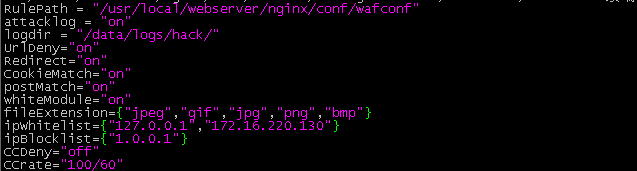
RulePath = waf的路径--规则存放目录
logdir = 日志记录地址--log存储目录,该目录需要用户自己新建,切需要nginx用户的可写权限
attacklog = "off" --是否开启攻击信息记录,需要配置logdir
UrlDeny="on" --是否拦截url访问
Redirect="on" --是否拦截后重定向
CookieMatch = "on" --是否拦截cookie攻击
postMatch = "on" --是否拦截post攻击
whiteModule = "on" --是否开启URL白名单
ipWhitelist={"127.0.0.1"} --ip白名单,多个ip用逗号分隔
ipBlocklist={"1.0.0.1"} --ip黑名单,多个ip用逗号分隔
CCDeny="on" --是否开启拦截cc攻击(需要nginx.conf的http段增加luashareddict limit 10m;)
CCrate = "100/60" --设置cc攻击频率,单位为秒. --默认1分钟同一个IP只能请求同一个地址100次
html=[[Please go away~~]] --警告内容,可在中括号内自定义
备注:不要乱动双引号,区分大小写
修改nginx配置,在HTTP里面加入 记得改自己的路径
lua_need_request_body on;
lua_package_path "/usr/local/webserver/nginx/conf /?.lua";
lua_shared_dict limit 10m;
init_by_lua_file /usr/local/webserver/nginx/conf/init.lua;
access_by_lua_file /usr/local/webserver/nginx/conf/waf.lua;
limit_req_zone $binary_remote_addr $uri zone=two:3m rate=1r/s;
limit_req_zone $binary_remote_addr $request_uri zone=thre:3m rate=1r/s;
然后启动nginx.
测试创建个test.php文件,内容为test,使用curl来访问,当然前提是nginx做好了虚拟主机,这里就不介绍怎么做虚拟主机了.
curl http://localhost/test.php?id=../etc/passwd
返回的内容:test
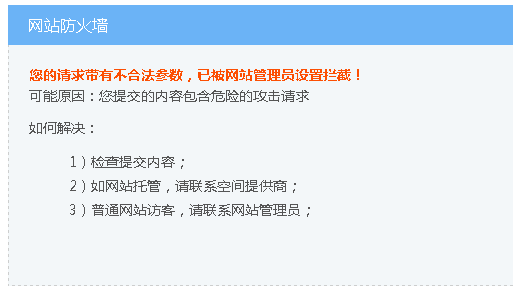
因为127.0.0.1允许的所以能看见页面的内容,因为域名地址是不允许的所以能看不见页面的内容,说明生效了
curl http://blog.slogra.com/test.php?id=../etc/passwd
返回的内容:
安装nginx+ngx_lua支持WAF防护功能的更多相关文章
- Nginx 支持 WAF 防护功能实战
WAF(Web Application Firewall),中文名称叫做“Web应用防火墙 WAF的定义是这样的:Web应用防火墙是通过执行一系列针对HTTP/HTTPS的安全策略来专门为Web应用提 ...
- 让 Nginx 支持 WAF 防护功能实战
ngx_lua_waf 安装说明文档 作者github地址: https://github.com/loveshell/ngx_lua_waf ———————————————————————————— ...
- Nginx 配置支持 WAF
WAF(Web Application Firewall),中文名叫做“Web应用防火墙” WAF的定义是这样的:Web应用防火墙是通过执行一系列针对HTTP/HTTPS的安全策略来专门为Web应用提 ...
- 40、Nginx 配置支持 WAF
40.1 waf说明 1 WAF(Web Application Firewall),中文名叫做"Web应用防火墙". 2 WAF的定义是这样的:Web应用防火墙是通过执行一系列针 ...
- 热安装NGINX并支持多站点SSL
https://www.moonfly.net/801.html http://www.centoscn.com/image-text/config/2015/0423/5251.html 1.查看n ...
- nginx + ngx_lua安装测试
nginx lua模块淘宝开发的nginx第三方模块,它能将lua语言嵌入到nginx配置中,从而使用lua就极大增强了nginx的能力.nginx以高并发而知名,lua脚本轻便,两者的搭配堪称完美. ...
- centos7.3下安装nginx
Nginx简介 Nginx是一款轻量级的Web服务器/反向代理服务器/电子邮件(IMAP/POP3)代理服务器,在BSD-like 协议下发行.其特点是占有内存少,并发能力强, Nginx的并发能力在 ...
- 06_Linux基础-NGINX和浏览器、网页的关系-云服务器ssh登陆-安装NGINX-上传网页-压缩命令-xz-gzip-bzip2-zip-tar-配置NGINX服务器支持下载功能-备份脚本
06_Linux基础-NGINX和浏览器.网页的关系-云服务器ssh登陆-安装NGINX-上传网页-压缩命令-xz-gzip-bzip2-zip-tar-配置NGINX服务器支持下载功能-备份脚本 一 ...
- nginx安装waf防护
一.安装nginx 二.安装luajit2.0 三.安装ngx_devel_kit#wget https://github.com/simpl/ngx_devel_kit/archive/v0.2.1 ...
随机推荐
- maven下配置pom.xml
博主原创,转载请注明. 遇到的问题: 缺少依赖库.解决办法: 在build标签中添加: <plugin> <groupId>org.apache.maven.plugins&l ...
- 几种MQ消息队列对比与消息队列之间的通信问题
消息队列 开发语言 协议支持 设计模式 持久化支持 事务支持 负载均衡支持 功能特点 缺点 RabbitMQ Erlang AMQP,XMPP,SMTP,STOMP 代理(Broker)模式(消息在发 ...
- 使用flask开发网站后端
Flask 是一个用于 Python 的微型网络开发框架,可以用于快速的搭建一个小型的网站. 我的搜索引擎:http://www.abelkhan.com 就是基于flask开发 一个flask的He ...
- vue 基础-->进阶 教程(3):组件嵌套、组件之间的通信、路由机制
前面的nodejs教程并没有停止更新,因为node项目需要用vue来实现界面部分,所以先插入一个vue教程,以免不会的同学不能很好的完成项目. 本教程,将从零开始,教给大家vue的基础.高级操作.组件 ...
- 【LeetCode】237. Delete Node in a Linked List
题目: Write a function to delete a node (except the tail) in a singly linked list, given only access t ...
- EXT 基础环境搭建
EXT 基础环境搭建使用 Sencha CMD 下载地址 https://www.sencha.com/products/extjs/cmd-download/ Sencha CMD 常用命令 API ...
- 最全的CSS浏览器兼容问题(转至http://68design.net/Web-Guide/HTMLCSS/37154-1.html)
最全的CSS浏览器兼容问题 CSS对浏览器的兼容性有时让人很头疼,或许当你了解当中的技巧跟原理,就会觉得也不是难事,从网上收集了IE7,6与Fireofx的兼容性处理方法并整理了一下.对于web2 ...
- 正则表达式获取body内容
最近项目需要,要弄个正则表达式获取body的内容. 用过angularjs就知道,很多时候要写指令时引用templateUrl的时候.template的内容root是不能包含多个节点的,否则就报错. ...
- KBEngine WebConsole Guide
https://github.com/kbengine/kbengine/tree/master/docs
- ES语法注意事项
在函数内部定义全局变量:举个栗子 function fn(){ var str = "hezhi"; } -alert(str) //=>fn不执行的 =>str is ...