
VS2015+Win10 调试DirectX 报错
安装完Win10调试程序突然在这个地方报错:
#if (defined(DEBUG) || defined(_DEBUG))

deviceFlags |= D3D11_CREATE_DEVICE_DEBUG;

#endif /* (defined(DEBUG) || defined(_DEBUG)) */
错误信息如下:
D3D11CreateDevice: Flags (0x2) were specified which require the D3D11 SDK Layers for Windows 10, but they are not present on the system. These flags must be removed, or the Windows 10 SDK must be installed. Flags include: D3D11_CREATE_DEVICE_DEBUG
问题分析:
以前在win7 和Win8 下安装完DirectX 的SDK就不错了,在Win10 下则装了DirectX也报错(Win8 的SDK 和Win10 的SDK都装了)
后来在MSDN的博客中发现:
Windows 10 optional feature: Graphics Tools
There are several scenarios where you need only minimal graphics tools on the target system. For example:
- Install the D3D SDK Layers so that your application can create a D3D Debug device
- Use DXCAP command line tool to capture and playback D3D graphics log file
- Scripting of API traces or doing regression testing on a lab machine
In these cases, all you need to install is the Windows 10 optional feature of “Graphics Tools”.
To install the Graphics Tools optional feature, go to the Settings panel, under System, Apps & features, Manage optional Features, Add a feature, and then look for “Graphics Tools”
解决方案:
方法1
Settings panel -> System -> Apps & features -> Manage optional Features -> Add a feature -> Select "Graphics Tools"
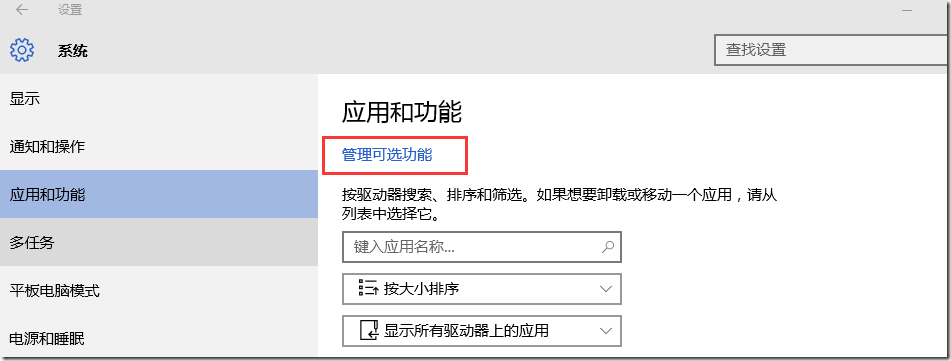
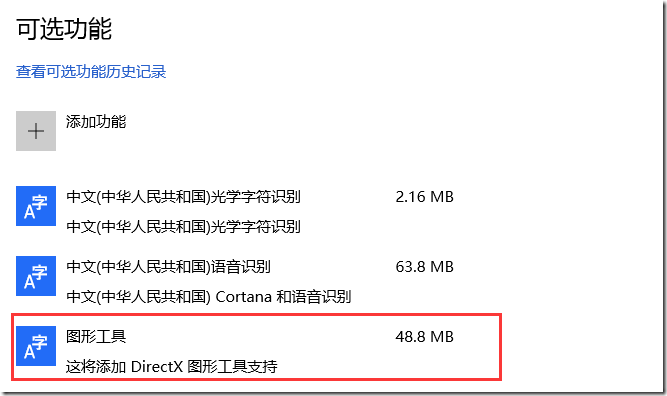
方法2
用管理员身份打开命令行工具(cmd),执行如下命令:
Dism /online /add-capability /capabilityname:Tools.Graphics.DirectX~~~~0.0.1.0
参考
Visual Studio 2015 and Graphics Tools for Windows 10
Use D3D11 debug layer with VS2013 on Windows 10
VS2015+Win10 调试DirectX 报错的更多相关文章
- 【Datastage】Datastage在win10上安装报错:This Application requires one of the following versions of the .NET Framework:v1.1.4322 Do you want to install this .NET Framework version now?
Datastage在win10上安装报错如下: 这个错误的意思是:.netFramWork的版本不符合要求,于是,我在网上下载了一个版本一致的 下载地址为:http://pan.baidu.com/s ...
- 获取win10 Insider Preview报错0x80080300
获取win10 Insider Preview报错0x80080300 1.msconfig2.隐藏Microsoft 服务3.disable 剩下的服务4.win + i, Update&s ...
- Ubuntu-1404 GDB 调试C++报错
问题 Ubuntu1404下,当用GDB调试C++程序时,报错ImportError: No module named 'libstdcxx' 解决办法 vim ~/.gdbinit #~/.gdbi ...
- win10安装wmi报错问题
在win10上,安装wmi,首先下载https://pypi.python.org/pypi/WMI/#downloads,将wmi下载下来 安装过程中,会报错,No Python installat ...
- 本地调试 谷歌浏览器报错:跨域问题处理 Access-Control-Allow-Origin
前端在本地,调试,就经常的就是会遇到 调用接口,提示跨域了. 如你要访问 http://****/api/user chrome 浏览器 报错: XMLHttpRequest cannot load ...
- ionic真机调试Android报错 - could not read ok from ADB Server * failed to start daemon * error: cannot connect to daemon
在使用真机调试Android程序时,报错如下: could not read ok from ADB Server * failed to start daemon error: cannot con ...
- 安卓小程序的一次bug调试,报错:java.lang.NullPointerException,logcat学习
做实验的时候,调试了很久后模拟器执行后,app还是会崩溃并停止运行,错误如下. 因为初学,所以也不知道怎么使用调试工具,也不懂看日志,经过学习后尝试这查看了LogCat日志上面有这样的提示: 其中引起 ...
- Delphi2007 在Win10 下运行报错 Assertion failure
Delphi2007 原来安装在Win7 下 运行正常, 自从升级到Win10 ,新建工程运行然后关闭报错, 报错信息如下: ---------------------------bds.exe - ...
- vscode与MinGW64调试c++报错
这个问题在刚配好环境测试的时候往往不会被发现,因为单纯的c++编译调试是没问题的.但一旦调试使用stl库的代码就会报错,而编译又没问题且可以正常运行,但在vscode的集成终端里运行不会显示任何本该显 ...
随机推荐
- 无需编译、快速生成 Vue 风格的文档网站
无需编译.快速生成 Vue 风格的文档网站 https://docsify.js.org/#/#coverpage https://github.com/QingWei-Li/docsify/
- pixi.js webgl库
分析pixi源码,刚搭建环境gulp+webpack,目前正在看... https://github.com/JsAaron/webgl-demo
- 关于png、jpg、gif切图时的使用感悟
关于png.jpg.gif切图时的使用感悟 曾经切图时都是一股脑所有图全切成jpg格式,最近突然心血来潮简单的研究了下其他图片格式的具体属性,才突然发现走了不少弯路,并没有做到使图片用最小体积展现出最 ...
- [函数] Firemonkey Windows 重新计算 Font Baseline
计算字型 Baseline 是一个不常用的函数,但如果想要显示不同大小文字下方对齐,就得用它来计算字型的 Baseline 才行,如果计算不准,显示的文字就会高高低低不整齐. 在 Firemonkey ...
- spring/spring boot/spring cloud开发总结
背景 针对RPC远程调用,都在使用dubbo.dubbox等,我们也是如此.由于社区暂停维护.应对未来发展,我们准备尝试新技术(或许这时候也不算什么新技术了吧),选择使用了spring ...
- jquery手风琴
--js $(document).ready(function(){ //Set default open/close settings$('.acc_container').hide(); //Hi ...
- JavaScript数组方法reduce解析
Array.prototype.reduce() 概述 reduce()方法是数组的一个实例方法(共有方法),可以被数组的实例对象调用.reduce() 方法接收一个函数作为累加器(accumulat ...
- layer.js中layer.tips
<script src="~/Content/js/layer/layer.js"></script> layer.tips('名称不能为空', '#pro ...
- HTML中的标记-遁地龙卷风
第三版 上一版本在未经验证的情况下,盲目的认为很多东西是那样,造成错误,非常抱歉. 0.什么是标记 <input type="checkbox" checked />& ...
- 基于Cesium1.26地图API下的GeoServer2.9.0服务器跨域设置
遇到的问题: 最近基于Cesium来做3D模型的地图开发,在访问自己发布的WMS服务之后,遇到了GeoServer跨域问题. 调用这个WMS服务的时候,浏览器(我用Chrome)开发者工具报错: 控制 ...