
protobuf-net-data
protobuf-net
http://www.codeproject.com/Articles/642677/Protobuf-net-the-unofficial-manual
https://github.com/rdingwall/protobuf-net-data
https://github.com/mgravell/protobuf-net
protobuf是google的一个开源项目,可用于以下两种用途:
(1)数据的存储(序列化和反序列化),类似于xml、json等;
(2)制作网络通信协议。
源代码下载地址:https://github.com/mgravell/protobuf-net
开源项目地址如下:https://code.google.com/p/protobuf-net/,下载解压后的目录如下所示,每个文件夹的详细介绍都在最后一个txt文件里面了。
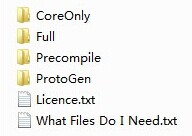
ProtoGen是用来根据***.proto文件生成对应的***.cs文件的,而做数据存储功能只需要用到protobuf-net.dll即可,至于使用哪个版本项目情况决定。下面的例子在Windows平台下新建一个C#的控制台工程,并引入ProtoBufNet\Full\net30\protobuf-net.dll,代码如下所示:

namespace TestProtoBuf

{

    [ProtoContract]

    public class Address

    {

        [ProtoMember(1)]

        public string Line1;

        [ProtoMember(2)]

        public string Line2;

    }

    [ProtoContract]

    public class Person

    {

        [ProtoMember(1)]

        public int Id;

        [ProtoMember(2)]

        public string Name;

        [ProtoMember(3)]

        public Address Addr;

    }

    class Program

    {

        static void Main(string[] args)

        {

            Person person = new Person();

            person.Id = 1;

            person.Name = "First";

            person.Addr = new Address { Line1="line1", Line2="line2"};

            // ProtoBuf序列化

            using(var file = System.IO.File.Create("Person.bin"))

            {

                ProtoBuf.Serializer.Serialize(file, person);

            }

            // ProtoBuf反序列化

            Person binPerson = null;

            using(var file = System.IO.File.OpenRead("Person.bin"))

            {

                binPerson = ProtoBuf.Serializer.Deserialize<Person>(file);

            }

            System.Console.WriteLine(binPerson.Name);

        }

    }

}
可以看到序列化和反序列化的代码非常简单。
protobuf提供了一种proto脚本用来编写***.proto文件,这种脚本格式简单、可读性强、方便扩展,用proto脚本定义网络协议是非常好用的。
下面是一个proto脚本的简单例子:
message Person {

    required string name=1;

    required int32 id=2;

    optional string email=3;

    enum PhoneType {

        MOBILE=0;

        HOME=1;

        WORK=2;

    }

    message PhoneNumber {

        required string number=1;

        optional PhoneType type=2 [default=HOME];

    }

    repeated PhoneNumber phone=4;

}
requied是必须有的字段、optional是可有可无的字段、repeated是可以重复的字段(数组或列表),同时枚举字段都必须给出默认值。
接下来就可以使用ProgoGen来根据proto脚本生成源代码cs文件了,命令行如下:
protogen -i:test.proto -0:test.cs -ns:MyProtoBuf
-i指定了输入,-o指定了输出,-ns指定了生成代码的namespace,上面的proto脚本生成的源码如下:
//------------------------------------------------------------------------------

// <auto-generated>

//     This code was generated by a tool.

//

//     Changes to this file may cause incorrect behavior and will be lost if

//     the code is regenerated.

// </auto-generated>

//------------------------------------------------------------------------------

// Generated from: file/pb.proto

namespace MyProtoBuf

{

  [global::System.Serializable, global::ProtoBuf.ProtoContract(Name=@"Person")]

  public partial class Person : global::ProtoBuf.IExtensible

  {

    public Person() {}

    private string _name;

    [global::ProtoBuf.ProtoMember(1, IsRequired = true, Name=@"name", DataFormat = global::ProtoBuf.DataFormat.Default)]

    public string name

    {

      get { return _name; }

      set { _name = value; }

    }

    private int _id;

    [global::ProtoBuf.ProtoMember(2, IsRequired = true, Name=@"id", DataFormat = global::ProtoBuf.DataFormat.TwosComplement)]

    public int id

    {

      get { return _id; }

      set { _id = value; }

    }

    private string _email = "";

    [global::ProtoBuf.ProtoMember(3, IsRequired = false, Name=@"email", DataFormat = global::ProtoBuf.DataFormat.Default)]

    [global::System.ComponentModel.DefaultValue("")]

    public string email

    {

      get { return _email; }

      set { _email = value; }

    }

    private readonly global::System.Collections.Generic.List<Person.PhoneNumber> _phone = new global::System.Collections.Generic.List<Person.PhoneNumber>();

    [global::ProtoBuf.ProtoMember(4, Name=@"phone", DataFormat = global::ProtoBuf.DataFormat.Default)]

    public global::System.Collections.Generic.List<Person.PhoneNumber> phone

    {

      get { return _phone; }

    }

  [global::System.Serializable, global::ProtoBuf.ProtoContract(Name=@"PhoneNumber")]

  public partial class PhoneNumber : global::ProtoBuf.IExtensible

  {

    public PhoneNumber() {}

    private string _number;

    [global::ProtoBuf.ProtoMember(1, IsRequired = true, Name=@"number", DataFormat = global::ProtoBuf.DataFormat.Default)]

    public string number

    {

      get { return _number; }

      set { _number = value; }

    }

    private Person.PhoneType _type = Person.PhoneType.HOME;

    [global::ProtoBuf.ProtoMember(2, IsRequired = false, Name=@"type", DataFormat = global::ProtoBuf.DataFormat.TwosComplement)]

    [global::System.ComponentModel.DefaultValue(Person.PhoneType.HOME)]

    public Person.PhoneType type

    {

      get { return _type; }

      set { _type = value; }

    }

    private global::ProtoBuf.IExtension extensionObject;

    global::ProtoBuf.IExtension global::ProtoBuf.IExtensible.GetExtensionObject(bool createIfMissing)

      { return global::ProtoBuf.Extensible.GetExtensionObject(ref extensionObject, createIfMissing); }

  }

    [global::ProtoBuf.ProtoContract(Name=@"PhoneType")]

    public enum PhoneType

    {

      [global::ProtoBuf.ProtoEnum(Name=@"MOBILE", Value=0)]

      MOBILE = 0,

      [global::ProtoBuf.ProtoEnum(Name=@"HOME", Value=1)]

      HOME = 1,

      [global::ProtoBuf.ProtoEnum(Name=@"WORK", Value=2)]

      WORK = 2

    }

    private global::ProtoBuf.IExtension extensionObject;

    global::ProtoBuf.IExtension global::ProtoBuf.IExtensible.GetExtensionObject(bool createIfMissing)

      { return global::ProtoBuf.Extensible.GetExtensionObject(ref extensionObject, createIfMissing); }

  }

}
to be continue...
什么是ProtoBuf-net
Protobuf是google开源的一个项目,用户数据序列化反序列化,google声称google的数据通信都是用该序列化方法。它比xml格式要少的多,甚至比二进制数据格式也小的多。
Protobuf格式协议和xml一样具有平台独立性,可以在不同平台间通信,通信所需资源很少,并可以扩展,可以旧的协议上添加新数据
Protobuf是在java和c++运行的,Protobuf-net当然就是Protobuf在.net环境下的移植。
请参见:https://code.google.com/p/protobuf-net/
Get Start
[ProtoBuf.ProtoContract]

    public class Person

    {

        [ProtoBuf.ProtoMember(1)]

        public int Id { get; set; }

        [ProtoBuf.ProtoMember(2)]

        public string Name { get; set; }

        [ProtoBuf.ProtoMember(3)]

        public Address Address { get; set; }

    }

    [ProtoBuf.ProtoContract]

    public class Address

    {

        [ProtoBuf.ProtoMember(1)]

        public string Line1 { get; set; }

        [ProtoBuf.ProtoMember(2)]

        public string Line2 { get; set; }

    }
类前加上ProtoContract Attrbuit,成员加上ProtoMember Attribute即可,其中ProtoMember需要一个大于0的int类型的值,原则上这个int类型没有大小限制,但建议从1开始,这是一个良好的习惯,另外这个参数必需是这个类成员的唯一标识,不可重复
序列化
            var person = new Person

            {

                Id = 1,

                Name = "First",

                Address = new Address { Line1 = "Line1", Line2 = "Line2" }

            };

            using (var file = System.IO.File.Create("Person.bin"))

            {

                ProtoBuf.Serializer.Serialize(file, person);

            }
反序列化
Person newPerson;

using (var file = System.IO.File.OpenRead("Person.bin"))

{

    newPerson = ProtoBuf.Serializer.Deserialize<Person>(file);

}
使用起来很简单,代码移植也会相当方便,下面我要对比下序列化的文件大小。
1.使用ProtoBuf序列化1000个对象,查看Person.bin文件大小为:30 KB (29,760 字节)
List<Person> list = new List<Person>();

            for (var i = 0; i < 1000; i++)

            {

                var person = new Person

                {

                    Id = i,

                    Name = "Name"+i,

                    Address = new Address { Line1 = "Line1", Line2 = "Line2" }

                };

                list.Add(person);

            }

            using (var file = System.IO.File.Create("Person.bin"))

            {

                ProtoBuf.Serializer.Serialize(file, list);

            }
2.使用xml序列化1000个对象,Person.xml大小为:152 KB (155,935 字节)
            List<Person> list = new List<Person>();

            for (var i = 0; i < 1000; i++)

            {

                var person = new Person

                {

                    Id = i,

                    Name = "Name"+i,

                    Address = new Address { Line1 = "Line1", Line2 = "Line2" }

                };

                list.Add(person);

            }

            System.Xml.Serialization.XmlSerializer xmlSerizlizer = new System.Xml.Serialization.XmlSerializer(typeof(List<Person>));

            using(var file= System.IO.File.Create("Persion.xml")){

                xmlSerizlizer.Serialize(file, list);

            }
3. 使用binary序列化1000个对象,Person.dat大小为:54.1 KB (55,445 字节)
            List<Person> list = new List<Person>();

            for (var i = 0; i < 1000; i++)

            {

                var person = new Person

                {

                    Id = i,

                    Name = "Name"+i,

                    Address = new Address { Line1 = "Line1", Line2 = "Line2" }

                };

                list.Add(person);

            }

            using(var file = new System.IO.FileStream("Person.dat", System.IO.FileMode.Create))

            {

                System.Runtime.Serialization.Formatters.Binary.BinaryFormatter binaryFormatter =

                    new System.Runtime.Serialization.Formatters.Binary.BinaryFormatter();

                binaryFormatter.Serialize(file, list);

            }

在这个实验中ProtoBuf比xml序列化小5倍,比二进制也近小一倍,有人说ProtoBuf比xml可以小到20倍,根据数据的复杂度这是有可能的。ProtoBuf的数据格式做为数据报文有着绝对优势,当然也有个弊端,它是2进制报文,没有xml格式这样的可读性,要想看懂报文内容只能用ProtoBuf反序列化了,不过我认识这基本上不是问题~
protobuf-net-data的更多相关文章
- google protobuf 简单实例
1.定义proto文件: User.proto package netty; option java_package="myprotobuf"; option java_outer ...
- 【MINA】用protobuf做编解码协议
SOCKET协议 支持java serial 与 AMF3的混合协议,目前没有基于xml 与 json的实现. 协议说明: * 9个字节协议头+协议体. * * 协议头1-4字节表示协议长度 =协议体 ...
- (中级篇 NettyNIO编解码开发)第八章-Google Protobuf 编解码-1
Google的Protobuf在业界非常流行,很多商业项目选择Protobuf作为编解码框架,这里一起回顾一下Protobuf 的优点.(1)在谷歌内部长期使用,产品成熟度高:(2)跨语言,支持 ...
- 序列化之protobuf与avro对比(Java)
最近在做socket通信中用到了关于序列化工具选型的问题,在调研过程中开始趋向于用protobuf,可以省去了编解码的过程.能够实现快速开发,且只需要维护一份协议文件即可. 但是调研过程中发现了pro ...
- netty和protobuf的使用
一.什么是protobuf Protobuf是google的开源项目,全称是Google Protocol Buffers,它是一个与语言无关.平台无关.可扩展的结构化数据序列化机制,类似XML,但它 ...
- Google Protobuf 使用 Java 版
一 . Protobuf 的入门 Protobuf 是一个灵活,高效,结构化的数据序列化框架, 相比于 XML 等传统的序列化工具,它更小,更快,更灵活,更简单. Protobuf 支持数据结构化一次 ...
- Swoole http server + yaf, swoole socket server + protobuf 等小结
拥抱swoole, 拥抱更好的php Swoole 是什么? Yaf 是什么? 接触swoole已经4年多了,一直没有好好静下心来学习.一直在做web端的应用,对网络协议和常驻内存型服务器一窍不通.一 ...
- Protobuf 小试牛刀
本文以PHP为例. 环境: CentOS 6.8 proto 3.8 PHP 7.1.12 PHP protobuf扩展 3.8.0 go1.12.5 linux/amd64 本文示例仓库地址: ht ...
- protobuf使用
一.protobuf环境搭建 Github 地址: https://github.com/protocolbuffers/protobuf 然后进入下载页 https://github.com/pro ...
- 《精通并发与Netty》学习笔记(05 - Google Protobuf与Netty的结合)
protobuf是由Google开发的一套对数据结构进行序列化的方法,可用做通信协议,数据存储格式,等等.其特点是不限语言.不限平台.扩展性强 Netty也提供了对Protobuf的天然支持,我们今天 ...
随机推荐
- 基于HTML5气3D仿真培训系统
根据最近的上线HTML5的燃气3D培训仿真系统.曾经的老系统是採用基于C++和OpenGL的OpenSceneGraph引擎设计的,OSG引擎性能和渲染效果各方面还是不错的,但由于这次新产品需求要求能 ...
- RH253读书笔记(1)-Lab 1 System Monitoring
Lab 1 System Monitoring Goal: To build skills to better assess system resources, performance and sec ...
- [MySQL]-->询5
几天之内解决在新年发行一个同事的生日过程
前言: 遇到朋友提问,例如以下:SELECT * FROM ali_users WHERE DATEDIFF(CAST(CONCAT(DATE_FORMAT(NOW(),'%y'),D ...
- jqm的多列布局demo,html5的多列布局demo,多列布局的具体解说,html5开发实例具体解释
因为移动设备屏幕宽度较小,所以一般不建议使用多列布局.但有时你可能须要并排放置一些元素(如button之类的). jQuery Mobile通过约定的类名ui-grid来提供了一种基于css的多列布局 ...
- 使用更清晰DebugLog开发和调试工具
在开发和应用的开发和调试过程中难免会发现故障的过程中.我相信很多做iOS开发程序员Xcode的debug调试功能大加关注. 但在这样做Android开发过程中,却不那么方便,虽然IDE也提供了debu ...
- Git常用操作汇总(转)
如果一个文件被删除了,可以使用切换版本号进行恢复.恢复方法: 先确定需要恢复的文件要恢复成哪一个历史版本(commit),假设那个版本号是: commit_id,那么 git checkout com ...
- HDU 2414 Chessboard Dance (力模拟)
主题链接:HDU 2414 Chessboard Dance 意甲冠军:鉴于地图,>,<,^,v的方向,字母相当于是箱子,箱子能够推出边界.人保证不会做出边界.以下输入指令,依照指令走,输 ...
- dojo加载树错误
1.错误叙述性说明 error loading undefined children. TypeError:this._arrayOfTopLevelItems is undefied. ...
- JAVA必备——Struts
在我们的开发中,有一个经典的框架,就是SSH,他们各自是:Struts,Spring,Hibernate,我们队他们神交已久,在曾经的博客中我介绍了Hibernate,今天我们也逐步揭开Struts的 ...
- JAVA学习笔记 -- JDBC及其应用
一个.准备工作 1.开放SQL Server服务与支持TCP/IP 进一步确认TCPport watermark/2/text/aHR0cDovL2Jsb2cuY3Nkbi5uZXQvdTAxMjk ...