
LigerUI权限系统之用户管理
用户管理较之前的的组织结构和菜单管理稍显复杂。不管怎样还是先上图吧,再来讲解
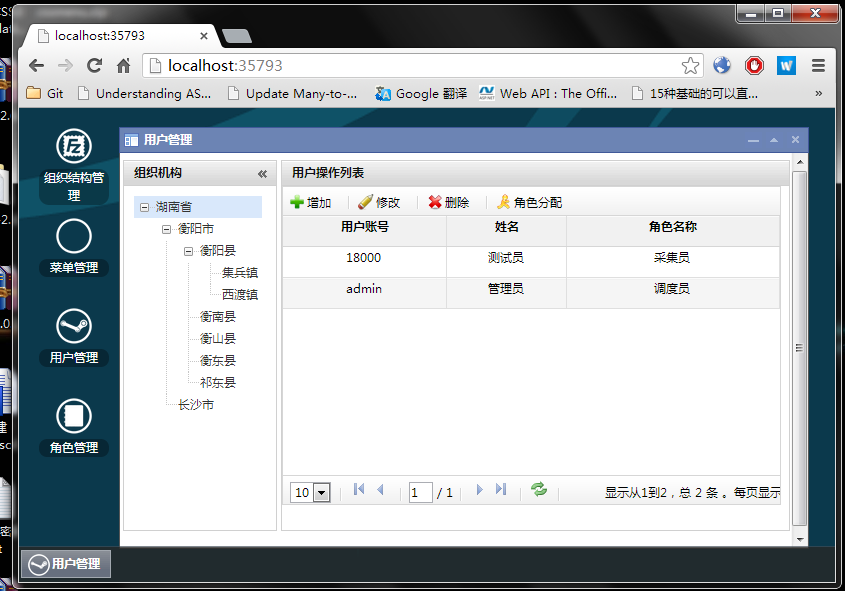
左边是组织结构,右边是用户,用户是跟组织机构挂钩的,通过点击左边的组织结构,来刷新右边,加载该组织机构下的用户。
用户管理添加:
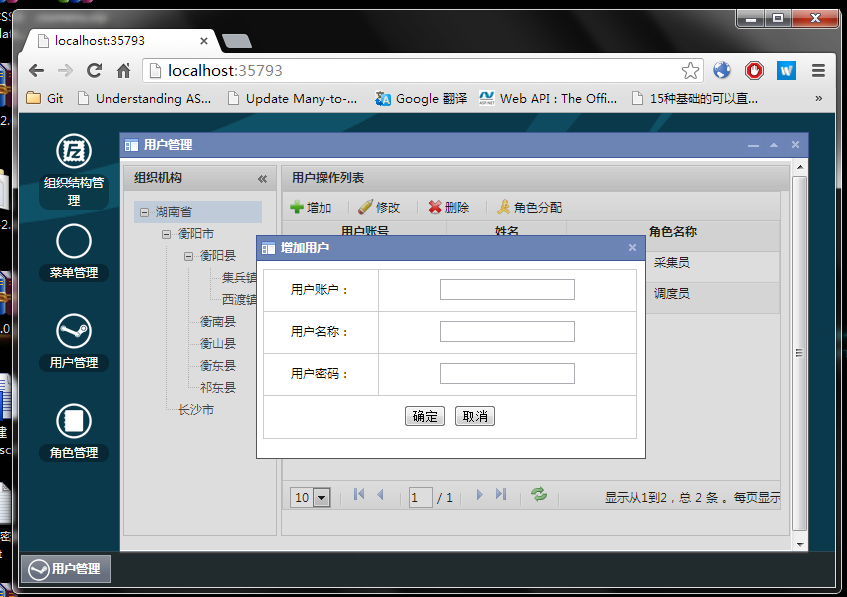
选中左边的组织机构,用户就加在该选中的组织机构下
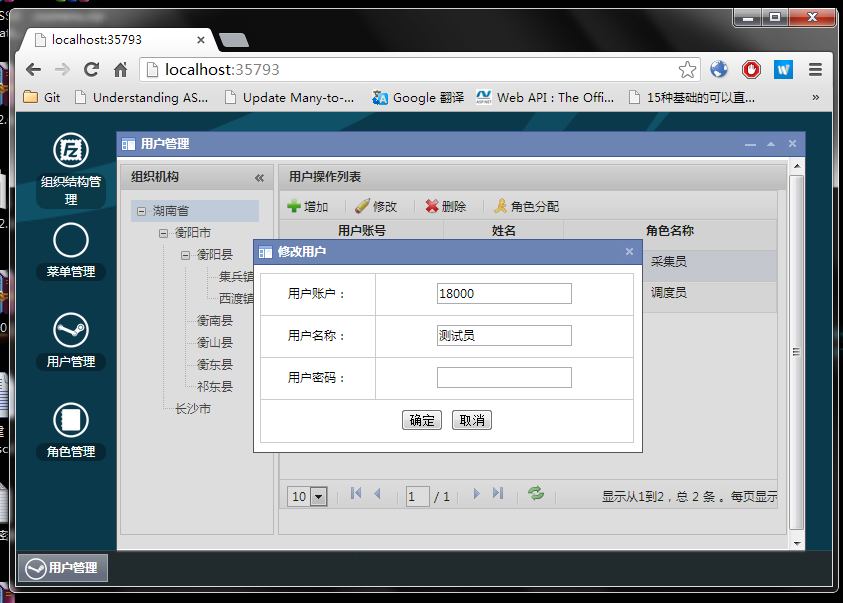
用户管理修改:
用户管理删除:
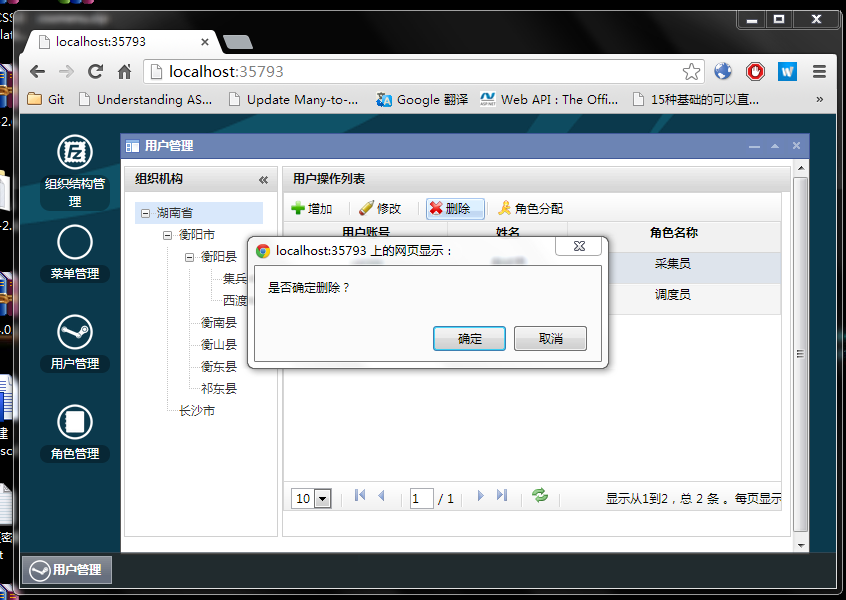
删除该组织机构下的用户,若该用户分配了角色,那么也把关联的角色删掉
用户管理角色分配:
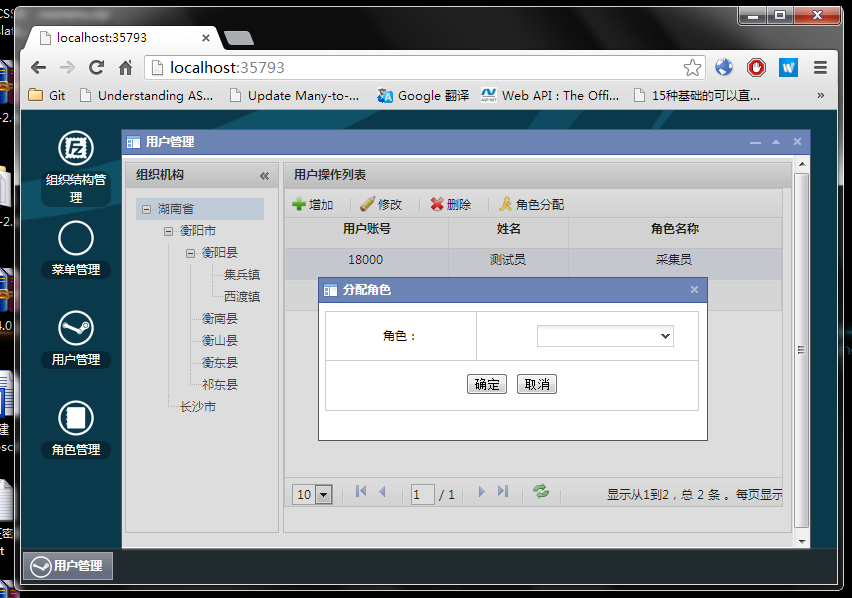
为用户分配角色,一个用户可以有多个角色,当然一个角色也可以是多个用户。它们是多对多的关系
前端完整代码:
@section headerScripts{
<style type="text/css">
#layout {
width: 99.2%;
margin: auto;
margin-top: 4px;
}
#tree {
width: 200px;
height: 300px;
margin: 10px;
float: left;
overflow: auto;
}
</style>
<script type="text/javascript">
$(function () {
var UrlTreeDataSource = '@Url.Action("TreeDataSource")';
var UrlUserDataSource = '@Url.Action("UserDataSource")';
var UrlAddUser = '@Url.Action("AddUser")';
var UrlModifyUser = '@Url.Action("ModifyUser")';
var UrlDeleteUser = '@Url.Action("DeleteUser")';
var UrlAddRole = '@Url.Action("AddRole")';
var UrlGetRole = '@Url.Action("GetRole")';
var grid;
var tree;
$("#layout").ligerLayout({
leftWidth: ,
height: '100%',
heightDiff: -,
space:
});
tree = $("#tree").ligerTree({
url: UrlTreeDataSource,
nodeWidth: ,
checkbox: false,
parentIcon: null,
childIcon: null,
idFieldName: 'orgCode',
textFieldName: 'name',
parentIDFieldName: 'parentCode',
onSelect: LoadUser
});
grid = $("#grid").ligerGrid({
columns: [
{ display: '用户账号', name: 'userid', align: 'center', width: '30%' },
{ display: '姓名', name: 'name', type: 'int', align: 'center', width: '30%' },
{ display: '角色名称', name: 'rolename', type: 'int', align: 'center', width: '30%' },
],
width: '98%',
pageSizeOptions: [, , ],
height: '90%',
rowHeight: ,
headerRowHeight: ,
url: UrlUserDataSource,
alternatingRow: true,
parms: { orgCode: "" },
toolbar: {
items: [
{ text: '增加', click: AddUser, img: '@Url.Content("~/Content/LigerUI/icons/add.gif")' },
{ line: true },
{ text: '修改', click: ModifyUser, img: '@Url.Content("~/Content/LigerUI/icons/modify.gif")' },
{ line: true },
{ text: '删除', click: DeleteUser, img: '@Url.Content("~/Content/LigerUI/icons/delete.gif")' },
{ line: true },
{ text: '角色分配', click: RoleAllocation, img: '@Url.Content("~/Content/LigerUI/icons/role.gif")' }
]
}
}
);
function LoadUser() {
grid.loadServerData({ orgCode: tree.getSelected().data.orgCode });
}
function AddUser() {
var node = tree.getSelected();
if (node == null) {
alert("请选择组织机构!");
return;
}
$("#winAdd").data("orgCode", tree.getSelected().data.orgCode);
if (!window.addWin) {
window.addWin = $.ligerDialog.open({
target: $("#winAdd"),
height: ,
width: ,
title: "增加用户",
isHidden: false
});
$("#btnCancel").click(function () {
window.addWin.hide();
});
$("#btnConfirm").click(function () {
var orgCode = $("#winAdd").data("orgCode");
var userId = $("#txtUserId").val();
var userName = $("#txtUserName").val();
var password = $("#txtPassword").val();
if (userId == "" || userName == "" || password == "") {
alert("用户账号,名称,密码都不能为空!");
return;
}
$.post(UrlAddUser,
{ orgCode: orgCode, userId: userId, userName: userName, password: password },
function (data) {
if (data.result) {
alert("操作成功!");
$("#grid").ligerGrid().reload();
} else {
alert(data.msg);
}
});
});
} else {
window.addWin.show();
}
}
function ModifyUser() {
var ModifyDialog;
var grid = $("#grid").ligerGrid();
var row = grid.getSelectedRow();
if (row == null) {
alert("请选择用户");
return;
}
$("#winModify").data("userId", row.userid);
$("#winModify").data("name", row.name);
$("#txtModifyUserId").attr("readonly", true);
if (!window.modifyWin) {
window.modifyWin = $.ligerDialog.open({
target: $("#winModify"),
height: ,
width: ,
title: "修改用户"
});
$("#txtModifyUserId").val($("#winModify").data("userId"));
$("#txtModifyUserName").val($("#winModify").data("name"));
$("#btnModifyCancel").click(function () {
window.modifyWin.hide();
});
$("#btnModifyConfirm").click(function () {
var userId = $("#txtModifyUserId").val();
var userName = $("#txtModifyUserName").val();
var password = $("#txtModifyPassword").val();
if (userName == "" || password == "") {
alert("用户名和密码不能为空!");
return;
}
$.post(UrlModifyUser, { userId: userId, userName: userName, password: password }, function (data) {
if (data.result) {
alert("操作成功!");
$("#grid").ligerGrid().reload();
} else {
alert(data.msg);
}
});
});
} else {
$("#winModify").data("userId", row.userid);
$("#winModify").data("name", row.name);
window.modifyWin.show();
}
}
function DeleteUser() {
var grid = $("#grid").ligerGrid();
var row = grid.getSelectedRow();
if (row == null) {
alert("请选择用户");
return;
}
if (confirm("是否确定删除?")) {
$.post(UrlDeleteUser, { userId: row.userid }, function (data) {
if (data.result) {
alert("删除成功!");
$("#grid").ligerGrid().reload();
} else {
alert(data.msg);
}
});
}
}
function RoleAllocation() {
var grid = $("#grid").ligerGrid();
var row = grid.getSelectedRow();
if (row == null) {
alert("请选择用户");
return;
}
$("#winAllocation").data("userName", row.name);
$("#winAllocation").data("userId", row.userid);
if (!window.dialog) {
window.dialog = $.ligerDialog.open({
target: $("#winAllocation"),
height: ,
width: ,
title: "分配角色",
isHidden: false
});
$("#txtRole").ligerComboBox(
{
url: UrlGetRole,
valueField: 'roleid',
textField: 'rolename',
selectBoxWidth: ,
autocomplete: true,
width: ,
hideOnLoseFocus:true,
css: 'combo'
}
);
$("#btnRoleCancel").click(function () {
window.dialog.hide();
});
$("#btnRoleConfirm").click(function () {
var userId = $("#winAllocation").data("userId");
var userName = $("#winAllocation").data("userName");
var roleName = $("#txtRole").ligerComboBox().getText();
if (roleName == "") {
alert("角色不能为空!");
return;
}
$.post(UrlAddRole,
{userId:userId, userName: userName, roleName: roleName },
function (data) {
if (data.result) {
alert("操作成功!");
$("#grid").ligerGrid().reload();
} else {
alert(data.msg);
}
});
});
} else {
window.dialog.show();
}
}
})
</script>
}
<div id="layout">
<div position="left" title="组织机构">
<ul id="tree">
</ul>
</div>
<div position="center" title="用户操作列表">
<div id="grid"></div>
</div>
</div>
<div id="winAdd" style="display: none;">
<table class="tb" style="height: 170px;">
<tr class="tr">
<td class="td">用户账户:</td>
<td>
<input id="txtUserId" /></td>
</tr>
<tr class="tr">
<td class="td">用户名称:</td>
<td>
<input id="txtUserName" /></td>
</tr>
<tr class="tr">
<td class="td">用户密码:</td>
<td>
<input id="txtPassword" type="text" /></td>
</tr>
<tr class="tr">
<td colspan="">
<button id="btnConfirm" class="ui-button">确定</button>
<button id="btnCancel" class="ui-button">取消</button>
</td>
</tr>
</table>
</div>
<div id="winModify" style="display: none;">
<table class="tb" style="height: 170px;">
<tr class="tr">
<td class="td">用户账户:</td>
<td>
<input id="txtModifyUserId" /></td>
</tr>
<tr class="tr">
<td class="td">用户名称:</td>
<td>
<input id="txtModifyUserName" /></td>
</tr>
<tr class="tr">
<td class="td">用户密码:</td>
<td>
<input id="txtModifyPassword" type="text" /></td>
</tr>
<tr class="tr">
<td colspan="">
<button id="btnModifyConfirm" class="ui-button">确定</button>
<button id="btnModifyCancel" class="ui-button">取消</button>
</td>
</tr>
</table>
</div>
<div id="winAllocation" style="display: none;">
<table class="tb" style="height: 100px;">
<tr class="tr">
<td class="td" style=" width:150px;">角色:</td>
<td>
<input id="txtRole" /></td>
</tr>
<tr class="tr">
<td colspan="">
<button id="btnRoleConfirm" class="ui-button">确定</button>
<button id="btnRoleCancel" class="ui-button">取消</button>
</td>
</tr>
</table>
</div>
后端完整代码:
 public class UserController : Controller

     {

         //

         // GET: /User/

         private IUserRepository _userRepository;

         private IOrgRepository _orgRepository;

         private IRoleRepository _roleRepository;

         public UserController(IUserRepository userRepository, IOrgRepository orgRepository, IRoleRepository roleRepository)

         {

             this._userRepository = userRepository;

             this._orgRepository = orgRepository;

             this._roleRepository = roleRepository;

         }

         public ActionResult Index()

         {

             return View();

         }

         public JsonResult TreeDataSource()

         {

             var data = _orgRepository.GetOrgAll().ToList().Select(m => new

             {

                 orgCode = m.orgcode,

                 name = m.name,

                 parentCode = m.parentCode

             });

             return Json(data, JsonRequestBehavior.AllowGet);

         }

         public JsonResult UserDataSource(string orgCode)

         {

             var data = _userRepository.GetUserByOrgCode(orgCode).ToList();

             return Json(new

             {

                 Rows = data.Select(m => new

                 {

                     userid = m.userid,

                     name = m.name,

                     rolename = string.Join(",", m.role == null ? new string[] { "" } : m.role.ToList().Select(r => r.rolename).Distinct())

                 }),

                 Total = data.Count()

             }, JsonRequestBehavior.AllowGet);

         }

         public JsonResult AddUser(string orgCode, string userId, string userName, string password)

         {

             var check = _userRepository.GetUserBySpecifiedCondition(userId);

             if (check.Count() > )

             {

                 return Json(new { result = false, msg = "添加失败,已存在相同的用户账号!" }, JsonRequestBehavior.AllowGet);

             }

             var org = new t_user()

             {

                 orgcode = orgCode,

                 userid = userId,

                 name = userName,

                 password = password

             };

             try

             {

                 var result = _userRepository.AddUser(org);

                 if (result)

                 {

                     return Json(new { result = true, msg = "" }, JsonRequestBehavior.AllowGet);

                 }

                 else

                 {

                     return Json(new { result = false, msg = "操作失败!" }, JsonRequestBehavior.AllowGet);

                 }

             }

             catch (Exception ex)

             {

                 return Json(new { result = false, msg = ex.Message }, JsonRequestBehavior.AllowGet);

             }

         }

         public JsonResult ModifyUser(string userId, string userName, string password)

         {

             var org = new t_user()

             {

                 userid = userId,

                 name = userName,

                 password = password

             };

             try

             {

                 var result = _userRepository.ModifyUser(org);

                 if (result)

                 {

                     return Json(new { result = true, msg = "" }, JsonRequestBehavior.AllowGet);

                 }

                 else

                 {

                     return Json(new { result = false, msg = "操作失败!" }, JsonRequestBehavior.AllowGet);

                 }

             }

             catch (Exception ex)

             {

                 return Json(new { result = false, msg = ex.Message }, JsonRequestBehavior.AllowGet);

             }

         }

         public JsonResult DeleteUser(string userId)

         {

             try

             {

                 var result = _userRepository.DeleteUser(userId);

                 if (result)

                 {

                     return Json(new { result = true, msg = "" }, JsonRequestBehavior.AllowGet);

                 }

                 else

                 {

                     return Json(new { result = false, msg = "操作失败!" }, JsonRequestBehavior.AllowGet);

                 }

             }

             catch (Exception ex)

             {

                 return Json(new { result = false, msg = ex.Message }, JsonRequestBehavior.AllowGet);

             }

         }

         public JsonResult AddRole(string userId, string userName, string roleName)

         {

             var check = _userRepository.GetUserRoleByCondition(userName, roleName);

             if (check.Count() > )

             {

                 return Json(new { result = false, msg = "添加失败,不能重复添加相同的角色!" }, JsonRequestBehavior.AllowGet);

             }

             try

             {

                 var result = _userRepository.AddRole(userId, userName, roleName);

                 if (result)

                 {

                     return Json(new { result = true, msg = "" }, JsonRequestBehavior.AllowGet);

                 }

                 else

                 {

                     return Json(new { result = false, msg = "操作失败!" }, JsonRequestBehavior.AllowGet);

                 }

             }

             catch (Exception ex)

             {

                 return Json(new { result = false, msg = ex.Message }, JsonRequestBehavior.AllowGet);

             }

         }

         public JsonResult GetRole()

         {

             var data = _roleRepository

                 .GetAll()

                 .ToList()

                 .Select(m => new

                 {

                     roleid = m.roleid,

                     rolename = m.rolename

                 });

             return Json(data, JsonRequestBehavior.AllowGet);

         }

     }
LigerUI权限系统之用户管理的更多相关文章
- LigerUI权限系统之角色管理
角色管理比前面几个页面都稍显复杂点.好吧,还是先看图. 左边是角色列表,右边是页面列表,它们也是多对多的关系,即一个角色可以访问多个页面,同时一个页面也可以被多个角色访问. 点击左边的角色,刷新右边页 ...
- LigerUI权限系统之菜单管理
菜单管理跟上篇的组织结构实现方式差不多,所以不存在多大的问题.还是老样,先上图,再看代码.菜单管理界面 菜单管理添加: 菜单管理修改: 前端完整代码: @section headerScripts{ ...
- 分享Mvc3+NInject+EF+LigerUI权限系统
分享Mvc3+NInject+EF+LigerUI权限系统 前段时间时不时看到有园友的分享权限系统,于是本人突发奇想,也想写一个玩玩,就利用晚上时间,陆陆续续花了一周多样子,写了如今这个权限系统, ...
- 分享Mvc3+NInject+EF+LigerUI权限系统Demo
前段时间时不时看到有园友的分享权限系统,于是本人突发奇想,也想写一个玩玩,就利用晚上时间,陆陆续续花了一周多样子,写了如今这个权限系统,这个权限系统具有 组织结构.用户.角色.菜单,组织结构下挂用户, ...
- linux(raspbian)下mysql的安装,权限设置和用户管理
一 MySQL安装:(1) 使用apt-get安装, 由于raspbian是基于Debian的自由操作系统,debian默认自带apt-get指令安装应用因此可以使用来安装 sudo apt-get ...
- Mysql权限操作、用户管理、密码操作
Mysql的权限 mysql中存在4个控制权限的表,分别为user表,db表,tables_priv表,columns_priv表. mysql权限表的验证过程为: 先从user表中的Host,Use ...
- [Linux] Linux系统(用户管理)
Linux中有三种用户 Root用户:超级管理员 系统用户:Linux运行某些程序所必需的用户,不建议修改 普通用户:一般修改这个 使用命令groupadd,添加用户组,参数:组名称 在文件/etc/ ...
- 混合了RBAC和ACL的权限系统(一) -- 用户组织结构
最近的工作是一个基础设计,打造一个基于RBAC和ACL的权限基础组件. 这个基础组件的特点是:同时混合了RBAC和ACL的认证方式,也就是说同时提供系统级别的授权(RBAC)和对象级别的授权(ACL) ...
- LigerUI权限系统之组织结构
先上图,再看代码.组织结构界面 组织结构添加: 组织结构修改: 组织结构删除: 我在做这个页面的时候treegrid 的远程数据加载让我很头痛,从LigerUI官网提供的Demo来看,它是根据json ...
随机推荐
- HDU 5055 Bob and math problem(结构体)
主题链接:http://acm.hdu.edu.cn/showproblem.php?pid=5055 Problem Description Recently, Bob has been think ...
- 拥抱大家庭,nodejs走thrift
拥抱大家庭,nodejs走thrift.最贱的例子,nodejs与nodejs之间走thrift对传. 1,官网下载 http://mirrors.cnnic.cn/apache/thrift/0.9 ...
- 一些常用的jquery数字正则表达式
使用 <script type="text/javascript"> function validate(){ var reg = new RegExp("^ ...
- FlexiGrid使用手册
FlexiGrid使用手册 一.概览 Flexigrid是一个基于jQuery开发的Grid,与 Ext Gird类似.Flexigrid显示的数据能够通过Ajax获取或者从一个普通的表格转换. 它的 ...
- Scala Sublime text 3 Build 编译
使用Sublime text 3编译Scala 在sublime工具栏中[tools]->[Build System]->[new Build System]添加如下文本 { " ...
- C# 我的注册表操作类
using System; using System.Collections.Generic; using System.Text; using Microsoft.Win32; using Syst ...
- FFT 的C 语言
FFT 的C 语言 说好的C 语言实现.必须搞定它! 理论介绍: http://blog.csdn.net/cinmyheart/article/details/39052739 这里有之前matla ...
- C语言运算符表(优先级)
http://www.is.pku.edu.cn/~qzy/c/operator.htm
- C# File类的操作
原文:C# File类的操作 File类,是一个静态类,主要是来提供一些函数库用的.静态实用类,提供了很多静态的方法,支持对文件的基本操作,包括创建,拷贝,移动,删除和打开一个文件.File类方法的参 ...
- Mysql插入内容过长(Packet for query is too large)
原文:Mysql插入内容过长(Packet for query is too large) 这个以前一直没有碰到过,一次性向Mysql数据库插入内容过长的话会出现这个问题,解决办法就是在Mysql配置 ...