
Model的绑定
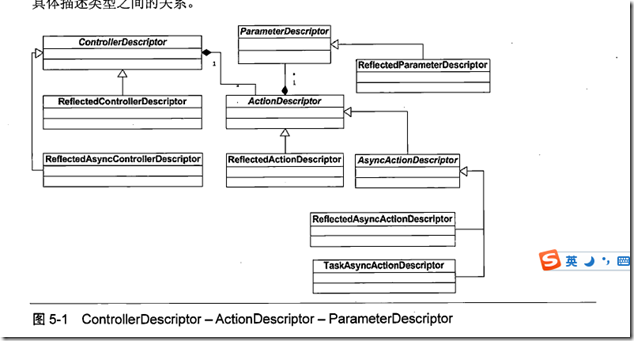
- ReflectedControllerDescriptor:ControllerDescriptor
- Controller的 public override ActionDescriptor FindAction(ControllerContext controllerContext, string actionName)方法内部,调用ActionMethodSelector.FindActionMethod方法查找Action.
- public override ActionDescriptor[] GetCanonicalActions()方法会根据ActionMethodSelector的两个方法列表,创建ActionDescription列表
- ActionNameAttribute :ActionNameSelectorAttribute
- 根据名称对Action进行筛选.
public override bool IsValidName(ControllerContext controllerContext, string actionName, MethodInfo methodInfo)

        {

            return String.Equals(actionName, Name, StringComparison.OrdinalIgnoreCase);

        }
- ActionMethodSelectorAttribute
ASP.NETMVC 定义了如下7 个基于相应HTTP 方法(GET 、POST 、PUT 、DELETE 、Head 、Options 和Patch) 的ActionMethodSelectorAttribute 类型.当将它们应用到某个Action 方法上时,只有在当前请求的HTTP 方法与之相匹配的情况下目标Action 方法才会被选择。他们的内部也是用AcceptVerbsAttribute 实现的.
public sealed class HttpGetAttribute : ActionMethodSelectorAttribute

        {

            private static readonly AcceptVerbsAttribute _innerAttribute = new AcceptVerbsAttribute(HttpVerbs.Get);

            public override bool IsValidForRequest(ControllerContext controllerContext, MethodInfo methodInfo)

            {

                return _innerAttribute.IsValidForRequest(controllerContext, methodInfo);

            }

        }
- HttpVerbs 这个枚举应用了Flags标记,可以HttpVerbs.Get|HttpVerbs.Post这样使用.按位或操作
[Flags] //指示可以将枚举作为位域(即一组标志)处理。

        public enum HttpVerbs

        {

            Get = 1 << 0,//移位

            Post = 1 << 1,

            Put = 1 << 2,

            Delete = 1 << 3,

            Head = 1 << 4,

            Patch = 1 << 5,

            Options = 1 << 6,

        }
public class AcceptVerbsAttribute : ActionMethodSelectorAttribute

        {

            public ICollection<string> Verbs { get; private set; }//支持的请求类型

            public override bool IsValidForRequest(ControllerContext controllerContext, MethodInfo methodInfo)

            {

                if (controllerContext == null) {

                    throw new ArgumentNullException("controllerContext");

                }

                string incomingVerb = controllerContext.HttpContext.Request.GetHttpMethodOverride();

                return Verbs.Contains(incomingVerb, StringComparer.OrdinalIgnoreCase);

            }

        }//过滤的方法体
- NonActionAttribute:ActionMethodSelectorAttribute 他的IsValidForRequest方法直接返回FALSE.
- ActionMethodSelector FindActionMethod方法执行查找对应ActionNAme的方法.查找过程:
- 在初始化此实例时,会生成应用了ActionNameSelectorAttribute特性的具有别名的方法列表,和没有别名的方法列表,保存两个列表.从Controller继承的方法和静态方法,非Public的方法不会被选择
- 调用FindActionMethod(ControllerContext controllerContext, string actionName)时,首先从具有别名的方法列表中,根据别名的特性过滤,没有别名的方法直接根据方法名称过滤.得到一个总列表.
- 从请求中找到请求类型,Get,post等,根据Action方法的ActionMethodSelectorAttribute特性进行过滤.
- 如果结果不是一个MethodInfo,则抛出异常.
- Action应用别名之后,原方法名不能用了.
- Array.FindAll
- ActionSelector[] selectors = Array.ConvertAll(attrs, attr => (ActionSelector)(controllerContext => attr.IsValidForRequest(controllerContext, methodInfo)));
- 异步ActionDescriprot的创建过程
private ActionDescriptorCreator GetActionDescriptorDelegate(MethodInfo entryMethod)

        {

            // Does the action return a Task?

            if (entryMethod.ReturnType != null && typeof(Task).IsAssignableFrom(entryMethod.ReturnType)) {

                return (actionName, controllerDescriptor) => new TaskAsyncActionDescriptor(entryMethod, actionName, controllerDescriptor);

            }

            // Is this the FooAsync() / FooCompleted() pattern?

            if (IsAsyncSuffixedMethod(entryMethod)) {

                string completionMethodName = entryMethod.Name.Substring(0, entryMethod.Name.Length - "Async".Length) + "Completed";

                MethodInfo completionMethod = GetMethodByName(completionMethodName);

                if (completionMethod != null) {

                    return (actionName, controllerDescriptor) => new ReflectedAsyncActionDescriptor(entryMethod, completionMethod, actionName, controllerDescriptor);

                } else {

                    throw Error.AsyncActionMethodSelector_CouldNotFindMethod(completionMethodName, ControllerType);

                }

            }

            // Fallback to synchronous method

            return (actionName, controllerDescriptor) => new ReflectedActionDescriptor(entryMethod, actionName, controllerDescriptor);

        }
- BindAttribute ","分割
internal static bool IsPropertyAllowed(string propertyName, string[] includeProperties, string[] excludeProperties)

        {

            // We allow a property to be bound if its both in the include list AND not in the exclude list.

            // An empty include list implies all properties are allowed.

            // An empty exclude list implies no properties are disallowed.

            bool includeProperty = (includeProperties == null) || (includeProperties.Length == 0) || includeProperties.Contains(propertyName, StringComparer.OrdinalIgnoreCase);

            bool excludeProperty = (excludeProperties != null) && excludeProperties.Contains(propertyName, StringComparer.OrdinalIgnoreCase);

            return includeProperty && !excludeProperty;

        }
- ValueProvider
Controller 使用的ValueProvider 可以通过定义在ContollerBase 中的ValueProvider 属性进行获取和设置。
public interface IValueProvider

        {

            bool ContainsPrefix(string prefix);

            ValueProviderResult GetValue(string key);

        }
ValueProviderResult RawValue表示提供的原始数据,AttemptedValue表示数据值的字符串表示。ConvertTo进行数据转换
- NameValueCollectionValueProvider:IUnvalidatedValueProvider,IEnumerableValueProvider,IValueProvider
- 数据绑定时使用的前缀分隔符有. []这两个.根据前缀查找时,只查找一级,不查找下一级别.
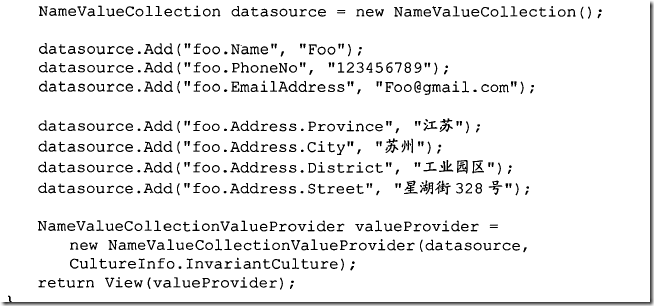
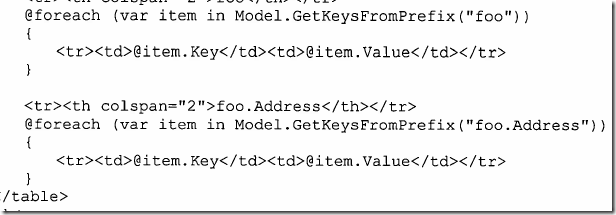
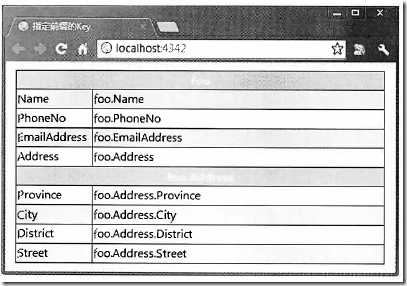
- NameValueCollectionValueProvider中用的数据存储容器是NameValueCollection,NameValueCollection一个Key对应的是一个列表.如
public virtual string Get(int index)

        {

            ArrayList list = (ArrayList)base.BaseGet(index);

            return GetAsOneString(list);

        }

        private static string GetAsOneString(ArrayList list)

        {

            int num = (list != null) ? list.Count : 0;

            if (num == 1) {

                return (string)list[0];

            }

            if (num <= 1) {

                return null;

            }

            StringBuilder builder = new StringBuilder((string)list[0]);

            for (int i = 1; i < num; i++) {

                builder.Append(',');

                builder.Append((string)list[i]);

            }

            return builder.ToString();

        }
- FormValueprovider : NameValueCollectionValueProvider
- QueryStringValueProvider : NameValueCollectionValueProvider
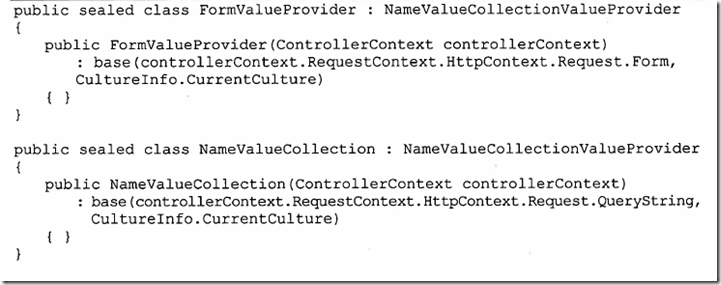
- DictionaryValueProvider
通过NameValueCollection ValueProvider 提供的数据源将保存在一个NameValueCollection对象中, DictionaryValueProvider 自然将数据源存放在一个真正的字典对象之中。它们之间的不同之处在于NameValueCollection 中的元素仅限于字符串,并且不对Key 作唯一性约束(每个Key对应的是一个存储值的列表):字典中的Key 则是唯一的, Value 也不仅仅局限于字符串。 public DictionaryValueProvider(IDictionary<string, TValue> dictionary, CultureInfo culture)
- RouteDataValueProvider: DictionaryValueProvider<object> 通过URL 路由系统解析请求地址得到的路由数据可以作为Model 绑定的数据来源,
public RouteDataValueProvider(ControllerContext controllerContext)

: base(controllerContext.RouteData.Values, CultureInfo.InvariantCulture)

{

}
- HtlpFileCollectionValueProvider: DictionaryValueProvider<HttpPostedFileBase[]>
this.Request.Files类型是HttpFileCollectionBase,元素类型是HttpPostedFileBase
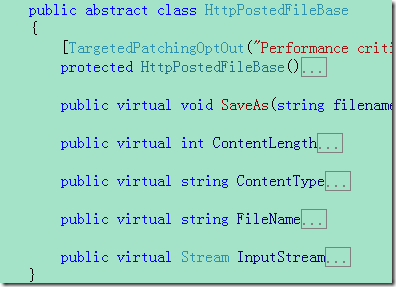
当我们根据当前ControllerContext 构建一个H即FileCollectionValueProvider 的时候,ASP.NETMVC 会从当前HTTP 请求的Files 属性中获取所有的HttpPostedFileBase 对象。多个HttpPostedFileBase 可以共享相同的名称,作为数据源容器的字典将HttpPostedFileBase 的名称作为Key ,具有相同名称的一个或者多个HttpPostedFileBase 对象构成一个数组作为对应的Value 。
- ChildActionValueProvider:DictionaryValueProvider<object>
子Action 和普通Action 的不同之处在于它不能用于响应来自客户端的请求,只是在某个View 中被调用以生成某个部分的HTML.HtmIHelper.Action方法调用指定名称的Action生成相应的Html的代码.
作为子Action 方法参数的数据来源与普通Action 方法有所不同, Model 绑定过程中具体的数据提供由一个类型为System. Web.Mvc.ChildAction ValueProvider 的对象来完成。
public ChildActionValueProvider(ControllerContext controllerContext)

: base(controllerContext.RouteData.Values, CultureInfo.InvariantCulture)

{根据路由数据的Values生成数据容器

}
但是ChildActionValueProvider 的GetValue 方法针对给定的Key 获取的值却并不是简单地来源于原始的路由数据,不然ChildActionValueProvider 就和RouteDataValueProvider 没有什么分别了。实际上Chil dActionValueProvider 的GetValue 方法获取的值来源于调用
HtmHelper 的扩展方法Action 时,通过参数routeValues 指定的RouteValueDictionary 对象。
当我们通过HtmIHelper 的扩展方法Action 调用某个指定的子Action 时,如果参数routeValues 指定的RouteValueDictionary 不为空, HtmIHelper 会据此创建一个DictionaryValueProvider<Object>对象,并将这个对象添加到通过routeValues 参数表示的原始的RouteValueDictionary 对象中,对应的Key 就是Chil dActionValueProvider 的静态属性_ childActionValuesKey 所表示的GUID 。
这个RouteValueDictionary 被进一步封装成表示请求上下文的RequestContext 对象,随后被调子Action 所在的Controller 会在该请求上下文中被激活,在Controller 激活过程中表示ControllerContext 的ControllerContext 被创建出来,毫无疑问它包含了之前创建的
Route ValueDictionary 对象。当我们针对当前ControllerContext 创建ChildActionValueProvider的时候,作为数据源的RouteValueDictionary 就是这么一个对象。
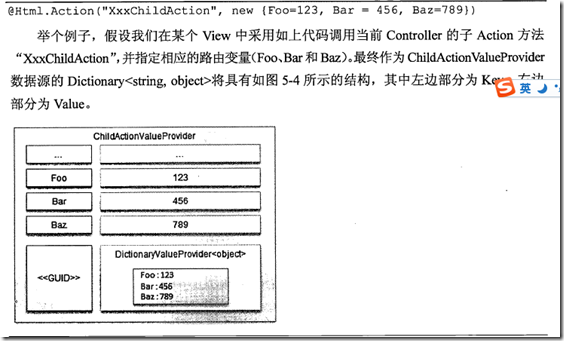
当调用ChildActionValueProvider 的GetValue 方法获取指定Key 的值时,实际上它并不会直接根据指定的Key 去获取对应的值,而是根据通过其静态字段_childAction ValuesKey 值去获取对应的DictionaryValueProvider<objec t>对象,然后再调用该对象的GetValue 根据指定的Key 去获得相应的值。代码如下
public override ValueProviderResult GetValue(string key)

        {

            if (key == null) {

                throw new ArgumentNullException("key");

            }

            ValueProviderResult explicitValues = base.GetValue(ChildActionValuesKey);

            if (explicitValues != null) {

                DictionaryValueProvider<object> rawExplicitValues = explicitValues.RawValue as DictionaryValueProvider<object>;

                if (rawExplicitValues != null) {

                    return rawExplicitValues.GetValue(key);

                }

            }

            return null;

        }
在调用HtmlHelper.Action时,代码如下
internal static void ActionHelper(HtmlHelper htmlHelper, string actionName, string controllerName, RouteValueDictionary routeValues, TextWriter textWriter)

        {

            if (htmlHelper == null) {

                throw new ArgumentNullException("htmlHelper");

            }

            if (String.IsNullOrEmpty(actionName)) {

                throw new ArgumentException(MvcResources.Common_NullOrEmpty, "actionName");

            }

            RouteValueDictionary additionalRouteValues = routeValues;

            routeValues = MergeDictionaries(routeValues, htmlHelper.ViewContext.RouteData.Values);

            routeValues["action"] = actionName;

            if (!String.IsNullOrEmpty(controllerName)) {

                routeValues["controller"] = controllerName;

            }

            bool usingAreas;

            VirtualPathData vpd = htmlHelper.RouteCollection.GetVirtualPathForArea(htmlHelper.ViewContext.RequestContext, null /* name */, routeValues, out usingAreas);

            if (vpd == null) {

                throw new InvalidOperationException(MvcResources.Common_NoRouteMatched);

            }

            if (usingAreas) {

                routeValues.Remove("area");

                if (additionalRouteValues != null) {

                    additionalRouteValues.Remove("area");

                }

            }

            if (additionalRouteValues != null) {

                routeValues[ChildActionValueProvider.ChildActionValuesKey] = new DictionaryValueProvider<object>(additionalRouteValues, CultureInfo.InvariantCulture);

            }

            RouteData routeData = CreateRouteData(vpd.Route, routeValues, vpd.DataTokens, htmlHelper.ViewContext);

            HttpContextBase httpContext = htmlHelper.ViewContext.HttpContext;

            RequestContext requestContext = new RequestContext(httpContext, routeData);

            ChildActionMvcHandler handler = new ChildActionMvcHandler(requestContext);//通过这个Handle(继承MVCHandle)去处理请求

            httpContext.Server.Execute(HttpHandlerUtil.WrapForServerExecute(handler), textWriter, true /* preserveForm */);

        }
- ValueProviderCollection
//System. Web.Mvc. ValueProviderCollection 表示一个元素类型为IValueProvider 的集合,除此之外,它本身也是一个ValueProvider

        public virtual ValueProviderResult GetValue(string key, bool skipValidation)//循环遍历其中的Provider查找,返回第一个.

        {

            return (from provider in this

                    let result = GetValueFromProvider(provider, key, skipValidation)

                    where result != null

                    select result).FirstOrDefault();

        }
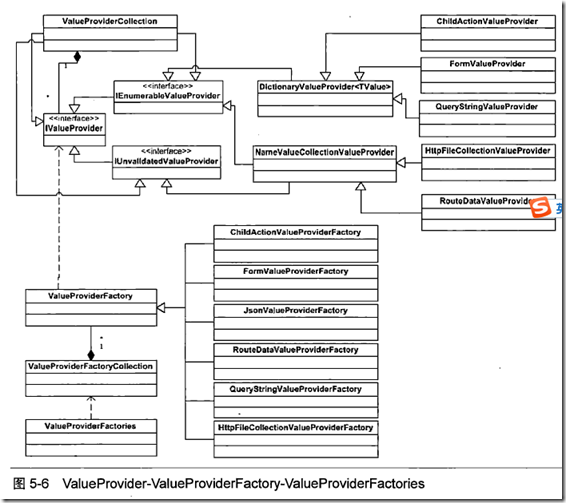
- ValueProviderFactory每一个Provider都有一个对应的Factory.
- 如FormValueProviderFactory
public override IValueProvider GetValueProvider(ControllerContext controllerContext)

        {

            if (controllerContext == null) {

                throw new ArgumentNullException("controllerContext");

            }

            return new FormValueProvider(controllerContext, _unvalidatedValuesAccessor(controllerContext));

        }
- ValueProviderFactories包含所有的Factory.
public static class ValueProviderFactories

        {

            private static readonly ValueProviderFactoryCollection _factories = new ValueProviderFactoryCollection()

                        {

                        new ChildActionValueProviderFactory(),

                        new FormValueProviderFactory(),

                        new JsonValueProviderFactory(),

                        new RouteDataValueProviderFactory(),

                        new QueryStringValueProviderFactory(),

                        new HttpFileCollectionValueProviderFactory(),

                        };

            public static ValueProviderFactoryCollection Factories

            {

                get { return _factories; }

            }

        }
ValueProviderFactoryCollection的方法:返回所有的Provider.他们的顺序决定了使用的优先级.
public IValueProvider GetValueProvider(ControllerContext controllerContext)

        {

            var valueProviders = from factory in _serviceResolver.Current

                                 let valueProvider = factory.GetValueProvider(controllerContext)

                                 where valueProvider != null

                                 select valueProvider;

            return new ValueProviderCollection(valueProviders.ToList());

        }
- BindAttribute应用在参数上,包含Include和Exclude属性,通过逗号分割.只有当指定的属性名在Include列表(或者为空)中并且不在Exclude列表中,IsPropertyAlowed方法才返回TRUE,此方法用于判断指定的属性是否允许绑定,
- ReflectedParameterDescriptor
- public ParameterInfo ParameterInfo { get; private set; }绑定用的类
- _bindingInfo = new ReflectedParameterBindingInfo(parameterInfo);在ReflectedParameterDescriptor的构造函数中初始化
- ReflectedParameterBindingInfo
- 有一个方法获取ModelBinder,通过读取应用在参数上的ModelBinderAttribute
public override IModelBinder Binder

        {

            get

            {

                IModelBinder binder = ModelBinders.GetBinderFromAttributes(_parameterInfo,

                () => String.Format(CultureInfo.CurrentCulture, MvcResources.ReflectedParameterBindingInfo_MultipleConverterAttributes,

                _parameterInfo.Name, _parameterInfo.Member));

                return binder;

            }

        }
- public override ICollection<string> Exclude
- public override ICollection<string> Include
- public override string Prefix
- 这三个属性通过读取应用在参数上的BindAttribute
private void ReadSettingsFromBindAttribute()

        {

            BindAttribute attr = (BindAttribute)Attribute.GetCustomAttribute(_parameterInfo, typeof(BindAttribute));

            if (attr == null) {

                return;

            }

            _exclude = new ReadOnlyCollection<string>(AuthorizeAttribute.SplitString(attr.Exclude));

            _include = new ReadOnlyCollection<string>(AuthorizeAttribute.SplitString(attr.Include));

            _prefix = attr.Prefix;

        }
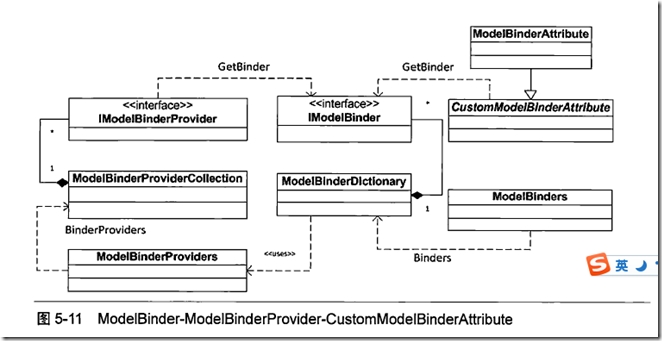
- CustomModelBinderAttribute 抽象类, 只有一个方法 public abstract IModelBinder GetBinder();
- public sealed class ModelBinderAttribute : CustomModelBinderAttribute是CustomModelBinderAttribute的唯一继承者 public 构造函数ModelBinderAttribute(Type binderType)指定Binder的类型.只有将此特性应用在方法的参数上,才能生效.应用在属性或者类上是无效的.
- 如果没有给参数指定IModelBinder的类型(没有给参数添加ModelBinderAttribute),系统会通过ModelBinders中的默认的binder
public static class ModelBinders

        {

            private static readonly ModelBinderDictionary _binders = CreateDefaultBinderDictionary();

            public static ModelBinderDictionary Binders

            {

                get { return _binders; }

            }

            private static ModelBinderDictionary CreateDefaultBinderDictionary()

            {

                // We can't add a binder to the HttpPostedFileBase type as an attribute, so we'll just

                // prepopulate the dictionary as a convenience to users.

                ModelBinderDictionary binders = new ModelBinderDictionary()

                {

                //值会放入innerDictionary

                { typeof(HttpPostedFileBase), new HttpPostedFileBaseModelBinder() },

                { typeof(byte[]), new ByteArrayModelBinder() },

                { typeof(Binary), new LinqBinaryModelBinder() },

                { typeof(CancellationToken), new CancellationTokenModelBinder() }

                };

                return binders;

            }

        }

        public class ModelBinderDictionary : IDictionary<Type, IModelBinder>

        {

            private readonly Dictionary<Type, IModelBinder> _innerDictionary = new Dictionary<Type, IModelBinder>();

            private IModelBinder _defaultBinder;

            private ModelBinderProviderCollection _modelBinderProviders;

            public ModelBinderDictionary()

                : this(ModelBinderProviders.BinderProviders)

            {

            }

        }
//查找binder的过程
private IModelBinder GetBinder(Type modelType, IModelBinder fallbackBinder)

        {

            // Try to look up a binder for this type. We use this order of precedence:

            // 1. Binder returned from provider

            // 2. Binder registered in the global table

            // 3. Binder attribute defined on the type

            // 4. Supplied fallback binder

            //1.

            IModelBinder binder = _modelBinderProviders.GetBinder(modelType);

            if (binder != null) {

                return binder;

            }

            //2.

            if (_innerDictionary.TryGetValue(modelType, out binder)) {

                return binder;

            }

            //3.读取应用在参数类型上的CustomModelBinderAttribute

            binder = ModelBinders.GetBinderFromAttributes(modelType,

            () => String.Format(CultureInfo.CurrentCulture, MvcResources.ModelBinderDictionary_MultipleAttributes, modelType.FullName));

            return binder ?? fallbackBinder;

        }
根据类型查找对应的默认的ModelBinder.最高优先级是,在参数上定义的ModelBindAttribute,其次是上边的三个.书中有错误
可以通过注册对应数据类型的IModelBinder,代码ModelBinders.Binders.Add(typeof(Baz) , new BazModelBinder());
也可以添加Provider 代码ModelBinderProviders.BinderProviders.Add(new MyModelBinderProvider())i
- ModelBinderProviders
public static ModelBinderProviderCollection BinderProviders
{
get { return _binderProviders; }
}
- ModelBinderProviderCollection
- public class ModelBinderProviderCollection : Collection<IModelBinderProvider>
- ModelState 与Model 绑定
- Model 绑定除了利用ModelBinder 为目标Action 方法的执行提供参数之外,还会将相关的数据以ModelState 的形式存储于当前Controller 的ViewData 中.Controller 的基类ControllerBase 中具有一个System. Web.Mvc. ViewDataDictionary 类型的属'性ViewData。顾名思义, ViewData 就是Controller 在进行View 呈现过程中传递的数据。
- 字典类型的ViewDataDictionary 具有一个类型为System.Web.Mvc.ModelStateDictionary的属性ModelState,这是一个Key 和Value 类型分别为String 和System.Web.Mvc.ModelState的字典。在这里有一点需要引起读者注意: ViewDataDictionary 的ModelState 属性类型不是ModelState,而是ModelStateDictionary 。
public class ModelState

        {

            private ModelErrorCollection _errors = new ModelErrorCollection();

            public ModelErrorCollection Errors

            {

                get

                {

                    return this._errors;

                }

            }

            public ValueProviderResult Value { get; set; }

        }
- ModelBindingContext 的创建
- 创建ModelBindingContext 对象,需要对ModelName,ModelState,ValueProvider,ModelMetadata和FallbackToEmptyPrefix属性进行初始化.
- ControllerActionInvoker中的方法:
protected virtual object GetParameterValue(ControllerContext controllerContext, ParameterDescriptor parameterDescriptor)

        {

            // collect all of the necessary binding properties

            Type parameterType = parameterDescriptor.ParameterType;

            IModelBinder binder = GetModelBinder(parameterDescriptor);

            IValueProvider valueProvider = controllerContext.Controller.ValueProvider;

            string parameterName = parameterDescriptor.BindingInfo.Prefix ?? parameterDescriptor.ParameterName;

            Predicate<string> propertyFilter = GetPropertyFilter(parameterDescriptor);

            // finally, call into the binder

            ModelBindingContext bindingContext = new ModelBindingContext() {

                FallbackToEmptyPrefix = (parameterDescriptor.BindingInfo.Prefix == null), // only fall back if prefix not specified

                ModelMetadata = ModelMetadataProviders.Current.GetMetadataForType(null, parameterType),

                ModelName = parameterName,

                ModelState = controllerContext.Controller.ViewData.ModelState,

                PropertyFilter = propertyFilter,

                ValueProvider = valueProvider

            };

            object result = binder.BindModel(controllerContext, bindingContext);

            return result ?? parameterDescriptor.DefaultValue;

        }
- FallbackToEmptyPrefix
如果没有利用BindAttribute 特性为参数设置一个前缀,默认情况下会将参数名称作为前缀。通过前面的介绍我们知道,这个前缀会被ValueProvider 用于数据的匹配。如果ValueProvider 通过此前缀找不到匹配的数据,将剔除前缀再次进行数据获取。针对如下定义的Action 方法AddContacts ,在请求数据并不包含基于参数名("foo" 和"bar")前缀的情况下,两个参数最终将被绑定上相同的值。
public class ContactController
public void AddContacts(Contact foo , Contact bar)
反之,如果我们应用BindAttribute 特性显式地设置了一个前缀,这种去除前缀再次实施Model 绑定的后备机制将不会被采用,是否采用后备Model 绑定策略通过ModelBindingContext 的FallbackToEmptyPrefix 属性来控制。
对于简单数据类型,应该没有这个用法.因为前缀置为空的话,属性名就好是空的了
- DefaultModelBinder在根据类型创建对象时的代码:针对泛型有特殊的处理
protected virtual object CreateModel(ControllerContext controllerContext, ModelBindingContext bindingContext, Type modelType)

        {

            Type typeToCreate = modelType;

            // we can understand some collection interfaces, e.g. IList<>, IDictionary<,>

            if (modelType.IsGenericType) {

                Type genericTypeDefinition = modelType.GetGenericTypeDefinition();

                if (genericTypeDefinition == typeof(IDictionary<,>)) {

                    typeToCreate = typeof(Dictionary<,>).MakeGenericType(modelType.GetGenericArguments());

                } else if (genericTypeDefinition == typeof(IEnumerable<>) || genericTypeDefinition == typeof(ICollection<>) || genericTypeDefinition == typeof(IList<>)) {

                    typeToCreate = typeof(List<>).MakeGenericType(modelType.GetGenericArguments());

                }

            }

            // fallback to the type's default constructor

            return Activator.CreateInstance(typeToCreate);

        }
- Array array = Array.CreateInstance(elementType, list.Count);
list.CopyTo(array, 0);
- TypeDescriptor.GetProperties()返回指定组件属性的集合
- PropertyDescriptor提供类上的属性的抽象化。
- 数据绑定的过程:
- 如果指定了BindAttribute属性,FallbackToEmptyPrefix 会被设置为False,即不会用去除前缀的后背策略.
- 如果制定了BindAttribute属性,则采用指定的Prefix作为前缀,否则使用参数名称最为前缀.
- 使用这个前缀从ValueProvider中查找是否包含前缀
- 如果不包含前缀,且FallbackToEmptyPrefix 为FALSE,则返回Null.
- 如果不包含前缀,且FallbackToEmptyPrefix 为true,则使用后背策略,使用去除前缀的方式搜索
- 如果包含前缀,则继续进行
- 简单类型不能够使用后备策略查找
- 对于数组,在使用数字作为索引时,不能中断,否则中断后的会丢弃.
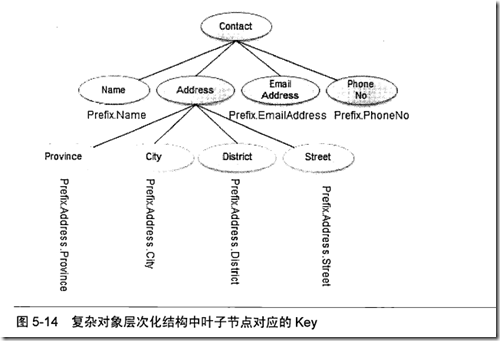
- 数组绑定数据时,会先查找和数组参数同名不包含索引的部分数据.不存在的话会添加索引再次查找.如Action(String[] foo),会先查找foo作为Key的值,然后依次添加0.1.2.的索引foo[0.,1]进行查找.如果自定义了索引,那么数字索引就不会使用了.定义索引用prefix.index.直接匹配参数名称、使用自定义索引、使用数字索引三种方式是互斥的
- IEnumerable<>类型的,同数组类似,先获取数据列表,然后就行转换.规则同数组一样.支持索引和与参数同名的数据
- 字典:
- 字典是-个KeyValuePair<TKey , TValue>对象的集合,所以在字典元素这一级可以采用基于索引的匹配机制。同数组和IEnumerable
- KeyValuePair<TKey, TValue>是一个复杂类型,可以按照属性名称(Key 和Value) 进行匹配。后缀分别添加Key和Value进行匹配
Model的绑定的更多相关文章
- 《ASP.NET MVC4 WEB编程》学习笔记------Model模型绑定
本文转载自haiziguo Asp.net mvc中的模型绑定,或许大家经常用,但是具体说他是怎么一回事,可能还是会有些陌生,那么,本文就带你理解模型绑定.为了理解模型绑定,本文会先给出其定义,然后对 ...
- ASP.NET MVC中默认Model Binder绑定Action参数为List、Dictionary等集合的实例
在实际的ASP.NET mvc项目开发中,有时会遇到一个参数是一个List.Dictionary等集合类型的情况,默认的情况ASP.NET MVC框架是怎么为我们绑定ASP.NET MVC的Actio ...
- Artech的MVC4框架学习——第五章Model的绑定
第一Model绑定本质就是为目标Action方法生成参数列表的过程,参数数据存在于http请求.请求的 URL .消息报头或主体中. 第二aciton 参数的元数据通过 ParameterDescri ...
- [转载]SpringMVC的Model参数绑定方式
SpringMVC的各种参数绑定方式 http://www.cnblogs.com/HD/p/4107674.html springMVC中复杂嵌套对象.List等集合类型数据绑定 http://ww ...
- vue model双向绑定
view <div id='demo' class="container"> <input type="text" v-model='name ...
- ASP.NET MVC Model绑定(二)
ASP.NET MVC Model绑定(二) 前言 上篇对于Model绑定的简单演示想必大家对Model绑定的使用方式有一点的了解,那大家有没有想过Model绑定器是在什么时候执行的?又或是执行的过程 ...
- Asp.net MVC中提交集合对象,实现Model绑定
Asp.net MVC中的Model自动绑定功能,方便了我们对于request中的数据的处理, 从客户端的请求数据,自动地以Action方法参数的形式呈现.有时候我们的Action方法中想要接收数组类 ...
- Asp.net MVC中提交集合对象,实现Model绑定(转载)
Asp.net MVC中的Model自动绑定功能,方便了我们对于request中的数据的处理, 从客户端的请求数据,自动地以Action方法参数的形式呈现.有时候我们的Action方法中想要接收数组类 ...
- ModelBinder——ASP.NET MVC Model绑定的核心
ModelBinder——ASP.NET MVC Model绑定的核心 Model的绑定体现在从当前请求提取相应的数据绑定到目标Action方法的参数.通过前面的介绍我们知道Action方法的参数通过 ...
随机推荐
- 软件工程随堂小作业——寻找“水桶”(C++)
一.设计思想 思路与寻找一个水王相似,这次只是计数器和嫌疑人变量都设置为数组.每次选取一个ID与三个嫌疑人比较,若有相同则计数:若三个都不相同,则三个计数器都减一.若减为0,则从新赋值给嫌疑人. 二. ...
- Understanding Convolutions【转】
Understanding Convolutions In a previous post, we built up an understanding of convolutional neural ...
- Hibernate 检索查询的几种方式(HQL,QBC,本地SQL,集成Spring等)
1.非集成Spring hibernate的检索方式,主要有以下五种. 1.导航对象图检索方式.(根据已经加载的对象,导航到其他对象.) 2.OID检索方式.(按照对象的OID来检索对象.) 3.HQ ...
- Careercup - Google面试题 - 5634470967246848
2014-05-06 07:11 题目链接 原题: Find a shortest path ,) to (N,N), assume is destination, use memorization ...
- 【反射】——Autofac 类型注册
Autofac是.net界一款轻量化的IOC组件,使用Autofac可以帮助完成代码中很多依赖注入工作.在以前文章中,介绍过Autofac的配置过程(http://www.cnblogs.com/Jn ...
- BZOJ 1001: [BeiJing2006]狼抓兔子 最小割
题目链接:http://www.lydsy.com/JudgeOnline/problem.php?id=1001 现在小朋友们最喜欢的"喜羊羊与灰太狼",话说灰太狼抓羊不到,但抓 ...
- Java compiler level does not match the version of the instal
一.问题描述 新建了一个项目,workspace默认jdk编译版本是1.7的,新建项目使用的是jdk1.5的版本,肯定会报@override错误.这个时候,修改项目的compilor即可. 这时候,你 ...
- Codeforces Round #204 (Div. 2)->C. Jeff and Rounding
C. Jeff and Rounding time limit per test 1 second memory limit per test 256 megabytes input standard ...
- SGU 104
104. Little shop of flowers time limit per test: 0.25 sec. memory limit per test: 4096 KB PROBLEM Yo ...
- POJ 1961 2406 (KMP,最小循环节,循环周期)
关于KMP的最短循环节.循环周期,请戳: http://www.cnblogs.com/chenxiwenruo/p/3546457.html (KMP模板,最小循环节) POJ 2406 Powe ...