
3.5 The Lexical-Analyzer Generator Lex
3.5 The Lexical-Analyzer Generator Lex
In this section, we introduce a tool called Lex, or in a more recent implementation Flex, that allows one to specify a lexical analyzer by specifying regular expressions to describe patterns for tokens. The input notation for the Lex tool is referred to as the Lex language and the tool itself is the Lex compiler. Behind the scenes, the Lex compiler transforms the input patterns into a transition diagram and generates code, in a file called lex.yy.c, that simulates this transition diagram. The mechanics of how this translation from regular expressions to transition diagrams occurs is the subject of the next sections; here we only learn the Lex language.
3.5.1 Use of Lex
Figure 3.22 suggests how Lex is used. An input file, which we call lex.l, is written in the Lex language and describes the lexical analyzer to be generated. The Lex compiler transforms lex.l to a C program, in a file that is always named lex.yy.c. The latter file is compiled by the C compiler into a file called a.out, as always. The C-compiler output is a working lexical analyzer that can take a stream of input characters and produce a stream of tokens.
Figure 3.22: Creating a lexical analyzer with Lex
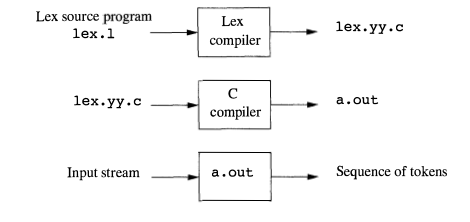
The normal use of the compiled C program, referred to as a.out in Fig. 3.22, is as a subroutine of the parser. It is a C function that returns an integer, which is a code for one of the possible token names. The attribute value, whether it be another numeric code, a pointer to the symbol table, or nothing, is placed in a global variable yylval, which is shared between the lexical analyzer and parser, thereby making it simple to return both the name and an attribute value of a token.
3.5.2 Structure of Lex Programs
A Lex program has the following form:
declarations

%%

translation rules

%%

auxiliary functions
The declarations section includes declarations of variables, manifest constants (identifiers declared to stand for a constant, e.g., the name of a token), and regular definition s, in the style of Section 3.3.4.
The translation rules each have the form
Pattern { Action }
Each pattern is a regular expression, which may use the regular definitions of the declaration section. The actions are fragments of code, typically written in C, although many variants of Lex using other languages have been created.
The third section holds whatever additional functions are used in the actions. Alternatively, these functions can be compiled separately and loaded with the lexical analyzer.
The lexical analyzer created by Lex behaves in concert with the parser as follows. When called by the parser, the lexical analyzer begins reading its remaining input, one character at a time, until it finds the longest prefix of the input that matches one of the patterns Pi. It then executes the associated action Ai. Typically, Ai will return to the parser, but if it does not (e.g., because Pi describes whitespace or comments), then the lexical analyzer proceeds to find additional lexemes, until one of the corresponding actions causes a return to the parser. The lexical analyzer returns a single value, the token name, to the parser, but uses the shared, integer variable yyl val to pass additional information about the lexeme found, if needed.
Example 3.11:
Figure 3.23 is a Lex program that recognizes the tokens of Fig. 3.12 and returns the token found. A few observations about this code will introduce us to many of the important features of Lex.
Figure 3.23: Lex program for the tokens of Fig. 3.12
%{

    /* definitions of manifest constants

    LT, LE, EQ, NE, GT, GE,

    IF, THEN, ELSE, ID, NUMBER, RELOP */

%}

/* regular definitions */

delim  [ \t\n]

ws     {delim}+

letter [A-Za-z]

digit  [0-9]

id     {letter}({letter}|{digit})*

number {digit}+ (\.{digit}+)?(E[+-]?{digit}+)?

%%

{ws}     {/* no action and no return */}

if       {return(IF) ; }

then     {return(THEN) ; }

else     {return(ELSE) ; }

{id}     {yylval = (int) installID(); return(ID); }

{number} {yylval = (int) installNum(); return(NUMBER); }

"<"      {yylval = LT; return(RELOP); }

"<="     {yylval = LE; return(RELOP); }

"="      {yylval = EQ; return(RELOP); }

"<>"     {yylval = NE; return(RELOP); }

">"      {yylval = GT; return(RELOP); }

">="     {yylval = GE; return(RELOP); }

%%

int installID () {

    /* function to install the lexeme , whose

    first character is pointed to by yytext,

    and whose length is yyleng, into the

    symbol table and return a pointer

    thereto */

}

int installNum() {

    /* similar to installID, but puts numerical

    constants into a separate table */

}
In the declarations section we see a pair of special brackets, %{ and %}. Anything within these brackets is copied directly to the file lex.y y.c, and is not treated as a regular definition. It is common to place there the definitions of the manifest constants, using C #define statements to associate unique integer codes with each of the manifest constants. In our example, we have listed in a comment the names of the manifest constants, LT, IF, and so on, but have not shown them defined to be particular integers.
Note: If Lex is used along with Yacc, then it would be normal to define the manifest constants in the Yacc program and use them without definition in the Lex program. Since lex.yy.c is compiled with the Yacc output, the constants thus will be available to the actions in the Lex program.
Also in the declarations section is a sequence of regular definitions. These use the extended notation for regular expressions described in Section 3.3.5. Regular definitions that are used in later definitions or in the patterns of the translation rules are surrounded by curly braces. Thus, for instance, delim is defined to be a shorthand for the character class consisting of the blank, the tab, and the newline; the latter two are represented, as in all UNIX commands, by backslash followed by t or n, respectively. Then, ws is defined to be one or more delimiters, by the regular expression {delim}+.
Notice that in the definition of id and number, parentheses are used as grouping metasymbols and do not stand for themselves. In contrast, E in the definition of number stands for itself. If we wish to use one of the Lex meta- symbols, such as any of the parentheses, +, *, or ?, to stand for themselves, we may precede them with a backslash. For instance, we see \ . in the definition of number, to represent the dot, since that character is a metasymbol representing "any character," as usual in UNIX regular expressions.
In the auxiliary-function section, we see two such functions, installID() and installNum(). Like the portion of the declaration section that appears between %{ ... %}, everything in the auxiliary section is copied directly to file lex.yy.c, but may be used in the actions.
Finally, let us examine some of the patterns and rules in the middle section of Fig. 3.23. First, ws, an identifier declared in the first section, has an associated empty action. If we find whitespace, we do not return to the parser, but look for another lexeme. The second token has the simple regular expression pattern if. Should we see the two letters if on the input, and they are not followed by another letter or digit ( which would cause the lexical analyzer to find a longer prefix of the input matching the pattern for id), then the lexical analyzer consumes these two letters from the input and returns the token name IF, that is, the integer for which the manifest constant IF stands. Keywords then and else are treated similarly.
The fifth token has the pattern defined by id. Note that, although keywords like if match this pattern as well as an earlier pattern, Lex chooses whichever pattern is listed first in situations where the longest matching prefix matches two or more patterns. The action taken when id is matched is threefold:
- Function installID() is called to place the lexeme found in the symbol table.
- This function returns a pointer to the symbol table, which is placed in global variable yylval, where it can be used by the parser or a later component of the compiler. Note that installID() has available to it two variables that are set automatically by the lexical analyzer that Lex generates:
- yytext is a pointer to the beginning of the lexeme, analogous to lexemeBegin in Fig. 3.3.
- yyleng is the length of the lexeme found.
- The token name ID is returned to the parser.
The action taken when a lexeme matching the pattern number is similar, using the auxiliary function installNum().
3.5.3 Conflict Resolution in Lex
We have alluded to the two rules that Lex uses to decide on the proper lexeme to select, when several prefixes of the input match one or more patterns:
- Always prefer a longer prefix to a shorter prefix.
- If the longest possible prefix matches two or more patterns, prefer the pattern listed first in the Lex program.
Example 3.12
The first rule tells us to continue reading letters and digits to find the longest prefix of these characters to group as an identifier. It also tells us to treat <= as a single lexeme, rather than selecting < as one lexeme and = as the next lexeme. The second rule makes keywords reserved, if we list the keywords before id in the program. For instance, if then is determined to be the longest prefix of the input that matches any pattern, and the pattern then precedes {id}, as it does in Fig. 3.23, then the token THEN is returned, rather than ID.
3.5.4 The Lookahead Operator
Lex automatically reads one character ahead of the last character that forms the selected lexeme, and then retracts the input so only the lexeme itself is consumed from the input. However, sometimes, we want a certain pattern to be matched to the input only when it is followed by a certain other characters. If so, we may use the slash in a pattern to indicate the end of the part of the pattern that matches the lexeme. What follows/is additional pattern that must be matched before we can decide that the token in question was seen, but what matches this second pattern is not part of the lexeme.
Example 3.13
In Fortran and some other languages, keywords are not reserved. That situation creates problems, such as a statement
IF(I, J) = 3
where IF is the name of an array, not a keyword. This statement contrasts with statements of the form
IF ( condition ) THEN ...
where IF is a keyword. Fortunately, we can be sure that the keyword IF is always followed by a left parenthesis, some text the condition that may contain parentheses, a right parenthesis and a letter. Thus, we could write a Lex rule for the keyword IF like:
IF/\(.*\){letter}
This rule says that the pattern the lexeme matches is just the two letters IF. The slash says that additional pattern follows but does not match the lexeme. In this pattern, the first character is the left parentheses. Since that character is a Lex metasymbol, it must be preceded by a backslash to indicate that it has its literal meaning. The dot and star match "any string without a newline." Note that the dot is a Lex metasymbol meaning "any character except newline." It is followed by a right parenthesis, again with a backslash to give that character its literal meaning. The additional pattern is followed by the symbol letter, which is a regular definition representing the character class of all letters.
Note that in order for this pattern to be foolproof, we must preprocess the input to delete whitespace. We have in the pattern neither provision for whitespace, nor can we deal with the possibility that the condition extends over lines, since the dot will not match a newline character.
For instance, suppose this pattern is asked to match a prefix of input:
IF(A<(B+C)*D)THEN ...
the first two characters match IF, the next character matches \( , the next nine characters match .*, and the next two match \) and letter. Note the fact that the first right parenthesis (after C) is not followed by a letter is irrelevant; we only need to find some way of matching the input to the pattern. We conclude that the letters IF constitute the lexeme, and they are an instance of token if.
3.5 The Lexical-Analyzer Generator Lex的更多相关文章
- [转载] 如何使用Lex/YACC
原文: http://segmentfault.com/a/1190000000396608?hmsr=toutiao.io&utm_medium=toutiao.io&utm_sou ...
- Stanford CS1 Compilers PA2J notes
[题记·碎碎念] 斯坦福这门Compilers原本放在Coursera上,当年错过档期很是可惜,后来发现他们自己的MOOC站放了一个self paced版本,真是普大喜奔,趁着放假有空学学. 这门课的 ...
- Writing a simple Lexer in PHP/C++/Java
catalog . Comparison of parser generators . Writing a simple lexer in PHP . phc . JLexPHP: A PHP Lex ...
- C# 词法分析器(一)词法分析介绍 update 2014.1.8
系列导航 (一)词法分析介绍 (二)输入缓冲和代码定位 (三)正则表达式 (四)构造 NFA (五)转换 DFA (六)构造词法分析器 (七)总结 虽然文章的标题是词法分析,但首先还是要从编译原理说开 ...
- [计算机、网络相关历史]unix简史
本文2001年由台湾“网络农夫”所写,其人生平不祥,此文受鸟哥大力推崇,两人应该相识.文章写得很不错,应该是查了很多资料整理而成的,美中不足的是好多语句不通顺,国考语文绝对不及格,哈哈. 0.我的准备 ...
- UNIX发展史(BSD,GNU,linux)
先前的一個理想 UNIX 系统自 1969 年 Ken Thompson 与 Dennis Ritchie 在美国贝尔电话实验室(Bell Telephone Laboratories)发展出雏形至今 ...
- C# 词法分析器(一)词法分析介绍
系列导航 (一)词法分析介绍 (二)输入缓冲和代码定位 (三)正则表达式 (四)构造 NFA (五)转换 DFA (六)构造词法分析器 (七)总结 虽然文章的标题是词法分析,但首先还是要从编译原理说开 ...
- [PHP] PHP的脚本执行
PHP的脚本执行:PHP的脚本执行还是会经过编译环节, 只不过它们一般会在运行的时候实时进行编译1.启动PHP及Zend引擎, 加载注册的扩展模块2.读取脚本文件,Zend引擎对脚本文件进行词法分析, ...
- UNIX发展史(BSD,GNU,linux)(转)
转自 UNIX发展史(BSD,GNU,linux) 这篇文章写的非常好,在这里转一下. 先前的一個理想 UNIX 系统自 1969 年 Ken ThompsonKen Thompson 与 Denni ...
随机推荐
- Java-输入输出
1. 流的分类 java.io 1.1 输入和输出流 File类不能访问文件内容本身,需要使用输入/输出流 输入输出流的方向是相对与内存读写的方向. 1.2 字节流和字符流 字节流 InputStea ...
- Add 4 multipath LUNs into RHEL
1. SSH to oracle-node1 and run the following commands: # echo "- - -" > /sys/class/scsi ...
- 45. Jump Game II
Given an array of non-negative integers, you are initially positioned at the first index of the arra ...
- JavaScript中Call()以及Apply()的应用
apply()和call()的真正用武之地是能够扩充函数赖以运行的作用域 三点说明: 1.每个函数都包含两个非继承而来的方法:apply()和call(). 2.他们的用途相同,都是在特定的作用域中调 ...
- PLSQL_性能优化系列20_Oracle Result Cash结果缓存
20150528 Created By BaoXinjian
- codeforces 285 D. Permutation Sum 状压 dfs打表
题意: 如果有2个排列a,b,定义序列c为: c[i] = (a[i] + b[i] - 2) % n + 1 但是,明显c不一定是一个排列 现在,给出排列的长度n (1 <= n <= ...
- CF 445A 简单DP
今天早上找一道题的bug,还是找不出来,下午刷了几道水题,晚上准备回家的事, 然后本来想打CF的,一看,数学场,不打了. 这道题的题意: 给出一个序列,每次你可以从这个序列里面选择一个数ak,删除,然 ...
- SVN---脱离SVN控制
创建一个记事本文件,然后吧这句话复制进去for /r . %%a in (.) do @if exist "%%a\.svn" rd /s /q "%%a\.svn&qu ...
- SQL Server 2005中的分区表(二):如何添加、查询、修改分区表中的数据(转)
在创建完分区表后,可以向分区表中直接插入数据,而不用去管它这些数据放在哪个物理上的数据表中.接上篇文章,我们在创建好的分区表中插入几条数据 insert Sale ([Name],[SaleTime] ...
- Linux 下绑定域名与IP地址
在 Linux 下,hosts 文件的路径是 /etc/hosts,此文件需要有root权限才可编辑,条目也是通过“IP 域名”的格式将域名与IP进行绑定. 对 Linux 的 hosts 配置文件的 ...