
VC++2010配置使用MySQL5.6
0、前提
安装后的文件概览

编译器: VC++2010
MySQL版本:MySQL5.6.19 for win64

Connector版本:connector c++ 1.1.3

在VS2010下配置使用MySQL
1、配置头文件
项目属性--VC++目录--包含目录

2、配置库文件
在connector c++ 1.1.3\lib目录下有两个目录:debug目录 和 opt目录

lib\debug目录

lib\opt目录

由于有debug目录,所以猜测opt目录可能是类似release目录的优化(optimize)后的文件,因此在VC++中使用时在Debug下使用debug目录下的库文件,在Release模式下使用opt目录下的库目录。
eg.
#ifdef _DEBUG
#pragma comment(lib, "debug下的mysqlcppconn.lib")
#pragma comment(lib, "debug下的mysqlcppconn-static.lib")
#else
#pragma comment(lib, "opt下的mysqlcppconn.lib")
#pragma comment(lib, "opt下的mysqlcppconn-static.lib")
#endif
另外,在Debug或Release模式下将debug或opt目录下的mysqlcppcon.dll拷贝到项目目录下或system32目录下。 将 MySQL\MySQL Server5.6\lib目录下的libmysql.dll拷贝到项目目录下或system32目录下。

3、配置项目
由于该版本的MySQL是64位的,因此使用该MySQL的connector的项目必须被配置为X64类型的。 否则会有链接错误! 这一点要注意!

4、Demo
数据库:db_1220, 表:tbl_user, MySQL服务器:本地的localhost

#include "stdafx.h"

#include <Windows.h>

#include <iostream>

#include <mysql_connection.h>

#include <cppconn/driver.h>

#include <cppconn/exception.h>

#include <cppconn/resultset.h>

#include <cppconn/statement.h>

#pragma warning(disable:4251)

#ifdef   _DEBUG

#pragma comment(lib, "D:\\Program Files\\MySQL\\Connector C++ 1.1.3\\lib\\debug\\mysqlcppconn-static.lib")

#pragma comment(lib, "D:\\Program Files\\MySQL\\Connector C++ 1.1.3\\lib\\debug\\mysqlcppconn.lib")

#else

#pragma comment(lib, "D:\\Program Files\\MySQL\\Connector C++ 1.1.3\\lib\\opt\\mysqlcppconn-static.lib")

#pragma comment(lib, "D:\\Program Files\\MySQL\\Connector C++ 1.1.3\\lib\\opt\\mysqlcppconn.lib")

#endif

using namespace  std;

int _tmain(int argc, _TCHAR* argv[])

{

    sql::Driver     *driver = NULL;

    sql::Connection *con    = NULL;

    sql::Statement  *stmt   = NULL;

    sql::ResultSet  *res    = NULL;

    sql::SQLString strHost("localhost");

    sql::SQLString strUser("root");

    sql::SQLString strPwd("XXXXXXX");

    sql::SQLString strSchema("db_1220");

    sql::SQLString strQuery("select * from tbl_user");

    try

    {

        driver = get_driver_instance();

        con = driver->connect(strHost, strUser, strPwd);

        con->setSchema(strSchema);

        stmt = con->createStatement();

        res = stmt->executeQuery(strQuery);

        sql::ResultSetMetaData* pMetaData = res->getMetaData();

        cout << endl;

        cout << "Results have " << res->rowsCount() << " rows" << endl << endl;

        while(res->next())

        {

            //get data by column name

            cout << res->getInt("id")

                 << "   "

                 << res->getString("name").c_str()   //sql::SQLString没有重载<<操作符,因此不能直接cout<<res->getString("name")

                 << "   "

                 << res->getString("password").c_str()

                 << endl;

            //get data by column index

            cout << res->getInt()

                 << "   "

                 << res->getString().c_str()

                 << "   "

                 << res->getString().c_str()

                 << endl;

        }

    }

    catch (sql::SQLException& e)

    {

        cerr << endl << e.what() << endl;

    }

    catch (...)

    {

        cerr << endl << "some exception happeded" << endl;

    }

    if (NULL != res)

        delete res;

    if (NULL != stmt)

        delete stmt;

    if (NULL != con)

        delete con;

    cout << endl << endl;

    return ;

}
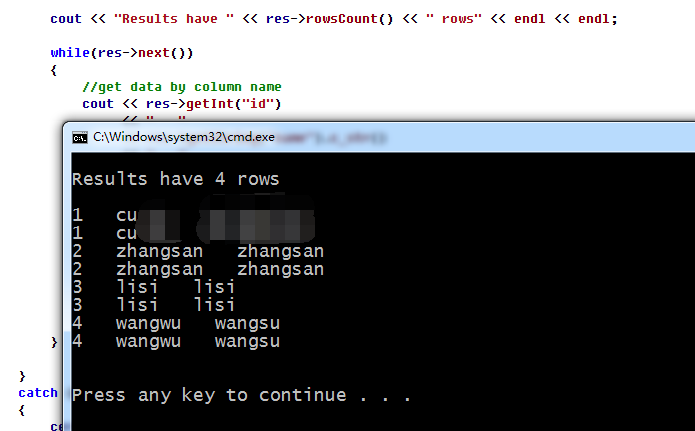
运行结果:
5、补充
如果在编译过程中报错找不到类似 “<boost/variant.hpp>”这样的错误信息,则是需要boost库支持,下载boost库配置一下即可。
VC++2010配置使用MySQL5.6的更多相关文章
- 配置VC++2010的glut库
VC++2010是一个成熟稳定的版本,微软的编译工具Visual Studio系列从VC6到如今的VC2019,功能非常强大,我们在开始学习C++和计算机图形学的时候,一般入手<<C++P ...
- VC++2010下编译STLport,Boost
VC++2010下编译STLport,Boost 最近在想向Boost转移,努力掌握Boost代码的过程中, STLport版本:5.2.1 Boost版本:1.4.6.1 (1.4.7.0也OK) ...
- VC 2010 Express 学生版(中文版)
Microsoft Visual C++ 2010 Express 学生版 下载传送门(提取码:r7sm) 如何安装 拿到压缩文件后,解压到桌面(别怕,安装完后这个文件夹是可以删除的). 在 &quo ...
- TFS 2010 配置的时候,提示TF255466错误
TFS 2010 配置的时候,提示TF255466错误 Error [ System Checks ] TF255466: The configuration process for Team Fou ...
- VC项目配置基础以及快捷键(收藏)
来自http://blog.csdn.net/phunxm/article/details/5082488 一.IDE基础配置 1.字体 VC6中“Tools→Options→Format→Font” ...
- visual studio 2010配置驱动开发环境
visual studio 2010 配置驱动开发环境 ** 工具/材料 VS2010.WDK开发包 ** 配置过程 以下将讲述VS2010驱动开发环境的配置过程,至于必要软件的安装过程这里不再赘述 ...
- VC#2010 视图设计器无法打开 问题的正解
继上次VC#2010中视图设计器无法打开的问题的讨论后,我感觉每次都重新安装一次安装包未免也太麻烦了,程序员的时间都灰常宝贵. 所以在这次人工智能作业的时候,找到了一个简单的途径: 打开VC#2010 ...
- MySQL安装 MySQL5.7.10免安装版配置,mysql5.7.10免安装版
MySQL5.7.10免安装版配置,mysql5.7.10免安装版 最新版的 Mysql 不提供图形界面的安装了, 下载下来是一个压缩包的形式, 那么我们如何来使用它呢, 让它为我们工作呢? 环境: ...
- Systemc在VC++2010安装方法及如何在VC++2010运行Noxim模拟器
Systemc在VC++2010的安装方法可以参考文档"Systemc with Microsoft Visual Studio 2008.pdf".本文档可以在"htt ...
随机推荐
- Hadoop HDFS文件常用操作及注意事项
Hadoop HDFS文件常用操作及注意事项 1.Copy a file from the local file system to HDFS The srcFile variable needs t ...
- 《Linux/Unix系统编程手册》读书笔记7 (/proc文件的简介和运用)
<Linux/Unix系统编程手册>读书笔记 目录 第11章 这章主要讲了关于Linux和UNIX的系统资源的限制. 关于限制都存在一个最小值,这些最小值为<limits.h> ...
- HDU 1054 Strategic Game (树形dp)
题目链接 题意: 给一颗树,用最少的点覆盖整棵树. 每一个结点可以防守相邻的一个边,求最少的点防守所有的边. 分析: 1:以当前节点为根节点,在该节点排士兵守护道路的最小消耗.在这种情况下,他的子节点 ...
- eclipse有生成不带参数的构造方法的快捷键吗
你打上类名的2个字母,然后”alt“ +“/” 基本上选第一个就行了
- Qt之QLabel
简述 QLabel提供了一个文本或图像的显示,没有提供用户交互功能. 一个QLabel可以包含以下任意内容类型: 内容 设置 纯文本 使用setText()设置一个QString 富文本 使用setT ...
- jquery仿天猫商城左侧导航菜单
之前看到有博友写了一个仿天猫商城左侧导航菜单,可惜不提供免费下载,也没有代码.以前自己也写过类似的效果,只是都是一小块一小块的,现在重新拼凑.我将一步一步的实现拼凑过程,希望对你有所帮助. Demo在 ...
- I.MX6 ov5640 camera
/************************************************************************ * I.MX6 ov5640 camera * 说明 ...
- valueOf intValue parsetInt区别
1.int intValue() 以 int 类型返回该 Integer 的值. Long l = 123; l.intValue() ---->int : 123 2.static int p ...
- Ensemble Learning 之 Gradient Boosting 与 GBDT
之前一篇写了关于基于权重的 Boosting 方法 Adaboost,本文主要讲述 Boosting 的另一种形式 Gradient Boosting ,在 Adaboost 中样本权重随着分类正确与 ...
- 【英语】Bingo口语笔记(44) - 进餐时的表达