
RabbitMQ-TTL-死信队列_DLX
1. 简介
死信队列,简称:DLX,Dead Letter Exchange(死信交换机),当消息成为Dead message后,可以被重新发送到另外一个交换机,这个交换机就是DLX。
(一般会将DLX和与其binding 的 Queue,一并称为死信队列或DLX,习惯而已,不必纠结)

那么什么情况下会成为Dead message?
- 队列的长度达到阈值。
- 消费者拒接消费消息,
basicNack/basicReject,并且不把消息重新放入原目标队列,requeue=false。 - 原队列存在消息过期设置,消息到达超时时间未被消费。
流程讲解,如图所示(以第三种情况为例):
Producer发送一条消息到Exchange并路由到设有过期时间(假设30分钟)的Queue中。- 当消息的存活时间超过了30分钟后,
Queue会将消息转发给DLX。 DLX接收到Dead message后,将Dead message路由到与其绑定的Queue中。- 此时消费者监听此死信队列并消费此消息。
死信队列有什么用呢?
- 取消订单(比如下单30分钟后未付款,则取消订单,回滚库存),或者新用户注册,隔段时间进行短信问候等。
- 将消费者拒绝的消息发送到死信队列,然后将消息进行持久化,后续可以做业务分析或者处理。
2. TTL
因为要实现延迟消息,我们先得知道如何设置过期时间。这里指演示
TTL :Time To Live(存活时间/过期时间),当消息到达存活时间后,还没有被消费,会被自动清除。
RabbitMQ可以对消息设置过期时间,也可以对整个队列(Queue)设置过期时间。
设置队列过期时间使用参数:x-message-ttl,单位:ms(毫秒),会对整个队列消息统一过期。
设置消息过期时间使用参数:expiration。单位:ms(毫秒),当该消息在队列头部时(消费时),会单独判断这一消息是否过期。
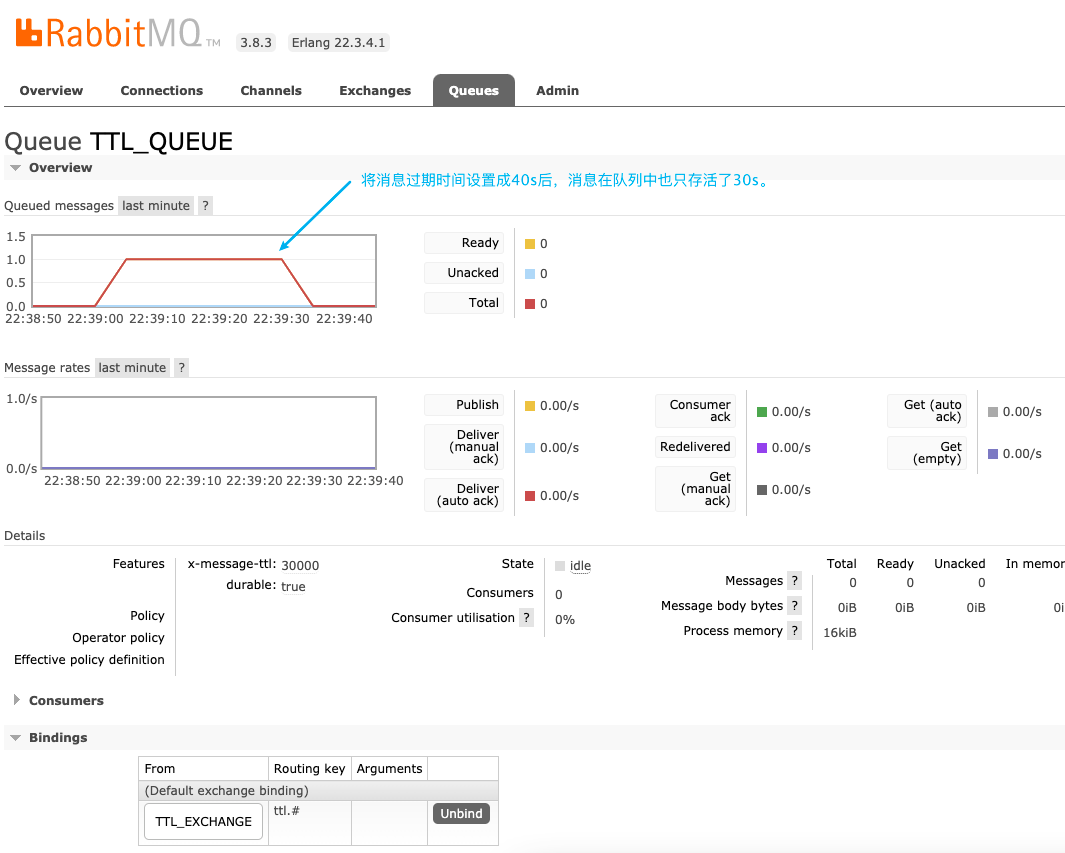
如果两者都进行了设置,以时间短的为准。
2.1 队列设置TTL
2.1.1 引入所需依赖
<dependency>

    <groupId>org.springframework.boot</groupId>

    <artifactId>spring-boot-starter-amqp</artifactId>

</dependency>

<dependency>

    <groupId>org.projectlombok</groupId>

    <artifactId>lombok</artifactId>

    <optional>true</optional>

</dependency>

<dependency>

    <groupId>org.springframework.boot</groupId>

    <artifactId>spring-boot-starter-test</artifactId>

    <scope>test</scope>

</dependency>

<dependency>

    <groupId>org.springframework.amqp</groupId>

    <artifactId>spring-rabbit-test</artifactId>

    <scope>test</scope>

</dependency>
2.1.2 application.yaml
spring:

  rabbitmq:

    host: localhost

    port: 5672

    # rabbit 默认的虚拟主机

    virtual-host: /

    # rabbit 用户名密码

    username: admin

    password: admin123
2.1.3 RabbitConfig
- 声明一个过期时间为30s的
Queue。 - 声明一个交换机(这里声明的是主题交换机,交换机类型无所谓,只要消息能路由到
Queue即可)。 - 设置绑定关系。
import org.springframework.amqp.core.Binding;

import org.springframework.amqp.core.BindingBuilder;

import org.springframework.amqp.core.Exchange;

import org.springframework.amqp.core.ExchangeBuilder;

import org.springframework.amqp.core.Queue;

import org.springframework.amqp.core.QueueBuilder;

import org.springframework.beans.factory.annotation.Qualifier;

import org.springframework.context.annotation.Bean;

import org.springframework.context.annotation.Configuration;

/**

 * 设置过期队列

 *

 * @author ludangxin

 * @date 2021/9/15

 */

@Configuration

public class RabbitTtlConfig {

   public static final String EXCHANGE_NAME = "TTL_EXCHANGE";

   public static final String QUEUE_NAME = "TTL_QUEUE";

   @Bean(QUEUE_NAME)

   public Queue queue() {

      return QueueBuilder.durable(QUEUE_NAME).ttl(30000).build();

   }

   @Bean(EXCHANGE_NAME)

   public Exchange exchange() {

      return ExchangeBuilder.topicExchange(EXCHANGE_NAME).durable(true).build();

   }

   @Bean

   public Binding binding(@Qualifier(QUEUE_NAME) Queue queue, @Qualifier(EXCHANGE_NAME) Exchange exchange) {

      return BindingBuilder.bind(queue).to(exchange).with("ttl.#").noargs();

   }

}
2.1.4 Producer
import com.ldx.rabbitmq.config.RabbitTtlConfig;

import org.springframework.amqp.rabbit.core.RabbitTemplate;

import org.springframework.beans.factory.annotation.Autowired;

import org.springframework.stereotype.Component;

/**

 * 具有过期时间的消息 生产者

 *

 * @author ludangxin

 * @date 2021/9/9

 */

@Component

public class TtlProducer {

    @Autowired

    private RabbitTemplate rabbitTemplate;

   public void sendMsg() {

      rabbitTemplate.convertAndSend(RabbitTtlConfig.EXCHANGE_NAME, "ttl.user", "这是一条有生命周期的消息。");

   }

}
2.1.5 测试代码
@Autowired

private TtlProducer ttlProducer;

@Test

public void sendMsg() {

    ttlProducer.sendMsg();

}
2.1.6 启动测试
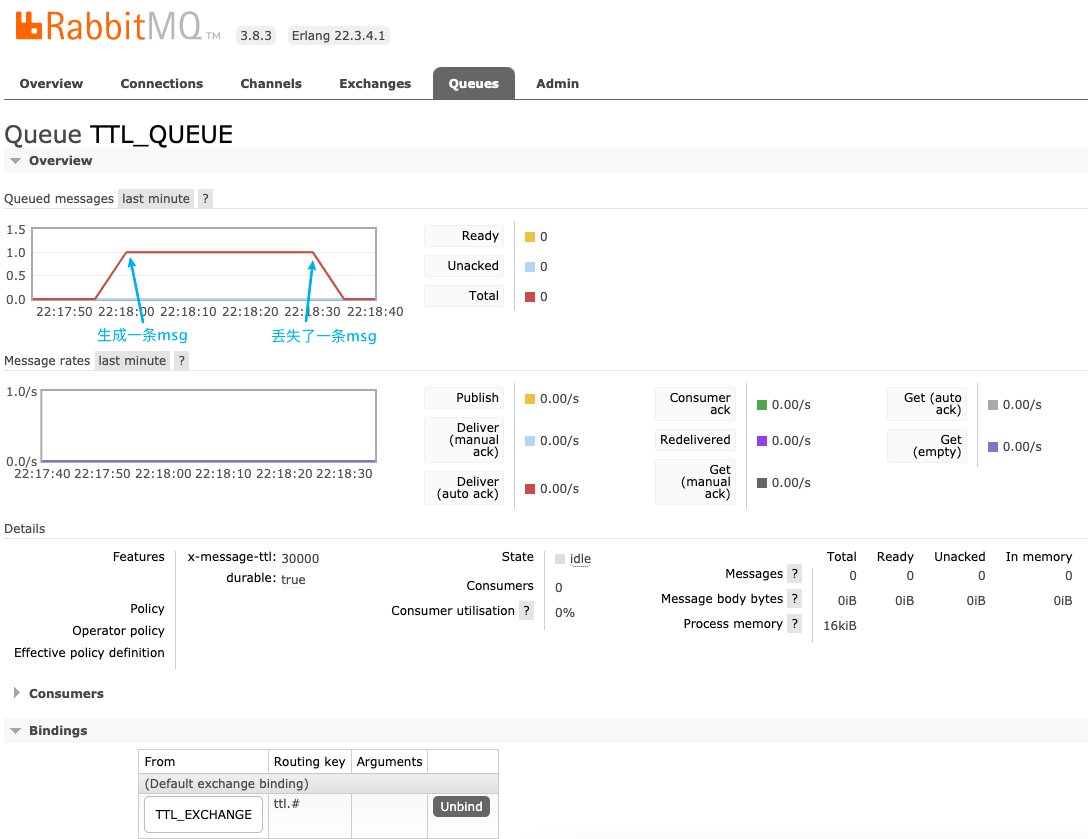
运行测试代码后,到RabbitMQ 控制台中查看队列即消息情况。
如图所示,消息存活30s未被消费后,消息被遗弃。
2.2 消息设置TTL
2.2.1 Producer
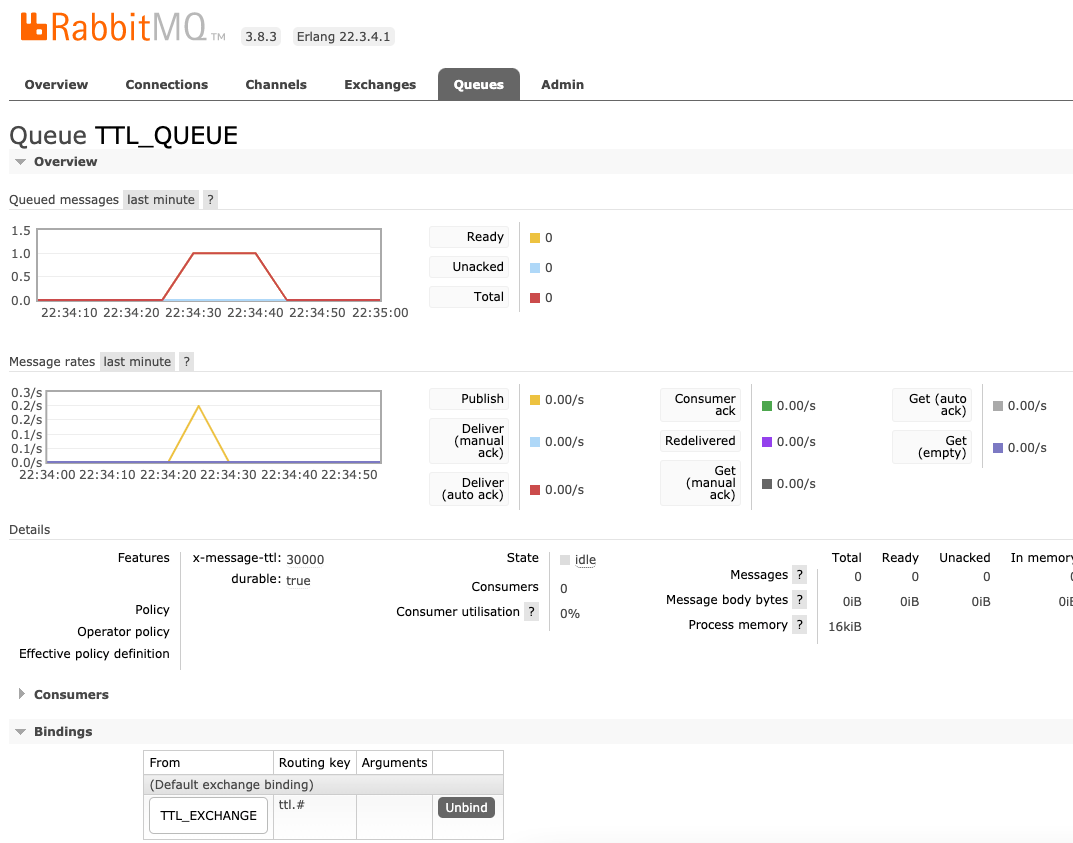
我们将Producer代码稍加修改,给消息设置10s的过期时间,观察消息到底是存活30s还是10s。
import com.ldx.rabbitmq.config.RabbitTtlConfig;

import org.springframework.amqp.core.Message;

import org.springframework.amqp.core.MessageProperties;

import org.springframework.amqp.rabbit.core.RabbitTemplate;

import org.springframework.beans.factory.annotation.Autowired;

import org.springframework.stereotype.Component;

/**

 * 具有过期时间的消息 生产者

 *

 * @author ludangxin

 * @date 2021/9/9

 */

@Component

public class TtlProducer {

   @Autowired

   private RabbitTemplate rabbitTemplate;

   public void sendMsg() {

      MessageProperties mp = new MessageProperties();

      mp.setExpiration("10000");

      Message message = new Message("这是一条有生命周期的消息。".getBytes(), mp);

      rabbitTemplate.convertAndSend(RabbitTtlConfig.EXCHANGE_NAME, "ttl.user", message);

   }

}
2.2.2 启动测试
如图所示,消息只存活了10s。
我们将过期时间设置成40s后,但消息还是只存活了30s。说明当同时设置了过期时间时,是以时间短的为准。
3. TTL + DLX
接下来我们通过设置过期时间和死信队列来实现延迟队列的功能。
首先罗列下实现步骤:
- 声明一个
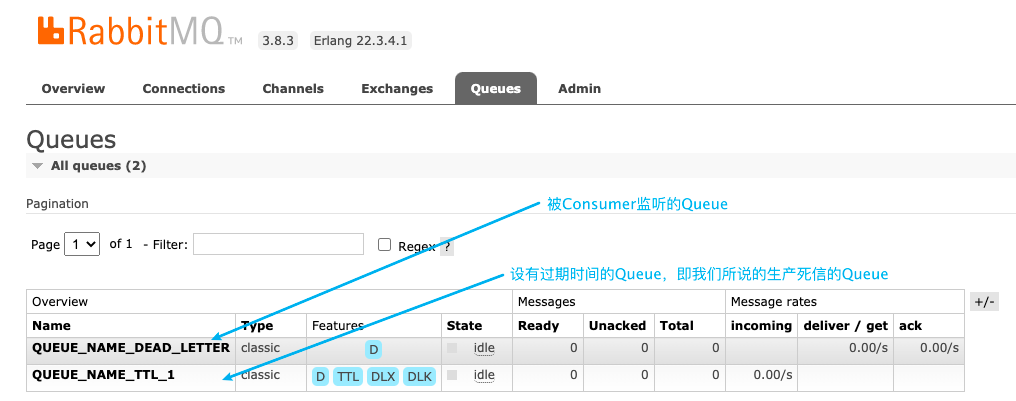
Exchange与TTl Queue,并且绑定关系,实现生成死信的逻辑。 - 声明一个
DLX与Queue,此步骤的Queue是为了接收死信并让Consumer进行监听消费的。 - 将
TTl Queue与DLX进行绑定,使消息成为死信后能转发给DLX。
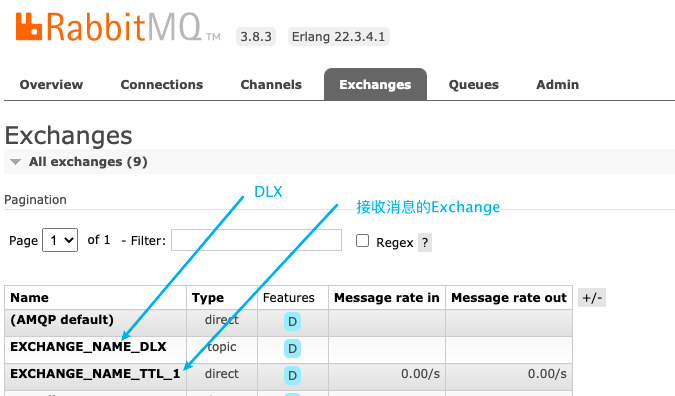
3.1 RabbitConfig
其实DLX与普通的Exchange没有什么区别,只不过是“生产”死信的Queue指定了消息成为死信后转发到DLX。
import org.springframework.amqp.core.Binding;

import org.springframework.amqp.core.BindingBuilder;

import org.springframework.amqp.core.Exchange;

import org.springframework.amqp.core.ExchangeBuilder;

import org.springframework.amqp.core.Queue;

import org.springframework.amqp.core.QueueBuilder;

import org.springframework.beans.factory.annotation.Qualifier;

import org.springframework.context.annotation.Bean;

import org.springframework.context.annotation.Configuration;

/**

 * 死信队列配置

 *

 * @author ludangxin

 * @date 2021/9/15

 */

@Configuration

public class RabbitDeadLetterConfig {

   public static final String QUEUE_NAME_TTL = "QUEUE_NAME_TTL_1";

   public static final String EXCHANGE_NAME_TTL = "EXCHANGE_NAME_TTL_1";

   public static final String QUEUE_NAME_DEAD_LETTER = "QUEUE_NAME_DEAD_LETTER";

   public static final String EXCHANGE_NAME_DLX = "EXCHANGE_NAME_DLX";

   public static final String ROUTING_KEY_DLX = "EXPIRE.#";

   public static final String ROUTING_KEY_DEAD_LETTER = "EXPIRE.10";

   public static final String ROUTING_KEY_TTL = "EXPIRE_TTL_10";

   /**

    * 1. Queue 队列

    */

   @Bean(QUEUE_NAME_TTL)

   public Queue queue() {

      /*

       * 1. 设置队列的过期时间 30s

       * 2. 绑定DLX

       * 3. 设置routing key(注意:这里设置的是路由到死信Queue的路由,并不是设置binding关系的路由)

       */

      return QueueBuilder.durable(QUEUE_NAME_TTL).ttl(10000).deadLetterExchange(EXCHANGE_NAME_DLX).deadLetterRoutingKey(ROUTING_KEY_DEAD_LETTER).build();

   }

   /**

    * 2. exchange

    */

   @Bean(EXCHANGE_NAME_TTL)

   public Exchange exchange() {

      return ExchangeBuilder.directExchange(EXCHANGE_NAME_TTL).durable(true).build();

   }

   /**

    * 3. 队列和交互机绑定关系 Binding

    */

   @Bean

   public Binding bindExchange(@Qualifier(QUEUE_NAME_TTL) Queue queue, @Qualifier(EXCHANGE_NAME_TTL) Exchange exchange) {

      return BindingBuilder.bind(queue).to(exchange).with(ROUTING_KEY_TTL).noargs();

   }

   /**

    * 4. 死信队列

    */

   @Bean(QUEUE_NAME_DEAD_LETTER)

   public Queue deadLetterQueue() {

      return QueueBuilder.durable(QUEUE_NAME_DEAD_LETTER).build();

   }

   /**

    * 5. dlx

    */

   @Bean(EXCHANGE_NAME_DLX)

   public Exchange exchangeDlx() {

      return ExchangeBuilder.topicExchange(EXCHANGE_NAME_DLX).durable(true).build();

   }

   /**

    * 6. 队列和交互机绑定关系 Binding

    */

   @Bean

   public Binding bindDlxExchange(@Qualifier(QUEUE_NAME_DEAD_LETTER) Queue queue, @Qualifier(EXCHANGE_NAME_DLX) Exchange exchange) {

      return BindingBuilder.bind(queue).to(exchange).with(ROUTING_KEY_DLX).noargs();

   }

}
3.2 Producer
import com.ldx.rabbitmq.config.RabbitDeadLetterConfig;

import org.springframework.amqp.core.Message;

import org.springframework.amqp.rabbit.core.RabbitTemplate;

import org.springframework.beans.factory.annotation.Autowired;

import org.springframework.stereotype.Component;

import java.time.LocalDateTime;

import java.time.format.DateTimeFormatter;

/**

 * 延迟消息生产者

 *

 * @author ludangxin

 * @date 2021/9/9

 */

@Component

public class DelayProducer {

   @Autowired

   private RabbitTemplate rabbitTemplate;

   public void sendMsg() {

      String msg = "这是一条有生命周期的消息,发送时间为:" + LocalDateTime.now().format(DateTimeFormatter.ofPattern("yyyy-MM-dd HH:mm:ss"));

      Message message = new Message(msg.getBytes());

      rabbitTemplate.convertAndSend(RabbitDeadLetterConfig.EXCHANGE_NAME_TTL, RabbitDeadLetterConfig.ROUTING_KEY_TTL, message);

   }

}
3.3 Consumer
import com.ldx.rabbitmq.config.RabbitDeadLetterConfig;

import lombok.extern.slf4j.Slf4j;

import org.springframework.amqp.core.Message;

import org.springframework.amqp.rabbit.annotation.RabbitListener;

import org.springframework.stereotype.Component;

import java.time.LocalDateTime;

import java.time.format.DateTimeFormatter;

/**

 * 延迟消息消费者

 *

 * @author ludangxin

 * @date 2021/9/9

 */

@Slf4j

@Component

public class DelayConsumer {

    @RabbitListener(queues = {RabbitDeadLetterConfig.QUEUE_NAME_DEAD_LETTER})

    public void dlxQueue(Message message){

        log.info(new String(message.getBody()) + ",消息接收时间为:" + LocalDateTime.now().format(DateTimeFormatter.ofPattern("yyyy-MM-dd HH:mm:ss")));

    }

}
3.4 测试代码
@Autowired

private DelayProducer delayProducer;

@Test

@SneakyThrows

public void sendDlxMsg() {

    delayProducer.sendMsg();

    // 使进程阻塞,方便Consumer监听输出Message

    System.in.read();

}
3.5 启动测试
输出日志内容如下:
2021-09-15 23:51:22.795 INFO 8122 --- [ntContainer#0-1] com.ldx.rabbitmq.consumer.DelayConsumer : 这是一条有生命周期的消息,发送时间为:2021-09-15 23:51:12,消息接收时间为:2021-09-15 23:51:22
RabbitMQ-TTL-死信队列_DLX的更多相关文章
- RabbitMQ实战-死信队列
RabbitMQ死信队列 场景说明 代码实现 简单的Util 生产者 消费者 场景说明 场景: 当队列的消息未正常被消费时,如何解决? 消息被拒绝并且不再重新投递 消息超过有效期 队列超载 方案: 未 ...
- RabbitMQ配置死信队列
死信队列 消息传输过程中难免会产生一些无法及时处理的消息,这些暂时无法处理的消息有时候也是需要被保留下来的,于是这些无法被及时处理的消息就变成了死信. 既然需要保留这些死信,那么就需要一个容器来存储它 ...
- RabbitMQ之死信队列
1:何为死信队列 死信队列也是一个正常的队列,可以被消费. 但是,死信队列的消息来源于其他队列的转发. 2:如何触发死信队列 1:消息超时 2:队列长度达到极限 3:消息被拒绝消费,并不再重进队列,且 ...
- RabbitMQ 消费端限流、TTL、死信队列
目录 消费端限流 1. 为什么要对消费端限流 2.限流的 api 讲解 3.如何对消费端进行限流 TTL 1.消息的 TTL 2.队列的 TTL 死信队列 实现死信队列步骤 总结 消费端限流 1. 为 ...
- 【RabbitMQ】一文带你搞定RabbitMQ死信队列
本文口味:爆炒鱿鱼 预计阅读:15分钟 一.说明 RabbitMQ是流行的开源消息队列系统,使用erlang语言开发,由于其社区活跃度高,维护更新较快,性能稳定,深得很多企业的欢心(当然,也包括我 ...
- 面试官:RabbitMQ过期时间设置、死信队列、延时队列怎么设计?
哈喽!大家好,我是小奇,一位不靠谱的程序员 小奇打算以轻松幽默的对话方式来分享一些技术,如果你觉得通过小奇的文章学到了东西,那就给小奇一个赞吧 文章持续更新 一.前言 RabbitMQ我们经常的使用, ...
- RabbitMQ死信队列另类用法之复合死信
前言 在业务开发过程中,我们常常需要做一些定时任务,这些任务一般用来做监控或者清理任务,比如在订单的业务场景中,用户在创建订单后一段时间内,没有完成支付,系统将自动取消该订单,并将库存返回到商品中,又 ...
- rabbitmq~消息失败后重试达到 TTL放到死信队列(事务型消息补偿机制)
这是一个基于消息的分布式事务的一部分,主要通过消息来实现,生产者把消息发到队列后,由消费方去执行剩下的逻辑,而当消费方处理失败后,我们需要进行重试,即为了最现数据的最终一致性,在rabbitmq里,它 ...
- RabbitMQ TTL、死信队列
TTL概念 TTL是Time To Live的缩写,也就是生存时间. RabbitMQ支持消息的过期时间,在消息发送时可以进行指定. RabbitMQ支持队列的过期时间,从消息入队列开始计算,只要超过 ...
- RabbitMQ消费端ACK与重回队列机制,TTL,死信队列详解(十一)
消费端的手工ACK和NACK 消费端进行消费的时候,如果由于业务异常我们可以进行日志的记录,然后进行补偿. 如果由于服务器宕机等严重问题,那么我们就需要手工进行ACK保障消费端成功. 消费端重回队列 ...
随机推荐
- 3、基于Python建立任意层数的深度神经网络
一.神经网络介绍: 神经网络算法参考人的神经元原理(轴突.树突.神经核),在很多神经元基础上构建神经网络模型,每个神经元可看作一个个学习单元.这些神经元采纳一定的特征作为输入,根据自身的模型得到输出. ...
- appium自动化测试(5)-一些pyhon操作
1.套件的问题 将所有的测试用例加进去,会一个个执行,用于用例名字没有规范test开头的时候 def suite(): suite = unittest.TestSuite suite.addTest ...
- C++STL—string类
string容器 1.1 string容器的基本概念 string容器是一个类 这个容器中有一个指针,指针维护了一个数组 string容器提供copy.find.insert.replace等等功能 ...
- 数据结构与算法-排序(七)希尔排序(Shell Sort)
摘要 看希尔排序需要先想象出一个二维的矩阵,在这个矩阵中,有多少列数据全看步长(一定的规则得到).处理完之后,就再接着用另一个步长组成矩阵处理.直到步长全部使用完. 这里的巧妙之处就是没有把序列先处理 ...
- MySQL 不完全入门指南
由于 MySQL 的整个体系太过于庞大,文章的篇幅有限,不能够完全的覆盖所有的方面.所以我会尽可能的从更加贴进我们日常使用的方式来进行解释. 小白眼中的 MySQL 首先,对于我们来说,MySQL 是 ...
- Shell-15-脚本练习
批量生成随机字符串文件名 # 用for循环在 /test 目录下批量创建10个html文件,其中每个文件需要包含10个随机小写字符加固定字符串 alnk #!/bin/bash ########### ...
- 【笔记】sklearn中的SVM以及使用多项式特征以及核函数
sklearn中的SVM以及使用多项式特征以及核函数 sklearn中的SVM的使用 SVM的理论部分 需要注意的是,使用SVM算法,和KNN算法一样,都是需要做数据标准化的处理才可以,因为不同尺度的 ...
- QZEZTEST2021.7.27分析
T1 qzez 错误检测 题意 思路 代码 T2 qzez 比赛 题意 题面 有\(AB\)两队,每队\(n\)人,两队间进行\(n\)场比赛,每个人都要参赛,对手随机且概率均等.每人都有一个实力值, ...
- MATLAB—命令窗、文件夹、路径、工作内存区、帮助系统
文章目录 一.命令窗操作 1.命令窗的显示 2.数据显示格式 3.命令行的标点符号 4.命令窗常用控制命令 5.指令行编辑 二.当前文件夹和路径设置 1.当前文件夹及其使用 2.搜索路径和路径设置 三 ...
- dockerfile中ENTRYPOINT与CMD的结合
一.写在前面 我们在上篇小作文docker容器dockerfile详解对中dockerfile有了比较全面的认识,我们也提到ENTRYPOINT和CMD都可以指定容器启动命令.因为这两个命令是掌握do ...