
uwp 语音指令
Xml code
--------------------------------
<Page
x:Class="MyApp.MainPage"
xmlns="http://schemas.microsoft.com/winfx/2006/xaml/presentation"
xmlns:x="http://schemas.microsoft.com/winfx/2006/xaml"
xmlns:local="using:MyApp"
xmlns:d="http://schemas.microsoft.com/expression/blend/2008"
xmlns:mc="http://schemas.openxmlformats.org/markup-compatibility/2006"
mc:Ignorable="d"
Background="{ThemeResource ApplicationPageBackgroundThemeBrush}">
<StackPanel>
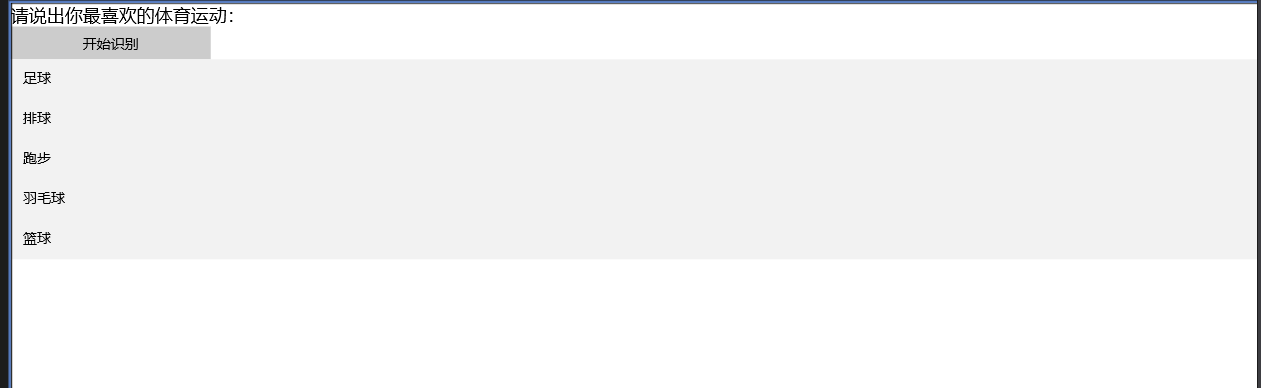
<TextBlock Text="请说出你最喜欢的体育运动:" FontSize="18"/>
<Button Content="开始识别" Width="200" Click="OnClick"/>
<ListBox Name="lb">
<x:String>足球</x:String>
<x:String>排球</x:String>
<x:String>跑步</x:String>
<x:String>羽毛球</x:String>
<x:String>篮球</x:String>
</ListBox>
</StackPanel>
</Page>
C# code
------------------------
public sealed partial class MainPage : Page
{
SpeechRecognizer _recognizer = null;
public MainPage()
{
this.InitializeComponent();
this.NavigationCacheMode = NavigationCacheMode.Required;
this.Loaded += Page_Loaded;
this.Unloaded += Page_Unloaded;
}
private void Page_Unloaded(object sender, RoutedEventArgs e)
{
// 释放资源
_recognizer.Dispose();
}
private async void Page_Loaded(object sender, RoutedEventArgs e)
{
_recognizer = new SpeechRecognizer();
// 创建自定义短语约束
string[] array = { "足球", "排球", "跑步", "羽毛球", "篮球" };
SpeechRecognitionListConstraint listConstraint = new SpeechRecognitionListConstraint(array);
// 添加约束实例到集合中
_recognizer.Constraints.Add(listConstraint);
// 编译约束
await _recognizer.CompileConstraintsAsync();
}
private async void OnClick(object sender, RoutedEventArgs e)
{
Button btn = sender as Button;
btn.IsEnabled = false;
try
{
SpeechRecognitionResult res = await _recognizer.RecognizeAsync();
if (res.Status == SpeechRecognitionResultStatus.Success)
{
// 处理识别结果
this.lb.SelectedItem = res.Text;
}
}
catch { /* 忽略异常 */ }
btn.IsEnabled = true;
}
}
xml 文件
语音识别
public sealed partial class App : Application
{
/// <summary>
/// Initializes the singleton application object. This is the first line of authored code
/// executed, and as such is the logical equivalent of main() or WinMain().
/// </summary>
public App()
{
this.InitializeComponent();
this.Suspending += this.OnSuspending;
}
/// <summary>
/// Invoked when the application is launched normally by the end user. Other entry points
/// will be used when the application is launched to open a specific file, to display
/// search results, and so forth.
/// </summary>
/// <param name="e">Details about the launch request and process.</param>
protected async override void OnLaunched(LaunchActivatedEventArgs e)
{
StorageFile vcdFile = await StorageFile.GetFileFromApplicationUriAsync(new Uri("ms-appx:///vcd.xml"));
// 安装VCD文件
await VoiceCommandDefinitionManager.InstallCommandDefinitionsFromStorageFileAsync(vcdFile);
Frame rootFrame = Window.Current.Content as Frame;
// Do not repeat app initialization when the Window already has content,
// just ensure that the window is active
if (rootFrame == null)
{
// Create a Frame to act as the navigation context and navigate to the first page
rootFrame = new Frame();
// TODO: change this value to a cache size that is appropriate for your application
rootFrame.CacheSize = 1;
// Set the default language
rootFrame.Language = "zh-CN";
if (e.PreviousExecutionState == ApplicationExecutionState.Terminated)
{
// TODO: Load state from previously suspended application
}
// Place the frame in the current Window
Window.Current.Content = rootFrame;
}
if (rootFrame.Content == null)
{
// When the navigation stack isn't restored navigate to the first page,
// configuring the new page by passing required information as a navigation
// parameter
if (!rootFrame.Navigate(typeof(MainPage), e.Arguments))
{
throw new Exception("Failed to create initial page");
}
}
// Ensure the current window is active
Window.Current.Activate();
}
/// <summary>
/// Invoked when application execution is being suspended. Application state is saved
/// without knowing whether the application will be terminated or resumed with the contents
/// of memory still intact.
/// </summary>
/// <param name="sender">The source of the suspend request.</param>
/// <param name="e">Details about the suspend request.</param>
private void OnSuspending(object sender, SuspendingEventArgs e)
{
var deferral = e.SuspendingOperation.GetDeferral();
// TODO: Save application state and stop any background activity
deferral.Complete();
}
protected override void OnActivated(IActivatedEventArgs args)
{
if (args.Kind == ActivationKind.VoiceCommand)
{
VoiceCommandActivatedEventArgs varg = (VoiceCommandActivatedEventArgs)args;
// 处理识别结果
SpeechRecognitionResult res = varg.Result;
// 获取已识别的指令名字
string cmdName = res.RulePath[0];
if (cmdName == "open")
{
// 获取PhraseList中被识别出来的项
var interpretation = res.SemanticInterpretation;
if (interpretation != null)
{
// 通过PhraseList的Label属性可以查询出被识别的Item
string item = interpretation.Properties["pages"].FirstOrDefault();
if (!string.IsNullOrEmpty(item))
{
// 导航到对应页面
Frame root = Window.Current.Content as Frame;
if (root == null)
{
root = new Frame();
Window.Current.Content = root;
}
switch (item)
{
case "我的音乐":
root.Navigate(typeof(MyMusicPage));
break;
case "我的视频":
root.Navigate(typeof(MyVedioPage));
break;
case "我的照片":
root.Navigate(typeof(MyPhotoPage));
break;
case "主页":
root.Navigate(typeof(MainPage));
break;
default:
root.Navigate(typeof(MainPage));
break;
}
}
}
}
}
Window.Current.Activate();
}
}
识别的xml 文件
<?xml version="1.0" encoding="utf-8"?>
<VoiceCommands xmlns="http://schemas.microsoft.com/voicecommands/1.1">
<CommandSet xml:lang="zh-cn">
<CommandPrefix>测试应用</CommandPrefix>
<Example>“打开 主页”或“打开 我的音乐”或“我的音乐”或“打开我的视频”或“我的视频”……</Example>
<Command Name="open">
<Example>“打开 我的音乐”或“我的音乐”</Example>
<ListenFor>[打开]{pages}</ListenFor>
<Feedback>好的,正在努力打开中……</Feedback>
<Navigate/>
</Command>
<PhraseList Label="pages">
<Item>主页</Item>
<Item>我的音乐</Item>
<Item>我的视频</Item>
<Item>我的照片</Item>
</PhraseList>
</CommandSet>
</VoiceCommands>
uwp 语音指令的更多相关文章
- Win10/UWP开发—使用Cortana语音指令与App的前台交互
Win10开发中最具有系统特色的功能点绝对少不了集成Cortana语音指令,其实Cortana语音指令在以前的wp8/8.1时就已经存在了,发展到了Win10,Cortana最明显的进步就是开始支持调 ...
- Win10/UWP开发—使用Cortana语音指令启动前台App
这两天进群(53078485)找大咖的童鞋比较多,只是大咖比较忙,目前Demo还没有要到,这里先给大家转载一篇Aran大咖的博客学习下,以下是原文: Win10开发中最具有系统特色的功能点绝对少不了集 ...
- WP中的语音识别(下):语音指令
除了系统集成的可以用于搜索.启动应用程序等语音命令外,在我们的应用程序内部还能自己定义语音指令,使得我们的APP能与语音操控结合得更加完全. 语音指令是通过一个XML文件来定义的.比如,咱小舅子开了家 ...
- anki vector robot入门语音指令大全
vector机器人功能不断完善. 一:刚开始支持一些基础指令,你跟他说话他能在本机识别,然后做出相应的响应.在说这部分指令之前,需要加上Hey Vector.(嘿,维课的),然后他会准备听取你的指令, ...
- Win10/UWP开发—使用Cortana语音与App后台Service交互
上篇文章中我们介绍了使用Cortana调用前台App,不熟悉的移步到:Win10/UWP开发—使用Cortana语音指令与App的前台交互,这篇我们讲讲如何使用Cortana调用App的后台任务,相比 ...
- 在UWP应用中加入Cortana语音指令集
本文介绍小娜语音指令集的使用场景,如何将UWP应用接入小娜的语音指令集,使用户直接通过小娜启动应用并使用应用中 一些轻量级的功能.文中以必应词典作为实例讲解必应词典UWP版本是如何接入小娜语音功能的. ...
- HoloLens开发手记 - 语音输入 Voice input
语音是HoloLens三大重要输入形式之一.它允许你直接通过语言控制全息图像,而不用借助手势.你只要凝视全息图像然后说出语音命令即可.语音输入是自然的交互方式,它能够很好的改善复杂的交互,因为通过一条 ...
- 3D语音天气球(源码分享)——完结篇
转载请注明本文出自大苞米的博客(http://blog.csdn.net/a396901990),谢谢支持! 开篇废话: 由于这篇文章是本系列最后一篇,有必要进行简单的回顾和思路整理. 这个程序是由两 ...
- 微软Hololens学院教程-Hologram 212-Voice(语音)【微软教程已经更新,本文是老版本】
这是老版本的教程,为了不耽误大家的时间,请直接看原文,本文仅供参考哦!原文链接:https://developer.microsoft.com/EN-US/WINDOWS/HOLOGRAPHIC/ho ...
随机推荐
- WIN7 WIN10修改path不用重启即可生效
近来安装python scrapy经常忘了添加到path,需要时增加了但需要重启才能起作用,用下面的方法马上能生效: 1修改path:右击"计算机"--高级--环境变量--path ...
- Docker搭建Redis5.0并挂载数据
记录 Docker 搭建 Redis5.0 并挂载数据过程,搭建参考自 Docker Hub 系列文章欢迎访问:https://www.itwxe.com/posts/9e76db89/ 一.简单挂载 ...
- Day4 包机制 及JavaDoc文档.
包机制 为了更好地组织类,java提供了包机制,用于区别类名的命名空间. 包的本质是文件夹 它语句的语法格式为: package pkg1[. pkg2 [.pkg3...] ] ; 一般利用公司域名 ...
- Python基础之魔术方法(一个序列容器的魔术方法)
# 创建自己想要的序列容器魔术方法'''__len__():调用len(obj)函数会调用这个魔术方法__getitem__(self,key):在使用下标操作temp['key']以及切片操作的时候 ...
- springMVC-2-MVC初步了解
Spring MVC的特点 轻量级,简单易学 高效 , 基于请求响应的MVC框架 与Spring兼容性好,无缝结合 约定优于配置 功能强大:RESTful.数据验证.格式化.本地化.主题等 简洁灵活 ...
- 1java基础
1.java特性 详细解读 Java语言_小沐CA-CSDN博客 (1)Easy:Java的语法比C++的相对简单,另一个方面就是Java能使软件在很小的机器上运行,基础解释其和类库的支持的大小约为4 ...
- NOI2021游记
NOI2021游记 前言 写于 2021.7.28,成绩榜刚出后几个小时.总分 345 拿到银牌 183 名. 我的高中 OI 生活在这里画上句号.结局对我而言虽然不够完美,但是无论怎样都是我人生道路 ...
- visibility:hidden和display:none的区别
一.相同点 disable:none和visibility:hidden都能把网页上的某元素隐藏起来 二.不同点 display:none--不为被隐藏的对象保留其物理空间,即该对象在页面上彻底消失. ...
- airtest前期准备(pocoSDK+unity打apk包+安装pocoui库)
只介绍unity的环境准备,cocos的可以参考官方文档 https://poco-chinese.readthedocs.io/zh_CN/latest/source/doc/integrat ...
- CSS 格式 设置标签间距 和 input slot
作者:张艳涛 日期:2020-07-29 CSS设置俩个标签的间距 及 Input Slots <div> <div class="m-b-20 ovf-hd"& ...