
python_自动查找指定目录下的文件或目录的方法
代码如下
import os

def find_file(search_path, file_type="file", filename=None, file_startswith=None, file_endswith=None, abspath=False) -> dict:

    """

    查找指定目录下所有的文件(不包含以__开头和结尾的文件)或指定格式的文件,若不同目录存在相同文件名,只返回第1个文件的路径

    :param search_path: 查找的目录路径

    :param file_type: 查找的类型,可缺省,缺省则默认查找文件类型,可输入值:file和dir,file表示文件,dir表示目录

    :param filename: 查找名称,精确匹配,可缺省,缺省则返回所有文件或目录,不可与file_startswith或file_endswith组合使用

    :param file_startswith: 模糊匹配开头,可缺省,缺省则不匹配,可与file_endswith组合使用

    :param file_endswith:  模糊匹配结尾,可缺省,缺省则不匹配

    :param abspath: 是否返回绝对路径,默认返回相对路径

    :return: 有结果返回dict类型,key为文件名,value为文件路径,无结果返None

    """

    filename_path = {}

    the_filename_path = {}

    if abspath:

        search_path = os.path.abspath(search_path)

    if file_type not in ["file", "dir"]:

        raise ValueError(f"file_type只能为file或dir,而输入值为{file_type}")

    def __find_file(_search_path):

        # 返回目录所有名称

        names = os.listdir(_search_path)

        find_flag = False

        # 如果查找指定文件,找到就停止查找

        if filename is not None and (filename in names):

            path = os.path.join(_search_path, filename)

            if file_type == "file" and os.path.isfile(path):

                the_filename_path.setdefault(filename, path)

                find_flag = True

            elif file_type == "dir" and os.path.isdir(path):

                the_filename_path.setdefault(filename, path)

                find_flag = True

            return find_flag

        # 如果根目录未找到,在子目录继续查找

        for name in names:

            # 过滤以__开头和__结尾的目录,以及__init__.py文件

            if name.startswith("__") and name.endswith("__") or name == "__init__.py":

                continue

            child_path = os.path.join(_search_path, name)

            # 如果是文件就保存

            if file_type == "file" and os.path.isfile(child_path):

                if file_startswith is None and file_endswith is None:

                    filename_path.setdefault(name, child_path)

                # 保存指定结尾的文件

                elif file_startswith is not None and file_endswith is None and name.startswith(file_startswith):

                    filename_path.setdefault(name, child_path)

                elif file_startswith is None and file_endswith is not None and name.endswith(file_endswith):

                    filename_path.setdefault(name, child_path)

                elif file_startswith is not None and file_endswith is not None and name.startswith(file_startswith) and name.endswith(file_endswith):

                    filename_path.setdefault(name, child_path)

                continue

            if os.path.isdir(child_path):

                if file_type == "dir":

                    if file_startswith is None and file_endswith is None:

                        filename_path.setdefault(name, child_path)

                    # 保存指定结尾的文件

                    elif file_startswith is not None and file_endswith is None and name.startswith(file_startswith):

                        filename_path.setdefault(name, child_path)

                    elif file_startswith is None and file_endswith is not None and name.endswith(file_endswith):

                        filename_path.setdefault(name, child_path)

                    elif file_startswith is not None and file_endswith is not None and name.startswith(file_startswith) and name.endswith(file_endswith):

                        filename_path.setdefault(name, child_path)

                _result = __find_file(child_path)

                if _result is True:

                    return _result

    result = __find_file(search_path)

    if filename is None:

        if filename_path:

            return filename_path

    if filename is not None:

        if result is True:

            return the_filename_path
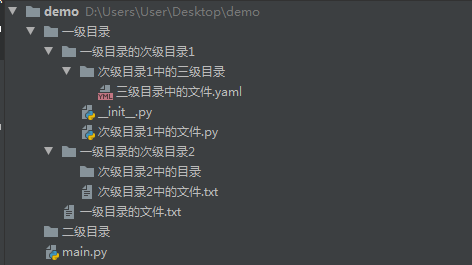
目录结构
用法演示
if __name__ == '__main__':

    # 目录下不存在文件时

    start_path = r".\二级目录"

    ret = find_file(start_path)

    print("目录下不存在文件时:%s" % ret)

    assert ret is None

    print("="*60)

    start_path = r".\一级目录"

    # 查找所有文件或目录

    ret = find_file(start_path, file_type="file")

    print("查找所有文件:%s" % ret)

    assert len(ret) == 4

    ret = find_file(start_path, file_type="dir")

    print("查找所有目录:%s" % ret)

    assert len(ret) == 4

    print("="*60)

    # 查找指定开始的所有文件

    ret = find_file(start_path, file_startswith="次级")

    print("查找指定开始的文件:%s" % ret)

    assert "次级目录1中的文件.py" in ret

    ret = find_file(start_path, file_type="file", file_startswith="哈哈")

    print("查找指定开始的文件不存在时:%s" % ret)

    assert ret is None

    print("="*60)

    # 查找指定结尾的所有文件

    ret = find_file(start_path, file_endswith="txt")

    print("查找指定结尾的文件:%s" % ret)

    assert "一级目录的文件.txt" in ret

    ret = find_file(start_path, file_type="file", file_endswith="哈哈")

    print("查找指定结尾的文件不存在时:%s" % ret)

    assert ret is None

    print("="*60)

    # 查找指定开头和指定结尾的所有文件

    ret = find_file(start_path, file_startswith="次级", file_endswith="txt")

    print("查找指定开头和指定结尾的所有文件:%s" % ret)

    assert "次级目录2中的文件.txt" == list(ret.keys())[0]

    ret = find_file(start_path, file_startswith="呵呵", file_endswith="txt")

    print("查找指定开始不存在,指定结尾存在时:%s" % ret)

    assert ret is None

    ret = find_file(start_path, file_startswith="次级", file_endswith="哈哈")

    print("查找指定开始存在,指定结尾不存在时:%s" % ret)

    assert ret is None

    ret = find_file(start_path, file_startswith="呵呵", file_endswith="哈哈")

    print("查找指定开始和指定结尾都不存在时:%s" % ret)

    assert ret is None

    print("="*60)

    # 查找指定开始的所有文件

    ret = find_file(start_path, file_type="dir", file_startswith="次级")

    print("查找指定开始的文件:%s" % ret)

    assert "次级目录1中的三级目录" in ret

    ret = find_file(start_path, file_type="dir", file_startswith="哈哈")

    print("查找指定开始的文件不存在时:%s" % ret)

    assert ret is None

    print("="*60)

    # 查找指定结尾的所有目录

    ret = find_file(start_path, file_type="dir", file_endswith="目录")

    print("查找指定结尾的目录:%s" % ret)

    assert len(ret) == 2

    ret = find_file(start_path, file_type="dir", file_endswith="哈哈")

    print("查找指定结尾的目录不存在时:%s" % ret)

    assert ret is None

    print("="*60)

    # 查找指定开头和指定结尾的所有目录

    ret = find_file(start_path, file_type="dir", file_startswith="次级", file_endswith="目录")

    print("查找指定开头和指定结尾的所有文件:%s" % ret)

    assert "次级目录2中的目录" in ret

    ret = find_file(start_path, file_type="dir", file_startswith="呵呵", file_endswith="目录")

    print("查找指定开始不存在,指定结尾存在时:%s" % ret)

    assert ret is None

    ret = find_file(start_path, file_type="dir", file_startswith="次级", file_endswith="哈哈")

    print("查找指定开始存在,指定结尾不存在时:%s" % ret)

    assert ret is None

    ret = find_file(start_path, file_type="dir", file_startswith="呵呵", file_endswith="哈哈")

    print("查找指定开始和指定结尾都不存在时:%s" % ret)

    assert ret is None

    print("="*60)

    # 查找指定文件

    ret = find_file(start_path, file_type="file", filename="三级目录中的文件.yaml")

    print("查找指定文件:%s" % ret)

    assert len(ret) == 1

    ret = find_file(start_path, file_type="file", filename="asd")

    print("查找不存在的文件:%s" % ret)

    assert ret is None

    ret = find_file(start_path, file_type="file", filename="次级目录1中的三级目录")

    print("以文件类型去查找已存在文件:%s" % ret)

    assert ret is None

    print("=" * 60)

    # 查找指定目录

    ret = find_file(start_path, file_type="dir", filename="次级目录1中的三级目录")

    print("查找指定目录:%s" % ret)

    assert len(ret) == 1

    ret = find_file(start_path, file_type="dir", filename="asd")

    print("查找不存在的目录:%s" % ret)

    assert ret is None

    ret = find_file(start_path, file_type="dir", filename="三级目录中的文件.yaml")

    print("以目录类型去查找已存在文件:%s" % ret)

    assert ret is None
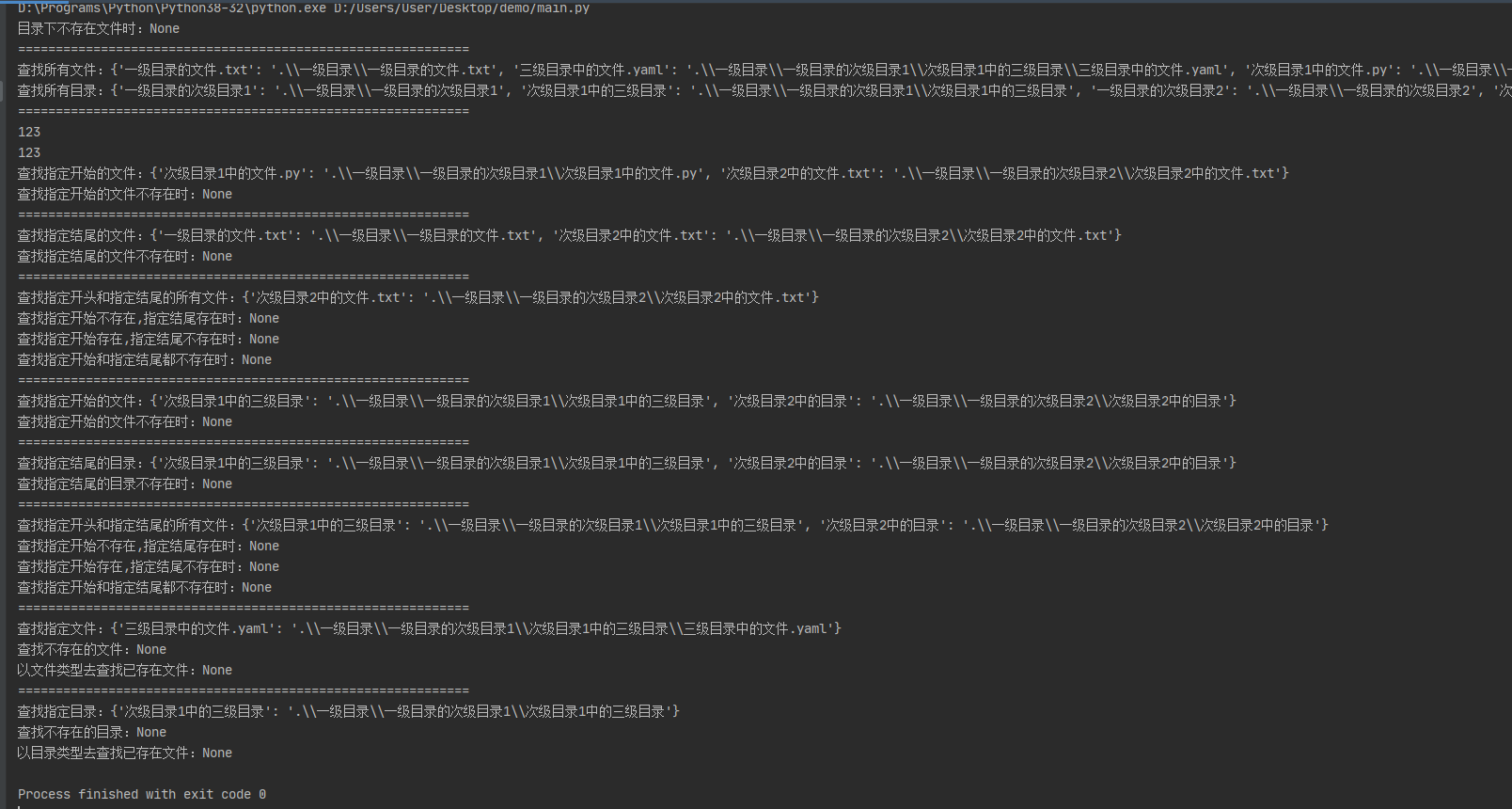
演示结果
python_自动查找指定目录下的文件或目录的方法的更多相关文章
- 初识TypeScript:查找指定路径下的文件按类型生成json
如果开发过node.js的话应该对js(javascript)非常熟悉,TypeScript(以下简称ts)是js的超集. 下面是ts的官网: https://www.tslang.cn/ 1.环境配 ...
- 9.proc目录下的文件和目录详解
1./proc目录下的文件和目录详解 /proc:虚拟目录.是内存的映射,内核和进程的虚拟文件系统目录,每个进程会生成1个pid,而每个进程都有1个目录. /proc/Version:内核版本 /pr ...
- 8.var目录下的文件和目录详解
1./var目录下的文件和目录详解. /var (该目录存放的是不断扩充且经常修改的目录,包括各种日志文件或者pid文件,存放linux的启动日志和正在运行的程序目录(变化的目录:一般是日志文件,ca ...
- Golang获取目录下的文件及目录信息
一.获取当前目录下的文件或目录信息(不包含多级子目录) func main() { pwd,_ := os.Getwd() //获取当前目录 //获取文件或目录相关信息 fileInfoList ...
- C#递归搜索指定目录下的文件或目录
诚然可以使用现成的Directory类下的GetFiles.GetDirectories.GetFileSystemEntries这几个方法实现同样的功能,但请相信我不是蛋疼,原因是这几个方法在遇上[ ...
- 6.etc目录下重要文件和目录详解
1./etc/下的重要的配置文件 /etc(二进制软件包的 yum /rpm 安装的软件和所有系统管理所需要的配置文件和子目录.还有安装的服务的启动命令也放置在此处) /etc/sysconfig/n ...
- .gitignore排除(不忽略)二级以上目录下的文件或目录
在.gitignore中,结合使用/*和!filename的语法,可以达到除特定文件或目录外全部忽略的目的.但当希望不忽略的文件或目录在二级或多级目录下时,如果这样写 /* !/sub/subsub/ ...
- 使用File类列出指定位置下的文件及目录信息
public static void main(String [] args) { File f=new File("C:"); File [] fl=f.listFiles(); ...
- AIX查询当前目录下各文件及目录大小
AIX下要查询某个目录下各个文件或目录的占用空间大小 可以对du命令增加一个别名alias 放在~/.profile里 alias dus='du -sg ./* |sort' s表示文件和目录都是显 ...
随机推荐
- 解决Spring MVC @ResponseBody出现问号乱码问题
原因是SpringMVC的@ResponseBody使用的默认处理字符串编码为ISO-8859-1,而我们前台或者客户端的编码一般是UTF-8或者GBK.现将解决方法分享如下! 第一种方法: 对于需要 ...
- Hibernate的基本功能:对数据库的增删改查(创建对象实例)
一.通过实例化的对象向数据库添加新记录 package com.yh.test; import org.hibernate.Session; import org.hibernate.SessionF ...
- C/C++ Qt 数据库SqlRelationalTable关联表
在上一篇博文中详细介绍了SqlTableModle组件是如何使用的,本篇博文将介绍SqlRelationalTable关联表组件,该组件其实是SqlTableModle组件的扩展类,SqlRelati ...
- IT过来人的10点经验谈
1 入行要趁早,正常是22岁本科或25岁硕士毕业入行.如果是零基础经培训班加持的,尽量在28岁前入行,30岁以后再想要入行IT的,千万慎重. 2 IT行业确实能挣大钱,而且能为学历一般学校一般家庭背景 ...
- DevOps团队交付了什么?
一.简介 "你在团队里是做什么的?" "DevOps." "DevOps是什么呢?" "DevOps是一种文化.一种实践,目标是加 ...
- React中使用 react-router-dom 路由传参的三种方式详解【含V5.x、V6.x】!!!
路由传值的三种方式(v5.x) params参数 //路由链接(携带参数): <Link to='/demo/test/tom/18'}>详情</Link> //或 <L ...
- how2heap libc2.31学习
今天是四月十九,想在五月份之前把how2heap中的高版本(2.31)的例子过一遍.所以这个系列目前还是在更新中.如果比较简单就几句话带过了,遇到难一点的会写的详细一点. fastbin_dup 源代 ...
- [BUUCTF]REVERSE——[ACTF新生赛2020]easyre
[ACTF新生赛2020]easyre 附件 步骤 查壳,32位程序,upx壳儿 脱完壳儿,扔进ida 分析 一开始给我们定义了一个数组, v4=[42,70,39,34,78,44,34,40,73 ...
- NOAA数据下载方法
NOAA OneStop https://data.noaa.gov/onestop/about NOAA 数据搜索平台,在一个地方同时搜索NOAA的 Geophysical, oceans, coa ...
- Go语言核心36讲(Go语言实战与应用二十七)--学习笔记
49 | 程序性能分析基础(下) 在上一篇文章中,我们围绕着"怎样让程序对 CPU 概要信息进行采样"这一问题进行了探讨,今天,我们再来一起看看它的拓展问题. 知识扩展 问题 1: ...