
Winform同步调用异步函数死锁原因分析、为什么要用异步
1、前言
几年前,一个开发同学遇到同步调用异步函数出现死锁问题,导致UI界面假死。我解释了一堆,关于状态机、线程池、WindowsFormsSynchronizationContext.Post、control.BeginInvoke、APC、IOCP,结果我也没讲明白、他也没听明白。后来路过他座位时看到他在各种摸索、尝试,使用Task、await、async各种组合,当时的场景是这样的:
 。问题有点复杂,随着那个开发同学离职转做产品后,就不了了之了。工作中许多同事对于同步、异步也不是特别了解,我会以执行流程图表加源码的形式表述,希望通过这篇文章最少能让大家了解.NET的async await出现deadlock的原因,最好能粗略了解async状态机机制、.NET在不同平台网络调用实现机制。如果文章中表述存在问题,欢迎指正。
2、场景再现、执行过程解析
Winform死锁场景
如下代码,如果点击按钮触发btn_realDead_Click事件,Ui线程将挂起在DeadTask().Result陷入死锁。
死锁产生的原因: Ui线程阻塞等待Task完成,Task需要通过Ui线程设置完成结果。
        private void btn_realDead_Click(object sender, EventArgs e)

        {

            var result = DeadTask().Result; // UI线程挂起位置

            PrintInfo(result);

        }

        /// <summary>

        ///

        /// </summary>

        /// <returns></returns>

        private async Task<string> DeadTask()

        {

            await Task.Delay(500);

            return await Task.FromResult("Hello world");

        }
场景模拟,解析WindowsFormsSynchronizationContext.Post执行过程
Demo代码地址 : https://gitee.com/RiverBied/async-demo
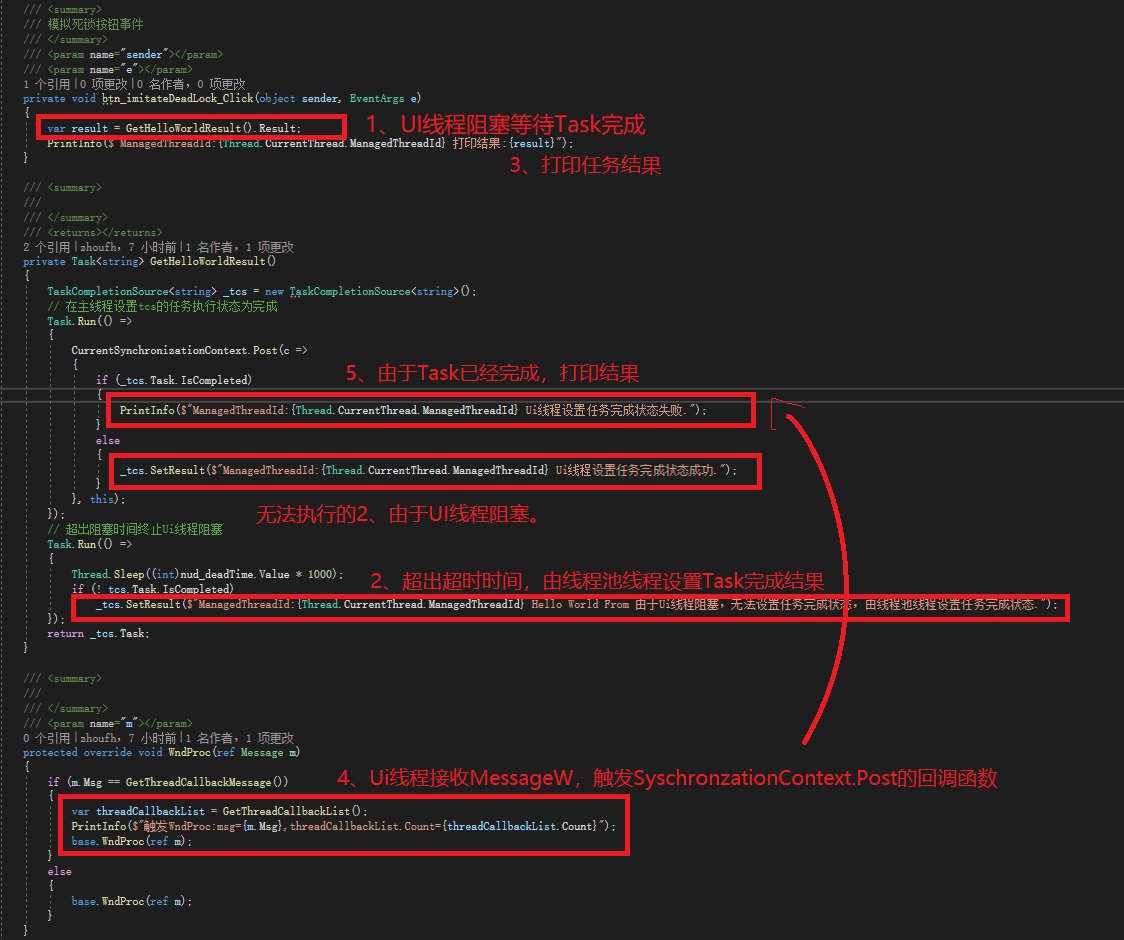
死锁模拟代码
使用async关键字将会由编译器生成状态机代码,反编译的代码也不太直观,所以我先使用非async代码进行简化模拟,async代码下文在解析。
死锁产生的原因: Ui线程阻塞等待Task完成,Task需要通过Ui线程设置完成结果。
解除死锁: 通过其他线程设置Task完成结果,Ui线程等到Task完成信号继续执行,死锁得到解除。
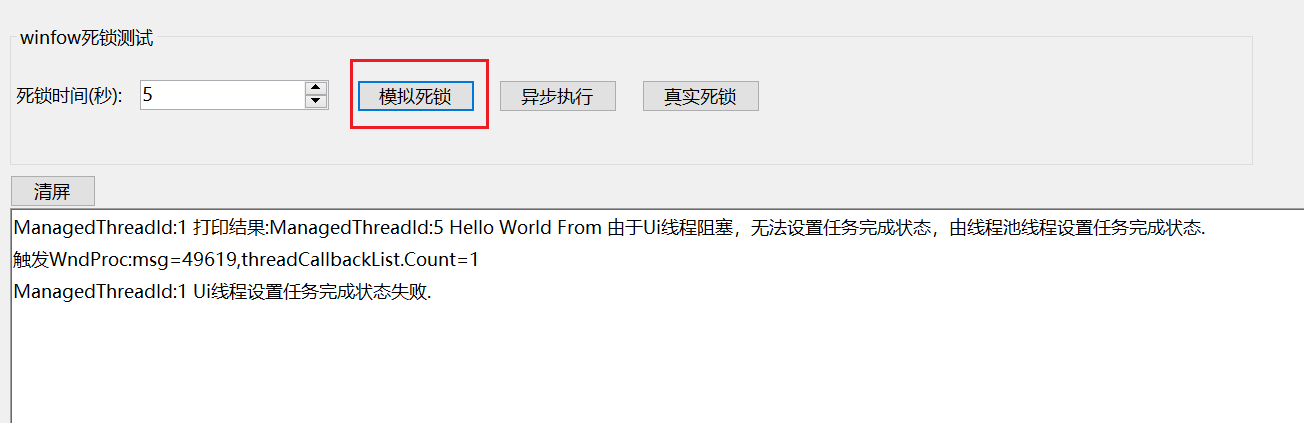
点击模拟死锁后,输出信息:
执行过程
相信大家看完下面这个图,会有更直观认识。可以看到CurrentSynchronizationContext.Post的SendOrPostCallback内容被包装为ThreadMethodEntry写入到窗体的队列对象的_threadCallbackList。但是 _threadCallbackList什么触发的,采用的是User32 MessageW异步消息接口,最后在UI线程空闲时系统触发窗体回调函数WndProc。
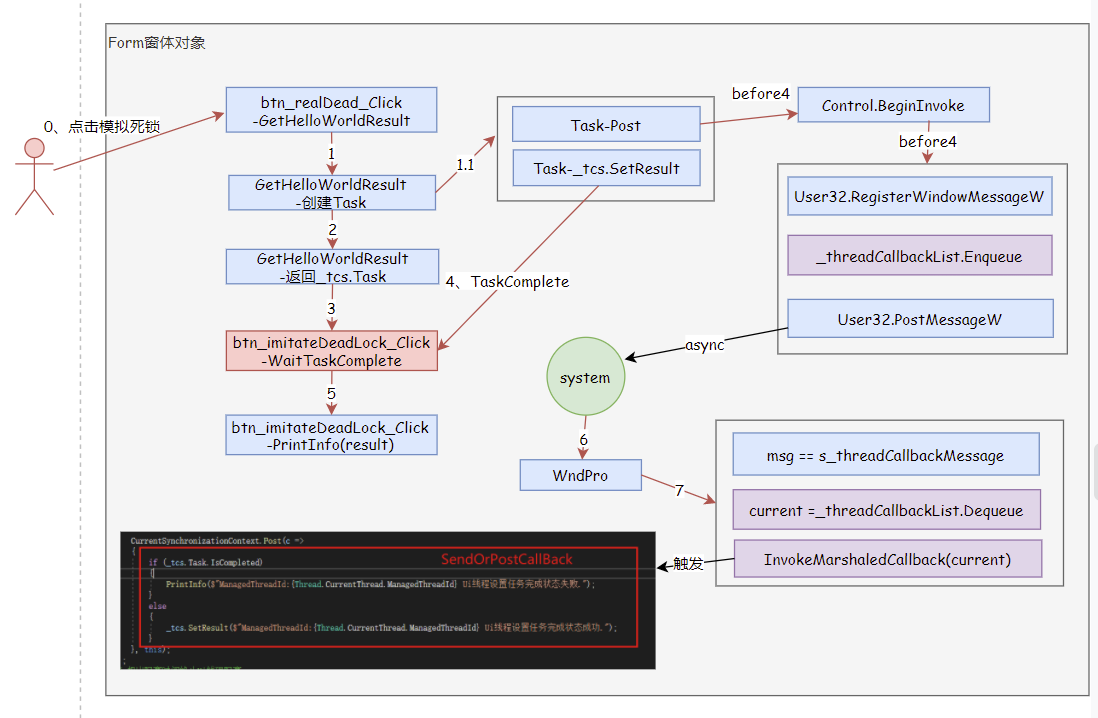
CurrentSynchronizationContext=WindowsFormsSynchronizationContext
WindowsFormsSynchronizationContext设置代码:
        // 示例代码

		public Form1()

        {

            InitializeComponent();

            CurrentSynchronizationContext = SynchronizationContext.Current;

            var controlToSendToField = typeof(WindowsFormsSynchronizationContext).GetField("controlToSendTo", BindingFlags.Instance | BindingFlags.NonPublic);

            // controlToSendTo设置为当前窗口对象,让重写的WndProc执行接收到消息

            controlToSendToField.SetValue(CurrentSynchronizationContext, this);

        }
WindowsFormsSynchronizationContext.Post源码:
SynchronizationContext.Post功能为发送一个异步委托消息,不阻塞当前线程,委托消息需要在SynchronizationContext绑定线程进行执行。在死锁模拟场景中SynchronizationContext绑定的为Ui线程,所以委托消息需要在Ui线程进行执行。
//源码地址: //https://github.com/dotnet/winforms/blob/release/5.0/src/System.Windows.Forms/src/System/Windows/Forms/WindowsFormsSynchronizationContext.cs#L90

		public override void Post(SendOrPostCallback d, object state)

        {

            // 调用form1窗口对象的BeginInvoke

            controlToSendTo?.BeginInvoke(d, new object[] { state });

        }
Control.BeginInvoke
BeginInvoke关键源码:
 // 定义保证在整个系统中唯一的窗口消息,消息值可用于发送或发布消息,返回窗口消息标识(int)。

 s_threadCallbackMessage = User32.RegisterWindowMessageW(Application.WindowMessagesVersion + "_ThreadCallbackMessage");

 // 将回调函数执行信息添加到回调函数队列,回调函数即为WindowsFormsSynchronizationContext.Post的SendOrPostCallback参数,_threadCallbackList为Control字段

 _threadCallbackList.Enqueue(tme);

 // 在与创建指定窗口的线程关联的消息队列中放置(发布)一条消息,并在不等待线程处理消息的情况下返回

 User32.PostMessageW(this, s_threadCallbackMessage);
BeginInvoke源码:
//源码地址:

//https://github.com/dotnet/winforms/blob/release/5.0/src/System.Windows.Forms/src/System/Windows/Forms/Control.cs#L4678

private object MarshaledInvoke(Control caller, Delegate method, object[] args, bool synchronous)

        {

            if (!IsHandleCreated)

            {

                throw new InvalidOperationException(SR.ErrorNoMarshalingThread);

            }

            ActiveXImpl activeXImpl = (ActiveXImpl)Properties.GetObject(s_activeXImplProperty);

            // We don't want to wait if we're on the same thread, or else we'll deadlock.

            // It is important that syncSameThread always be false for asynchronous calls.

            bool syncSameThread = false;

            if (User32.GetWindowThreadProcessId(this, out _) == Kernel32.GetCurrentThreadId())

            {

                if (synchronous)

                {

                    syncSameThread = true;

                }

            }

            ExecutionContext executionContext = null;

            if (!syncSameThread)

            {

                executionContext = ExecutionContext.Capture();

            }

            ThreadMethodEntry tme = new ThreadMethodEntry(caller, this, method, args, synchronous, executionContext);

            lock (this)

            {

                if (_threadCallbackList is null)

                {

                    _threadCallbackList = new Queue();

                }

            }

            lock (_threadCallbackList)

            {

                if (s_threadCallbackMessage == User32.WM.NULL)

                {

                    // 注册消息返回消息标识(int)

                    s_threadCallbackMessage = User32.RegisterWindowMessageW(Application.WindowMessagesVersion + "_ThreadCallbackMessage");

                }

				// 将回调函数执行信息添加到回调函数队列

                _threadCallbackList.Enqueue(tme);

            }

			// 同一个线程则直接执行

            if (syncSameThread)

            {

                InvokeMarshaledCallbacks();

            }

            else

            {

                // 将一个消息放入(寄送)到与指定窗口创建的线程相联系消息队列里

                User32.PostMessageW(this, s_threadCallbackMessage);

            }

            if (synchronous)

            {

                if (!tme.IsCompleted)

                {

                    WaitForWaitHandle(tme.AsyncWaitHandle);

                }

                if (tme._exception != null)

                {

                    throw tme._exception;

                }

                return tme._retVal;

            }

            else

            {

                return tme;

            }

        }
WndProc
应用程序中定义的回调函数,用于处理发送到窗口的消息。
示例中的代码:
        /// <summary>

        ///  重写接收窗口的消息的回调函数

        /// </summary>

        /// <param name="m"></param>

        protected override void WndProc(ref Message m)

        {

            if (m.Msg == GetThreadCallbackMessage())

            {

                var threadCallbackList = GetThreadCallbackList();

                PrintInfo($"触发WndProc:msg={m.Msg},threadCallbackList.Count={threadCallbackList.Count}");

                base.WndProc(ref m);

            }

            else

            {

                base.WndProc(ref m);

            }

        }

		/// <summary>

        /// 获取需要在Ui线程执行的回调委托队列

        /// </summary>

        /// <returns></returns>

        private System.Collections.Queue GetThreadCallbackList()

        {

            var threadCallbackListFiled = typeof(Control).GetField("_threadCallbackList", BindingFlags.NonPublic | BindingFlags.Instance);

            return (System.Collections.Queue)threadCallbackListFiled.GetValue(this);

        }

        private static int _threadCallbackMessage = 0;

        /// <summary>

        /// 获取触发回调委托的窗口消息标识

        /// </summary>

        /// <returns></returns>

        private int GetThreadCallbackMessage()

        {

            if (_threadCallbackMessage == 0)

            {

                var threadCallbackMessageFiled = typeof(Control).GetField("s_threadCallbackMessage", BindingFlags.NonPublic | BindingFlags.Static);

                _threadCallbackMessage = Convert.ToInt32(threadCallbackMessageFiled.GetValue(null));

            }

            return _threadCallbackMessage;

        }
WndProc源码:
WndProc接收到s_threadCallbackMessage消息触发执行队列_threadCallbackList的消息。
//源码地址:

//https://github.com/dotnet/winforms/blob/release/5.0/src/System.Windows.Forms/src/System/Windows/Forms/Control.cs#L12681

		/// <summary>

        ///  Base wndProc. All messages are sent to wndProc after getting filtered

        ///  through the preProcessMessage function. Inheriting controls should

        ///  call base.wndProc for any messages that they don't handle.

        /// </summary>

        protected virtual void WndProc(ref Message m)

        {

            // 此处省略代码未知行

            // If you add any new messages below (or change the message handling code for any messages)

            // please make sure that you also modify AxHost.WndProc to do the right thing and intercept

            // messages which the Ocx would own before passing them onto Control.WndProc.

            switch ((User32.WM)m.Msg)

            {

                // 此处省略代码未知行

                default:

                    // If we received a thread execute message, then execute it.

                    if (m.Msg == (int)s_threadCallbackMessage && m.Msg != 0)

                    {

                        InvokeMarshaledCallbacks();

                        return;

                    }

                    break;

                 // 此处省略代码未知行

            }

            // 此处省略代码未知行

        }

		/// <summary>

        ///  Called on the control's owning thread to perform the actual callback.

        ///  This empties this control's callback queue, propagating any exceptions

        ///  back as needed.

        /// </summary>

        private void InvokeMarshaledCallbacks()

        {

            ThreadMethodEntry current = null;

            lock (_threadCallbackList)

            {

                if (_threadCallbackList.Count > 0)

                {

                    current = (ThreadMethodEntry)_threadCallbackList.Dequeue();

                }

            }

            // Now invoke on all the queued items.

            while (current != null)

            {

                if (current._method != null)

                {

                    try

                    {

                        // If we are running under the debugger, don't wrap asynchronous

                        // calls in a try catch.  It is much better to throw here than pop up

                        // a thread exception dialog below.

                        if (NativeWindow.WndProcShouldBeDebuggable && !current._synchronous)

                        {

                            InvokeMarshaledCallback(current);

                        }

                        else

                        {

                            try

                            {

                                InvokeMarshaledCallback(current);

                            }

                            catch (Exception t)

                            {

                                current._exception = t.GetBaseException();

                            }

                        }

                    }

                    finally

                    {

                        current.Complete();

                        if (!NativeWindow.WndProcShouldBeDebuggable &&

                            current._exception != null && !current._synchronous)

                        {

                            Application.OnThreadException(current._exception);

                        }

                    }

                }

                lock (_threadCallbackList)

                {

                    if (_threadCallbackList.Count > 0)

                    {

                        current = (ThreadMethodEntry)_threadCallbackList.Dequeue();

                    }

                    else

                    {

                        current = null;

                    }

                }

            }

        }
3、async deadlock代码解析
死锁代码示例、反编译代码查看
https://sharplab.io/很不错的一个网站,可在线查看C#编译后代码、中间语言代码。
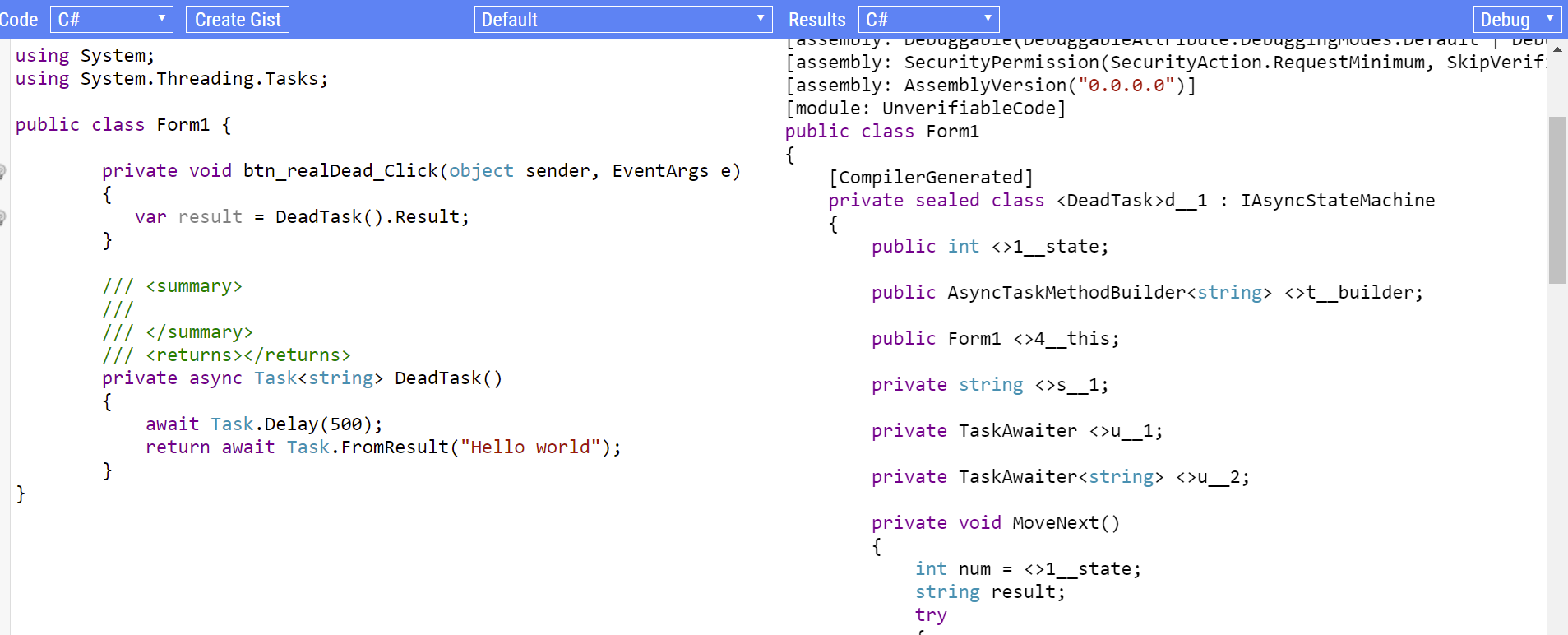
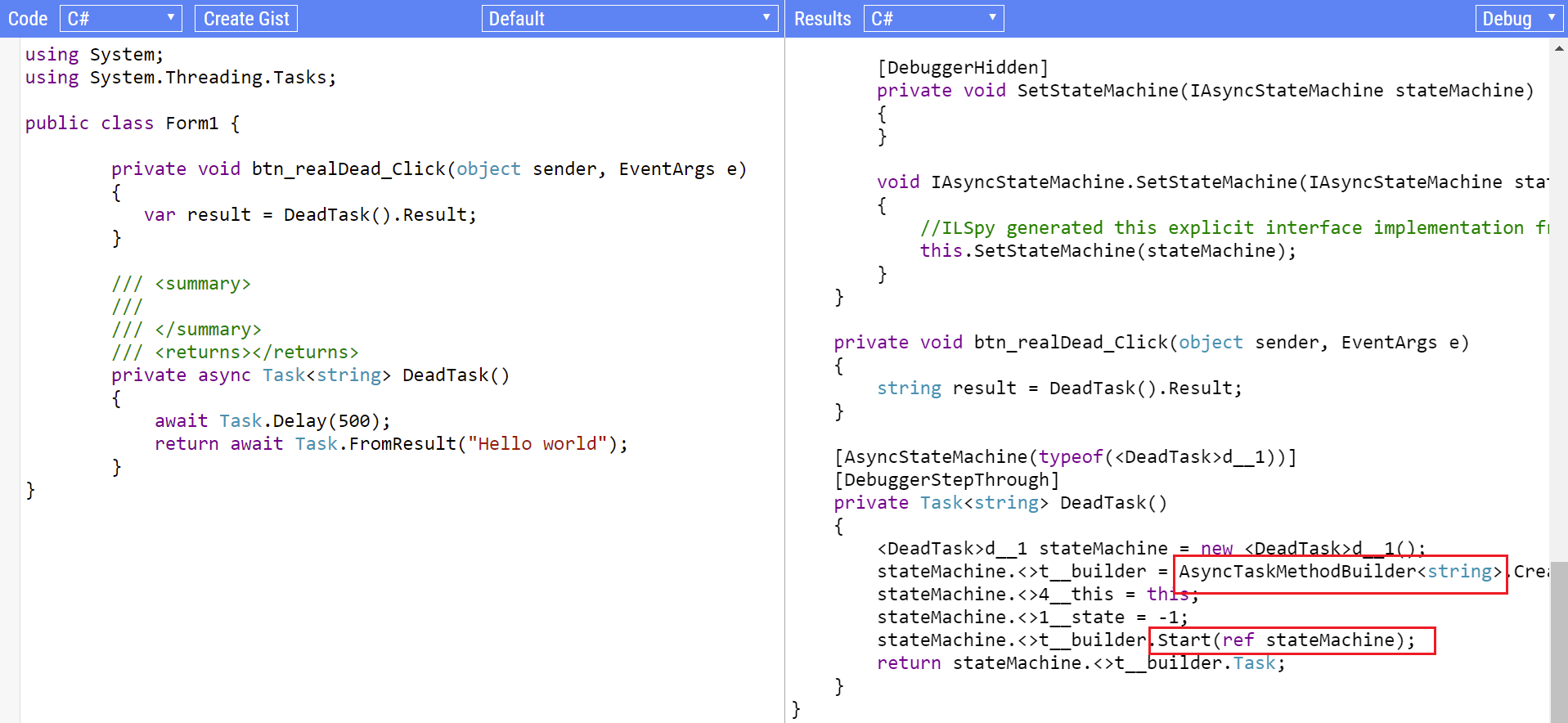
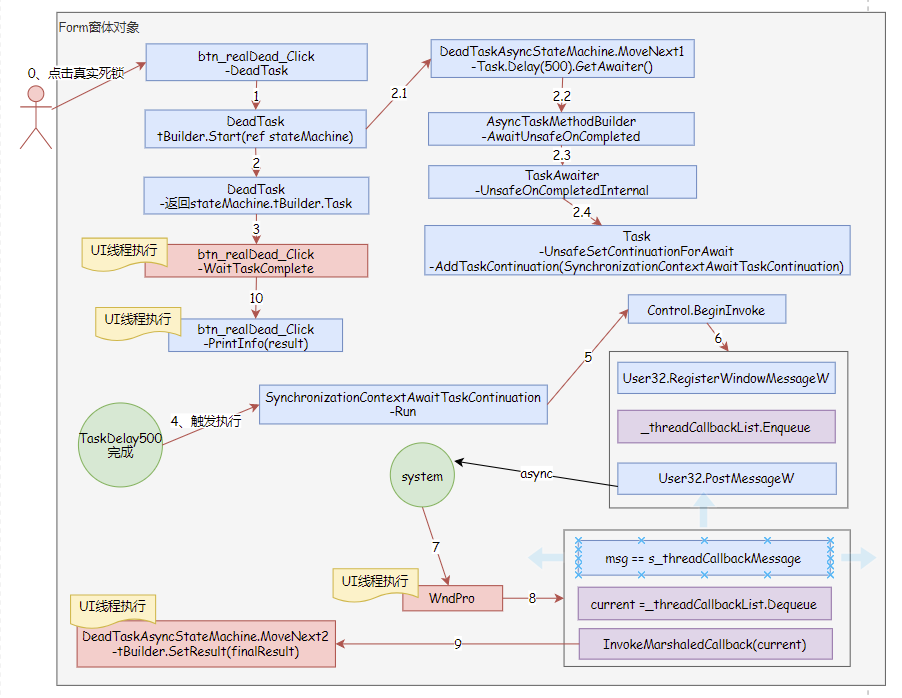
执行过程:
可以看到9和10都在UI线程执行,但是UI线程已经被10的执行流程占用,导致9无法将任务设置为完成状态,陷入死锁。
编译后的DeadTask函数
由于编译的代码不清晰,我进行重命名和代码精简。
可以看到DeadTask返回DeadTaskAsyncStateMachine.Task,看来要整明白AsyncTaskMethodBuilder执行过程,才能清楚来龙去脉了。
	    private Task<string> DeadTask()

        {

            DeadTaskAsyncStateMachine stateMachine = new DeadTaskAsyncStateMachine();

            stateMachine.tBuilder = AsyncTaskMethodBuilder<string>.Create();

            stateMachine.form1 = this;

            stateMachine.state1 = -1;

            stateMachine.tBuilder.Start(ref stateMachine);

            return stateMachine.tBuilder.Task;

        }
编译生成的DeadTaskAsyncStateMachine类
由于编译的代码不清晰,我进行重命名。
	  private sealed class DeadTaskAsyncStateMachine : IAsyncStateMachine

        {

            public int state1;

            public AsyncTaskMethodBuilder<string> tBuilder;

            public Form1 form1;

            private string taskResult;

            private TaskAwaiter delay500Awaiter;

            private TaskAwaiter<string> helloWorldAwaiter;

            private void MoveNext()

            {

                int num = state1;

                string finalResult;

                try

                {

                    TaskAwaiter<string> awaiter;

                    TaskAwaiter awaiter2;

                    if (num != 0)

                    {

                        if (num == 1)

                        {

                            awaiter = helloWorldAwaiter;

                            helloWorldAwaiter = default(TaskAwaiter<string>);

                            num = (state1 = -1);

                            goto finalTag;

                        }

                        awaiter2 = Task.Delay(500).GetAwaiter();

                        if (!awaiter2.IsCompleted)

                        {

                            num = (state1 = 0);

                            delay500Awaiter = awaiter2;

                            DeadTaskAsyncStateMachine stateMachine = this;

                            tBuilder.AwaitUnsafeOnCompleted(ref awaiter2, ref stateMachine);

                            return;

                        }

                    }

                    else

                    {

                        awaiter2 = delay500Awaiter;

                        delay500Awaiter = default(TaskAwaiter);

                        num = (state1 = -1);

                    }

                    awaiter2.GetResult();

                    awaiter = Task.FromResult("Hello world").GetAwaiter();

                    // 因为awaiter.IsCompleted == true,部分代码进行移除

                    goto finalTag;

                finalTag:

                    finalResult = awaiter.GetResult();

                }

                catch (Exception exception)

                {

                    state1 = -2;

                    tBuilder.SetException(exception);

                    return;

                }

                state1 = -2;

                tBuilder.SetResult(finalResult); // 设置结果,同时设置任务为完成状态

            }

            void IAsyncStateMachine.MoveNext()

            {

                //ILSpy generated this explicit interface implementation from .override directive in MoveNext

                this.MoveNext(); // 执行状态机当前任务,初始状态state1 = -1

            }

            private void SetStateMachine(IAsyncStateMachine stateMachine)

            {

            }

            void IAsyncStateMachine.SetStateMachine(IAsyncStateMachine stateMachine)

            {

                //ILSpy generated this explicit interface implementation from .override directive in SetStateMachine

                this.SetStateMachine(stateMachine);

            }

        }
关键代码:
MoveNext源码
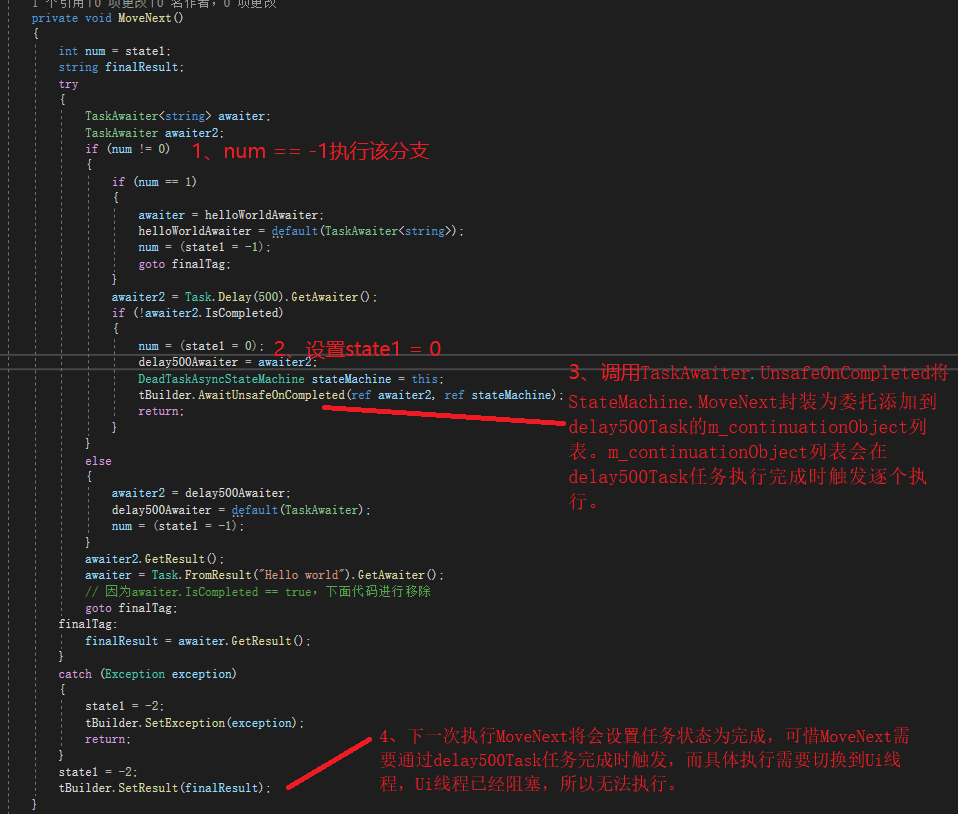
AsyncTaskMethodBuilder.AwaitUnsafeOnCompleted源码:
可以看到将会调用函数TaskAwaiter.UnsafeOnCompletedInternal(ta.m_task, box, continueOnCapturedContext: true)。
public void Start<TStateMachine>(ref TStateMachine stateMachine) where TStateMachine : IAsyncStateMachine =>

            AsyncMethodBuilderCore.Start(ref stateMachine);

//源码地址:

//https://github.com/dotnet/runtime/blob/release/5.0/src/libraries/System.Private.CoreLib/src/System/Runtime/CompilerServices/AsyncTaskMethodBuilderT.cs#L101

        internal static void AwaitUnsafeOnCompleted<TAwaiter>(

            ref TAwaiter awaiter, IAsyncStateMachineBox box)

            where TAwaiter : ICriticalNotifyCompletion

        {

			// 执行位置,默认continueOnCapturedContext = true即为继续在上下文执行

            // 最终SynchronizationContext.Current.Post触发执行stateMachine.MoveNext

            if ((null != (object?)default(TAwaiter)) && (awaiter is ITaskAwaiter))

            {

                ref TaskAwaiter ta = ref Unsafe.As<TAwaiter, TaskAwaiter>(ref awaiter); // relies on TaskAwaiter/TaskAwaiter<T> having the same layout

                TaskAwaiter.UnsafeOnCompletedInternal(ta.m_task, box, continueOnCapturedContext: true);

            }

          // ConfigureAwait(false).GetAwaiter()返回类型为IConfiguredTaskAwaiter,可以避免死锁

            else if ((null != (object?)default(TAwaiter)) && (awaiter is IConfiguredTaskAwaiter))

            {

                ref ConfiguredTaskAwaitable.ConfiguredTaskAwaiter ta = ref Unsafe.As<TAwaiter, ConfiguredTaskAwaitable.ConfiguredTaskAwaiter>(ref awaiter);

                TaskAwaiter.UnsafeOnCompletedInternal(ta.m_task, box, ta.m_continueOnCapturedContext);

            }

           // 省略代码未知行

        }
AsyncMethodBuilderCore.Start源码:
//源码地址

//https://github.com/dotnet/runtime/blob/release/5.0/src/libraries/System.Private.CoreLib/src/System/Runtime/CompilerServices/AsyncMethodBuilderCore.cs#L21

        public static void Start<TStateMachine>(ref TStateMachine stateMachine) where TStateMachine : IAsyncStateMachine

        {

            if (stateMachine == null) // TStateMachines are generally non-nullable value types, so this check will be elided

            {

                ThrowHelper.ThrowArgumentNullException(ExceptionArgument.stateMachine);

            }

            // enregistrer variables with 0 post-fix so they can be used in registers without EH forcing them to stack

            // Capture references to Thread Contexts

            Thread currentThread0 = Thread.CurrentThread;

            Thread currentThread = currentThread0;

            ExecutionContext? previousExecutionCtx0 = currentThread0._executionContext;

            ExecutionContext? previousExecutionCtx = previousExecutionCtx0;

            SynchronizationContext? previousSyncCtx = currentThread0._synchronizationContext;

            try

            {

                // 执行DeadTaskAsyncStateMachine.MoveNext()

                stateMachine.MoveNext();

            }

            finally

            {

                // Re-enregistrer variables post EH with 1 post-fix so they can be used in registers rather than from stack

                SynchronizationContext? previousSyncCtx1 = previousSyncCtx;

                Thread currentThread1 = currentThread;

                // The common case is that these have not changed, so avoid the cost of a write barrier if not needed.

                if (previousSyncCtx1 != currentThread1._synchronizationContext)

                {

                    // Restore changed SynchronizationContext back to previous

                    currentThread1._synchronizationContext = previousSyncCtx1;

                }

                ExecutionContext? previousExecutionCtx1 = previousExecutionCtx;

                ExecutionContext? currentExecutionCtx1 = currentThread1._executionContext;

                if (previousExecutionCtx1 != currentExecutionCtx1)

                {

                    ExecutionContext.RestoreChangedContextToThread(currentThread1, previousExecutionCtx1, currentExecutionCtx1);

                }

            }

        }
TaskAwaiter.UnsafeOnCompletedInternal源码:
// 源码地址

//https://github.com/dotnet/runtime/blob/release/5.0/src/libraries/System.Private.CoreLib/src/System/Runtime/CompilerServices/TaskAwaiter.cs#L220

	internal static void UnsafeOnCompletedInternal(Task task, IAsyncStateMachineBox stateMachineBox, bool continueOnCapturedContext)

        {

            task.UnsafeSetContinuationForAwait(stateMachineBox, continueOnCapturedContext);

        }
Task.UnsafeSetContinuationForAwait源码:
// 源码地址

//https://github.com/dotnet/runtime/blob/release/5.0/src/libraries/System.Private.CoreLib/src/System/Threading/Tasks/Task.cs#L2513

        internal void UnsafeSetContinuationForAwait(IAsyncStateMachineBox stateMachineBox, bool continueOnCapturedContext)

        {

            // continueOnCapturedContext == true,走这个分支

            if (continueOnCapturedContext)

            {

                SynchronizationContext? syncCtx = SynchronizationContext.Current;

                if (syncCtx != null && syncCtx.GetType() != typeof(SynchronizationContext))

                {

                    var tc = new SynchronizationContextAwaitTaskContinuation(syncCtx, stateMachineBox.MoveNextAction, flowExecutionContext: false);

                    // 添加到m_continuationObject,如果添加失败则代表任务已经完成,tc直接执行

                    if (!AddTaskContinuation(tc, addBeforeOthers: false))

                    {

                        tc.Run(this, canInlineContinuationTask: false);

                    }

                    return;

                }

                else

                {

                    TaskScheduler? scheduler = TaskScheduler.InternalCurrent;

                    if (scheduler != null && scheduler != TaskScheduler.Default)

                    {

                        var tc = new TaskSchedulerAwaitTaskContinuation(scheduler, stateMachineBox.MoveNextAction, flowExecutionContext: false);

                        if (!AddTaskContinuation(tc, addBeforeOthers: false))

                        {

                            tc.Run(this, canInlineContinuationTask: false);

                        }

                        return;

                    }

                }

            }

            // Otherwise, add the state machine box directly as the continuation.

            // If we're unable to because the task has already completed, queue it.

            if (!AddTaskContinuation(stateMachineBox, addBeforeOthers: false))

            {

                ThreadPool.UnsafeQueueUserWorkItemInternal(stateMachineBox, preferLocal: true);

            }

        }
SynchronizationContextAwaitTaskContinuation源码:
// 源码地址

//https://github.com/dotnet/runtime/blob/release/5.0/src/libraries/System.Private.CoreLib/src/System/Threading/Tasks/TaskContinuation.cs#L364

/// <summary>Task continuation for awaiting with a current synchronization context.</summary>

    internal sealed class SynchronizationContextAwaitTaskContinuation : AwaitTaskContinuation

    {

        /// <summary>SendOrPostCallback delegate to invoke the action.</summary>

        private static readonly SendOrPostCallback s_postCallback = static state =>

        {

            Debug.Assert(state is Action);

            ((Action)state)();

        };

        /// <summary>Cached delegate for PostAction</summary>

        private static ContextCallback? s_postActionCallback;

        /// <summary>The context with which to run the action.</summary>

        private readonly SynchronizationContext m_syncContext;

        internal SynchronizationContextAwaitTaskContinuation(

            SynchronizationContext context, Action action, bool flowExecutionContext) :

            base(action, flowExecutionContext)

        {

            Debug.Assert(context != null);

            m_syncContext = context;

        }

        internal sealed override void Run(Task task, bool canInlineContinuationTask)

        {

            // If we're allowed to inline, run the action on this thread.

            if (canInlineContinuationTask &&

                m_syncContext == SynchronizationContext.Current)

            {

                RunCallback(GetInvokeActionCallback(), m_action, ref Task.t_currentTask);

            }

            // Otherwise, Post the action back to the SynchronizationContext.

            else

            {

                TplEventSource log = TplEventSource.Log;

                if (log.IsEnabled())

                {

                    m_continuationId = Task.NewId();

                    log.AwaitTaskContinuationScheduled((task.ExecutingTaskScheduler ?? TaskScheduler.Default).Id, task.Id, m_continuationId);

                }

                // 执行PostAction

                RunCallback(GetPostActionCallback(), this, ref Task.t_currentTask);

            }

            // Any exceptions will be handled by RunCallback.

        }

        private static void PostAction(object? state)

        {

            Debug.Assert(state is SynchronizationContextAwaitTaskContinuation);

            var c = (SynchronizationContextAwaitTaskContinuation)state;

            TplEventSource log = TplEventSource.Log;

            if (log.IsEnabled() && log.TasksSetActivityIds && c.m_continuationId != 0)

            {

                // 调用Control.BeginInvoke

                c.m_syncContext.Post(s_postCallback, GetActionLogDelegate(c.m_continuationId, c.m_action));

            }

            else

            {

                c.m_syncContext.Post(s_postCallback, c.m_action); // s_postCallback is manually cached, as the compiler won't in a SecurityCritical method

            }

        }

        private static Action GetActionLogDelegate(int continuationId, Action action)

        {

            return () =>

                {

                    Guid activityId = TplEventSource.CreateGuidForTaskID(continuationId);

                    System.Diagnostics.Tracing.EventSource.SetCurrentThreadActivityId(activityId, out Guid savedActivityId);

                    try { action(); }

                    finally { System.Diagnostics.Tracing.EventSource.SetCurrentThreadActivityId(savedActivityId); }

                };

        }

        [MethodImpl(MethodImplOptions.AggressiveInlining)]

        private static ContextCallback GetPostActionCallback() => s_postActionCallback ??= PostAction;

    }
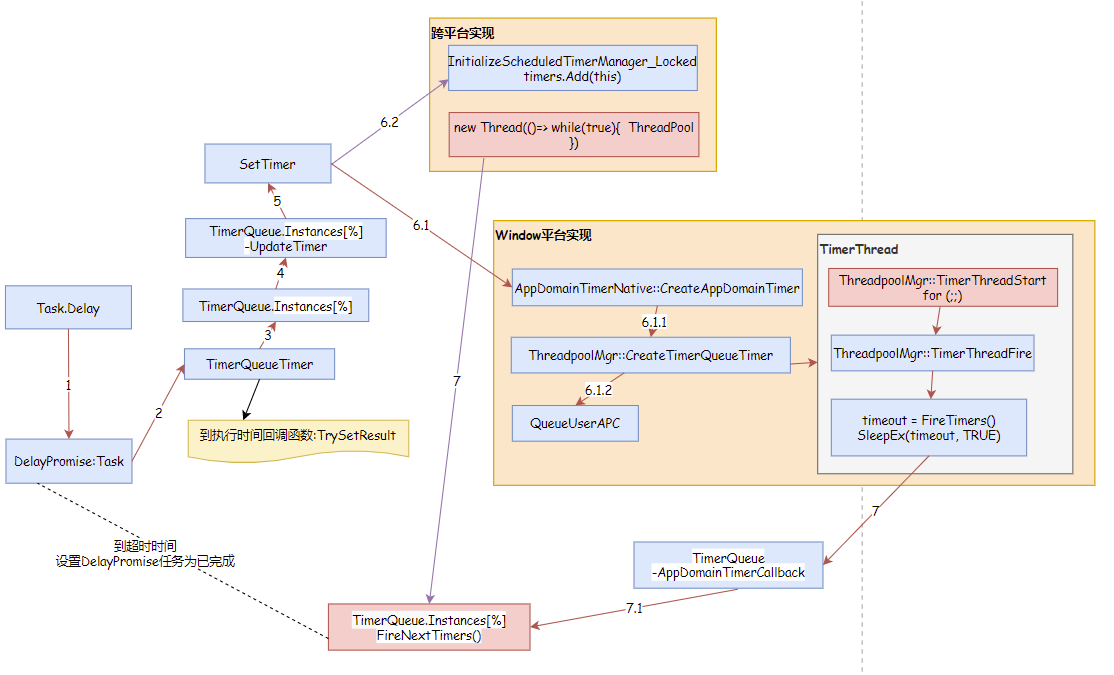
Task.Delay实现过程
Task.Delay有多种实现,我精简后画了大致实现流程,感兴趣的同学可以阅读一下源码,部分在coreclr实现。
QueueUseAPC: https://docs.microsoft.com/en-us/windows/win32/api/processthreadsapi/nf-processthreadsapi-queueuserapc
SleepEx: https://docs.microsoft.com/en-us/windows/win32/api/synchapi/nf-synchapi-sleepex
为什么IO型、延时任务要采用async
原因: 线程池默认的最小工作线程数量为CPU核心数,如果不采用async会导致线程同步阻塞,需要线程池创建更多的工作线程来应对的并发。当线程池工作线程的数量大于最小工作线程数量时,工作线程的创建速度受限于最小工作线程数量,每秒不超过2个,这时候程序会出现假死的情况。线程池默认设置最小工作线程数量为CPU核心数,主要是希望使用async通过多路复用来提升程序的并发性能。如果旧程序不好改造,快速解决的方法就是通过ThreadPool.SetMinThreads设置最小工作线程数量,放开工作线程创建速度限制,以多线程模型应对更多的并发,虽然系统性能差一些,至少不会假死。
小实验:
Demo源码地址: https://gitee.com/RiverBied/async-demo
启动Web.Api站点,运行WinForms.App进行测试,不过不要在调试状态运行。

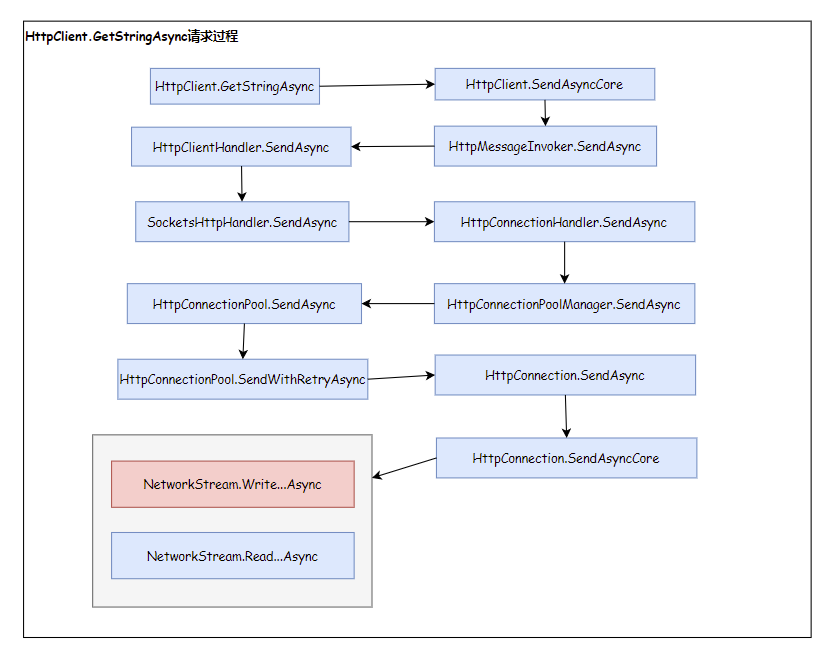
HttpClient.GetStringAsync执行过程
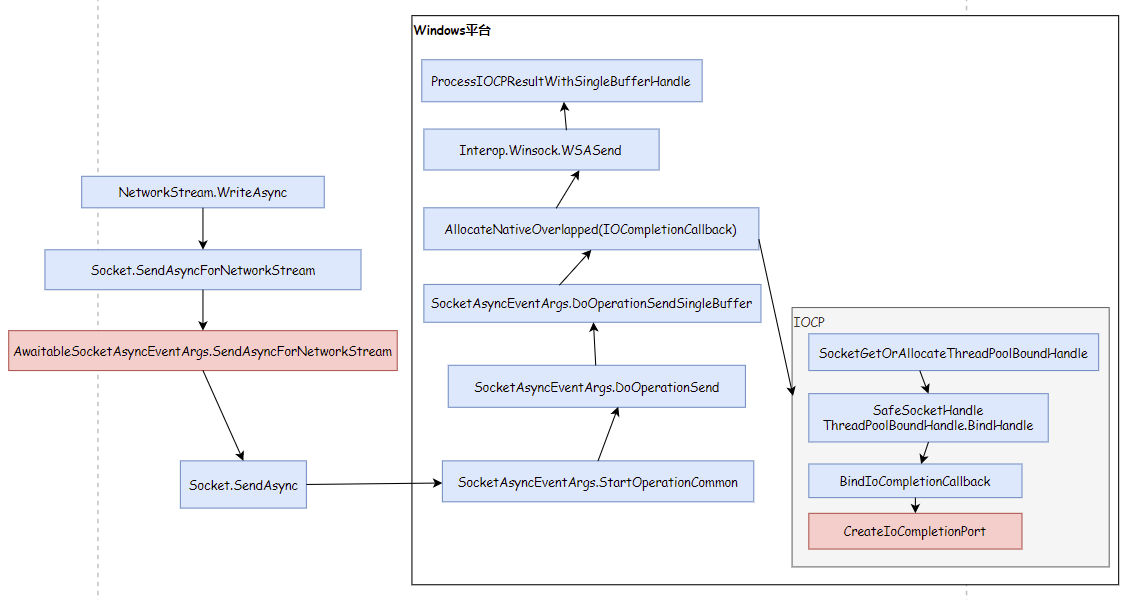
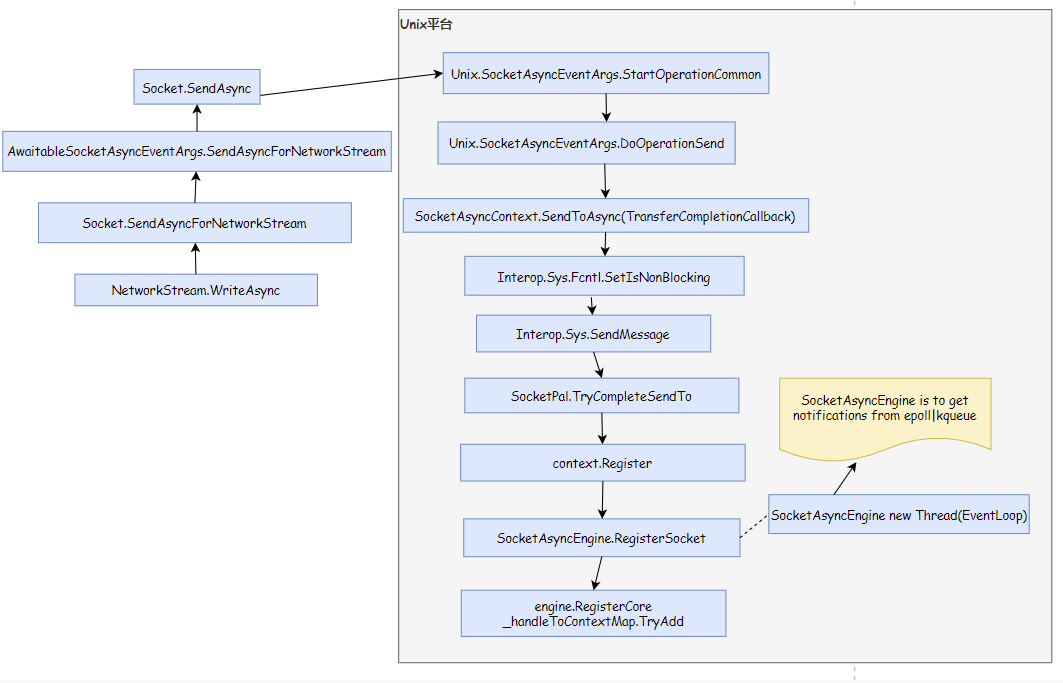
可以看到在Windows平台是通过IOCP触发回调事件。在Unix平台是在SocketAsyncEngine类创建while(true)循环的执行线程,再通过Wait epoll或kqueue获取IO事件,最后触发回调事件。IOPC为异步非阻塞IO、epoll为同步非阻塞IO,IOCP、epoll会涉及IO模型、IO多路复用等知识,网上介绍较多,可以自行查阅。同时需要注意AwaitableSocketAsyncEventArgs既继承SocketAsyncEventArgs类也实现IValueTaskSource接口。
HttpClient.GetStringAsync请求:
NetworkStream.WriteAsync在Windows平台实现:
NetworkStream.WriteAsync在Unix平台实现:
async await推荐实践方法
async/await适用于IO型(文件读取、网络通信)、延时型任务。对于计算型任务可以使用Task.Factory创建LongRunning任务,该任务会独立新建一个后台线程进行处理。
关于MySql驱动组件: 建议采用MySqlConnector组件。因为MySqlConnector组件支持异步IO,MySql.Data组件不支持真实的异步IO。
如果条件允许、尽量使用ConfigureAwait(false)。如果不设置在Winform场景下会调用SynchronizationContext.Post通过UI线程执行回调函数,同步方法调用异步方式时会出现死锁。
Task方法替代清单:
| 同步方法 | 异步方式 | 描述信息 |
|---|---|---|
| task.Wait | await task | 等待一个任务执行完成 |
| task.Result | await task | 获取任务返回结果 |
| Task.WaitAny | await Task.WhenAny | 等待其中一个任务执行完成,继续执行 |
| Task.WaitAll | await Task.WhenAll | 等待所有任务执行完成,继续执行 |
| Thread.Sleep | await Task.Delay | 延时几秒继续执行 |
附
Demo代码地址 : https://gitee.com/RiverBied/async-demo
Winform同步调用异步函数死锁原因分析、为什么要用异步的更多相关文章
- Mysql update后insert造成死锁原因分析及解决
系统中出现死锁的日志如下: ) TRANSACTION: , ACTIVE sec inserting mysql tables , locked LOCK WAIT lock struct(s), ...
- MySQL死锁原因分析
行级锁有三种模式: innodb 行级锁 record-level lock大致有三种:record lock, gap lock and Next-KeyLocks. record lock 锁住 ...
- Winform中调用js函数
var wb = new WebBrowser(); wb.AllowNavigation = true; wb.ScriptErrorsSuppressed = false; wb.Navigate ...
- 10-Node.js学习笔记-异步函数
异步函数 异步函数是异步编程语法的终极解决方案,它可以让我们将异步代码写成同步的形式,让代码不再有回调函数嵌套,是代码变得清晰明了 const fn = async()=>{} async fu ...
- 【校招面试 之 C/C++】第10题 C++不在构造函数和析构函数中调用虚函数
1.不要在构造函数中调用虚函数的原因 在概念上,构造函数的工作是为对象进行初始化.在构造函数完成之前,被构造的对象被认为“未完全生成”.当创建某个派生类的对象时,如果在它的基类的构造函数中调用虚函数, ...
- Python并发编程06 /阻塞、异步调用/同步调用、异步回调函数、线程queue、事件event、协程
Python并发编程06 /阻塞.异步调用/同步调用.异步回调函数.线程queue.事件event.协程 目录 Python并发编程06 /阻塞.异步调用/同步调用.异步回调函数.线程queue.事件 ...
- dubbo同步调用、异步调用和是否返回结果源码分析和实例
0. dubbo同步调用.异步调用和是否返回结果配置 (1)dubbo默认为同步调用,并且有返回结果. (2)dubbo异步调用配置,设置 async="true",异步调用可以提 ...
- python 并发编程 同步调用和异步调用 回调函数
提交任务的两张方式: 1.同步调用 2.异步调用 同步调用:提交完任务后,就在原地等待任务执行完后,拿到结果,再执行下一行代码 同步调用,导致程序串行执行 from concurrent.future ...
- 『审慎』.Net4.6 Task 异步函数 比 同步函数 慢5倍 踩坑经历
异步Task简单介绍 本标题有点 哗众取宠,各位都别介意(不排除个人技术能力问题) —— 接下来:我将会用一个小Demo 把 本文思想阐述清楚. .Net 4.0 就有了 Task 函数 —— 异步编 ...
随机推荐
- MySQL存储结构及SQL分类
MySQL目录结构 bin -- mysql执行程序 docs -- 文档 share - 各国编码信息 data -- 存放mysql 数据文件 * 每个数据库 创建一个同名文件夹,.frm 存放t ...
- 基于Linux系统Samba服务器的部署
1.基础信息 用 Internet 文件系统 CIFS(Common Internet File System)是适用于MicrosoftWindows 服务器和客户端的标准文件和打印机共享系统信息块 ...
- Python常见问题 - 写入数据到 excel 报 ValueError: invalid literal for int() with base 10 错误
背景 在上写入数据到excel中,报了以下错误 出现原因 对于写入excel场景下出现该错误的话,很大概率是写入数据的单元格原本的数据格式有问题 解决方法 清理掉单元格的旧数据,然后再写入就可以了
- 【第八篇】- Git 查看提交历史之Spring Cloud直播商城 b2b2c电子商务技术总结
Git 查看提交历史 Git 提交历史一般常用两个命令: git log 在使用 Git 提交了若干更新之后,又或者克隆了某个项目,想回顾下提交历史,我们可以使用 git log 命令查看. 针对 ...
- angularjs 文件上传
github连接地址:https://github.com/danialfarid/ng-file-upload 核心代码: html: <div class="form-group& ...
- symfony2已有数据表导入实体时报错 Doctrine does not support reverse engineering from tables that don't have a primary key
先在配置文件 app/config/config.yml中配置 schema_filter: /^(?!(tablename))/ 即可,或者在出现问题表都加上一个id 然后再使用命令 php app ...
- linux停止nginx服务 未成功
在上线新功能的时候,需要将服务器停掉,防止在更新过程中有用户进行操作额外的数据. 1:查看nginx主进程: ps -ef | grep nginx 这里root 后面的数字表示:主进程号nginx后 ...
- Java基础系列(38)- 数组的使用
数组的使用 For-Each循环 数组作方法入参 数组作返回值 For-Each循环 普通型 package array; import sun.security.util.Length; publi ...
- Java基础系列(7)- 标识符和关键字
关键字 标识符 Java所有的组成部分都需要名字.类名.变量名.方法名都称为标识符 首字母以字母(A-Z或者a-z),美元符号($),或者下划线(_)开头 首字母之后可以用字母.美元符号.下划线.数字 ...
- jmeter 元件详细介绍
一.基本介绍 可以进行功能测试.性能测试.自动化测试. 二.配置元件介绍 线程组:threads 虚拟用户数,设置Jmeter按照什么场景运行,是一系列线程的集合,每一个线程都代表一个正在使用应用程序 ...