
Identity用户管理入门一(框架搭建)
理论知识微软官方文档最完整,最详细,这里只一步步的介绍如何使用,地址:https://docs.microsoft.com/zh-cn/aspnet/core/security/authentication/?view=aspnetcore-3.1
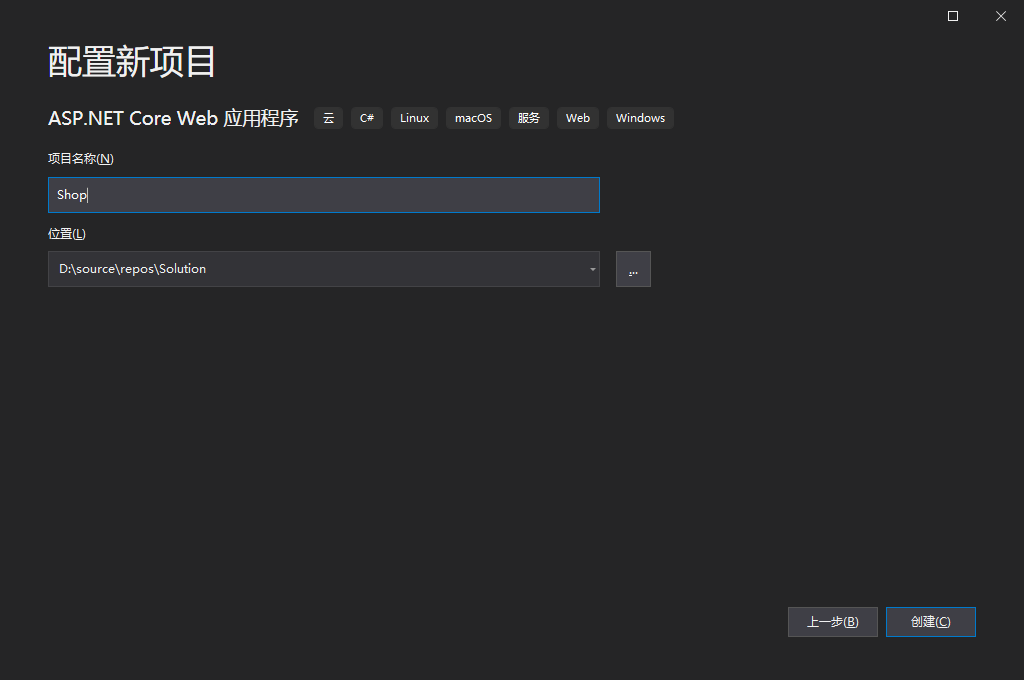
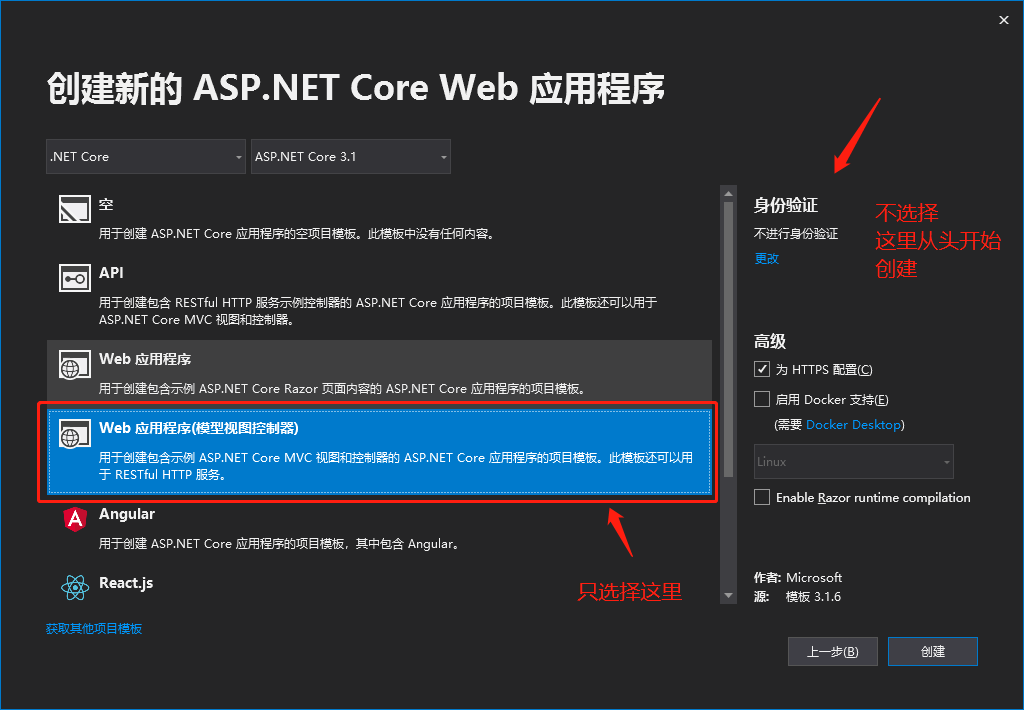
一、新建Mvc项目

二、加入EF依赖

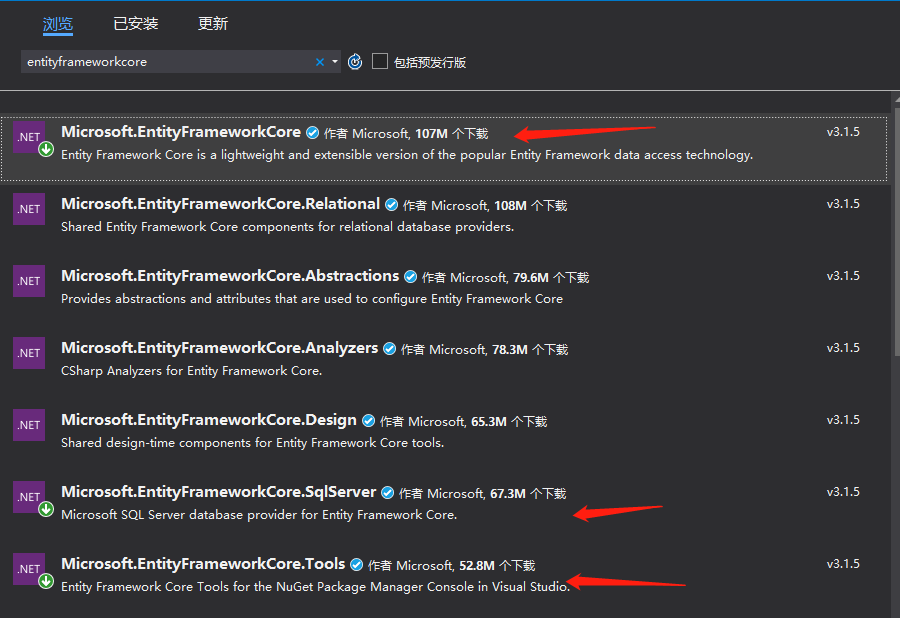
浏览输入entityframeworkcore安装以下三项
Microsoft.EntityFrameworkCore
Microsoft.EntityFrameworkCore.SqlServer
Microsoft.EntityFrameworkCore.Tools
三、加入Identity依赖
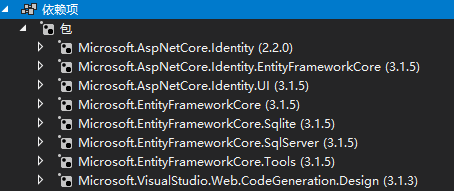
同样方式将Identity依赖包加入
Microsoft.AspNetCore.Identity
Microsoft.AspNetCore.Identity.EntityFrameworkCore
Microsoft.AspNetCore.Identity.UI
四、创建DbContext
Models目录下创建ApplicationDbContext.cs类,代码如下,注意需要继承自IdentityDbContext
using Microsoft.AspNetCore.Identity.EntityFrameworkCore;

using Microsoft.EntityFrameworkCore;

namespace Shop.Models

{

    public class ApplicationDbContext:IdentityDbContext

    {

        public ApplicationDbContext(DbContextOptions<ApplicationDbContext> options)

            : base(options)

        {

        }

    }

}
五、修改Startup增加DbContext服务,
        public void ConfigureServices(IServiceCollection services)

        {

            services.AddControllersWithViews();

            services.AddDbContext<ApplicationDbContext>(options =>

                options.UseSqlServer(Configuration.GetConnectionString("Default")));

            services.AddDefaultIdentity<IdentityUser>(options => options.SignIn.RequireConfirmedAccount = true)

                .AddEntityFrameworkStores<ApplicationDbContext>();

        }
六、增加Migrations并更新数据库,这里是从新建项目增加验证中复制过来的

00000000000000_CreateIdentitySchema.cs


using System;

using Microsoft.EntityFrameworkCore.Metadata;

using Microsoft.EntityFrameworkCore.Migrations;

namespace WebApplication1.Data.Migrations

{

    public partial class CreateIdentitySchema : Migration

    {

        protected override void Up(MigrationBuilder migrationBuilder)

        {

            migrationBuilder.CreateTable(

                name: "AspNetRoles",

                columns: table => new

                {

                    Id = table.Column<string>(nullable: false),

                    Name = table.Column<string>(maxLength: 256, nullable: true),

                    NormalizedName = table.Column<string>(maxLength: 256, nullable: true),

                    ConcurrencyStamp = table.Column<string>(nullable: true)

                },

                constraints: table =>

                {

                    table.PrimaryKey("PK_AspNetRoles", x => x.Id);

                });

            migrationBuilder.CreateTable(

                name: "AspNetUsers",

                columns: table => new

                {

                    Id = table.Column<string>(nullable: false),

                    UserName = table.Column<string>(maxLength: 256, nullable: true),

                    NormalizedUserName = table.Column<string>(maxLength: 256, nullable: true),

                    Email = table.Column<string>(maxLength: 256, nullable: true),

                    NormalizedEmail = table.Column<string>(maxLength: 256, nullable: true),

                    EmailConfirmed = table.Column<bool>(nullable: false),

                    PasswordHash = table.Column<string>(nullable: true),

                    SecurityStamp = table.Column<string>(nullable: true),

                    ConcurrencyStamp = table.Column<string>(nullable: true),

                    PhoneNumber = table.Column<string>(nullable: true),

                    PhoneNumberConfirmed = table.Column<bool>(nullable: false),

                    TwoFactorEnabled = table.Column<bool>(nullable: false),

                    LockoutEnd = table.Column<DateTimeOffset>(nullable: true),

                    LockoutEnabled = table.Column<bool>(nullable: false),

                    AccessFailedCount = table.Column<int>(nullable: false)

                },

                constraints: table =>

                {

                    table.PrimaryKey("PK_AspNetUsers", x => x.Id);

                });

            migrationBuilder.CreateTable(

                name: "AspNetRoleClaims",

                columns: table => new

                {

                    Id = table.Column<int>(nullable: false)

                        .Annotation("SqlServer:ValueGenerationStrategy", SqlServerValueGenerationStrategy.IdentityColumn),

                    RoleId = table.Column<string>(nullable: false),

                    ClaimType = table.Column<string>(nullable: true),

                    ClaimValue = table.Column<string>(nullable: true)

                },

                constraints: table =>

                {

                    table.PrimaryKey("PK_AspNetRoleClaims", x => x.Id);

                    table.ForeignKey(

                        name: "FK_AspNetRoleClaims_AspNetRoles_RoleId",

                        column: x => x.RoleId,

                        principalTable: "AspNetRoles",

                        principalColumn: "Id",

                        onDelete: ReferentialAction.Cascade);

                });

            migrationBuilder.CreateTable(

                name: "AspNetUserClaims",

                columns: table => new

                {

                    Id = table.Column<int>(nullable: false)

                        .Annotation("SqlServer:ValueGenerationStrategy", SqlServerValueGenerationStrategy.IdentityColumn),

                    UserId = table.Column<string>(nullable: false),

                    ClaimType = table.Column<string>(nullable: true),

                    ClaimValue = table.Column<string>(nullable: true)

                },

                constraints: table =>

                {

                    table.PrimaryKey("PK_AspNetUserClaims", x => x.Id);

                    table.ForeignKey(

                        name: "FK_AspNetUserClaims_AspNetUsers_UserId",

                        column: x => x.UserId,

                        principalTable: "AspNetUsers",

                        principalColumn: "Id",

                        onDelete: ReferentialAction.Cascade);

                });

            migrationBuilder.CreateTable(

                name: "AspNetUserLogins",

                columns: table => new

                {

                    LoginProvider = table.Column<string>(maxLength: 128, nullable: false),

                    ProviderKey = table.Column<string>(maxLength: 128, nullable: false),

                    ProviderDisplayName = table.Column<string>(nullable: true),

                    UserId = table.Column<string>(nullable: false)

                },

                constraints: table =>

                {

                    table.PrimaryKey("PK_AspNetUserLogins", x => new { x.LoginProvider, x.ProviderKey });

                    table.ForeignKey(

                        name: "FK_AspNetUserLogins_AspNetUsers_UserId",

                        column: x => x.UserId,

                        principalTable: "AspNetUsers",

                        principalColumn: "Id",

                        onDelete: ReferentialAction.Cascade);

                });

            migrationBuilder.CreateTable(

                name: "AspNetUserRoles",

                columns: table => new

                {

                    UserId = table.Column<string>(nullable: false),

                    RoleId = table.Column<string>(nullable: false)

                },

                constraints: table =>

                {

                    table.PrimaryKey("PK_AspNetUserRoles", x => new { x.UserId, x.RoleId });

                    table.ForeignKey(

                        name: "FK_AspNetUserRoles_AspNetRoles_RoleId",

                        column: x => x.RoleId,

                        principalTable: "AspNetRoles",

                        principalColumn: "Id",

                        onDelete: ReferentialAction.Cascade);

                    table.ForeignKey(

                        name: "FK_AspNetUserRoles_AspNetUsers_UserId",

                        column: x => x.UserId,

                        principalTable: "AspNetUsers",

                        principalColumn: "Id",

                        onDelete: ReferentialAction.Cascade);

                });

            migrationBuilder.CreateTable(

                name: "AspNetUserTokens",

                columns: table => new

                {

                    UserId = table.Column<string>(nullable: false),

                    LoginProvider = table.Column<string>(maxLength: 128, nullable: false),

                    Name = table.Column<string>(maxLength: 128, nullable: false),

                    Value = table.Column<string>(nullable: true)

                },

                constraints: table =>

                {

                    table.PrimaryKey("PK_AspNetUserTokens", x => new { x.UserId, x.LoginProvider, x.Name });

                    table.ForeignKey(

                        name: "FK_AspNetUserTokens_AspNetUsers_UserId",

                        column: x => x.UserId,

                        principalTable: "AspNetUsers",

                        principalColumn: "Id",

                        onDelete: ReferentialAction.Cascade);

                });

            migrationBuilder.CreateIndex(

                name: "IX_AspNetRoleClaims_RoleId",

                table: "AspNetRoleClaims",

                column: "RoleId");

            migrationBuilder.CreateIndex(

                name: "RoleNameIndex",

                table: "AspNetRoles",

                column: "NormalizedName",

                unique: true,

                filter: "[NormalizedName] IS NOT NULL");

            migrationBuilder.CreateIndex(

                name: "IX_AspNetUserClaims_UserId",

                table: "AspNetUserClaims",

                column: "UserId");

            migrationBuilder.CreateIndex(

                name: "IX_AspNetUserLogins_UserId",

                table: "AspNetUserLogins",

                column: "UserId");

            migrationBuilder.CreateIndex(

                name: "IX_AspNetUserRoles_RoleId",

                table: "AspNetUserRoles",

                column: "RoleId");

            migrationBuilder.CreateIndex(

                name: "EmailIndex",

                table: "AspNetUsers",

                column: "NormalizedEmail");

            migrationBuilder.CreateIndex(

                name: "UserNameIndex",

                table: "AspNetUsers",

                column: "NormalizedUserName",

                unique: true,

                filter: "[NormalizedUserName] IS NOT NULL");

        }

        protected override void Down(MigrationBuilder migrationBuilder)

        {

            migrationBuilder.DropTable(

                name: "AspNetRoleClaims");

            migrationBuilder.DropTable(

                name: "AspNetUserClaims");

            migrationBuilder.DropTable(

                name: "AspNetUserLogins");

            migrationBuilder.DropTable(

                name: "AspNetUserRoles");

            migrationBuilder.DropTable(

                name: "AspNetUserTokens");

            migrationBuilder.DropTable(

                name: "AspNetRoles");

            migrationBuilder.DropTable(

                name: "AspNetUsers");

        }

    }

}
ApplicationDbContextModelSnapshot.cs
// <auto-generated />

using System;

using Microsoft.EntityFrameworkCore;

using Microsoft.EntityFrameworkCore.Infrastructure;

using Microsoft.EntityFrameworkCore.Metadata;

using Microsoft.EntityFrameworkCore.Storage.ValueConversion;

using Shop.Models;

namespace WebApplication1.Data.Migrations

{

    [DbContext(typeof(ApplicationDbContext))]

    partial class ApplicationDbContextModelSnapshot : ModelSnapshot

    {

        protected override void BuildModel(ModelBuilder modelBuilder)

        {

#pragma warning disable 612, 618

            modelBuilder

                .HasAnnotation("ProductVersion", "3.0.0")

                .HasAnnotation("Relational:MaxIdentifierLength", 128)

                .HasAnnotation("SqlServer:ValueGenerationStrategy", SqlServerValueGenerationStrategy.IdentityColumn);

            modelBuilder.Entity("Microsoft.AspNetCore.Identity.IdentityRole", b =>

                {

                    b.Property<string>("Id")

                        .HasColumnType("nvarchar(450)");

                    b.Property<string>("ConcurrencyStamp")

                        .IsConcurrencyToken()

                        .HasColumnType("nvarchar(max)");

                    b.Property<string>("Name")

                        .HasColumnType("nvarchar(256)")

                        .HasMaxLength(256);

                    b.Property<string>("NormalizedName")

                        .HasColumnType("nvarchar(256)")

                        .HasMaxLength(256);

                    b.HasKey("Id");

                    b.HasIndex("NormalizedName")

                        .IsUnique()

                        .HasName("RoleNameIndex")

                        .HasFilter("[NormalizedName] IS NOT NULL");

                    b.ToTable("AspNetRoles");

                });

            modelBuilder.Entity("Microsoft.AspNetCore.Identity.IdentityRoleClaim<string>", b =>

                {

                    b.Property<int>("Id")

                        .ValueGeneratedOnAdd()

                        .HasColumnType("int")

                        .HasAnnotation("SqlServer:ValueGenerationStrategy", SqlServerValueGenerationStrategy.IdentityColumn);

                    b.Property<string>("ClaimType")

                        .HasColumnType("nvarchar(max)");

                    b.Property<string>("ClaimValue")

                        .HasColumnType("nvarchar(max)");

                    b.Property<string>("RoleId")

                        .IsRequired()

                        .HasColumnType("nvarchar(450)");

                    b.HasKey("Id");

                    b.HasIndex("RoleId");

                    b.ToTable("AspNetRoleClaims");

                });

            modelBuilder.Entity("Microsoft.AspNetCore.Identity.IdentityUser", b =>

                {

                    b.Property<string>("Id")

                        .HasColumnType("nvarchar(450)");

                    b.Property<int>("AccessFailedCount")

                        .HasColumnType("int");

                    b.Property<string>("ConcurrencyStamp")

                        .IsConcurrencyToken()

                        .HasColumnType("nvarchar(max)");

                    b.Property<string>("Email")

                        .HasColumnType("nvarchar(256)")

                        .HasMaxLength(256);

                    b.Property<bool>("EmailConfirmed")

                        .HasColumnType("bit");

                    b.Property<bool>("LockoutEnabled")

                        .HasColumnType("bit");

                    b.Property<DateTimeOffset?>("LockoutEnd")

                        .HasColumnType("datetimeoffset");

                    b.Property<string>("NormalizedEmail")

                        .HasColumnType("nvarchar(256)")

                        .HasMaxLength(256);

                    b.Property<string>("NormalizedUserName")

                        .HasColumnType("nvarchar(256)")

                        .HasMaxLength(256);

                    b.Property<string>("PasswordHash")

                        .HasColumnType("nvarchar(max)");

                    b.Property<string>("PhoneNumber")

                        .HasColumnType("nvarchar(max)");

                    b.Property<bool>("PhoneNumberConfirmed")

                        .HasColumnType("bit");

                    b.Property<string>("SecurityStamp")

                        .HasColumnType("nvarchar(max)");

                    b.Property<bool>("TwoFactorEnabled")

                        .HasColumnType("bit");

                    b.Property<string>("UserName")

                        .HasColumnType("nvarchar(256)")

                        .HasMaxLength(256);

                    b.HasKey("Id");

                    b.HasIndex("NormalizedEmail")

                        .HasName("EmailIndex");

                    b.HasIndex("NormalizedUserName")

                        .IsUnique()

                        .HasName("UserNameIndex")

                        .HasFilter("[NormalizedUserName] IS NOT NULL");

                    b.ToTable("AspNetUsers");

                });

            modelBuilder.Entity("Microsoft.AspNetCore.Identity.IdentityUserClaim<string>", b =>

                {

                    b.Property<int>("Id")

                        .ValueGeneratedOnAdd()

                        .HasColumnType("int")

                        .HasAnnotation("SqlServer:ValueGenerationStrategy", SqlServerValueGenerationStrategy.IdentityColumn);

                    b.Property<string>("ClaimType")

                        .HasColumnType("nvarchar(max)");

                    b.Property<string>("ClaimValue")

                        .HasColumnType("nvarchar(max)");

                    b.Property<string>("UserId")

                        .IsRequired()

                        .HasColumnType("nvarchar(450)");

                    b.HasKey("Id");

                    b.HasIndex("UserId");

                    b.ToTable("AspNetUserClaims");

                });

            modelBuilder.Entity("Microsoft.AspNetCore.Identity.IdentityUserLogin<string>", b =>

                {

                    b.Property<string>("LoginProvider")

                        .HasColumnType("nvarchar(128)")

                        .HasMaxLength(128);

                    b.Property<string>("ProviderKey")

                        .HasColumnType("nvarchar(128)")

                        .HasMaxLength(128);

                    b.Property<string>("ProviderDisplayName")

                        .HasColumnType("nvarchar(max)");

                    b.Property<string>("UserId")

                        .IsRequired()

                        .HasColumnType("nvarchar(450)");

                    b.HasKey("LoginProvider", "ProviderKey");

                    b.HasIndex("UserId");

                    b.ToTable("AspNetUserLogins");

                });

            modelBuilder.Entity("Microsoft.AspNetCore.Identity.IdentityUserRole<string>", b =>

                {

                    b.Property<string>("UserId")

                        .HasColumnType("nvarchar(450)");

                    b.Property<string>("RoleId")

                        .HasColumnType("nvarchar(450)");

                    b.HasKey("UserId", "RoleId");

                    b.HasIndex("RoleId");

                    b.ToTable("AspNetUserRoles");

                });

            modelBuilder.Entity("Microsoft.AspNetCore.Identity.IdentityUserToken<string>", b =>

                {

                    b.Property<string>("UserId")

                        .HasColumnType("nvarchar(450)");

                    b.Property<string>("LoginProvider")

                        .HasColumnType("nvarchar(128)")

                        .HasMaxLength(128);

                    b.Property<string>("Name")

                        .HasColumnType("nvarchar(128)")

                        .HasMaxLength(128);

                    b.Property<string>("Value")

                        .HasColumnType("nvarchar(max)");

                    b.HasKey("UserId", "LoginProvider", "Name");

                    b.ToTable("AspNetUserTokens");

                });

            modelBuilder.Entity("Microsoft.AspNetCore.Identity.IdentityRoleClaim<string>", b =>

                {

                    b.HasOne("Microsoft.AspNetCore.Identity.IdentityRole", null)

                        .WithMany()

                        .HasForeignKey("RoleId")

                        .OnDelete(DeleteBehavior.Cascade)

                        .IsRequired();

                });

            modelBuilder.Entity("Microsoft.AspNetCore.Identity.IdentityUserClaim<string>", b =>

                {

                    b.HasOne("Microsoft.AspNetCore.Identity.IdentityUser", null)

                        .WithMany()

                        .HasForeignKey("UserId")

                        .OnDelete(DeleteBehavior.Cascade)

                        .IsRequired();

                });

            modelBuilder.Entity("Microsoft.AspNetCore.Identity.IdentityUserLogin<string>", b =>

                {

                    b.HasOne("Microsoft.AspNetCore.Identity.IdentityUser", null)

                        .WithMany()

                        .HasForeignKey("UserId")

                        .OnDelete(DeleteBehavior.Cascade)

                        .IsRequired();

                });

            modelBuilder.Entity("Microsoft.AspNetCore.Identity.IdentityUserRole<string>", b =>

                {

                    b.HasOne("Microsoft.AspNetCore.Identity.IdentityRole", null)

                        .WithMany()

                        .HasForeignKey("RoleId")

                        .OnDelete(DeleteBehavior.Cascade)

                        .IsRequired();

                    b.HasOne("Microsoft.AspNetCore.Identity.IdentityUser", null)

                        .WithMany()

                        .HasForeignKey("UserId")

                        .OnDelete(DeleteBehavior.Cascade)

                        .IsRequired();

                });

            modelBuilder.Entity("Microsoft.AspNetCore.Identity.IdentityUserToken<string>", b =>

                {

                    b.HasOne("Microsoft.AspNetCore.Identity.IdentityUser", null)

                        .WithMany()

                        .HasForeignKey("UserId")

                        .OnDelete(DeleteBehavior.Cascade)

                        .IsRequired();

                });

#pragma warning restore 612, 618

        }

    }

}
PM> update-database

Build started...

Build succeeded.

Done.
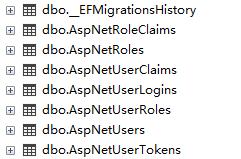
复制到本项目后直接更新数据库,目前项目框架已经搭建好,数据库表如下
Identity用户管理入门一(框架搭建)的更多相关文章
- Identity用户管理入门六(判断是否登录)
目前用户管理的增删改查及登录功能已经全部实现,但存在一个问题,登录后要取消登录按钮显示退出按钮,未登录应该有注册按钮,现实现过程如下 一.Startup.cs中增加服务 app.UseAuthenti ...
- Identity用户管理入门二(显示用户列表)
在Controllers中新建AccountController,并在构造方法(函数)中注入SignInManager,UserManager UserManager 用户管理(注册,查找,修改, ...
- Identity用户管理入门七(扩展用户字段)
在实际使用时会发现很多字段在IdentityUser中并不存在,比如增加生日,地址等字段,可在模型类中实现自己的模型并继承自IdentityUser,需要修改的代码为以下类 一.新增模型 using ...
- Identity用户管理入门三(注册用户)
用户注册主要有2个方法,1.密码加密 2.用户注册 3.ASP.NET Core Identity 使用密码策略.锁定和 cookie 配置等设置的默认值. 可以在类中重写这些设置 Startup(官 ...
- Identity用户管理入门五(登录、注销)
一.建立LoginViewModel视图模型 using System.ComponentModel.DataAnnotations; namespace Shop.ViewModel { publi ...
- Identity用户管理入门四(修改、删除用户)
修改用户不能修改Id及用户名所以创建视图模型时需要去除,新增用户跟修改用户基本视图一直,所以不再做演示 一.新建UpdateUserViewModel视图模型 using System.Compone ...
- ASP.NET MVC+EF框架+EasyUI实现权限管理系列(1)-框架搭建
原文:ASP.NET MVC+EF框架+EasyUI实现权限管理系列(1)-框架搭建 ASP.NET MVC+EF框架+EasyUI实现权限管系列 (开篇) 前言:这篇博客开始我们便一步一步的来实现这 ...
- 一个用户管理的ci框架的小demo--转载
一个ci框架的小demo 最近在学习ci框架,作为一个初学者,在啃完一遍官方文档并也跟着官方文档的例程(新闻发布系统)做了一遍,决定在将之前练习PHP与MySQL数据库的用户管理系统再用ci框架实现一 ...
- oracle用户管理入门
1.创建一个新用户(普通) create user 用户名 identified by 密码 示例,创建一个名叫小明的用户,密码为xm 2.以管理员的身份给普通用户修改密码(当普通用户忘掉自己的密码时 ...
随机推荐
- user-agent浏览器标识集合
user_agent_list = [ "Mozilla/4.0 (compatible; MSIE 6.0; Windows NT 5.1; SV1; AcooBrowser; .NET ...
- Spring学习笔记-Hello Spring
实现原理 采用XML方式配置Bean的时候,Bean的定义和实现分离的,采用注解的方式可以将两者合为一体,Bean的定义信息直接以注解形式定义在实现类中,从而实现了零配置. 控制反转是一种通过描述(X ...
- MIPS汇编学习
MIPS汇编学习 mips汇编不同于x86汇编,属于精简指令集,常见于路由器等一些嵌入式设备中. mips汇编没有对堆栈的直接操作,也就是没有push和pop指令,mips汇编中保留了32个通用寄存器 ...
- ms17-010
永恒之蓝和ms17-010简介: 永恒之蓝(EternalBLUE)"是Shadow Brokers(影子经纪人)黑客组织公布的一款黑客工具,该工具利用的漏洞也被称为MS17-010漏洞,M ...
- Vue实现点击按钮进行文件下载(后端Java)
最近项目中需要实现点击按钮下载文件的需求,前端用的vue,因为文件是各种类型的,比如图片.pdf.word之类的.这里后端是可以返回文件的地址给前端的,但我看了下网上各种五花八门的答案,感觉都不是我想 ...
- Terracotta 2.7.2 Admin Console Guide
http://www.terracotta.org/confluence/display/docs27/Admin+Console+Guide#AdminConsoleGuide-Roots
- windows的自动登录和隐藏用户
Launch Regedit. #r -> regedit 1. Navigate to: HKEY_LOCAL_MACHINE\Software\Microsoft\Windows NT\Cu ...
- kivy之Button常用属性实操练习
kivy提供了Button按钮一系列属性来改变样式,下面列了常用的一些Button属性并用实操案例进行演练学习. 新建一个main.py,内容代码如下: from kivy.app import Ap ...
- 【网络编程】TCPIP_3_地址族与数据序列
目录 前言 3. 地址族与数据序列 3.1 分配给套接字的 IP 地址与端口号 3.2 参数 IP 地址 3.2.1 IPV4 地址的结构体 3.2.2 地址族(Address Family) 3.2 ...
- CTF--[BJDCTF2020]Cookie is so stable 1(SSTI)
从hint.php可以找到提示,要求观察cookies 打开flag.php可以看到需要输入用户名,多次试验后发现输入的用户名会以cookies的方式储存 使用dirsearch扫描没有发现什么有用的 ...