
Elasticsearch学习概念之curl
curl,简单认为是可以在命令行下访问url的一个工具。即增删改查。
curl是利用URL语法在命令行方式下工作的开源文件传输工具,使用curl可以简单实现常见的get/post请求。
查看curl的help文档
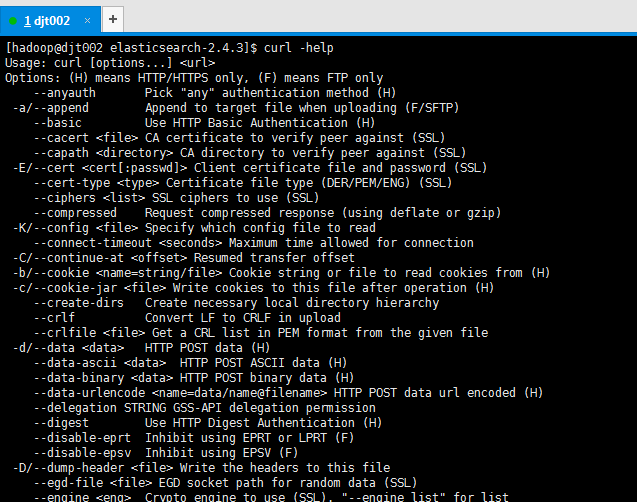
[hadoop@djt002 elasticsearch-2.4.3]$ curl -help
Usage: curl [options...] <url>
Options: (H) means HTTP/HTTPS only, (F) means FTP only
--anyauth Pick "any" authentication method (H)
-a/--append Append to target file when uploading (F/SFTP)
--basic Use HTTP Basic Authentication (H)
--cacert <file> CA certificate to verify peer against (SSL)
--capath <directory> CA directory to verify peer against (SSL)
-E/--cert <cert[:passwd]> Client certificate file and password (SSL)
--cert-type <type> Certificate file type (DER/PEM/ENG) (SSL)
--ciphers <list> SSL ciphers to use (SSL)
--compressed Request compressed response (using deflate or gzip)
-K/--config <file> Specify which config file to read
--connect-timeout <seconds> Maximum time allowed for connection
-C/--continue-at <offset> Resumed transfer offset
-b/--cookie <name=string/file> Cookie string or file to read cookies from (H)
-c/--cookie-jar <file> Write cookies to this file after operation (H)
--create-dirs Create necessary local directory hierarchy
--crlf Convert LF to CRLF in upload
--crlfile <file> Get a CRL list in PEM format from the given file
-d/--data <data> HTTP POST data (H)
--data-ascii <data> HTTP POST ASCII data (H)
--data-binary <data> HTTP POST binary data (H)
--data-urlencode <name=data/name@filename> HTTP POST data url encoded (H)
--delegation STRING GSS-API delegation permission
--digest Use HTTP Digest Authentication (H)
--disable-eprt Inhibit using EPRT or LPRT (F)
--disable-epsv Inhibit using EPSV (F)
-D/--dump-header <file> Write the headers to this file
--egd-file <file> EGD socket path for random data (SSL)
--engine <eng> Crypto engine to use (SSL). "--engine list" for list
-f/--fail Fail silently (no output at all) on HTTP errors (H)
-F/--form <name=content> Specify HTTP multipart POST data (H)
--form-string <name=string> Specify HTTP multipart POST data (H)
--ftp-account <data> Account data to send when requested by server (F)
--ftp-alternative-to-user <cmd> String to replace "USER [name]" (F)
--ftp-create-dirs Create the remote dirs if not present (F)
--ftp-method [multicwd/nocwd/singlecwd] Control CWD usage (F)
--ftp-pasv Use PASV/EPSV instead of PORT (F)
-P/--ftp-port <address> Use PORT with address instead of PASV (F)
--ftp-skip-pasv-ip Skip the IP address for PASV (F)
--ftp-ssl Try SSL/TLS for ftp transfer (F)
--ftp-ssl-ccc Send CCC after authenticating (F)
--ftp-ssl-ccc-mode [active/passive] Set CCC mode (F)
--ftp-ssl-control Require SSL/TLS for ftp login, clear for transfer (F)
--ftp-ssl-reqd Require SSL/TLS for ftp transfer (F)
-G/--get Send the -d data with a HTTP GET (H)
-g/--globoff Disable URL sequences and ranges using {} and []
-H/--header <line> Custom header to pass to server (H)
-I/--head Show document info only
-h/--help This help text
--hostpubmd5 <md5> Hex encoded MD5 string of the host public key. (SSH)
-0/--http1.0 Use HTTP 1.0 (H)
--ignore-content-length Ignore the HTTP Content-Length header
-i/--include Include protocol headers in the output (H/F)
-k/--insecure Allow connections to SSL sites without certs (H)
--interface <interface> Specify network interface/address to use
-4/--ipv4 Resolve name to IPv4 address
-6/--ipv6 Resolve name to IPv6 address
-j/--junk-session-cookies Ignore session cookies read from file (H)
--keepalive-time <seconds> Interval between keepalive probes
--key <key> Private key file name (SSL/SSH)
--key-type <type> Private key file type (DER/PEM/ENG) (SSL)
--krb <level> Enable Kerberos with specified security level (F)
--libcurl <file> Dump libcurl equivalent code of this command line
--limit-rate <rate> Limit transfer speed to this rate
-l/--list-only List only names of an FTP directory (F)
--local-port <num>[-num] Force use of these local port numbers
-L/--location Follow Location: hints (H)
--location-trusted Follow Location: and send auth to other hosts (H)
-M/--manual Display the full manual
--max-filesize <bytes> Maximum file size to download (H/F)
--max-redirs <num> Maximum number of redirects allowed (H)
-m/--max-time <seconds> Maximum time allowed for the transfer
--negotiate Use HTTP Negotiate Authentication (H)
-n/--netrc Must read .netrc for user name and password
--netrc-optional Use either .netrc or URL; overrides -n
-N/--no-buffer Disable buffering of the output stream
--no-keepalive Disable keepalive use on the connection
--no-sessionid Disable SSL session-ID reusing (SSL)
--noproxy Comma-separated list of hosts which do not use proxy
--ntlm Use HTTP NTLM authentication (H)
-o/--output <file> Write output to <file> instead of stdout
--pass <pass> Pass phrase for the private key (SSL/SSH)
--post301 Do not switch to GET after following a 301 redirect (H)
--post302 Do not switch to GET after following a 302 redirect (H)
-#/--progress-bar Display transfer progress as a progress bar
-x/--proxy <host[:port]> Use HTTP proxy on given port
--proxy-anyauth Pick "any" proxy authentication method (H)
--proxy-basic Use Basic authentication on the proxy (H)
--proxy-digest Use Digest authentication on the proxy (H)
--proxy-negotiate Use Negotiate authentication on the proxy (H)
--proxy-ntlm Use NTLM authentication on the proxy (H)
-U/--proxy-user <user[:password]> Set proxy user and password
--proxy1.0 <host[:port]> Use HTTP/1.0 proxy on given port
-p/--proxytunnel Operate through a HTTP proxy tunnel (using CONNECT)
--pubkey <key> Public key file name (SSH)
-Q/--quote <cmd> Send command(s) to server before file transfer (F/SFTP)
--random-file <file> File for reading random data from (SSL)
-r/--range <range> Retrieve only the bytes within a range
--raw Pass HTTP "raw", without any transfer decoding (H)
-e/--referer Referer URL (H)
-O/--remote-name Write output to a file named as the remote file
--remote-name-all Use the remote file name for all URLs
-R/--remote-time Set the remote file's time on the local output
-X/--request <command> Specify request command to use
--retry <num> Retry request <num> times if transient problems occur
--retry-delay <seconds> When retrying, wait this many seconds between each
--retry-max-time <seconds> Retry only within this period
-S/--show-error Show error. With -s, make curl show errors when they occur
-s/--silent Silent mode. Don't output anything
--socks4 <host[:port]> SOCKS4 proxy on given host + port
--socks4a <host[:port]> SOCKS4a proxy on given host + port
--socks5 <host[:port]> SOCKS5 proxy on given host + port
--socks5-hostname <host[:port]> SOCKS5 proxy, pass host name to proxy
--socks5-gssapi-service <name> SOCKS5 proxy service name for gssapi
--socks5-gssapi-nec Compatibility with NEC SOCKS5 server
-Y/--speed-limit Stop transfer if below speed-limit for 'speed-time' secs
-y/--speed-time Time needed to trig speed-limit abort. Defaults to 30
-2/--sslv2 Use SSLv2 (SSL)
-3/--sslv3 Use SSLv3 (SSL)
--stderr <file> Where to redirect stderr. - means stdout
--tcp-nodelay Use the TCP_NODELAY option
-t/--telnet-option <OPT=val> Set telnet option
-z/--time-cond <time> Transfer based on a time condition
-1/--tlsv1 Use TLSv1 (SSL)
--trace <file> Write a debug trace to the given file
--trace-ascii <file> Like --trace but without the hex output
--trace-time Add time stamps to trace/verbose output
-T/--upload-file <file> Transfer <file> to remote site
--url <URL> Set URL to work with
-B/--use-ascii Use ASCII/text transfer
-u/--user <user[:password]> Set server user and password
-A/--user-agent <string> User-Agent to send to server (H)
-v/--verbose Make the operation more talkative
-V/--version Show version number and quit
-w/--write-out <format> What to output after completion
-q If used as the first parameter disables .curlrc
[hadoop@djt002 elasticsearch-2.4.3]$
比如,
curl
-x 指定http请求的方法
GET POST PUT DELETE
-d 指定要传递的参数
推荐
http://zhaoyanblog.com/archives/732.html
Elasticsearch学习概念之curl的更多相关文章
- ELK 学习笔记之 elasticsearch基本概念和CRUD
elasticsearch基本概念和CRUD: 基本概念: CRUD: 创建索引: curl -XPUT 'http://192.168.1.151:9200/library/' -d '{" ...
- Elasticsearch学习之基本核心概念
在Elasticsearch中有许多术语和概念 1. 核心概念 Elasticsearch集群可以包含多个索引(indices)(数据库),每一个索引可以包含多个类型(types)(表),每一个类型包 ...
- Elasticsearch学习笔记一
Elasticsearch Elasticsearch(以下简称ES)是一款Java语言开发的基于Lucene的高效全文搜索引擎.它提供了一个分布式多用户能力的基于RESTful web接口的全文搜索 ...
- elasticSearch学习安装
资料: 1.Elasticsearch学习,请先看这一篇! https://blog.csdn.net/laoyang360/article/details/52244917 2. linux下ela ...
- MacOS下ElasticSearch学习(第一天)
ElasticSearch第一天 学于黑马和传智播客联合做的教学项目 感谢 黑马官网 传智播客官网 微信搜索"艺术行者",关注并回复关键词"elasticsearch&q ...
- Elasticsearch学习笔记
Why Elasticsearch? 由于需要提升项目的搜索质量,最近研究了一下Elasticsearch,一款非常优秀的分布式搜索程序.最开始的一些笔记放到github,这里只是归纳总结一下. 首先 ...
- ElasticSearch 学习记录之ES短语匹配基本用法
短语匹配 短语匹配故名思意就是对分词后的短语就是匹配,而不是仅仅对单独的单词进行匹配 下面就是根据下面的脚本例子来看整个短语匹配的有哪些作用和优点 GET /my_index/my_type/_sea ...
- ElasticSearch 学习记录之 分布式文档存储往ES中存数据和取数据的原理
分布式文档存储 ES分布式特性 屏蔽了分布式系统的复杂性 集群内的原理 垂直扩容和水平扩容 真正的扩容能力是来自于水平扩容–为集群添加更多的节点,并且将负载压力和稳定性分散到这些节点中 ES集群特点 ...
- Elasticsearch 学习总结 - 相关配置补充说明
一. Elasticsearch的基本概念 term索引词,在elasticsearch中索引词(term)是一个能够被索引的精确值.foo,Foo Foo几个单词是不相同的索引词.索引词(ter ...
随机推荐
- eclipse中三大利器
eclipse中两大利器: 首先说下用eclipse开发工具.进行java代码,开发的时候,我们开发完成以后.需要测试.大部分我们用Junit测试工具.可是内部的代码覆盖率.和结构我们看的不是那么详细 ...
- 抽钻石vs中奖门 概率问题
在概率问题中,假设跟着日常经验与感觉走.常常会得到错误的答案.以下"抽钻石"的故事非常可以说明这一点. 题目一:某天电视台举办了这种一个游戏节目.主持人首先拿出三个盒子.已知这三个 ...
- WPF的ListView控件自定义布局用法实例
正文: 如何布局是在App.xaml中定义源码如下 <Application x:Class="CWebsSynAssistant.App" xmlns="ht ...
- 37、pendingIntent 点击通知栏进入页面
转载: http://blog.csdn.net/yuzhiboyi/article/details/8484771 https://my.oschina.net/youranhongcha/blog ...
- Unix环境高级编程—进程控制(三)
一.解释器文件 解释器文件属于文本文件,起始行形式为: #! pathname[optional-argument] 我们创建一个只有一行的文件如下: #!/home/webber/test/echo ...
- Python中的staticmethod和classmethod
谈谈Python中的staticmethod和classmethod 首先值得说明的是staticmethod和classmethod都是python中定义的装饰器,用的时候需要在前面加@ 即@sta ...
- 给this添加属性
const f =()=>{ console.log(this) let a=5 console.log(this) console.log(this) this.ak =3} f() let ...
- SecureCRT 会话设置项
登陆动作------自动登陆仿真------两个颜色复选框都勾上模式------光标键模式(2个复选框)映射键------使用windows复制和粘贴热键外观------字符编码:UTF-8外观--- ...
- POJ 2442 Sequence【堆】
题目链接:http://poj.org/problem?id=2442 题目大意:给出一个m*n的矩阵,从每一行中取出一个数相加.能得到n^m个不同的结果.要求输出当中前n项. 建立一个以n元数组为底 ...
- LeetCode:有效的括号【20】
LeetCode:有效的括号[20] 题目描述 给定一个只包括 '(',')','{','}','[',']' 的字符串,判断字符串是否有效. 有效字符串需满足: 左括号必须用相同类型的右括号闭合. ...