
canvas转盘抽奖的实现(一)
网络上已经有了很多转盘抽奖的代码,但大多是用jQuery插件实现的,其中的原理比较难弄明白,于是自己摸索了一个。最终效果如下:
// = totalTime) {
stopRotation();
return;
}
var currentAngle = finalValue - easeOut(currentTime,0,finalValue,totalTime);
//弧度随时间递增,但增速由快变慢
startAngle += currentAngle * PI / 180;
draw();
t = setTimeout(rotation, 17);
}
function stopRotation() {
clearTimeout(t);
var arc = startAngle + PI / 2,
index = lenPrize - 1 - ((arc % (2 * PI) / piece) >> 0);
result.innerHTML = '' + prizeList[index] + '';
}
draw();
var run = document.getElementById('run'),
result = document.getElementById('result');
run.onclick = function() {
currentTime = 0;
totalTime = Math.random() * 500 + 4000;
finalValue = Math.random() * 20 + 20;
rotation();
};
function easeOut(t,b,c,d) {
return -c *(t/=d)*(t-2) + b;
}
})();
// ]]>
实现步骤:
1.根据奖品数量绘制转盘
var      r1 = 200,    //外圆半径

         r2 = 160,    //奖品文字距离圆心的位置

         r3 = 60,    //中心按钮半径

         centerX = c.width / 2,    //中点

         centerY = c.height / 2,

         PI = Math.PI,

         prizeList = ['一等奖','二等奖','三等奖','四等奖','五等奖','六等奖','七等奖','八等奖'],    //奖品列表

         colorList = ['#ffffff','#FDFAC3','#ffffff','#FDFAC3','#ffffff','#FDFAC3','#ffffff','#FDFAC3'],    //奖品对应的背景颜色

         lenPrize = prizeList.length,
         startAngle = 0,  //开始绘制时的起始角度

         piece = 2 * PI / lenPrize;    //根据奖品数量划分区域,单位为弧度
//绘制分区

for (var i = 0; i < lenPrize; i++) {

    ctx.fillStyle = colorList[i];

    var angle = startAngle + piece * i;

    ctx.beginPath();

    //设置圆心为起点,方便closePath()自动闭合路径

    ctx.moveTo(centerX, centerY);

    //分块绘制,目的是方便填充颜色,如果以lineTo的形式绘制,在填充颜色时会很麻烦

    ctx.arc(centerX, centerY, r1, angle, angle + piece, false);

    ctx.closePath();

    ctx.fill();

    ctx.stroke();

    //绘制奖品说明

    ctx.save();

    ctx.font = '30px Microsoft YaHei';

    ctx.fillStyle = '#d60000';

    ctx.translate(centerX + Math.cos(angle + piece / 2) * r2, centerY + Math.sin(angle + piece / 2) * r2);

    ctx.rotate(angle + piece / 2 + PI / 2);

    var s = prizeList[i].split('');

    for (var j = 0; j < s.length; j++) {

        var text = s[j];

        ctx.fillText(text, -ctx.measureText(text).width / 2, 32 * j);

    }

    ctx.restore();

}
这一部分代码的效果如下:
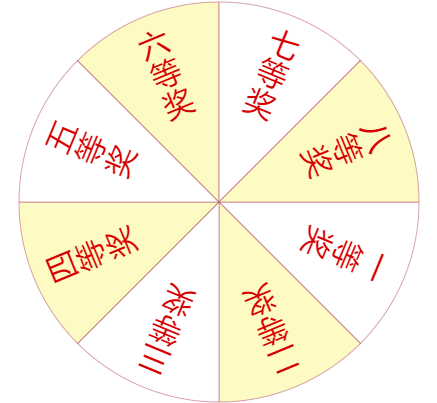
图一
要注意首个奖品说明的位置,也就是一等奖的位置,是从三点钟方向开始的,这是arc()方法的规定,下面这张图表示从1到N按顺序绘制。

图二
接下来绘制箭头和中心圆:
//绘制箭头

ctx.strokeStyle = '#FF5722';

ctx.fillStyle = '#FF5722';

ctx.save();

ctx.translate(centerX, centerY - 40);

ctx.moveTo( - 10, 0);

ctx.beginPath();

ctx.lineTo( - 10, 0);

ctx.lineTo( - 10, -30);

ctx.lineTo( - 20, -30);

ctx.lineTo(0, -50);

ctx.lineTo(20, -30);

ctx.lineTo(10, -30);

ctx.lineTo(10, 0);

ctx.closePath();

ctx.fill();

ctx.stroke();

ctx.restore();

//绘制中心圆

ctx.fillStyle = '#FF5722';

ctx.beginPath();

ctx.arc(centerX, centerY, r3, 0, 2 * PI, false);

ctx.closePath();

ctx.fill();

ctx.stroke();

//绘制抽奖文字

ctx.font = '30px Microsoft YaHei';

ctx.fillStyle = '#fff';

ctx.save();

ctx.translate(centerX, centerY);

ctx.fillText("抽奖", -ctx.measureText(text).width, 10);

ctx.restore();
这就是最终效果

最后实现转盘的转动,先定义几个变量:
var currentTime = 0,  //表示动画开始到现在持续的时间

    totalTime = Math.random() * 500 + 4000,   //动画总时间
    finalValue = Math.random() * 20 + 20,//动画总时间内期望的位移总量,越大转得越快,因为总时间一定,只有加快速度才能在规定时间内到达期望位移

   t; //setTimeout Id
转盘转动方法:
function rotation() {

    currentTime += 30;    //每帧增加30的运行时间

    if (currentTime >= totalTime) {//到达总时间后停止动画

        stopRotation();

        return;

    }

    //缓动

    var currentAngle = finalValue - easeOut(currentTime, 0, finalValue, totalTime);

    //弧度随时间递增,但增速由快变慢

    startAngle += currentAngle * PI / 180;

    //根据startAngle的变化重新绘制转盘,以达到转动的效果

    draw();

    t = setTimeout(rotation, 17);

}
停止转盘:
function stopRotation() {

    clearTimeout(t);

    //动画时间内转动的总弧度,因为是从三点钟方向开始绘制的,所以应当加上PI/2

    var arc = startAngle + PI / 2,

    //arc模2*PI以计算转动整圈以外不满一圈的零数

    //零数除以单位弧度,表示转动了几个单位,不满整数则向下取整(Math.floor)

    //奖品数量(以下标算,故先减1)减去转动过的单位得到当前指针所指奖品的索引

    index = lenPrize - 1 - ((arc % (2 * PI) / piece) >> 0);

    result.innerHTML = '<strong style="font-size:26px; color:#f00">' + prizeList[index] + '</strong>';

}

全部代码:
 < !DOCTYPE html >

 <html lang = "en" >

 <head >

 <meta charset = "UTF-8" >

 <title> Document </title>

  <style>

     body{margin: 0; font:12px Arial; background-color: #fff}

     .canvas_container{

         position: relative;

         width: 500px;

         height: 500px;

     }

     #run{

         position: absolute;

         width: 120px;

         height: 120px;

         cursor: pointer;

         left: 190px;

         top: 190px;

     }

  </style > </head>

  <body>

      <div class="canvas_container">

          <div id="run"></div > <canvas id = "c"width = "500"height = "500" > </canvas>

      </div > <div id = "result" > </div>

      <script>

      var c = document.getElementById('c'),

          ctx = c.getContext("2d"),

          r1 = 200,    / / 外圆半径r2 = 160,

 //文字所在位置半径

 r3 = 60,

 //中心按钮

 centerX = c.width / 2,

 //中点

 centerY = c.height / 2,

 PI = Math.PI;

 var prizeList = ['一等奖', '二等奖', '三等奖', '四等奖', '五等奖', '六等奖', '七等奖', '八等奖'],

 colorList = ['#ffffff', '#FDFAC3', '#ffffff', '#FDFAC3', '#ffffff', '#FDFAC3', '#ffffff', '#FDFAC3'],

 lenPrize = prizeList.length,

 lenColor = colorList.length,

 piece = 2 * PI / lenPrize,

 //根据奖品数量划分区域,单位弧度

 startAngle = 0; //起始角度

 function draw() {

     ctx.clearRect(0, 0, c.width, c.height);

     ctx.lineWidth = 0.5;

     ctx.strokeStyle = '#AF4760';

     //绘制分区

     for (var i = 0; i < lenPrize; i++) {

         ctx.fillStyle = colorList[i];

         var angle = startAngle + piece * i;

         ctx.beginPath();

         ctx.moveTo(centerX, centerY);

         //分块绘制,目的是方便填充颜色,如果以lineTo的形式绘制,在填充颜色时会很麻烦

         ctx.arc(centerX, centerY, r1, angle, angle + piece, false);

         ctx.closePath();

         ctx.fill();

         ctx.stroke();

         //绘制奖品说明

         ctx.save();

         ctx.font = '30px Microsoft YaHei';

         ctx.fillStyle = '#d60000';

         ctx.translate(centerX + Math.cos(angle + piece / 2) * r2, centerY + Math.sin(angle + piece / 2) * r2);

         ctx.rotate(angle + piece / 2 + PI / 2);

         var s = prizeList[i].split('');

         for (var j = 0; j < s.length; j++) {

             var text = s[j];

             ctx.fillText(text, -ctx.measureText(text).width / 2, 32 * j);

         }

         ctx.restore();

     }

     //绘制箭头

     ctx.strokeStyle = '#FF5722';

     ctx.fillStyle = '#FF5722';

     ctx.save();

     ctx.translate(centerX, centerY - 40);

     ctx.moveTo( - 10, 0);

     ctx.beginPath();

     ctx.lineTo( - 10, 0);

     ctx.lineTo( - 10, -30);

     ctx.lineTo( - 20, -30);

     ctx.lineTo(0, -50);

     ctx.lineTo(20, -30);

     ctx.lineTo(10, -30);

     ctx.lineTo(10, 0);

     ctx.closePath();

     ctx.fill();

     ctx.stroke();

     ctx.restore();

     //绘制中心圆

     ctx.fillStyle = '#FF5722';

     ctx.beginPath();

     ctx.arc(centerX, centerY, r3, 0, 2 * PI, false);

     ctx.closePath();

     ctx.fill();

     ctx.stroke();

     //绘制抽奖文字

     ctx.font = '30px Microsoft YaHei';

     ctx.fillStyle = '#fff';

     ctx.save();

     ctx.translate(centerX, centerY);

     ctx.fillText("抽奖", -ctx.measureText(text).width, 10);

     ctx.restore();

 }

 var currentTime = 0,

 totalTime = Math.random() * 500 + 4000,

 finalValue = Math.random() * 20 + 20,

 //终点值

 t;

 function rotation() {

     currentTime += 30;

     if (currentTime >= totalTime) {

         stopRotation();

         return;

     }

     var currentAngle = finalValue - easeOut(currentTime, 0, finalValue, totalTime);

     //弧度随时间递增,但增速由快变慢

     startAngle += currentAngle * PI / 180;

     draw();

     t = setTimeout(rotation, 17);

 }

 function stopRotation() {

     clearTimeout(t);

     var arc = startAngle + PI / 2,

     index = lenPrize - 1 - ((arc % (2 * PI) / piece) >> 0);

     result.innerHTML = '<strong style="font-size:26px; color:#f00">' + prizeList[index] + '</strong>';

 }

 draw();

 //rotation();

 var run = document.getElementById('run'),

 result = document.getElementById('result');

 run.onclick = function() {

     currentTime = 0;

     totalTime = Math.random() * 500 + 4000;

     finalValue = Math.random() * 20 + 20;

     rotation();

 };

 /*

         t: current time(当前时间)

         b: beginning value(初始值)

         c: change in value(变化总量)

         d: duration(持续时间)

      */

 function easeOut(t, b, c, d) {

     return - c * (t /= d) * (t - 2) + b;

 }

 </script>

 </body >

 </html>
canvas转盘抽奖的实现(一)的更多相关文章
- canvas转盘抽奖的实现(二)
本篇是<canvas转盘抽奖的实现(一)>的另一种实现方法,主要通过css3的transform以及transition过渡来实现. // ' + r + '等奖'; } draw ...
- canvas转盘抽奖
1 <!DOCTYPE html> 2 <html> 3 <head> 4 <meta http-equiv="Content-Type" ...
- HTML5 Canvas绘制转盘抽奖
新项目:完整的Canvas转盘抽奖代码 https://github.com/givebest/GB-canvas-turntable 演示 http://blog.givebest.cn/GB-ca ...
- 转盘抽奖 canvas & 抽奖 H5 源码
转盘抽奖 canvas https://github.com/givebest/wechat-turntalbe-canvas https://blog.givebest.cn/GB-canvas-t ...
- 纯CSS3大转盘抽奖(响应式、可配置)
源于前段时候微信小程序最初火爆公测时段,把以前用 Canvas 实现的大转盘抽奖移植成微信小程序,无奈当时小程序对 Canvas 支持不够完善,只好降低用 CSS3 实现.虽然比不上 Canvas 绘 ...
- HTML5 Canvas圆盘抽奖应用(适用于Vue项目)
<!DOCTYPE html> <html lang="zh-cn"> <head> <meta charset="UTF-8& ...
- 用jQuery和PHP来实现转盘抽奖程序
准备工作 首先要准备素材,抽奖的界面用到两张图片,圆盘图片和指针图片,实际应用中可以根据不同的需求制作不同的圆盘图片. 接着制作html页面,实例中我们在body中加入如下代码: <div cl ...
- javascript 转盘抽奖代码和计数器代码
要介绍了javascript圆盘抽奖程序实现原理和完整代码例子,需要的朋友可以参考下 看到网页上有不少大转盘抽奖的应用,心血来潮也想弄个.于是找了点资料自己研究... 效果预览: 一.模拟抽奖的实 ...
- jquery——九宫格大转盘抽奖
一.用到的图片 二.代码如下,重点是js部分 <!DOCTYPE html> <html> <head> <meta http-equiv="Con ...
随机推荐
- 关于css的float
什么是浮动? CSS中的一些元素是块级元素,表示它们会自动另起一行. 举个例子,如果你创建了两个段落,每个段落都只有一个单词.这两个单词不会靠在一起,而是会各自占据一行. 另一些元素是行内元素,表示它 ...
- SPOJ QTREE4 - Query on a tree IV
You are given a tree (an acyclic undirected connected graph) with N nodes, and nodes numbered 1,2,3. ...
- TinyXML2使用教程(转)
原文转自 http://blog.csdn.net/K346K346/article/details/48750417 1.TinyXML2概述 TinyXML2是simple.small.effic ...
- 34深入理解C指针之---通过字符串传递函数
一.通过字符串传递函数 1.定义:可以使用函数名(字符串)调用函数,也可以使用函数指针调用函数,将两者结合 2.特征: 1).在函数声明时使用函数指针 2).调用函数时使用函数名称(字符串) 3).可 ...
- Vue中的computed 解读
computed相当于属性的一个实时计算,如果实时计算里关联了对象,那么当对象的某个值改变的时候,同事会出发实时计算.比如: <body id="content"> & ...
- 容器中元素的去重——ans.erase(unique(ans.begin(),ans.end()),ans.end());
啊,原来unique()函数,只是处理的连续的元素,比如 -1 -1 -1 1 2 -1 2 就处理成了 -1 1 2 -1 2 -1 -1并且返回5,之后eraser(5,7)剩下了 -1 1 2 ...
- AC日记——[Sdoi2013]森林 bzoj 3123
3123: [Sdoi2013]森林 Time Limit: 20 Sec Memory Limit: 512 MBSubmit: 3216 Solved: 944[Submit][Status] ...
- PythonWeb开发教程(二),搭建第一个django项目
这篇写怎么创建django项目,以及把django项目运行起来. 1.创建django项目 a.使用命令创建,安装完django之后就有django-admin命令了,执行命令创建即可,命令如下: ...
- ML| EM
What's xxx The EM algorithm is used to find the maximum likelihood parameters of a statistical model ...
- ubuntu网络、包管理、工作内容小结
中国地图 1.配置IP cat /etc/network/interfaces auto lo iface lo inet loopback # The loopback network interf ...