
随手正则写的 CSDN【只看楼主】功能
写这个的时候居然没有看到原来CSDN已经有这个功能了,写完代码了突然发现原来早就已经有了。
现把代码贴出来吧,虽然有很多解析HTML的开源类库如:http://htmlagilitypack.codeplex.com/,但我一直习惯于正则匹配。
截图:
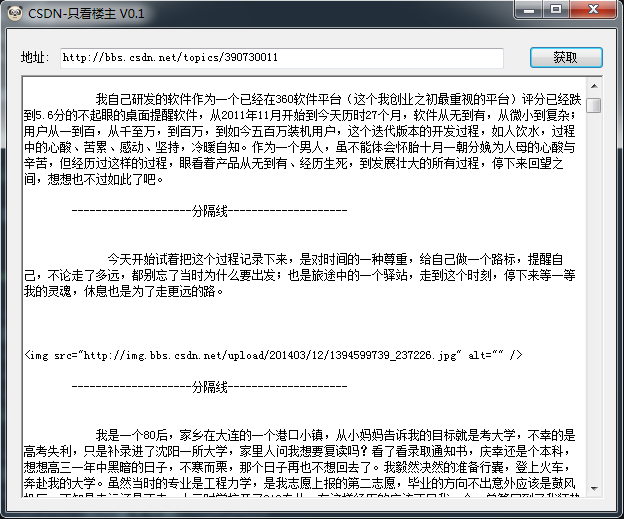
呵呵,起码还能看吧@——#
 private void button1_Click(object sender, EventArgs e)

         {

             if (!string.IsNullOrEmpty(txtCsdnUrl.Text.Trim()))

             {

                 string url = txtCsdnUrl.Text.Trim();

                 string htmlSource = string.Empty;

                 htmlSource = GetHtmlSource(url);

                 int pageCount = GetPageCount(htmlSource);

                 string context = string.Empty;

                 if (pageCount > )

                 {

                     for (int i = ; i <= pageCount; i++)

                     {

                         htmlSource = GetHtmlSource(url + "?page=" + i);

                        context+= GetLZArticle(htmlSource);

                     }

                 }

                 else

                 {

                     context += GetLZArticle(htmlSource);

                 }

                 richTextBox1.Text = context;

             }

             else

             {

                 MessageBox.Show("请输入地址");

             }

         }

         /// <summary>

         /// 获取源代码

         /// </summary>

         /// <param name="Url"></param>

         /// <returns></returns>

         public string GetHtmlSource(string Url)

         {

             WebClient client = new WebClient();

             client.Headers.Add("user-agent", "Mozilla/4.0 (compatible; MSIE 6.0; Windows NT 5.2; .NET CLR 1.0.3705;)");

             Stream data = client.OpenRead(Url);

             string result = string.Empty;

             using (StreamReader reader = new StreamReader(data, Encoding.UTF8))

             {

                 result = reader.ReadToEnd();

             }

             return result;

         }

         /// <summary>

         /// 获取贴子总页数 URL格式:http://bbs.csdn.net/topics/390730011?page=2

         /// </summary>

         /// <returns>返回最大页数</returns>

         public int GetPageCount(string HtmlSource)

         {

             int pageCount = ;

             Regex reg = new Regex("<select class=\"jumpMenu\" name=\"jumpMenu\">(?<val>.*?)</select>", RegexOptions.Singleline | RegexOptions.IgnoreCase);

             string htmlSource = HtmlSource;

             Regex reg1 = new Regex("<option.*?>(?<val>.*?)</option>", RegexOptions.Singleline | RegexOptions.IgnoreCase);

             int count = reg1.Matches(reg.Match(htmlSource).Groups["val"].Value).Count;

             int.TryParse(reg1.Matches(reg.Match(htmlSource).Groups["val"].Value)[count - ].Groups["val"].Value,

                          out pageCount);

             return pageCount;

         }

         /// <summary>

         /// 获取文章标题

         /// </summary>

         /// <param name="HtmlSource">网页内容</param>

         /// <returns></returns>

         public string GetArticleTitle(string HtmlSource)

         {

             string title = string.Empty;

             Regex reg = new Regex("<span class=\"title text_overflow\">(?<title>.*?)</span>", RegexOptions.Singleline | RegexOptions.IgnoreCase);

             title = reg.Match(HtmlSource).Groups["title"].Value;

             return title;

         }

         public string GetAuthorName(string HtmlSource)

         {

             string result = string.Empty;

             Regex regex = new Regex("<a class=\"p-author\" href=\"#\">(?<value>.*?)</a>");

             result = regex.Match(HtmlSource).Groups["value"].Value;

             return result;

         }

         public string GetLZArticle(string HtmlSource)

         {

             string result = string.Empty;

             string authorName = GetAuthorName(HtmlSource);

             Regex regex = new Regex("<td valign=\"top\" class=\"post_info .*?\" data-username=\"" + authorName + "\".*?>.*?<div class=\"post_body\">(?<value>.*?)</div>.*?</td>", RegexOptions.Singleline | RegexOptions.IgnoreCase);

             for (int i = ; i < regex.Matches(HtmlSource).Count; i++)

             {

                 result += regex.Matches(HtmlSource)[i].Groups["value"].Value;

                 result += "--------------------分隔线--------------------";

             }

             return result.Trim().Replace("<br />","\r\n");

         }
代码都在这里了。
随手正则写的 CSDN【只看楼主】功能的更多相关文章
- 开发快很重要——如果只看法语或者产品结果C++似乎很强大,但是参与这个C++的开发过程,就会感觉到这种痛苦(Google也是这个看法)
开发快很重要——如果只看语法或者产品结果C++似乎很强大,但是参与这个C++的开发过程,就会感觉到这种痛苦,太慢了,太麻烦了,虽然在反复调试和优化之后,最后产品的结果可能还不错. Delphi的最大特 ...
- css知识笔记:水平垂直居中(别只看,请实操!!!)
css实现元素的水平垂直居中. (尝试采用5W2H方法说明): 别只看,请实操!!! What: 1.这篇文档主要描述元素水平方向居中的几种最常见和最实用的几种方式,并说明优缺点. 2.写这篇文章的目 ...
- css知识笔记:垂直居中(别只看,请实操!!!)
css实现元素的垂直居中. (尝试采用5W2H方法说明): 别只看,请实操!!! What: 1.这篇文档主要描述元素水平方向居中的几种最常见和最实用的几种方式,并说明优缺点. 2.写这篇文章的目的, ...
- css知识笔记:水平居中(别只看,请实操!!!)
css实现元素的水平居中. (尝试采用5W2H方法说明): 别只看,请实操!!! What: 1.这篇文档主要描述元素水平方向居中的几种最常见和最实用的几种方式,并说明优缺点. 2.写这篇文章的目的, ...
- C语言 不看怎么存,只看怎么读 ,短字节长字节之间的转换
不看怎么存,只看怎么读 e.g. int a = 010; //8以8进制存 int b = 8;//8以10进制存 printf("%d %d\n",a,b); 以十进制取 a和 ...
- CSDN管理员看过来
CSDN管理员看过来 你好.CSDN管理员,我想我被特殊对待了.我看了一些人的博客.终于发现仅仅有我博客的数据有异常.这算是给我的惊喜吗? 言归正传,我发现我博客上两个地方出现的文章的总数对不上.原创 ...
- 写给非专业人士看的 *** 简介(同时也解释了GFW )
写给非专业人士看的 *** 简介 这个文章来源于一个朋友在***的过程中,搞不清楚 *** 的配置问题,在这里我想按照我对 *** 的理解简单梳理一下,以便一些非专业人士也能了解 long long ...
- windows server 2019 域控批量新增不用,只看这一篇就够了,别的不用看
windows server 2019 域控批量新增不用,只看这一篇就够了,别的不用看 1. 新建excel表格 A B C D E 姓 名 全名 登录名 密码 李 四 李四 李四 test123!@ ...
- 成功的背后!(给所有IT人)----转载:来自CSDN第一名博主
转载:来自CSDN第一名博主:http://blog.csdn.net/phphot/article/details/2187505 放在这里激励你我! 正文: 成功的背后,有着许多不为人知的故事,而 ...
随机推荐
- MVC与MVVM的关系
什么是MVC? M(Model数据层) 职能单一,只负责操作数据库,执行对于的 Sql 语句,进行数据的CRUD C: create 增加 R: Read 读取 U: update 修改 D: Del ...
- 【干货】Html与CSS入门学习笔记4-8
四.web镇之旅,连接起来 找一家托管公司如阿里云,购买域名和空间,然后将网页文件上传到购买的空间的根目录下. 1.绝对路径url url:uniform resource locators 统一资源 ...
- 零基础逆向工程32_Win32_06_通用控件_VM_NOTIFY
标准控件与可用控件 windows标准控件,标准控件总是可用的 Static Group Box Button Check Box Radio Button Edit ComboBox ListBox ...
- MATLAB之数据处理+公式拟合
MATLAB之数据处理+公式拟合 前言:由试验得到一组数据,对该组数据进行处理,作图分析,分析各变量的关系,期望得到拟合公式. 试验数据背景 本次试验有三个自变量:V.M.G,因变量为F,每组试验重复 ...
- IIS发布网站出错解决方案
1.第一类错误(Web服务器被配置为不列出此目录的内容) 问题所在没有为请求的URL设置默认文档,在IIS“默认文档”添加一个你要访问的默认文档名字,如:Default.aspx. 2.第二类错误(请 ...
- 改善WPF应用程序性能的10大方法 (转发)
WPF(Windows Presentation Foundation)应用程序在没有图形加速设备的机器上运行速度很慢是个公开的秘密,给用户的感觉是它太吃资源了,WPF程序的性能和硬件确实有很大的关系 ...
- 在wpf或winform关闭子窗口或对子窗口进行某个操作后刷新父窗口
父窗口: ///<summary> ///弹出窗口 ///</summary> ///<param name="sender"></pa ...
- LeetCode Best Time to Buy and Sell Stock II (简单题)
题意: 股票买卖第2题.给出每天的股票价格,每次最多买一股,可以多次操作,但是每次在买之前必须保证身上无股票.问最大的利润? 思路: 每天的股票价格可以看成是一条曲线,能卖掉就卖掉,那么肯定是在上升的 ...
- 【硬盘整理】使用UltimateDefrag将常用文件放置在磁盘最外圈
使用方法未知.软件截图如下: 官方网站(英文):http://www.disktrix.com/ 汉化破解版V3.0下载地址:http://page2.dfpan.com/fs/7com9monca3 ...
- Kibana功能一览
Overview标签 总共32个请求,最大响应时间:4.7秒 Usage标签 可以看到HTTP请求的发起时间分布 Performance and Quality 6个请求里,响应时间在100毫秒以下的 ...