
java在线聊天项目 swt可视化窗口Design 重新设计好友列表窗口 增加菜单栏
增加的菜单栏效果图如下:
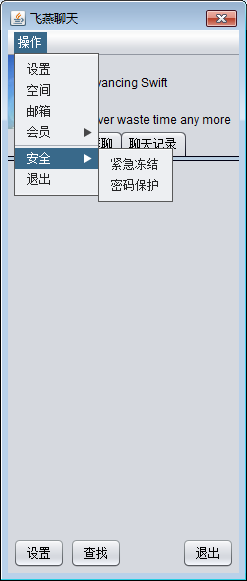
eclipse 中调整到 swt的design视图下
控件区域选择Menu Controls
将Menu Bar拖动到窗口标题栏
将Cascaded Menu拖动到Menu Bar
依次将多个Menu Item加入到New SubMenu
Separator是分隔符
也可以再放入Cascaded Menu级联菜单
好友列表窗口的代码如下:
package com.swift.frame;

import java.awt.BorderLayout;

import java.awt.Component;

import java.awt.Dimension;

import java.awt.EventQueue;

import java.awt.FlowLayout;

import java.awt.event.MouseAdapter;

import java.awt.event.MouseEvent;

import java.awt.event.WindowAdapter;

import java.awt.event.WindowEvent;

import javax.swing.ImageIcon;

import javax.swing.JButton;

import javax.swing.JDialog;

import javax.swing.JFrame;

import javax.swing.JLabel;

import javax.swing.JMenu;

import javax.swing.JMenuBar;

import javax.swing.JMenuItem;

import javax.swing.JPanel;

import javax.swing.JPopupMenu;

import javax.swing.JTabbedPane;

import javax.swing.SwingConstants;

import javax.swing.UIManager;

import javax.swing.UnsupportedLookAndFeelException;

public class FriendsDialog extends JDialog {

    public static void main(String args[]) {

        JFrame.setDefaultLookAndFeelDecorated(true);

        JDialog.setDefaultLookAndFeelDecorated(true);

        try {

            UIManager.setLookAndFeel("javax.swing.plaf.nimbus.NimbusLookAndFeel");

        } catch (ClassNotFoundException e1) {

            e1.printStackTrace();

        } catch (InstantiationException e1) {

            e1.printStackTrace();

        } catch (IllegalAccessException e1) {

            e1.printStackTrace();

        } catch (UnsupportedLookAndFeelException e1) {

            e1.printStackTrace();

        }

        EventQueue.invokeLater(new Runnable() {

            public void run() {

                try {

                    FriendsDialog dialog = new FriendsDialog();

                    dialog.addWindowListener(new WindowAdapter() {

                        public void windowClosing(WindowEvent e) {

                            System.exit(0);

                        }

                    });

                    dialog.setVisible(true);

                } catch (Exception e) {

                    e.printStackTrace();

                }

            }

        });

    }

    public FriendsDialog() {

        super();

        setTitle("飞燕聊天");

        setBounds(100, 100, 247, 581);

        final JPanel panel = new JPanel();

        panel.setLayout(new BorderLayout());

        getContentPane().add(panel, BorderLayout.NORTH);

        final JLabel label = new JLabel(new ImageIcon("Images/logo.jpg"));

        label.setText("New JLabel");

        panel.add(label, BorderLayout.WEST);

        label.setPreferredSize(new Dimension(74,74));

        final JPanel panel_1 = new JPanel();

        panel_1.setLayout(new BorderLayout());

        panel.add(panel_1, BorderLayout.CENTER);

        final JLabel advancingSwiftLabel = new JLabel();

        advancingSwiftLabel.setText("Advancing Swift");

        panel_1.add(advancingSwiftLabel, BorderLayout.CENTER);

        final JLabel neverWasterLabel = new JLabel();

        neverWasterLabel.setText("Never waste time any more");

        panel_1.add(neverWasterLabel, BorderLayout.SOUTH);

        final JPanel panel_2 = new JPanel();

        panel_2.setLayout(new BorderLayout());

        getContentPane().add(panel_2, BorderLayout.SOUTH);

        final JPanel panel_3 = new JPanel();

        final FlowLayout flowLayout = new FlowLayout();

        flowLayout.setAlignment(FlowLayout.LEFT);

        panel_3.setLayout(flowLayout);

        panel_2.add(panel_3);

        final JButton button = new JButton();

        panel_3.add(button);

        button.setHorizontalTextPosition(SwingConstants.LEFT);

        button.setHorizontalAlignment(SwingConstants.LEFT);

        button.setText("设置");

        final JButton button_1 = new JButton();

        panel_3.add(button_1);

        button_1.setText("查找");

        final JPanel panel_4 = new JPanel();

        panel_2.add(panel_4, BorderLayout.EAST);

        final JButton button_2 = new JButton();

        panel_4.add(button_2);

        button_2.setText("退出");

        final JTabbedPane tabbedPane = new JTabbedPane();

        getContentPane().add(tabbedPane, BorderLayout.CENTER);

        final JPanel panel_5 = new JPanel();

        tabbedPane.addTab("好友列表", null, panel_5, null);

        final JPanel panel_6 = new JPanel();

        tabbedPane.addTab("群聊", null, panel_6, null);

        final JPanel panel_7 = new JPanel();

        tabbedPane.addTab("聊天记录", null, panel_7, null);

        final JMenuBar menuBar = new JMenuBar();

        setJMenuBar(menuBar);

        final JMenu menu = new JMenu();

        menu.setText("操作");

        menuBar.add(menu);

        final JMenuItem newItemMenuItem = new JMenuItem();

        newItemMenuItem.setText("设置");

        menu.add(newItemMenuItem);

        final JMenuItem newItemMenuItem_1 = new JMenuItem();

        newItemMenuItem_1.setText("空间");

        menu.add(newItemMenuItem_1);

        final JMenuItem newItemMenuItem_2 = new JMenuItem();

        newItemMenuItem_2.setText("邮箱");

        menu.add(newItemMenuItem_2);

        final JMenu menu_1 = new JMenu();

        menu_1.setText("会员");

        menu.add(menu_1);

        final JMenuItem newItemMenuItem_3 = new JMenuItem();

        newItemMenuItem_3.setText("会员官网");

        menu_1.add(newItemMenuItem_3);

        final JMenuItem newItemMenuItem_4 = new JMenuItem();

        newItemMenuItem_4.setText("会员专区");

        menu_1.add(newItemMenuItem_4);

        menu.addSeparator();

        final JMenu menu_2 = new JMenu();

        menu_2.setText("安全");

        menu.add(menu_2);

        final JMenuItem newItemMenuItem_5 = new JMenuItem();

        newItemMenuItem_5.setText("紧急冻结");

        menu_2.add(newItemMenuItem_5);

        final JMenuItem newItemMenuItem_6 = new JMenuItem();

        newItemMenuItem_6.setText("密码保护");

        menu_2.add(newItemMenuItem_6);

        final JMenuItem newItemMenuItem_7 = new JMenuItem();

        newItemMenuItem_7.setText("退出");

        menu.add(newItemMenuItem_7);

        final FlowLayout flowLayout_1 = new FlowLayout();

        flowLayout_1.setAlignment(FlowLayout.RIGHT);

    }

    /**

     * WindowBuilder generated method.<br>

     * Please don't remove this method or its invocations.<br>

     * It used by WindowBuilder to associate the {@link javax.swing.JPopupMenu} with parent.

     */

    private static void addPopup(Component component, final JPopupMenu popup) {

        component.addMouseListener(new MouseAdapter() {

            public void mousePressed(MouseEvent e) {

                if (e.isPopupTrigger())

                    showMenu(e);

            }

            public void mouseReleased(MouseEvent e) {

                if (e.isPopupTrigger())

                    showMenu(e);

            }

            private void showMenu(MouseEvent e) {

                popup.show(e.getComponent(), e.getX(), e.getY());

            }

        });

    }

}
java在线聊天项目 swt可视化窗口Design 重新设计好友列表窗口 增加菜单栏的更多相关文章
- java在线聊天项目 swt可视化窗口Design 好友列表窗口
熟练使用各种布局方式 FlowLayout 流布局 left center right等 BorderLayout 边框布局 east west sorth north center Absolute ...
- java在线聊天项目 swt可视化窗口Design 登录框注册按钮点击改变窗口大小——出现注册面板 实现打开登录框时屏幕居中
登录框注册按钮点击改变窗口大小——出现注册面板 首先用swt可视化设计登录窗口如下图: 此时窗口高度为578 没点击注册时高度为301(可自己定) 注意:注册用户的Jpanel 的border选择T ...
- java在线聊天项目 swt可视化窗口Design 重新设计聊天窗口
设计的聊天窗口如下: 制作过程: 首先,在默认的BorderLayout视图下, 上边也就是North处添加一个JPanel,将Layout调整为BorderLayout,West放一个JLabel用 ...
- java在线聊天项目 实现基本聊天功能后补充的其他功能详细需求分析 及所需要掌握的Java知识基础 SWT的激活方法,swt开发包下载,及破解激活码
补充聊天项目功能,做如下需求分析: 梳理项目开发所需的必要Java知识基础 GUI将使用更快速的swt实现 SWT(Standard Widget Toolkit) Standard Widget T ...
- java在线聊天项目 客户端登陆窗口LoginDialog的注册用户功能 修改注册逻辑 增空用户名密码的反馈 增加showMessageDialog()提示框
LoginDialog类的代码修改如下: package com.swift.frame; import java.awt.EventQueue; import java.awt.event.Acti ...
- java在线聊天项目0.9版 实现把服务端接收到的信息返回给每一个客户端窗口中显示功能之客户端接收
客户端要不断接收服务端发来的信息 与服务端不断接收客户端发来信息相同,使用线程的方法,在线程中循环接收 客户端修改后代码如下: package com.swift; import java.awt.B ...
- java在线聊天项目0.4版本 制作服务端接收连接,客户端连接功能 新增客户端窗口打开时光标指向下边文本域功能,使用WindowListener监听WindowAdapter
建一个服务端类ChatServer,用于设置端口接收连接 package com.swift; import java.io.IOException; import java.net.ServerSo ...
- java在线聊天项目1.1版 ——开启多个客户端,分别实现注册和登录功能,使用客户端与服务端信息request机制,重构线程,将单独的登录和注册线程合并
实现效果图: eclipse项目中初步整合之前的各个客户端和服务端的窗口与工具类,效果如下图: 已将注册服务器线程RegServer功能放到LoginServer中,使用客户端与服务端的request ...
- java在线聊天项目1.3版 ——设计好友列表框功能
设计好友列表框功能,思路—— 1.当客户端成功登陆后,则客户端把成功登陆信息发送给服务端, 2.由服务端将接收到来自各个成功登陆的客户端的用户信息添加进好友列表, 3.每当有成功登陆的用户就向各个客户 ...
随机推荐
- 强大的在线web编辑器UEditor
UEditor是由百度web前端研发部开发所见即所得富文本web编辑器,具有轻量,可定制,注重用户体验等特点,开源基于MIT协议,允许自由使用和修改代码. UEditor在线演示地址:http://u ...
- spoj3105 MOD - Power Modulo Inverted(exbsgs)
传送门 关于exbsgs是个什么东东可以去看看yyb大佬的博客->这里 //minamoto #include<iostream> #include<cstdio> #i ...
- [Xcode 实际操作]三、视图控制器-(2)UITabBarController选项卡(标签)视图控制器
目录:[Swift]Xcode实际操作 本文将为你演示,选项卡视图控制器的创建和使用. 在项目文件夹[DemoApp]上点击鼠标右键,弹出右键菜单. [New File]->[Cocoa Tou ...
- ISCC 2018线上赛 writeup
今天有机会去ISCC2018参加了比赛,个人的感受是比赛题目整体难度不高,就是脑洞特别大,flag形式不明确,拿到flag后也要猜测flag格式,贼坑 废话不多说,以下是本人的解题思路 MISC 0x ...
- iOS开发 - 多线程实现方案之GCD篇
GCD概念 GCD为Grand Central Dispatch的缩写,纯c语言编写,是Apple开发的一个多核编程的较新的解决方法.它主要用于优化应用程序以支持多核处理器以及其他对称多处理系统.它是 ...
- iOS开发 - 多线程实现方案之Pthread篇
pthread基础 pthread是POSIX thread的简写,一套通用的多线程API,适用于Unix.Linux.Windows等系统,跨平台.可移植,使用难度大,C语言框架,线程生命周期由程序 ...
- PAT甲级——1130 Infix Expression (25 分)
1130 Infix Expression (25 分)(找规律.中序遍历) 我是先在CSDN上面发表的这篇文章https://blog.csdn.net/weixin_44385565/articl ...
- nutzboot dubbo zookeeper简单使用
提供方和消费方properties 配置基本差不多 nutz.application.name这个值不一样 提供方配置自动端口就行server.port=0 消费方一般需要对外提供web服务配置ip和 ...
- Technocup 2017 - Elimination Round 1 (Unofficially Open for Everyone, Rated for Div. 2) B
Vasily exited from a store and now he wants to recheck the total price of all purchases in his bill. ...
- PlSqlDev中执行INSERT SQL语句包含&符号导致数据异常
在PLSQL Developer中执行Insert语句时提示如下信息: 当时未注意,直接点击OK按钮继续. 导入数据后查看发现部分数据中的参数丢失了一部分,呈以下规律: . 而正常应为: . 经询问大 ...