
语音文件 pcm 静默(静音)判断
转载:http://www.voidcn.com/relative/p-fwdkigvh-bro.html
pcm 文件存储的是 原始的声音波型二进制流,没有文件头。
(1)首先要确认 pcm文件的每个采样数据 采样位数,一般为8bit或16bit。
(2)然后确定是双声道还是单声道,双声道是两个声道的数据交互排列,需要单独提取出每个声道的数据。
(3)然后确定有没有符号位,如采样点位16bit有符号位的的范围为-32768~32767
(4)确定当前操作系统的内存方式是大端,还是小端存储。具体看http://blog.csdn.net/u013378306/article/details/78904238
(5)根据以上四条对pcm文件进行解析,转化为10进制文件
注意:对于1-3可以在windows使用cooledit 工具设置参数播放pcm文件来确定具体参数,也可以使用以下java代码进行测试:
本例子的语音为: 静默1秒,然后说 “你好”,然后静默两秒。pcm文件下载路径:http://download.csdn.net/download/u013378306/10175068
package test;

import java.io.File;

import java.io.FileInputStream;

import java.io.FileNotFoundException;

import java.io.IOException;

import java.io.InputStream;

import javax.sound.sampled.AudioFormat;

import javax.sound.sampled.AudioSystem;

import javax.sound.sampled.DataLine;

import javax.sound.sampled.LineUnavailableException;

import javax.sound.sampled.SourceDataLine;

public class test {

    /**

     * @param args

     * @throws Exception

     */

    public static void main(String[] args) throws Exception {

        // TODO Auto-generated method stub

            File file = new File("3.pcm");

            System.out.println(file.length());

            int offset = 0;

            int bufferSize = Integer.valueOf(String.valueOf(file.length())) ;

            byte[] audioData = new byte[bufferSize];

            InputStream in = new FileInputStream(file);

            in.read(audioData);

            float sampleRate = 20000;

            int sampleSizeInBits = 16;

            int channels = 1;

            boolean signed = true;

            boolean bigEndian = false;

            // sampleRate - 每秒的样本数

            // sampleSizeInBits - 每个样本中的位数

            // channels - 声道数(单声道 1 个,立体声 2 个)

            // signed - 指示数据是有符号的,还是无符号的

            // bigEndian -是否为大端存储, 指示是否以 big-endian 字节顺序存储单个样本中的数据(false 意味着

            // little-endian)。

            AudioFormat af = new AudioFormat(sampleRate, sampleSizeInBits, channels, signed, bigEndian);

            SourceDataLine.Info info = new DataLine.Info(SourceDataLine.class, af, bufferSize);

            SourceDataLine sdl = (SourceDataLine) AudioSystem.getLine(info);

            sdl.open(af);

            sdl.start();

                        for(int i=0;i<audioData.length;i++)

                            audioData[i]*=1;

            while (offset < audioData.length) {

                offset += sdl.write(audioData, offset, bufferSize);

            }

    }

}
如果测试通过确定了参数就可以对pcm文件进行解析,如下java代码对每个采样数据为16bits,单声道的pcm,在操作系统内存为小端存储下解析为10进制文件。
package test;

import java.io.File;

import java.io.FileInputStream;

import java.io.FileWriter;

import java.io.InputStream;

import java.math.BigInteger;

public class ffff {

    /**

     * 采样位为16bits,小端存储,单声道解析为10进制文件

     * @param args

     */

    public static void main(String[] args) {

        try {

            File file = new File("3.pcm");

            System.out.println(file.length());

            System.out.println(file.length());

            int bufferSize = Integer.valueOf(String.valueOf(file.length()));

            byte[] buffers = new byte[bufferSize];

            InputStream in = new FileInputStream(file);

            in.read(buffers);

            String rs = "";

            for (int i = 0; i < buffers.length; i++) {

                byte[] bs = new byte[2];

                bs[0]=buffers[i+1];//小端存储,

                bs[1]=buffers[i];

                int s = Integer.valueOf(binary(bs, 10));

                i = i + 1;

                rs += " " + s;

            }

            writeFile(rs);

            in.close();

        } catch (Exception e) {

            e.printStackTrace();

        }

    }

    public static void writeFile(String s) {

        try {

            FileWriter fw = new FileWriter("hello3.txt");

            fw.write(s, 0, s.length());

            fw.flush();

            fw.close();

        } catch (Exception e) {

            e.printStackTrace();

        }

    }

    public static String binary(byte[] bytes, int radix) {

        return new BigInteger(bytes).toString(radix);// 这里的1代表正数

    }

}
执行完可以查看hello.txt ,可以看到一开始振幅很小,如下,基本不超过100:
-15 -12 -18 -24 -17 -8 -8 -17 -22 -14 -5 -18 -47 -67 -60 -41 -28 -28 -23 -12 -6 -9 -13 -8 0 6 21 49 68 48 -2 -43 -47 -32 -22 -10 22 56
但说你好的时候,振幅变得很大:
-2507 -2585 -2600 -2596 -2620 -2670 -2703 -2674 -2581 -2468 -2378 -2305 -2200 -2018 -1774 -1523 -1307 -1127 -962 -806 -652 -505 -384 -313 -281 -241 -163
然后静默两秒,振幅又变的很小:
5 3 0 -4 -5 -6 -6 -7 -7 -8 -9 -8 -10 -10 -11 -10 -11 -11 -11 -11 -11 -11 -10 -9 -7 -6 -3 -2 -2 -3 -3 -3 -1 2 4 4
具体波形图可以使用python代码显示:
import numpy as np

import pylab as pl

import math

import codecs

file=codecs.open("hello3.txt","r") //原文代码file=codecs.open("hello3.txt","rb"),b是binary,以二进制方式读取,是错误的。

lines=" "

for line in file.readlines():

    lines=lines+line

ys=lines.split(" ")

yss=[]

ays=list()

axs=list()

i=0

max1=pow(2,16)-1

for y in ys:

    if y.strip()=="":

        continue

    yss.append(y)

for index in range(len(yss)):

    y1=yss[index]

    i+=1;

    y=int(y1)

    ays.append(y)

    axs.append(i)

#print  i

file.close()

pl.plot(axs, ays,"ro")# use pylab to plot x and y

pl.show()# show the plot on the screen
得到波形图
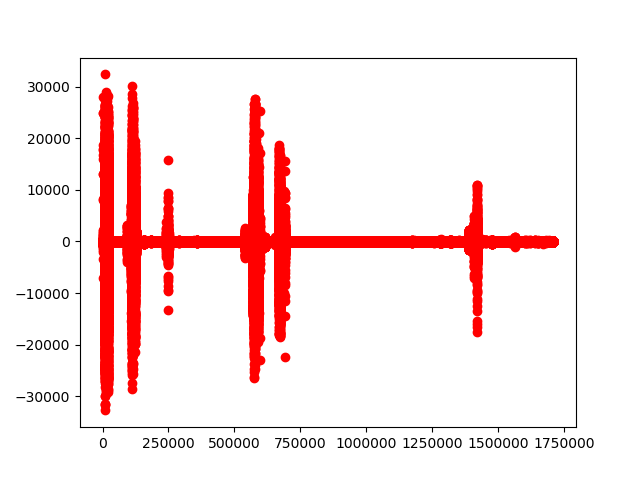
这里音频振幅与audacity中呈现的结果吻合,只是这里把振幅放大以便用肉眼去观察。

2019-11-20 更新:
经过实践发展,可以使用时间单位来检测该时间内的数据是否检测振幅。
(数学不太好,随便用一个字符代替说明一下)
设时间单位为t,音频采样率为S,如果连续的时间单位t时间内振幅很小(也可以计算分贝数),可以认为是静音(没有声音录入) 。
待检验数据长度L=S*t,则检测目标是长度为L的数组,如果这个时间类振幅(分贝)数据小于阈值(threshold),则认为近似静音。
例:采样率16000,2秒以外则认为没有声音输入。即 2*16000长度的数组内,所有数组低于一个阈值。
stackoverflow答案:
参考:https://stackoverflow.com/questions/5800649/detect-silence-when-recording
How can I detect silence when recording operation is started in Java?
Calculate the dB or RMS value for a group of sound frames and decide at what level it is considered to be 'silence'.
What is PCM data?
Data that is in Pulse-code modulation format.
How can I calculate PCM data in Java?
I do not understand that question. But guessing it has something to do with the speech-recognition tag, I have some bad news.
This might theoretically be done using the Java Speech API. But there are apparently no 'speech to text' implementations available for the API (only 'text to speech').
I have to calculate rms for speech-recognition project. But I do not know how can I calculate in Java.
For a single channel that is represented by signal sizes in a double ranging from -1 to 1, you might use this method.
/** Computes the RMS volume of a group of signal sizes ranging from -1 to 1. */

public double volumeRMS(double[] raw) {

    double sum = 0d;

    if (raw.length==0) {

        return sum;

    } else {

        for (int ii=0; ii<raw.length; ii++) {

            sum += raw[ii];

        }

    }

    double average = sum/raw.length;

    double sumMeanSquare = 0d;

    for (int ii=0; ii<raw.length; ii++) {

        sumMeanSquare += Math.pow(raw[ii]-average,2d);

    }

    double averageMeanSquare = sumMeanSquare/raw.length;

    double rootMeanSquare = Math.sqrt(averageMeanSquare);

    return rootMeanSquare;

}
There is a byte buffer to save input values from the line, and what I should have to do with this buffer?
If using the volumeRMS(double[]) method, convert the byte values to an array of double values ranging from -1 to 1. ;)
笔者的思路是计算音频分贝值,可以参考通过pcm音频数据计算分贝
以下代码转载自:https://blog.csdn.net/balijinyi/article/details/80284520
很多场合我们需要动态显示实时声音分贝,下面列举三种计算分贝的算法。(以双声道为例,也就是一个short类型,最大能量值为32767)
1:计算分贝 音频数据与大小
首先我们分别累加每个采样点的数值,除以采样个数,得到声音平均能量值。
然后再将其做100与32767之间的等比量化。得到1-100的量化值。
通常情况下,人声分布在较低的能量范围,这样就会使量化后的数据大致分布在1-20的较小区间,不能够很敏感的感知变化。
所以我们将其做了5倍的放大,当然计算后大于100的值,我们将其赋值100.
//参数为数据,采样个数

//返回值为分贝

#define VOLUMEMAX   32767

int SimpleCalculate_DB(short* pcmData, int sample)

{

    signed short ret = ;

    if (sample > ){

        int sum = ;

        signed short* pos = (signed short *)pcmData;

        for (int i = ; i < sample; i++){

            sum += abs(*pos);

            pos++;

        }

        ret = sum * 500.0 / (sample * VOLUMEMAX);

        if (ret >= ){

            ret = ;

        }

   }

   return ret;

}
2:计算均方根(RMS) 即能量值
static const float kMaxSquaredLevel =  * ;

constexpr float kMinLevel = .f;

void Process(const int16_t* data, size_t length)

{

    float sum_square_ = ;

    size_t sample_count_ = ;

    for (size_t i = ; i < length; ++i) {

        sum_square_ += data[i] * data[i];

    }

    sample_count_ += length;.

    float rms = sum_square_ / (sample_count_ * kMaxSquaredLevel);

    //20log_10(x^0.5) = 10log_10(x)

    rms =  * log10(rms);

    if (rms < -kMinLevel)

        rms = -kMinLevel;

    rms = -rms;

    return static_cast<int>(rms + 0.5);

}
3:获取音频数据最大的振幅(即绝对值最大)(0-32767),除以1000,得到(0-32)。从数组中获取相应索引所对应的分贝值。(提取自webrtc)
const int8_t permutation[] =

    {,,,,,,,,,,,,,,,,,,,,,,,,,,,,,,,,};

int16_t WebRtcSpl_MaxAbsValueW16C(const int16_t* vector, size_t length)

{

    size_t i = ;

    int absolute = , maximum = ;

    for (i = ; i < length; i++) {

        absolute = abs((int)vector[i]);

        if (absolute > maximum) {

            maximum = absolute;

        }

    }

    if (maximum > ) {

        maximum = ;

    }

    return (int16_t)maximum;

}

void ComputeLevel(const int16_t* data, size_t length)

{

    int16_t _absMax = ;

    int16_t _count = ;

    int8_t _currentLevel = ;

    int16_t absValue();

    absValue = WebRtcSpl_MaxAbsValueW16(data,length);

    if (absValue > _absMax)

        _absMax = absValue;

    if (_count++ == ) {

        _count = ;

        int32_t position = _absMax/;

        if ((position == ) && (_absMax > )){

            position = ;

        }

        _currentLevel = permutation[position];

        _absMax >>= ;

    }

}
语音文件 pcm 静默(静音)判断的更多相关文章
- js 上传文件后缀名的判断 var flag=false;应用
js 上传文件后缀名的判断 var flag=false;应用 <!DOCTYPE html PUBLIC "-//W3C//DTD XHTML 1.0 Transitional// ...
- web前端对上传的文件进行类型大小判断的js自定义函数
<!DOCTYPE html PUBLIC "-//W3C//DTD XHTML 1.0 Transitional//EN" "http://www.w3.org/ ...
- C# wav语音文件合并
开发完成语音播报产品,由于客户所使用的播放产品种类繁多,在使用HDMI接口播放音频时,由于采用的声卡不同,个别机器会出现播报声音过小,或者不播报的情况.所以采用将语音文件合并播放的方式,来解决此问题. ...
- Yaml 文件中Condition If- else 判断的问题
在做项目的CI/ CD 时,难免会用到 Travis.CI 和 AppVeyor 以及 CodeCov 来判断测试的覆盖率,今天突然遇到了一个问题,就是我需要在每次做测试的时候判断是否存在一个环境变量 ...
- UNIX环境编程学习笔记(6)——文件I/O之判断文件类型
lienhua342014-09-01 1 文件类型 我们平时最常接触的文件类型有普通文件(regular file)和目录(di-rectory file),但是 UNIX 系统提供了多种文件类型: ...
- python 兼容中文路径 + 目标文件是否是图像格式判断
1. 中文路径兼容python程序如果路径中包含中文字符,不加处理会有类似报错:'ascii' codec can't decode byte 0xxx in position xx:ordinal ...
- asp.net使用SpeechSynthesizer类生成语音文件部署到iis遇到的几个坑
首先需要引入命名空间System.Speech.Synthesis,代码如下: using (var speechSyn = new SpeechSynthesizer()) { speechSyn. ...
- 文件夹操作之判断是否存在(Directory)
Directory类用于操作文件夹,用于创建.移动和枚举目录和子目录的静态方法.DirectoryInfo类用于典型操作,如复制,移动,重命名,创建和删除目录.他们都可用于获取和设置相关属性或有关创建 ...
- Delphi文字转语音TTS【支持选择语音库,播放,暂停,开始,停止,生成语音文件,设置音量,设置语速】
作者QQ:(648437169) 点击下载➨文字转语音TTS [Delphi 文字转语音TTS]调用系统自带的TTS组件,支持XP,vista,win7,win8,win10系统,支持选择语音库,播放 ...
随机推荐
- 【wlan】iw命令集合
查看所连接的客户端的个数和信息 iw dev wlan0 station dump root@OpenWrt:~# iw dev wlan0 station dump Station e0:ac:cb ...
- Python 读取txt文件,排序并写回文件
# 'C:\Users\SAM\Desktop\数据竞赛\个人征信_1108\个人征信\train\bank_detail_train.txt'# 反斜杠的写法会报编码错误f=open('C:/Use ...
- bind支持mysql
最近打算将bind的记录信息存入到数据库中去,网上找了下,原来早有老外写好了mysql-bind的补丁,重新编译bind即可实现bind支持mysql存储.(http://mysql-bind.sou ...
- Boosting算法(一)
本章全部来自于李航的<统计学>以及他的博客和自己试验.仅供个人复习使用. Boosting算法通过改变训练样本的权重,学习多个分类器,并将这些分类器进行线性组合,提高分类性能.我们以Ada ...
- 如何低成本搭建dnslog服务器
DNSLog,简单来说,就是通过记录对于域名的DNS请求,通过dns请求这个相对"隐蔽"的渠道,来委婉地获取到想要获得的信息. 例如,在一个针对mysql数据库的注入中,如果没有回 ...
- struts2编写表单提交简单的(2)
实体 package com.oak.entity; public class User {private int id;private String username;private String ...
- 解决安装Anaconda后ZSH中使用的依然是系统自带的Python
最近重装了Anaconda,pip是Anaconda的pip,可是python是系统的python.如下图. 最开始检查了很久是环境变量的问题,其实不是.需要执行conda init zsh
- springboot2.0入门(四)----mock模拟测试+单元测试
一.本节主要记录模拟测试.单元测试: 二.mock 测试 1.1什么是Mock? 在面向对象程序设计中,模拟对象(英语:mock object,也译作模仿对象)是以可控的方式模拟真实对象行为的假的对象 ...
- 去掉amcharts4图表上的logo
引用了amcharts的图表工具,但右下角会显示amcharts 的图形LOGO,如下图: 而且每个图表上都有这个代码.看了一下代码里,找到这些LOGO,发现都有如下特征: aria-labelled ...
- Elasticsearch 读时分词、写时分词
初次接触 Elasticsearch 的同学经常会遇到分词相关的难题,比如如下这些场景: 为什么明明有包含搜索关键词的文档,但结果里面就没有相关文档呢?我存进去的文档到底被分成哪些词(term)了?我 ...