
使用DocumentFormat.OpenXml操作Excel文件.xlsx
1.开始
DocumentFormat.OpenXml是ms官方给一个操作office三大件新版文件格式(.xlsx,.docx,.pptx)的组件;特色是它定义了OpenXml所包含的所有对象(たぶん),能做到精确微调文件内容格式;因此它没有EppPlus那么容易上手,性能也很看使用者的水平。。
DocumentFormat.OpenXml的语法很接近直接操作xml,所以使用它来操作Excel,得先熟悉Excel的xml文档结构:
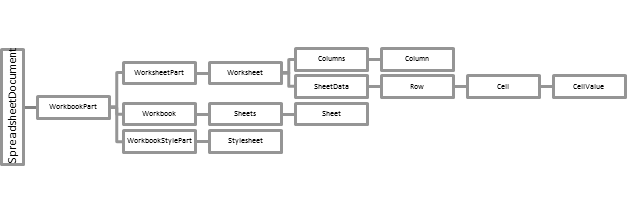
↑已经忘记从哪里找来的了; WorkbookPart包含4个重要子节点:
- WorkSheetPart:表格数据内容就在这里面,结构最复杂的部分,Workheet的子节点除了Colmns、SheetData还有合并单元格集合MergeCells(图中缺失);
- WorkSheet:存放表单id及命名(sheet1, Sheet2...),这里有excel的坑,如果包含多个Sheet直接Sheets.First()有可能获取到最后一张Sheet,最好根据Name来搜索;
- WorkbootStylePart:存放样式;
- SharedStringTablePart(上图中缺失):共享字符串集合,字符串默认会存在里面,然后Cell引用其数组下标,这也是类似保存1w行"一二三亖"的.xlsx比.txt小的原因
using System;
using System.Collections.Generic;
using System.Linq;
using System.Xml;
using DocumentFormat.OpenXml;
using DocumentFormat.OpenXml.Packaging;
using DocumentFormat.OpenXml.Spreadsheet; namespace EOpenXml
{
public static class OpenXmlExcelExtentions
{
public static Sheet GetSheet(this WorkbookPart workbookPart, string sheetName)
{
return workbookPart.Workbook
.GetFirstChild<Sheets>()
.Elements<Sheet>().Where(s => s.Name == sheetName).FirstOrDefault();
} /// <summary>
/// Given a worksheet and a row index, return the row.
/// </summary>
/// <param name="sheetData"></param>
/// <param name="rowIndex"></param>
/// <returns></returns>
public static Row GetRow(this SheetData sheetData, uint rowIndex)
{
return sheetData.
Elements<Row>().Where(r => r.RowIndex == rowIndex).FirstOrDefault();
}
public static Cell GetCell(this SheetData sheetData, string columnName, uint rowIndex)
{
Row row = GetRow(sheetData, rowIndex); if (row == null)
return null; return row.Elements<Cell>().Where(c => string.Compare
(c.CellReference.Value, columnName +
rowIndex, true) == ).FirstOrDefault();
} // https://msdn.microsoft.com/en-us/library/office/cc861607.aspx
// Given a column name, a row index, and a WorksheetPart, inserts a cell into the worksheet.
// If the cell already exists, returns it.
public static Cell GetOrCreateCell(this SheetData sheetData, string columnName, uint rowIndex)
{
string cellReference = columnName + rowIndex; // If the worksheet does not contain a row with the specified row index, insert one.
Row row;
if (sheetData.Elements<Row>().Where(r => r.RowIndex == rowIndex).Count() != )
{
row = sheetData.Elements<Row>().Where(r => r.RowIndex == rowIndex).First();
}
else
{
row = new Row() { RowIndex = rowIndex };
sheetData.Append(row);
} return row.GetOrCreateCell(cellReference);
}
public static Cell GetOrCreateCell(this Row row, string cellReference)
{
// If there is not a cell with the specified column name, insert one.
if (row.Elements<Cell>().Where(c => c?.CellReference?.Value == cellReference).Count() > )
{
return row.Elements<Cell>().Where(c => c.CellReference.Value == cellReference).First();
}
else
{
// Cells must be in sequential order according to CellReference. Determine where to insert the new cell.
Cell refCell = null;
foreach (Cell cell in row.Elements<Cell>())
{
if (cell.CellReference.Value.Length == cellReference.Length)
{
if (string.Compare(cell.CellReference.Value, cellReference, true) > )
{
refCell = cell;
break;
}
}
} Cell newCell = new Cell() { CellReference = cellReference };
row.InsertBefore(newCell, refCell);
return newCell;
}
} public static string GetValue(this Cell cell, SharedStringTablePart shareStringPart)
{
if (cell == null)
return null;
string cellvalue = cell.InnerText;
if (cell.DataType != null)
{
if (cell.DataType == CellValues.SharedString)
{
int id = -;
if (Int32.TryParse(cellvalue, out id))
{
SharedStringItem item = GetItem(shareStringPart, id);
if (item.Text != null)
{
//code to take the string value
cellvalue = item.Text.Text;
}
else if (item.InnerText != null)
{
cellvalue = item.InnerText;
}
else if (item.InnerXml != null)
{
cellvalue = item.InnerXml;
}
}
}
}
return cellvalue;
}
public static string GetValue(this Cell cell, string[] shareStringPartValues)
{
if (cell == null)
return null;
string cellvalue = cell.InnerText;
if (cell.DataType != null)
{
if (cell.DataType == CellValues.SharedString)
{
int id = -;
if (Int32.TryParse(cellvalue, out id))
{
cellvalue = shareStringPartValues[id];
}
}
}
return cellvalue;
} public static Cell SetValue(this Cell cell, object value = null, SharedStringTablePart shareStringPart = null, int shareStringItemIndex = -, uint styleIndex = )
{
if (value == null)
{
cell.CellValue = new CellValue();
if (shareStringItemIndex != -)
{
cell.CellValue = new CellValue(shareStringItemIndex.ToString());
cell.DataType = new EnumValue<CellValues>(CellValues.SharedString);
}
}
else if (value is string str)
{
if (shareStringPart == null)
{
cell.CellValue = new CellValue(str);
cell.DataType = new EnumValue<CellValues>(CellValues.String);
}
else
{
// Insert the text into the SharedStringTablePart.
int index = shareStringPart.GetOrInsertItem(str, false);
// Set the value of cell
cell.CellValue = new CellValue(index.ToString());
cell.DataType = new EnumValue<CellValues>(CellValues.SharedString);
}
}
else if (value is int || value is short || value is long ||
value is float || value is double || value is uint ||
value is ulong || value is ushort || value is decimal)
{
cell.CellValue = new CellValue(value.ToString());
cell.DataType = new EnumValue<CellValues>(CellValues.Number);
}
else if (value is DateTime date)
{
cell.CellValue = new CellValue(date.ToString("yyyy-MM-dd")); // ISO 861
cell.DataType = new EnumValue<CellValues>(CellValues.Date);
}
else if (value is XmlDocument xd)
{
if (shareStringPart == null)
{
throw new Exception("Param [shareStringPart] can't be null when value type is XmlDocument.");
}
else
{
int index = shareStringPart.GetOrInsertItem(xd.OuterXml, true);
// Set the value of cell
cell.CellValue = new CellValue(index.ToString());
cell.DataType = new EnumValue<CellValues>(CellValues.SharedString);
}
} if (styleIndex != )
cell.StyleIndex = styleIndex; return cell;
} // https://msdn.microsoft.com/en-us/library/office/gg278314.aspx
// Given text and a SharedStringTablePart, creates a SharedStringItem with the specified text
// and inserts it into the SharedStringTablePart. If the item already exists, returns its index.
public static int GetOrInsertItem(this SharedStringTablePart shareStringPart, string content, bool isXml)
{
// If the part does not contain a SharedStringTable, create one.
if (shareStringPart.SharedStringTable == null)
{
shareStringPart.SharedStringTable = new SharedStringTable();
} int i = ; // Iterate through all the items in the SharedStringTable. If the text already exists, return its index.
foreach (SharedStringItem item in shareStringPart.SharedStringTable.Elements<SharedStringItem>())
{
if ((!isXml && item.InnerText == content) || (isXml && item.OuterXml == content))
{
return i;
} i++;
} // The text does not exist in the part. Create the SharedStringItem and return its index.
if (isXml)
shareStringPart.SharedStringTable.AppendChild(new SharedStringItem(content));
else
shareStringPart.SharedStringTable.AppendChild(new SharedStringItem(new Text(content)));
shareStringPart.SharedStringTable.Save(); return i;
}
private static SharedStringItem GetItem(this SharedStringTablePart shareStringPart, int id)
{
return shareStringPart.SharedStringTable.Elements<SharedStringItem>().ElementAt(id);
} /// <summary>
/// https://docs.microsoft.com/en-us/office/open-xml/how-to-merge-two-adjacent-cells-in-a-spreadsheet
/// </summary>
/// <param name="worksheet"></param>
/// <returns></returns>
public static MergeCells GetOrCreateMergeCells(this Worksheet worksheet)
{
MergeCells mergeCells;
if (worksheet.Elements<MergeCells>().Count() > )
{
mergeCells = worksheet.Elements<MergeCells>().First();
}
else
{
mergeCells = new MergeCells(); // Insert a MergeCells object into the specified position.
if (worksheet.Elements<CustomSheetView>().Count() > )
{
worksheet.InsertAfter(mergeCells, worksheet.Elements<CustomSheetView>().First());
}
else if (worksheet.Elements<DataConsolidate>().Count() > )
{
worksheet.InsertAfter(mergeCells, worksheet.Elements<DataConsolidate>().First());
}
else if (worksheet.Elements<SortState>().Count() > )
{
worksheet.InsertAfter(mergeCells, worksheet.Elements<SortState>().First());
}
else if (worksheet.Elements<AutoFilter>().Count() > )
{
worksheet.InsertAfter(mergeCells, worksheet.Elements<AutoFilter>().First());
}
else if (worksheet.Elements<Scenarios>().Count() > )
{
worksheet.InsertAfter(mergeCells, worksheet.Elements<Scenarios>().First());
}
else if (worksheet.Elements<ProtectedRanges>().Count() > )
{
worksheet.InsertAfter(mergeCells, worksheet.Elements<ProtectedRanges>().First());
}
else if (worksheet.Elements<SheetProtection>().Count() > )
{
worksheet.InsertAfter(mergeCells, worksheet.Elements<SheetProtection>().First());
}
else if (worksheet.Elements<SheetCalculationProperties>().Count() > )
{
worksheet.InsertAfter(mergeCells, worksheet.Elements<SheetCalculationProperties>().First());
}
else
{
worksheet.InsertAfter(mergeCells, worksheet.Elements<SheetData>().First());
}
worksheet.Save();
}
return mergeCells;
} /// <summary>
/// Given the names of two adjacent cells, merges the two cells.
/// Create the merged cell and append it to the MergeCells collection.
/// When two cells are merged, only the content from one cell is preserved:
/// the upper-left cell for left-to-right languages or the upper-right cell for right-to-left languages.
/// </summary>
/// <param name="mergeCells"></param>
/// <param name="cell1Name"></param>
/// <param name="cell2Name"></param>
public static void MergeTwoCells(this MergeCells mergeCells, string cell1Name, string cell2Name)
{
MergeCell mergeCell = new MergeCell() { Reference = new StringValue(cell1Name + ":" + cell2Name) };
mergeCells.Append(mergeCell);
} public static IEnumerable<string> GetItemValues(this SharedStringTablePart shareStringPart)
{
foreach (var item in shareStringPart.SharedStringTable.Elements<SharedStringItem>())
{
if (item.Text != null)
{
//code to take the string value
yield return item.Text.Text;
}
else if (item.InnerText != null)
{
yield return item.InnerText;
}
else if (item.InnerXml != null)
{
yield return item.InnerXml;
}
else
{
yield return null;
}
};
}
public static XmlDocument GetCellAssociatedSharedStringItemXmlDocument(this SheetData sheetData, string columnName, uint rowIndex, SharedStringTablePart shareStringPart)
{
Cell cell = GetCell(sheetData, columnName, rowIndex);
if (cell == null)
return null;
if (cell.DataType == CellValues.SharedString)
{
int id = -;
if (Int32.TryParse(cell.InnerText, out id))
{
SharedStringItem ssi = shareStringPart.GetItem(id);
var doc = new XmlDocument();
doc.LoadXml(ssi.OuterXml);
return doc;
}
}
return null;
}
}
}
2.插入数据
         private static void GenerateExcel()

         {

             using (MemoryStream mem = new MemoryStream())

             {

                 using (var temp = File.OpenRead(@"E:\template.xlsx"))

                 {

                     temp.CopyTo(mem);

                 }

                 using (SpreadsheetDocument doc = SpreadsheetDocument.Open(mem, true))

                 {

                     WorkbookPart wbPart = doc.WorkbookPart;

                     Worksheet worksheet = wbPart.WorksheetParts.First().Worksheet;

                     //statement to get the sheetdata which contains the rows and cell in table

                     SheetData sheetData = worksheet.GetFirstChild<SheetData>();

                     SharedStringTablePart shareStringPart;

                     if (wbPart.GetPartsOfType<SharedStringTablePart>().Any())

                         shareStringPart = wbPart.GetPartsOfType<SharedStringTablePart>().First();

                     else

                         shareStringPart = wbPart.AddNewPart<SharedStringTablePart>();

                     //假设模板第一行是Title不用动,把要用到的样式都定义在了第二行的单元格里

                     var secondRow = sheetData.GetRow();

                     uint[] lineStyles = secondRow.Elements<Cell>().Select(c => c.StyleIndex.Value).ToArray();

                     sheetData.RemoveChild(secondRow);

                     //从第二行开始循环插入4列1000数据

                     uint currentRowIndex = ;

                     for (int i = ;i<;i++)

                     {

                         Row row = new Row();

                         row.RowIndex = currentRowIndex;//设置行号

                         row.AppendChild(new Cell().SetValue(, shareStringPart, styleIndex: lineStyles[]));

                         row.AppendChild(new Cell().SetValue(DateTime.Now, shareStringPart, styleIndex: lineStyles[]));

                         row.AppendChild(new Cell().SetValue(3.1415926535, shareStringPart, styleIndex: lineStyles[]));

                         row.AppendChild(new Cell().SetValue("通商宽衣", shareStringPart, styleIndex: lineStyles[]));//这里慢

                         sheetData.AppendChild(row);

                         currentRowIndex++;

                     }

                     wbPart.Workbook.Save();

                     doc.SaveAs($@"E:\Temp_{DateTime.Now.ToString("yyMMddHHmm")}.xlsx");

                     doc.Close();

                 }

                 mem.Close();

             }

         }
以上就生成了一个Excel打开不会报任何格式错误提示的标准.xlsx文件;但有需要优化的地方:在每次插入字符串的时候会去循环共享字符集,调用shareStringPart.GetItemValues().ToArray()可以将集合全部存到数组或Dictionary<string,int>里面会快很多,如果清楚集合内容就不用去判断重复了,当然也可以简单粗暴的保存为CellValues.InlineString,这样在重复字符串比较多的时候两种方式所生成的文件大小会有很大差异。
3.快速遍历
         public static void Read()

         {

             using (var sd = SpreadsheetDocument.Open(@"E:\temp.xlsx", false))

             {

                 WorkbookPart wbPart = sd.WorkbookPart;

                 SharedStringTablePart shareStringPart;

                 if (wbPart.GetPartsOfType<SharedStringTablePart>().Count() > )

                     shareStringPart = wbPart.GetPartsOfType<SharedStringTablePart>().First();

                 else

                     shareStringPart = wbPart.AddNewPart<SharedStringTablePart>();

                 string[] shareStringItemValues = shareStringPart.GetItemValues().ToArray();

                 WorksheetPart worksheetPart = wbPart.WorksheetParts.First();

                 uint dataRowStart = ;//数据开始行

                 OpenXmlReader reader = OpenXmlReader.Create(worksheetPart);

                 while (reader.Read())

                 {

                     if (reader.ElementType == typeof(Worksheet))

                     {

                         reader.ReadFirstChild();

                     }

                     if (reader.ElementType == typeof(Row))

                     {

                         Row r = (Row)reader.LoadCurrentElement();

                         if (r.RowIndex < dataRowStart)

                             continue;

                         foreach (Cell c in r.Elements<Cell>())

                         {

                             if (c.CellReference != null && c.CellReference.HasValue)

                             {

                                 string cv = c.GetValue(shareStringItemValues);

                                 Console.WriteLine(cv);

                                 if (c.CellReference.Value == "B" + r.RowIndex)

                                     Console.WriteLine("刚读取的是B列");

                             }

                         }

                     }

                 }

                 sd.Close();

             }

         }
4.总结
DocumentFormat.OpenXml不友好但操作透明,使用前最好先自行封装下,习惯之后相信能用的很爽。
以上です。
使用DocumentFormat.OpenXml操作Excel文件.xlsx的更多相关文章
- C# 操作 Excel 文件(.xls 或 .xlsx)
在.net中,常用的操作excel文件的方式,有三种: OLE DB的形式, 第三方框架NPOI, Office组件. 总结: 通过对比,在读取大数据量的excel文件,建议用OLE DB的形式,把e ...
- java使用Apache POI操作excel文件
官方介绍 HSSF is the POI Project's pure Java implementation of the Excel '97(-2007) file format. XSSF is ...
- 记录python接口自动化测试--把操作excel文件的方法封装起来(第五目)
前面补充了如何来操作excel文件,这次把如何获取excel文件的sheet对象.行数.单元格数据的方法进行封装,方便后面调用 handle_excel.py# coding:utf-8 import ...
- python3:操作excel文件
前提:自动化接口测试中,可以将用例放在excel中管理.结合实际情况讲解如何操作excel文件 1.安装xlrd:pip install xlrd 2.导入模块:import xlrd 3.打开Exc ...
- python 操作Excel文件
1 安装xlrd.xlwt.xlutils cmd下输入: pip install xlrd #读取excel pip install xlwt #写入excel pi ...
- C#项目中操作Excel文件——使用NPOI库
转载自:http://blog.csdn.net/dcrmg/article/details/52356236# 感谢-牧野- 实际C#项目中经常会涉及到需要对本地Excel文件进行操作,特别是一些包 ...
- C#使用oledb操作excel文件的方法
本文实例讲述了C#使用oledb操作excel文件的方法.分享给大家供大家参考.具体分析如下: 不管什么编程语言都会提供操作Excel文件的方式,C#操作Excel主要有以下几种方式: 1.Excel ...
- java使用POI操作excel文件,实现批量导出,和导入
一.POI的定义 JAVA中操作Excel的有两种比较主流的工具包: JXL 和 POI .jxl 只能操作Excel 95, 97, 2000也即以.xls为后缀的excel.而poi可以操作Exc ...
- 用Python的pandas框架操作Excel文件中的数据教程
用Python的pandas框架操作Excel文件中的数据教程 本文的目的,是向您展示如何使用pandas 来执行一些常见的Excel任务.有些例子比较琐碎,但我觉得展示这些简单的东西与那些你可以在其 ...
随机推荐
- django -- ORM实现图书增删改查
表结构设计 上篇我们实现了出版社的增删改查,出版社数据表有两个字段id和name,那图书的表结构怎么设计呢?图书也要有一个主键id,还要有一个名称title,是哪个出版社的,要有个字段press和Pr ...
- 洛谷 P3373 【模板】线段树 2 题解
P3373 [模板]线段树 2 题目描述 如题,已知一个数列,你需要进行下面三种操作: 1.将某区间每一个数乘上x 2.将某区间每一个数加上x 3.求出某区间每一个数的和 输入格式 第一行包含三个整数 ...
- TCP/IP协议族体系结构:死也不能忘记的四个层
1.死也不能忘记的四个层 ①数据链路层实现了网卡接口的网络驱动程序,以处理数据在物理媒介(比如以太网.令牌环等)上的传输.主要的协议ARP和RARP经过数据链路层封装的数据成为帧,有以太网帧.令牌环帧 ...
- Circos图
Circos官网 http://circos.ca 在线绘图工具 http://mkweb.bcgsc.ca/tableviewer/visualize/ Circos图的诞生 Circos ...
- .NETCore_项目启动设置域名以及端口
//第一种方式就是启动是一个命令窗口 public static IWebHostBuilder CreateWebHostBuilder(string[] args) => WebHost.C ...
- [HeadFrist-HTMLCSS学习笔记]第五章认识媒体:给网页添加图像
[HeadFrist-HTMLCSS学习笔记]第五章认识媒体:给网页添加图像 干货 JPEG.PNG.GIF有何不同 JPEG适合连续色调图像,如照片:不支持透明度:不支持动画:有损格式 PNG适合单 ...
- 修改ARP缓存表大小
在下发Mininet的ARP缓存表表项时,出现了如下的错误信息: SIOCSARP: No buffer space available 这是由于ARP表是缓存在内存中的,超过了系统对ARP缓存表大小 ...
- Mercari Price Suggestion in Kaggle
Mercari Price Suggestion 最近看到了一个竞赛,竞赛的内容是根据已知的商品的描述,品牌,品类,物品的状态等特征来预测商品的价格 最后的评估标准为 平均算术平方根误差Root Me ...
- Skipping unneeded JARs during scanning can improve startup time and JSP compilation time
Tomcat在启动是提示: INFO [localhost-startStop-1] org.apache.jasper.servlet.TldScanner.scanJars At least on ...
- IO流—字符流
字符流 只能读写文本文件 Reader 抽象类 字符输出流的父类 Writer 抽象类 字符输出流的父类 字符转换输出流: OutputStreamWriter(OutputStream out):创 ...