
0027SpringMVC拦截器的编写和配置
SpringMvc中想使用拦截器,主要分为两步:
a、编写拦截器,需实现HandlerInterceptor接口
b、springmvc.xml中配置拦截器
逻辑图如下:

测试过程主要分为如下几步:
1、编写interceptorIndex.jsp
2、编写InterceptorController.java
3、编写interceptorSuccess.jsp
4、编写拦截器MyInterceptor1.java
5、springmvc.xml中配置拦截器
具体实现如下:
1、编写interceptorIndex.jsp
<%--
  Created by IntelliJ IDEA.
  User: Administrator
  Date: 2019/12/8
  Time: 17:36
  To change this template use File | Settings | File Templates.
--%>
<%@ page contentType="text/html;charset=UTF-8" language="java" %>
<html>
<head>
    <title>SpringMVC Interceptor</title>
</head>
<body>
    <h3>SpringMVC Interceptor测试</h3>
    <a href="interceptor/interceptorTest">interceptor</a>
</body>
</html>
2、编写InterceptorController.java
package com.example.controller;

import org.springframework.stereotype.Controller;
import org.springframework.web.bind.annotation.RequestMapping;

@Controller
@RequestMapping("/interceptor")
public class InterceptorController {
    public static final String SUCCESS = "interceptorSuccess";
    @RequestMapping("interceptorTest")
    public String interceptorTest(){
        System.out.println("执行controller中的方法");
        return SUCCESS;
    }
}
3、编写interceptorSuccess.jsp
<%--
  Created by IntelliJ IDEA.
  User: Administrator
  Date: 2019/12/8
  Time: 17:43
  To change this template use File | Settings | File Templates.
--%>
<%@ page contentType="text/html;charset=UTF-8" language="java" %>
<html>
<head>
    <title>Title</title>
</head>
<body>
    <h3>执行成功</h3>
    <%System.out.println("执行interceptorSuccess.jsp"); %>
</body>
</html>
4、编写拦截器MyInterceptor1.java
package com.example.interceptor;

import org.springframework.web.servlet.HandlerInterceptor;
import org.springframework.web.servlet.ModelAndView;

import javax.servlet.http.HttpServletRequest;
import javax.servlet.http.HttpServletResponse;

public class MyInterceptor1 implements HandlerInterceptor {
    @Override
    /*1、返回true代表放行,可以处理后续的拦截器或者controller中的方法
    * 2、返回false代表后续的内容不会被执行,可用参数中的request或者response跳转到错误页面或者登录页面等(权限验证)*/
    public boolean preHandle(HttpServletRequest request, HttpServletResponse response, Object handler) throws Exception {
        System.out.println("执行MyInterceptor1的前置方法");
        return true;
    }

    @Override
    /*结果页面执行完之后执行*/
    public void postHandle(HttpServletRequest request, HttpServletResponse response, Object handler, ModelAndView modelAndView) throws Exception {
        System.out.println("执行MyInterceptor1的后置方法");
    }

    @Override
/*也可使用参数的request或者response跳转到某些页面,则controller中的return不会被执行,因此可以控制不会跳两个页面*/
    public void afterCompletion(HttpServletRequest request, HttpServletResponse response, Object handler, Exception ex) throws Exception {
        System.out.println("执行MyInterceptor1的afterCompletion方法");
    }
}
5、springmvc.xml中配置拦截器
<?xml version="1.0" encoding="UTF-8"?>
<beans xmlns="http://www.springframework.org/schema/beans"
       xmlns:xsi="http://www.w3.org/2001/XMLSchema-instance"
       xmlns:aop="http://www.springframework.org/schema/aop"
       xmlns:c="http://www.springframework.org/schema/c"
       xmlns:cache="http://www.springframework.org/schema/cache"
       xmlns:context="http://www.springframework.org/schema/context"
       xmlns:jdbc="http://www.springframework.org/schema/jdbc"
       xmlns:jee="http://www.springframework.org/schema/jee"
       xmlns:lang="http://www.springframework.org/schema/lang"
       xmlns:mvc="http://www.springframework.org/schema/mvc"
       xmlns:p="http://www.springframework.org/schema/p"
       xmlns:task="http://www.springframework.org/schema/task"
       xmlns:tx="http://www.springframework.org/schema/tx"
       xmlns:util="http://www.springframework.org/schema/util"
       xsi:schemaLocation="http://www.springframework.org/schema/jee http://www.springframework.org/schema/jee/spring-jee-4.3.xsd
      http://www.springframework.org/schema/mvc http://www.springframework.org/schema/mvc/spring-mvc-4.3.xsd
      http://www.springframework.org/schema/context http://www.springframework.org/schema/context/spring-context-4.3.xsd
      http://www.springframework.org/schema/aop http://www.springframework.org/schema/aop/spring-aop-4.3.xsd
      http://www.springframework.org/schema/util http://www.springframework.org/schema/util/spring-util-4.3.xsd
      http://www.springframework.org/schema/jdbc http://www.springframework.org/schema/jdbc/spring-jdbc-4.3.xsd
      http://www.springframework.org/schema/cache http://www.springframework.org/schema/cache/spring-cache-4.3.xsd
      http://www.springframework.org/schema/task http://www.springframework.org/schema/task/spring-task-4.3.xsd
      http://www.springframework.org/schema/beans http://www.springframework.org/schema/beans/spring-beans.xsd
      http://www.springframework.org/schema/lang http://www.springframework.org/schema/lang/spring-lang-4.3.xsd
      http://www.springframework.org/schema/tx http://www.springframework.org/schema/tx/spring-tx-4.3.xsd ">
    <!--开启注解扫描-->
    <context:component-scan base-package="com.example" />
    <!--视图解析器,根据Controller返回的字符串找对应的文件-->
    <bean id="internalResourceViewResolver" class="org.springframework.web.servlet.view.InternalResourceViewResolver">
        <!--文件路径-->
        <property name="prefix" value="/WEB-INF/pages/" />
        <!--文件后缀-->
        <property name="suffix" value=".jsp" />
    </bean>
    <!--配置自定义类型转换器-->
    <bean id="conversionServiceFactoryBean" class="org.springframework.context.support.ConversionServiceFactoryBean">
        <property name="converters">
            <set>
                <bean class="com.example.util.StingToDateConvertr" />
            </set>
        </property>
    </bean>

    <!--1、开启springmvc框架注解的支持-->
    <!--2、欲使配置的自定义类型转换器生效,需加上conversion-service属性-->
    <mvc:annotation-driven conversion-service="conversionServiceFactoryBean"/>

    <!--jsp页面引入的js文件也会被拦截,配置哪些静态资源文件不要被前端控制器拦截-->
    <mvc:resources mapping="/js/" location="/js/**" />
    <mvc:resources mapping="/css/" location="/css/**" />

    <!--SpringMVC文件上传需配置文件解析器,且要求id必须是multipartResolver,
    否则controller的方法中的参数是接收不到值的,会报空指针-->
    <bean id="multipartResolver" class="org.springframework.web.multipart.commons.CommonsMultipartResolver">
        <property name="maxUploadSize" value="10485760" />
    </bean>

    <!--配置拦截器-->
    <mvc:interceptors>
        <mvc:interceptor>
            <!--配置拦截哪些方法-->
            <mvc:mapping path="/interceptor/*"/>
            <!--配置不拦截哪些方法-->
            <!--<mvc:exclude-mapping path=""/>-->
            <!--使用的拦截器类-->
            <bean class="com.example.interceptor.MyInterceptor1"/>
        </mvc:interceptor>
        <mvc:interceptor>
            <!--配置拦截哪些方法-->
            <mvc:mapping path="/interceptor/*"/>
            <!--配置不拦截哪些方法-->
            <!--<mvc:exclude-mapping path=""/>-->
            <!--使用的拦截器类-->
            <bean class="com.example.interceptor.MyInterceptor2"/>
        </mvc:interceptor>
    </mvc:interceptors>
</beans>
MyInterceptor2.java与MyInterceptor1.java代码基本相同,不重复罗列。
测试:启动项目,在interceptorIndex.jsp点击链接访问controller中的方法,执行结果如下:
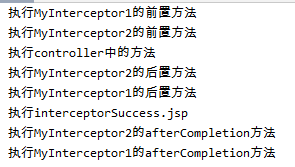
结果总结:
1、执行拦截器的前置方法
2、执行controller中的方法
3、执行拦截器的后置方法
4、执行controller中的return,进入相应的页面,执行页面中的代码
5、页面执行完之后,执行拦截的afterCompletion方法。
若有理解不到之处,望指正!
0027SpringMVC拦截器的编写和配置的更多相关文章
- vue axios拦截器 + 自编写插件 实现全局 loading 效果;
项目需求:用自定义的 .gif 图标实现全局 loading 效果:为避免在每个页面手动添加,且简单高效的实现,经查阅资料,最终采用了 vue axios拦截器 + 自编写 loading 插件:下面 ...
- struts文件上传拦截器中参数的配置(maximumSize,allowedTypes ,allowedExtensions)问题
<interceptor-ref name="fileUpload"> <param name="allowedTypes">image ...
- Struts2中拦截器的使用与配置
一,拦截器是什么? 拦截器是在Action执行之前和之后执行的代码,是一个类似于过滤器的类: 二,拦截器的作用 拦截器拦截Action的请求,在Action之前或之后实现某项功能: 三,拦截器的特点 ...
- 拦截器的使用,配置手机浏览器访问的h5页面
package com.thinkgem.jeesite.modules.sys.interceptor; import javax.servlet.http.HttpServletRequest; ...
- springmvc拦截器和概念,配置!!!
用于拦截请求,过滤后再拦截 实现HandlerInterceptor接口 配置拦截器 package cn.zys.lanjieqi; import javax.servlet.http.HttpSe ...
- springmvc中拦截器的定义和配置
package com.hope.interceptor;import org.springframework.lang.Nullable;import org.springframework.web ...
- springboot设置过滤器、监听器、拦截器
其实这篇文章算不上是springboot的东西,我们在spring普通项目中也是可以直接使用的 设置过滤器: 以前在普通项目中我们要在web.xml中进行filter的配置,但是只从servlet 3 ...
- 初学Struts2-自定义拦截器及其配置
自定义拦截器,首先新建一个继承自AbstractInterceptor类的类,然后重写intercept方法,代码如下 public class HelloInterceptor extends Ab ...
- jfinal拦截器配置
实现aop @Before(Tx.class) public void index(){ // renderText("hello world!"); render("/ ...
随机推荐
- sql 查找所有员工信息(俩表连接查询)
题目描述 查找所有员工的last_name和first_name以及对应部门编号dept_no,也包括展示没有分配具体部门的员工CREATE TABLE `dept_emp` (`emp_no` in ...
- appium怎么按下系统按键?如按下返回键、home键等等
ava_client3.0版本以后使用pressKeyCode方法,之前的版本使用sendKeyEvent方法 1. 返回:driver.pressKeyCode(AndroidKeyCode.BAC ...
- Redis专栏
后端开发都应该掌握的Redis基础 Redis实用监控工具一览
- Qt去掉treeview项的焦点虚线
项目做到后期,进行局部美化的时候发现了问题,在treeview框选择状态下会有虚线. 其实,不仅是treeview,tableview,listview,乃至button在有焦点的情况下,都会出现虚线 ...
- Pytorch1.3源码解析-第一篇
pytorch$ tree -L 1 . ├── android ├── aten ├── benchmarks ├── binaries ├── c10 ├── caffe2 ├── CITATIO ...
- Java反射桥接方法解析
在阅读mybaits源码的反射模块时,看到了如下的一段代码: /** * 添加 Method 数组到 uniqueMethods * @param uniqueMethods * @param met ...
- 基于Snappy实现数据压缩和解压
Snappy是谷歌开源的一个用来压缩和解压的开发包.相较其他压缩算法速率有明显的优势,官方文档显示在64位 i7处理器上,每秒可达200~500MB的压缩速度,不禁感叹大厂的算法就是厉害. 开源项目地 ...
- Python-15-面向对象
一.什么是面向对象 面向过程:根据业务逻辑从上到下写垒代码 函数式:将某功能代码封装到函数中,日后便无需重复编写,仅调用函数即可 面向对象:对函数进行分类和封装,让开发“更快更好更强...” 优点:解 ...
- 正则表达式"(^|&)" ,什么意思?
^匹配字符串开头,&就是&字符 (^|&)匹配字符串开头或者&字符,如果其后还有正则,那么必须出现在字符串开始或&字符之后 用法一: 限定开头 文档上给出了 ...
- 2.4_Database Interface ODBC数据库驱动程序类型(单层与多层)
两大类:单层驱动程序和多层驱动程序 1.单层数据库驱动程序 早期的xBASE数据库系统的驱动程序就属于单层驱动程序. 单层驱动程序不仅要处理ODBC函数调用,还要解释执行SQL语句,执行数据库管理系统 ...