
Automatically generating nice graphs at end of your Load Test with Apache JMeter and JMeter-Plugins
Update as of November 2017:
Since JMeter 3.0, last version being 3.3, JMeter provides Out Of The Box a dynamic Web report with tons of information.
You can read an up to date blog (15th january 2019) described here.
We highly advise you to use it instead of what is described below which is no more necessary.
Report contains more sexy graphs, tables (Errors synthesis, Top 5 errors by sampler, APDEX…) that will help you analyze your load test more easily and open it in a Browser.
Creating it is just a matter of adding 2 more command-line options in NON GUI load test.
We are the proud implementers and contributors of this web-report that was partly sponsored by Decathlon (a great French and worldwide sports company).
Context
You are using Apache JMeter for your Load Tests.
Once test has ended, you would like your favorite tool to automatically generate for you nice and meaningful graphs so that you can faster analyze your test results and include them in your report.
Apache JMeter is great in many ways but its core lacks this built-in feature, but it’s plugin Architecture will let us add it easily.
Hopefully a great must have Open Source and free third-party library called JMeter-Plugins comes to the rescue.
Before version 1.1.3 of JMeter-Plugins, you could use JMeterPluginsCMD Command Line Tool to generate your graphs in a shell, but this was not optimal.
As users of both Apache JMeter and JMeter-Plugins, we decided to contribute this new feature to JMeter-Plugins.
Our philosophy is :
- “If you use an Open-Source and free project, be grateful, always contribute in a way”
About author:
Philippe Mouawad works as an Architect and technical expert for Ubik-Ingenierie where he leads among other things the development of UbikLoadPack a set of Commercial Plugins for Apache JMeter allowing to load test different protocols like HLS, GWT, Flex.
Philippe is a committer on the Apache JMeter project and member of the PMC since October 2011.
Finally he is a co-author of a french book on JMeter called Maîriser JMeter: Du test de charge à Devops.
Feature Overview
To automatically generate your reports just add a new Listener called “jp@gc Graphs Generator“.
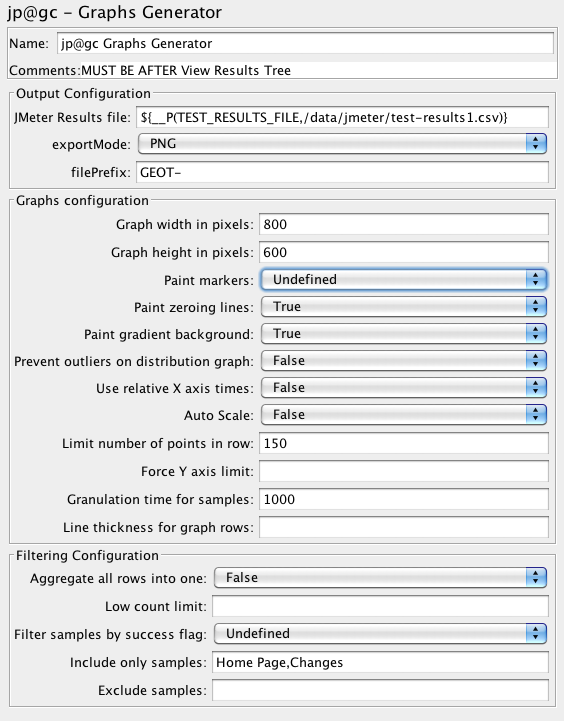
You can define the following properties:
| Property | Description/Possible Values |
| Graph width in pixels | for PNG only – width of the image, default is 800 |
| Graph height in pixels | for PNG only – height of the image, default is 600 |
| granulation time for samples | granulation time for samples |
| relative-times <true/false> | use relative X axis times, no will set absolute times |
| Aggregate all Rows into one | True/False |
| Paint gradient background | True/False |
| Paint markers | paint markers |
| Paint zeroing lines | paint zeroing lines |
| paint-markers <yes/no> | paint markers on data points (since 1.1.3) |
| prevent-outliers <yes/no> | prevent outliers on distribution graph |
| Limit number of points in row | limit number of points in row |
| Force Y axis limit | Force input value as Y axis limit |
| Low count limit | hide points with sample count below input limit |
| success-filter <true/false/Undefined> | filter samples by success flag (since 0.5.6), possible values are:
|
| Include only samples | Comma-separated list of samples to be graphed |
| Exclude samples | Exclude from report samples with specified labels, comma-separated |
| Auto-Scale | enable/disable auto-scale multipliers for perfmon/composite graph |
| line thickness for graph rows | line thickness for graph rows |
JMeter Setup:
JMeter-Plugin installation:
- Use JMeter version >= 2.10
- Download extras bundle and unzip it, copy lib/ext/JMeterPlugins-Extras.jar to <jmeter home>/lib/ext.
- Restart jmeter.
JMeter Configuration:
Edit <jmeter home>/bin/user.properties and ensure you set these properties:
jmeter.save.saveservice.output_format=csv

jmeter.save.saveservice.data_type=false

jmeter.save.saveservice.label=true

jmeter.save.saveservice.response_code=true

jmeter.save.saveservice.response_data.on_error=false

jmeter.save.saveservice.response_message=false

jmeter.save.saveservice.assertion_results_failure_message=false

jmeter.save.saveservice.successful=true

jmeter.save.saveservice.thread_name=true

jmeter.save.saveservice.time=true

jmeter.save.saveservice.subresults=false

jmeter.save.saveservice.assertions=true

jmeter.save.saveservice.latency=true

jmeter.save.saveservice.bytes=true

jmeter.save.saveservice.hostname=true

# This will enable correct graphs display

# which deal with threads after reloading the results file.

jmeter.save.saveservice.thread_counts=true

jmeter.save.saveservice.sample_count=true

jmeter.save.saveservice.timestamp_format=HH:mm:ss

jmeter.save.saveservice.default_delimiter=;

jmeter.save.saveservice.print_field_names=true

# This is needed to ensure all results are

# available when Listener runs

jmeter.save.saveservice.autoflush=true
Test Plan setup:
If using distributed testing, ensure you add to your Thread Group names:
${__machineName()}_My Threadgroup name
Test Plan example:
We will use a test plan you can easily create with Templates…> Building a Web Test Plan
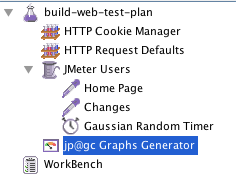
We just added an Http Cookie Manager and removed Graph Results listener.
We end up with this, the only listener is the new jp@gc Graphs Generator
Let’s run plan:
Now run this plan in NON-GUI mode as per JMeter Best-Practices using following command-line:
./jmeter -t GraphsReportListener-GenerationAtEndOfTestNonGUI.jmx -n

  -l /data/jmeter/test-results.csv

 -JTEST_RESULTS_FILE=/data/jmeter/test-results.csv
Notice the following:
- -t GraphsReportListener-GenerationAtEndOfTestNonGUI.jmx : Means use following jmx file GraphsReportListener-GenerationAtEndOfTestNonGUI.jmx
- -n : Means NON GUI
- -l /data/jmeter/test-results.csv : Means output results in following file
- -JTEST_RESULTS_FILE=/data/jmeter/test-results.csv : Notice we set the same value as output file in 3). We set this because in “jp@gc Graphs Generator” we have used __P function in JMeter to replace TEST_RESULTS_FILE by the value we input in -J:
- ${__P(TEST_RESULTS_FILE,/data/jmeter/test-results.csv)}
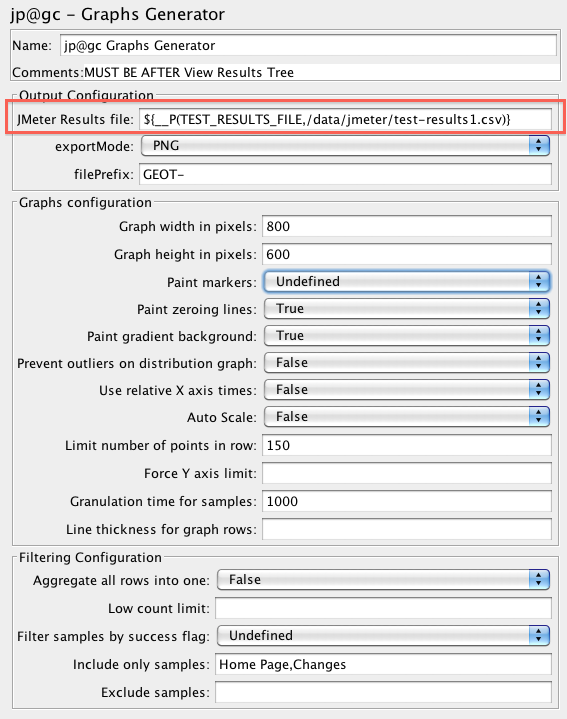
In this configuration, notice we have decided to only include 2 samples:
- Home Page
- Changes
In a real worl scenario, you would use Transaction Controller for meaningful transaction names and only include those in your report.
Results:
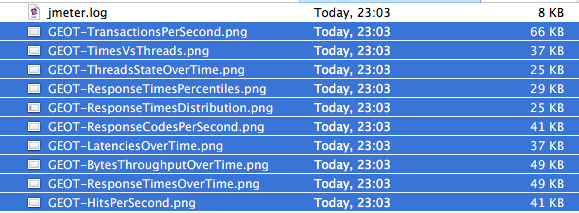
At end of test JMeter automatically generated in <jmeter home>/bin folder the following files:
Graphs:
Response Times over time:
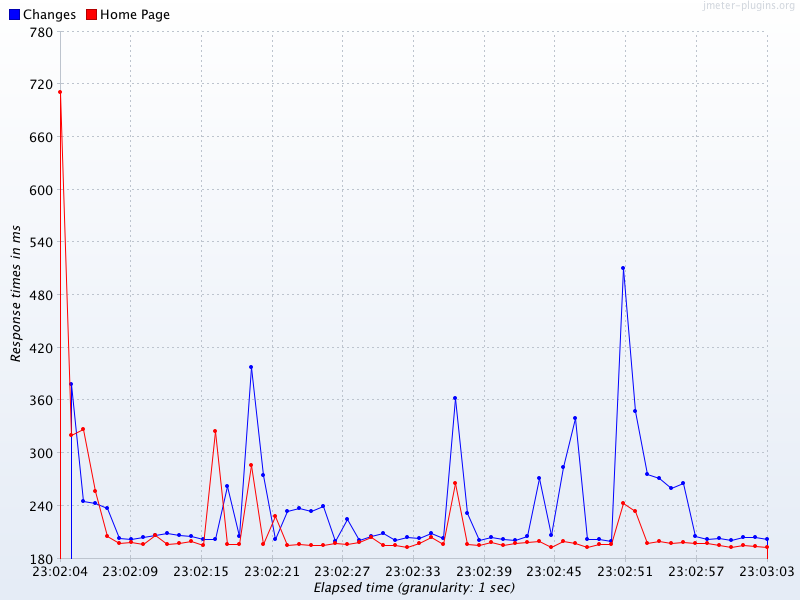
Hits Per Second:
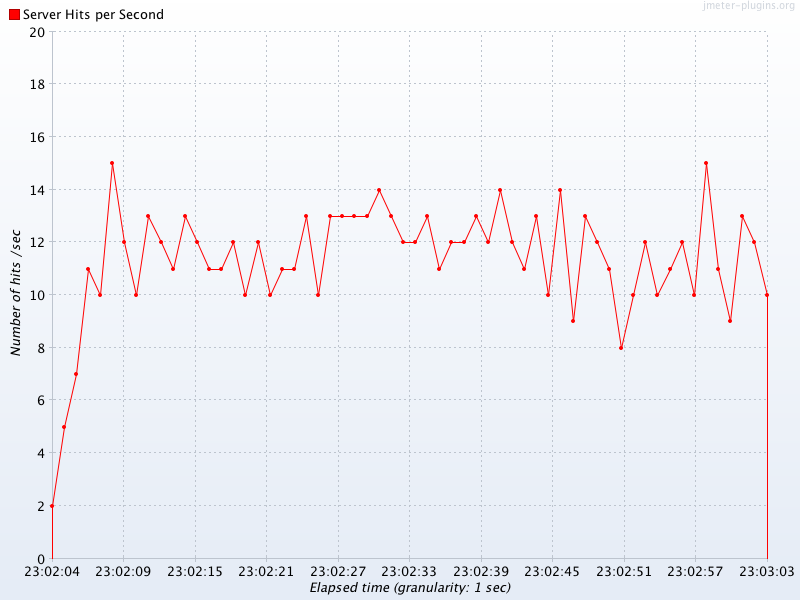
Bytes throughput over time:
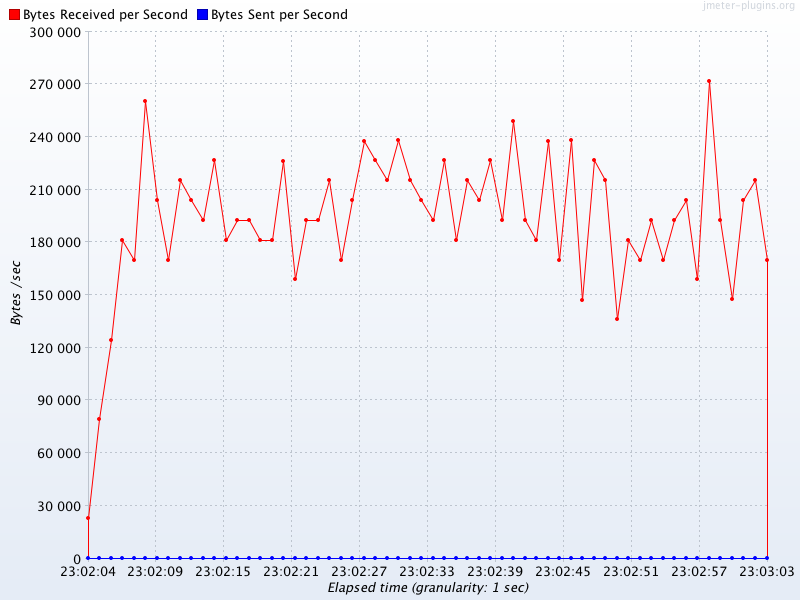
Latencies over time:
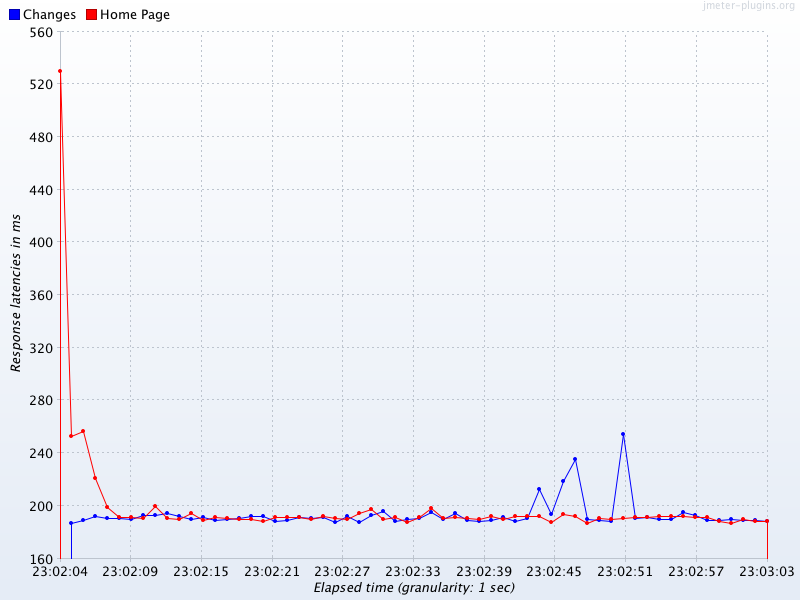
Response codes per second:
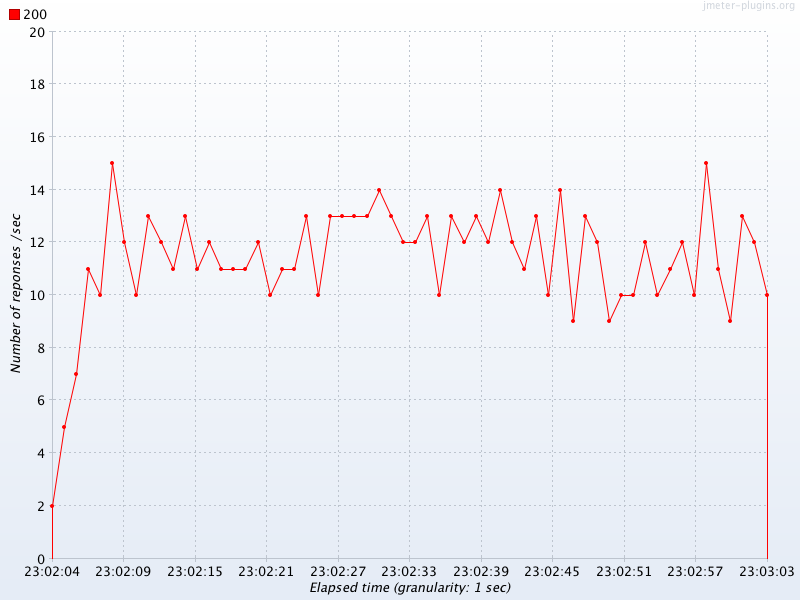
Response times distribution:
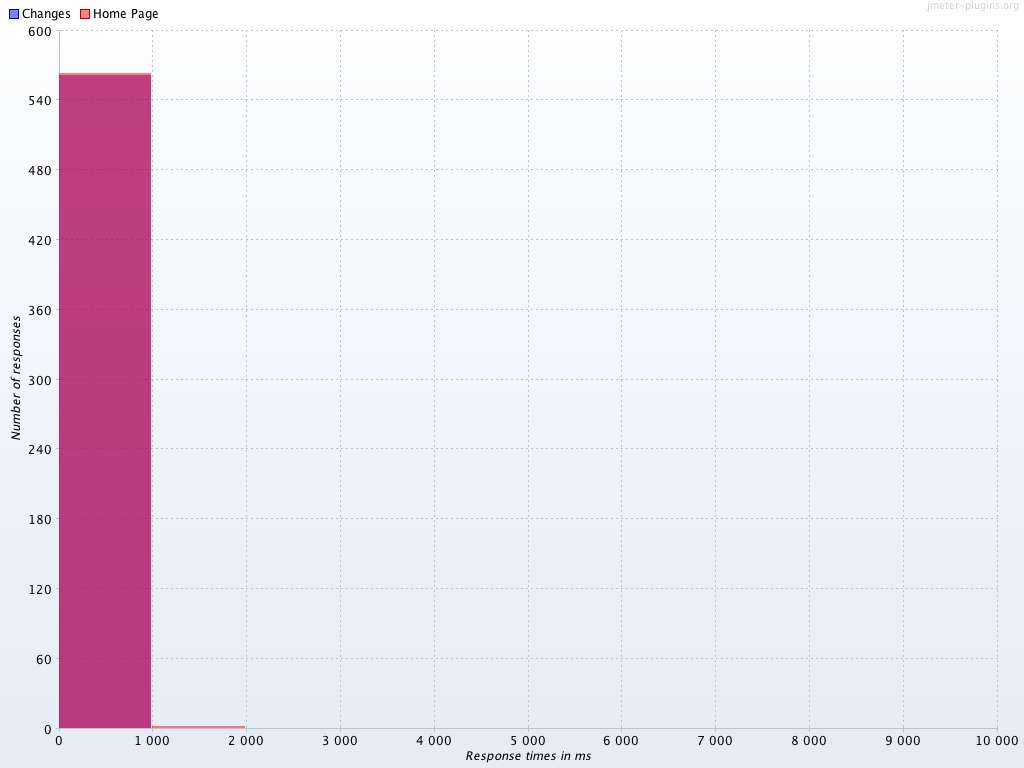
Response times percentiles:
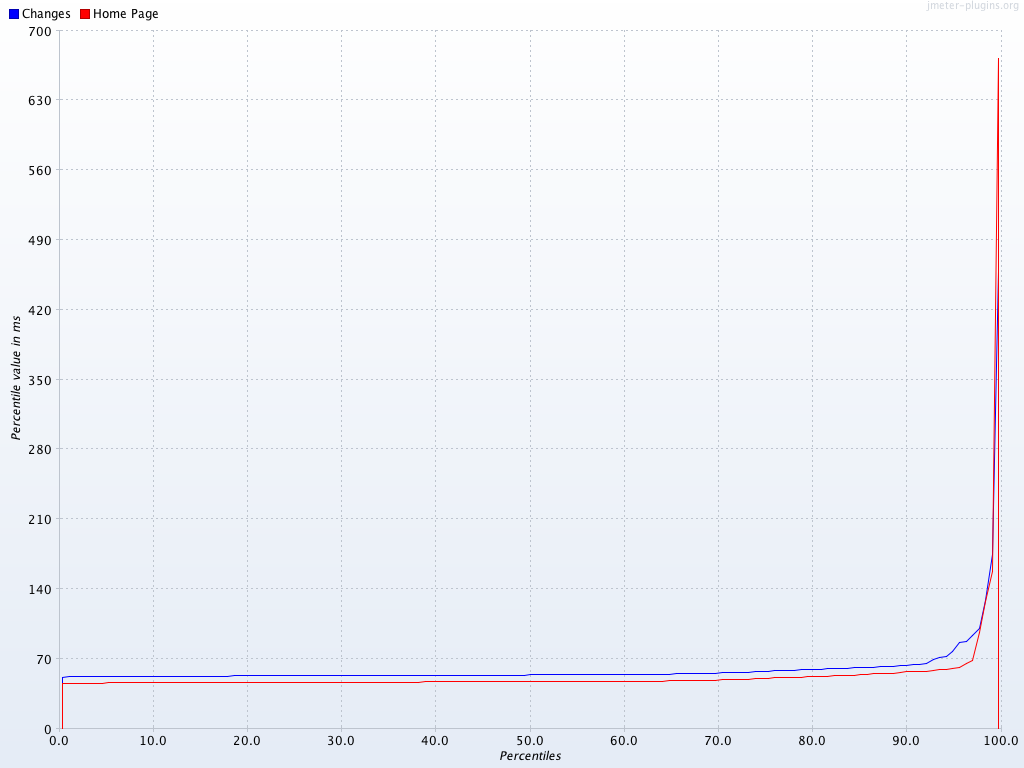
Threads state over time:
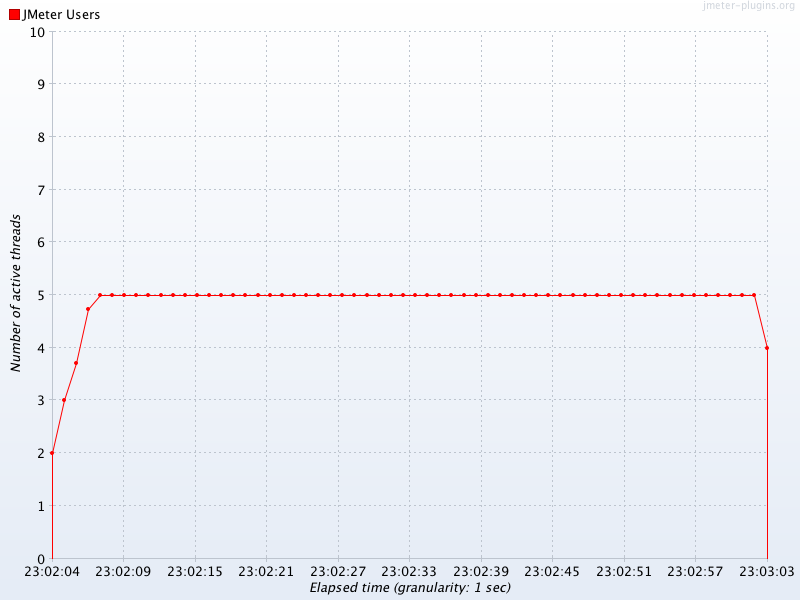
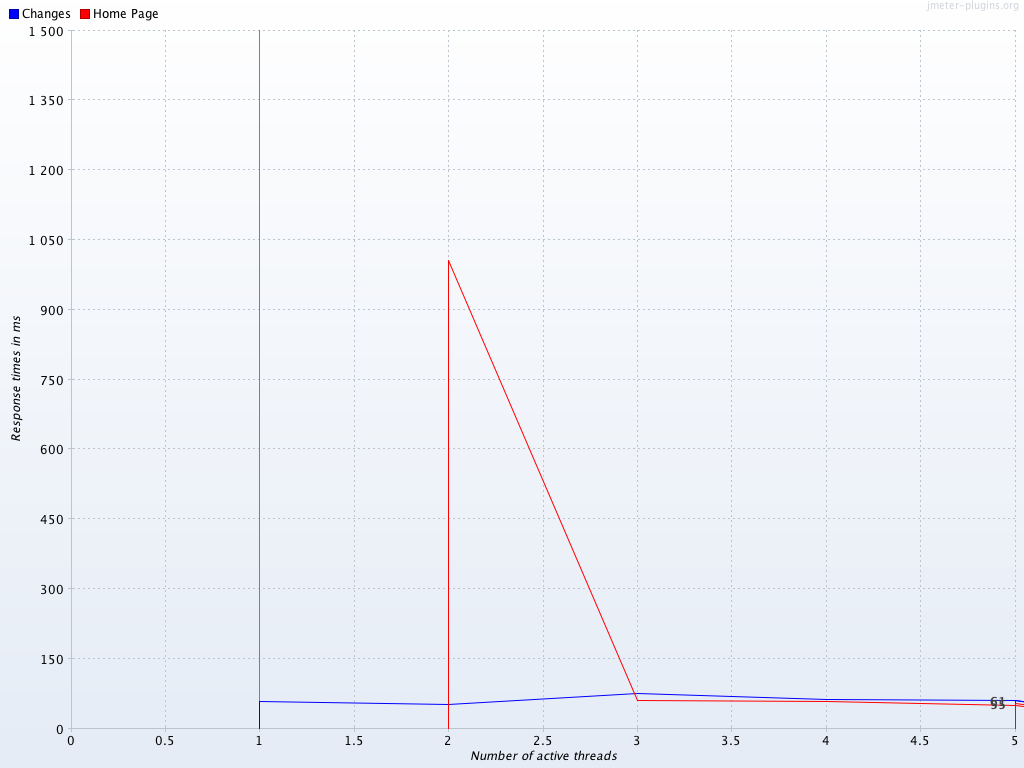
Time vs Threads:
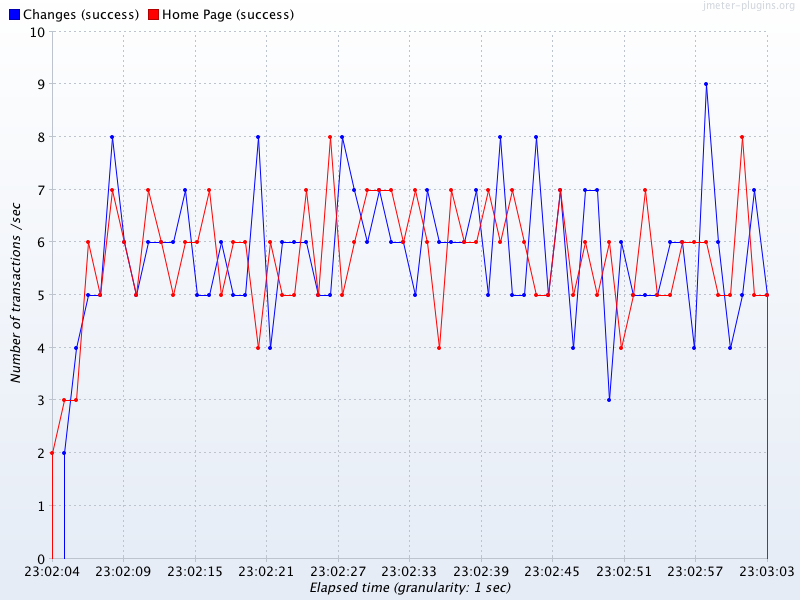
Transactions per second:
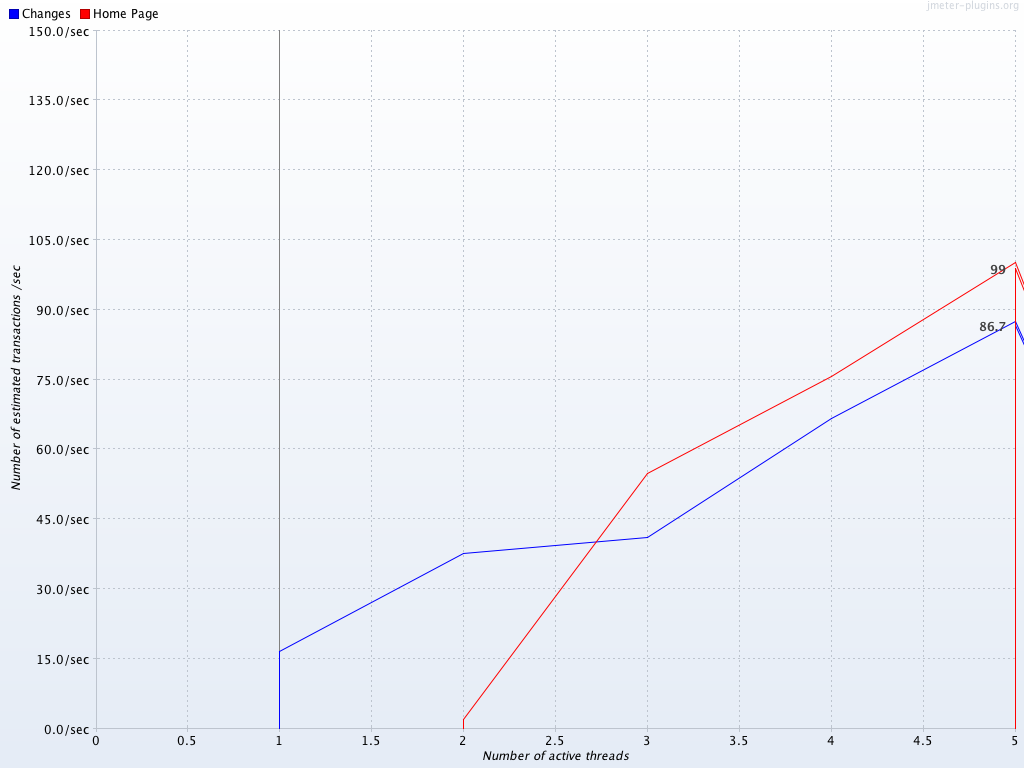
Throughput vs Threads:
Other Features
Graphs Generator Listener can also generate CSV files besides PNG files.
Graph Generator Listener can even generate graphs for existing results, to do so, create a fake plan like the following:
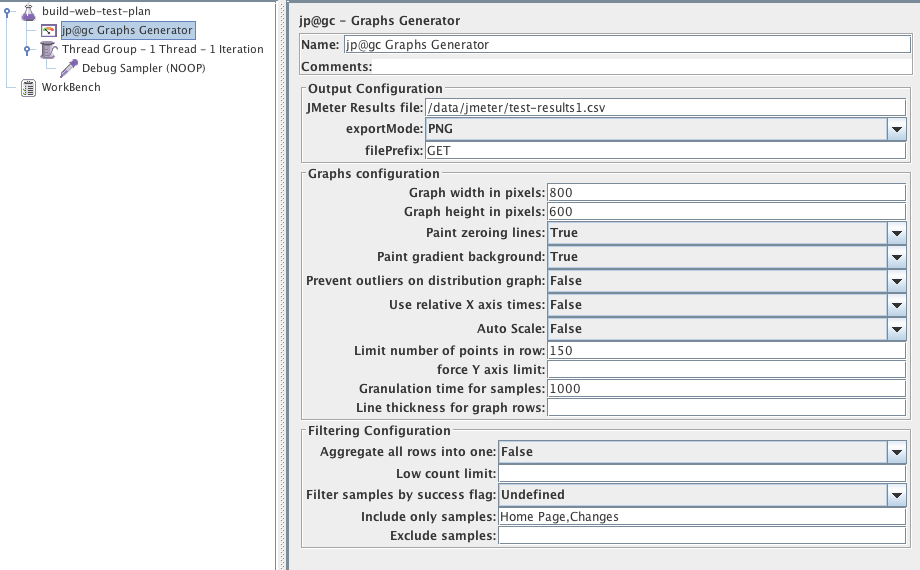
Run it in GUI or NON-GUI mode, the graphs will be generated.
Ensure you use the same properties configuration you used during the test that generated the results you are graphing.
NDLR:
With this new Graphs Generator Listener , you can now easily:
- Generate meaningful and sexy graphs at the end of your test
- Generate meaningful and sexy graphs for existing results any time you want
- Output CSVs with computed datas at end of your test if you want to use custom graphs
- Output CSVs with computed datas for existing results any time you want if you want to use custom graphs
About author:
Philippe Mouawad is a developer, committer and member of the JMeter Project Management Committee at Apache.
He is also the co-author of the book Master JMeter : from load testing to DevOps
Automatically generating nice graphs at end of your Load Test with Apache JMeter and JMeter-Plugins的更多相关文章
- Jmeter3.0新特性
2016-5-19昨日,Jmeter又更新了新版本. 那么新版本有哪些新特性呢? Changes This page details the changes made in the current ...
- ARTIFICIAL INTELLIGENCE FOR GAMES (Ian Millington / John Funge 著)
相关网站:http://www.ai4g.com PART I AI AND GAMESCHAPTER1 INTRODUCTIONCHAPTER2 GAME AIPART II TECHNIQUESC ...
- Python equivalent of D3.js
http://brandonrose.org/ Python equivalent of D3.js Ask Question Asked 7 years, 1 month ago Act ...
- P6 Professional Installation and Configuration Guide (Microsoft SQL Server Database) 16 R1
P6 Professional Installation and Configuration Guide (Microsoft SQL Server Database) 16 R1 May ...
- Free Slideshow, Gallery And Lightboxes Scripts
http://bootstraphelpers.codeplex.com/SourceControl/list/changesets https://github.com/gordon-matt/Bo ...
- windows 下使用 zip安装包安装MySQL 5.7
以下内容参考官方文档:http://dev.mysql.com/doc/refman/5.7/en/windows-start-command-line.html 解压缩zip到D:\mysql-5. ...
- Ubuntu环境下Hadoop1.2.1, HBase0.94.25, nutch2.2.1各个配置文件一览
/×××××××××××××××××××××××××××××××××××××××××/ Author:xxx0624 HomePage:http://www.cnblogs.com/xxx0624/ ...
- yarn源代码
Modules-------YARN consists of multiple modules. The modules are listed below as per the directory s ...
- springboot 注册dao层 service 层
可以使用三种注解来引入DAO层的接口到spring容器中.1.@Mapper,写在每一个DAO层接口上,如下: 2.@MapperScan和@ComponentScan两者之一.前者的意义是将指定包中 ...
随机推荐
- Java 内部类和Lambda
Java内部类 内部类又称为嵌套类,是在类中定义另外一个类.内部类可以处于方法内/外,内部类的成员变量/方法名可以和外部类的相同.内部类编译后会成为完全不同的两个类,分别为outer.class和ou ...
- vue cli4.0 快速搭建项目详解
搭建项目之前,请确认好你自己已经安装过node, npm, vue cli.没安装的可以参考下面的链接安装. 如何安装node? 安装好node默认已经安装好npm了,所以不用单独安装了. 如何安装v ...
- Making Huge Palindromes LightOJ - 1258
题目链接:LightOJ - 1258 1258 - Making Huge Palindromes PDF (English) Statistics Forum Time Limit: 1 se ...
- Direction of Arrival Based Spatial Covariance Model for Blind Sound Source Separation
基于信号协方差模型DOA的盲声源分离[1]. 在此基础上,作者团队于2018年又发布了一篇文章,采用分级和时间差的空间协方差模型及非负矩阵分解的多通道盲声源分离[2]. 摘要 本文通过对短时傅立叶变换 ...
- HAVING 搜索条件在进行分组操作之后应用
HAVING 搜索条件在进行分组操作之后应用: 如:查询帖子访问量大于15的用户id: select t.user_id,u.name,sum(count_view) from t_topic t l ...
- 洛谷 P1948 [USACO08JAN]电话线Telephone Lines 题解
P1948 [USACO08JAN]电话线Telephone Lines 题目描述 Farmer John wants to set up a telephone line at his farm. ...
- 洛谷 题解 P2731 【骑马修栅栏 Riding the Fences】
简单的开始 完美の开始 这里数组什么的用来干什么后面标注的清楚了 #include<iostream> #include<cstdio> #include<cmath&g ...
- 计蒜客 39272.Tree-树链剖分(点权)+带修改区间异或和 (The 2019 ACM-ICPC China Shannxi Provincial Programming Contest E.) 2019ICPC西安邀请赛现场赛重现赛
Tree Ming and Hong are playing a simple game called nim game. They have nn piles of stones numbered ...
- 55、Spark Streaming:updateStateByKey以及基于缓存的实时wordcount程序
一.updateStateByKey 1.概述 SparkStreaming 7*24 小时不间断的运行,有时需要管理一些状态,比如wordCount,每个batch的数据不是独立的而是需要累加的,这 ...
- Linux crontab命令:循环执行定时任务(详解版)
前面学习了 at 命令,此命令在指定的时间仅能执行一次任务,但在实际工作中,系统的定时任务一般是需要重复执行的.而 at 命令显然无法满足需求,这是就需要使用 crontab 命令来执行循环定时任务. ...