
Blend Grid行列拖拽控制宽高
看效果
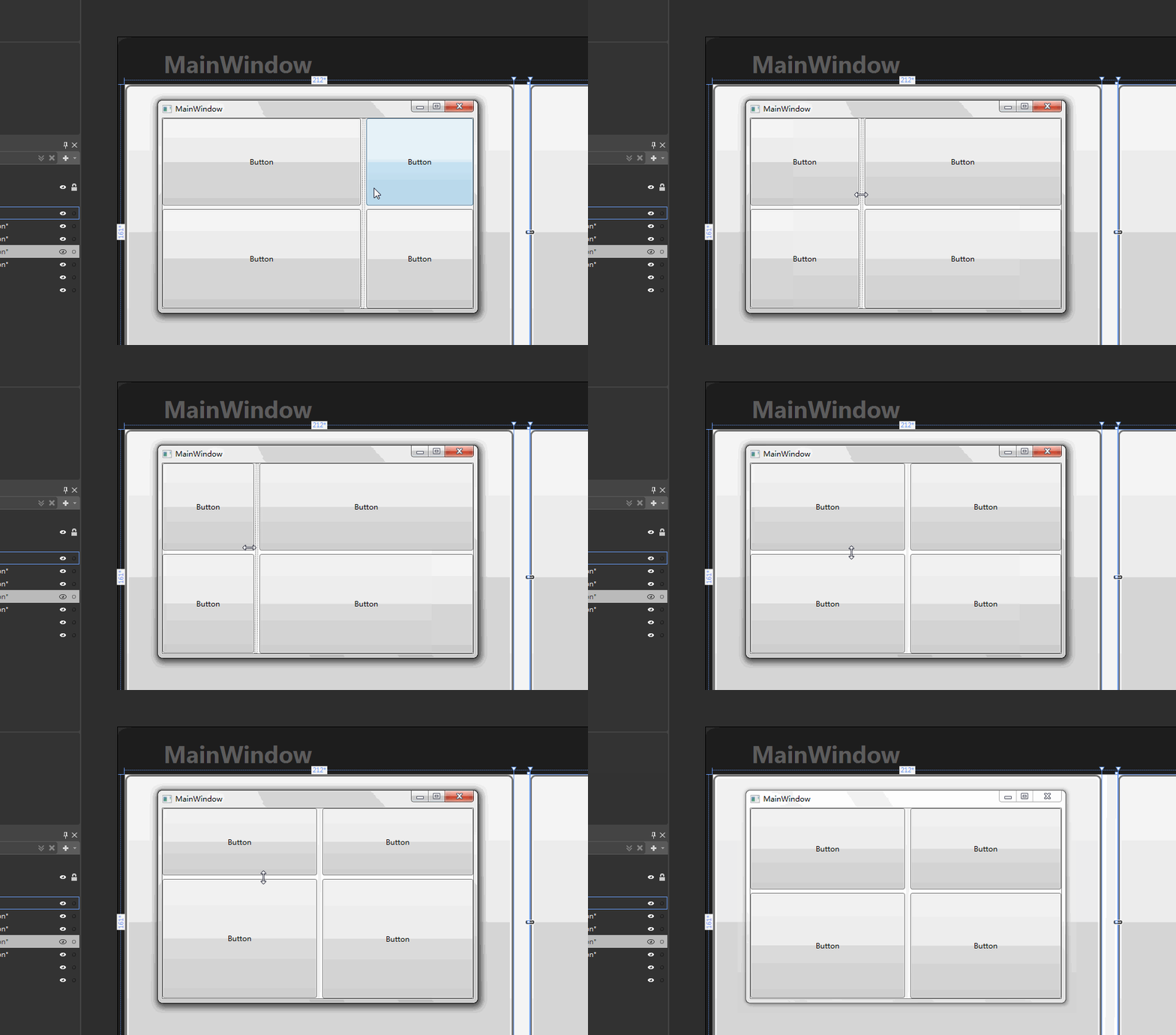
-
<Grid>
-
<Grid.ColumnDefinitions>
-
<ColumnDefinition Width="212*"/>
-
<ColumnDefinition Width="9*"/>
-
<ColumnDefinition Width="296*"/>
-
</Grid.ColumnDefinitions>
-
<Grid.RowDefinitions>
-
<RowDefinition Height="161*"/>
-
<RowDefinition Height="6*"/>
-
<RowDefinition Height="153*"/>
-
</Grid.RowDefinitions>
-
<Button Content="Button" Margin="0"/>
-
<Button Content="Button" Margin="0,0,0,1" Grid.Row="2"/>
-
<Button Content="Button" Grid.Column="2"/>
-
<Button Content="Button" Grid.Column="2" Grid.Row="2"/>
-
<GridSplitter HorizontalAlignment="Center" Margin="2,0" Grid.RowSpan="3" Width="5" Grid.Column="1" RenderTransformOrigin="0.5,0.5">
-
<GridSplitter.RenderTransform>
-
<TransformGroup>
-
<ScaleTransform/>
-
<SkewTransform/>
-
<RotateTransform Angle="0.349"/>
-
<TranslateTransform/>
-
</TransformGroup>
-
</GridSplitter.RenderTransform>
-
</GridSplitter>
-
<GridSplitter Grid.ColumnSpan="3" HorizontalAlignment="Stretch" Margin="0,3" Grid.Row="1" VerticalAlignment="Center" Height="5"/>
-
-
</Grid>
效果2

主要设置俩个地方 注意设置列 auto
1)最外层gridGrid.IsSharedSizeScope="True"
2)设置GridSplitter 所在列或行 SharedSizeGroup
-
<Grid Grid.IsSharedSizeScope="True" >
-
<Grid Margin="19,182,60,48" Background="White">
-
<Grid.ColumnDefinitions>
-
<ColumnDefinition Width="377*"/>
-
<ColumnDefinition Width="16*" />
-
<ColumnDefinition Width="Auto" SharedSizeGroup="aaa"/>
-
</Grid.ColumnDefinitions>
-
<Grid.RowDefinitions>
-
<RowDefinition Height="9*"/>
-
<RowDefinition/>
-
<RowDefinition Height="8*"/>
-
</Grid.RowDefinitions>
-
<Button Content="Button" Margin="0"/>
-
<Button Content="Button" Margin="0,0,0,1" Grid.Row="2"/>
-
<Button Content="Button" Grid.Column="2"/>
-
<Button Content="Button" Grid.Column="2" Grid.Row="2"/>
-
<GridSplitter HorizontalAlignment="Center" Margin="1.313,0,1.312,0" Grid.RowSpan="3" Width="5" Grid.Column="1" RenderTransformOrigin="0.5,0.5">
-
<GridSplitter.RenderTransform>
-
<TransformGroup>
-
<ScaleTransform/>
-
<SkewTransform/>
-
<RotateTransform Angle="0.349"/>
-
<TranslateTransform/>
-
</TransformGroup>
-
</GridSplitter.RenderTransform>
-
</GridSplitter>
-
<GridSplitter Grid.ColumnSpan="3" HorizontalAlignment="Stretch" VerticalAlignment="Center" Height="5" Grid.Row="1"/>
-
-
</Grid>
-
<Grid Margin="19,61,60,169" Background="White">
-
<Grid.ColumnDefinitions>
-
<ColumnDefinition Width="377*" />
-
<ColumnDefinition Width="16*" />
-
<ColumnDefinition Width="Auto" SharedSizeGroup="aaa"/>
-
</Grid.ColumnDefinitions>
-
<Grid.RowDefinitions>
-
<RowDefinition Height="15*" />
-
<RowDefinition Height="2*"/>
-
<RowDefinition Height="13*"/>
-
</Grid.RowDefinitions>
-
<Button Content="Button" Margin="0"/>
-
<Button Content="Button" Margin="0,0,0,1" Grid.Row="2"/>
-
<Button Content="Button" Grid.Column="2"/>
-
<Button Content="Button" Grid.Column="2" Grid.Row="2"/>
-
<GridSplitter HorizontalAlignment="Center" Margin="1.313,0,1.312,0" Grid.RowSpan="3" Width="5" Grid.Column="1" RenderTransformOrigin="0.5,0.5">
-
<GridSplitter.RenderTransform>
-
<TransformGroup>
-
<ScaleTransform/>
-
<SkewTransform/>
-
<RotateTransform Angle="0.349"/>
-
<TranslateTransform/>
-
</TransformGroup>
-
</GridSplitter.RenderTransform>
-
</GridSplitter>
-
<GridSplitter Grid.ColumnSpan="3" HorizontalAlignment="Stretch" Margin="0,1,0,0" VerticalAlignment="Center" Height="5" Grid.Row="1"/>
-
-
</Grid>
-
</Grid>
Blend Grid行列拖拽控制宽高的更多相关文章
- FMX ScrollBox 拖拽控制
Firemonkey下的ScrollBox 拖拽控制,滚动控制,拖拽,滚动条 AniCalculations 仅允许纵向拖拽,拖拽 scrlbx.AniCalculations.TouchTracki ...
- 案例(拖拽对话框、高清放大镜、自制滚动条、元素的隐藏方式、表格隔行变色、tab切换效果、字符串拼接、刷新评论)
一.拖拽对话框 <style> .of{ width: 500px; } #link,#close{ text-decoration: none; margin: 0 10px; font ...
- textarea拖拽控制
一.用处 textarea默认时允许用户以拖拽形式来改变textarea大小,但textarea的大小变化会撑大其父节点,有时会破坏整体布局,有时我们并不希望textarea随意拖拽. forklif ...
- el-table实现行列拖拽
element ui 表格没有自带的拖拽排序的功能,只能借助第三方插件Sortablejs来实现. 实现步骤: 安装Sortable.js npm install sortablejs --save ...
- element ui + sortablejs实现表格的行列拖拽
<template> <div class="container"> <el-table :data="tableData" bo ...
- div拖拽的问题
今天看到一篇写的很好的文章,摘抄如下: 思路 父盒子相对定位,子元素,也就是被拖拽的元素绝对定位 当鼠标在子元素中按下时,绑定鼠标移动事件,根据鼠标位置改变元素位置 设置鼠标当前位置(offsetX, ...
- JQUERY 拖拽 draggable droppable resizable selectable sortable
今天用了jq ui的拖动碰撞功能,好不容易看到有详细的API解说,记录如下: <script language="JavaScript" type="text/ ...
- html5 Sortable.js 拖拽排序源码分析
最近公司项目经常用到一个拖拽 Sortable.js插件,所以有空的时候看了 Sortable.js 源码,总共1300多行这样,写的挺完美的. 本帖属于原创,转载请出名出处. 官网http:// ...
- CSS 奇思妙想 | 使用 resize 实现强大的图片拖拽切换预览功能
本文将介绍一个非常有意思的功能,使用纯 CSS 利用 resize 实现强大的图片切换预览功能.类似于这样: 思路 首先,要实现这样一个效果如果不要求可以拖拽,其实有非常多的办法. 将两张图片叠加在一 ...
随机推荐
- ubuntu 16.04下node和pm2安装
一.安装node,这里安装9.0的版本,安装其它版本直接到https://deb.nodesource.com/setup_9.x找相应版本的更改既可 1.sudo apt-get remove no ...
- 2019 China Collegiate Programming Contest Qinhuangdao Onsite
传送门 D - Decimal 题意: 询问\(\frac{1}{n}\)是否为有限小数. 思路: 拆质因子,看是不是只包含2和5即可,否则除不尽. Code #include <bits/st ...
- 理解serialVersionUID是什么?有什么用?如何生成?
如果您曾经实现过Serializable接口,则必须遇到此警告消息 The serializable class xxx does not declare a static final serialV ...
- zz深度学习论文合集大全
Pull requestsIssues Marketplace Explore Learn Git and GitHub without any code! Using ...
- python 并行处理数据
来源:https://blog.csdn.net/weixin_42001089/article/details/88843152 import multiprocessing import time ...
- springboot配置spring security 静态资源不能访问
在springboot整合spring security 过程中曾遇到下面问题:(spring boot 2.0以上版本 spring security 5.x (spring secur ...
- 【oracle】oracle11g安装失败 提示找不到文件,模板General_Purpose.dbc不存在
先确定一下自己的安装包是不是一起解压的! 不是就重新解压,重新装. 是,剩下的我也不会
- 数据结构or算法
其实长久以来 mrxfyxj一直纠结着数据结构和算法到底有什么区别 只要学了一个算法就在惋惜她为什么不能是数据结构 产生这种想法的原因是mrxf觉得他blog里数据结构的东西很少 而mrxf自身又有一 ...
- [LeetCode] 919. Complete Binary Tree Inserter 完全二叉树插入器
A complete binary tree is a binary tree in which every level, except possibly the last, is completel ...
- [LeetCode] 598. Range Addition II 范围相加之二
Given an m * n matrix M initialized with all 0's and several update operations. Operations are repre ...