
在ASP.NET Web API 2中使用Owin基于Token令牌的身份验证
基于令牌的身份验证
基于令牌的身份验证主要区别于以前常用的常用的基于cookie的身份验证,基于cookie的身份验证在B/S架构中使用比较多,但是在Web Api中因其特殊性,基于cookie的身份验证已经不适合了,因为并不是每一个调用api的客户端都是从浏览器发起,我们面临的客户端可能是手机、平板、或者app。
使用基于Token令牌的身份验证有一些好处:
- 服务器的可伸缩性:发送到服务器的令牌是字包含的,不依赖与共享会话存储
- 松散耦合:前端应用程序位于特定的身份验证机制耦合,令牌是从服务器生成的,并且API构建方式可理解该令牌并进行身份验证
- 适用于移动设备:cookie依赖于浏览器,存储于本机平台,使用token将简化流程
构建后端API
步骤一: 创建Web Api 项目
为了进行代码演示,创建一个相对比较干净的环境,我们新建一个项目演示本次功能,本文使用Visual Studio 2017和 .NTE Framework 4.7。
在Vs中选择新建项目,选择ASP.NET Web 应用程序(.NET Framework) ,命名为OauthExample或者随便你喜欢的名字,然后下一步,选择空模板。ok
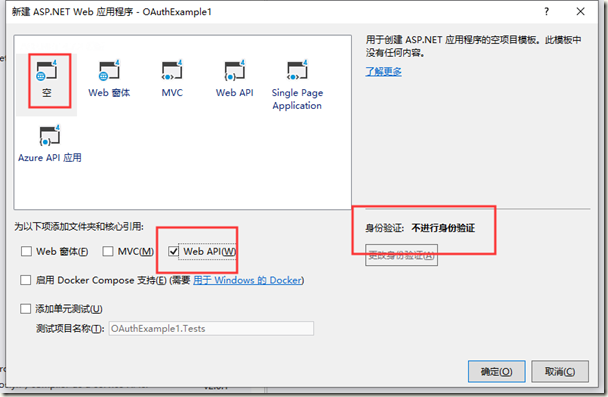
步骤二:安装Owin包,并设置“StarUp”类
项目右键,管理Nuget程序包,分别安装
Microsoft.AspNet.WebApi.Owin
Microsoft.Owin.Host.SystemWeb
也可以在程序包管理器输入如下代码安装:
Install-Package Microsoft.AspNet.WebApi.Owin

Install-Package Microsoft.Owin.Host.SystemWeb
等待安装完成。
右键项目,移除Global.asax,右键项目,添加OWIN StartUp 类,然后修改代码如下:
using System.Web.Http;

using Microsoft.Owin;

using Owin;

[assembly: OwinStartup(typeof(OAuthExample.Startup))]

namespace OAuthExample

{

    public class Startup

    {

        public void Configuration(IAppBuilder app)

        {

            // 有关如何配置应用程序的详细信息,请访问 https://go.microsoft.com/fwlink/?LinkID=316888

            HttpConfiguration config = new HttpConfiguration();

            WebApiConfig.Register(config);

            app.UseWebApi(config);

        }

    }

}
简要说明
- assembly属性设置了启动时要触发的类
- HttpConfiguration对象用于配置API路由等,我们将对象传递给Register方法
- UasWebApi接收对象config,该方法将把Web Api连接到我们的OWIN服务管道
完成后编译一下,检查是否能通过,如果有问题检查一下Nuget包是否安装正确。
步骤三:添加对OAuth承载令牌生成的支持
安装Owin包,Microsoft.Owin.Security.OAuth,再次打开StartUp文件,修改代码如下(斜体):
using System;

using System.Web.Http;

using Microsoft.Owin;

using Microsoft.Owin.Security.OAuth;

using Owin;

[assembly: OwinStartup(typeof(OAuthExample.Startup))]

namespace OAuthExample

{

    public class Startup

    {

        public void Configuration(IAppBuilder app)

        {

            // 有关如何配置应用程序的详细信息,请访问 https://go.microsoft.com/fwlink/?LinkID=316888

            OAuthAuthorizationServerOptions OAuthServerOptions = new OAuthAuthorizationServerOptions()

            {

                AllowInsecureHttp = true,

                TokenEndpointPath = new PathString("/oauth/token"),

                AccessTokenExpireTimeSpan = TimeSpan.FromDays(),

                Provider = new CustomAuthorizationServerProvider()

            };

            // Token Generation

            app.UseOAuthAuthorizationServer(OAuthServerOptions);

            app.UseOAuthBearerAuthentication(new OAuthBearerAuthenticationOptions());

            HttpConfiguration config = new HttpConfiguration();

            WebApiConfig.Register(config);

            app.UseWebApi(config);

        }

    }

}
在这里,我们从类“OAuthAuthorizationServerOptions”创建了新实例,并设置选项如下:
- 允许客户端使用http协议请求
- 令牌生成路径为"/oauth/token" ,即通过路径host: port:/oauth/token 获取令牌信息
- 设置令牌的有效时间为一天,如果用户在令牌发出24小时候使用令牌进行身份验证,请求将被拒绝,并返回状态码
- 我们在名为“CustomAuthorizationServerProvider”的类中实现了如何用户票据的验证和发放
最后我们将此选项传递给扩展方法“ UseOAuthAuthorizationServer”,以便将身份验证中间件添加到管道中。
步骤四:实现“CustomAuthorizationServerProvider”类
在项目中添加名为“ Providers”的新文件夹,然后添加名为“ SimpleAuthorizationServerProvider”的新类,在下面粘贴代码片段:
using System.Security.Claims;

using System.Threading.Tasks;

using Microsoft.Owin.Security.OAuth;

namespace OAuthExample.Providers

{

    public class CustomAuthorizationServerProvider : OAuthAuthorizationServerProvider

    {

        /// <summary>

        /// Called to validate that the origin of the request is a registered "client_id", and that the correct credentials for that client are

        /// present on the request. If the web application accepts Basic authentication credentials,

        /// context.TryGetBasicCredentials(out clientId, out clientSecret) may be called to acquire those values if present in the request header. If the web

        /// application accepts "client_id" and "client_secret" as form encoded POST parameters,

        /// context.TryGetFormCredentials(out clientId, out clientSecret) may be called to acquire those values if present in the request body.

        /// If context.Validated is not called the request will not proceed further.

        /// </summary>

        /// <param name="context">The context of the event carries information in and results out.</param>

        public override async Task ValidateClientAuthentication(OAuthValidateClientAuthenticationContext context)

        {

            context.Validated();

        }

        /// <summary>

        /// Called when a request to the Token endpoint arrives with a "grant_type" of "password". This occurs when the user has provided name and password

        /// credentials directly into the client application's user interface, and the client application is using those to acquire an "access_token" and

        /// optional "refresh_token". If the web application supports the

        /// resource owner credentials grant type it must validate the context.Username and context.Password as appropriate. To issue an

        /// access token the context.Validated must be called with a new ticket containing the claims about the resource owner which should be associated

        /// with the access token. The application should take appropriate measures to ensure that the endpoint isn’t abused by malicious callers.

        /// The default behavior is to reject this grant type.

        /// See also http://tools.ietf.org/html/rfc6749#section-4.3.2

        /// </summary>

        /// <param name="context">The context of the event carries information in and results out.</param>

        public override async Task GrantResourceOwnerCredentials(OAuthGrantResourceOwnerCredentialsContext context)

        {

            context.OwinContext.Response.Headers.Add("Access-Control-Allow-Origin", new[] { "*" });

            //这里是验证用户名和密码,可以根据项目情况自己实现

            if (!(context.UserName == "zhangsan" && context.Password == ""))

            {

                context.SetError("invalid_grant", "The user name or password is incorrect.");

                return;

            }

            //可以随便添加

            var identity = new ClaimsIdentity(context.Options.AuthenticationType);

            identity.AddClaim(new Claim("sub", context.UserName));

            identity.AddClaim(new Claim("role", "user"));

            context.Validated(identity);

        }

    }

}
步骤五:允许ASP.NET Web Api跨域请求
使用nuget安装程序包,Install-Package Microsoft.Owin.Cors
然后在Startup类中添加如下代码,最终代码如下:
using System;

using System.Web.Http;

using Microsoft.Owin;

using Microsoft.Owin.Security.OAuth;

using OAuthExample.Providers;

using Owin;

[assembly: OwinStartup(typeof(OAuthExample.Startup))]

namespace OAuthExample

{

    public class Startup

    {

        public void Configuration(IAppBuilder app)

        {

            // 有关如何配置应用程序的详细信息,请访问 https://go.microsoft.com/fwlink/?LinkID=316888

            OAuthAuthorizationServerOptions OAuthServerOptions = new OAuthAuthorizationServerOptions()

            {

                AllowInsecureHttp = true,

                TokenEndpointPath = new PathString("/token"),

                AccessTokenExpireTimeSpan = TimeSpan.FromDays(),

                Provider = new CustomAuthorizationServerProvider()

            };

            // Token Generation

            app.UseOAuthAuthorizationServer(OAuthServerOptions);

            app.UseOAuthBearerAuthentication(new OAuthBearerAuthenticationOptions());

            HttpConfiguration config = new HttpConfiguration();

            WebApiConfig.Register(config);

            app.UseCors(Microsoft.Owin.Cors.CorsOptions.AllowAll);

            app.UseWebApi(config);

        }

    }

}
代码测试
我们添加一个测试空的Order控制,用来测试一下上面的实现:
[RoutePrefix("api/Orders")]

    public class OrdersController : ApiController

    {

        [Authorize]

        [Route("")]

        public IHttpActionResult Get()

        {

            return Ok(Order.CreateOrders());

        }

    }

    #region Helpers

    public class Order

    {

        public int OrderID { get; set; }

        public string CustomerName { get; set; }

        public string ShipperCity { get; set; }

        public Boolean IsShipped { get; set; }

        public static List<Order> CreateOrders()

        {

            List<Order> OrderList = new List<Order>

            {

                new Order {OrderID = , CustomerName = "Taiseer Joudeh", ShipperCity = "Amman", IsShipped = true },

                new Order {OrderID = , CustomerName = "Ahmad Hasan", ShipperCity = "Dubai", IsShipped = false},

                new Order {OrderID = ,CustomerName = "Tamer Yaser", ShipperCity = "Jeddah", IsShipped = false },

                new Order {OrderID = ,CustomerName = "Lina Majed", ShipperCity = "Abu Dhabi", IsShipped = false},

                new Order {OrderID = ,CustomerName = "Yasmeen Rami", ShipperCity = "Kuwait", IsShipped = true}

            };

            return OrderList;

        }

    }

    #endregion
下面使用PostMan进行模拟测试.
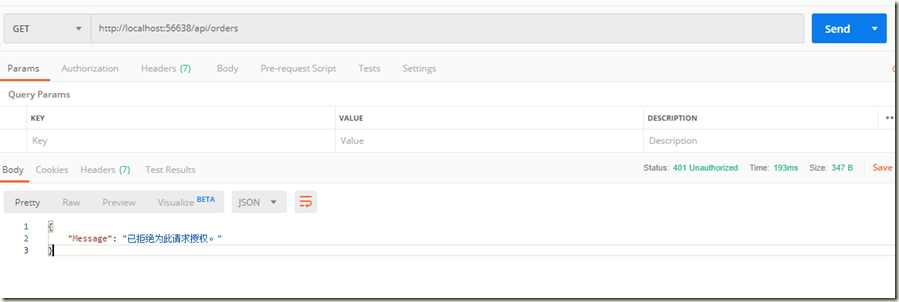
在未授权时,直接访问 http://localhost:56638/api/orders得到如下结果:
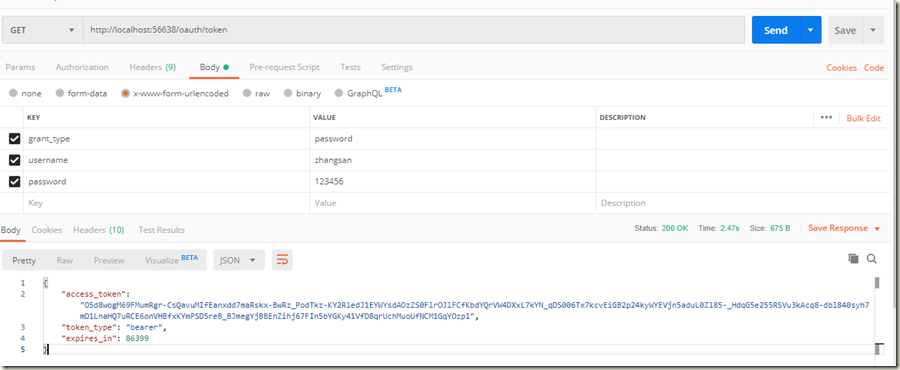
模拟授权访问,先获取令牌:
将令牌附加到Order请求,再次尝试访问:
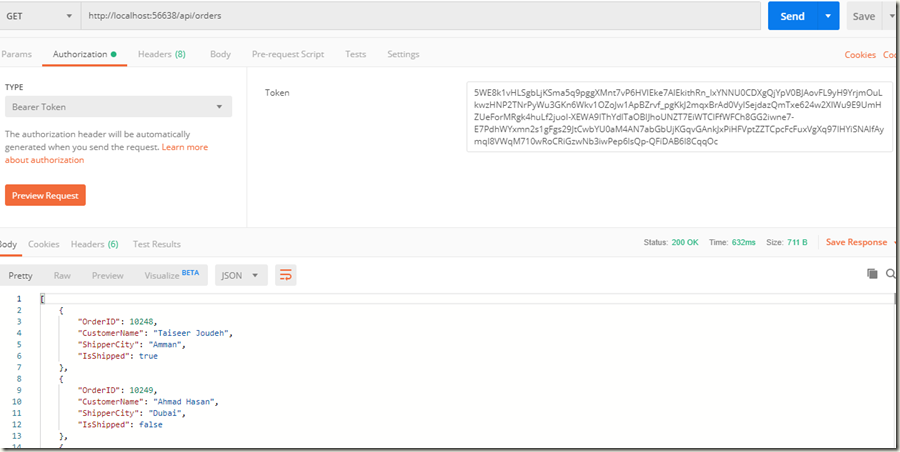
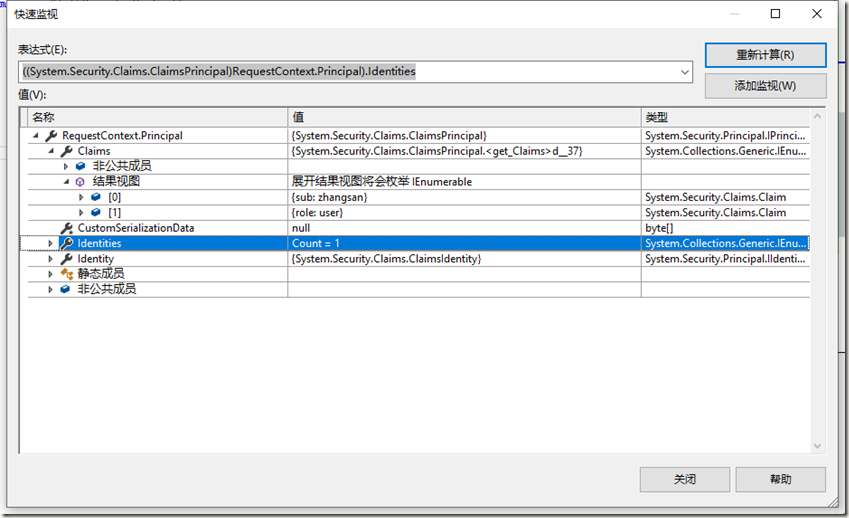
可以看到已经能正常获取到数据,打开调试,看一下方法中的变量如下:
总结
一直觉得WebApi和MVC很多都一样的东西,在实际应用中还是有不少区别,关于OAuth、JWT等等在WebApi中使用较多,本文是参照文末连接做的一个总结,细看下原po的时间都已经是14年的文章了。马上要aspnet core 3.2都要发布了,现在却还在补以前的知识,惭愧的很!
参考链接:
Token Based Authentication using ASP.NET Web API 2, Owin, and Identity
Enable OAuth Refresh Tokens in AngularJS App using ASP .NET Web API 2, and Owin
在ASP.NET Web API 2中使用Owin基于Token令牌的身份验证的更多相关文章
- 在ASP.NET Web API 2中使用Owin OAuth 刷新令牌(示例代码)
在上篇文章介绍了Web Api中使用令牌进行授权的后端实现方法,基于WebApi2和OWIN OAuth实现了获取access token,使用token访问需授权的资源信息.本文将介绍在Web Ap ...
- ASP.NET Web API 2 中的属性路由使用(转载)
转载地址:ASP.NET Web API 2 中的属性路由使用
- 在ASP.NET Web API项目中使用Hangfire实现后台任务处理
当前项目中有这样一个需求:由前端用户的一个操作,需要触发到不同设备的消息推送.由于推送这个具体功能,我们采用了第三方的服务.而这个服务调用有时候可能会有延时,为此,我们希望将消息推送与用户前端操作实现 ...
- ASP.NET Web API 2 中的特性路由
ASP.NET MVC 5.1 开始已经支持基于特性的路由(http://attributerouting.net),ASP.NET WEB API 2 同时也支持了这一特性. 启用特性路 由只需要在 ...
- ASP.NET Web API 2中的错误处理
前几天在webapi项目中遇到一个问题:Controller构造函数中抛出异常时全局过滤器捕获不到,于是网搜一把写下这篇博客作为总结. HttpResponseException 通常在WebAPI的 ...
- [翻译]ASP.NET Web API 2 中的全局错误处理
目录 已存在的选项 解决方案预览 设计原则 什么时候去用 方案详情 示例 附录: 基类详情 原文链接 Global Error Handling in ASP.NET Web API 2 由于翻译水平 ...
- (转)【ASP.NET Web API】Authentication with OWIN
概述 本文说明了如何使用 OWIN 来实现 ASP.NET Web API 的验证功能,以及在客户端与服务器的交互过程中,避免重复提交用户名和密码的机制. 客户端可以分为两类: JavaScript: ...
- ASP.NET Web API实现微信公众平台开发(一)服务器验证
最近朋友的微信公众号准备做活动,靠固定的微信公众平台模版搞定不了,于是请我代为开发微信后台.鉴于我也是第一次尝试开发微信后台,所以也踩了不少坑,此系列博客将会描述微信公众号各项功能的实现. 先决条件 ...
- integration asp.net web api with autofac and owin
There is an example project showing Web API in conjunction with OWIN self hosting https://github.com ...
随机推荐
- 019.nexus搭建docker镜像仓库/maven仓库
一.安装docker CE 参考docker doc https://docs.docker.com/install/linux/docker-ce/centos/ 二.docker启动nexus3 ...
- 数据库系统(五)---MySQL基础
一.SQL基本概念: SQL 已经成为关系数据库的标准语言,是一种数据库查询和程序设计语言,用 于存取数据以及查询.更新和管理关系数据库系统. 功能不仅仅是查询,还包括数据定义.数据操纵和数据控制等于 ...
- elasticsearch 集群、节点、索引、分片、副本概念
原文链接: https://www.jianshu.com/p/297e13045605 集群(cluster): 由一个或多个节点组成, 并通过集群名称与其他集群进行区分 节点(node): 单个 ...
- Properties类按顺序输出加载内容
Properties类按顺序输出加载内容 最近手写工厂的时候,遇到了加载配置文件时不按照properties文件中的数据的顺序来加载. 一.问题代码 import java.io.IOExceptio ...
- Python从零开始——数值类型
- Python元组与字符串操作(10)——冒泡法
冒泡法 属于交换排序,元素两两比较大小,交换位置,结果可升序或降序排列 nums = [2,5,1,6,7,9,8,3,4] for i in range(len(nums)): ##计数器0~8 f ...
- 关于DFS的理解
DFS(深度优先搜索)相当于暴力寻找有效解的过程 如果把多种情况写成一个树的方式 那么DFS的实质就是遍历所有分枝来寻找最优解 而DFS中遍历所有解的方式采用了我们称之为回溯法的东西 如图所示 图中的 ...
- SSM整合开发——基于SSM的OA系统
一.课程介绍 链接: https://pan.baidu.com/s/18B-lWfOUnKZPvuVEHY_NmQ 提取码: ky7t 复制这段内容后打开百度网盘手机App,操作更方便哦 需要 to ...
- 学习CNN系列二:训练过程
卷积神经网络在本质上是一种输入到输出的映射,它能够学习大量的输入与输出之间的映射关系,而不需要任何输入和输出之间精确的数学表达式,只要用已知的模式对卷积神经网络加以训练,网络就具有输入.输出之间映射的 ...
- 16-numpy笔记-莫烦pandas-4
代码 import pandas as pd import numpy as np dates = pd.date_range('20130101', periods=6) df=pd.DataFra ...