
在vivado中使用attribute
之前最常用的一个attribute就是mark_debug了,语法如下:(*mark_debug="ture"*)。
今天又学到几个新的,原文在这里:http://china.xilinx.com/support/answers/54357.html
一、PARALLEL_CASE (Verilog Only)
Parallel case is valid only for Verilog designs. This attribute forces a case statement to be built as a parallel multiplexer. This also prevents the case statement from being transformed into a prioritized if-elsif cascade.
This attribute can only be controlled through the Verilog RTL.
Example:
(* parallel_case *)

casex select

   'b1xxx: res = data1;

   'bx1xx: res = data2;

   'bxx1x: res = data3;

   'bxxx1: res = data4;

endcase
二、TRANSLATE_OFF/TRANSLATE_ON
TRANSLATE_OFF and TRANSLATE_ON instructs the Synthesis tool to ignore blocks of code. This can be useful to ignore source code that is not relevant for Synthesis, such as simulation code.
These attributes are given within a comment in RTL code. The comment should start with one of the following keywords:
- synthesis
- synopsys
- pragma
TRANSLATE_OFF starts the section of code to be ignored, and TRANSLATE_ON ends the section to be ignored. These attributes cannot be nested.
Be careful with the types of code that are included between the translate statements.
If it is code that affects the behavior of the design, a simulator could use that code, and create a simulation mismatch.
Verilog Example
// synthesis translate_off

...Code to be ignored...

// synthesis translate_on
VHDL Example
-- synthesis translate_off

...Code to be ignored...

-- synthesis translate_on
三、USE_DSP48
The use_dsp48 attributes allows a user to control how the Synthesis tool deals with arithmetic structures.
By default, mults, mult-add, mult-sub, and mult-accumulate type structures go into DSP48 blocks. Adders, subtractors, and accumulators can also go into these blocks, but by default are implemented with the fabric instead of using DSP48 blocks.
If this attribute is not specified, the default behavior is for Vivado Synthesis to determine the correct behavior.
This attribute overrides the default behavior and forces these structures into DSP48 blocks, and is placed in the RTL on signals, architectures and components, entities and modules, with the following priority:
- Signals
- Architectures and components
- Modules and entities
Accepted values for this attribute are "yes" and "no."
Verilog Example
(* use_dsp48 = "yes" *) module test(clk, in1, in2, out1);
VHDL Example
attribute use_dsp48 : string;

attribute use_dsp48 of P_reg : signal is "no";
重点说一下USE_DSP48,这句话可以放在模块的前面,也可以放在reg声明的前面,如下:
一、放到模块前面
(*use_dsp48="yes"*)module COUNTER(

    input           clk,

    input           rst,

    output  [:]   cnt

);

    reg [:]   cnt_tmp = 'b0;

    always @(posedge clk,posedge rst)

        if(rst)

            cnt_tmp <= 'b0;

        else

            cnt_tmp <= cnt_tmp + 'b1;

    assign cnt = cnt_tmp;

endmodule
综合后的资源占用如下:
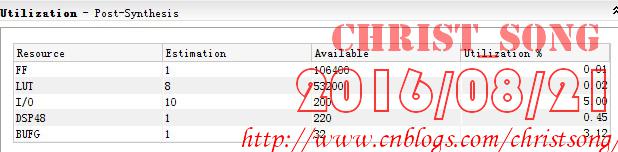
二、放到寄存器声明前面
module COUNTER(

    input           clk,

    input           rst,

    output  [:]   cnt

);

    (*use_dsp48="yes"*)reg [:]   cnt_tmp = 'b0;

    always @(posedge clk,posedge rst)

        if(rst)

            cnt_tmp <= 'b0;

        else

            cnt_tmp <= cnt_tmp + 'b1;

    assign cnt = cnt_tmp;

endmodule
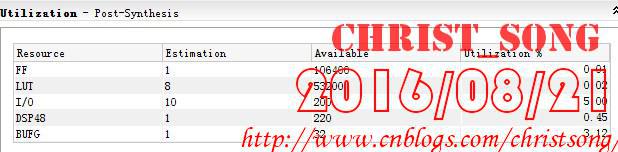
综合后的资源占用如下,可以看到跟放到模块前面的资源使用情况是一样的。但这只是针对计数器这么一个简单的模块,如果你的模块中还有其它更复杂的逻辑,那么建议使用第二种方法,只对某些特定的逻辑使用DSP单元。
三、对比不使用DSP
// (*use_dsp48="yes"*) 默认加法不使用DSP

module COUNTER(

    input           clk,

    input           rst,

    output  [:]   cnt

);

    reg [:]   cnt_tmp = 'b0;

    always @(posedge clk,posedge rst)

        if(rst)

            cnt_tmp <= 'b0;

        else

            cnt_tmp <= cnt_tmp + 'b1;

    assign cnt = cnt_tmp;

endmodule
综合后的资源占用:

在vivado中使用attribute的更多相关文章
- 浅析C#中的Attribute(转)
最近用到了,所以静下心来找些资料看了一下,终于把这东西搞清楚了. 一.什么是Attribute 先看下面的三段代码: 1.自定义Attribute类:VersionAttribute [Attribu ...
- 关于C# 中的Attribute 特性
关于C# 中的Attribute 特性 作者: 钢钢 来源: 博客园 发布时间: 2011-01-09 23:30 阅读: 13921 次 推荐: 12 原文链接 [收藏] 摘要:纠结地说 ...
- C#中的Attribute
最近用到了,所以静下心来找些资料看了一下,终于把这东西搞清楚了. 一.什么是Attribute 先看下面的三段代码: 1.自定义Attribute类:VersionAttribute [Attribu ...
- C#中的Attribute和Java中的Annotation
在之前的博客中介绍过C#的Attribute(特性),简单的说,特性主要就是利用反射技术,在运行期获取关注类的相关标注信息,然后利用这些标注信息对关注的类进行处理,最近因为工作的原因,需要看一下Jav ...
- 设置ISE/vivado中默认文本编辑器为gvim
ise windows版,添加方式 ISE下点击菜单Edit -> Preferences -> Editor. 在Editor选项框里选择Custom,在Command line syn ...
- Tcl在Vivado中的使用
http://blog.chinaaet.com/detail/36014 Vivado是Xilinx最新的FPGA设计工具,支持7系列以后的FPGA及Zynq 7000的开发.与之前的ISE设计套件 ...
- 在Vivado中调用ModelSim生成FSM的状态转移图
如果我们已经书写了一段FSM代码,现在想倒过来把它转换成为状态转移图,方便我们直观地检查我们书写的状态对不对(在写论文什么的画图太麻烦的时候,有个自动生成的是多方便啊!),应该怎么弄呢?通过在Viva ...
- 关于VO中的Attribute的问题
对于新手来说,有些时候会遇到VO中的Attribute的各种问题; 总结如下:1,你页面上输入了值,但是点击保存之后值并不能存到数据库,这个是因为该字段在VO中不是基于EO的 2,你将一个VO中的E ...
- 从Unity中的Attribute到AOP(七)
本章我们将依然讲解Unity中的Attribute,继续命名空间在UnityEngine里的. PropertyAttribute,这个特性主要来控制变量或者类在Inspector里面的显示方式.和P ...
随机推荐
- phpMyAdmin如何设置float小数点
在长度/值设置 5,2就行了哈
- Back-propagation, an introduction
About Contact Subscribe Back-propagation, an introduction Sanjeev Arora and Tengyu Ma • Dec 20, ...
- Android应用开发-网络编程(一)(重制版)
网络图片查看器 1. 确定图片的网址 2. 发送http请求 URL url = new URL(address); // 获取客户端和服务器的连接对象,此时还没有建立连接 HttpURLConnec ...
- TObject、Pointer、Interface的转换
unit Unit4; )); )); )); //将Obj转为接口 //LInf1 := ITest(Pointer(LObj1)); //无法转换了,丢失了接口信息 ...
- gcc警告: warning: dereferencing type-punned pointer will break strict-aliasing rules
Q: 在高优化级别下,不同类型指针之间的强制类型转换可能会触发以下警告: warning: dereferencing type-punned pointer will break strict-al ...
- Swift 简介
1.swift支持所有C和Obeject-c的基本类型,支持面向过程和面向对象的编程机制. 2.swift提供了2种功能强劲的集合类型:数组和字典 3.元祖 4.可选类型 5.swift 是一种类型安 ...
- SparkConf加载与SparkContext创建(源码阅读二)
紧接着昨天,我们继续开搞了啊.. 1.下面,开始创建BroadcastManager,就是传说中的广播变量管理器.BroadcastManager用于将配置信息和序列化后的RDD.Job以及Shuff ...
- 转,SelectNodes + XPath
XPath 是 XML 的内容,这里 SelectNodes 是 C# 中 XmlDocument 或 XmlNode 的一个方法.SelectNodes 使用 XPath 来选取节点. 重要语法 S ...
- 主成分分析(PCA)特征选择算法详解
1. 问题 真实的训练数据总是存在各种各样的问题: 1. 比如拿到一个汽车的样本,里面既有以“千米/每小时”度量的最大速度特征,也有“英里/小时”的最大速度特征,显然这两个特征有一个多余. 2. 拿到 ...
- 标签中id和name的作用和区别
id:作为标签的唯一标识.name:作为可与服务器交互数据的HTML元素的服务器端的标示.