
jQuery构造函数init参数分析(三)
分析完了字符串情况剩下的就不多了。
5.参数selector是函数
这个就是很容易想到了,首先说一下dom加载。我们通常在head里面写脚本的时候需要等待文档加载在进行处理,js是这么写的
 window.onload=function(){

    your code...

 }
但是这样是需要等待所有资源都加载完毕才会执行,如果页面有很多图片的话就会加载的很慢。dom2级呢有一个加载完成事件DOMContentLoad比较好用,这个事件是会在html文档结构加载完毕触发。比如说这个页面有10个img元素,只要获取到这些元素而不会在意是否图片被加载进来这样就很好地提高了js加载速度,用法如下:
  addEventListener("DOMContentLoad", function () {

      your code

  }, false);
遗憾的是ie低版本浏览器并不支持这种写法,首先ie低版本没有addEventListener这个绑定事件的方法,倒是有一个相似方法addEvent但是由于存在很多问题往往不被使用,再者ie低版本没有DOMContentLoad事件。那么针对ie低版本(ie9一下)呢通常用doScroll结合onreadystatechange方法检测。具体可以参考http://www.iefans.net/ie-mofang-domcontentloaded/
说完了回到jQuery,我们使用jQuery时就不用考虑浏览器兼容问题了直接:
 $(function(){

    yourcode...

 })

 //或者

 $(document).ready(function(){

     yourcode...

 })
第一种就是我们要讲的情况selector是一个函数,其实jQuery会调ready方法,源码如下:
 // HANDLE: $(function)

         // Shortcut for document ready

         } else if ( jQuery.isFunction( selector ) ) {

             return rootjQuery.ready( selector );

         }
rootjQuery之前也已经说过啦就是$(document),最终还是执行的ready方法这就是为什么dom加载的两种写法都可以,关于readdy方法也是会用到之前分析的DOMContentLoad,doScroll,onreadystatechange等只不过会更复杂写以后学到dom加载模块在慢慢分析吧。

6.selector是jQuery对象或者特殊对象
这个种情况应该不多没有人喜欢这样$($(document))写吧,但是如果非要有人这样写jQuery也支持
 if ( selector.selector !== undefined ) {

     this.selector = selector.selector;

     this.context = selector.context;

 }
如果selector存在selector属性说明就可能是jquery对象,为什么说可能是呢,看下面的例子就明白了
console.log($({selector:1}));
当我这样写的时候是不是selector(此时是对象{selector:1})的selector属性存在啊而且最后也会生成结果
[Object, selector: 1, context: undefined, constructor: function, init: function, jquery: "1.7.1"…]

0: Object

context: undefined

length: 1

selector: 1

__proto__: jQuery[0]
这个是对原书作者的修正,并不是只有jQuery对象才在这里处理
如果前面说的所有情况都不符合那么jQuery还有最后一招
return jQuery.makeArray( selector, this );
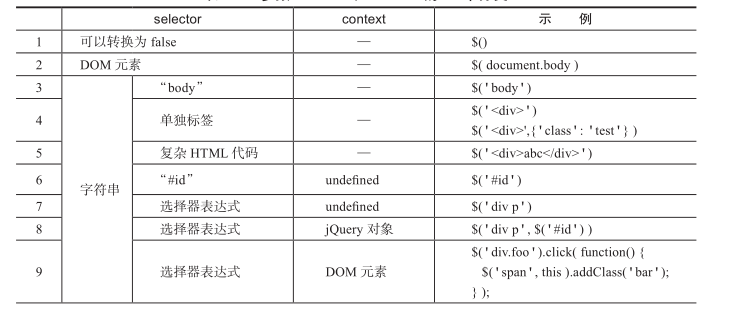
makeArray方法将类数组对象转换为数组对象。但是在代码内部还有更艰巨的任务就是把一些数组、类数组普通对象等不是jQuery的形式的转换成jQuery形式。这个方法在以后详细分析。到了这里jQuery构造函数init的参数就分析完了大类有7个细分呢有12个分类。用原书一张图总结一下吧


下面是整个init函数1.7.1的源码
 init: function( selector, context, rootjQuery ) {

         var match, elem, ret, doc;

         // Handle $(""), $(null), or $(undefined)

         if ( !selector ) {

             return this;

         }

         // Handle $(DOMElement)

         if ( selector.nodeType ) {

             this.context = this[0] = selector;

             this.length = 1;

             return this;

         }

         // The body element only exists once, optimize finding it

         if ( selector === "body" && !context && document.body ) {

             this.context = document;

             this[0] = document.body;

             this.selector = selector;

             this.length = 1;

             return this;

         }

         // Handle HTML strings

         if ( typeof selector === "string" ) {

             // Are we dealing with HTML string or an ID?

             if ( selector.charAt(0) === "<" && selector.charAt( selector.length - 1 ) === ">" && selector.length >= 3 ) {

                 // Assume that strings that start and end with <> are HTML and skip the regex check

                 match = [ null, selector, null ];

             } else {

                 match = quickExpr.exec( selector );

             }

             // Verify a match, and that no context was specified for #id

             if ( match && (match[1] || !context) ) {

                 // HANDLE: $(html) -> $(array)

                 if ( match[1] ) {

                     context = context instanceof jQuery ? context[0] : context;

                     doc = ( context ? context.ownerDocument || context : document );

                     // If a single string is passed in and it's a single tag

                     // just do a createElement and skip the rest

                     ret = rsingleTag.exec( selector );

                     if ( ret ) {

                         if ( jQuery.isPlainObject( context ) ) {

                             selector = [ document.createElement( ret[1] ) ];

                             jQuery.fn.attr.call( selector, context, true );

                         } else {

                             selector = [ doc.createElement( ret[1] ) ];

                         }

                     } else {

                         ret = jQuery.buildFragment( [ match[1] ], [ doc ] );

                         selector = ( ret.cacheable ? jQuery.clone(ret.fragment) : ret.fragment ).childNodes;

                     }

                     return jQuery.merge( this, selector );

                 // HANDLE: $("#id")

                 } else {

                     elem = document.getElementById( match[2] );

                     // Check parentNode to catch when Blackberry 4.6 returns

                     // nodes that are no longer in the document #6963

                     if ( elem && elem.parentNode ) {

                         // Handle the case where IE and Opera return items

                         // by name instead of ID

                         if ( elem.id !== match[2] ) {

                             return rootjQuery.find( selector );

                         }

                         // Otherwise, we inject the element directly into the jQuery object

                         this.length = 1;

                         this[0] = elem;

                     }

                     this.context = document;

                     this.selector = selector;

                     return this;

                 }

             // HANDLE: $(expr, $(...))

             } else if ( !context || context.jquery ) {

                 return ( context || rootjQuery ).find( selector );

             // HANDLE: $(expr, context)

             // (which is just equivalent to: $(context).find(expr)

             } else {

                 return this.constructor( context ).find( selector );

             }

         // HANDLE: $(function)

         // Shortcut for document ready

         } else if ( jQuery.isFunction( selector ) ) {

             return rootjQuery.ready( selector );

         }

         if ( selector.selector !== undefined ) {

             this.selector = selector.selector;

             this.context = selector.context;

         }

         return jQuery.makeArray( selector, this );

     },
jQuery构造函数init参数分析(三)的更多相关文章
- jQuery构造函数init参数分析(一)
在我的上一篇随笔里面分析了jQuery的构造函数,jQuery对象中有一个原型方法init才是是真正的构造函数,通过init的原型对象跟jQuery的原型对象保持引用关系使得init的实例可以正常调用 ...
- jQuery构造函数init参数分析(二)
接着上一篇随笔讨论. 如果selector是其他字符串情况就比较多了比较复杂了 // Handle HTML strings if ( typeof selector === "string ...
- 浅谈jQuery构造函数
$()函数到底做的什么 jQuery在前端领域路人皆知,对于一向喜欢玩js的博主来说,虽然能力有限,但是还是很喜欢研究他的做为.那么一个简单的美元符号$与一对常见的()括号,jQuery底层到底做了哪 ...
- jQuery学习笔记之jQuery.fn.init()的参数分析
这篇文章主要介绍了jQuery.fn.init()的参数分析,需要的朋友可以参考下 从return new jQuery.fn.init( selector, context, rootjQuer ...
- jQuery分析(3) - jQuery.fn.init
1.前言 上一篇jQuery分析(2)中了解了jQuery库的骨架实现原理,这就好比摇滚音乐,摇滚音乐不是某种音乐他就像一个音乐盒子,里面包含了各种不同的摇滚风格(山地.朋克.乡村.流行.硬摇.金属. ...
- jQuery 源码分析 8: 回头看jQuery的构造器(jQuery.fn,jQury.prototype,jQuery.fn.init.prototype的分析)
在第一篇jQuery源码分析中,简单分析了jQuery对象的构造过程,里面提到了jQuery.fn.jQuery.prototype.jQuery.fn.init.prototype的关系. 从代码中 ...
- 四.jQuery源码解析之jQuery.fn.init()的参数解析
从return new jQuery.fn.init( selector, context, rootjQuery )中可以看出 参数selector和context是来自我们在调用jQuery方法时 ...
- Android中自定义样式与View的构造函数中的第三个参数defStyle的意义
零.序 一.自定义Style 二.在XML中为属性声明属性值 1. 在layout中定义属性 2. 设置Style 3. 通过Theme指定 三.在运行时获取属性值 1. View的第三个构造函数的第 ...
- jQuery构造函数分析
在我的上一篇文章里面 阐述了jQuery的大致框架,知道了所有代码都是写在了一个自调用匿名函数里面,并且传入了window对象,源码是这样的: (function( window, undefined ...
随机推荐
- Spring学习总结(六)——Spring整合MyBatis完整示例
为了梳理前面学习的内容<Spring整合MyBatis(Maven+MySQL)一>与<Spring整合MyBatis(Maven+MySQL)二>,做一个完整的示例完成一个简 ...
- 可视化(番外篇)——在Eclipse RCP中玩转OpenGL
最近在看有关Eclipse RCP方面的东西,鉴于Gephi是使用opengl作为绘图引擎,所以,萌生了在Eclipse RCP下添加画布,使用opengl绘图的想法,网上有博文详细介绍这方面的内容, ...
- SQL Server中参数化SQL写法遇到parameter sniff ,导致不合理执行计划重用的一种解决方案
parameter sniff问题是重用其他参数生成的执行计划,导致当前参数采用该执行计划非最优化的现象.想必熟悉数据的同学都应该知道,产生parameter sniff最典型的问题就是使用了参数化的 ...
- Android自动化测试之Monkeyrunner学习笔记(一)
Android自动化测试之Monkeyrunner学习笔记(一) 因项目需要,开始研究Android自动化测试方法,对其中的一些工具.方法和框架做了一些简单的整理,其中包括Monkey.Monkeyr ...
- Microsoft Azure News(1) 新的数据中心Japan East, Japan West and Brazil South
<Windows Azure Platform 系列文章目录> 微软官方博客今天表示,微软宣布将在日本东部(埼玉县)和日本西部(大阪)提供Windows Azure服务.就在最近,微软为W ...
- PLT:说说Evaluation strategy
Brief 在学习方法/函数时,我们总会接触到 按值传值 和 引用传值 两个概念.像C#是按值传值,但参数列表添加了ref/out后则是引用传值,但奇怪的事出现了 namespace Foo{ cla ...
- easyui-datagrid自动合并行
1.目标 1.1表格初始化完成后,已经自动合并好需要合并的行: 1.2当点击字段排序后,重新进行合并: 2.实现 2.1 引入插件 /** * author ____′↘夏悸 * create dat ...
- iOS阶段学习第15天笔记(NSArray与NSMutableArray 数组)
iOS学习(OC语言)知识点整理 一.OC中的数组 1)数组:也是一个对象,数组中存放的是对象的地址,可以存放任意类型对象的地址,只能是对象不能是具体的数值,数组是有序的, 可以存放重复的元 ...
- C# Redis使用之StackExchange
第1章 安装 在.NET平台使用Redis需要做如下准备工作: 创建一个新的Visual Studio应用或者打开一个已经存在的Visual Studio应用. 打开NuGet程序包 搜索并添加S ...
- 【转】PHP 5.3 5.4 5.5 5.6特性
前两天,PHP5.6已经发布了.恐怕我们很多人都停留在5.2时代吧. PHP5.3 (2009-2012) PHP5.3 算是一个非常大的更新,新增了大量新特征,同时也做了一些不向下兼容的修改. 弃用 ...