
记录一次线上实施snmp
公司要实施一个部级的项目,我们公司的提供的产品要对接下客户的一个平台监控平台,该监控平台使用snmp,我们公司的产品不支持snmp,所以由我负责在现网实施snmp,记录这次现网
一、生成编译规则
1、下载snmp的tar包
2、解压
[root@localhost admin]# tar -zxvf net-snmp-5.7.1.tar.gz
drwxr-xr-x 18  1274  1274    4096 Sep 28  2011 net-snmp-5.7.1

-rw-rw-r--  1 admin admin 6110619 Jul 23 14:37 net-snmp-5.7.1.tar.gz
3、生成编译规则
./configure --prefix=/usr/local/snmp --with-mib-modules='ucd-snmp/diskio ip-mib/ipv4InterfaceTable'
4、点击回车

5、点击回车:1、default version of-snmp-version:
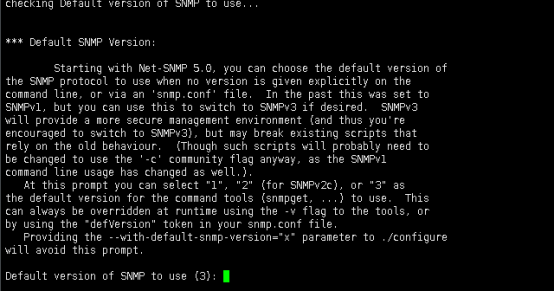
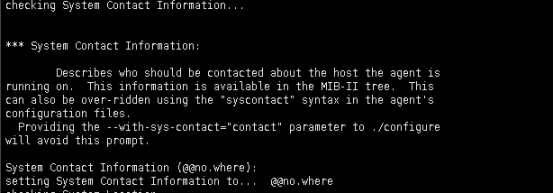
6、点击回车:Systemcontact information(配置该设备的联系人):
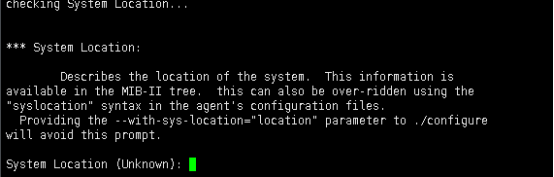
7、点击回车:System location (该设备的位置):
8、点击回车:Location to write logfile (日志文件位置): /var/log/snmpd.log

9、点击回车:Location to Write persistent(数据存储目录): /var/net-snmp

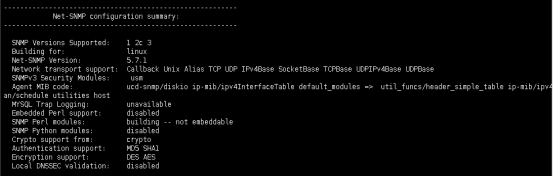
10、编译规则生成完成
二、安装
1、编译并安装
make && make install
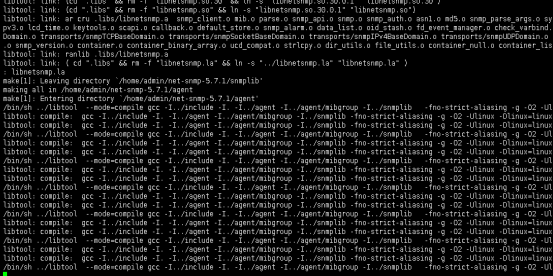
2、编译安装完成
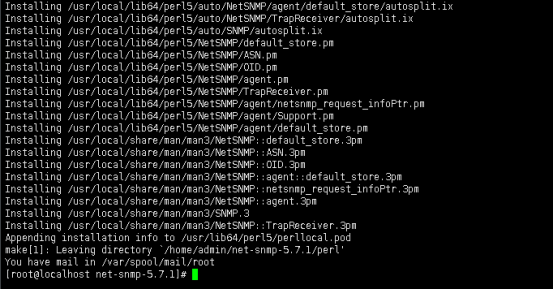
3、在snmp安装目录创建配置文件路径
[root@localhost snmp]# mkdir etc

[root@localhost snmp]# pwd

/usr/local/snmp

[root@localhost snmp]# ll

total 8

drwxr-xr-x 2 root root 4096 Jul 23 14:57 bin

drwxr-xr-x 2 root root    6 Jul 23 14:59 etc

drwxr-xr-x 3 root root   21 Jul 23 14:57 include

drwxr-xr-x 2 root root 4096 Jul 23 14:57 lib

drwxr-xr-x 2 root root   34 Jul 23 14:57 sbin

drwxr-xr-x 4 root root   27 Jul 23 14:57 share
4、在源文件目录下拷贝配置文件到安装的etc目录
[root@localhost snmp]# scp /home/admin/net-snmp-5.7.1/EXAMPLE.conf /usr/local/snmp/etc/snmpd.conf

You have mail in /var/spool/mail/root

[root@localhost snmp]# ll

total 8

drwxr-xr-x 2 root root 4096 Jul 23 14:57 bin

drwxr-xr-x 2 root root   23 Jul 23 15:01 etc

drwxr-xr-x 3 root root   21 Jul 23 14:57 include

drwxr-xr-x 2 root root 4096 Jul 23 14:57 lib

drwxr-xr-x 2 root root   34 Jul 23 14:57 sbin

drwxr-xr-x 4 root root   27 Jul 23 14:57 share

[root@localhost snmp]# cd etc/
[root@localhost etc]# ll

total 8

-rw-r--r-- 1 root root 6993 Jul 23 15:01 snmpd.conf
5、编辑配置文件
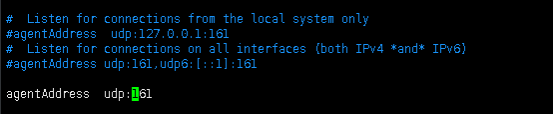
a、配置允许网络访问,按照截图中的方式修改
b、选择v2c SNMP协议的版本,按照截图中的方式修改
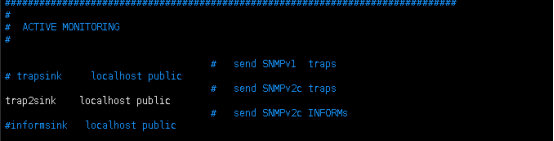
c、设置访问权限,按照截图中的方式修改
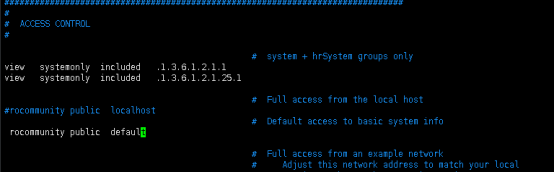
三、启动和调试
1、启动
[root@localhost etc]# /usr/local/snmp/sbin/snmpd -c /usr/local/snmp/etc/snmpd.conf
2、检查进程和端口
[root@localhost etc]# netstat -an |grep -w 161

[root@localhost etc]# ps auxf |grep -w snmp

root     26440  0.0  0.0 112708   980 pts/0    S+   15:10   0:00  |                   \_ grep --color=auto -w snmp
[root@localhost etc]# ps auxf |grep snmp

root      3327  0.0  0.0 112708   956 pts/0    S+   15:11   0:00  |                   \_ grep --color=auto snmp

root      1696  0.2  0.0 187880  5164 ?        S    15:11   0:00 /usr/local/snmp/sbin/snmpd -c /usr/local/snmp/etc/snmpd.conf

[root@localhost etc]# netstat -anu |grep 161

udp        0      0 0.0.0.0:161             0.0.0.0:*

[root@localhost etc]#
3、添加到开机启动项中
4、添加防火墙规则
firewall-cmd --permanent --direct --add-rule ipv4 filter INPUT 1 -s 10.87.18.101/24 -p udp --dport=161 -j ACCEPT
[root@localhost init.d]# firewall-cmd --reload
5、测试

6、附上oid
CPU Statistics

Load

1 minute Load: .1.3.6.1.4.1.2021.10.1.3.1

5 minute Load: .1.3.6.1.4.1.2021.10.1.3.2

15 minute Load: .1.3.6.1.4.1.2021.10.1.3.3

CPU

percentage of user CPU time: .1.3.6.1.4.1.2021.11.9.0

raw user cpu time: .1.3.6.1.4.1.2021.11.50.0

percentages of system CPU time: .1.3.6.1.4.1.2021.11.10.0

raw system cpu time: .1.3.6.1.4.1.2021.11.52.0

percentages of idle CPU time: .1.3.6.1.4.1.2021.11.11.0

raw idle cpu time: .1.3.6.1.4.1.2021.11.53.0

raw nice cpu time: .1.3.6.1.4.1.2021.11.51.0

Memory Statistics

Total Swap Size: .1.3.6.1.4.1.2021.4.3.0

Available Swap Space: .1.3.6.1.4.1.2021.4.4.0

Total RAM in machine: .1.3.6.1.4.1.2021.4.5.0

Total RAM used: .1.3.6.1.4.1.2021.4.6.0

Total RAM Free: .1.3.6.1.4.1.2021.4.11.0

Total RAM Shared: .1.3.6.1.4.1.2021.4.13.0

Total RAM Buffered: .1.3.6.1.4.1.2021.4.14.0

Total Cached Memory: .1.3.6.1.4.1.2021.4.15.0 Disk Statistics

The snmpd.conf needs to be edited. Add the following (assuming a machine with a single '/' partition):

disk / 100000 (or)

includeAllDisks 10% for all partitions and disks

The OIDs are as follows

Path where the disk is mounted: .1.3.6.1.4.1.2021.9.1.2.1

Path of the device for the partition: .1.3.6.1.4.1.2021.9.1.3.1

Total size of the disk / partion (kBytes): .1.3.6.1.4.1.2021.9.1.6.1

Available space on the disk: .1.3.6.1.4.1.2021.9.1.7.1

Used space on the disk: .1.3.6.1.4.1.2021.9.1.8.1

Percentage of space used on disk: .1.3.6.1.4.1.2021.9.1.9.1

Percentage of inodes used on disk: .1.3.6.1.4.1.2021.9.1.10.1

System Uptime: .1.3.6.1.2.1.1.3.0

Examples

These Commands you need to run on the SNMP server

Get available disk space for / on the target host

# Snmpget-v 1-c "community" target_name_or_ip .1.3.6.1.4.1.2021.9.1.7.1

this will return available disk space for the first entry in the 'disk' section of snmpd.conf; replace 1 with n for the nth entry

Get the 1-minute system load on the target host

# Snmpget-v 1-c "community" target_name_or_ip .1.3.6.1.4.1.2021.10.1.3.1

Get the 5-minute system load on the target host

# Snmpget-v 1-c "community" target_name_or_ip .1.3.6.1.4.1.2021.10.1.3.2

Get the 15-minute system load on the target host

# Snmpget-v 1-c "community" target_name_or_ip .1.3.6.1.4.1.2021.10.1.3.3

Get amount of available swap space on the target host

# Snmpget-v 1-c "community" target_name_or_ip .1.3.6.1.4.1.2021.4.4.
记录一次线上实施snmp的更多相关文章
- Linux(2)---记录一次线上服务 CPU 100%的排查过程
Linux(2)---记录一次线上服务 CPU 100%的排查过程 当时产生CPU飙升接近100%的原因是因为项目中的websocket时时断开又重连导致CPU飙升接近100% .如何排查的呢 是通过 ...
- 记录一次线上bug
记录一次线上bug,总的来说就是弱网和重复点击.特殊值校验的问题. 测试场景一: 在3g网络或者使页面加载速度需要两秒左右的时候,输入学号,提交学生的缴费项目,提交完一个 学生的缴费后, ...
- 原创 记录一次线上Mysql慢查询问题排查过程
背景 前段时间收到运维反馈,线上Mysql数据库凌晨时候出现慢查询的报警,并把原始sql发了过来: --去除了业务含义的sql update test_user set a=1 where id=1; ...
- 【JVM】记录一次线上SWAP偏高告警的故障分析过程
近期遇到一个堆外内存导致swap飙高的问题,这类问题比较罕见,因此将整个排查过程记录下来了 现象描述 最近1周线上服务器时不时出现swap报警(swap超过内存10%时触发报警,内存是4G,因此swa ...
- 记录一次线上yarn RM频繁切换的故障
周末一大早被报警惊醒,rm频繁切换 急急忙忙排查 看到两处错误日志 错误信息1 ervation <memory:0, vCores:0> 2019-12-21 11:51:57,781 ...
- 记录一次线上OOM调优经历
现状: k8s 的一个pod 有32G内存,每秒产生新对象的峰值在900Mb ---- 1900Mb(根据jstat计算Eden区获得) . 修改之前的参数 就一个命令行参数是-Xmx31g; 我修改 ...
- 【Java分享客栈】从线上环境摘取了四个代码优化记录分享给大家
前言 因为前段时间新项目已经完成目前趋于稳定,所以最近我被分配到了公司的运维组,负责维护另外一个项目,包含处理客户反馈的日常问题,以及对系统缺陷进行优化. 经过了接近两周的维护,除了日常问题以外,代码 ...
- 记录一次linux线上服务器被黑事件
1.原因:本来在家正常休息了,我们放在上海托管机房的线上服务器突然蹦了远程不了,服务启动不了,然后让上海机房重启了一次,还是直接挂了,一直到我远程上才行. 2.现象:远程服务器发现出现这类信息 Hi, ...
- 一次线上Mysql数据库崩溃事故的记录
文章简介 工作这几年,技术栈在不断更新,项目管理心得也增加了不少,写代码的速度也在提升,感觉很欣慰,毕竟是在一直进步,但是过程中也有许许多多的曲折,也踩过了数不尽的坑坑洼洼,从一个连百度都不知道用的萌 ...
随机推荐
- Django---进阶16<XSS攻击>
目录 后台管理 添加文章 kindeditor富文本编辑器 编辑器上传图片 修改用户头像 bbs项目总结 后台管理 """ 当一个文件夹下文件比较多的时候 你还可以继续创 ...
- PowerJob 的故事开始:“玩够了,才有精力写开源啊!”
本文适合有 Java 基础知识的人群 作者:HelloGitHub-Salieri HelloGitHub 推出的<讲解开源项目>系列.经过几番的努力和沟通,终于邀请到分布式任务调度与计算 ...
- REST,RPC和GraphQL应用场景,WebHooks、WebSocket、HTTP Streaming应用场景。
一.请求--响应API. 请求--响应类的API的典型做法是,通过基于HTTP的Web服务器暴露一个/套接口.API定义一些端点,客户端发送数据的请求到这些端点,Web服务器处理这些请求,然后返回响应 ...
- day17 作业
目录 一.编写函数(函数执行的时间用time.sleep(n)模拟) 二.编写装饰器,为函数加上统计时间的功能 三.编写装饰器,为函数加上认证的功能 四.编写装饰器,为多个函数加上认证的功能(用户的账 ...
- Canonical通过Flutter启用Linux桌面应用程序支持
子标题:Ubuntu团队为所有Linux发行版上的Flutter应用程序制作了一个新的基于GTK +的主机. 此文翻译自:https://medium.com/flutter/announcing-f ...
- 数据可视化之DAX篇(二十一)连接表的几个DAX函数,一次全掌握
https://zhuanlan.zhihu.com/p/67015995 编写DAX代码进行业务分析时,经常会用到表与表之间的连接计算,比如在之前的产品关联分析一文中(如何用Power BI分析产品 ...
- python之爬虫(十一) 实例爬取上海高级人民法院网开庭公告数据
通过前面的文章已经学习了基本的爬虫知识,通过这个例子进行一下练习,毕竟前面文章的知识点只是一个 一个单独的散知识点,需要通过实际的例子进行融合 分析网站 其实爬虫最重要的是前面的分析网站,只有对要爬取 ...
- 深度学习趣谈:什么是迁移学习?(附带Tensorflow代码实现)
一.迁移学习的概念 什么是迁移学习呢?迁移学习可以由下面的这张图来表示: 这张图最左边表示了迁移学习也就是把已经训练好的模型和权重直接纳入到新的数据集当中进行训练,但是我们只改变之前模型的分类器(全连 ...
- 03 AMD规范的基础使用详解
AMD模块规范 1.1 AMD规范说明 AMD规范专门用来实现浏览器端的模块化,并且模块的加载是异步的:引入一个第三方的require.js脚本用来解析AMD规范编写的模块 1.2 基本语法 使用de ...
- [redis] -- 为什么那么快
1 完全基于内存 2 数据结构简单,对数据操作也简单 3 只有单线程,避免了不必要的上下文切换,也不存在竞态,不存在多进程或多线程导致的切换而消耗CPU,不用开了各种锁的问题 4 使用多路IO复用模型 ...