
apache https 双向证书生成
Https分单向认证和双向认证
单向认证表现形式:网站URL链接为https://xxx.com格式
双向认证表现心事:网站URL链接为https://xxx.com格式,并且需要客户端浏览器安装一个client.pfx格式的证书文件才能打开网址
需求说明:假设需要实现本地环境newdefend.com域名双向认证。单向认证,直接忽略本文中黄色底的操作步骤即可。也不需要生成和安装客户端证书:client.pfx
参考网址:http://blog.163.com/hr_php/blog/static/235853083201503011428985/
安装环境:Wampserver集成安装包;window7系统。
第一步:cmd进入apache的bin目录。eg:D:\wamp5.3\bin\apache\Apache2.2.21\bin
指明配置文件
|
1
|
set OPENSSL_CONF=../conf/openssl.cnf |
配置参考(不需要手动去改这个文件的内容,这里只是贴出代码,提供参考。下面建立文件夹,主要就是从这里看的):

dir        = ./demoCA # Where everything is kept

certs        = $dir/certs        # Where the issued certs are kept

crl_dir        = $dir/crl        # Where the issued crl are kept

database    = $dir/index.txt    # database index file.

# several ctificates with same subject.

new_certs_dir    = $dir/newcerts        # default place for new certs.

certificate    = $dir/cacert.pem     # The CA certificate

serial        = $dir/serial         # The current serial number

crlnumber    = $dir/crlnumber    # the current crl number

# must be commented out to leave a V1 CRL

crl        = $dir/crl.pem         # The current CRL

private_key    = $dir/private/cakey.pem# The private key

RANDFILE    = $dir/private/.rand    # private random number file
新建一些目录和文件。创建目录的原因:由于配置文件openssl.cnf里面会用到这些目录或者文件,继续下面的命令时,会操作这些目录和文件
在apache/bin目录创建如下文件夹

demoCA/newcerts/

demoCA/private/

创建如下文件

demoCA/index.txt

demoCA/serial   //内容写 2个(0-9,A-F)的字符即可,如1A
第二步:生成需要的私钥key
|
1
2
3
|
openssl genrsa > root.key // 生成根密钥openssl genrsa > server.key // 生成服务端密钥openssl genrsa > client.key // 生成客户端密钥 |
第三步:生成自签名的根证书
|
1
|
openssl req -x509 -new -key root.key >root.crt |
说明:-new 生成一个新的文件 -key filename 参数filename指明我们的私有密钥文件名 -x509 将产生自签名的证书,一般用来测试用,或者自己玩下做个Root CA.证书的扩展在config文件里面指定
第四步:生成服务端,客户端签名请求文件。
|
1
2
|
openssl req -new -key server.key -out server.csropenssl req -new -key client.key -out client.csr //此处可能会有错误信息,请看下面的错误解决方案 |
说明:按提示输入一系列的参数 CN - SH - SH - '' - '' - 域名/IP 。除了Common Name处填写域名/ip需要特别注意,国家地区填写“中国CN上海SH”。其余地方可以为空
Country Name (2 letter code) [AU]:CNISO国家代码(只支持两位字符)

State or Province Name (full name) [Some-State]:ZJ所在省份

Locality Name (eg, city) []:HZ所在城市

Organization Name (eg, company):THS公司名称

Organizational Unit Name (eg, section) []:THS组织名称

Common Name (eg, YOUR name) []:localhost(申请证书的域名或IP地址)

Email Address []:laoniangke@xxx.com管理员邮箱

Please enter the following 'extra' attributes

to be sent with your certificate request

A challenge password []:交换密钥

An optional company name []:
提示:错误解决方案(出现在最开始创建的那堆文件里)
//错误提示
Sign the certificate? [y/n]:y

failed to update database

TXT_DB error number 2

//产生的原因是:

This thing happens when certificates share common data. You cannot have two

certificates that look otherwise the same.

//解决办法

//方法一:

    修改demoCA下 index.txt.attr

    unique_subject = yes  为  unique_subject = no

//方法二:

    删除demoCA下的index.txt里面的内容

//方法三:

    将 common name设置成不同的
第五步:使用根证书为服务端及客户端签名
openssl ca -in server.csr -cert root.crt -keyfile root.key -out server.crt

openssl ca -in client.csr -cert root.crt -keyfile root.key -out client.crt
说明:-in filename要签名的csr文件 -cert CA本身的证书文件名 -keyfile CA自己的私有密钥文件 -out filename签名后的证书文件名。证书的细节也会给写进去
第六步:配置openssl.cnf,创建文件路径,生成所需cakey.pem(CA的key文件)和cacert.pem(CA的crt文件)文件
openssl genrsa -out demoCA/private/cakey.pem 2048

openssl req -out demoCA/cacert.pem   -x509 -new -key demoCA/private/cakey.pem
第七步:客户端证书转成pfx格式,生成后,直接双击文件安装到浏览器 (重要)
openssl pkcs12 -export -clcerts -in client.crt -inkey client.key -out client.pfx
注意:这个时候填写的密码,是客户安装证书的时候,需要填写的密码。密码可以为空
到此openssl相关的证书文件就结束了
第八步:配置apache目录httpd.conf文件
LoadModule ssl_module modules/mod_ssl.so

Include conf/extra/httpd-ssl.conf
第九步:配置httpd-ssl.conf。说明:如果apache下有多个站点,还要配置http-vhosts.conf
SSLSessionCache        "shmcb:D:/wamp/bin/apache/apache2.4.9/logs/ssl_scache(512000)"

<VirtualHost _default_:443>

    DocumentRoot "D:/wamp/www"

    ServerName  localhost

    SSLEngine on

    SSLCertificateFile "D:/wamp/bin/apache/apache2.4.9/bin/server.crt"

    SSLCertificateKeyFile "D:/wamp/bin/apache/apache2.4.9/bin/server.key"

   # 如果是单向认证,下面3行注释掉

    SSLCACertificateFile "D:/wamp/bin/apache/apache2.4.9/bin/root.crt"

    SSLVerifyClient require

    SSLVerifyDepth  1


    CustomLog "D:/wamp/bin/apache/apache2.4.9/logs/ssl_request.log" \

              "%t %h %{SSL_PROTOCOL}x %{SSL_CIPHER}x \"%r\" %b"

</VirtualHost>
http-vhosts.conf
<VirtualHost *:80>

    DocumentRoot "D:/wamp/www/www.newdefend.com"

    ServerName my.newdefend.com

</VirtualHost>

<VirtualHost *:443>

    DocumentRoot "D:/wamp/www/www.newdefend.com"

    ServerName my.newdefend.com

    ErrorLog "D:/wamp/www/logs/error.log"

    TransferLog "D:/wamp/www/logs/access.log"

    SSLEngine on

    SSLCertificateFile "D:/wamp/bin/apache/apache2.4.9/bin/server.crt"

    SSLCertificateKeyFile "D:/wamp/bin/apache/apache2.4.9/bin/server.key"

    # 如果是单向认证,下面3行注释掉

    SSLCACertificateFile "D:/wamp/bin/apache/apache2.4.9/bin/root.crt"

    SSLVerifyClient require

    SSLVerifyDepth  10

</VirtualHost>
重启wamp
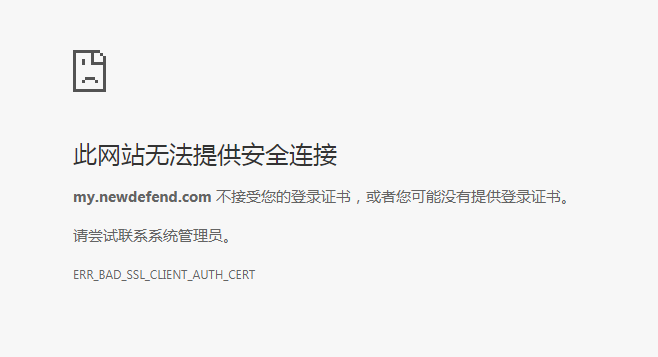
双向认证效果展示:
下图表示:client.pfx文件还没有在电脑上安装,请双击安装
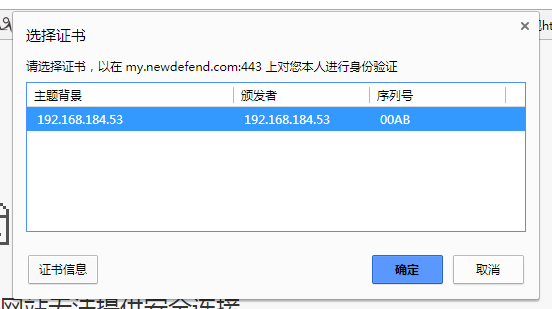
下图表示:client.pfx已经安装,客户端打开时,需要选择证书
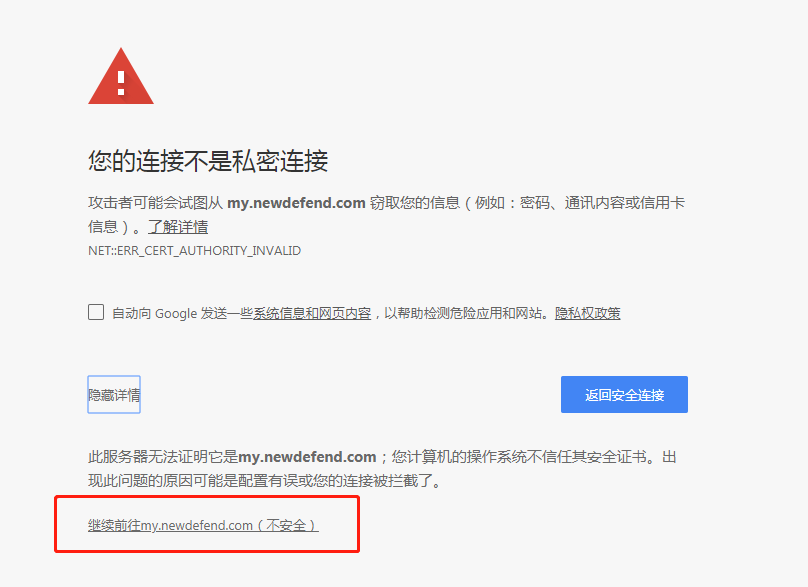
下图表示:成功,直接访问即可。因为是本地生成的证书,所以不被浏览器信任。真是上线的时候,找个权威的CA机构就不会出现这种情况了
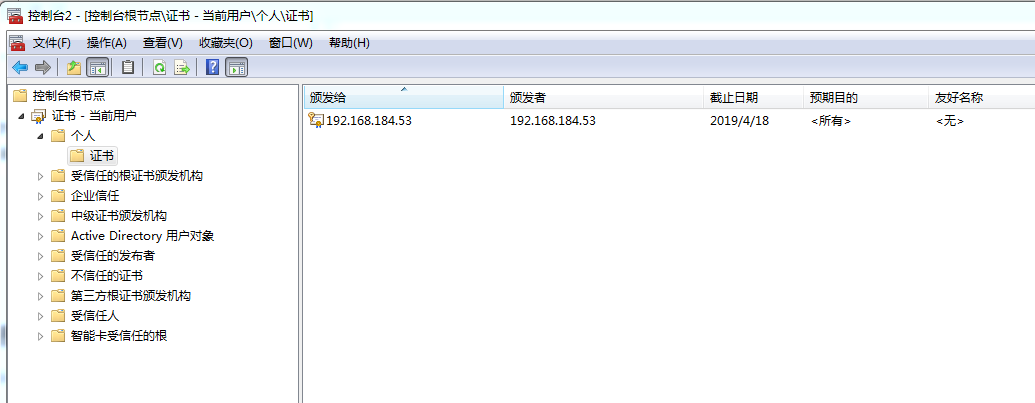
最后:查看电脑上已经安装了那些证书,请参考:https://jingyan.baidu.com/article/c275f6baf8622ae33d756794.html
效果展示如下:192.168.184.53就是我自己生成的证书
#以上内容为转载内容 为windows 的部署方式下面内容是经过测试 linux 环境下配置的
cd /etc/pki/CA

mkdir newcerts

mkdir private

touch index.txt

echo 1B > serial

openssl genrsa > root.key

openssl genrsa > server.key

openssl genrsa > client.key

openssl req -x509 -new -key root.key >root.crt

openssl req -new -key server.key -out server.csr

openssl req -new -key client.key -out client.csr

#生成证书填写相关信息必须要填写 国家及城市和主机名,否则会不成功缺少必要字段

openssl ca -in server.csr -cert root.crt -keyfile root.key -out server.crt

openssl ca -in client.csr -cert root.crt -keyfile root.key -out client.crt

 openssl ca -in client.csr -cert root.crt -keyfile root.key -out client.crt

 openssl genrsa -out private/cakey.pem 2048

 openssl req -out cacert.pem   -x509 -new -key private/cakey.pem

 #生成客户端密钥

 openssl pkcs12 -export -clcerts -in client.crt -inkey client.key -out client.pfx

#apache 配置

vim /etc/conf/httpd.conf

#增加,如没有mod_ssl.so 模块需要安装  yum -y install mod_ssl

IncludeOptional conf.d/*.conf

LoadModule ssl_module         modules/mod_ssl.so

#httpd-ssl 配置

SSLVerifyClient require

SSLVerifyDepth  1

SSLCACertificateFile /etc/pki/CA/root.crt

SSLCertificateKeyFile /etc/pki/CA/server.key

SSLCertificateKeyFile /etc/pki/CA/server.key
#注意mac用户安装数字证书必须有密码,否则安装失败,解决方法是生成一个有密码 的证书
openssl pkcs12 -export -clcerts -in client.crt -inkey client.key -out client.pfx
apache https 双向证书生成的更多相关文章
- mkcert本地 HTTPS 加密证书生成工具
软件介绍: mkcert 是一个生成本地 HTTPS 加密证书的工具,一个命令就可以生成证书,不需要任何配置. 下载地址: https://github.com/FiloSottile/mkcert/ ...
- apache https 双向认证
Https分单向认证和双向认证 单向认证表现形式:网站URL链接为https://xxx.com格式 双向认证表现心事:网站URL链接为https://xxx.com格式,并且需要客户端浏览器安装一个 ...
- linux下安装Apache(https) 服务器证书安装配置指南
一. 安装准备 1. 安装Openssl 要使Apache支持SSL,需要首先安装Openssl支持.推荐下载安装openssl-0.9.8k.tar.gz 下载Openssl:http: ...
- https 双向证书
一:服务器端 1.首先需要配置站点的SSl证书 打开Nginx安装目录下conf目录中的nginx.conf文件 找到 # HTTPS server # #server { ...
- Https:证书生成 .p12 .keyStore 和 .truststore文件理解
当我们需要SSL证书时,可以自动生成SSL证书,但是每个系统都申请一次证书会比较麻烦,所以用到了如下几个文件格式: .p12(PKCS #12) 我们的每一个证书都可以生成一个.p12文件,这个文 ...
- [svc]HTTPS证书生成原理和部署细节
参考: http://www.barretlee.com/blog/2015/10/05/how-to-build-a-https-server/ 今天摸索了下 HTTPS 的证书生成,以及它在 Ng ...
- nodejs之https双向认证
说在前面 之前我们总结了https的相关知识,如果不懂可以看我另一篇文章:白话理解https 有关证书生成可以参考:自签证书生成 正题 今天使用nodejs来实现https双向认证 话不多说,直接进入 ...
- Tomcat服务器配置https双向认证(使用keytool生成证书)
一,HTTPS原理 1,HTTP.HTTPS.SSL.TLS介绍与相互关系 (1)HTTP:平时浏览网页时候使用的一种协议.HTTP协议传输的数据都是未加密的(明文),因此使用HTTP协议传输隐私 ...
- linux:Nginx+https双向验证(数字安全证书)
本文由邓亚运提供 Nginx+https双向验证 说明: 要想实现nginx的https,nginx必须启用http_ssl模块:在编译时加上--with-http_ssl_module参数就ok.另 ...
随机推荐
- 【项目实践】一文带你搞定Spring Security + JWT
以项目驱动学习,以实践检验真知 前言 关于认证和授权,R之前已经写了两篇文章: [项目实践]在用安全框架前,我想先让你手撸一个登陆认证 [项目实践]一文带你搞定页面权限.按钮权限以及数据权限 在这两篇 ...
- web元素定位和appium-app元素定位
一.web页面元素定位工具介绍 1.打开google浏览器,按F12进入开发者模式,如下图: 2.用鼠标点击下图红色框中的箭头--然后鼠标移动到web页面的元素上(此处为百度框),会自动定位到对应的h ...
- Python使用Protobuf&&如何赋值&&如何正反序列化
前言 使用protobuf主要是两个步骤,序列化和反序列化. 关于Proto有哪些数据类型,然后如何编写,此处就不赘述了,百度一下有很多. 此文主要是总结,python使用protobuf的过程,如何 ...
- TCP/IP协议栈在Linux内核中的运行时序分析
网络程序设计调研报告 TCP/IP协议栈在Linux内核中的运行时序分析 姓名:柴浩宇 学号:SA20225105 班级:软设1班 2021年1月 调研要求 在深入理解Linux内核任务调度(中断处理 ...
- 通过trace分析优化其如何选择执行计划
mysql5.6提供了对sql的跟踪trace,通过trace文件能够进一步了解为什么优化其选择执行计划a而不选b执行计划,帮助我们更好的理解优化其的行为. 使用方式:首先打开trace,设置格式为j ...
- 串口使用Pipeline时诡异的ReadOnlySequence问题
借鉴之前的Pipeline的操作方式,现在目标是给串口读取操作也使用上Pipeline.稍微改造一下,以下代码可以直接运行. 协议为使用连续的4个0XFF作为结尾,没有头标志.数据总长为68位定长. ...
- 【Linux】linux中用vim来比较文件内容不同
1. 使用vim的比较模式打开两个文件: vim -d file1 file2 或 vimdiff file1 file2 2. 如果已经打开了文件file1,再打开另一个文件file2进行比较: : ...
- 映泰主板H100系列安装win7的各种坑
自100系列主板发布以来,windows7好像就被遗弃一样,原因就在于安装win7的时候,会出现USB设备无法使用导致无法安装的问题.主要在于Win7系统没有整合USB的XHCI驱动,而100系列芯片 ...
- VB基础总结
前段时间用VB写了一个简单窗口小应用,久了不碰VB,都忘了,下面用思维导图简单总结了一些基础的东西,方便以后快速查阅.
- Pulsar 社区周报|2021-01-11~2021-01-17
Pulsar 周报由 StreamNative 翻译整理.原文内容来自 StreamNative 官网 Pulsar 周报模块. 本期编辑:Tango@StreamNative. 关于 Apache ...