
Hbuilder获取手机当前地理位置的天气
前言:前面一段时间,公司项目里有一个需求 是获取当前手机地理位置当天的天气情况 将实时天气信息提供给客户。在网上搜索资料时候,发现知识很零碎,自己实现以后整理出来,方便于各位的学习与使用。
一、获取当前手机地理位置。
Html5提供接口plus.geolocation.getCurrentPosition(function(position) {
}, function(error) {});
可以用console.log(JSON.stringify(position));查看一下返回的内容,从中提取自己实际项目中需要地理信息。
在获取天气时候 为了优化用户体验。是需要做指引性质的操作的。例如 :百度地图的提示,是否开启手机精准定位等等。即需要检测当前用户是否已经开启了定位,如果没有,指引用户完成手机定位开启。如果已经开启手机定位则跳过。
                        var that = this;

                        if(plus.os.name == "Android") {

                            var context = plus.android.importClass("android.content.Context");

                            var locationManager = plus.android.importClass("android.location.LocationManager");

                            var mainplus = plus.android.runtimeMainActivity();

                            var mainSvr = mainplus.getSystemService(context.LOCATION_SERVICE);

                            var androidIsOpen = mainSvr.isProviderEnabled(locationManager.GPS_PROVIDER);

                            if(!androidIsOpen) {

                                mui.confirm('开启位置服务,获取精准定位', ' ', ['去开启', '取消'], function(result) {

                                    if(result.index == 0) {

                                        var Intent = plus.android.importClass('android.content.Intent');

                                        var Settings = plus.android.importClass('android.provider.Settings');

                                        var intent = new Intent(Settings.ACTION_LOCATION_SOURCE_SETTINGS); //可设置表中所有Action字段

                                        mainplus.startActivity(intent);

                                    }

                                }, 'div')

                            }

                            that.IsOpenGps = androidIsOpen;

                        } else {

                            var CLLocationManager = plus.ios.import("CLLocationManager");

                            var authorizationStatus = CLLocationManager.authorizationStatus();

                            switch(authorizationStatus) {

                                case 0:

                                    mui.toast("未被授权位置信息,无法展示天气");

                                    /// User has not yet made a choice with regards to this application未作出位置信息权限选择

                                    break;

                                case 1:

                                    mui.toast("未被授权位置信息,无法展示天气");

                                    // This application is not authorized to use location services.  Due

                                    // to active restrictions on location services, the user cannot change

                                    // this status, and may not have personally denied authorization未被授权位置信息

                                    break;

                                case 2:

                                    mui.toast("未被授权位置信息,无法展示天气");

                                    // User has explicitly denied authorization for this application, or

                                    // location services are disabled in Settings.明确拒绝授权位置信息

                                    break;

                                case 3:

                                    //mui.toast("已经获取位置信息");

                                    // User has granted authorization to use their location at any time,

                                    // including monitoring for regions, visits, or significant location changes.

                                    break;

                                case 4:

                                    //mui.toast("已经获取位置信息");

                                    // User has granted authorization to use their location only when your app

                                    // is visible to them (it will be made visible to them if you continue to

                                    // receive location updates while in the background).  Authorization to use

                                    // launch APIs has not been granted.

                                    break;

                                case 5:

                                    mui.toast("未被授权位置信息,无法展示天气");

                                    // This value is deprecated, but was equivalent to the new -Always value.值被弃用

                                    break;

                                    defalut:

                                        break;

                            }

                            var isIosOpen = false;

                            if(authorizationStatus == 3 || authorizationStatus == 4) {

                                isIosOpen = true;

                            }

                            that.IsOpenGps = isIosOpen;
二、根据获取的地理信息获取当天的天气情况。
这里采用了百度天气的接口。
1.首先需要百度地图的API Key 申请地址:http://lbsyun.baidu.com/apiconsole/key
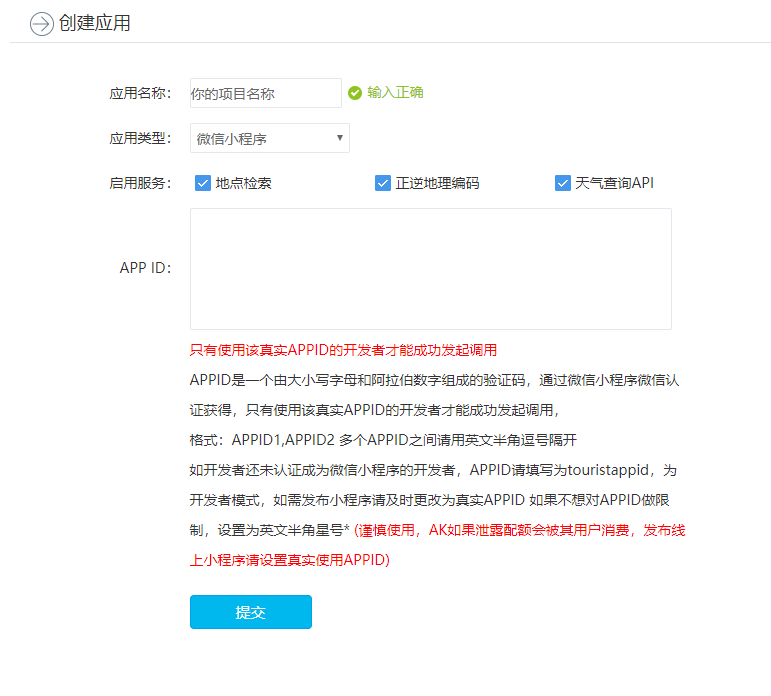
2.创建应用 选择微信小程序的应用类型。
3.获取天气JSON
var baidukey = "voUKGmLO***********Ia1qQc";//申请的AK

//LatandLong  经纬度

    function GetTodayWeather(city, LatandLong,callback) {

        var jsonUrl = "http://api.map.baidu.com/telematics/v3/weather?location=" + LatandLong + "&output=json&ak=" + baidukey + "";

        mui.ajax(jsonUrl, {

            dataType: 'json',

            type: 'get',

            //timeout: 10000,

            success: function(data) {

                if(data.status == "success") {

                    callback(data.results[0])

                }

            },

            error: function(xhr, type, error) {

                //console.log(type)

                mui.toast("网络异常,请稍候再试");

            }

        });

    }
4.天气JSON
{

    error: 0,

    status: "success",

    date: "2013-07-17",

    results: [

        {

            currentCity: "北京市",

            weather_data: [

                {

                    date: "今天(周三)",

                    dayPictureUrl: "http://api.map.baidu.com/images/weather/day/duoyun.png",

                    nightPictureUrl: "http://api.map.baidu.com/images/weather/night/duoyun.png",

                    weather: "多云",

                    wind: "微风",

                    temperature: "23℃"

                },

                {

                    date: "明天(周四)",

                    dayPictureUrl: "http://api.map.baidu.com/images/weather/day/leizhenyu.png",

                    nightPictureUrl: "http://api.map.baidu.com/images/weather/night/zhongyu.png",

                    weather: "雷阵雨转中雨",

                    wind: "微风",

                    temperature: "29~22℃"

                },

                {

                    date: "后天(周五)",

                    dayPictureUrl: "http://api.map.baidu.com/images/weather/day/yin.png",

                    nightPictureUrl: "http://api.map.baidu.com/images/weather/night/duoyun.png",

                    weather: "阴转多云",

                    wind: "微风",

                    temperature: "31~23℃"

                },

                {

                    date: "大后天(周六)",

                    dayPictureUrl: "http://api.map.baidu.com/images/weather/day/duoyun.png",

                    nightPictureUrl: "http://api.map.baidu.com/images/weather/night/duoyun.png",

                    weather: "多云",

                    wind: "微风",

                    temperature: "31~24℃"

                }

            ]

        },

        {

            currentCity: "合肥市",

            weather_data: [

                {

                    date: "今天(周三)",

                    dayPictureUrl: "http://api.map.baidu.com/images/weather/day/duoyun.png",

                    nightPictureUrl: "http://api.map.baidu.com/images/weather/night/duoyun.png",

                    weather: "多云",

                    wind: "东风3-4级",

                    temperature: "27℃"

                },

                {

                    date: "明天(周四)",

                    dayPictureUrl: "http://api.map.baidu.com/images/weather/day/duoyun.png",

                    nightPictureUrl: "http://api.map.baidu.com/images/weather/night/duoyun.png",

                    weather: "多云",

                    wind: "东北风3-4级",

                    temperature: "35~27℃"

                },

                {

                    date: "后天(周五)",

                    dayPictureUrl: "http://api.map.baidu.com/images/weather/day/duoyun.png",

                    nightPictureUrl: "http://api.map.baidu.com/images/weather/night/duoyun.png",

                    weather: "多云",

                    wind: "南风",

                    temperature: "35~27℃"

                },

                {

                    date: "大后天(周六)",

                    dayPictureUrl: "http://api.map.baidu.com/images/weather/day/duoyun.png",

                    nightPictureUrl: "http://api.map.baidu.com/images/weather/night/duoyun.png",

                    weather: "多云",

                    wind: "东风",

                    temperature: "34~27℃"

                }

            ]

        }

    ]

}
5.在回调函数里面解析自己需要的数据即可。
结语:希望对正在用Hbuilder 开发APP的你 有所帮助。
Hbuilder获取手机当前地理位置的天气的更多相关文章
- 用百度SDK获取地理位置和天气信息
以下实现通过百度SDK获取地理位置和天气信息,请參考title=android-locsdk/guide/v5-0">百度开发文档 1. 在相关下载最新的库文件.将so文件的压缩文件解 ...
- iOS 整理笔记 获取手机信息(UIDevice、NSBundle、NSLocale)
/* iOS的APP的应用开发的过程中,有时为了bug跟踪或者获取用反馈的需要自动收集用户设备.系统信息.应用信息等等,这些信息方便开发者诊断问题,当然这些信息是用户的非隐私信息,是通过开发ap ...
- 使用navigator.geolocation来获取用户的地理位置信息
使用navigator.geolocation来获取用户的地理位置信息 W3C 中新添加了一个名为 Geolocation的 API 规范,Geoloaction API的作用就是通过浏览器获取用户的 ...
- iOS学习笔记(十三)——获取手机信息(UIDevice、NSBundle、NSLocale)
iOS的APP的应用开发的过程中,有时为了bug跟踪或者获取用反馈的需要自动收集用户设备.系统信息.应用信息等等,这些信息方便开发者诊断问题,当然这些信息是用户的非隐私信息,是通过开发api可以获取到 ...
- ios 获取手机信息(UIDevice、NSBundle、NSLocale)
iOS的SDK中提供了UIDevice.NSBundle,NSLocale. UIDevice UIDevice提供了多种属性.类函数及状态通知,帮助我们全方位了解设备状况. 从检測电池 ...
- 如何获取用户的地理位置-浏览器地理位置(Geolocation)API 简介
如何获取用户的地理位置-浏览器地理位置(Geolocation)API 简介 一.总结 一句话总结:Geolocation API(地理位置应用程序接口)提供了一个可以准确知道浏览器用户当前位置的方法 ...
- 利用RxJava获取手机已安装的App的图片、应用名称和版本号
先上效果图: 获取手机已安装的App列表利用Android系统API就可以办到,这里为什么要引入RxJava?现在我们假设一下有下面几个需求: 1.我们不需要所有的App,只需要用户安装的第三方App ...
- iOS获取手机型号,类似iphone 7这种 含swift和OC
获取手机设备信息,如name.model.version等,但如果想获取具体的手机型号,如iphone5.5s这种,就需要如下这种 swift: func phonetype () -> Str ...
- UI Automator Viewer获取手机镜像时报错
使用UI Automator Viewer获取手机镜像时报错,具体信息如下: Error while obtaining UI hierarchy XML file: com.android.ddml ...
随机推荐
- 是时候扔掉 Postman 了,Apifox 不香吗!
偶然间发现这款测试工具Apifox,暂时还没有想好该把它叫接口测试工具还是辅助开发工具.但是,给我感觉,就是很好用,而且后面还有很多开发的功能是我很期待的. 根据官方给出的简单描述,它能做的事就是: ...
- 【Android】Android开发启动app弹出一张广告图片,Dialog可以查看大图,查看某个图片功能
作者:程序员小冰,GitHub主页:https://github.com/QQ986945193 新浪微博:http://weibo.com/mcxiaobing 首先给大家看一下我们今天这个最终实现 ...
- 【转】Android DrawingCache
转自:http://magiclen.org/android-drawingcache/ 日期: 2014 年 8 月 27 日 | 作者: Magic Len 開發Android的時候,在許多情況下 ...
- Java反射(一)
什么是反射? 在程序的运行过程中,可以动态的创建对象. 反射的基石是什么? 字节码对象是反射的基石.字节码对象:Java类文件通过javac进行编译后生成的xxx.class文件,此文件由jvm加载至 ...
- 异步(async)编程
思考:为什么要使用异步编程? 我们先看看同步方法和异步方法之前在程序中执行的逻辑: 1. 同步方法 static void Main(string[] args) { Console.WriteLin ...
- 购书网站前端实现(HTML+CSS+JavaScript)
购书+阅读静态网页设计与实现 一.主页设计HTML 1.效果展示及实现 2.完整代码 二.主页样式布局CSS 三.空间功能实现Javascript 主要功能 Javascript完整代码: 总结 购书 ...
- 在腾讯云云函数计算上部署.NET Core 3.1
云厂商(腾讯云.Azure等)提供了Serverless服务,借助于Serverless,开发人员可以更加专注于代码的开发,减少运维的成本.腾讯云的函数计算提供了很多运行库,对.NET的支持需要通过c ...
- 第一次编程作业(My Own Score)
博客班级 https://edu.cnblogs.com/campus/fzzcxy/2018SE2 作业要求 https://edu.cnblogs.com/campus/fzzcxy/2018SE ...
- vue父子传值与非父子传值
大概梳理下传值的几种方式 一:父子组件传值 props方式 子组件对外暴露方法并向父组件传递由于触发方法导致的值的变化,父组件接收子组件传递来的值:子组件接收父组件传递来的值,并根据传递来的值在子组件 ...
- 修改mysql、sqlserver数据库默认用户,不允许为root、sa等
1.mysql cmd进入dos命令,输入mysql -u root -P 1202 -h localhost -p敲回车输入密码 use mysql; 修改用户名root为其他用户 update u ...