
微服务实战系列(七)-网关springcloud gateway
1. 场景描述
springcloud刚推出的时候用的是netflix全家桶,路由用的zuul,但是据说zull1.0在大数据量访问的时候存在较大性能问题,2.0就没集成到springcloud中了,springcloud推出了自己的路由-springcloud gateway,亲儿子,目前官网主推。
netfelix的zull路由:
        <dependency>

            <groupId>org.springframework.cloud</groupId>

            <artifactId>spring-cloud-starter-netflix-zuul</artifactId>

        </dependency>
2. 解决方案
2.1 新建springboot项目
在springcloud项目中,新建的项目全部是基于springboot的。
2.1.1 new->project
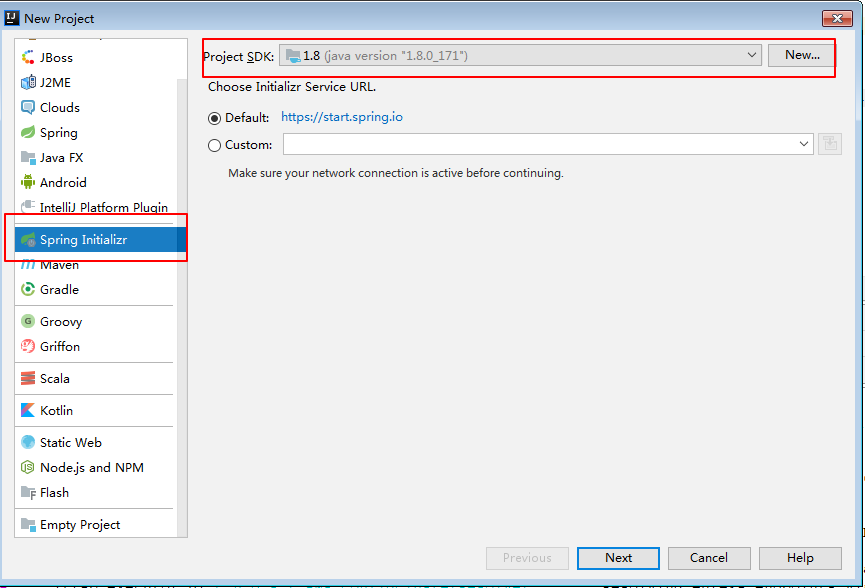
next->next 更改下项目名称。
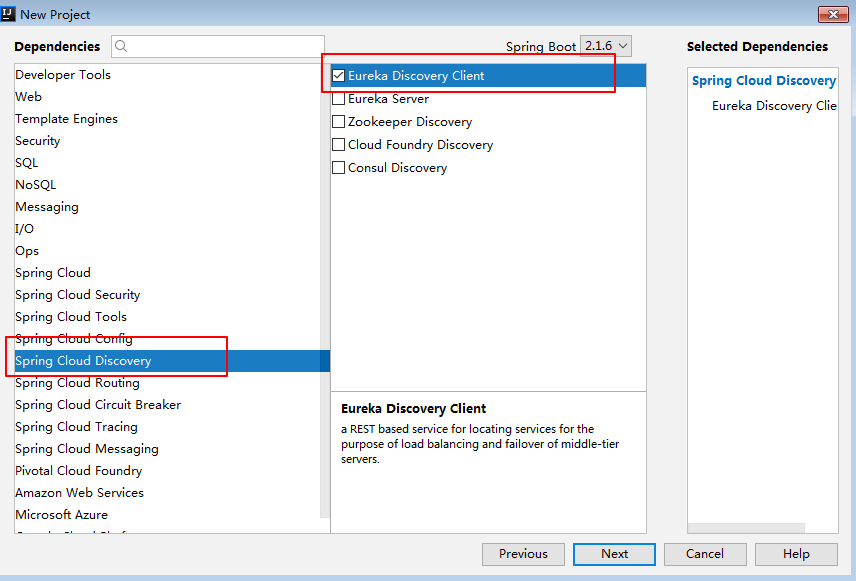
2.1.2 选择组件
(1)注册中心客户端
(2) 选择springcloud gateway
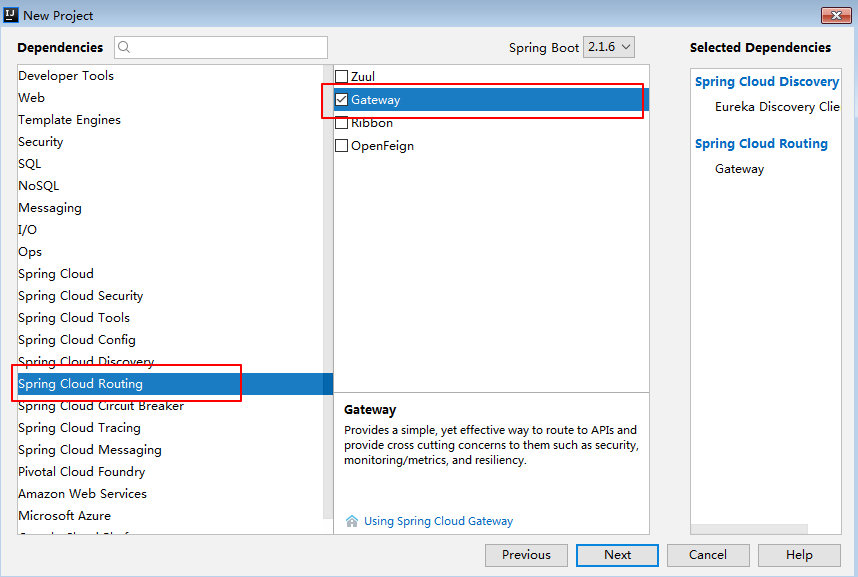
next->next, 完成。
2.2 类目录图
开始介绍springcloud-gateway,为了区分上一篇的关于zull的介绍,项目名称设置为springgate。
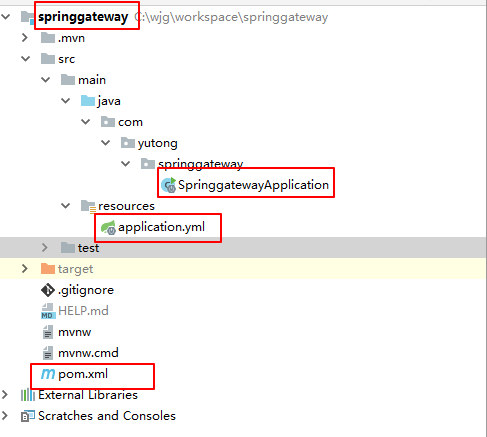
2.3 重点还是三个文件
2.3.1 pom.xml
<?xml version="1.0" encoding="UTF-8"?>

<project xmlns="http://maven.apache.org/POM/4.0.0" xmlns:xsi="http://www.w3.org/2001/XMLSchema-instance"

         xsi:schemaLocation="http://maven.apache.org/POM/4.0.0 http://maven.apache.org/xsd/maven-4.0.0.xsd">

    <modelVersion>4.0.0</modelVersion>

    <parent>

        <groupId>org.springframework.boot</groupId>

        <artifactId>spring-boot-starter-parent</artifactId>

        <version>2.1.5.RELEASE</version>

        <relativePath/> <!-- lookup parent from repository -->

    </parent>

    <groupId>com.yutong</groupId>

    <artifactId>springgateway</artifactId>

    <version>0.0.1-SNAPSHOT</version>

    <name>springgateway</name>

    <description>Demo project for Spring Boot</description>

    <properties>

        <java.version>1.8</java.version>

        <spring-cloud.version>Greenwich.SR1</spring-cloud.version>

    </properties>

    <dependencies>

        <dependency>

            <groupId>org.springframework.cloud</groupId>

            <artifactId>spring-cloud-starter-gateway</artifactId>

        </dependency>

        <dependency>

            <groupId>org.springframework.cloud</groupId>

            <artifactId>spring-cloud-starter-netflix-eureka-client</artifactId>

        </dependency>

        <dependency>

            <groupId>org.springframework.boot</groupId>

            <artifactId>spring-boot-starter-test</artifactId>

            <scope>test</scope>

        </dependency>

    </dependencies>

    <dependencyManagement>

        <dependencies>

            <dependency>

                <groupId>org.springframework.cloud</groupId>

                <artifactId>spring-cloud-dependencies</artifactId>

                <version>${spring-cloud.version}</version>

                <type>pom</type>

                <scope>import</scope>

            </dependency>

        </dependencies>

    </dependencyManagement>

    <build>

        <plugins>

            <plugin>

                <groupId>org.springframework.boot</groupId>

                <artifactId>spring-boot-maven-plugin</artifactId>

            </plugin>

        </plugins>

    </build>

</project>
说明,重点就两个starter:
(1)gateway,不同于zull,这个是直接位于spring-cloud下面,是springcloud的嫡系部队。
(2)注册中心客户端,不多说了
2.3.2 启动类application
package com.yutong.springgateway;

import org.springframework.beans.factory.annotation.Value;

import org.springframework.boot.SpringApplication;

import org.springframework.boot.autoconfigure.SpringBootApplication;

import org.springframework.cloud.gateway.route.RouteLocator;

import org.springframework.cloud.gateway.route.builder.RouteLocatorBuilder;

import org.springframework.context.annotation.Bean;

@SpringBootApplication

public class SpringgatewayApplication {

    @Value("${test.uri}")

    private String uri;

    @Bean

    public RouteLocator customRouteLocator(RouteLocatorBuilder builder) {

        return builder.routes()

                //basic proxy

                .route(r -> r.path("/**")

                        .uri(uri)

                ).build();

    }

    public static void main(String[] args) {

        SpringApplication.run(SpringgatewayApplication.class, args);

    }

}
说明:
(1)不同于路由zull,需要zull的标签,这里只需要springboot的启动标签@SpringBootApplication就可以了。
(2)增加@Bean标签,RouteLocator 是路由规则,这个稍微复杂点,示例中只做了简单配置,路由规则用于过滤控制路由等,可根据具体需求,参考路由规则API进行设置。
如果你觉得文章对你有些帮助,欢迎微信搜索「软件老王」第一时间阅读或交流!
2.3.3 配置类application.yml
test:

  uri: lb://client

spring:

  application:

    name: springgateway

  cloud:

    gateway:

      discovery:

        locator:

          lower-case-service-id: true

eureka:

  client:

    service-url:

      defaultZone: http://localhost:8761/eureka

server:

  port: 9000
说明:
(1)第一行的uri在启动类application中用到,指访问的客户端服务,client为注册中心客户端服务名称。
(2)defaultZone为注册中心地址。
(3) 为了区分介绍zull的项目,name设置为:springgateway
2.3.4 效果图
(1)注册中心
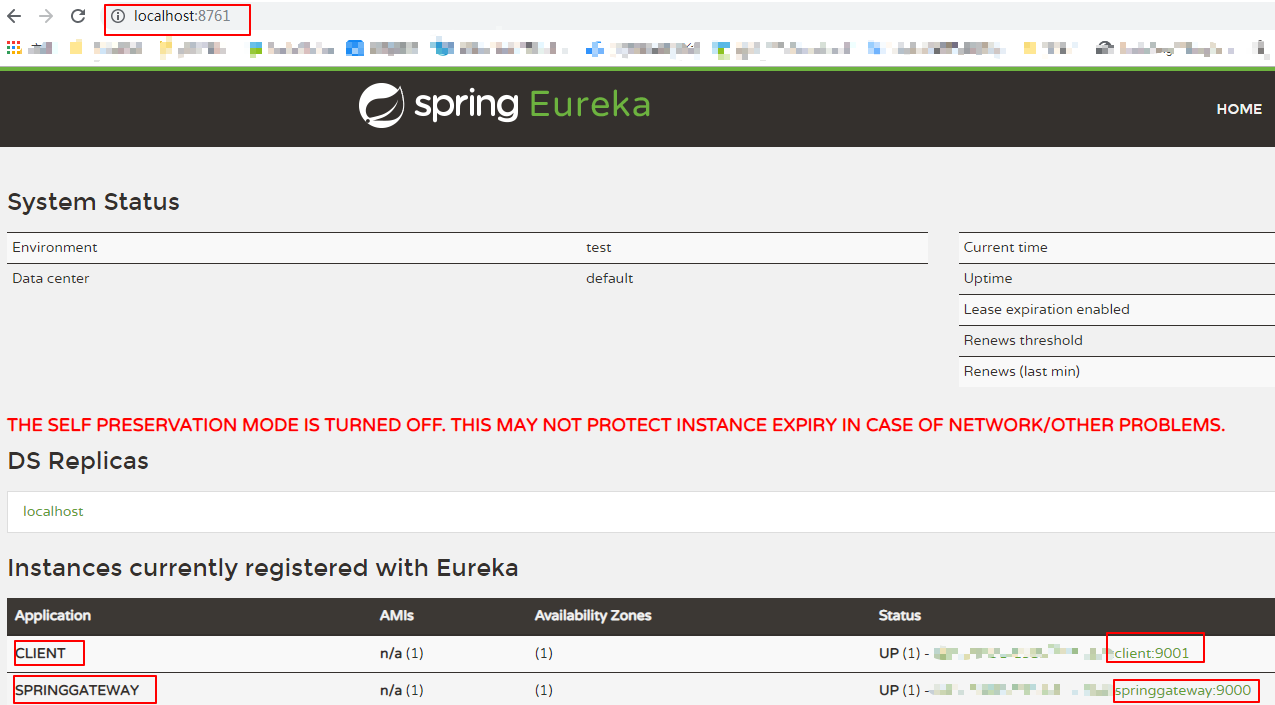
(2)路由springcloud gateway访问
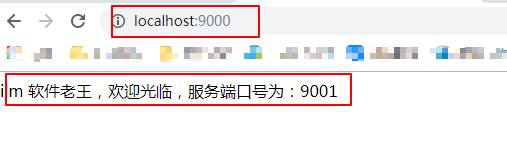
说明:
路由访问的时候不需要指定客户端名称client,因为在gateway启动类中已经指定过了。
更多知识请关注公众号:「软件老王」,IT技术与相关干货分享,回复关键字获取对应干货,java,送必看的10本“武功秘籍”;图片,送100多万张可商用高清图片;面试,送刚毕业就能月薪“20k”的java面试题,软考,送官方pdf书籍与通关论文,后续会不断更新,比如“工具”,“视频“等,已经在整理中。
微服务实战系列(七)-网关springcloud gateway的更多相关文章
- go-zero微服务实战系列(十一、大结局)
本篇是整个系列的最后一篇了,本来打算在系列的最后一两篇写一下关于k8s部署相关的内容,在构思的过程中觉得自己对k8s知识的掌握还很不足,在自己没有理解掌握的前提下我觉得也很难写出自己满意的文章,大家看 ...
- go-zero微服务实战系列(三、API定义和表结构设计)
前两篇文章分别介绍了本系列文章的背景以及根据业务职能对商城系统做了服务的拆分,其中每个服务又可分为如下三类: api服务 - BFF层,对外提供HTTP接口 rpc服务 - 内部依赖的微服务,实现单一 ...
- 微服务实战系列--Nginx官网发布(转)
这是Nginx官网写的一个系列,共七篇文章,如下 Introduction to Microservices (this article) Building Microservices: Using ...
- ASP.NET Core微服务实战系列
希望给你3-5分钟的碎片化学习,可能是坐地铁.等公交,积少成多,水滴石穿,码字辛苦,如果你吃了蛋觉得味道不错,希望点个赞,谢谢关注. 前言 这里记录的是个人奋斗和成长的地方,该篇只是一个系列目录和构想 ...
- Chris Richardson微服务实战系列
微服务实战(一):微服务架构的优势与不足 微服务实战(二):使用API Gateway 微服务实战(三):深入微服务架构的进程间通信 微服务实战(四):服务发现的可行方案以及实践案例 微服务实践(五) ...
- 微服务实战系列(八)-网关springcloud gateway自定义规则
1. 场景描述 先说明下项目中使用的网关是:springcloud gateway, 因需要给各个网关服务系统提供自定义配置路由规则,实时生效,不用重启网关(重启风险大),目前已实现:动态加载自定义路 ...
- 微服务实战系列(四)-注册中心springcloud alibaba nacos
1.场景描述 因要用到微服务,关于注册中心这块,与同事在技术原型上做了讨论,初步定的方案是使用:阿里巴巴的nacos+springcloud gateway,下面表格是同事整理的注册中心对比,以前用的 ...
- 微服务实战系列(六)-网关springcloud zuul
1. 场景描述 今天接着介绍springcloud,今天介绍下springcloud的路由网关-Zuul,外围系统或者用户通过网关访问服务,网关通过注册中心找到对应提供服务的客户端,网关也需要到注册中 ...
- Spring-cloud微服务实战【七】:服务熔断与降级hystrix
在之前的文章中,我们先后介绍了eureka,ribbon,feign,使用eureka集群的方式来保证注册中心的高可用,在eureka中使用ribbon进行负载均衡,使用feign接口替换手动编码 ...
随机推荐
- Java——注解
注解的产生背景以前,xml以低耦合的方式得到了广大开发者的青睐,xml在当时基本上能完成框架中的所有配置.但是随着项目越来越庞大,xml的配置也越来越复杂,维护性也随之降低,维护成本增高.于是就产生了 ...
- 面经手册 · 第7篇《ArrayList也这么多知识?一个指定位置插入就把谢飞机面晕了!》
作者:小傅哥 博客:https://bugstack.cn 沉淀.分享.成长,让自己和他人都能有所收获! 一.前言 数据结构是写好代码的基础! 说到数据结构基本包括:数组.链表.队列.红黑树等,但当你 ...
- SEO工程师考试题目
http://www.wocaoseo.com/thread-201-1-1.html SEO,全名Search Engine Optimization,其中文名字为'搜索引擎优化' .其英 ...
- Python字符串类型格式化之format方法
python字符串格式化一般使用 format() 方法,用法如下: <模板字符串>.format(<逗号分割的参数>) 其中模板字符串中可以由一个或多个 {} 组成的 槽 , ...
- Android开发之模拟器genymotion安装apk出现错误: Install_failed_invalid_URI
作者:程序员小冰,CSDN博客:http://blog.csdn.net/qq_21376985,转载请说明出处. install failed invalid uri Android开发之模拟器ge ...
- 用LR录制终于可以在我的电脑上顺利弹出IE了
之前在我的电脑上各种折腾,由于是win764bit+IE11,安装了LR11连最基本的录制都没能搞定.google之后各种的尝试,也没能解决问题.狠下心来把IE11换成了IE8,终于可以勉强使用了,没 ...
- C. News Distribution(并查集)
In some social network, there are nn users communicating with each other in mm groups of friends. Le ...
- Linux:apache安装
1.查询是否已安装 rpm -qa httpd 如果已安装,先卸载 发现有依赖包,先把依赖卸载 或者加上--nodeps参数,不考虑依赖,直接卸载 rpm -e --nodeps httpd-2. ...
- 【原创】解BUG-xenomai内核与linux内核时间子系统之间存在漂移
版权声明:本文为本文为博主原创文章,转载请注明出处.如有问题,欢迎指正.博客地址:https://www.cnblogs.com/wsg1100/ 一.问题起源 何为漂移?举个例子两颗32.768kH ...
- git仓库下拉和上传
git仓库比较方便,可以实现白天在公司写的代码,下班之前上传到git仓库,晚上在另一台电脑上直接下拉下来,其实感觉和开发用的svn差不多 在另一篇博客里面写到,需要先在git里面新增好仓库和成员之后, ...