
JedisCluster使用pipeline操作Redis Cluster最详细从0到1实现过程
公众号文章链接:https://mp.weixin.qq.com/s/6fMsG009RukLW954UUndbw
前言
2020年4月30日,Redis 6.0.0正式发布,标志着redis从此告别单线程。在此之前,在大数据生产环境中使用的是一个30个节点的Codis集群,SparkStreaming以此作为缓存,QPS高峰大概在2000w/s。
因为Codis不再更新迭代,于是在Redis 6.0.6版本发布的时候搭建了Redis Cluster,新的应用将不再使用Codis。之前连接Codis使用的Java客户端是Jedis,通过Pipeline方式批次执行命令,以此来提高效率。而Redis Cluster的客户端JedisCluster没有提供Pipeline方式,只能单条执行命令,于是开始考虑其他的Java客户端。
这里备选了两个客户端:lettuce和Redisson
pipeline原理
这里先说一下Jedis的pipeline的原理。通过pipeline对redis的所有操作命令,都会先放到一个List中,当pipeline直接执行或者通过jedis.close()调用sync()的时候,所有的命令都会一次性地发送到客户端,并且每个操作命令返回一个response,通过get来获取操作结果。
lettuce
lettuce提供了async异步方式来实现pipeline的功能,来测试一下是否可按批次处理命令。
测试代码:
public static void main(String[] args) throws Exception {

        RedisURI uri = RedisURI.builder()

                .withHost("47.102.xxx.xxx")

                .withPassword("Redis6.0.6".toCharArray())

                .withPort(10001)

                .build();

        RedisClusterClient client = RedisClusterClient.create(uri);

        StatefulRedisClusterConnection<String, String> connect = client.connect();

        RedisAdvancedClusterAsyncCommands<String, String> async = connect.async();

        // 断点1

        async.set("key1", "v1");

        Thread.sleep(1000 * 3);

        // 断点2

        async.set("key2", "v2");

        // 断点3

        async.flushCommands();

        Thread.sleep(1000 * 3);

        connect.close();

        client.shutdown();

}
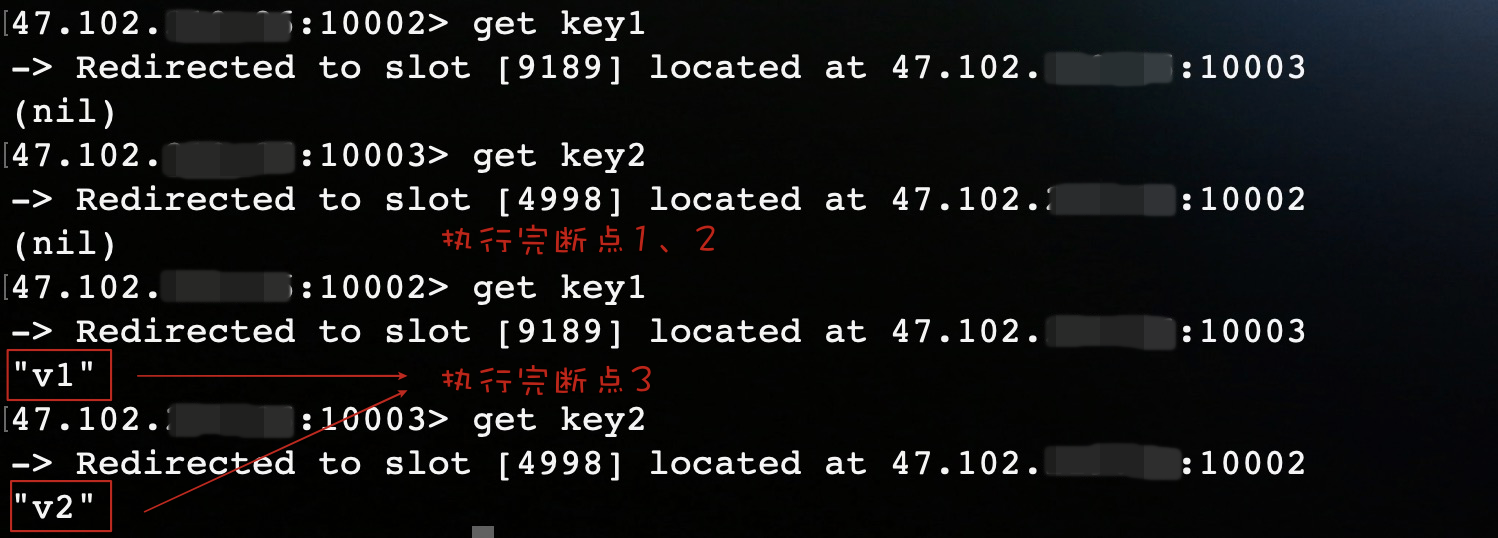
在程序中设置三个断点。如果是pipeline的话,只有执行完断点3,两条set命令才会执行。
运行结果:
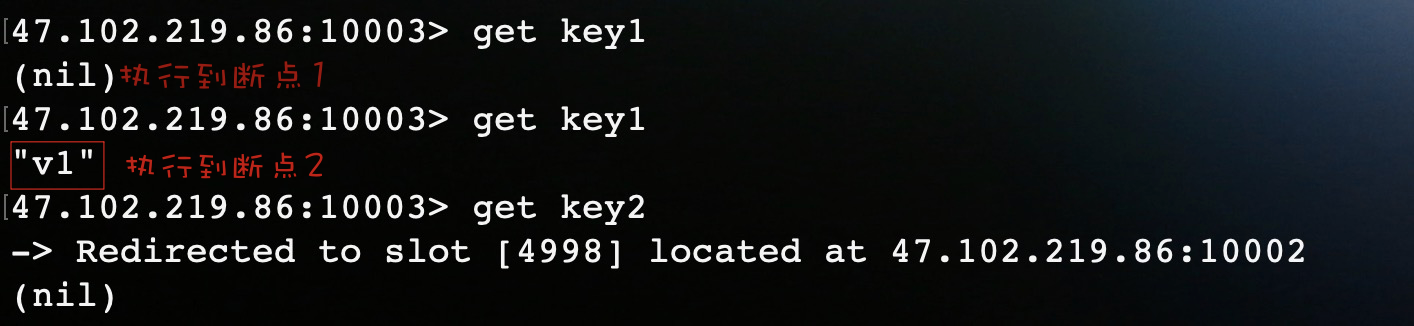
结果表明还未到flushCommands(),第一个set命令已经执行。到这你可能就会以为lettuce其实还是逐条命令执行,只是开启了异步请求模式。其实不然,在lettuce异步操作中,默认开启了命令自动刷新功能,所以给你的假象还是逐条执行,在此需要禁用自动刷新来开启pipeline功能。
在set()之前加上一行代码:
async.setAutoFlushCommands(false);
运行结果:
Redisson
redisson提供了batch来实现pipeline的功能。
测试代码:
 Config config = new Config();

 config.useClusterServers()

       .addNodeAddress("redis://47.102.219.86:10001")

       .setPassword("Redis@6.0.6");

 RedissonClient redisson = Redisson.create(config);

 RBatch batch = redisson.createBatch();

 String key = "test";

 for (int i = 1; i < 3; i++) {

      batch.getMap(key + i).putAsync(String.valueOf(i), String.valueOf(i));

	}

 // 打上断点

 batch.execute();

 redisson.shutdown();
这里我们在execute()处打上断点,debug运行程序。
运行结果:
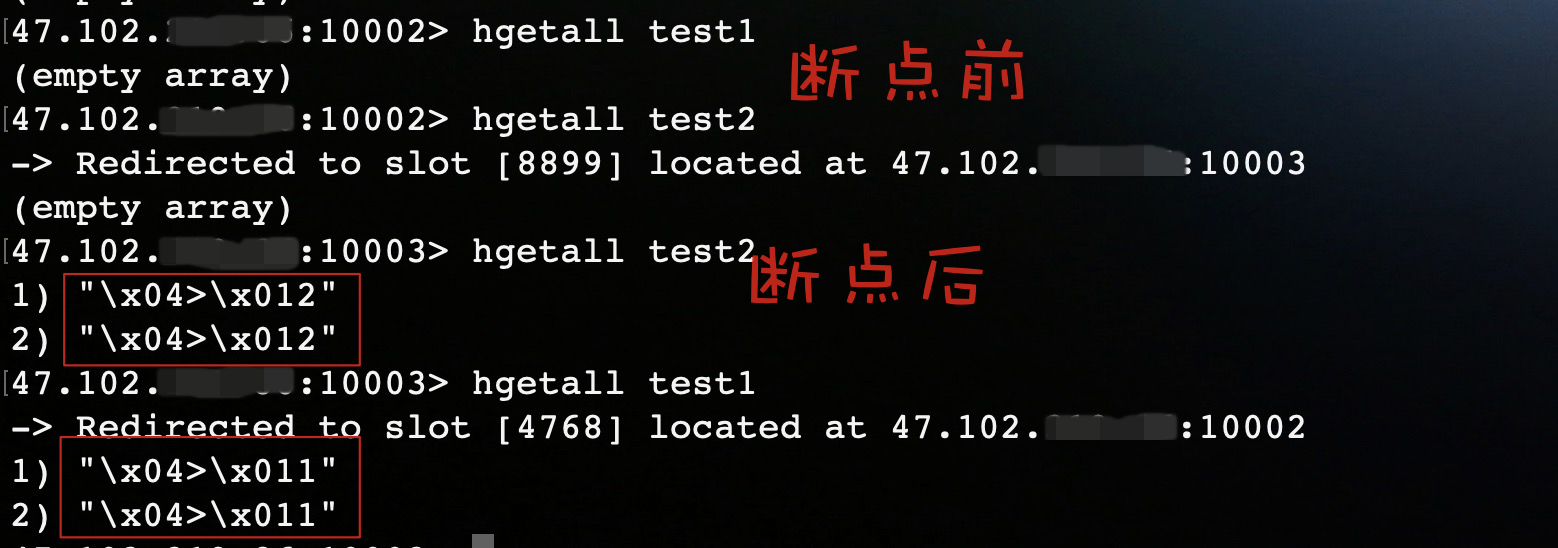
结果表明Redisson会将命令放在一个batch中,当执行execute()时,会将命令一次性发送到redis执行。虽然Redisson实现了pipeline的功能,但是我最后还是放弃了它。原因很简单,它的方法不像jedis和lettuce一样简单明了,和redis的操作命令相差太多,导致使用起来比较繁琐。
Jedis Cluster Pipeline
原因
开头也提到了,Jedis对Redis Cluster提供了JedisCluster客户端,但是没有Pipeline模式,那么JedisCluster为什么不支持Pipeline?
在redis中一共有16384个Slot,每个节点负责一部分Slot,当对Key进行操作时,redis会通过CRC16计算出key对应的Slot,将Key映射到Slot所在节点上执行操作。
因为不同Key映射的节点不同,所以JedisCluster需要持有Redis Cluster每个节点的连接才能执行操作,而Pipeline是面向于一个redis连接的执行模式,所以JedisCluster无法支持Pipeline。
那么我们自己有没有办法利用JedisCluster去封装一个具有Pipeline模式的客户端?
思路
刚刚提到,JedisCluster会持有Redis Cluster所有节点的连接。那么,如果我们可以获取到所有节点的连接,对每个节点的连接都开启Pipeline。首先计算出每个Key所在的Slot,再找到Slot对应节点,就可以将Key放到对应节点连接的Pipeline上,这样不就实现了集群版的Pipeline了么!
我们要做的工作就是找到对应关系,将每个Key分配到对应的节点连接中。
秉着不重复造轮子的观点,我们先看看JedisCluster是如何执行命令的?
JedisCluster
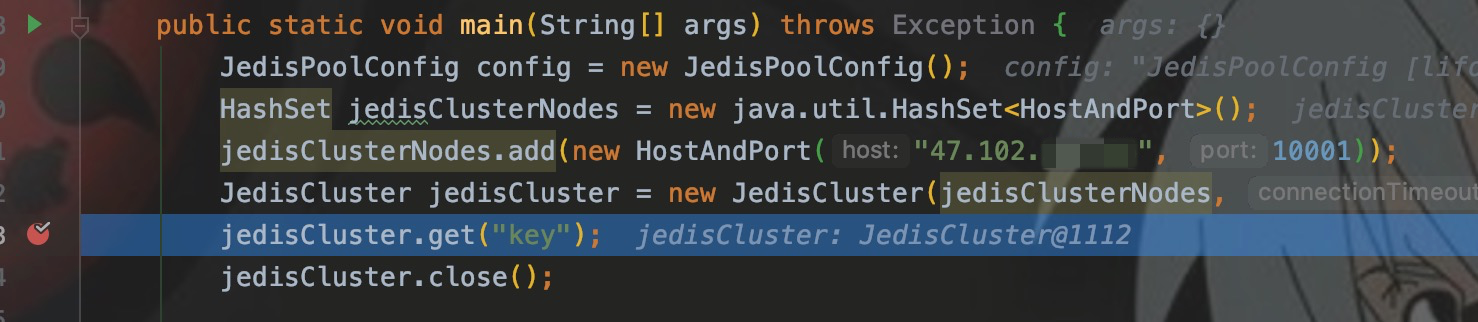
先写样例,并在get()处打断点。
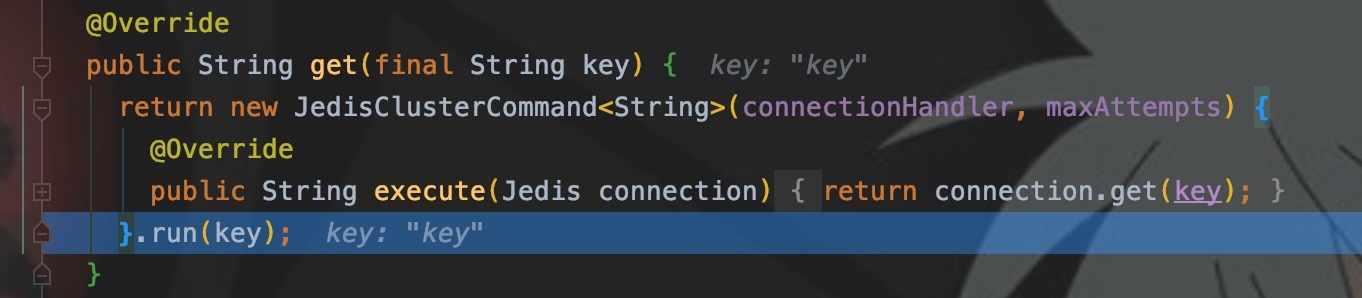
CRC16
进入run(),可以看到JedisClusterCRC16提供了getSlot()方法,可以计算出Key所在的Slot。

run()里面调用了runWithRetries(),这是核心方法之一,Step into
// 据方法调用参数删除了部分代码

private T runWithRetries(final int slot, int attempts, boolean tryRandomNode, JedisRedirectionException redirect) {

    Jedis connection = null;

    try {

    	// false

    	if (tryRandomNode) {

      		connection = connectionHandler.getConnection();

    	} else {

	    	// 重点:从方法名看,是根据slot来获取jedis连接!!

      		connection = connectionHandler.getConnectionFromSlot(slot);

    	}

      	return execute(connection);

    } catch (JedisNoReachableClusterNodeException jnrcne) {

      throw jnrcne;

    } catch (JedisConnectionException jce) {

      // 释放连接

      releaseConnection(connection);

      connection = null;

      if (attempts <= 1) {

      	// 刷新slots

        this.connectionHandler.renewSlotCache();

      }

      return runWithRetries(slot, attempts - 1, tryRandomNode, redirect);

    }

  }
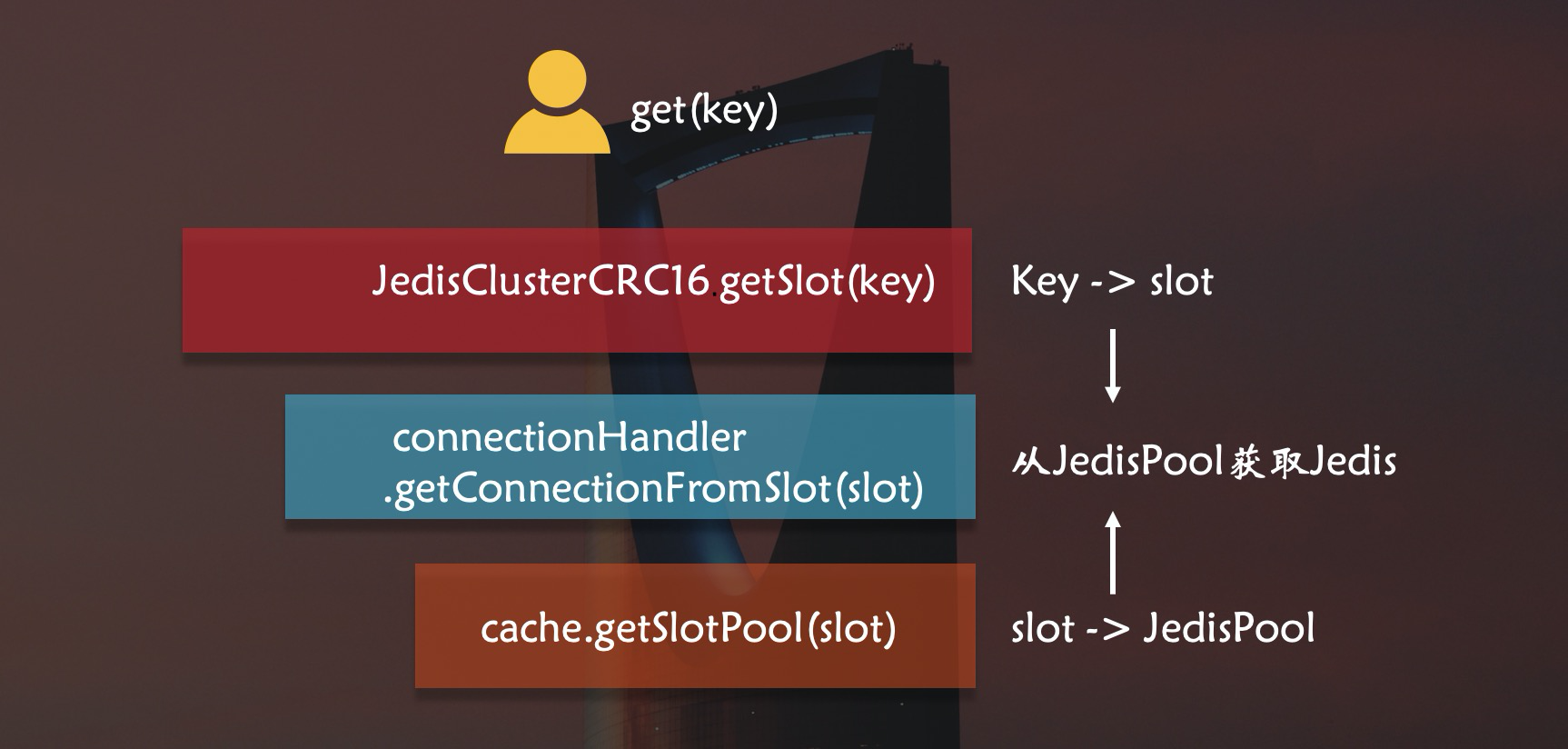
从runWithRetries()可以看到,JedisCluster通过调用getConnectionFromSlot(slot)来获取jedis连接,这里实现了Slot和Jedis的关系。
那么connectionHandler为什么可以提供redis连接?
connectionHandler
查看connectionHandler变量信息
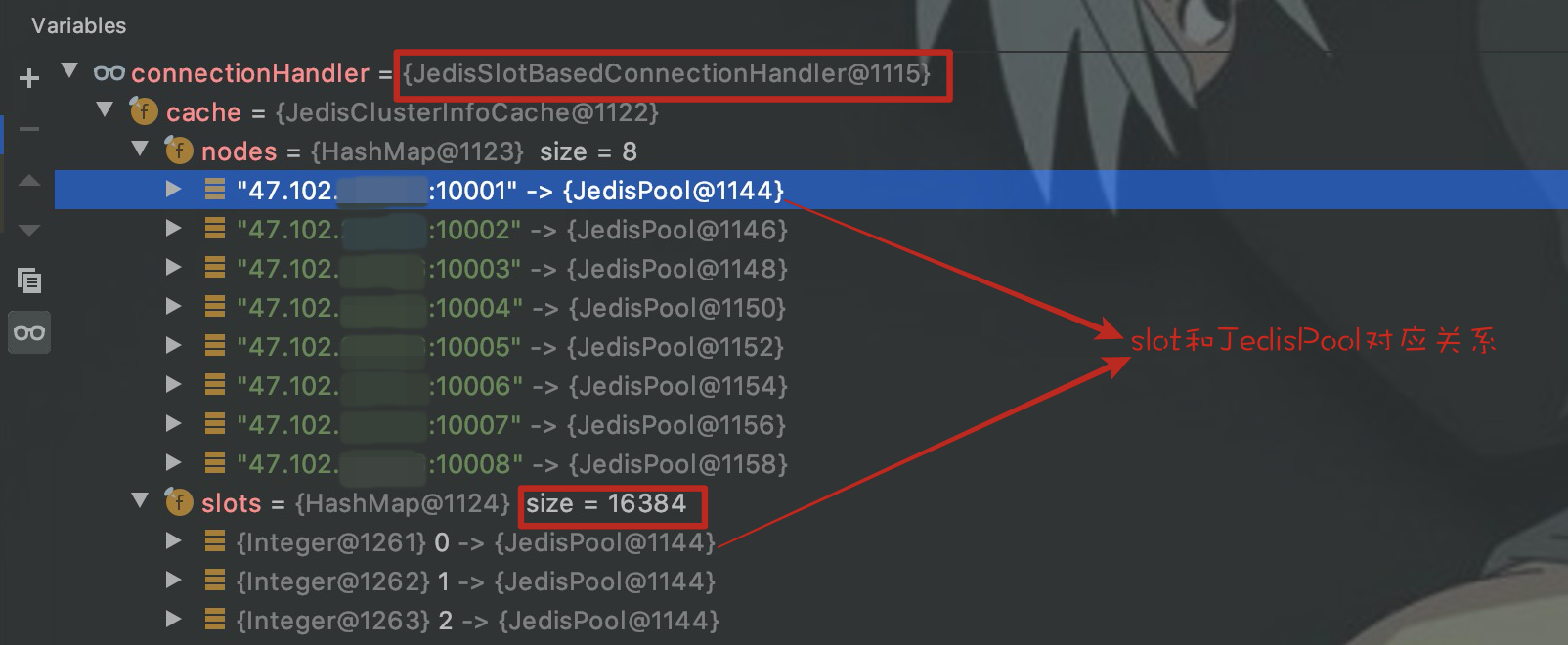
可以看到它有一个JedisClusterInfoCache类型的成员变量cache,cache有两个HashMap类型的成员变量nodes和slots,nodes保存节点和JedisPool的映射关系,slots保存16384个slot和JedisPool的映射关系,这里slot和节点实现了映射关系。
接着看一下getConnectionFromSlot():
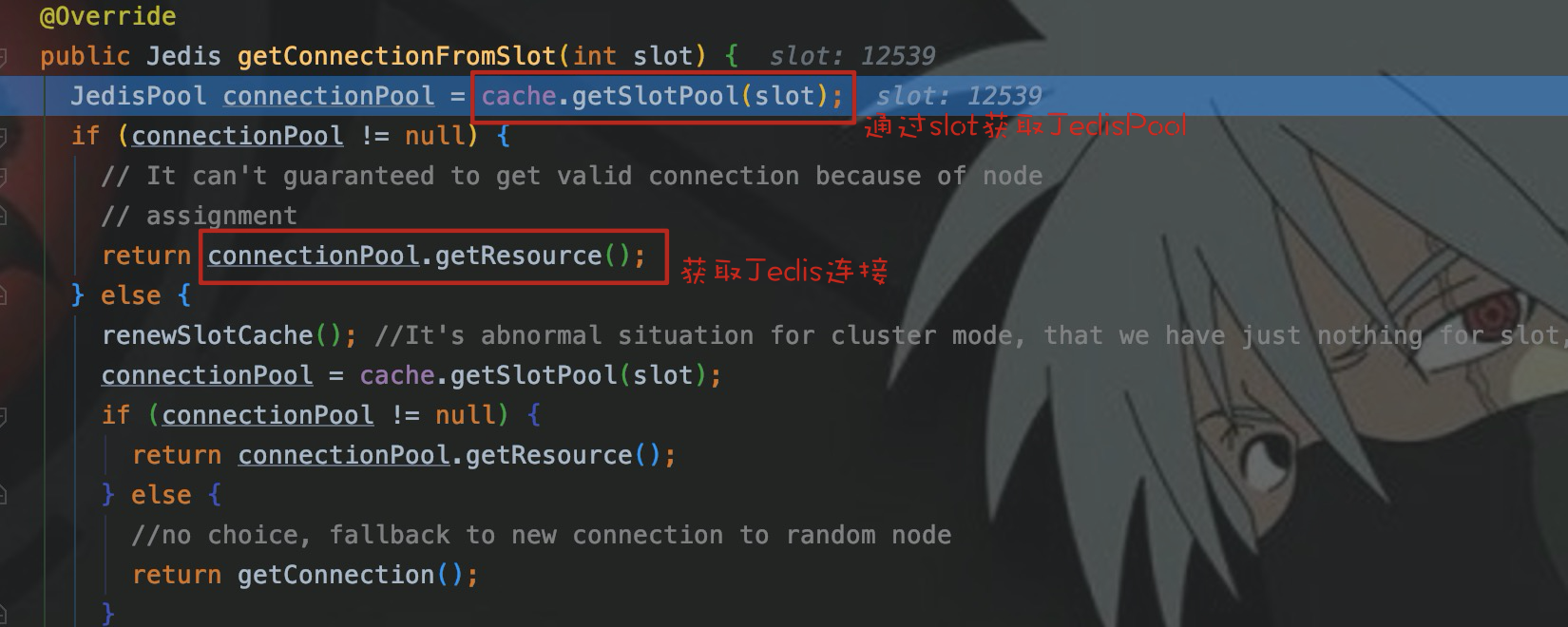
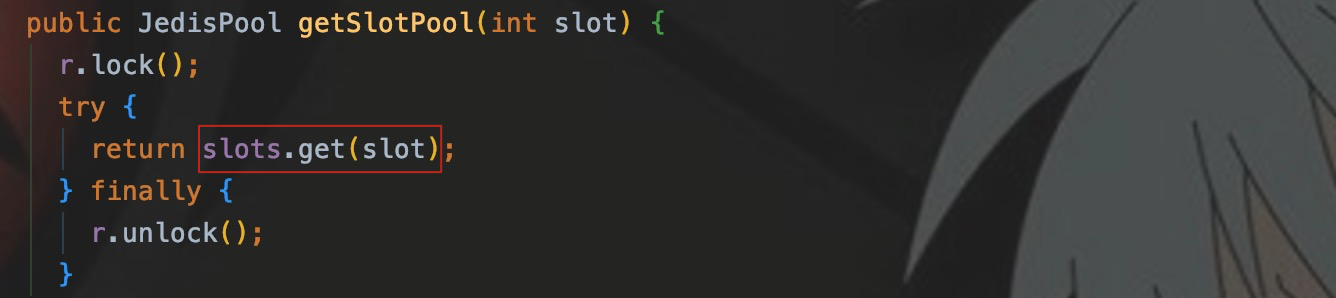
可以看出,cache调用getSlotPool(),从成员变量slots中通过slot取到了相应节点的JedisPool。
简单的画一下流程图:
至此,所有轮子都已经具备,开始造车。

实现Pipeline
我们只要获取到connectionHandler变量,就可以使用它的成员变量cache来获取Jedis。
connectionHandler是JedisCluster的成员变量,在其父类BinaryJedisCluster中找到了此变量。

cache是connectionHandler的成员变量,在其父类JedisClusterConnectionHandler找到了此变量。

connectionHandler和cache都是protected变量,外部类无法直接访问,所以需要定义子类访问变量。
自定义ConnectionHandler
目的:使用cache保存的Cluster信息,用其来获取JedisPool。
public class JedisSlotConnectionHandlerImp extends JedisSlotBasedConnectionHandler implements Serializable {

    public JedisSlotConnectionHandlerImp(Set<HostAndPort> nodes, GenericObjectPoolConfig poolConfig, int connectionTimeout, int soTimeout, String password) {

        super(nodes, poolConfig, connectionTimeout, soTimeout, password);

    }

    // 自定义通过slot获取JedisPool的方法

    // 为了保证后面一个JedisPool只取一个Jedis

    public JedisPool getJedisPoolFromSlot(int slot) {

        JedisPool jedisPool = cache.getSlotPool(slot);

        if (jedisPool != null) {

            return jedisPool;

        } else {

            renewSlotCache();

            jedisPool = cache.getSlotPool(slot);

            if (jedisPool != null) {

                return jedisPool;

            } else {

                throw new JedisNoReachableClusterNodeException("No reachable node in cluster for slot " + slot);

            }

        }

    }

}
自定义ClusterPipeline
目的:使用connectionHandler来建立key、slot以及JedisPool之间关系映射
public class JedisClusterPipeline extends JedisCluster implements Serializable {

    // 覆盖父类中的connectionHandler

    protected JedisSlotConnectionHandlerImp connectionHandler;

    public JedisClusterPipeline(HashSet node, int connectionTimeout, int soTimeout, int maxAttempts, String password, GenericObjectPoolConfig poolConfig) {

        super(node, connectionTimeout, soTimeout, maxAttempts, password, poolConfig);

        connectionHandler = new JedisSlotConnectionHandlerImp(node, poolConfig, connectionTimeout, soTimeout, password);

    }

	// 通过key转换成slot,再获取JedisPool

    public JedisPool getJedisPoolFromSlot(String key) {

        return connectionHandler.getJedisPoolFromSlot(JedisClusterCRC16.getSlot(key));

    }

}
使用
使用自定义的JedisClusterPipeline,需要自己实现set、get、hget等方法来覆盖父类JedisCluster对应的方法。最初的目的是应用于Spark将维度信息存入Redis Cluster,当时是用scala面向RDD的partition实现了集群版的hmset()方法。
这里临时用Java实现一下Pipeline的set()方法。
实现set()
public class JedisClusterPipelineCommand {

    /**

     * 自定义的pipeline模式set方法

     * @param key 存放的key

     * @param value 存放的value

     * @param clusterPipeline 用来获取JedisPool

     * @param pipelines 建立JedisPool和pipeline映射,保证一个JedisPool只开启一个pipeline

     * @param jedisMap 建立pipeline和Jedis映射,用来释放Jedis

     * @param nums 记录每个pipeline放入key的条数

     * @param threshold pipeline进行sync的阈值

     */

    public static void setByPipeline(String key, String value, JedisClusterPipeline clusterPipeline, ConcurrentHashMap<JedisPool, Pipeline> pipelines, ConcurrentHashMap<Pipeline, Jedis> jedisMap,  ConcurrentHashMap<Pipeline, Integer> nums, int threshold) {

        JedisPool jedisPool = clusterPipeline.getJedisPoolFromSlot(key);

        // 查看对应节点是否已经开启了pipeline

        Pipeline pipeline = pipelines.get(jedisPool);

        if (pipeline == null) {

            Jedis jedis = jedisPool.getResource();

            pipeline = jedis.pipelined();

            // 构建映射关系,保证每个节点只有一个jedis来开启pipeline

            jedisMap.put(pipeline, jedis);

            pipelines.put(jedisPool, pipeline);

            nums.put(pipeline, 0);

        }else {

            int num = nums.get(pipeline);

            nums.put(pipeline, num + 1);

            if (num % threshold == 0) {

                pipeline.sync();

            }

        }

        pipeline.set(key, value);

    }

    /**

     * 释放jedis并强制pipeline sync

     */

    public static void releaseConnection(ConcurrentHashMap<Pipeline, Jedis> jedisMap) {

        for (Jedis jedis : jedisMap.values()) {

            jedis.close();

        }

    }

}
执行类
    public static void main(String[] args) throws Exception {

        JedisPoolConfig config = new JedisPoolConfig();

        HashSet jedisClusterNodes = new java.util.HashSet<HostAndPort>();

        jedisClusterNodes.add(new HostAndPort("47.102.xxx.xx", 10001));

        JedisClusterPipeline jedisClusterPipeline = new JedisClusterPipeline(jedisClusterNodes, 1000, 1000, 10, "Redis6", config);

        ConcurrentHashMap<JedisPool, Pipeline> pipelines = new ConcurrentHashMap<>();

        ConcurrentHashMap<Pipeline, Jedis> jedisMap = new ConcurrentHashMap<>();

        ConcurrentHashMap<Pipeline, Integer> nums = new ConcurrentHashMap<>();

        for (int i = 0; i < 1000; i++) {

            JedisClusterPipelineCommand.setByPipeline("k" + i, "v" + i, jedisClusterPipeline, pipelines, jedisMap, nums, 100 );

        }

        JedisClusterPipelineCommand.releaseConnection(jedisMap);

    }
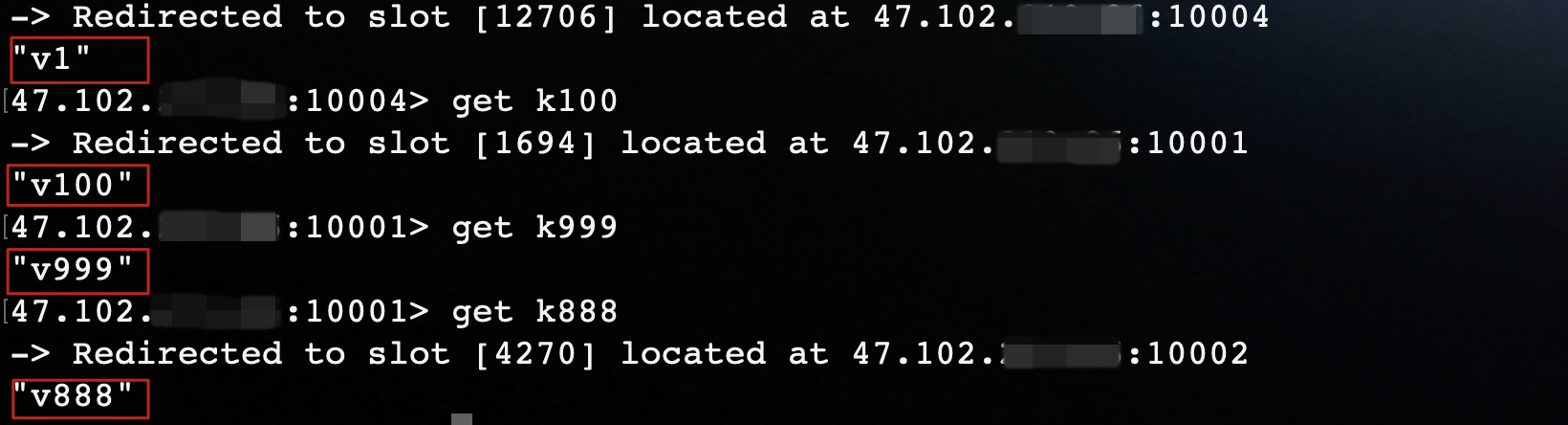
执行结果
性能测试
本机环境1000条数据
pipeline模式:2.32s
JedisCluster:68.6s
Spark on Yarn 128w条 Hash
- 1Core 1G Pipeline:18s
本机环境测试结果受限于网络和主机配置,仅供比较参考。
结语
最后选择自己实现pipeline,首先是因为比较了解pipeline的原理,说白了就是用习惯了。其次是在本机测试letttuce时,出现了一些意料之外的问题,目前还在探索中。下一步的工作就是慢慢的将Pipeline其他的方法实现,逐步优化,用于生产。
写的都是日常工作中的亲身实践,处于自己的角度从0写到1,保证能够真正让大家看懂。
文章会在公众号 [入门到放弃之路] 首发,期待你的关注。

JedisCluster使用pipeline操作Redis Cluster最详细从0到1实现过程的更多相关文章
- Spring-data-redis操作redis cluster
Redis 3.X版本引入了集群的新特性,为了保证所开发系统的高可用性项目组决定引用Redis的集群特性.对于Redis数据访问的支持,目前主要有二种方式:一.以直接调用jedis来实现:二.使用sp ...
- redis cluster + sentinel详细过程和错误处理三主三备三哨兵
redis cluster + sentinel详细过程和错误处理三主三备三哨兵1.基本架构192.168.70.215 7001 Master + sentinel 27001192.168.70. ...
- php操作redis cluster集群成功实例
java操作redis cluster集群可使用jredis php要操作redis cluster集群有两种方式: 1.使用phpredis扩展,这是个c扩展,性能更高,但是phpredis2.x扩 ...
- Ubuntu 15.10 下Scala 操作Redis Cluster
1 前言 Redis Standalone,Redis Cluster的安装在前面介绍过,地址:http://www.cnblogs.com/liuchangchun/p/5063477.html,这 ...
- Redis Cluster [WARNING] Node 127.0.0.1:7003 has slots in migrating state (15495).
错误描述 在迁移一个节点上的slot到另一个节点的时候卡在其中的一个slot报错,截图如下: 查询发现在15495的这个slot上面存在一个key,但是并没有发现这个key有什么问题.使用fix进行修 ...
- 开源|如何开发一个高性能的redis cluster proxy?
文|曹佳俊 网易智慧企业资深服务端开发工程师 背 景 redis cluster简介 Redis cluster是redis官方提供集群方案,设计上采用非中心化的架构,节点之间通过gossip协 ...
- Redis Cluster的搭建与部署,实现redis的分布式方案
前言 上篇Redis Sentinel安装与部署,实现redis的高可用实现了redis的高可用,针对的主要是master宕机的情况,我们发现所有节点的数据都是一样的,那么一旦数据量过大,redi也会 ...
- Redis Cluster集群知识学习总结
Redis集群解决方案有两个: 1) Twemproxy: 这是Twitter推出的解决方案,简单的说就是上层加个代理负责分发,属于client端集群方案,目前很多应用者都在采用的解决方案.Twem ...
- Docker Compose 搭建 Redis Cluster 集群环境
在前文<Docker 搭建 Redis Cluster 集群环境>中我已经教过大家如何搭建了,本文使用 Docker Compose 再带大家搭建一遍,其目的主要是为了让大家感受 Dock ...
随机推荐
- 第三十七章、PyQt输入部件:QAbstractSlider派生类QScrollBar滚动条、QSlider滑动条、QDial刻度盘功能介绍
专栏:Python基础教程目录 专栏:使用PyQt开发图形界面Python应用 专栏:PyQt入门学习 老猿Python博文目录 老猿学5G博文目录 一.引言 Designer中的输入部件Horizo ...
- PyQt(Python+Qt)学习随笔:QTreeView树形视图的uniformRowHeights属性
老猿Python博文目录 专栏:使用PyQt开发图形界面Python应用 老猿Python博客地址 uniformRowHeights属性用于控制视图中所有数据项是否保持相同高度,所有高度都与视图中第 ...
- Python+Qt学习随笔:PyQt中常用的事件处理函数
在PyQt图形界面中,我们经常要捕获特定事件如鼠标按键按下.鼠标按下等事件以执行特定操作,可以通过重写组件对象的相关事件处理函数来实现相关处理,具体特定事件常用的包括如下: keyPressEvent ...
- Android10_原理机制系列_Window介绍及WMS的启动过程
简介 Window简介 Android中,Window是一个重要部分,用户看到的界面.触摸显示界面进行一系列操作都涉及到Window.但实际上,Window本身并不具备绘制功能. 该篇简单介绍下Win ...
- 【题解】三角形 [P1222] / 三角形覆盖问题 [HNOI2012] [P3219]
[题解]三角形 [P1222] / 三角形覆盖问题 [HNOI2012] [P3219] 传送门: 三角形 \(\text{[P1222]}\) 三角形覆盖问题 \(\text{[HNOI2012] ...
- 一篇文章掌握Nginx核心文件结构
1 Nginx核心配置结构 2 配置模块详解 设置worker进程的用户,指的linux中的用户,会涉及到nginx操作目录或文件的一些权限,默认为nobody user root; worker进程 ...
- Node:使用express搭建一个简易的服务器
①安装node环境 在node.js官网下载LTS长期支持版本,然后傻瓜式安装 ②查看是否安装成功 打开cmd终端,输入node -v 有版本号,则安装成功.再输入npm -v 有版本号,则npm也安 ...
- Jmeter(3)返回内容乱码
一.创建jmeter实例测试百度接口返回 1.添加线程组 2.添加取样器 3.添加监听器 二.运行结果如下 返回结果中有乱码,原因是Jmeter取样器结果的编码默认为sampleresult.defa ...
- Envoy入门实战部署
一.Envoy介绍 官方文档解释: Envoy是专为大型现SOA(面向服务架构)设置的L7代理和通信总线.该项目源于以下理念:网络对应用程序来说应该是透明的.当网络和应用程序出现问题时,应该很容易确定 ...
- flink1.11报错No ExecutorFactory found to execute the application
使用flink1.11版本时,报错:No ExecutorFactory found to execute the application 查找maven下载的依赖,发现没有下载flink-clien ...