
使用pdf.js实现前端页面预览pdf文档,解决了跨域请求
pdf.js主要包含两个库文件,一个pdf.js和一个pdf.worker.js,,一个负责API解析,一个负责核心解析
官网地址:http://mozilla.github.io/pdf.js/
- 下载pdf.js插件

- 解压后有 web 和 build 两个文件夹 如图
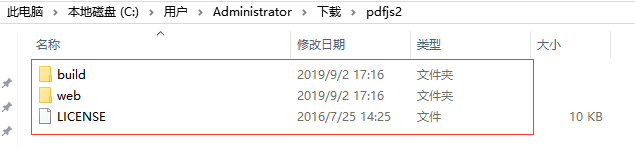
- 运行示例 将解压后的文件直接仍到项目路径下

访问 ip:port/文件夹名称/web/viewer.html
显示的是 web 文件夹下的compressed.tracemonkey-pldi-09.pdf
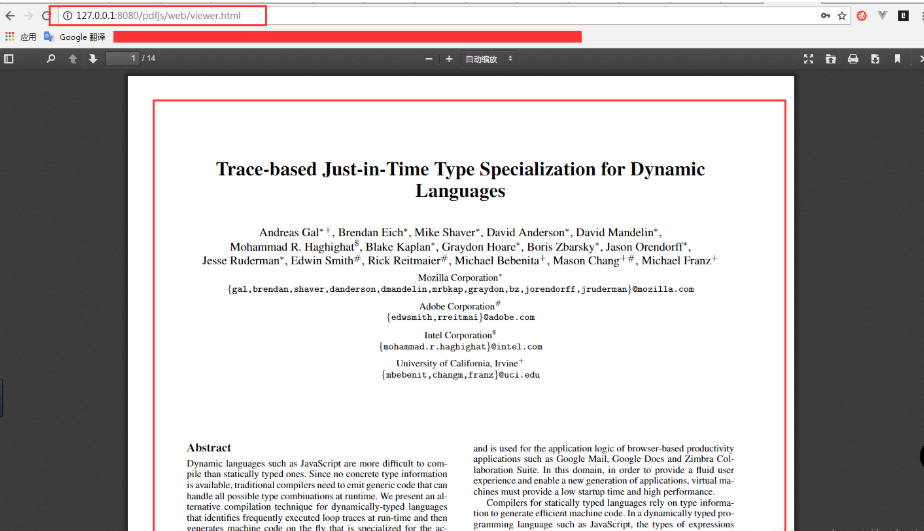
- 修改默认打开PDF

我们只用修改viewer.js文件中的pdf路径参数即可:
var DEFAULT_URL = ‘09.pdf’;
如果pdf文件与viewer.html不在一层目录中,改成相对路径即可:
var DEFAULT_URL = ’ ../doc/ 09.pdf’;
viewer.html可以通过页面参数传值的方式加载pdf文件,比如我们想打开09.pdf文件的话,只需要这样:
先把viewer.js中的参数修改为空:
var DEFAULT_URL = ”;
然后把url改写为参数传值:
http://127.0.0.1:8080/pdfjs/web/viewer.html?file=09.pdf
如果pdf文件与viewer.html不在一层目录中,改成相对路径即可:
http://127.0.0.1:8080/pdfjs/web/viewer.html?file=../doc/09.pdf
参考地址https://github.com/mozilla/pdf.js/wiki/Frequently-Asked-Questions#file
- 获取服务器上的PDF文件
通过页面参数传值的方式加载pdf文件
file的值需要URLEncode编码 指向服务器端
例如:
http://xxxxx.com:89/demo/fileupdownfud=1&rid=4&isweb=1&iswebshow=1&dbid=01&filepath=fj_ob_item/Y201809/11.pdf
URLEncode编码:为
http%3A%2F%2Fxxxx.com%3A89%2Fdemo%2Ffileupdown%3Ffud%3D1%26rid%3D4%26isweb%3D1%26iswebshow%3D1%26dbid%3D01%26filepath%3Dfj_ob_item%2FY201809%2F11.pdf
访问地址为:
http://127.0.0.1:8080/pdfjs/web/viewer.html?file=http%3A%2F%2Fxxxx.com%3A89%2Fdemo%2Ffileupdown%3Ffud%3D1%26rid%3D4%26isweb%3D1%26iswebshow%3D1%26dbid%3D01%26filepath%3Dfj_ob_item%2FY201809%2F11.pdf
————————————————
版权声明:本文为CSDN博主「三年二班Pit」的原创文章,遵循 CC 4.0 BY-SA 版权协议,转载请附上原文出处链接及本声明。
原文链接:https://blog.csdn.net/l_ai_yi/article/details/82388497
PDF.js默认好像是不能跨域请求

将viewer.js 中的错误提示注释掉即可
try {
var viewerOrigin = new URL(window.location.href).origin || 'null';
if (HOSTED_VIEWER_ORIGINS.indexOf(viewerOrigin) >= 0) {
return;
}
var fileOrigin = new URL(file, window.location.href).origin;
//跨域请求错误提示
//if (fileOrigin !== viewerOrigin) {
//throw new Error('file origin does not match viewer\'s');
//}
} catch (ex) {
var message = ex && ex.message;
PDFViewerApplication.l10n.get('loading_error', null, 'An error occurred while loading the PDF.').then(function (loadingErrorMessage) {
PDFViewerApplication.error(loadingErrorMessage, { message: message });
});
throw ex;
}
- 服务端代码
//跨域请求

String s0 = "C:11.pdf"

response.setHeader("Access-Control-Allow-Origin", "*");

File file = new File(s0);

response.setContentLength((int) file.length());

response.setHeader( "Content-Disposition", "attachment;filename=" + URLEncoder.encode(file.getName(), "UTF-8"));// 设置在下载框默认显示的文件名

response.setContentType("application/octet-stream");// 指明response的返回对象是文件流

// 读出文件到response

// 这里是先需要把要把文件内容先读到缓冲区

// 再把缓冲区的内容写到response的输出流供用户下载

FileInputStream fileInputStream = new FileInputStream(file);

BufferedInputStream bufferedInputStream = new BufferedInputStream(fileInputStream);

OutputStream outputStream = response.getOutputStream();

byte buffer[] = new byte[];

int len = ;

while ((len = bufferedInputStream.read(buffer)) > ) {

    outputStream.write(buffer, , len);

}

// 人走带门

bufferedInputStream.close();

outputStream.flush();

outputStream.close();
案例二:
@{

    Layout = null;

}

<!DOCTYPE html>

<html>

<head>

    <meta name="viewport" content="width=device-width" />

    <title>testPdf</title>

    <script src="~/Scripts/jquery-1.8.2.min.js"></script>

    <script src="~/pdfjs2/build/pdf.js"></script>

    <style type="text/css">

        .lightbox {

            position: fixed;

            top: 0px;

            left: 0px;

            height: 100%;

            width: 100%;

            z-index: 7;

            opacity: 0.3;

            display: block;

            background-color: rgb(0, 0, 0);

            display: none;

        }

        .pop, iframe {

            position: absolute;

            left: 50%;

            top: 0;

            width: 893px;

            height: 100%;

            margin-left: -446.5px;

            z-index: 9;

        }

    </style>

    <script type="text/javascript">

        function showPdf(isShow) {

            var state = "";

            if (isShow) {

                state = "block";

            } else {

                state = "none";

            }

            var pop = document.getElementById("pop");

            pop.style.display = state;

            var lightbox = document.getElementById("lightbox");

            lightbox.style.display = state;

        }

        function close() {

            showPdf(false);

        }

        function pd(dd) {

            $("#" + dd)[0].contentWindow.print();

        }

    </script>

</head>

<body>

    <ul>

        <li><a href="../pdfjs2/web/viewer.html?file=../DownFile/430000447746159F19030038催缴通知书.pdf" target="pdfContainer" onclick="showPdf(true)">0001_pdf</a></li>

        <li><a href="../pdfjs2/web/viewer.html?name=../DownFile/430000447746159F19030038事前告知书.pdf" target="pdfContainer" onclick="showPdf(true)">0002_pdf</a></li>

    </ul>

    <div class="lightbox" id="lightbox"></div>

    <div id="pop" class="pop" style="display: none;">

        <a href="javascript:close()" style="

            position: absolute;

            right: -90px;

            display: inline-block;

            width: 80px;

            height: 30px;

        " id="close">关闭</a>

        @*<a href="#" onclick="pd('pdfContainer')" style="

           position:absolute;

           right :-90px;

           display :inline-block;

           width :80px;

           height: 30px;">打印</a>*@

        <iframe src="" frameborder="0" id="pdfContainer" name="pdfContainer"></iframe>

    </div>

</body>

</html>
案例三:
直接使用iframe
<iframe id="pdf_page_1" name="pdf_page" style="width:795px;height:789px" frameborder="0" ></iframe>
赋值显示:
  param = "chId=" + $("#chId").val() + "&unitId=" + unId;

    pdfurl = "/OverrunPunishment/ApprovedBookData?" + param;

    //pdfurl为文件流,使用encodeURIComponent()函数可把字符串作为 URI 组件进行编码。

    $("#pdf_page_1").attr('src', "../pdfjs/web/viewer.html?file=" + encodeURIComponent(pdfurl) + "");
后台将pdf文档转文件流方法:
 public string ApprovedBookData(string chId, string unitId)

        {

            InstrumentInfo instr = new InstrumentInfo();

            string name = "";

            FileStream fs = null;

            if (Request.Cookies["LoginValue"] == null) Response.Redirect("../Login/LoginPage");

            try

            {

                instr = ApprovedDataUtil.ExportPdfText(chId, unitId);

                string path = instr.fileName.Replace("\\", "/");

                fs = new FileStream(path, FileMode.Open, FileAccess.Read, FileShare.ReadWrite);//读取生成的pdf文件

                byte[] buffer = new byte[fs.Length];

                fs.Position = ;

                fs.Read(buffer, , (int)fs.Length);

                Response.Clear();

                Response.AddHeader("Content-Length", fs.Length.ToString());

                Response.ContentType = "application/pdf";

                Response.AddHeader("Content-Disposition", "inline;FileName=抄告文书.pdf");

                Response.BinaryWrite(buffer);

                Response.OutputStream.Flush();

                Response.OutputStream.Close();

                name = fs.Name;

                fs.Close();

            }

            catch (Exception ex)

            {

                CSysCfg.WriteLog("获取文书异常:" + ex.Message);

            }

            return name;

        }
注:获取流时,需要用encodeURIComponent将url转换成encode编码,放在file里。
使用pdf.js实现前端页面预览pdf文档,解决了跨域请求的更多相关文章
- 使用pdf.js在移动端预览pdf文档
pdf.js 是一个技术原型主要用于在 HTML5 平台上展示 PDF 文档,无需任何本地技术支持. 在线演示地址:http://mozilla.github.com/pdf.js/web/viewe ...
- pdf.js实现图片在线预览
项目需求 前段时间项目中遇到了一个模块,是关于在线预览word文档(PDF文件)的,所以,找了很多插件,例如,pdf.js,pdfobject.js框架,但是pdfobject.js框架对于IE浏览器 ...
- Java实现web在线预览office文档与pdf文档实例
https://yq.aliyun.com/ziliao/1768?spm=5176.8246799.blogcont.24.1PxYoX 摘要: 本文讲的是Java实现web在线预览office文档 ...
- IOS 预览word文档的集中方式
在iPhone中可以很方便的预览文档文件,如:pdf.word等等,这篇文章将以PDF为例.介绍三种预览PDF的方式,又分别从本地pdf文档和网络上的pdf文档进行对比. 预览本地PDF文档: 1.使 ...
- Asp.Net在线预览Word文档的解决方案与思路
前几天有个老项目找到我,有多老呢?比我工作年限都长,见到这个项目我还得叫一声前辈. 这个项目目前使用非常稳定,十多年了没怎么更新过,现在客户想加一个小功能:在线预览Word文档. 首先想到的是用第三方 ...
- html页面预览pdf文件使用插件pdfh5.js
html预览pdf文件需要依赖pdf.js 移动端适配需要pdfh5.js 记录移动端适配pdfh5.js的用发 在线预览: https://www.gjtool.cn/pdfh5/pdf.html? ...
- 在Outlook中查看预览SharePoint文档库的文档
本文概况 阅读时间: 约2分钟 适用版本:SharePoint Server 2010及以上 面向用户:普通用户,管理员 难度指数:★★☆☆☆ 在日常工作中,总有一些常用的文档需要经常打开查看,其实我 ...
- 通过程序预览Office文档
我承认,标题是夸大了,就是为了吸引注意力.这里只有Word文档和Excel文档的预览代码. Word://此部分来源:http://princed.mblogger.cn/posts/11885.as ...
- 点击<a>页面跳转解决办法/跨域请求,JSONP
有些时候做的东西刚好要用到链接,但又不需要去链接,只需要对onclick事件进行处理,但它却这样子写 <a href="#" onclick="gettext()& ...
随机推荐
- vx小程序(1)
一.程序配置 app.json 1. pages字段——用于描述当前小程序的页面路径. 2.window字段——定义小程序所有页面的顶部背景颜色,文字颜色等. 注意:可以在pages/logs目录下的 ...
- vue.js之常操作(实例)
听说大家都开始用react.vue这些MVVM框架了,为了不落后,还是学学吧!(之前只对angular了解一点,时间一长,也忘得差不多了,所以学习vue相当于从小白开始) 从vue.js官网看一下,先 ...
- 最小的K个数(剑指offer-29)
题目描述 输入n个整数,找出其中最小的K个数.例如输入4,5,1,6,2,7,3,8这8个数字,则最小的4个数字是1,2,3,4. 题目解析 大小为 K 的最小堆 复杂度:O(NlogK) + O(K ...
- java NIO 实例之多人聊天
关键抽象 1.定义一个HashMap<String,SocketChannel>用户存储每个用户的管道. 2.服务端监听read事件,获取消息后轮询hashmap发送消息给用户模型内的所有 ...
- postman做自动化测试1——collection runner
一.添加collection 打开postman,点击“collection”页签,点击collection下面的添加按钮. 弹出 新建面板,输入名称和描述,点击“creat”按钮,新建成功 3 点击 ...
- day17 生成器, 面向过程, 三元表达式, 生成式
1. 生成器 生成器:就是一种自定义的迭代器,是用来返回多次值自定义迭代器的好处:节省内存 return只能返回一次值,函数就立即结束了yield 1.可以挂起函数,保存函数的运行状态 2.可以用来返 ...
- css 浮动 定位
浮动 元素的浮动是指设置了浮动属性的元素会脱离标准普通 流的控制,移动到其父元素中指定位置的过程. 语法: float . left . right . none(默认) 注意: 1 ...
- JVM垃圾回收(五)
低延迟垃圾收集器 衡量垃圾收集器的三项最重要的指标是: 内存占用(Footprint).吞吐量(Throughput)和延迟(Latency).三者总体的表现会随技术进步而越来越好,但是要在这三个方面 ...
- ffmpeg播放器实现详解 - 视频显示
ffplay是ffmpeg源码中一个自带的开源播放器实例,同时支持本地视频文件的播放以及在线流媒体播放,功能非常强大. FFplay: FFplay is a very simple and port ...
- 图解:如何实现最小生成树(Prim算法与Kruskal算法)
这是图算法的第四篇文章 图解:如何实现最小生成树 文章目录: 1.概念和性质 2.思路探索 3.Kruskal算法 4.Prim算法 5.代码实现 1.概念和性质 今天我们考虑的模型是加权无向图,问题 ...