
python带颜色打印字符串
python带颜色打印字符串
之前调试pwn题的时候,有时候需要将某些特别的,重要的信息用不一样的颜色打印出来。查阅一些资料,了解了print函数的特性后,自己写了一个脚本,可以用来获取带颜色信息的字符串或者打印一串带颜色、背景色、下划线等的字符串。
脚本内容
#!/usr/bin/env python3

# -*- encoding: utf-8 -*-

'''

@File    : print_with_color.py

@Time    : 2021/03/07 12:41:35

@Author  : Lynne

@Email   : ch22166@163.com

@Desc    : None

'''

from functools import partial

class FontColor:

    BLACK = 30

    RED = 31

    GREEN = 32

    YELLO = 33

    BLUE = 34

    AMARANTH = 35

    CYAN = 36

    WHITE = 37

class BackgroundColor:

    NOCOLOR = -1

    BLACK = 40

    RED = 41

    GREEN = 42

    YELLO = 43

    BLUE = 44

    AMARANTH = 45

    CYAN = 46

    WHITE = 47

class TerminalMode:

    DEFAULT = 0

    HIGHLIGHT = 1

    UNDERLINE = 4

    TWINKLE = 5

    ANTI_WHITE = 7

    INVISIBLE = 8

def __check(font_color:int, background_color:int, terminal_mode:int) -> bool:

    b1 = (font_color >= FontColor.BLACK and font_color <= FontColor.WHITE)

    b2 = (background_color >= BackgroundColor.BLACK and background_color <= BackgroundColor.WHITE) or background_color == BackgroundColor.NOCOLOR

    b3 = (terminal_mode >= TerminalMode.DEFAULT and terminal_mode <= TerminalMode.INVISIBLE and terminal_mode != 2 and terminal_mode != 3 and terminal_mode != 6)

    return (b1 and b2 and b3)

def get_str_with_color(print_str:str, *,

                       font_color:int=FontColor.WHITE,

                       background_color:int=BackgroundColor.NOCOLOR,

                       terminal_mode:int=TerminalMode.DEFAULT)-> str:

    """Decorate a string with color

    Args:

        print_str (str): The str you want to modify.

        font_color (int, optional): Font color. Defaults to FontColor.WHITE.

        background_color (int, optional): Background color. Defaults to BackgroundColor.NOCOLOR.

        terminal_mode (int, optional): terminal mode. Defaults to TerminalMode.DEFAULT.

    Returns:

        str: A string with elaborate decoration.

    """

    check = __check(font_color, background_color, terminal_mode)

    if not check:

        print('\033[1;31;47mWARNING: Failure to set color!\033[0m')

        return print_str

    if background_color == BackgroundColor.NOCOLOR:

        background_color = ''

    else:

        background_color = ';'+str(background_color)

    res_str = '\033[{};{}{}m{}\033[0m'.format(terminal_mode, font_color, background_color, print_str)

    return res_str

def print_color(print_str:str, *,

                font_color:int=FontColor.WHITE,

                background_color:int=BackgroundColor.NOCOLOR,

                terminal_mode:int=TerminalMode.DEFAULT):

    """print a string with color

    Args:

        print_str (str): The str you want to modify.

        font_color (int, optional): Font color. Defaults to FontColor.WHITE.

        background_color (int, optional): Background color. Defaults to BackgroundColor.NOCOLOR.

        terminal_mode (int, optional): terminal mode. Defaults to TerminalMode.DEFAULT.

    """

    print(get_str_with_color(print_str, font_color=font_color, background_color=background_color, terminal_mode=terminal_mode))

# make rgb print func

print_red = partial(print_color,

                    font_color=FontColor.RED,

                    background_color=BackgroundColor.NOCOLOR,

                    terminal_mode=TerminalMode.DEFAULT)

print_green = partial(print_color,

                    font_color=FontColor.GREEN,

                    background_color=BackgroundColor.NOCOLOR,

                    terminal_mode=TerminalMode.DEFAULT)

print_blue = partial(print_color,

                    font_color=FontColor.BLUE,

                    background_color=BackgroundColor.NOCOLOR,

                    terminal_mode=TerminalMode.DEFAULT)

if __name__ == '__main__':

    print('Original print: lynne')

    print_red('Print with red font: lynne')

    print_green('Print with green font: lynne')

    print_blue('Print with blue font:lynne')

    print_color('Print with cyan font, blue background and underline: lynne', font_color=FontColor.CYAN, background_color=BackgroundColor.BLUE, terminal_mode=TerminalMode.UNDERLINE)
在控制台的打印效果如下:
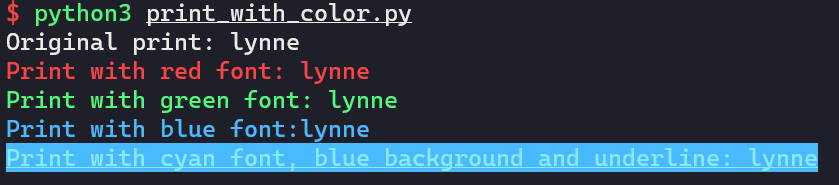
使用
- get_str_with_color:获取带颜色信息的字符串
- print_color:带颜色打印字符串
- print_red/print_green/print_blue:自已定义一些偏函数,方便使用
python带颜色打印字符串的更多相关文章
- linux下printf打印带颜色的字符串
转载:http://blog.chinaunix.net/uid-28917424-id-3889917.html 前不久就在某位同学的博客里看到,但是今天找了好久没找到,就直接google了,现贴出 ...
- python 带颜色样式打印到终端
#!/usr/bin/python # -*- coding: utf-8 -*- """ Created on Tue Aug 8 17:01:54 2017 @aut ...
- python3使用print打印带颜色的字符串
一.实现过程 终端的字符颜色是用转义序列控制的,是文本模式下的系统显示功能,和具体的语言无关 转义序列是以ESC开头,即用\033来完成(ESC的ASCII码用十进制表示是27,用八进制表示就是033 ...
- 在Linux中让打印带颜色的字
echo显示带颜色,需要使用参数-e 格式如下: echo -e "\033[字背景颜色;文字颜色m字符串\033[0m" 例如: echo -e "\033[41;37 ...
- Python_服务器与多客户端通信、UDP协议、pycharm打印带颜色输出、时间同步的机制
1.服务器与多客户端通信 import socket # 创建tcp socket的套接字 sk = socket.socket() # bind sk.bind(('127.0.0.1',8080) ...
- Python 入门 之 print带颜色输出
Python 入门 之 print带颜色输出 1.print带颜色输出书写格式: 开头部分: \033[显示方式; 前景色 ; 背景色 m 结尾部分: \033[0m 详解: 开头部分的三个参数: 显 ...
- DAY4(python)打印字符串以及增删改查
用while循环打印字符串 #if i in s: # print ( i ) s='nanfjkhndaol' index = 0 while 1 : print (s[index]) index+ ...
- 百万年薪python之路 -- 带颜色的print
带颜色的print print输出带颜色的方法详解 书写格式: 开头部分:\033[显示方式;前景色;背景色m + 结尾部分:\033[0m 注意:开头部分的三个参数:显示方式,前景色,背景色是可 ...
- python 输出颜色的与样式的方法
上次遇到这个问题就想写下来,其实当时我也不怎么会,老师说这个东西不需要理解,只需要死记硬背,写的多了就记住了,所以今天搜集了几篇文章,加上自己的理解,写下了这篇python 输出颜色的样式与方法的文章 ...
随机推荐
- hdu5402 Travelling Salesman Problem
Problem Description Teacher Mai is in a maze with n rows and m columns. There is a non-negative numb ...
- Jenkins 持续集成测试工具
一.Jenkins(hudson)流程 创建job 执行job 通知机制 二.两种执行策略 定时执行:每隔一段时间执行一下(适合UI和接口测试的执行) 监控代码库执行:单元测试的执行模式(适合单元测试 ...
- k8s-1-交付dubbo微服务
一.Dubbo微服务概述 1.1: dubbo介绍 1.2: 部署内容 二.实验环境架构 2.1: 架构 1.1 架构图解 1.最上面一排为K8S集群外服务 1.1 代码仓库使用基于git的gitee ...
- Linux CentOS7.x 升级内核的方法
一.概述 在数据中心基础环境中,Linux系统使用很普遍,但是有时候会遇到应用程序需要运行在高版本的内核上或者有时候系统自身要求需要升级内核,我们要综合考虑升级内核的风险. 二.升级内核的方法 1.查 ...
- 转载-cookie和session的窃取
一.cookie的基本特性 如果不了解cookie,可以先到 wikipedia 上学习一下. http request 浏览器向服务器发起的每个请求都会带上cookie: GET /index.ht ...
- 51nod1459 带权最短路
1459 迷宫游戏 基准时间限制:1 秒 空间限制:131072 KB 分值: 0 难度:基础题 你来到一个迷宫前.该迷宫由若干个房间组成,每个房间都有一个得分,第一次进入这个房间,你就可以得到这个分 ...
- hardsource bug
hardsource bug webpack crashed bug memory stackoverflow [hardsource:32210703] Could not freeze refs ...
- Chrome console & Command Line API
Chrome console & Command Line API $ && $$ querySelector querySelectorAll Command Line AP ...
- Android Studio & SDK & JDK & setting path
Android Studio & SDK & JDK & setting path https://developer.android.com/studio/intro/upd ...
- 近期最值得关注的潜力币种——VAST
近期币圈的热度又再次被掀起,很多新的币种也争相上线,还有一些币种虽然还未上线,但是在币圈的火热程度也非同一般.小编留意了一下,最近在币圈讨论的最火的便是VAST代币.许多生态建设者乃至机构都表示很看好 ...