
httpPost的两种方式
1,post-Body流和post参数,以下客户端代码和服务端代码可共用
客户端代码
/**
* post 方法
* 抛送给EDI
* @param url http://127.0.0.1:9003/api/edi/csm/csmReturnSubConBody?customerId=Fotile_CSM&api=csmreturnsub_confirm&id=6006
* @param jsonParam xml报文结构
* @return
*/
String httpPost45(String url, String jsonParam) {
//url?后面的即为post parmas 参数,bodu 放在数据流中进行传输
CloseableHttpClient httpclient = HttpClients.createDefault()
// HttpGet httpGet = new HttpGet(url)
HttpPost post=new HttpPost(url)
//httpClient 4.5版本的超时参数配置
RequestConfig requestConfig = RequestConfig.custom()
.setConnectTimeout(50000).setConnectionRequestTimeout(50000)
.setSocketTimeout(50000).build()
post.setConfig(requestConfig)
//往BODY里填充数据主体
StringEntity entitys=new StringEntity(jsonParam.toString(), "utf-8")
entitys.setContentEncoding("UTF-8")
entitys.setContentType("application/xml")
post.setEntity(entitys)
HttpResponse response = httpclient.execute(post)
// System.out.println("得到的结果:" + response.getStatusLine())//得到请求结果
String str = EntityUtils.toString(response.getEntity())//得到请求回来的数据
return str
}
客户端代码二=========================================
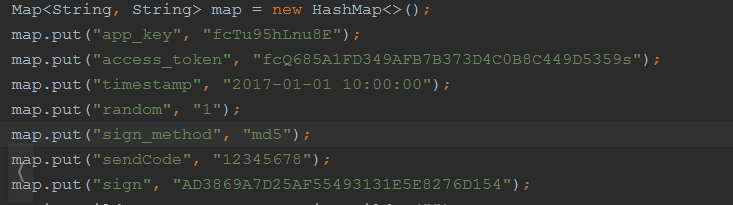
如果只是简单拼接进url是行不通的,因为我们都知道URLEncoder,对url字符集编码设置,所以需要对所有的值进行字符集编码设置,最终我们封装成了如下post方法支持url拼接入相应的请求参数:
POST_URL:请求url
urlParam:如上需要封装进url的参数
body:普通需要传递的参数
 public static String httpURLConnectionPOST (String POST_URL,Map<String, String> urlParam,String body) {

        CloseableHttpResponse response = null;

        try {

            RequestConfig defaultRequestConfig = RequestConfig.custom()

                    .setSocketTimeout(6000)

                    .setConnectTimeout(6000)

                    .setConnectionRequestTimeout(6000)

                    .build();
        //httpclient

            CloseableHttpClient httpclient = HttpClients.custom().setDefaultRequestConfig(defaultRequestConfig).build();

//            HttpPost httpPost = new HttpPost(POST_URL);

            StringBuilder param=new StringBuilder("");
//将要拼接的参数urlencode

            for (String key:urlParam.keySet()){

                param.append(key + "=" + URLEncoder.encode(urlParam.get(key), "UTF-8") + "&");

            }
//pingjie

            HttpPost httpPost = new HttpPost(POST_URL+param.toString());
//请求参数设置

            if(com.sf.ccsp.common.util.StringUtils.isNotEmpty(body)){

                StringEntity entity=new StringEntity(body, ContentType.APPLICATION_JSON);

                httpPost.setEntity(entity);

            }

            response = httpclient.execute(httpPost);

            HttpEntity entity = response.getEntity();

            return EntityUtils.toString(entity, "UTF-8");

        } catch (UnsupportedEncodingException e) {

            logger.error(e.getMessage(), e);

        } catch (ClientProtocolException e) {

            logger.error(e.getMessage(), e);

        } catch (IOException e) {

            logger.error(e.getMessage(), e);

        } catch (Exception e){

            System.out.println(e);

        }finally {

            if (response != null) {

                try {

                    response.close();

                } catch (IOException e) {

                    logger.error(e.getMessage(), e);

                }

            }

        }

        return null;

    }
服务端代码
@ResponseBody
@RequestMapping(value = "csmReturnSubConBody", method = RequestMethod.POST, produces = "application/xml")
ResponseMessage csmReturnSubConBody(HttpServletRequest request, HttpServletResponse response,
@RequestParam Map<String, String> params) {
//params为客户端URL?后面的参数集,同理,也可以将bodu放到参数集里,进行传输
CustomerInfo customerInfo = erpSetting.getCustomerInfo(params.customerId as String)
if (!customerInfo) return
ApiInfo apiInfo = erpSetting.getApiInfo(customerInfo, params.api as String)
if (!apiInfo) return
String body = readBody(request)//这里去解析post流里的body数据
ResponseMessage rsp = csmSvc.convertBodyAndSendErpRetu(apiInfo, customerInfo, body, "xml", params.id as Object, null)
return rsp
}
对于post参数流,服务端,可以这样取值
String body = params.keySet()[0] + "=" + params[params.keySet()[0]].toString()
params.keySet()[0]得到key
params[params.keySet()[0]].toString()得到第一个key的value

OLY电子标签项目
httpPost的两种方式的更多相关文章
- 在基于MVC的Web项目中使用Web API和直接连接两种方式混合式接入
在我之前介绍的混合式开发框架中,其界面是基于Winform的实现方式,后台使用Web API.WCF服务以及直接连接数据库的几种方式混合式接入,在Web项目中我们也可以采用这种方式实现混合式的接入方式 ...
- Android请求服务器的两种方式--post, get的区别
android中用get和post方式向服务器提交请求_疯狂之桥_新浪博客http://blog.sina.com.cn/s/blog_a46817ff01017yxt.html Android提交数 ...
- HTTP/HTTPS GET&POST两种方式的实现方法
关于GET及POST方式的区别请参照前面文章:http://www.cnblogs.com/hunterCecil/p/5698604.html http://www.cnblogs.com/hunt ...
- 比较两种方式的form请求提交
[一]浏览器form表单提交 表单提交, 适用于浏览器提交.像常见的pc端的网银支付,用户在商户商城购买商品,支付时商家系统把交易数据通过form表单提交到三方支付网关,然后用户在三方网关页面完成支付 ...
- Android提交数据到服务器的两种方式四种方法
本帖最后由 yanghe123 于 2012-6-7 09:58 编辑 Android应用开发中,会经常要提交数据到服务器和从服务器得到数据,本文主要是给出了利用http协议采用HttpClient方 ...
- js实现页面跳转的两种方式
CreateTime--2017年8月24日08:13:52Author:Marydon js实现页面跳转的两种方式 方式一: window.location.href = url 说明:我们常用 ...
- Struts2实现ajax的两种方式
基于Struts2框架下实现Ajax有两种方式,第一种是原声的方式,另外一种是struts2自带的一个插件. js部分调用方式是一样的: JS代码: function testAjax() { var ...
- CSharpGL(18)分别处理glDrawArrays()和glDrawElements()两种方式下的拾取(ColorCodedPicking)
CSharpGL(18)分别处理glDrawArrays()和glDrawElements()两种方式下的拾取(ColorCodedPicking) 我在(Modern OpenGL用Shader拾取 ...
- 两种方式实现java生成Excel
Web应用中难免会遇到需要将数据导出并生成excel文件的需求.同样,对于本博客中的总结,也是建立在为了完成这样的一个需求,才开始去了解其实现形式,并且顺利完成需求的开发,先将实现过程总结于此.本博文 ...
随机推荐
- streamlink 安装使用
CentOS 安装: pip install streamlink 使用: #查看视频信息 streamlink $URL #下载视频 streamlink $URL best streamlink ...
- Vue3.0新特性
Vue3.0新特性 Vue3.0的设计目标可以概括为体积更小.速度更快.加强TypeScript支持.加强API设计一致性.提高自身可维护性.开放更多底层功能. 描述 从Vue2到Vue3在一些比较重 ...
- OpenStack Train版-8.安装neutron网络服务(控制节点)
安装neutron网络服务(controller控制节点192.168.0.10) 创建neutron数据库 mysql -uroot CREATE DATABASE neutron; GRANT A ...
- MQTT 协议 部分细节
这里不纪录协议文档中大部分通用内容主要记录一下自己比较困惑的细节处理机制.主要有如下几个点: 连接时的具体细节行为? client 在连接到broker时同时指定自己的keepaliveTime和 w ...
- 翻译:《实用的Python编程》01_05_Lists
目录 | 上一节 (1.4 字符串) | 下一节 (1.6 文件) 1.5 列表 本节介绍 Python 原始数据类型列表(list). 列表是一种有序的集合. 创建列表 使用方括号 [] 来定义列表 ...
- CN_Week2_Neuron_code
CN_Week1_Neuron_code on Coursera Abstract for week2: -- 1. Technique for recording from the brain. - ...
- Web 前端 UI 组件库文档自动化方案 All In One
Web 前端 UI 组件库文档自动化方案 All In One 需求 自动化 动态 好用 markdown element-ui 中示例和说明按照一定规则写在md文件中,调用md-loader将md文 ...
- how to config custom process.env in node.js
how to config custom process.env in node.js process.env APP_ENV NODE_ENV https://nodejs.org/api/proc ...
- post upload file & application/x-www-form-urlencoded & multipart/form-data
post upload file application/x-www-form-urlencoded & multipart/form-data https://stackoverflow.c ...
- git 强制提交 & 覆盖 origin/master
git 强制提交 & 覆盖 origin/master git 强制提交本地分支覆盖远程分支 # git push origin 分支名 --force # local $ git push ...