
kettle连接报错
如何查看端口号
cmd命令行
输入mysql -u root -p密码进入mysql
输入show global variables like 'port';
就可以看到端口号3306

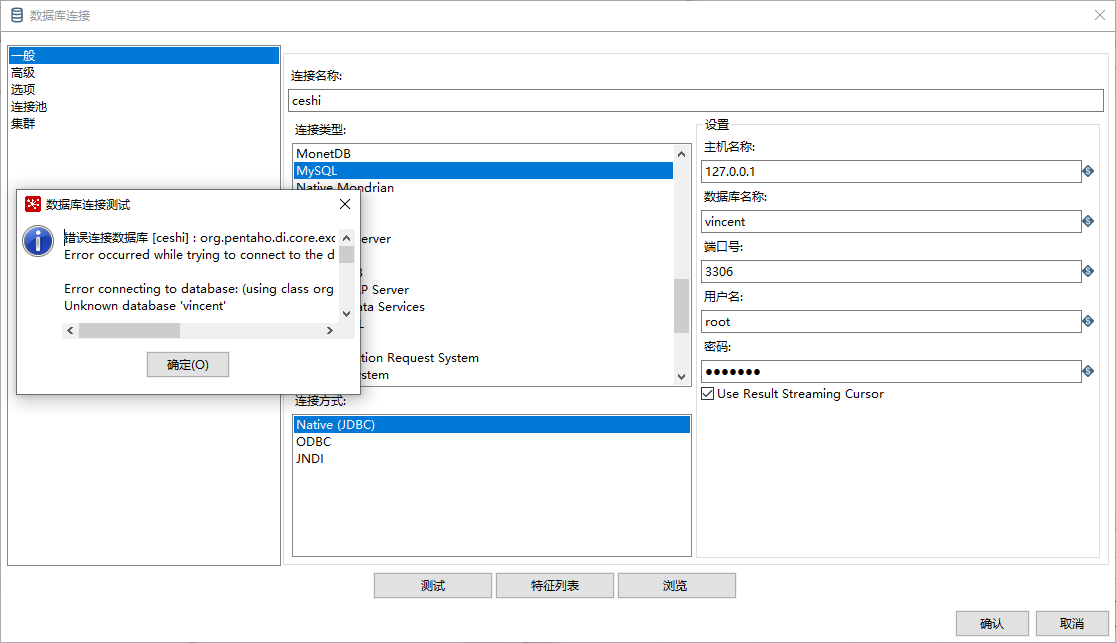
测试数据库链接
报错
错误连接数据库 [ceshi] : org.pentaho.di.core.exception.KettleDatabaseException:

Error occurred while trying to connect to the database

Error connecting to database: (using class org.gjt.mm.mysql.Driver)

Unknown database 'vincent'

org.pentaho.di.core.exception.KettleDatabaseException:

Error occurred while trying to connect to the database

Error connecting to database: (using class org.gjt.mm.mysql.Driver)

Unknown database 'vincent'

    at org.pentaho.di.core.database.Database.normalConnect(Database.java:472)

    at org.pentaho.di.core.database.Database.connect(Database.java:370)

    at org.pentaho.di.core.database.Database.connect(Database.java:341)

    at org.pentaho.di.core.database.Database.connect(Database.java:331)

    at org.pentaho.di.core.database.DatabaseFactory.getConnectionTestReport(DatabaseFactory.java:83)

    at org.pentaho.di.core.database.DatabaseFactory.getConnectionTestResults(DatabaseFactory.java:112)

    at org.pentaho.di.core.database.DatabaseMeta.testConnectionSuccess(DatabaseMeta.java:2811)

    at org.pentaho.ui.database.event.DataHandler.testDatabaseConnection(DataHandler.java:621)

    at sun.reflect.NativeMethodAccessorImpl.invoke0(Native Method)

    at sun.reflect.NativeMethodAccessorImpl.invoke(NativeMethodAccessorImpl.java:62)

    at sun.reflect.DelegatingMethodAccessorImpl.invoke(DelegatingMethodAccessorImpl.java:43)

    at java.lang.reflect.Method.invoke(Method.java:498)

    at org.pentaho.ui.xul.impl.AbstractXulDomContainer.invoke(AbstractXulDomContainer.java:313)

    at org.pentaho.ui.xul.impl.AbstractXulComponent.invoke(AbstractXulComponent.java:157)

    at org.pentaho.ui.xul.impl.AbstractXulComponent.invoke(AbstractXulComponent.java:141)

    at org.pentaho.ui.xul.swt.tags.SwtButton.access$500(SwtButton.java:43)

    at org.pentaho.ui.xul.swt.tags.SwtButton$4.widgetSelected(SwtButton.java:137)

    at org.eclipse.swt.widgets.TypedListener.handleEvent(Unknown Source)

    at org.eclipse.swt.widgets.EventTable.sendEvent(Unknown Source)

    at org.eclipse.swt.widgets.Display.sendEvent(Unknown Source)

    at org.eclipse.swt.widgets.Widget.sendEvent(Unknown Source)

    at org.eclipse.swt.widgets.Display.runDeferredEvents(Unknown Source)

    at org.eclipse.swt.widgets.Display.readAndDispatch(Unknown Source)

    at org.eclipse.jface.window.Window.runEventLoop(Window.java:820)

    at org.eclipse.jface.window.Window.open(Window.java:796)

    at org.pentaho.di.ui.xul.KettleDialog.show(KettleDialog.java:80)

    at org.pentaho.di.ui.xul.KettleDialog.show(KettleDialog.java:47)

    at org.pentaho.di.ui.core.database.dialog.XulDatabaseDialog.open(XulDatabaseDialog.java:116)

    at org.pentaho.di.ui.core.database.dialog.DatabaseDialog.open(DatabaseDialog.java:61)

    at org.pentaho.di.ui.spoon.delegates.SpoonDBDelegate.newConnection(SpoonDBDelegate.java:495)

    at org.pentaho.di.ui.spoon.delegates.SpoonDBDelegate.newConnection(SpoonDBDelegate.java:482)

    at org.pentaho.di.ui.spoon.Spoon.doubleClickedInTree(Spoon.java:3094)

    at org.pentaho.di.ui.spoon.Spoon.doubleClickedInTree(Spoon.java:3064)

    at org.pentaho.di.ui.spoon.Spoon.access$1700(Spoon.java:372)

    at org.pentaho.di.ui.spoon.Spoon$26.widgetDefaultSelected(Spoon.java:6206)

    at org.eclipse.swt.widgets.TypedListener.handleEvent(Unknown Source)

    at org.eclipse.swt.widgets.EventTable.sendEvent(Unknown Source)

    at org.eclipse.swt.widgets.Display.sendEvent(Unknown Source)

    at org.eclipse.swt.widgets.Widget.sendEvent(Unknown Source)

    at org.eclipse.swt.widgets.Display.runDeferredEvents(Unknown Source)

    at org.eclipse.swt.widgets.Display.readAndDispatch(Unknown Source)

    at org.pentaho.di.ui.spoon.Spoon.readAndDispatch(Spoon.java:1381)

    at org.pentaho.di.ui.spoon.Spoon.waitForDispose(Spoon.java:7817)

    at org.pentaho.di.ui.spoon.Spoon.start(Spoon.java:9179)

    at org.pentaho.di.ui.spoon.Spoon.main(Spoon.java:707)

    at sun.reflect.NativeMethodAccessorImpl.invoke0(Native Method)

    at sun.reflect.NativeMethodAccessorImpl.invoke(NativeMethodAccessorImpl.java:62)

    at sun.reflect.DelegatingMethodAccessorImpl.invoke(DelegatingMethodAccessorImpl.java:43)

    at java.lang.reflect.Method.invoke(Method.java:498)

    at org.pentaho.commons.launcher.Launcher.main(Launcher.java:92)

Caused by: org.pentaho.di.core.exception.KettleDatabaseException:

Error connecting to database: (using class org.gjt.mm.mysql.Driver)

Unknown database 'vincent'

    at org.pentaho.di.core.database.Database.connectUsingClass(Database.java:583)

    at org.pentaho.di.core.database.Database.normalConnect(Database.java:456)

    ... 49 more

Caused by: com.mysql.jdbc.exceptions.jdbc4.MySQLSyntaxErrorException: Unknown database 'vincent'

    at sun.reflect.NativeConstructorAccessorImpl.newInstance0(Native Method)

    at sun.reflect.NativeConstructorAccessorImpl.newInstance(NativeConstructorAccessorImpl.java:62)

    at sun.reflect.DelegatingConstructorAccessorImpl.newInstance(DelegatingConstructorAccessorImpl.java:45)

    at java.lang.reflect.Constructor.newInstance(Constructor.java:423)

    at com.mysql.jdbc.Util.handleNewInstance(Util.java:425)

    at com.mysql.jdbc.Util.getInstance(Util.java:408)

    at com.mysql.jdbc.SQLError.createSQLException(SQLError.java:944)

    at com.mysql.jdbc.MysqlIO.checkErrorPacket(MysqlIO.java:3976)

    at com.mysql.jdbc.MysqlIO.checkErrorPacket(MysqlIO.java:3912)

    at com.mysql.jdbc.MysqlIO.checkErrorPacket(MysqlIO.java:871)

    at com.mysql.jdbc.MysqlIO.proceedHandshakeWithPluggableAuthentication(MysqlIO.java:1714)

    at com.mysql.jdbc.MysqlIO.doHandshake(MysqlIO.java:1224)

    at com.mysql.jdbc.ConnectionImpl.coreConnect(ConnectionImpl.java:2190)

    at com.mysql.jdbc.ConnectionImpl.connectOneTryOnly(ConnectionImpl.java:2221)

    at com.mysql.jdbc.ConnectionImpl.createNewIO(ConnectionImpl.java:2016)

    at com.mysql.jdbc.ConnectionImpl.<init>(ConnectionImpl.java:776)

    at com.mysql.jdbc.JDBC4Connection.<init>(JDBC4Connection.java:47)

    at sun.reflect.NativeConstructorAccessorImpl.newInstance0(Native Method)

    at sun.reflect.NativeConstructorAccessorImpl.newInstance(NativeConstructorAccessorImpl.java:62)

    at sun.reflect.DelegatingConstructorAccessorImpl.newInstance(DelegatingConstructorAccessorImpl.java:45)

    at java.lang.reflect.Constructor.newInstance(Constructor.java:423)

    at com.mysql.jdbc.Util.handleNewInstance(Util.java:425)

    at com.mysql.jdbc.ConnectionImpl.getInstance(ConnectionImpl.java:386)

    at com.mysql.jdbc.NonRegisteringDriver.connect(NonRegisteringDriver.java:330)

    at java.sql.DriverManager.getConnection(DriverManager.java:664)

    at java.sql.DriverManager.getConnection(DriverManager.java:208)

    at org.pentaho.di.core.database.Database.connectUsingClass(Database.java:567)

    ... 50 more

主机名       : 127.0.0.1

端口           : 3306

数据库名:vincent
kettle版本8.2,JDK版本1.8.0_261,MYSQL版本8.0.19

尝试JNDI也是一样
问题很明显,数据库驱动问题,在遇到这个问题查找解决方案时,在网上搜索到千篇一律的答案,即在data-integration\lib目录下放入mysql-connector-java.jar包即可。
一般都能解决大部分人的问题,可以尝试了N多姿势就是不行
这里直接自定义连接即可
把对应版本的java包放到data-integration\lib目录下

不用加这么多次参数也行的
简单的

自定义连接URL(中文换成你的信息)

jdbc:mysql://IP地址:3306/要连接的数据库?&serverTimezone=Asia/Shanghai

自定义驱动类名称:

com.mysql.cj.jdbc.Driver
---
参考
https://lemonlzy.cn/2020/01/07/Kettle-Pentaho-Data-Integration-%E8%BF%9E%E6%8E%A5%E6%95%B0%E6%8D%AE%E5%BA%93%E4%B9%8B%E6%95%B0%E6%8D%AE%E5%BA%93%E9%A9%B1%E5%8A%A8%E5%BC%82%E5%B8%B8/
kettle连接报错的更多相关文章
- 解决oracle服务器重启之后连接报错的问题
DB服务器重启之后再连接报错如下: 原因是重启之后listener.ora被还原成初始文件,sid被清空. 解决步骤: 1.查看监听服务和数据库服务: 由此找到listener.ora文件的路径:D: ...
- 监听报错 TNS-00525: Insufficient privilege for operation 11gR2 + 连接报错ORA-12537: TNS:connection closed
1.TNS-00525: Insufficient privilege for operation Started with pid= Listening on: (DESCRIPTION=(ADDR ...
- Oracle SQL Developer连接报错(ORA-12505)
Oracle SQL Developer连接报错(ORA-12505) 之前我的Oracle数据库出现问题,费大波周折终于弄好了,今天又创建了一个DBA管理员的连接方式出现问题,本人现在把解决方案分享 ...
- 启动tomcat直接报错:org.apache.tomcat.util.digester.Digester startElement
今天很奇怪,自己手动搭建了一个ssm(spring+springmvc+mybatis)的项目,然后添加到tomcat下,启动直接报错: 2017-3-19 9:24:47 org.apache.to ...
- Jmeter录制脚本过程及Could not create script recorder报错、您的连接不是私密连接报错
转载自 https://www.cnblogs.com/wwho/p/7173172.html Jmeter录制脚本过程及Could not create script recorder报错.您 ...
- Oracle 12c SQL Developer连接报错(ORA-12505)
Oracle 12c SQL Developer连接报错(ORA-12505) 连接时报错码:Listener refused the connection with following error: ...
- 二、Jmeter录制脚本过程及Could not create script recorder报错、您的连接不是私密连接报错
两个报错:Could not create script recorder报错和您的连接不是私密连接报错 1.录制过程 * 打开jmeter * 点击Templated,选择Recoding模版 * ...
- ssh连接报错Write failed: Broken pipe Resource temporarily unavailable
问题描述 使用root连接服务器正常,切换普通用户连接报错 具体报错如下:Write failed: Broken pipe 或者:failed to execute /bin/bash: Resou ...
- Mysql远程连接报错:SQL Error (1130): Host '192.168.61.128' is not allowed to connect to this MySQL server
Mysql远程连接报错:SQL Error (1130): Host '192.168.0.18' is not allowed to connect to this MySQL server ...
随机推荐
- centos8安装fastdfs6.06集群方式二之:tracker的安装/配置/运行
一,查看本地centos的版本 [root@localhost lib]# cat /etc/redhat-release CentOS Linux release 8.1.1911 (Core) 说 ...
- js鼠标、键盘事件实例代码
1. 鼠标的哪个按键被点击? <html> <head> <script type="text/javascript"> function wh ...
- 【API管理 APIM】APIM集成内部VNet后,自我访问出现(Unable to connect to the remote server)问题,而Remote Server正是APIM它自己
问题描述 在使用APIM配置内部VNET后,如API-1正常配置访问后端服务器的一个接口,而API-2则是通过调用APIM中的API-1来作为backendUrl,会出现500错误. 经过测试,目前这 ...
- 【Azure 批处理 Azure Batch】在Azure Batch中如何通过开始任务自动安装第三方依赖的一些软件(Windows环境)
准备条件 Azure Batch账号 需要安装的软件包(zip)文件,里面包含该软件的msi安装文件, 此处使用python.msi 版本 3.3.3 作为例子(https://www.python. ...
- Synergy屏幕共享键鼠 (for Mac&Ubuntu)
Synergy屏幕共享键鼠(for Mac&Ubuntu) 1. 简介 一套键盘和鼠标,操控多台电脑,下面介绍下Mac和Ubuntu之间的共享.(synergy分为服务端和客户端,把插着鼠 ...
- 使用BeetleX.Tracks对APM关系链埋点
在现今微服务流行的年代相信一定有了解APM,对于APM核心来说是数据来源,一般各自的APM都有对应的组件帮助完成这些工作.如果需要制作自己的APM系统 ,那需要考虑服务程序调用埋点问题:在这里介绍使用 ...
- 6个冷门但实用的pandas知识点
1 简介 pandas作为开展数据分析的利器,蕴含了与数据处理相关的丰富多样的API,使得我们可以灵活方便地对数据进行各种加工,但很多pandas中的实用方法其实大部分人都是不知道的,今天就来给大家介 ...
- F. Moving Points 解析(思維、離散化、BIT、前綴和)
Codeforce 1311 F. Moving Points 解析(思維.離散化.BIT.前綴和) 今天我們來看看CF1311F 題目連結 題目 略,請直接看原題. 前言 最近寫1900的題目更容易 ...
- 【DeepLearning】基本概念:卷积、池化、Backpropagation
终于有了2个月的空闲时间,给自己消化沉淀,希望别有太多的杂事打扰.在很多课程中,我都学过卷积.池化.dropout等基本内容,但目前在脑海中还都是零散的概念,缺乏整体性框架,本系列博客就希望进行一定的 ...
- LuoguP1286 两数之和
题面概括 将n个数两两相加得到n*(n-1)/2个和,给出这些和,求所有原数方案 n<=500 LuoguP1286 题解 此题原题是 n<10, 没啥可做的 先将 \(n*(n-1)/2 ...